
Where Flight Simulation Enthusiasts Gather from Around the World!
AVSIM Library - Search Results

| Category: Flight Simulator 2004 - Panels | |
| FS Announcement Panel v3.1: AUTOMATIC SCS Tu-134 Edition |

|
Images related to this file:
File Description:
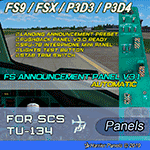
The update will add a photorealistic 2D Tupolev Tu-134 FO Electrical Panel with fully functioning SPU-7B Interphone Mini Panel used to listen to VOR / ADF Morse Code signals and select COM-1 or COM-2 radios for ATC communications. It is also designed to choose from up to 4 pre-installed landing announcements and is ready for using Pushback Panel v3.0.
FSAP v3.1 Features:
☑ Landing announcement preset
☑ Pushback Panel v3.0 ready
SCS Tu-134 v2.0 (FS9 / FSX) Features:
☑ SPU-7B Interphone Mini Panel
☑ Lights Test button
☑ STAB Trim switch
The panel also has Pax Sign switches and other Tu-134 buttons and switches.
IMPORTANT: Both FS Announcement Panel v3.0: AUTOMATIC and v3.1 Update are required and should be installed prior to installing the SCS Tu-134 Edition.
Tupolev Tu-134 FO Electrical Panel Review: https://youtu.be/8ZVsTMpWzw8
FSAP v3.0 REVIEW: https://youtu.be/ohqpI3j7tds
| Filename: | FS_Announcement_Panel_v31_AUTOMATIC_SCS_Tu134_Edit.zip |
| License: | Freeware, limited distribution |
| Added: | 27th July 2019, 03:01:24 |
| Downloads: | 142 |
| Author: | Gene Churumov |
| Size: | 3.86 MB |
| Category: Flight Simulator 2002 - AFCAD Files | |
| EGLL UK2000 AFCAD 2.0 |
|
File Description:
This latest version of the EGLL AFCAD for the UK2000 scenery contains many, many tweaks which have been the result of hours of testing. These include better taxiway and parking alignment, and faster runway exiting. I hope that you will find this new version a great improvement, as it has been designed purely with the correct movements of AI traffic in mind, with as little aircraft becoming "stuck" as possible!
This is virtually identical to my EGLL20.zip, but aligns aircraft with the much more realistic UK2000 airport scenery, which I was pleased to purchase. The excellent idea of using aircraft radius sizing allows the correct airlines to park at the 4 different terminals. Even better, runway use is now correct - one for take off, and one for landing. If you know how to use AFCAD you could switch these around if you wish.
| Filename: | EGLL_UK2000_AFCAD_20.zip |
| License: | Freeware, limited distribution |
| Added: | 19th July 2003, 01:42:50 |
| Downloads: | 822 |
| Author: | Carl Edwards |
| Size: | 12.98 KB |
| Category: Flight Simulator 2004 - Scenery | |
| Landsberg Airbase - enhancements |
|
Images related to this file:
File Description:
The "ai_landsberg-airbase_fs9.zip" package from AVSIM is the SECOND part of this airbase. The package by Klaus Jone installs several AI planes, a Traffic File and an AFCAD. All the AI models are also included. This is a COMPLETE package.
In this zip file "ai_landsberg-airbase_fs2004- enhancements",
I have included TWO files which create a more exact airbase polygon for ETSA Landsberg. Just compare the screenshots...BEFORE and AFTER the installation of my two VTP files...
The alteration is obvious immediately when you switch to TOP-DOWN view of the airbase. Or go for a flight round the area.
I designed these two files for my own enjoyment of Landsberg. However, it is now my turn to offer something back to all flightsimmers. Little though it may be.
Credit for this ETSA Landsberg Airbase belongs to Klaus Jone and Stefan Deiters. Without a doubt!!
| Filename: | Landsberg_Airbase__enhancements.zip |
| License: | Freeware |
| Added: | 16th April 2011, 12:32:18 |
| Downloads: | 501 |
| Author: | Klaus Jone |
| Size: | 1.61 MB |
| Category: Flight Simulator X - Miscellaneous Files | |
| Boeing 737-700 MCE Flows v1.2 for Multi Crew Environment |
|
File Description:
UPDATED V1.2 These are a set of flows for the PMDG 737-700NGX (might also work with the -600 too) The first officer will perform the flows at your command and help you from powering your aircraft from Cold and Dark at your departure airport to securing the aircraft at your destination and everything in between! Included is a pdf of the flows that detail all procedures for both Captain and First officer to perform and what you need to say to get the First Officer to start a particular flow. Also incorporates when to call for checklists as well as engine fire procedures. More details in the readme.
V1.2 Changes - Increased time copilot waits to switch on APU generators as he was pressing gen switches too early; Added fuel pumps off and apu off to secure aircraft flow; Added these changes to pdf flow document
| Filename: | Boeing_737700_MCE_Flows_v12_for_Multi_Crew_Environ.zip |
| License: | Freeware |
| Added: | 1st July 2012, 17:17:05 |
| Downloads: | 862 |
| Author: | Dan Hat |
| Size: | 129.13 KB |
| Category: Flight Simulator 2004 - Original Aircraft | |
| Piaggio PD-808GE |
|
File Description:
NEEDS FS9_pd808rm.ZIP TO WORK. THIS PACKAGE DOES NOT INCLUDE THE NEEDED PANEL, GAUGES AND SOUNDS.
This is a complete simulation of the Piaggio PD-808. It includes advanced engine management, realistic systems, and some failure modeling. The model features a complete 3-D virtual cockpit,and a 2-D panel. The external model features all typical animations plus a load of custom ones. Also incluides all custom special effects, including different selectable floodlights for the virtual cockpit (by simply flicking ON the proper light switch on the cockpit itself). Plus with a fly-on-the-numbers flight dynamics file. Includes full documentation. THIS IS THE FS-2004 RELEASE. IT WILL NOT WORK PROPERLY WITH FS-X. THERE IS ALSO A FS-X RELEASE THAT WILL NOT WORK PROPERLY WITH FS-2004. THis is the "GE" variant of the aircraft and requires the base package "FS9_PD808RM.zip" to work.
| Filename: | Piaggio_PD808GE.zip |
| License: | Freeware |
| Added: | 15th February 2009, 11:53:18 |
| Downloads: | 1,601 |
| Author: | Mario Noriega |
| Size: | 14.19 MB |
| Category: Prepar3D V1-4 - Utilities | |
| Flight Simulator First Officer (FSFO) V3.1 |
|
Images related to this file:
File Description:
Flight Simulator First Officer V3.1 is a generic copilot designed to work with any aircraft that conform to Xplane (via XPUIPC), FS9, FSX and P3D V3/V4 SDK; in short, it adds a touch of realism while providing a copilot to share cockpit responsibilities. FSFO V3 does not require strict adherence to Standard Operating Procedures (i.e. scripts), reading lengthy manuals or precise speech. To that end, it can be as complex or simple as you want; for example, FSFO can complete the entire Before Start Checklist, or only those functions you chose not to accomplish. Regardless, he will check every switch to ensure it's placed in the correct position. Just hit connect and fly with confidence that your First Officer is there sharing responsibilities For a list of features, go here: http://flightsimaddons.proboards.com/thread/106/introducing-fsfo-v3. Change log from 3.0 to 3.1 here: http://flightsimaddons.proboards.com/thread/109/updates
| Filename: | Flight_Simulator_First_Officer_FSFO_V31.zip |
| License: | Freeware, limited distribution |
| Added: | 5th July 2019, 03:28:07 |
| Downloads: | 1,645 |
| Author: | Matthew King |
| Size: | 200.76 MB |
| Category: Flight Simulator X - Aircraft Repaints, Textures and Modifications | |
| Airspeed indicator in Knots for A2A Piper Comanche 250 |
|
Images related to this file:
File Description:

Airspeed Indicator and Attitude Indicator repaint for the A2A Simulations Piper Comanche 250. Works in FSX and P3D, for all versions in which the Cherokee is supported.
This mod for the A2A Simulations Comanche 250 does several things:
- The main scale on the Airspeed Indicator is changed from 'miles per hour' to 'knots'.
- The smaller, inner scale on the Airspeed Indicator is changed from 'knots' to 'miles per hour'
- The 'sky' colour on the Attitude Indicator has been changed to a darker blue. (Optional)
- The 'land' colour on the Attitude Indicator has been changed to a darker brown-grey. (Optional)
- The lightmap, used for cockpit lighting of these instruments, was updated correspondingly.
- The speed placards on the main instrument panel are taped over with the speeds in knots.
- This mod also takes into account the options on the A2A plane, so everything remains correct when you switch options.
Detailed installation instructions provided in the included readme.
| Filename: | Airspeed_indicator_in_Knots_for_A2A_Piper_Comanche.zip |
| License: | Freeware, limited distribution |
| Added: | 23rd March 2016, 22:31:54 |
| Downloads: | 1,122 |
| Author: | Lars Domen |
| Size: | 5.58 MB |
| Category: Flight Simulator X - Gauges | |
| BeThere! |
|
File Description:
This package contains the BeThere! gauge. It lets you pause the flight simulator once the aircraft reaches a certain position.
This is useful for long range flights where the pilot wants to leave the flight sim unattended. The procedure is to either load an FS flightplan, switch the navigation mode of the autopilot to GPS and engage the autopilot. Or - with advanced aircraft add-ons - a flightplan is loaded into the FMC and the LNAV mode is set to let the aircraft automatically follow the track. Anyway, the problem is, that the pilot doesn't want to miss the top of descent. So the pilot has to check the computer regularily in order to be there when it becomes interesting again. Or, and that's the idea of this package, the flight sim is automatically paused at a safe position/distance.
Read more about this gauge, how to install and use it, in the readme.txt file included in the package.
| Filename: | BeThere.zip |
| License: | Freeware |
| Added: | 8th February 2007, 15:40:29 |
| Downloads: | 3,403 |
| Author: | Thilo Arndt |
| Size: | 44.46 KB |
| Category: Flight Simulator 2004 - Miscellaneous Files | |
| GoTo Any Airport |
|
File Description:
GoTo Any Airport.
Inclued here Heathrow and London Luton. Always wanted to return to your favourite local Airport from anywhere in the world? simply - with no fuss? Look no Further.
Start at these Designated Airports,then Goto any Airport! - via the FS9 World menu and return to the Original Airport - every time! - By Just turning the GPS/nav switch to GPS and Flight Director and autothrottle on whilst still on the ground.Click on the Autopilot, IAS, ALT and Nav Hold switches once above 1000ft - thats it !! . Set Weather and Altitude as required and Speed in autopilot and away you go. Use the FS9 ATC as You Travel, call into Airport when close and receive the curent ATIS and Runway approach in use.
The added circuit flights are on Autopilot and allow you to observe the airport befor landing.They make good moving screen savers - but make sure you have plenty of fuel!compatible with UK2000 Airports & VFR scenery for UK.
| Filename: | GoTo_Any_Airport.zip |
| License: | Freeware |
| Added: | 19th June 2004, 07:12:30 |
| Downloads: | 690 |
| Author: | Alan Trussell |
| Size: | 38.37 KB |
| Category: Flight Simulator 2004 - AI Flight Plans | |
| Bulgaria Air (Bulgaria) - Winter 05-06 FP |
|
File Description:
99% accurate scheduled flightplans for the winter 2005-2006 period, which have been compiled according to the company website, and cross-checked with Amadeus (99% because I had to switch one return flight normally operated with a Boeing 737-300 by a 737-500, due to the numerous "equipment varying" appearing on their published timetables).
Bulgaria Air, re-established after the bankruptcy of Balkan is now operating five Boeing 737-300 and four Boeing 737-500.
One of their 737-500 (LZ-BOR) operates for the Bulgarian Governement and can be seen randomly on charter sorties, but not included in this file.
With this all-737 fleet, they operate from their main base Sofia-Vrazhdebna to:
Amsterdam, Barcelona, Berlin-Tegel, Brussels, Frankfurt/Main, Lisboa, London-Gatwick, Madrid-Barajas, Málaga, Manchester, Milano-Malpensa, Moscow-SVO, Palma de Mallorca, Paris-CDG, Roma-Fiumicino, Tel Aviv, Varna, Wien, and Zürich.
Schedule files fully compatible with Traffic Tools by Lee Swordy (available here). Enjoy...
| Filename: | Bulgaria_Air_Bulgaria__Winter_0506_FP.zip |
| License: | Freeware |
| Added: | 23rd November 2005, 18:44:56 |
| Downloads: | 1,763 |
| Author: | Jean-Philippe 'Jeepee' DELWICHE |
| Size: | 7.51 KB |


© 2001-2026 AVSIM Online
All Rights Reserved
Privacy Policy |