
Where Flight Simulation Enthusiasts Gather from Around the World!
AVSIM Library - Search Results

| Category: Prepar3D V1-4 - Utilities | |
| Prepar3D v2 Launcher Utility |

|
Images related to this file:
File Description: "Prepar3D v2" starts directly in flight.
Even you enable the scenario startup menu on startup there is no option to load
your flight from there. Every time, after the default flight gets loaded, you
have to go to the menu and load your saved flight from there which is a total
waste of time. I created this little utility to solve this little but annoying
problem until Prepar3D development team takes care of it. The program will
launch "Prepar3D v2" directly with your saved flight that you choose as you will
expect.
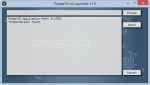
This method is also a faster way to start the simulator as you don't need to
wait anything to be loaded except your saved fight.
| Filename: | Prepar3D_v2_Launcher_Utility.zip |
| License: | Freeware |
| Added: | 6th December 2013, 00:50:33 |
| Downloads: | 1,080 |
| Author: | Ahmet Mehmetbeyoglu |
| Size: | 460.1 KB |
| Category: Prepar3D V1-4 - Utilities | |
| Addit! Pro Add-on Manager V8.3.3 |
|
Images related to this file:
File Description:
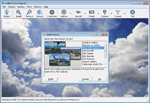
Addit! Pro is a comprehensive addon manager for Lockheed Martin's Prepar3D. Easily install, manage and remove aircraft, adventures, flights, flight plans, gauges, missions, panels, AI airport and facilities data, scenery, sounds, textures, videos, weather and more! Simple wizard-based interface makes installing and removing addons a breeze. Comprehensive addon management allows you to archive, rebuild and remove addons. Addit! Pro is fast and easy--no unzipping or file copying is necessary. Modify all aircraft, panels, sounds and scenery. Let Addit! Pro tackle the tough chores and spend your time flying. Shareware, please register to install an unlimited number of add-ons. See Register.htm. By Joseph Stearns.
| Filename: | Addit_Pro_Addon_Manager_V833.zip |
| License: | Shareware, limited functionality |
| Added: | 22nd October 2015, 22:06:08 |
| Downloads: | 566 |
| Author: | Joseph Stearns |
| Size: | 20.71 MB |
| Category: Prepar3D V1-4 - Utilities | |
| Beechcraft King Air 200 - Performance and fuel planner V1.2 |
|
Images related to this file:
File Description:

To establish a flight with this excel file, enter Crew and passengers weight, then input datas in "flight datas" page, then using orange buttons, complete each page (you can return to the menu by clicking on the title of each page), finally, you can print the weight and balance card and datas card, this datas card resume all performance and flight parameters, and, of course, the fuel planning.
Fuel weight, in the weight and balance page please estimate the fuel weight, enter all data then go back to this page to adjust your estimation have the exact fuel weight, this is an excel limitation!
| Filename: | Beechcraft_King_Air_200__Performance_and_fuel_plan.zip |
| License: | Freeware, limited distribution |
| Added: | 9th February 2016, 22:58:04 |
| Downloads: | 1,264 |
| Author: | Frederic Furst |
| Size: | 1.29 MB |
| Category: Prepar3D V1-4 - Utilities | |
| GENav pro Navigation |
|
Images related to this file:
File Description:

Previous payware product at SimMarket, now 100% free.
With GENav pro you will view all AIRAC navigation data and terminal procedures inside Google Earth. GENav pro run under Windows and require only Google Earth for displaying. You can also edit your own routes or just copy routes into GENav to view in Google Earth. You can search for example an airport or a fix by short or long name, Google Earth will take you there.
You can connect to Microsoft Flight Simulator to view your aircraft. Moving map and heading is available.
GENav pro is highly optimized for best performance and clear views without clutter. There are smart filters to select relevant data to display, all AIRAC items are available. You will find all data such as nav-aid frequencies, airport runways with ILS frequencies by click the displayed icons in Google Earth.
You can edit routes visual direct inside Google Earth by click. The database can always be updated with Navigraph's latest AIRAC data.
With GENav you can easy build valid routes. Unlike other common autorouting program, GENav is the tool for you to build routes with correct airway direction and correct connected to SID/STAR's. You will easy draw your routes most stright and correct to destination. It is also excellent for visual and instrument navigation flights.
FEATURES:
*** Display airports, nav aids, waypoints
*** Display High/Low airways and airways direction
*** Display SID/STAR, Approaches and Transitions
*** Display ARTCC/FIR border
*** AIRAC data available by click
*** Search airport and fixes
*** AIRAC data compatible Navigraph data
*** Visual editable routes
*** VOR to VOR route navigation data
*** Display your aircraft
BASIC SYSTEM REQUIREMENTS:
*** Windows with Google Earth installed
( Notice, no flightsim program required )
OPTIONALLY REQUIREMENTS:
*** SID/STAR require the Navigraph purchase or an alternative free source
*** Airways direction & high/low info require the Navigraph purchase
*** To display aircraft, Microsoft Flight Simulator or Prepare3D v1/v2, with free FSUIPC is required.
*** To display aircraft at a separate computer, also the payware WideFS is required.
| Filename: | GENav_pro_Navigation.zip |
| License: | Freeware |
| Added: | 25th May 2016, 11:24:52 |
| Downloads: | 654 |
| Author: | Lennart Vedin |
| Size: | 4.5 MB |
| Category: Prepar3D V1-4 - Utilities | |
| Addit! Pro Add-on Manager V8.4.1 |
|
Images related to this file:
File Description:
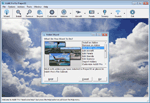
Addit! Pro is a comprehensive addon manager for Lockheed Martin's Prepar3D. Easily install, manage and remove aircraft, adventures, flights, flight plans, gauges, missions, panels, AI airport and facilities data, scenery, sounds, textures, videos, weather and more! Simple wizard-based interface makes installing and removing addons a breeze. Comprehensive addon management allows you to archive, rebuild and remove addons. Addit! Pro is fast and easy--no unzipping or file copying is necessary. Modify all aircraft, panels, sounds and scenery. Let Addit! Pro tackle the tough chores and spend your time flying. Shareware, please register to install an unlimited number of add-ons. See Register.htm. By Joseph Stearns.
| Filename: | Addit_Pro_Addon_Manager_V841.zip |
| License: | Shareware, limited functionality |
| Added: | 10th September 2016, 03:30:07 |
| Downloads: | 206 |
| Author: | Joseph Stearns |
| Size: | 22.95 MB |
| Category: Prepar3D V1-4 - Utilities | |
| MultiTool Prepar3D v3.2 |
|
Images related to this file:
File Description:
Multi-Tool Prepar3D v3.2 is a collection of tools, a number of them unique, extending the capabilities of P3D.
New features in v3.2 :
- Adjustable Horizon/Aircraft banking
- Bug fixes/Improvements on previous functions
Previous features include :
- Custom Flybys, user defined camera flyby paths.
- Roaming Flybys, computer generated camera flyby paths.
- Active Observers views placeable by clicking on a top-down view
- Find My Way Home random aircraft positioning.
- 3D Native Stereoscopic Output.
- Head tracking additions: Ordinals, Take off lock, View switching by head movement , Spot up/down tracking.
- Camera Shake + Vibration : Turbulence, G, ground roll, side slip, spoilers.
- Easy 2D & 3D custom cameras definitions.
- XYZ Position (Eyepoint) Mouse Move similar to the Mouse Look pan function, i.e. hold down a key and reposition your eyepoint with your mouse.
- POV conversion to multiple controller buttons.
- Keystroke macros to perform menu functions. - Landing lineup with runway camera.
- Multi screen VC setup. - Save/Recall view setup by aircraft.
- Recallable position autosaving. and more....
Youtube Channel https://www.youtube.com/channel/UCnFQCGMTB7eL-MFTHf8NFbA
| Filename: | MultiTool_Prepar3D_v32.zip |
| License: | Freeware |
| Added: | 22nd December 2016, 07:47:21 |
| Downloads: | 917 |
| Author: | Richard Barry |
| Size: | 3.74 MB |
| Category: Prepar3D V1-4 - Utilities | |
| FSX/FSXSE/Prepar3D FS Flight Builder |
|
Images related to this file:
File Description:
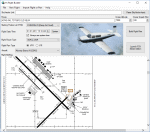
UPDATE - FS Flight Builder
Current users, please download and install.
A flight making application for FSX and
Prepar3D. Now supports FSX, FSX Steam
Edition, and Prepar3D. Airport weather and
charts have also been added. Flight routes
can be imported from the SkyVector Plain Text
Link or added manually. Automatically adds
a briefing file to the aircraft kneeboard.
By Tom Arduini
| Filename: | FSXFSXSEPrepar3D_FS_Flight_Builder.zip |
| License: | Freeware, limited distribution |
| Added: | 17th January 2017, 02:52:00 |
| Downloads: | 428 |
| Author: | Tom Arduini |
| Size: | 7.85 MB |
| Category: Prepar3D V1-4 - Utilities | |
| FSX/FSXSE/Prepar3D FS Flight Builder |
|
Images related to this file:
File Description:
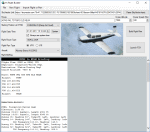
FS Flight Builder - Bug fix that prevented
installation when specific aircraft are
installed. FS Flight Builder is a flight
making application for FSX and Prepar3D. Now
supports FSX/FSX Steam Edition, and Prepar3D.
Airport weather and charts have also been
added. Flight routes can be imported from the
SkyVector Plain Text Link or added manually.
Automatically adds a briefing file to the
aircraft kneeboard. By Tom Arduini
| Filename: | FSXFSXSEPrepar3D_FS_Flight_Builder.zip |
| License: | Freeware, limited distribution |
| Added: | 21st January 2017, 18:45:29 |
| Downloads: | 204 |
| Author: | Tom Arduini |
| Size: | 7.86 MB |
| Category: Prepar3D V1-4 - Utilities | |
| FSX/FSXSE/Prepar3D FS Flight Builder |
|
Images related to this file:
File Description:
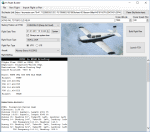
FS Flight Builder - UPDATE - You can now get
charts for airports worldwide. Color coding
has also been added for the departure and
destination airports to indicate flight
conditions. FS Flight Builder is a flight
making application for FSX/FSX Steam
Edition, and Prepar3D. Flight routes can be
imported from the SkyVector Plain Text Link
or added manually. Automatically adds a
briefing file to the aircraft kneeboard.
By Tom Arduini
| Filename: | FSXFSXSEPrepar3D_FS_Flight_Builder.zip |
| License: | Freeware, limited distribution |
| Added: | 24th January 2017, 00:48:40 |
| Downloads: | 796 |
| Author: | Tom Arduini |
| Size: | 7.35 MB |
| Category: Prepar3D V1-4 - Utilities | |
| Addit! Pro Add-on Manager V8.5.1 |
|
Images related to this file:
File Description:
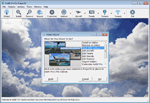
Addit! Pro is a comprehensive addon manager for Lockheed Martin's Prepar3D. Easily install, manage and remove aircraft, adventures, flights, flight plans, gauges, missions, panels, AI airport and facilities data, scenery, sounds, textures, videos, weather and more! Simple wizard-based interface makes installing and removing addons a breeze. Comprehensive addon management allows you to archive, rebuild and remove addons. Addit! Pro is fast and easy--no unzipping or file copying is necessary. Modify all aircraft, panels, sounds and scenery. Let Addit! Pro tackle the tough chores and spend your time flying. Shareware, please register to install an unlimited number of add-ons. See Register.htm. Supports Prepar3D v4, v3, v2, and v1. By Joseph Stearns.
| Filename: | Addit_Pro_Addon_Manager_V851.zip |
| License: | Shareware, limited functionality |
| Added: | 9th June 2017, 17:34:35 |
| Downloads: | 292 |
| Author: | Joseph Stearns |
| Size: | 22.46 MB |


© 2001-2026 AVSIM Online
All Rights Reserved
Privacy Policy |