
Where Flight Simulation Enthusiasts Gather from Around the World!
AVSIM Library - Search Results

| Category: Flight Simulator 2004 - Aircraft Repaints, Textures and Modifications | |
| VARIG Boeing 737-341 (PP-VOE) |

|
File Description:
VARIG B.737-341 PP-VOE C/N 24276-1645
Another of the original models B.737-341 builded by Boeing for VARIG(17 exemplaires builded). The 341 is the logic sucessor of the 241, the series 200 model,still in service for some routes. VARIG fleet had differents variant of the Boeing 737'(B.737-2C3Adv,B.737-241,B.737-2K9,B.737-2Q8,B.737-219,B.737-33A,B.737-36N,B.737-3K9,B.737-341,B.737-3Q8,B.737-4YO,etc)and the planes are the workhorse of the route systeme of the airline.The main technical center is located a Rio de Janeiro Antonio
Carlos Jobim(Galeao)with the most big hangar maintenance in South America.
Main hubs are Sao Paulo Guarulhos, Rio de Janeiro A.C.Jobim(Galeao),Porto Alegre Salgado Fihlo.I have included a serie of 90 Flights to the main national and international destinations,all
served with 737 and the timetable and numbers flights are the rights one of this year 2004.
Destinations are revised and actualised like in the reality(Curitiba,Porto Alegre, Ponte aereo=Rio Santos Dumont-Sao Paulo Congonhas,Foz do Iguazú,Manaus,Natal,Recife,Salvador,La Paz,Cordoba,etc.
Many flights are corrected to be acomplished with the 737 and not the Douglas DC-10(out of service by VARIG long time ago and remplaced with the MD-11,this last also to be tasked in the future to fly only cargo).
Today only two DC-10 fly cargo services with VARIG Logistica.
Also included a new complete revised AirFile for the 737-300 type(17-04-04).
| Filename: | VARIG_Boeing_737341_PPVOE.zip |
| License: | Freeware |
| Added: | 17th April 2004, 23:36:37 |
| Downloads: | 573 |
| Author: | Daniel Nole |
| Size: | 464.38 KB |
| Category: Prepar3D V1-4 - Utilities | |
| Flightplan Visualizer 1.11 |
|
Images related to this file:
File Description:
Flightplan Visualizer (FV) version 1.11.0. Copyright 2018-2019 by Pelle F. S. Liljendal ([email protected]), all rights reserved.
FV comes with 540 pre-imported Commercial AI flightplans (+380 BizJet flightplans are available as a separate download). However you are able to import additional (AI) flightplans yourself. Once imported these (AI) flightplans can be visualized on a map-view, and the user will be able to search accross all these. Hence you can use the program as inspiration as to which routes to fly. E.g. you can search across all imported flightplans to find all flights in an A321 flying into/out from LDDU, or simply to look for all flights in a Boeing 747-8F.
Simply run the included installer to install the software. The program will be installed into "C:\Program Files (x86)\Flightplan Visualizer" and all datafiles will be installed into: "C:\Users\[UserName]\AppData\Roaming\FlightplanVisualizer". The program comes with a full manual explaining everything, and a 3 page quick manual to get you started. The first 3 times you run the program the quick manual will automatically open. The forum is hosted here: https://forum.aerosoft.com/index.php?/forum/919-flightplan-visualizer/
Version 1.11 Contains the following changes: The file-format of the Flightplan-files was changed to accommodate some planed changes. The program remains backward compatible, so "old" flightplans can still be loaded. I wanted to implement these changes BEFORE I began importing new flightplans, to ensure these new/updated flightplans are all utilizing the new format. On startup the old flightplans will automatically be converted to the new format. The new installer now comes bundled with 540 commercial flightplans (schedules:22291, legs:699158) whereas the old one "only" contained 300 commercial flighplans (schedules:16786, legs:536198). All BizJet flightplans were removed from the installer and are now available as a separate download. A new settings-form have been added to eliminate the need to manually edit the settings-file using a text-editor. A new menu-item have been added which opens an explore window browsing the content of the UserData folder. Individual (disabled) flightplan-files can now be permanently deleted via the "Enable/disable flightplans" form. Flightplan sub-folders (with exception of "Disabled") can now be marked as "enabled" (using a check-box). Meaning that the flightplans in these will be also loaded on startup (along with the files in the root-folder). Using the "Enable/disable flightplans" form you can now both move and copy flightplans (based on the value of the radio-buttons). A creator-field have been added to flightplans, which can be entered when you import/edit a flightplan. The name of the creator is displayed as a tool tip when hoovering the mouse over the combo-box in the bottom of the main-form. When importing new Flightplans the program will try to grab creator and provider from the files bundled with the flightplan. Likewise a button is added to the import-form which list the content of the text-files (e.g. "ReadMe.txt"), in case you need to manually grab the creators name from this file. Both when importing- and editing flightplans a new column have been added to the airport list-view containing comments regarding airports that have been redirected (from one ICAO to another), or airports classified as pseudo-airports (in case the airport does not exists in the flightsim). The elevation-column from previous versions was removed to make more room for the comment-column. Added a new form to edit airport-redirections (redirect from one ICAO to another on import). In the airport-info form you can now switch between showing flights for the selected flightplan/last search and all flights to/from the airport being displayed. Added a new "Nearby Airports" tab-sheet to the Airport-info form, which shows a distance-sorted list of nearby airports. In the previous versions all new aircraft were automatically added to the selection of favorite aircraft. From version 1.11 you must manually choose which are your favorites (upgrading from a previous version, your current selection of favorites will NOT be changed). First letter of decoded-metar is now changed to uppercase, and a checkbox lets you decide if you want to perserve line-breaks in the decoded text copied to the clipboard. Switched position of "Save" and "Cancel" buttons in airport-info form, to match layout of other forms. Like elsewhere in the program, the airport search-browser now lists the icao-codes with an asterisk (*) for each airport that is a pseudo airport. Greatly improved the responsiveness/performance of the browser-forms, when searching for : Airports, Airlines and Aircraft. Managed to shave off a few 10th of a second loading/processing data at startup. Added support for additional Aircraft. Many of the Airports in the supplied data-files were updated likewise some new Airlines were added as well. Made the importer stronger to import flightplans where aircraft names are not in quotes, and multiweek days are written as "1/3" in stead of "10". Fixed: When manually redirecting an airport during import, the flightplan was not visualized corretly until re-loading the flightplan (e.g. restarting the program). Fixed: Closing the Enable/Disable-flightplan using other means than the close-button would not make the program re-load active flightplans afterwards. Fixed: Several of the combo-boxes on the airport-info form allowed text being entered into them. Fixed: Corrected an issue with map-caching.
Pelle
| Filename: | Flightplan_Visualizer_111.zip |
| License: | Freeware, limited distribution |
| Added: | 7th July 2019, 18:15:30 |
| Downloads: | 227 |
| Author: | Pelle Liljendal |
| Size: | 29.95 MB |
| Category: Flight Simulator 2002 - Original Aircraft | |
| Dreamfleet 737-400 Panel/Air and Ariane Gmax Visual Model Merge |
|
File Description:
Dreamfleet/Flight1 Panel and air file merged With Gmax Ariane 737-400 Aeroflot visual model in FS2002. NOTE: users may have both Dreamfleet and Ariane products to run my merge beacuse I don't send any *.bmp, *.mdl or *.air but only a rewritten aircraft.cfg and the instrctions! This merge of the excellent Dreamfleet/Flight1 panel and the Ariane Gmax Aeroflot 737-400 is a combination of adjustments made by me, Mirko Masiero, on previus work of Jason Barlow and Lou Betti. Do not bother Dreamfleet/Flight1 or Ariane with any problems due to this merge. They will not support it in any way. I may support it a bit as I find time, but you're basically on your own. I'm just contributing this to the community. If and when Dreamfleet/Flight1 release a Gmax visual model, I will cease to use this. The flight model should be exactly the same as the Dreamfleet/Flight1 737-400. This merge uses the Dreamfleet/Flight1 air file and most of the aircraft.cfg too. The station loads in the weighting section come right out of an aircraft.cfg edited by the Load Manager, so you could copy in your own station loads if you desire. Known problems: For some reason regard Flight One 737 air file and Ariane model interactions,the ailerons do not work VISUALLY (only!) even though they work on Ariane 737-400. I do not believe there is anything I can do about this. The virtual cockpit, I Think due to a particolar Ariane model design, is not usable, but this is a minor issue... Enjoy! Mirko Masiero Mirko Masiero - [email protected] Avio Club Virtuale Padova - http://www.acvpadova.net PPL F.I.V.S. - http://www.fivs.it VirtualAlitalia Pilot 1546 - http://www.virtualitalia.it
| Filename: | Dreamfleet_737400_PanelAir_and_Ariane_Gmax_Visual_.zip |
| License: | Freeware |
| Added: | 4th October 2002, 14:14:29 |
| Downloads: | 1,665 |
| Author: | Mirko Masiero |
| Size: | 13.55 KB |
| Category: Flight Simulator 2004 - Scenery | |
| Replacement Dynamic Water Textures v11 |
|
File Description:
Replacement dynamic water texture-sets for FS2004 (VERSION 11). These newer version 11 moon light textures are a completely new type than my earlier versions. The results are much improved and there is also a "new moon" texture in this version which is a more realistic and darker blue/black which contrasts nicely with my moon light textures. This compares quite drastically to the default over lit pinkish brown tones the default FS9 uses for a new moon. Now when you fly by moonlight you can actually see the moon kissed water and even see some wave action. It actually feels like you are there! There are 2 moon light textures in this download. The default reflections and water colors leave a lot to be desired in FS2004. As an example; The default milky "bright green" overcast texture is highly unrealistic in overcast conditions. The replacement textures will change this dramatically to a much more convincing and realistic "blue/grey", cast, with improved lighting and reflections in respect to the sun. These replacement textures will generally give a much more realistic tone and color to the water effects in FS2004. The change is quite dramatic and transforms the flight sim experience to a much greater level of realism. It is important to stress the default FS9 textures are fully compatible with these new textures and they can be used in any combinations and can be mixed and matched with the new textures. For example it may be that some users want to keep some of the water environment textures as they are by default but change only one or two textures. The choice is yours. As a further added bonus a voice control file has been included for "Shoot" which will control FS2004 by voice. It is brilliant and it's free.
| Filename: | Replacement_Dynamic_Water_Textures_v11.zip |
| License: | Freeware |
| Added: | 11th January 2004, 20:38:03 |
| Downloads: | 3,057 |
| Author: | Peter Wilding |
| Size: | 3.49 MB |
| Category: Flight Simulator 2004 - AFCAD Files | |
| Birmingham International Airport, Birmingham, Alabama (KBHM) |
|
File Description:
An extremely accurate rendition of the KBHM airport with appropriate gate, cargo and general aviation parkin. I've decided to make it a habit to do airports that one doesn't really see much on FS. Everyone does 300 AFCADs of KORD and there's nothing wrong with that it's a great airport but I figured I didn't need to add another KORD or KLAX to the pile unless I'd be providing something the others lack and I can't seem to find it. So, again, I'll be continuing to do AFCADs I feel are lacking or unavailable or not done well. The BHM airport is definetely not a bustling international port of call and it only receives mainline service from a few carriers but it has a decent amount of traffic and I thought it would be good to represent the airport. Thankfully this time MS did a reasonably good job with terminal space and I was able to include every gate in the two concourses. The great BHM website made my job a breeze by indicating which airlines park at which specific gate(s). Every airline is exactly where they should be as is cargo. A ramp for you VFR general aviation buffs is also available. The only time you might notice some craziness is if you start your flight super early in the morning and you have traffic at 95% +. It seems MS doesn't really "turn" planes in a realistic manner so you end up having more planes parked at the gate in the early morning hours then would be there in real life if they adheared to real world turn around times. Nothing I can do about that. Hope you enjoy your virtual trips in and out of the Birmingham International Airport.
| Filename: | Birmingham_International_Airport_Birmingham_Alabam.zip |
| License: | Freeware |
| Added: | 29th June 2004, 19:31:34 |
| Downloads: | 2,317 |
| Author: | Jason Diaz |
| Size: | 137.07 KB |
| Category: Flight Simulator X - Original Aircraft | |
| Piaggio P-149D FS-X DX9 Edition |
|
File Description:
This is a re-edition of the Piaggio P-149D with FS-X retail\SP1\2\Accel DX9 compatibility (DX10 users need to convert textures). The original model for FS-2004 is MN_P149D.zip + P149_FIX.zip available on AVSIM & www.mariopilot.6x.to. P_149_fix.zip is already included in this FS-X update.
The Piaggio P-149 is a trainer-laison aircraft. It first flew in June 19th, 1953. I'ts a development of the P-148 model, with increased seat cpacity, tricycle retractable landing gear and a more powerful engine, featuring a three-bladed constant speed propeller. It was mainly used by German Luftwaffe as a training aircraft, that oredred 75 examples in 1955. Later in 1957 another 190 were manufactured under licence by Focke-Wulf. The D version is the one employed by Luftwaffe, while later some few P-149CH variants were used by Swissair as flying schools, and a few P-149U variants, with a new tailplane section to allow more rotation clearance on takeoff were used by Ouganda's Air Force. The P-149 Has a seating capacity of 4 with some examples being certified for 5 (both cases including pilot) and it's fully aerobatic, having G-limits set at +7\-4.5. After training activities ceased with Luftwaffe, several are still flying under civilian operators. This gMAX model features completely 3-D virtual cocpkit and cabin with advanced night lighting and custom special effects, plus a sound package recorded from the real thing. Simulates all systems onboard the real aircraft, coming with panel instructions. Flight Dynamics are built using only real data based on the 1% spreadsheet plus lots of manual tweaking for fine tuning. Read Notes before flying please... Enjoy!
Notes and documentation are the htm files in the P-149D aircraft folder.
| Filename: | Piaggio_P149D_FSX_DX9_Edition.zip |
| License: | Freeware |
| Added: | 11th October 2008, 13:10:16 |
| Downloads: | 7,237 |
| Author: | Mario Noriega |
| Size: | 16.61 MB |
| Category: Flight Simulator X - Utilities | |
| Gauges Recovery 1.2 for FSX |
|
File Description:
New ! Since version 1.2 Gauges Recovery also fix the problem of compatibility from FS9 add-ons which display all gray and without texture !!!
DESCRIPTION:
For years I worked on Flight Simulator I realized that many people have problems with showing the gauges panel (black screen) or special effects such as afterburner, smoke or line of condensation occurring after uninstalling an add-on or accidentally deleted files of the simulator.
In your Flight Simulator X there is a folder named 'Gauges' it contains files 'gauges' representative board instrumentation for each add-on, such as the autopilot, the horizon indicator etc, if you delete one of these files, your panel will not display the gauge that it was programmed. It is the same for the folder 'Effects' that contains all the special effects in FSX, it sometimes happens that some files in these folders disappear leaving your simulator in a situation where you no longer see your instrument panel (black screens) and afetburner invisible. Under these conditions, you reinstall FSX and lose a lot of time (and patience).
So I created Gauges Recovery, a small free utility that will restore all your gauges and effects of origin in less than 10 seconds. With Gauges Recovery, you're sure to get the display of all gauges and effects.
This program does restore the original files from Microsoft FSX FSX SP1, FSX SP2 and not the files from other publishers, no changes will be made to these files.
Some people see the gauges all black (black screens), unless FSX is installed correctly. The solution to this problem is to install the files MSVCP70.DLL and msvcr70.dll in your 'system32', Gauges Recovery does this automatically for you.
Do not look if Gauges Recovery is installed because there is no installation, the program only updates files in FSX and nothing else.
| Filename: | Gauges_Recovery_12_for_FSX.zip |
| License: | Freeware |
| Added: | 19th January 2010, 10:47:17 |
| Downloads: | 4,884 |
| Author: | Erik BENDER |
| Size: | 11.43 MB |
| Category: Flight Simulator 2004 - Original Aircraft | |
| Savoia Marchetti SM.79 Sparviero, SERVICE PACK 1 (v.02) |
|
Images related to this file:
File Description:
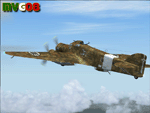
It was the most important Italian bomber of World War II, this tough three-engined aircraft established a reputation that contrasted with most Italian weapons of the day, and it was flown with courage and skill. SM.79s served widely in the normal bombing role, but it is as a land-based torpedo bomber that the type deserves its place in military aviation history, being regarded by many as one of the finest torpedo bombers of the war. In spite of its cumbersome appearance and outdated construction, with an internal provision for 2,750 lb (1,250 kg) of bombs, supplemented by under fuselage rack for a torpedo, the S.M.79 was a rugged, reliable multi-role medium bomber which did quite a bit of damage in the face of heavy opposition. About 1,300 production models were built over a nine year period. The SM.79 had a distinctive 'hump' on the upper forward fuselage, which housed both the fixed forward-firing heavy machine-gun and the dorsal gunner's position. Its appearance earned the aircraft the nickname 'Gobbo Maledetto' ('Damned Hunchback'). During the last phases of the war the surviving SM.79s were converted into various versions of utility transports and used in that role until 1952.
This "Service Pack" contains:
-4 UPGRADED + 1 NEW Hi-Res GMax models (5 different versions) feature the usual moving parts, such as all flight controls, props pitch and leading edge flaps.
-Eleven (11) different liveries (6 R.A., 1 A.N.R., 1 I.C.A.F., 1 Post-war A.M.I., 2 Spanish Nationalist Air Force).
-Revised SM.79M CFG & AIR files, New SM.79Bis CFG & AIR files
-Revised Sounds, Gauges & Effects
VC only. This plane was developed for FS9, but it works (it seems without problems) either in FSX. Created by Manuele Villa & ItalianWings, February 2008. Installation instructions included.
| Filename: | Savoia_Marchetti_SM79_Sparviero_SERVICE_PACK_1_v02.zip |
| License: | Freeware |
| Added: | 31st May 2010, 09:24:20 |
| Downloads: | 3,321 |
| Author: | Manuele Villa, Italianwings |
| Size: | 32.56 MB |
| Category: Flight Simulator X - AFCAD Files | |
| Hammonton Municipal Airport (N81) NJ |
|
File Description:
Located 03 miles NE of Hammonton, New Jersey on 107 acres of land, Hammonton Municipal Airport is a public asphalt strip 3601' in length. It has recently been renovated with all-new taxiways and aprons and this update is depicted in this version with the big change being the extension of the main apron to join the previously-separated north and south tarmacs. The airport's magnetic variation, traffic pattern height, and PAPI glide slope and location have also all been accurately adjusted. All tie down parking locations are located on either the North or South tarmacs. Parking spots marked as RAMP_GA are occupied by static aircraft/objects and should not be chosen to start in (although all static objects have collision disabled). North parking spots can accommodate wingspans up to 50' while South parking spots should only be used by aircraft with wingspans of 40' or less. The one DOCK_GA location in the hangar start that can accommodate aircraft with wingspans up to 45'. The helicopter start location will place you on the North tarmac in front of the main hangar. Fuel is available by stopping on the concrete area on the North tarmac or by the fuel truck on the South tarmac in front of the hangars. Please see the ReadMe for known issues regarding AI aircraft parking.
Scenery constructed with use of satellite images/streetview/aerial photos - the author has not been there in person.
This scenery is meant to be used in conjunction with MegaScenery Earth New Jersey/Delaware 003. It is not required, but apron use is minimized to allow satellite scenery to show through as much as possible, and objects are placed based on the MSE textures - lack of it may make scenery look out of place.
| Filename: | Hammonton_Municipal_Airport_N81_NJ.zip |
| License: | Freeware |
| Added: | 5th June 2011, 06:22:53 |
| Downloads: | 202 |
| Author: | Drew Sikora |
| Size: | 897.82 KB |
| Category: Combat Flight Simulator 1 and 2 - Aircraft | |
| B25-B Mitchell Doolitte's Raiders "Hari Carrier" A/C No. 40-2249 for The B24 Guy's OH |
|
File Description:
B25-B Mitchell Doolitte's Raiders "Hari Carrier" A/C No. 40-2249, April 18, 1942. Painted over The B24 Guy's B25 Mitchell Overhaul Model. This was mission plane #11, nicknamed The Hari Carrier. Pilot: Capt. C. Ross Greening, Co-Pilot: Lt. Kenneth E. Reddy, Navigator: Lt. Frank A. Kappeler, Bombardier: S/Sgt. William L. Birch, Flight Engineer/Gunner: Sgt. Melvin J. Gardner. The bomb group attacked targets in the Tokyo area. The North American B-25B was not designed or intended for aircraft carrier use, but there they were, sixteen highly modified bombers sitting on the deck of the USS Hornet (CV-8). They were modified to carry bombs to Tokyo. The B-25s are launched from their maximum range, and flew over Tokyo, bombing several installations. The bombs did little damage, but managed to damage the Japanese carrier Ryuho while it is in drydock. Many of the planes then head to wherever they can make it, since the fuel will be empty before they reach a friendly airbase. All of the B-25 bombers are forced to bail out or crash land except one. Eleven crews are forced to bail out over China, 3 crash land, and the last landed safely at Vladivostok. The crew that landed in Russia was interned, along with the plane, for a while. The crews were all volunteer, and had no carrier experience, yet all sixteen of the bombers were successful on take-off. Although little physical damage was inflicted on Japan, that day, the Japanese populace was demoralized, as suddenly, the war was brought to their homeland. Note the nose art. Texture, and Damage Files included. Note the three windows in both port and starboard bulkheads. By revev. Enjoy!
| Filename: | B25B_Mitchell_Doolittes_Raiders_Hari_Carrier_AC_No.zip |
| License: | Freeware |
| Added: | 1st August 2006, 20:02:12 |
| Downloads: | 416 |
| Author: | Evan G. Butterbrodt |
| Size: | 1.56 MB |


© 2001-2026 AVSIM Online
All Rights Reserved
Privacy Policy |