
Where Flight Simulation Enthusiasts Gather from Around the World!
AVSIM Library - Search Results

| Category: Flight Simulator 2004 - Aircraft Repaints, Textures and Modifications | |
| NHL "Pittsburgh Penguins" Beechcraft Twin Bonanza" |

|
File Description:
Simmers,and Hockey fans,
This aircraft includes my NEW Twin Bonanza Panel_ V3, and for you FSX users it also includes "Camera Definitions" so ***BE SURE YOU COPY aircraft.cfg file to your main Twinstar_ Twin_ Bonanza folder.NOTE!(Camera Definitions will have no effect in FS9)***These 1951 D Model Beechcraft Twin Bonanzas are pristine,no dirt,grease or oil leaks on these babies!Just fresh out of the paint booth, these are the 24th repaint of my in progress NHL collection.All repaints are of "Eric Dantes" Beechcraft Twin Bonanza. All NHL teams will be represented.These repaints are not layered so each one has to be redrawn in its official colors.All repaints will have two liveries,one with team logos and one without logos.All NHL team names were put in two hats, Eastern Conference and Western Conference, they are drawn one from each hat at random.The next repaint will be the San Jose Sharks.(Look for it soon. :)I hope you have as much fun collecting all 30 liveries as I will have painting them!
This file includes the texture.Penguins"(The Pittsburgh Penguins Edition)",texture.NHL Pittsburgh,
"(The NHL Pittsburgh Edition....NOLOGOS)",panel.Penguins and the panel.NHL Pittsburgh folders and the aircraft.cfg file.It also includes two files to correct the knee board,they are the beech_baron_58_check.htm and the beech_baron_58_ref.htm,just copy these two files to your main Twinstar_ Twin_ Bonanza folder.
The following additional file is required.--------------twinstar__twin__bonanza.zip--------------
This file can be downloaded @ http://www.avsim.com/
Go to the file library and just use the Quick Search: type: Chris Tuinstra and you should see the twinstar__twin__bonanza.zip,along with my other NHL and NFL repaints.Again I thank each of you for your downloads.
This file includes a complete matching interior for both liveries".
| Filename: | NHL_Pittsburgh_Penguins_Beechcraft_Twin_Bonanza.zip |
| License: | Freeware |
| Added: | 11th May 2008, 12:37:49 |
| Downloads: | 261 |
| Author: | Chris Tuinstra |
| Size: | 10.38 MB |
| Category: Flight Simulator 2004 - Aircraft Repaints, Textures and Modifications | |
| NHL "Chicago Blackhawks" Beechcraft Twin Bonanza" |
|
File Description:
Simmers,and Hockey fans,
This aircraft includes my Twin Bonanza Panel_ V3, and for you FSX users it also includes "Camera Definitions" so ***BE SURE YOU COPY aircraft.cfg file to your main Twinstar_ Twin_ Bonanza folder.NOTE!(Camera Definitions will have no effect in FS9)***These 1951 D Model Beechcraft Twin Bonanzas are pristine,no dirt,grease or oil leaks on these babies!Just fresh out of the paint booth, these are the 27th repaint of my in progress NHL collection.All repaints are of "Eric Dantes" Beechcraft Twin Bonanza. All NHL teams will be represented.These repaints are not layered so each one has to be redrawn in its offical colors.All repaints will have two liveries,one with team logos and one without logos.All NHL team names were put in two hats, Eastern Conference and Western Conference, they are drawn one from each hat at random.The next repaint will be the Washington Capitals .(Look for it soon. :)I hope you have as much fun collecting all 30 liveries as I will have painting them!
This file includes the texture.Blackhawks"(The Chicago Blackhawks Edition)",texture.NHL Chicago,
"(The NHL Chicago Edition....NOLOGOS)",panel.Blackhawks and the panel.NHL Chicago folders and the aircraft.cfg file.It also includes two files to correct the kneeboard,they are the beech_baron_58_check.htm and the beech_baron_58_ref.htm,just copy these two files to your main Twinstar_ Twin_ Bonanza folder.
The following additional file is required.--------------twinstar__twin__bonanza.zip--------------
This file can be downloaded @ http://www.avsim.com/
Go to the file library and just use the Quick Search: type: Chris Tuinstra and you should see the twinstar__twin__bonanza.zip,along with my other NHL and NFL repaints.Again I thank each of you for your downloads.
This file includes a complete matching interior for both liveries".
| Filename: | NHL_Chicago_Blackhawks_Beechcraft_Twin_Bonanza.zip |
| License: | Freeware |
| Added: | 15th June 2008, 14:52:59 |
| Downloads: | 246 |
| Author: | Chris Tuinstra |
| Size: | 6.75 MB |
| Category: Flight Simulator 2004 - Scenery | |
| MNPC Puerto Cabezas, Nicaragua |
|
Images related to this file:
File Description:
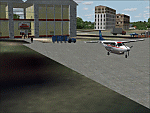
Googly scenery for MNPC Puerto Cabezas - a small international
airport in Nicaragua for which no facilities are provided in Microsoft Flight
Simulator 2004. These scenery files create the airport and add taxiways, aprons,
buildings and other airport features, so that you and your "AI" traffic can land,
taxi, park and take off in a realistic manner.
The airport, with its new Rigoberto Cabezas terminal opened in 2000, serves the
city of Puerto Cabezas and is surrounded by beautiful beaches and lush scenery.
Unfortunately, the country of Nicaragua has been embroiled in civil unrest almost
continuously since it became an independent republic in 1838, most of which is funded and fuelled by other countries seeking to interfere with Nicaragua's politics. For this reason, the country has no national airline or international flights of its own - the major powers refuse to accept its currency - and commercial traffic is confined to local flights operated by small craft from adjoining countries like those of Atlantic Airlines de Honduras and TACA Regional.
Fortunately, in Flight Simulator you do not need to worry about world politics
and you will be assured of a "virtual" welcome when you call in here. Please
say a small prayer for world peace when you do.
The scenery does not purport to be ultra-accurate. Based on high-detail satellite
imagery from Google Earth, the layout is proportionally correct but the added
airport features, such as buildings, are built from default Microsoft objects
and add-on libraries so will not look exactly like the real thing.
You are not obliged to download and install any additional scenery libraries,
but to enjoy this scenery in its entirety, you may wish to. It will work fine,
with or without. [File re-uploaded at request of AVSIM]
| Filename: | MNPC_Puerto_Cabezas_Nicaragua.zip |
| License: | Freeware |
| Added: | 28th May 2010, 20:36:10 |
| Downloads: | 1,149 |
| Author: | John Hinson |
| Size: | 67.63 KB |
| Category: Flight Simulator X - Gauges | |
| AP_MultiFuel_Gauges for FIP |
|
Images related to this file:
File Description:
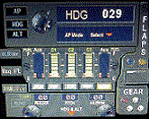
This set of 3 gauges is for use in the Saitek FIP and is an extension to my FIP gauge. That set of 3 gauges was designed to complement the Saitek AP/Multi panel and primarily showed the selected AP Altitude and Vert Spd whilst the Saitek AP/multi panel was displaying HDG. The second main part of those gauges were the Fuel Level displays, each gauge displaying a different combination of fuel tanks to suit the aircraft being flown and thus offered functionality for all types of aircraft.
This set of 3 gauges is designed for the same purpose but now encompasses a working AP that allows you to select HDG, ALT and VS values and activate the HDG and ALT mode (and AP master switch) to enable auto-pilot flight (for those who have a FIP but not an AP/multi panel).
For those who have an AP/multi panel, it gives a backup AP in your build/rig (although it all works off the same FS telemetry, I have found that when the AP/multi-panel freezes, especially the 'Alt' button, then this FIP gauge can de-activate it. The combinations displayed are those that suit my choice of aircraft, however it is easy to re-configure gauge Elements (fuel tank names) and artwork (fuel gauge titles) to suit the combination you prefer.
These gauges also retain the gear, flaps and light indicators, auto rudder on/off button plus rudder and aileron trim capability that were in the previous gauges. An additional feature is the battery switch will now turn off the AP display and fuel levels.
The artwork in these gauges has also been upgraded a bit and a template artwork is included to assist in customising.
| Filename: | AP_MultiFuel_Gauges_for_FIP.zip |
| License: | Freeware |
| Added: | 20th October 2014, 16:00:33 |
| Downloads: | 265 |
| Author: | Robert Budd |
| Size: | 764.26 KB |
| Category: Prepar3D V1-4 - Original Aircraft | |
| UV-4 V/STOL UAV (Experimental) |
|
Images related to this file:
File Description:
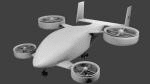
Created as a means to display the potential of a ducted fan rotorcraft powered by multiple electric motors. The system made its launch in 2015, since then advances and improvements have been completed to the airframe and power plant configurations. Delivering an efficient means of lift using smaller and therefore quieter propeller then traditional helicopters. The function of the ducted system serves as a mean of channeling pressure and vectoring thrust. Giving the UV-4 a unique control system and improved maneuverability. The design of a low speed "T-Tail" houses the function of yaw control with multiple rudders located on its vertical stabilizer, and elevators on its horizontal stabilizer. In addition the rear ducted systems may pivot up to less then sixty degrees forward and backwards to deliver the vector thrust where the aircraft needs it to be. The cargo bay may house up to four thousand pounds of deliverable payload. As its max gross take-off weight is designed to reach twelve thousand five hundred pounds. The electrical systems on the aircraft use a network of batteries, generators, and its two electrical motors. Proving five hundred horse power each, totaling an amount of one thousand horse power. An electrical charge then powers the mechanization used to spin the propeller to its desired rate per minute. Perhaps in the near future an additional system can be created to then generate electrical charges created by the spinning propeller of inside the duct back into the aircraft to then power systems or recharge the battery. We forward to providing this aircraft on Microsoft Flight Simulator X, Lockheed-Martin Prepar3d, and X-Plane 10 for download by the end of 2016. Aircraft by Rob Gomez & Kris Pyatt
| Filename: | UV4_VSTOL_UAV_Experimental.zip |
| License: | Commercial demo |
| Added: | 22nd January 2017, 04:10:41 |
| Downloads: | 185 |
| Author: | Rob Gomez & Kris Pyatt |
| Size: | 8.13 MB |
| Category: Prepar3D V1-4 - Utilities | |
| Flightplan Visualizer 1.7 |
|
File Description:
Flightplan Visualizer (FV) version 1.7.1. Copyright 2018 by Pelle F. S. Liljendal ([email protected]), all rights reserved.
FV comes with 300 Commercial-, and +380 BizJet AI pre-imported flightplans which the creators of those flightplans have gracefully allowed me to include with the installer, however you are able to import additional (AI) flightplans if you want to. Once imported these (AI) flightplans can be visualized on a map-view, and the user will be able to search accross all these. Hence you can use the program as inspiration as to which routes to fly. E.g. you can search across all imported flightplans to find all flights in an A321 flying into/out from LDDU, or simply to look for all flights in a Boeing 747-8F.
Simply run the included installer to install the software. The program will be installed into "C:\Program Files (x86)\Flightplan Visualizer" and all datafiles will be installed into: "C:\Users\[UserName]\AppData\Roaming\FlightplanVisualizer". The program comes with a full manual explaining everything, and a 2 page quick manual to get you started. The first 3 times you run the program the quick manual will automatically open. Lacking a “proper forum†I have - for now - setup a Facebook group for support. This group is called “Flightplan Visualizerâ€, and you can seek membership via this link: https://www.facebook.com/groups/FlightplanVisualizer/
If you are installing this version on top of a version prior to 1.7 the program will start slower than ususal and display a lot of warnings. This is because it fileformat of the pre-imported flightplans was changed between version 1.6 and 1.7, so starting version 1.7 it will update all flightplans (and in the progress it will display all those warnings). The next time you start FV you will no longer see this warnings as all flightplans will have become updated.
Pelle
| Filename: | Flightplan_Visualizer_17.zip |
| License: | Freeware, limited distribution |
| Added: | 27th November 2018, 17:23:12 |
| Downloads: | 463 |
| Author: | Pelle Liljendal |
| Size: | 23.28 MB |
| Category: Prepar3D V1-4 - Utilities | |
| Flightplan Visualizer 1.8 |
|
Images related to this file:
File Description:
Flightplan Visualizer (FV) version 1.8.0. Copyright 2018 by Pelle F. S. Liljendal ([email protected]), all rights reserved.
FV comes with 300 Commercial-, and +380 BizJet AI pre-imported flightplans which the creators of those flightplans have gracefully allowed me to include with the installer, however you are able to import additional (AI) flightplans if you want to. Once imported these (AI) flightplans can be visualized on a map-view, and the user will be able to search accross all these. Hence you can use the program as inspiration as to which routes to fly. E.g. you can search across all imported flightplans to find all flights in an A321 flying into/out from LDDU, or simply to look for all flights in a Boeing 747-8F.
Simply run the included installer to install the software. The program will be installed into "C:\Program Files (x86)\Flightplan Visualizer" and all datafiles will be installed into: "C:\Users\[UserName]\AppData\Roaming\FlightplanVisualizer". The program comes with a full manual explaining everything, and a 2 page quick manual to get you started. The first 3 times you run the program the quick manual will automatically open. Lacking a “proper forum†I have - for now - setup a Facebook group for support. This group is called “Flightplan Visualizerâ€, and you can seek membership via this link: https://www.facebook.com/groups/FlightplanVisualizer/
If you are installing this version on top of a version prior to 1.7 the program will start slower than ususal and display a lot of warnings. This is because it fileformat of the pre-imported flightplans was changed between version 1.6 and 1.7, so starting version 1.8 it will update all flightplans (and in the progress it will display all those warnings). The next time you start FV you will no longer see this warnings as all flightplans will have become updated.
Pelle
| Filename: | Flightplan_Visualizer_18.zip |
| License: | Freeware, limited distribution |
| Added: | 16th December 2018, 01:30:27 |
| Downloads: | 330 |
| Author: | Pelle Liljendal |
| Size: | 24.48 MB |
| Category: Flight Simulator 2004 - Scenery | |
| Puntzi Mountain CYPU in British Columbia Canada |
|
Images related to this file:
File Description:
Puntzi Mountain is near a village called Chilanko Forks, approximately midway between Bella Coola and Williams Lake and just north of the Chilcotin to Bella Coola Highway. It is what remains of a military base and which currently shows in FS9 as a town, reduced in my scenery version to what remains after the base was closed and cleared. All that remains of the base is now the runway, over 6,000 feet of asphalt aligned 04-22, unlit, at 2,985 feet above sea level, and with centre line markings that are almost invisible. The runway is used in the summer for whatever local fire-fighting operations are needed by ConAir and there are some buildings and fuel tanks for this. It is also used for local flights such as those for a lodge on Puntzi Lake to the north. I have added three AT-802 textures with additional tail numbers for use in the AI. These are to be added to an aircraft that you very likely already have and which was included in Don Grovestine's posting of Abbotsford CYXX. I have also included the revised config file that adds the planes to Don's original; save the original config under another name and replace it with mine. Put the three new texture folders in with the original, which is called "CYXX-AI_Air Tractor AT-802 (Wheels)". If you do not have Don's scenery I suggest you get it, as his work is worth having and like Greg Putz he puts in a lot more effort than I do. The L188 Electra should already be with you if you downloaded my Smithers CYYD scenery. If you find a defect, email me.
| Filename: | Puntzi_Mountain_CYPU_in_British_Columbia_Canada.zip |
| License: | Freeware, limited distribution |
| Added: | 20th November 2020, 05:33:01 |
| Downloads: | 174 |
| Author: | Roger Wensley |
| Size: | 10.33 MB |
| Category: Flight Simulator 2004 - Scenery | |
| Fort St James CYJM in British Columbia Canada |
|
Images related to this file:
File Description:
Fort St James is a small town of around 1,600 folks at the southeastern end of Stuart Lake, at the head of the Stuart River, and around 360 miles north of Vancouver and 220 miles inland from the coast. It was a long-established trading post for furs, with a permanent presence there from 1806 onwards. The airfield is 3 miles south of the town and is called "Fort St James (Perison)" in the Nav Canada listings. I presume that this is part of their trend towards calling airfields by their location rather than by their name. Makes sense as it is difficult to find information by searching for an airfield that is listed under a name you don't know. The field has an asphalt runway of 4,000 feet aligned 10-28 and at 2,364 feet ASL. There is no lighting. The main user of the airfield is Interior Helicopters Ltd. who are based there as operators, and at Williams Lake as helicopter dealers. For the AI helicopters, there is a screenshot (01) of the AS350 helicopter installation folder when it has been transformed into an AI helicopter. The process is to download and install the Ecuriel AS 350, along with the additional textures, as normal; this is straightforward. Then you download the software shown in screenshot 02 and add it as instructed and as shown in 01 so that the helicopter now operates as AI, with a different air file and a modified config file. I should have included this with the Pemberton post. I have posted this as Fort St James CYJM, but I suggest that you just add it to your previously created "BC airfields" and avoid the inevitable doubling up of common textures etc. Up to you. If you find a defect, email me.
| Filename: | Fort_St_James_CYJM_in_British_Columbia_Canada.zip |
| License: | Freeware, limited distribution |
| Added: | 23rd November 2020, 20:14:04 |
| Downloads: | 151 |
| Author: | Roger Wensley |
| Size: | 2.62 MB |
| Category: Flight Simulator 2004 - Scenery | |
| WASF Fak-Fak |
|
Images related to this file:
File Description:
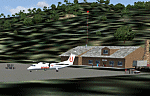
Googly scenery for WASF Fak-Fak, in Irian Jaya (Western New Gunea),
Indonesia - a small domestic airport that Microsoft managed to omit from Flight
Simulator 2004. These scenery files add the runway, apron, taxiways, buildings
and other airport features so that you and your "AI" traffic can land, taxi,
park and take off in a realistic manner.
Little information is available on the services operated - flight plans are
available for Lion Airlines showing two flights per week operated on their behalf
by Wings Abadi Dash 8 aircraft. But it is known that Merpati Nusentara also serve
the airport with Twin Otters. If you are using the Lion Airlines flight plans
for Winter 2006, you must change the airport's co-ordinates as detailed in the readme.txt file
because the co-ordinates given there will cause the aircraft to aim for a point
on the wrong side of the equator in the middle of the sea!
There is no lighting at this airport, and few navigational aids. However, I have
added a missing NDB nearby (FA, 380.0).
The scenery does not purport to be ultra-accurate. The quality of the satellite
imagery at Google Earth is poor, but a number of photographs and other information
has enabled this airport to be depicted reasonably accurately. However the added
airport features, such as buildings, are built from default Microsoft objects
and add-on libraries so will not look exactly like the real thing.
You are not obliged to download and install any additional scenery libraries,
but to enjoy this scenery in its entirety, you may wish to. It will work fine,
with or without.
An editvoicepack file has been included for the airport to help you embarrass
yourself in front of others when flying.
[File re-uploaded at request of AVSIM]
| Filename: | WASF_FakFak.zip |
| License: | Freeware |
| Added: | 7th May 2010, 22:30:22 |
| Downloads: | 1,904 |
| Author: | John Hinson |
| Size: | 72.51 KB |


© 2001-2026 AVSIM Online
All Rights Reserved
Privacy Policy |