
Where Flight Simulation Enthusiasts Gather from Around the World!
AVSIM Library - Search Results

| Category: Flight Simulator X - Aircraft Repaints, Textures and Modifications | |
| FSX/P3D Thomas Ruth Air Leisure Egypt SU-GBM Airbus A340-212 |

|
Images related to this file:
File Description:

(TEXTURES ONLY)
(ONLY TESTED IN FSX: STEAM EDITION)
This was requested by Ahmed Fouad on the Facebook as well as in Flightsim. This has been requested by him for a while so I decided to do it.
Happy New Years guys! This is my first livery for the year. Sadly, as of writing this, Flightsim just went offline for renovation and may stay like that for who knows how long. Could be days, weeks, or even months.
I used the placards from Joey_C's Dragonair A330-300 Livery for the Bulk Cargo Doors as well as the Cargo Door Levers. He is the same user I asked permission from to use his decals and door placards for my Dragonair Cargo 747-300SF Livery, so thanks to him again for letting me borrow his textures with his permission! You should also check out his page if you like flying with X-Plane!
I spent a few hours on this livery just by doing the logo alone. Since I needed a high quality photo of the tail logo, I used OpenAI's ChatGPT to upscale the logo and it did, though the edges still look very pixelated. So I spent a few hours trying to re-draw every line so it could be the highest quality as possible.
I further spent the entire day trying to find photos of the cargo door placards, specifically the "CARGO DOOR OPERATIONS" Instructions text. In real life, it included both in English and Arabic. I tried looking for a photo of the instructions for hours until I found it on a YouTube Shorts video. Then I used that as a reference which also took me a few hours trying to make lines, outlines, and text for it. I didn't want to spend more time doing the same thing for the Arabic text, so I used ChatGPT to translate all of the text and I just remove the background using DXTBMP.
Instructions and more information are included in the readme file.
| Filename: | FSXP3D_Thomas_Ruth_Air_Leisure_Egypt_SUGBM_Airbus_.zip |
| License: | Freeware |
| Added: | 3rd January 2026, 14:44:37 |
| Downloads: | 37 |
| Author: | Ryubunao |
| Size: | 79.81 MB |
| Category: Flight Simulator X - Utilities | |
| GENav pro Navigation |
|
Images related to this file:
File Description:

Previous payware product at SimMarket, now 100% free.
With GENav pro you will view all AIRAC navigation data and terminal procedures inside Google Earth. GENav pro run under Windows and require only Google Earth for displaying. You can also edit your own routes or just copy routes into GENav to view in Google Earth. You can search for example an airport or a fix by short or long name, Google Earth will take you there.
You can connect to Microsoft Flight Simulator to view your aircraft. Moving map and heading is available.
GENav pro is highly optimized for best performance and clear views without clutter. There are smart filters to select relevant data to display, all AIRAC items are available. You will find all data such as nav-aid frequencies, airport runways with ILS frequencies by click the displayed icons in Google Earth.
You can edit routes visual direct inside Google Earth by click. The database can always be updated with Navigraph's latest AIRAC data.
With GENav you can easy build valid routes. Unlike other common autorouting program, GENav is the tool for you to build routes with correct airway direction and correct connected to SID/STAR's. You will easy draw your routes most straight and correct to destination. It is also excellent for visual and instrument navigation flights.
FEATURES:
*** Display airports, nav aids, waypoints
*** Display High/Low airways and airways direction
*** Display SID/STAR, Approaches and Transitions
*** Display ARTCC/FIR border
*** AIRAC data available by click
*** Search airport and fixes
*** AIRAC data compatible Navigraph data
*** Visual editable routes
*** VOR to VOR route navigation data
*** Display your aircraft
BASIC SYSTEM REQUIREMENTS:
*** Windows with Google Earth installed
( Notice, no flightsim program required )
OPTIONALLY REQUIREMENTS:
*** SID/STAR require the Navigraph purchase or an alternative free source
*** Airways direction & high/low info require the Navigraph purchase
*** To display aircraft, Microsoft Flight Simulator or Prepare3D v1/v2, with free FSUIPC is required
*** To display aircraft at a separate computer, also the payware WideFS is required
| Filename: | GENav_pro_Navigation.zip |
| License: | Freeware |
| Added: | 23rd May 2016, 19:57:35 |
| Downloads: | 1,579 |
| Author: | Lennart Vedin |
| Size: | 4.5 MB |
| Category: Flight Simulator 2004 - Scenery | |
| Whati CEM3 in the Northwest Territories, Canada |
|
Images related to this file:
File Description:
Whati is a village at the southern end of Lac La Martre, a smaller lake (only by Canadian standards, at over 40 miles long) halfway between the Great Slave Lake and the Great Bear Lake and around 100 miles north of Yellowknife. The North West Company established a trading post there in 1793, and this was the centre for local trading in the area for 100 years until a post was opened by the Hudson Bay Company on the Great Slave Lake. The current population is in the region of 520. There is no graded road access and access is by boat or air. The main local economy revolves around hunting and fishing, with efforts being made to increase tourism amid the wilderness and the wildlife. The airfield is just over a mile east of the village, with a runway of around 3,400 feet of gravel aligned 09-27 as of 2010, with PAPI at both ends and lit. There are scheduled flights from Yellowknife by Air Tindi, included in the AI, and some GA. The terminal building is similar to that of Lutselk'e, but with a different colour scheme and with solar panels on the roof. It appears that they repaint the sign on the front of the building with a different wording every time; the one I have used is one of three that have existed in the last few years. The photos I had originally were taken in the winter, with snow. Seeing it in the summer I discovered that my version of the building is not at the right level above the ground by about a foot, or 30cm. I was too lazy to make it again, which was the only way to get it right and still have it throw a shadow on the ground. This scenery modifies the lake shore, corrects levels for land and lake, and adds the village and a connecting road in addition to the airport. A note here about my scenery making. There will not be many more to follow this as I am almost at the end of the photos I either took or found for scenery purposes, plus I expect to move on from FS9 at some point during next year.
| Filename: | Whati_CEM3_in_the_Northwest_Territories_Canada.zip |
| License: | Freeware, limited distribution |
| Added: | 15th December 2019, 19:18:29 |
| Downloads: | 151 |
| Author: | Roger Wensley |
| Size: | 4.25 MB |
| Category: Flight Simulator X - Original Aircraft | |
| B-52J |
|
Images related to this file:
File Description:
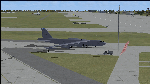
Since it became operational in 1955, the B-52 has been the main long-range heavy bomber of the U.S. Air Force. It first flew on Apr. 15, 1952. Nearly 750 B-52s were built when production ended in Oct. 1963. This "J" model is the future re-engined "h" model 60-0042 of the 917th Wing AFRC based at Barksdale AFB (KBAD). She flies higher, further, and faster than any previous version. The aircraft can cruise at 380 KIAS at 500 ft agl over about 5,000 nm which makes her capable of reaching targets within enemy airspace anywhere on the globe without being detected by radar until it's too late. Her normal high altitude cruise speed has been increased to Mach .88 above FL550E over 9,000 nm without refueling, and her service ceiling has increased to FL570E. The 50,000 lb payload is still nominal, but due to the lighter engines she now has more accomidations for the crew, and does not require refueling very often. She can range much further with less speed (i.e., Mach .85), but there is normally no need for that. This aircraft is designed to fly like the real thing. It is likely one of the best B-52 models available at this time. I have test-flown this aircraft around the globe several times to reassure myself that all is well. You will not have a bouncing effect occur when cruising with 16x speed acceleration and autopilot engaged because all aerodynamics and balance are perfected to a very low margin of error, or no error margin at all. Please be sure to read the INSTRUCT.TXT file for extended details. Original aircraft designer: Mike Stone; Textures by Bill Baldwin; Panel and gauges by Philippe Wallaert; Auto Smoke Effects by Richard Wisman; BR-725 Sound by Ronald Buffalo; Real World aero/engine dynamics, data, lights and effects by: Douglas E. Trapp, FS Flight Dynamics Engineer, Irving, Texas, [email protected], October 2018. The use of this model, and the configuaration of such, is designed for free educational purposes, and protected by the Free Use Act: (https://www.law.cornell.edu/uscode/text/17/107). This model and/or aspects of such cannot be used for monetary purposes!
| Filename: | B52J.zip |
| License: | Freeware |
| Added: | 27th October 2018, 18:57:21 |
| Downloads: | 637 |
| Author: | Douglas E. Trapp |
| Size: | 24.51 MB |
| Category: Flight Simulator X - AFCAD Files | |
| Parker Airport (70NJ), NJ |
|
File Description:
Located 02 miles S of Asbury, New Jersey on 13 acres of land, Parker Airport is a private turf strip located on residential property. This airport is challenging in many ways. For one, when approaching from the southeast the airport is located immediately after a tall ridge, so when topping this ridge at altitude you may not even see the airport over the nose of your aircraft before you overfly it. The runway for this airport is 1600' feet long but it is curved and slightly sloped perpendicular to your roll, so significant rudder will be needed to stay aligned - be careful when operating with any crosswind component! It is highly recommended that you only depart via Runway 25 and arrive via Runway 07 to avoid having to clear significant obstacles prior to landing or after taking off. This airport has no hard-surfaced runway and there is a very noticeable "bump" in the terrain halfway down the runway that will literally bounce your aircraft into the air - I tried my best to smooth it over but could not get rid of it entirely. When taking off make sure you have back pressure applied so your main gear only bounce you high enough to remain within ground effect - hitting your nose wheel can cause an extreme pitch up leading to a stall. Trees close in tight to the runway at the end of Runway 07 or the start of Runway 25, however collision has been disabled with the trees nearest the runway so you can scrape some branches if needed on the takeoff/landing rolls. The author has successfully departed and arrived on both runways in the default Cessna 172 under moderate crosswind from the northeast. This field may definitely require some practice but it is usable!! This airport has no edge lighting, so daytime VFR operations only are recommended.
Scenery constructed with use of satellite images/streetview/aerial photos - the author has not been there in person.
This scenery is meant to be used in conjunction with MegaScenery Earth New York 007. It is not required, but apron use is minimized to allow satellite scenery to show through as much as possible, and objects are placed based on the MSE textures - lack of it may make scenery look out of place.
| Filename: | Parker_Airport_70NJ_NJ.zip |
| License: | Freeware |
| Added: | 10th February 2011, 05:04:30 |
| Downloads: | 215 |
| Author: | Drew Sikora |
| Size: | 559.02 KB |
| Category: Flight Simulator 2004 - Panels | |
| Golovin N93 and Solomon AK26 in Alaska |
|
Images related to this file:
File Description:
Golovin is a coastal fishing village 70 miles east of Nome and around 20 miles west of Elim, with a population of under 200. The village is a check point on the Iditarod race and the name originates from a Russian admiral in the far distant past. The airfield has a gravel runway which is over 4,000 feet long; the older runway amid the village housing is still visible but not usable. The majority of flights to and from the airfield originate in Nome, but there are also others to and from nearby fields such as Elim, Unalakleet, Shaktoolik, and Koyuk. The AI includes a daily ERA flight. Most flights to villages of this size are in fact not "scheduled", but are "air taxi" being used by three or four villagers to go supermarket shopping in a larger neighbouring town, which in this case is Nome. In many cases the numbers of flights to and from a village in a year average out to one a day. There is a further scenery included here, which is Solomon AK26. Solomon is around 40 miles west of Golovin and from 1898 was suppporting a gold mining operation on the Fish and Niukluk rivers further inland at Council. Solomon, and the airfield which obviously came later, gradually faded from use in competition with Nome, leaving almost nothing behind at Solomon by the 1980's except a gravel runway and the nearby Solomon roadhouse. There are other buildings near the airfield which appear to be new and in good condition, but their function is unknown to me. The Solomon terrain modifications and grass deletion bgl's did not function until loaded in a "Top" folder; this is unusual, and may be required only in my FS9 setup or in all situations. I have no way of knowing as I can only design for my situation. A note here about my scenery making. This is post number 503 and there will not be many more to follow this as I am almost at the end of the photos I either took or found for scenery purposes. There is a limit to what can be located online and I have already been making use of the little there is; eg Unalakleet. Post 520 is unlikely. So, if you are near an airport (preferably Canadian or Alaskan) and have a camera..... Let me know.
| Filename: | Golovin_N93_and_Solomon_AK26_in_Alaska.zip |
| License: | Freeware, limited distribution |
| Added: | 5th August 2019, 16:19:07 |
| Downloads: | 83 |
| Author: | Roger Wensley |
| Size: | 4.23 MB |
| Category: Flight Simulator 2004 - Scenery | |
| Wilmington International Airport - Update |
|
File Description:
WILMINGTON INTERNATIONAL AIRPORT KILM, WILMINGTON, NORTH CAROLINA.
For FS9.
BY JOHN B. LONEY, JR, RAY LUNNING, and MICHAEL VERLIN
UPDATE
In this package you will find an updated copy of KILM_ADE9_MV.BGL.
The original release did not have taxiway signs, and the ATIS frequency was incorrect. These errors have been corrected.
INSTRUCTIONS -
Simply unzip this file to a temporary folder. Move the updated file to where you have your KILM files installed, overwriting the original file. This will update your installation
Legal stuff. Copyright and Distribution
The Copyrights of the items used in this scenery are property of the respective authors and are in full force on behalf of those authors. If I have infringed on any of the copyrights by including the items viewed in this scenery in the upload file, it was purely unintentional and I do sincerely apologize. I have acknowledged and given credit to all the persons associated with each aircraft in the scenery to the best of my knowledge. Also, I do appreciate the permissions I did receive from some of the authors. I felt is helps the end user when certain items in a scenery can be uploaded with the scenery. An honest attempt has been made to acknowledge and give credit to those whose works contributes to this scenery.
This scenery is freeware. Copyright John B. Loney, Jr. You do not have my permission to make any monetary gain from this scenery. It started out as freeware and it shall remain freeware.
This scenery should only be distributed from/to one of the following three websites: Flightsim.com, AVSIM.com or lfssd.net.
Written request to distribute this scenery and/or its components to any other website will be considered on an individual basis.
This scenery can be bundled with any modification to the scenery as long as the proper credit is given to the authors of the scenery and components of the scenery and the original readme file is included with the modification.
-The author's rights and wishes concerning this archive must be respected.
Copyright (c) 2013 by John B. Loney, Jr. All Rights Reserved.
-Disclaimer: I do not accept any responsibility for any damage to any system as a result of running this software.
-Contact: As usual, I welcome any comments. I will try to answer as many as I can. Website: www.lfssd.net Have fun and enjoy.
| Filename: | Wilmington_International_Airport__Update.zip |
| License: | Freeware, limited distribution |
| Added: | 24th August 2013, 10:28:35 |
| Downloads: | 605 |
| Author: | John B. Loney, Ray Lunning and Michael Verlin |
| Size: | 12.33 KB |
| Category: Prepar3D V1-4 - Aircraft Repaints, Textures and Modifications | |
| VARIG 1998 |
|
File Description:
In 1998, VARIG was still a huge legacy airline, but routes and frequencies were starting to be cut, which continued into the 2000s until their 2006 demise. MD-11s, DC-10-30s, and 747-300s mostly served long-haul routes such as NGO, NRT, LAX, MIA, JFK, MAD, BCN, LHR, CPH, ect, while the 767s did longer South America routes as well as CUN/MEX/JFK/MCO/MIA as well as flights to Spain and Portugal. VARIG's "around the world" GIG-GRU-JNB-BKK-HKG-BKK-JNB-CPT-GRU-GIG flight was flown with an MD-11 at the time, and I have assigned it to the "World Cup" livery MD-11, which means you will not see the aircraft much in Brazil but it will pop up abroad. VARIG flew many "tag on" flights, like LIM-LAX-NRT/NGO, LHR-CPH, MAD-BCN, MIA-MCO, ect, and there are many, many GIG-GRU and GRU-GIG flights that were part of international routes with no ticket sales in between. Between 0500 and 0700, there are many widebodies making this short flight. The 737-300s flew all over Brazil and to some South American countries. Rio Sul, who did the flights to CGH and SDU, is not included was released seperately on Avsim as "rio_sul_1998.zip". Though VARIG livery 737-300s flew on behalf of Rio Sul, Nordeste and PLUNA, those flights are not included and are included in those respective airlines. An MD-11 and a 737-300 were painted in special colors to celebrate the World Cup, and a 767-200 wore a special Star Alliance livery. The 747-300 in the Star Alliance colors only had them applied to one side of the aircraft and never flew revenue service in that livery, so it is not included. The rest of the fleet wore a mix of the 1997 introduced livery and the 1980s blue and white colors with the silver belly. The entire fleet on the FAIB 737-200, 737-300, 747-300, 767-200 and 767-300,and FSPX MD-11 by Raphael Rodrigues is included. The DC-10-30s on the AIM model by Jason King are on Avsim as "aim_dc1030_varig_pp-vmb_313514.zip" and "aim_dc1030_varig_oldcolors_307373.zip". Flightplans by Chasen Richardson. Part of the 1998 Flight Simulator Project. Follow us on Facebook at facebook.com/flightsim98 and on instagram as @bayviationsim. For more Retro AI, check out the forums at: http://retroai.proboards.com/
| Filename: | VARIG_1998.zip |
| License: | Freeware, limited distribution |
| Added: | 1st January 2020, 20:13:56 |
| Downloads: | 624 |
| Author: | Raphael Rodrigues, Chasen Richardson\ Bayviation |
| Size: | 30.59 MB |
| Category: Flight Simulator 2004 - Scenery | |
| Nenana Municipal Airport PANN in Alaska |
|
Images related to this file:
File Description:
Nenana is a village on the river of the same name around 40 miles west of Fairbanks, which is the second largest urban area in Alaska after Anchorage. Nenana, as a result of this proximity, is served by road and railway and unlike other Alaskan villages is not reliant on air cargo for necessities. The current population is just under 400, which is way down from its peak of 5,000 in the 1920's when gold was being mined and the railroad being built. Nenana's main claim to fame is as the starting point for the 1925 mushing delivery to Nome of the serum to combat an outbreak of diphtheria. Any Nenana Municipal Airport history is difficult to find, even the date of construction. It has two runways 3L-21R and 3R-21L, the first being asphalt and just under 5,000 feet with PAPI at both ends, the second grass and 1,800 feet. Both are lit. It also has a further water runway similarly aligned and 3,000 feet long. Maintenance is available and there is also fuel at the end of the northern apron, close to the crashed and stripped DC4 that sits among other unwanted items that are too large to make it worth the cost of moving them off the site. There are no regular scheduled flights to the airport, with air taxi or owner operated being in the majority. The scenery, in addition to the terrain, town, bridges, and airport items also modifies the terrain in an area further south where FS9 depicted as a city an Air Force base that is mainly concerned with radar and communications and in fact has very few buildings. The AI includes some Beavers on floats that were used in previous BC scenery with the kind permission of FSAddon. As I have already posted them I have not included them again here. The float plane AI uses the same radio frequency as the land based planes, but they fly to PANX and not to PANN as FS9 has problems with getting floats and wheels separated. Or maybe I just haven't worked out how to cope with FS9. A note here about my scenery making. There will not be many more to follow this as I am almost at the end of the photos I either took or found for scenery purposes, plus I expect to move on from FS9 at some point during next year.
| Filename: | Nenana_Municipal_Airport_PANN_in_Alaska.zip |
| License: | Freeware, limited distribution |
| Added: | 2nd December 2019, 18:12:42 |
| Downloads: | 159 |
| Author: | Roger Wensley |
| Size: | 7.36 MB |
| Category: Flight Simulator 2004 - Scenery | |
| PABR - Barrow - Alaska, USA |
|
Images related to this file:
File Description:
The town of Barrow is in the far north of Alaska, and is best known in flying circles as the place where Wiley Post crashed his floatplane on takeoff and killed himself and Will Rogers. The crash was some 15 miles south of Barrow and was "assisted" by the mismatched fuselage, wings, and floats that had been assembled to create the floatplane. The Barrow population is largely Inupiat and totals some 4,400. The downtown area of Barrow is immediately north of the airport. The second and largest part of Barrow is further north past a string of lagoons and is locally called Browerville. To the northeast along the coast is the smallest part around what used to be the Naval Arctic Research Lab, and is now a college. To the east of this are the DEW buildings, plus two large navy hangars and the gravel runway that was used to serve the DEW station. The PABR runway is aligned 06-24 in FS9 and is 7,100 feet long and 150 feet wide, built on top of a gravel base and surround that copes with the underlying permafrost. There is PAPI at both ends and an ILS and approach lights on 06; 06 circuits are to the right. The airport notes include a warning that the apron is not a standard width and that large planes that are enroute to the far end of the runway will not be able to taxi past a plane parked at the gate and should use the runway as a taxiway, then turn and takeoff. FS9 AI cannot cope with that, so the apron here is wider. There are, in real life and the AI, daily flights by Air Alaska (three at least) and Era (several, and which is now called Ravn, hence the new hangar door motif) and air cargo flights by Northern Air Cargo and Everts, plus GA. The buildings have been made with photographic textures or textures made from reference photos. I decided that while 500+ scenery objects was probably ok for most people the required 900+ to "make" the town of Barrow would likely not be. The auto-generated FS9 town objects could not be left as Barrow with trees would not look at all like reality; I have "faded" the density of the town buildings into the distance from the airport.
| Filename: | PABR__Barrow__Alaska_USA.zip |
| License: | Freeware, limited distribution |
| Added: | 17th May 2016, 09:32:36 |
| Downloads: | 979 |
| Author: | Roger Wensley |
| Size: | 15.12 MB |


© 2001-2026 AVSIM Online
All Rights Reserved
Privacy Policy |