
Where Flight Simulation Enthusiasts Gather from Around the World!
AVSIM Library - Search Results

| Category: Flight Simulator 2004 - Scenery | |
| Hewanorra TLPL on Saint Lucia in the eastern Caribbean |

|
Images related to this file:
File Description:
St Lucia island is to the north of the Grenadines, between Martinique and Saint Vincent. St Lucia is nearly 30 miles long and has a population of 175,000, with two airports. Hewanorra International is at the southern end of the island, the end furthest from the capital, Castries. The reason for this is that at the southern end it was possible to build a runway almost 9,000 feet long, while the airport in the north (Vigie) could not be extended further to accomodate the largest jets. The airport was originally a USAAF base, converted to commercial use.
All buildings are made with photographic textures and include the new terminal and a new control tower. The apron has been extended so that 747's etc can be accommodated, and there are regular international flights by Virgin, BA, Air Canada, Air France, etc and local connecting flights by LIAT; the AI includes both major international airlines and LIAT. The towns around the airport (Vieux Fort etc) are included here: the scenery is based on the "Lesser Antilles Mesh" which is required and can be downloaded for free.
| Filename: | Hewanorra_TLPL_on_Saint_Lucia_in_the_eastern_Carib.zip |
| License: | Freeware, limited distribution |
| Added: | 11th June 2013, 16:23:49 |
| Downloads: | 837 |
| Author: | Roger Wensley |
| Size: | 4.25 MB |
| Category: Flight Simulator X - Scenery | |
| ENHV - Honningsvag-Valan - Honningsvag, Norway |
|
Images related to this file:
File Description:
ENHV is the most northern airport in Europe (self-promotion of the airport). It it situated on a promontory 46 feet above the sea a few miles southeast of the Nordkap.
This scenery is not a stand-alone-scenery. It is an update of the Airports of Norway (AoN) where ENHV is already included. So AoN has to be installed first to see the buildings and the objects on this airport.
In addition the Nordkap is included with the rock, the museum and the viewing point.
AON you can download here:
http://www.flightsimnorway.com/addons/default.php?funct=dl&pack=aon
Also recommended is to install are the corresponding Photo sceneries AoN Phatopack 1 + 2:
http://www.flightsimnorway.com/addons/default.php?funct=dl&pack=aon
There are some errors corrected In ENHV that occur in the AoN:
1. The altitude is adjusted to the correct height of 46 feet.
2. The sea is where it should be.
3. The land classes are partially adjusted.
4. The town of Honningsvag is involved.
5. The Northern Cape is included, but can be installed separately.
| Filename: | ENHV__HonningsvagValan__Honningsvag_Norway.zip |
| License: | Freeware |
| Added: | 19th October 2015, 18:54:47 |
| Downloads: | 1,926 |
| Author: | Wolfgang Allers |
| Size: | 131.64 MB |
| Category: Flight Simulator X - Scenery | |
| 2016 Kigali Intl (HRYR) Rwanda |
|
Images related to this file:
File Description:
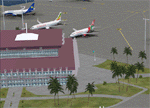
This sequel to the 2009 Kigali Intl (HRYR) Rwanda scenery (by Jacques Botha and Frits Beyer) brings it up to date with the current layout and enables full compliance with FTX Global/Vector and FSX. Buildings are added and adjusted to their real-world locations, and the new taxiway and south apron are added according to the May 2016 satellite imagery. In addition to real-world gate locations, custom apron markings are added along with apron lighting. The landclass around Kigali is also updated, and SRTMGL1 (30m) mesh is included. This scenery can be complemented by the Goma (FZNA) and Gisenyi (HRYG) scenery (FSX_FZNA-HRYG_CS.zip), and GA flightplans are included to supplement the commercial traffic at Kigali and provide more activity at FZNA and HRYG.
Updates were created or rebuilt in a manner which carefully aligns airport data with current satellite imagery. Scenery was created using Airport Design Editor X v1.70.6042, SBuilderX 3.13, and the FSX Object Placement Tool. Scenery objects were added and modified from stock FSX scenery to resemble as closely as possible the actual airports. The FSX apron lights included are from the set created by Jim Dhaenens.
| Filename: | 2016_Kigali_Intl_HRYR_Rwanda.zip |
| License: | Freeware |
| Added: | 4th August 2016, 21:10:09 |
| Downloads: | 3,391 |
| Author: | Carlyle Sharpe, Jacques Botha, and Frits Beyer |
| Size: | 17.12 MB |
| Category: Prepar3D V1-4 - Utilities | |
| Random Flight Database |
|
Images related to this file:
File Description:
Random Flight Database is a program that will allow you, depending on one or more criteria, to choose a flight corresponding to existing flights.
These flights are extracted from a database of 1,262,465 lines, available in the program. This database is updated in summer 2019.
You also have a user base that will allow you to share your data files (.XLS) between users to add even more choices.
Part of it is also dedicated to importing data from the website: https://developer.flightstats.com/
You must create an account on this site in order to extract (limited to about 6 airports in total for 1 account)
This import is made 7 days from the moment you make this import.
Once this import is done, you can import it directly into your user database and / or export it in XLS format for sharing with other users.
Files are available for free on the org.
The criteria for choosing your flights are:
- Airlines
- Departure airport
- Arrival Airport
- Type of plane
- Day of the week
- Multiple generation (generates a number of flights determined by the user)
- flight time (choice of a flight time interval, minimum flight time
| Filename: | Random_Flight_Database.zip |
| License: | Freeware |
| Added: | 29th August 2019, 16:11:49 |
| Downloads: | 129 |
| Author: | mikoulprostgrandprix |
| Size: | 79.9 MB |
| Category: Prepar3D V1-4 - Utilities | |
| Random Flight Database 2.1.9 |
|
File Description:
Random Flight Database is a program that will allow you, depending on one or more criteria, to choose a flight corresponding to existing flights.
These flights are extracted from a database of 1,262,465 lines, available in the program. This database is updated in summer 2019.
You also have a user base that will allow you to share your data files (.XLS) between users to add even more choices.
Part of it is also dedicated to importing data from the website: https://developer.flightstats.com/
You must create an account on this site in order to extract (limited to about 6 airports in total for 1 account)
This import is made 7 days from the moment you make this import.
Once this import is done, you can import it directly into your user database and / or export it in XLS format for sharing with other users.
Files are available for free on the org.
The criteria for choosing your flights are:
- Airlines
- Departure airport
- Arrival Airport
- Type of plane
- Day of the week
- Multiple generation (generates a number of flights determined by the user)
- flight time (choice of a flight time interval, minimum flight time
| Filename: | Random_Flight_Database_219.zip |
| License: | Freeware |
| Added: | 2nd September 2019, 22:25:07 |
| Downloads: | 86 |
| Author: | mikoulprostgrandprix |
| Size: | 80.46 MB |
| Category: Flight Simulator 2004 - Miscellaneous Files | |
| Active ILS - KMIA v2.0 |
|
File Description:
UPDATED KMIA see the readme file -- By design KMIA is now the most advanced ATC controlled airport in the FS9 database. As most know initiating the ILS at certain airports for AI Traffic is not a function at this time when using AFCAD2. If you add a new ILS runway to an airport such as KMIA (Miami International Airport 8L/26R) only the user aircraft can use this runway when visibility falls below 3 miles. ATC will no longer use this runway for AI Traffic because FS9 sees it as a visual runway. This will cause ATC to vector your AI Traffic back to 9L/27R (old numbers) 8R/26L (new numbers) which is also a Terminal departure runway. All 4 runways for KMIA are now simultaneously active for both departure and arrival. The many options (written in the XML compiled to bgl) are to numerous to list for KMIA so follow the instructions in the README and just sit back (or fly) and plane spot either VMC or IMC for a very active airport. *** FlyTampa-Miami Scenery AFCAD2 and special ILS bgl also updated and included ***
| Filename: | Active_ILS__KMIA__v20.zip |
| License: | Freeware, limited distribution |
| Added: | 26th July 2004, 16:20:37 |
| Downloads: | 5,939 |
| Author: | Jim Vile |
| Size: | 129.61 KB |
| Category: Flight Simulator 2004 - Miscellaneous Files | |
| Active ILS - Niagara International Airport KBUF |
|
File Description:
As most know initiating the ILS at certain airports for AI Aircraft or User Planes is not a function at this time when using AFCAD2 if visibilty falls below 3 miles. This is do to the somewhat complex XML code that has to be written for NAVAIDS and then the compiling into a bgl file. If you add a new ILS runway to an airport such as KBUF (rwy 32) only the user aircraft can use this runway when visibility falls below 3 miles if a GPS/LDA is unavailable. ATC will no longer use 32 ILS runway for AI Traffic or User Aircraft (by default) because FS9 sees it as a visual runway and will now vector your Planes back to 5/23 ILS which is also being used as a Terminal Departure Runway. The KBUF_ILS_jv.bgl file adds all NAVAIDS for making 32 a Precision Instrument Runway by adding all the radar fixes for both the ILS/DME approach portion and the proper missed approach procedures as per current published plates for runway 32. See the readme for what's new at the KBUF airport. **** AFCAD2 included for FS9 default scenery. ****
| Filename: | Active_ILS__Niagara_International_Airport__KBUF.zip |
| License: | Freeware, limited distribution |
| Added: | 30th January 2005, 17:21:34 |
| Downloads: | 1,306 |
| Author: | Jim Vile |
| Size: | 117.25 KB |
| Category: Flight Simulator 2004 - Miscellaneous Files | |
| Active ILS - KLAS (McCarran Intl - Las Vegas, Nevada) |
|
File Description:
As most know initiating the ILS at certain airports for AI Aircraft or User Planes is not a function at this time when using AFCAD2 if visibilty falls below 3 miles. This is do to the somewhat complex XML code that has to be written for NAVAIDS and then the compiling into a bgl file. If you add a new ILS runway to an airport such as KLAS (rwy 01L) only the user aircraft can use this runway when visibility falls below 3 miles. ATC will no longer use 01L ILS runway for AI Traffic or User Aircraft (by default) because FS9 sees it as a visual runway and will now vector your Planes back to rwy 7/25LR ILS which is also being used as a Terminal Departure Runway. The KLAS_ILS_jv.bgl file adds all NAVAIDS for making 01L a Precision Instrument Runway by adding all the radar fixes for both the ILS/DME approach portion and the proper missed approach procedures as per current published plates for runway 01L. See the readme for what's new at the KLAS airport. **** AFCAD2 included for FS9 default scenery. ****
| Filename: | Active_ILS____KLAS__McCarran_Intl____Las_Vegas_Nev.zip |
| License: | Freeware, limited distribution |
| Added: | 28th February 2005, 15:44:40 |
| Downloads: | 3,027 |
| Author: | Jim Vile |
| Size: | 33.84 KB |
| Category: Flight Simulator 2002 - Aircraft Repaints, Textures and Modifications | |
| FS2002 Val-U-Prop Plane and Panel |
|
File Description:
FS2002 Val-U-Prop Douglas DC-3 Plane and Panel
Val-U-Prop is a (fictional) rogue airline based in Bloomington, Indiana, that flies everything from VIPs to sheep manure anyplace and anytime. VP's motto is "No job too small; No fee too large," and our DC-3's and DC-6's can be seen hedge-hopping into various obscure airports throughout the USA. Based on the lovely DC-3 Pluna by Daniel Gazzano, this aircraft is a re-paint of the fabulous DC-3 OH-LCH by Jan Visser, Erik Ellis, Roy Chaffin, Ian Roper and Bill Rambow, to which FS2002 lights have been added. Panel includes everything on main panel, except for GPS, so there is no tabbing. (Default pop-up radio stack is also included.) Panel is based on photographs by Bill Blanchard (lower panel) and Shawn Clark (upper). The very aluminal wing views were shot by Thomas Andre Hjelmen, and the 1930s cabin was photographed by Ben Wang and is populated with various VIPs. All of this brought to you by Val-U-Prop - where WE VAL-U-YOU! By James Underwood
| Filename: | FS2002_ValUProp_Plane_and_Panel.zip |
| License: | Freeware, limited distribution |
| Added: | 26th February 2003, 16:36:44 |
| Downloads: | 600 |
| Author: | James Underwood |
| Size: | 6.2 MB |
| Category: Flight Simulator X - AFCAD Files | |
| CYLW - Kelowna International Airport / Kelowna, British Columbia, Canada |
|
Images related to this file:
File Description:
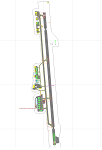
CYLW - Kelowna International Airport / Kelowna, British Columbia, Canada
This airport update was made with the latest version of ADE (Airport Design Editor) and made for FSX as a replacement for the stock (default) airport. I found that most stock airports in FSX lack a decent amount of character and realism and I've done my best to correct that wherever possible. I've made several additions to the airport which are listed below. All these enchancements are as close to the real airport as I can get with stock library objects. I've used satellite images, terminal photos and maps throughout the whole process so building locations are as accurate as possible. Happy landings in the beautiful Canada!
Features:
*Expanded parking apron
*Main terminal building with it's 8 gates some with jetways
*Seperate parking aprons for GA traffic
*Runway accurately expanded to 8,900ft to reflect 2008 runway project
*Hangar and other airport buildings added
*Airport vehicles and objects throughout the airport
*Main road in front of airport added with static vehicles
*Parking lots with static vehicles
*Airport fire station with fire trucks
*Static de-icing vehicles & runway plow
*2 Helipads
(Next up: CYWG Winnipeg Intl Airport)
| Filename: | CYLW__Kelowna_International_Airport__Kelowna_Briti.zip |
| License: | Freeware |
| Added: | 22nd July 2012, 15:13:45 |
| Downloads: | 1,132 |
| Author: | Jaison Diaz |
| Size: | 10.38 KB |


© 2001-2026 AVSIM Online
All Rights Reserved
Privacy Policy |