
Where Flight Simulation Enthusiasts Gather from Around the World!
AVSIM Library - Search Results

| Category: Flight Simulator X - Scenery | |
| Odense Airport (EKOD), Funen, Denmark |

|
Images related to this file:
File Description:
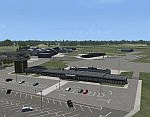
Odense Lufthavn (Odense Airport) is situated close the village of Beldringe, a few km north of Odense, the main city on the island of Funen, Denmark. Like several other Danish airports it was established as an airbase by the Germans during World War II. It was taken over by the Danish state after the war and owned by the state until 1998, at which time it was taken over by a consortium of local authorities, including the city of Odense.
Since the opening of the Great Belt Lin in 1997 there has been no regular passenger flights, apart from some charter traffic during the summer season. But there is a lot of traffic with one- and two-motor craft (including rotor craft) due to the many companies based in the airport.
The package is a complete scenery of the airport, including a few buildings around it. It includes approach lights, runway lights, taxiway lights and light on the apron, the car parking area and the surrounding roads. A traffic file with the (limited) charter traffic of the airport is also included.
| Filename: | Odense_Airport_EKOD_Funen_Denmark.zip |
| License: | Freeware, limited distribution |
| Added: | 31st October 2009, 10:29:34 |
| Downloads: | 3,734 |
| Author: | Peter H. Poulsen |
| Size: | 13.63 MB |
| Category: Flight Simulator 2004 - AI Flight Plans | |
| Vieques Air Link AI Flight Plans NEW COLORS |
|
Images related to this file:
File Description:
-This package have flight plans,updates for the AI models,AFCAD for the different airports and the Call Sign for VAL.
-Vieques Air Link(VAL) is a small regional airline that travel to sAN Juan,Isla Grande(Dominici),St. Croix,Ceiba(Roosevelt Roads) and Culebra
from Vieques,Puerto Rico.
-The flight plans are a combination of Real Schedule Operations of the airline plus some fictional plans that we think
will become real very soon(ST.Thomas,Punta Cana and la Romana).
-Models courtesy of Henry Tomkiewicz and the Repaints courtesy of Roberto Ayala and his website www.robertoayala.com
-In order for the package to work properly you need to have the Puertorico2004v2 scenery from Roberto Ayala installed,
you may find it at his website and youll need also the Blue Print TJSJ Scenery(freeware),you can find the link at Roberto's
website.
-The AI Models can be found at www.avsim.com or www.robertoayala.com with also more files of Roberto's work at the sim
community.To add the Trislander you have to downloaded and install it also on your Flight Simulator Aircraft Folder.
It require the Vieques Air Link AI MODELS NEW COLORS
| Filename: | Vieques_Air_Link_AI_Flight_Plans_NEW_COLORS.zip |
| License: | Freeware |
| Added: | 7th February 2010, 00:04:50 |
| Downloads: | 569 |
| Author: | Rafael Ortiz,Roberto Ayala |
| Size: | 361.05 KB |
| Category: Flight Simulator 2004 - AI Flight Plans | |
| VAL New Models |
|
Images related to this file:
File Description:
-This package have flight plans,updates for the AI models,AFCAD for the different airports and the Call Sign for VAL.
-Vieques Air Link(VAL) is a small regional airline that travel to sAN Juan,Isla Grande(Dominici),St. Croix,Ceiba(Roosevelt Roads) and Culebra
from Vieques,Puerto Rico.
-The flight plans are a combination of Real Schedule Operations of the airline plus some fictional plans that we think
will become real very soon(ST.Thomas,Punta Cana and la Romana).It require the Vieques Air Link AI Models New Colors zip
-Models courtesy of Henry Tomkiewicz and the Repaints courtesy of Roberto Ayala and his website www.robertoayala.com
-In order for the package to work properly you need to have the Puertorico2004v2 scenery from Roberto Ayala installed,
you may find it at his website and youll need also the Blue Print TJSJ Scenery(freeware),you can find the link at Roberto's
website.
-The AI Models can be found at www.flightsim.com or www.robertoayala.com with also more files of Roberto's work at the sim
community.To add the Trislander you have to downloaded and install it also on your Flight Simulator Aircraft Folder.
| Filename: | VAL_New_Models.zip |
| License: | Freeware |
| Added: | 7th February 2010, 11:18:52 |
| Downloads: | 462 |
| Author: | Roberto Ayala,Rafael Ortiz |
| Size: | 361.05 KB |
| Category: Flight Simulator 2004 - AI Aircraft | |
| Pegasus Aviation AI Pack: The Viscount Flies On |
|
Images related to this file:
File Description:
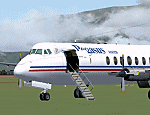
In deepest darkest Africa, one Viscount can still be found flying commercially - with Pegasus Aviation in the Democratic Republic of Congo.
These files include the aircraft, appropriate AI flight plans and AFCAD files for some of the airports served. Although not a true "AI
aircraft" it is unlikely to cause a strain on computer resources given the light
demands of AI traffic and scenery in the Congo area on Flight Simulator.
The aircraft is a modified version of Rick Piper's excellent Vickers Viscount 800
model available from http://www.btinternet.com/~rick.piper/ . If you wish to fly
the Pegasus Aviation Viscount yourself, please download the original aircraft files
from his site and install these textures to work with them - what is included
here is not suitable for your own flying as the Flight Dynamics have been modified
to work as AI traffic. [File re-uploaded at request of AVSIM] Footnote - since this file was first released in 2007, the aircraft has changed hands, it passed to Mango Airlines as 9Q-COD and is currently out of service at FZQA Lubumbashi. Sadly, it seems that the Viscount no longer flies on.
| Filename: | Pegasus_Aviation_AI_Pack_The_Viscount_Flies_On.zip |
| License: | Freeware |
| Added: | 26th May 2010, 19:15:46 |
| Downloads: | 985 |
| Author: | John Hinson, Billy Rutherford & Rick Piper |
| Size: | 812.55 KB |
| Category: Flight Simulator 2004 - Scenery | |
| KCLT Charlotte Douglas International Airport |
|
Images related to this file:
File Description:
In 2008 runway 18R/36L at KCLT was renamed 18C/36C in anticipation of a third parallel under construction. The new runway was to be designated 18R/36L and was finally activated on January 6, 2010. This scenery adds that new runway to the default Charlotte Douglas International Airport (KCLT). This is a complete rebuild of my previous upload, KCLT2010 (not required) that inadvertently removed approximately 30 airports in the Charlotte area, including Fayetteville and Spartanburg. It also includes Terminal E, which was added in 2002, but never made it into the default FS2004 scenery.
I used Airport Design Editor (ADE9x) to modify the default FS2004 KCLT file, renaming the default 18R/36L to 18C/36C, create the new taxiways, taxi signs, NavAids, 18R-36L runway, and Terminal E. I used Abacus EZ-Scenery to add jetways, gate markings, and ramp lights. All files, libraries, and textures are either default or included. No additional downloads are required. AI Aircraft were acting normally on my system. I sat at Taxiway W2 for the new Runway 18R/36L and watched AI Aircraft land and take off from it after creating this scenery.
| Filename: | KCLT_Charlotte_Douglas_International_Airport.zip |
| License: | Freeware, limited distribution |
| Added: | 12th January 2011, 22:34:51 |
| Downloads: | 3,572 |
| Author: | Randy Tyndall |
| Size: | 1022.34 KB |
| Category: Flight Simulator 2004 - Scenery Design | |
| FSX2FS9 Converts FSX Airport Files for Use in FS9 |
|
Images related to this file:
File Description:
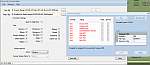
FSX2FS9 is a utility based on the ScruffyDuck Scenery Design Engine. It allows users to convert Airport Files designed for FSX for use in FS9. The program provides user control over the conversion process including selection of elements to be removed prior to conversion, handling of vehicle path networks and handling of those items in the FSX file which would cause the FS9 compiler to fail. The user also has the choice of whether to allow the program to automatically fix and faults found or to use the built in fault finder for more control. The program uses the Microsoft FS9 Compiler (included) to generate the FS9 Bgl file. The XML source is also available.
Please note that while airports converted with this program should work in FS9 there are a lot of variables and we recommend that the converted Bgl be opened in an Airport Facilities Editor (such as AFCAD, AFX or ADE) for further processing to ensure a satisfactory result.
This program is still a beta and users should use it in that light and make sure that valuable files are back up in a safe place. Please read the enclosed operating notes before using this program.
| Filename: | FSX2FS9_Converts_FSX_Airport_Files_for_Use_in_FS9.zip |
| License: | Freeware, limited distribution |
| Added: | 26th January 2011, 11:58:40 |
| Downloads: | 3,554 |
| Author: | Jon Masterson ScruffyDuck Software |
| Size: | 2.88 MB |
| Category: Flight Simulator 2004 - AI Aircraft | |
| St. Lucia Airways Retro Boeing 707-320 |
|
Images related to this file:
File Description:

St. Lucia Airways Retro B707-320.
St. Lucia Airways Limited was a privately owned company founded in 1975. General and tourist flights were operated mainly to Martinique and Barbados, but also extended throughout the Caribbean and South America. There was also a shuttle service between the two St. Lucia airports of Vigie and Hewannora. A Boeing 707 was acquired in 1982 for cargo charter work. Source Wiki.
Flightplans are available on AVSIM.
This works for both FS9 and FSX. Tested in FSX. FS9 models used.
For FSX users make sure you have UNCHECKED "Aircraft casts shadows on the ground" under the Aircraft - Exterior Settings in FSX to make any FS9-based model visible during the day!
Texture quality; FSX Native: DDS DXT5 with alpha. FS9 Native: BMP DXT3 with alpha.
FSX Light Fix included in the DDS night texture.
Custom Light Map. Custom Shadows, Highs, Weathering as usual...
Included repaint is for the following model; AI_B707-320 from Dee Waldron aka DWAI.
Model is available on AVSIM and FlightSim.com or on the author/developers site.
You need the basekit for this to work!!
Do make sure you copy the texture folder(s) in the respective folder.
| Filename: | St_Lucia_Airways_Retro_Boeing_707320.zip |
| License: | Freeware, limited distribution |
| Added: | 8th July 2012, 15:10:45 |
| Downloads: | 250 |
| Author: | Stephan Faessler / ImpulseAI |
| Size: | 957.55 KB |
| Category: Flight Simulator X - AFCAD Files | |
| Greater Moncton International Airport / Canada (CYQM) |
|
Images related to this file:
File Description:
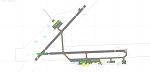
CYQM - Greater Moncton International Airport / Moncton, New Brunswick, Canada
This airport update was made with the latest version of ADE (Airport Design Editor) and made for FSX as a replacement for the stock (default) airport. I found that most stock airports in FSX lack a decent amount of character and realism and this area in particular was dreadful! The stock airport was rather inaccurate. I've made several additions to the airport which are listed below. All these enchancements are as close to the real airport as I can get with stock library objects. I've used satellite images, terminal photos and maps throughout the whole process so building locations are as accurate as possible. Happy landings in the beautiful Canada!
Features:
*Expanded parking apron
*Main terminal building with it's 2 jetways and additional parking for regional jets/turboprops
*Seperate parking aprons for GA traffic near the old terminal
*Hangar and other airport buildings added
*Airport vehicles and objects throughout the airport
*Main road in front of airport added with static vehicles
*Parking lots with static vehicles
*Airport fire station with fire trucks
*Static de-icing vehicles
| Filename: | Greater_Moncton_International_Airport__Canada_CYQM.zip |
| License: | Freeware |
| Added: | 21st July 2012, 02:41:58 |
| Downloads: | 817 |
| Author: | Jaison Diaz |
| Size: | 10.6 KB |
| Category: Flight Simulator X - AFCAD Files | |
| ORBI - Baghdad Intl Airport - Baghdad, Iraq |
|
Images related to this file:
File Description:
ORBI - Baghdad International Airport, Baghdad, Iraq
Slowly but surely the Baghdad international airport comes back to life. Although the airport is quite large, it is not yet used to its maximum. Some aprons still have no real use and thus are empty. Apron V, the presidential apron, is still present but might have been restructured by now.
Airlines like Austrian, Emirates, Etihad, Royal Jordanian and FlyDubai offer regular services to Baghdad.
Using ADEx 1.51 and the IRAQ AIP this AFCAD updates the default airport to what it is now on paper. Google Earth�´s images are too old to offer any help regarding buildings, vegetation and surrounding areas like offices, parkings, roads and apron V.
Gatenumbers have been updated, taxiways added and renamed, ILS 15R/33L has been removed, the military area is more detailed, taxiways are correctly sized and the overall quality of the airport increased.
For those interested, the complete IRAQ AIP is attached. It not only gives complete information about several Iraqi airports, it also holds approach plates of most of them. You will also find plates for ORSU, for which an AFCAD has been uploaded separately.
| Filename: | ORBI__Baghdad_Intl_Airport__Baghdad_Iraq.zip |
| License: | Freeware |
| Added: | 10th August 2012, 16:53:26 |
| Downloads: | 3,245 |
| Author: | Menno C. Robert |
| Size: | 14.54 MB |
| Category: Flight Simulator X - AFCAD Files | |
| OMAA - Abu Dhabi International Airport - Abu Dhabi, United Arab Emirates |
|
Images related to this file:
File Description:
Abu Dhabi International Airport is an airport in Abu Dhabi, the capital of the United Arab Emirates. The airport is one of the fastest growing airports in the world in terms of passengers, new airline operators and infrastructural development. The airport is now undergoing a US$6.8 billion expansion. As of January 2012, 53 airlines offered service to 85 destinations in 49 countries.
The airport is the second largest in the UAE, serving over 10 million passengers in 2010. It has three operational passenger terminals. Its terminal spaces are dominated by Etihad Airways, which is the United Arab Emirates' second largest air carrier after Emirates.
The new Terminal 3, a US$270 million interim facility, was designed to allow for the airport's passenger growth before the planned opening of the new Midfield Terminal in 2014. Used predominantly by Etihad Airways, the terminal boosted the airport's seven million passenger per year capacity to 12 million. It also added 10 new gates, two of which are Airbus A380 compatible.
Using ADEx 1.51, aeronautical maps and Google Earth this AFCAD is now on par with today's situation.
| Filename: | OMAA__Abu_Dhabi_International_Airport__Abu_Dhabi_U.zip |
| License: | Freeware |
| Added: | 12th January 2013, 22:09:29 |
| Downloads: | 1,695 |
| Author: | Menno C. Robert |
| Size: | 3.62 MB |


© 2001-2026 AVSIM Online
All Rights Reserved
Privacy Policy |