
Where Flight Simulation Enthusiasts Gather from Around the World!
AVSIM Library - Search Results

| Category: Flight Simulator 2004 - Gauges | |
| Douglas DC-3 Three Fuel Tank Automixture Gauge |

|
File Description:
For three-tank operation, this gauge may be of interest to those pilots who like to fly without checking the "Enable automixture" function in the "Aircraft/Realism Settings" pull-down menu, but want more DC-3 realism than can be achieved with FS2004's simulation of mixture control. It requires prior installation of Beaumont and Bitzer's Douglas DC-3 Three Fuel Tank Modification, to be found in DC3_3TK.ZIP. Its purpose is to replicate the auto-rich and auto-lean settings on the mixture controls, including a fully functional mixture control. Its calibrated range of operation is from 3000 to 12000ft. density altitude. In the auto-rich position, it approximates the checked "Enable automixture" setting on the "Aircraft/Realism Settings" menu. In the auto-lean position, the mixture is leaned to increase the exhaust gas temperature about 30 degrees K. from auto-rich, and will increase achieved miles per gallon.
| Filename: | Douglas_DC3_Three_Fuel_Tank_Automixture_Gauge.zip |
| License: | Freeware |
| Added: | 21st January 2004, 00:59:19 |
| Downloads: | 1,225 |
| Author: | Dave Bitzer, Mark Beaumont |
| Size: | 490.53 KB |
| Category: Flight Simulator 2004 - Gauges | |
| Douglas DC-3 Four Fuel Tank Automixture Gauge |
|
File Description:
For four-tank operation, this gauge may be of interest to those pilots who like to fly without checking the "Enable automixture" function in the "Aircraft/Realism Settings" pull-down menu, but want more DC-3 realism than can be achieved with FS2004's simulation of mixture control. It requires prior installation of Beaumont and Bitzer's Douglas DC-3 Four Fuel Tank Conversion Kit, to be found in DC3_4TK.ZIP. Its purpose is to replicate the auto-rich and auto-lean settings on the mixture controls, including a fully functional mixture control. Its calibrated range of operation is from 3000 to 12000ft. density altitude. In the auto-rich position, it approximates the checked "Enable automixture" setting on the "Aircraft/Realism Settings" menu. In the auto-lean position, the mixture is leaned to increase the exhaust gas temperature about 30 degrees K. from auto-rich, and will increase achieved miles per gallon.
| Filename: | Douglas_DC3_Four_Fuel_Tank_Automixture_Gauge.zip |
| License: | Freeware |
| Added: | 21st January 2004, 00:59:44 |
| Downloads: | 1,819 |
| Author: | Dave Bitzer, Mark Beaumont |
| Size: | 501.62 KB |
| Category: Flight Simulator 2004 - Utilities | |
| Get Tower View V1.1 |
|
File Description:
After landing it would be fine to have an external view (like the tower view) available for the instant replay function.
Unfortunately Microsoft FS leaves the tower where it is after starting the flight and it is a nasty job to locate the tower somewhere in the map view and move it to the desired position.
GetTowerView is a simple tool to adjust the tower view relative to the current aircraft position after landing.
It uses the freeware tool FDSConnection by Flight Deck Software (www.flightdecksoftware.com) (included) and the Delphi-SDK for FDSConnection by Alan Chan ([email protected]).
FDSConnection.PDF is also inluded.
The program was tested with FS2004 but may also work with FS2002.
New features of version 1.1:
- Added storage of custom tower view positions after landing in a drop-down list.
- Fixed bug: Current settings were not stored in version 1.0, when shut down via FSUIPC.
| Filename: | Get_Tower_View_V11.zip |
| License: | Freeware, limited distribution |
| Added: | 6th February 2005, 19:42:09 |
| Downloads: | 3,559 |
| Author: | Wolfgang Meininghaus |
| Size: | 330.49 KB |
| Category: Flight Simulator X - Aircraft Repaints, Textures and Modifications | |
| Boeing B-52H CONECT |
|
File Description:
In July 2013, the Air Force began a fleet-wide technological upgrade of its B-52 bombers called Combat Network Communications Technology (CONECT) to modernize electronics, communications technology, computing, instrumentation, and avionics on the flight deck. CONECT upgrades include software and hardware such as new servers, modems, radios, data-links, receivers, digital flight deck and workstations for the crew. Making the B-52 compatible with 21st century flight and combat roles.
Items reworked for FSX/P3D:
1. True FSX Native modeling, converted to FSX using ARNO'€™s MDLX program.
2. All new paints.
3. New blank bump mapping
4. All paints are in DDS format.
5. Multiple Liveries.
6. New air configuration file.
7. New HD VC textures.
8. FSX Air File installed.
9. Camera views added.
10. Transparency issue with VC model addressed.
11. All new digital cockpit created.
12. FSX coded gauges and sub panels.
13. Default and custom GPS.
14. Working Traffic Radar.
There are multiple popup windows that can be activated with-in the VC, they include the following. A full sized Horizontal Situational Indicator. A full sized Attitude Indicator. A full sized custom GPS. A full sized Radar Screen. Icon controlled Radio popup. Icon controlled over head electrical engine start panel. Icon controlled Throttle Panel. Icon controlled default GPS, Icon controlled Map, Icon controlled ATC, Mouseable Autopilot, Mouseable Flaps, Mouseable Landing Gears, Mouseable Warning lamps.
Video available here: https://www.youtube.com/watch?v=M2ii2uxSbNA
Based on the Alphasim freeware B-52 model.
| Filename: | Boeing_B52H_CONECT.zip |
| License: | Freeware |
| Added: | 3rd January 2016, 12:54:03 |
| Downloads: | 420 |
| Author: | David Robles |
| Size: | 36.28 MB |
| Category: Prepar3D V1-4 - Utilities | |
| FSTrampFree v7.26 for Prepart3D, FSX(-SE), X-Plane 11 (Win) |
|
Images related to this file:
File Description:
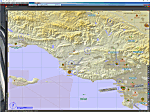
The FSTrampFree addon is a decoupling from the commercial product FSTramp. It shows a 3D world map and the real time moving AI or online aircraft. Due to the integration in the simulator, the map can also be used very well with just one display. Via the context menu of the world map, the aircraft can be moved to any runways or gates. With pressed Ctrl key even to every point on the ground or on the water. During the flight, jumps to other points in the air or on the ground are possible. The AIRAC data can be updated via an additional purchase from Navigraph.
| Filename: | FSTrampFree_v726_for_Prepart3D_FSXSE_XPlane_11_Win.zip |
| License: | Freeware |
| Added: | 27th June 2019, 04:11:25 |
| Downloads: | 1,967 |
| Author: | Helge Schroeder |
| Size: | 347.67 MB |
| Category: Flight Simulator 2004 - Scenery | |
| Marine One at The White House |
|
Images related to this file:
File Description:
Marine One at The White House. This small scenery package places the Marine One Helicopter at The White House and optionally at Andrews Air Force Base - waiting to transport the President. Setups are included for the default FS2004 scenery and for those using the MAIW enhancement of Andrews AFB. All files are included. Helicopter model by D.Hardcastle with textures by Christopher Baird and Dallas Mullen.
The Marine One Helicopter is an "almost static" display. See instructions for further details regarding this procedure. Please unzip to a temporary folder and follow the installation instructions. Compiled for your flying enjoyment by David "Opa" Marshall.
| Filename: | Marine_One_at_The_White_House.zip |
| License: | Freeware |
| Added: | 18th July 2010, 19:01:23 |
| Downloads: | 563 |
| Author: | David "Opa" Marshall |
| Size: | 1.41 MB |
| Category: Combat Flight Simulator 1 and 2 - Aircraft | |
| F6F-3 Hellcat UPDATE for the VF-27 |
|
Images related to this file:
File Description:

Re-upload. cfs2/Grumman F6F-3 Hellcat UPDATE for the VF-27 repaints by revev for The B24 Guy's F6F-3 Overhaul Model. This update contains the b.bmp, d.bmp, r.bmp, and t.bmp texture files for the VF-27's #3, #13, #17, and #23 Texture Folders, as well as the wing insignia file. These texture files are for the repaints by revev for the Overhauled Model F6F-3 Hellcat by The B24 Guy. These texture files display the tiger teeth on the front of the aircraft in addition to the tiger teeth that were displayed on the side of the nose in the original repaints by revev. By revev. Enjoy!
| Filename: | F6F3_Hellcat_UPDATE_for_the_VF27.zip |
| License: | Freeware |
| Added: | 26th May 2010, 04:13:14 |
| Downloads: | 128 |
| Author: | Evan G. Butterbrodt |
| Size: | 4.34 MB |
| Category: Flight Simulator 2004 - Aircraft Repaints, Textures and Modifications | |
| U.S. Navy Convair T-29B |
|
Images related to this file:
File Description:
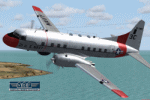
Convair T-29B (240-27) "Flying Classroom", tn 51-7906, cn 318, in Markings of U.S. Navy, Training Squadron 29 (VT-29), Naval Air Station Corpus Christi, Texas, 1966. Delivered to U.S. Air Force in 1953. Transferred to U.S. Navy on January 29, 1963. Withdrawn from use and stored at Davis Monthan Air Force Base, Arizona in April 1976. For preservation donated to Pima Country Air Museum on August 26, 1981 and placed on display. Textures and associated model file included only. Requires cv240VBFmilitary_basepack_010.ZIP. Original by Greg Pepper & Tom Gibson, upgraded by Georg Hauzenberger (model) and Hans Hermann (textures) Virtual Birds Factory, September 2010
| Filename: | US_Navy_Convair_T29B.zip |
| License: | Freeware, limited distribution |
| Added: | 15th September 2010, 21:40:26 |
| Downloads: | 496 |
| Author: | Georg Hauzenberger and Hans Hermann |
| Size: | 4.16 MB |
| Category: Flight Simulator X - Utilities | |
| 'MyConfig' Configuration Editor |
|
File Description:
After changing the display settings in FSX, the values for e.g. TEXTURE_MAX_LOAD, CLOUD_COVERAGE_DENSITY and LOD_RADIUS are reset to their default values, which is mostly not preferred. FSX MyConfig automatically restores your preferred parameter values as kept in the configuration file fsx.cfg.
I wrote the progam because the alternative: copy/paste a backed up fsx.cfg, has the risk of replacing the present fsx.cfg with an outdated one resulting in valid (recent) changes made by FSX or an add-on are lost, Moreover, managing a few parameter values, which you want never to be changed, is much easier accomplished by means of the relatively short FSXMyConfig.cfg file.
| Filename: | MyConfig_Configuration_Editor.zip |
| License: | Freeware |
| Added: | 19th January 2012, 14:35:50 |
| Downloads: | 1,574 |
| Author: | Edward Sluijter |
| Size: | 11.89 KB |
| Category: Flight Simulator X - Utilities | |
| 'MyConfig' Configuration Editor v1.1.0 (Final) |
|
File Description:
After changing the display settings in FSX, the values for e.g. TEXTURE_MAX_LOAD, CLOUD_COVERAGE_DENSITY and LOD_RADIUS are reset to their default values, which is mostly not preferred. FSX MyConfig automatically restores your preferred parameter values as kept in the configuration file fsx.cfg. I wrote the progam because the alternative: copy/paste a backed up fsx.cfg, has the risk of replacing the present fsx.cfg with an outdated one resulting in valid (recent) changes made by FSX or an add-on are lost, Moreover, managing a few parameter values, which you want never to be changed, is much easier accomplished by means of the relatively short FSXMyConfig.cfg file.
| Filename: | MyConfig_Configuration_Editor_v110_Final.zip |
| License: | Freeware |
| Added: | 25th January 2012, 15:48:46 |
| Downloads: | 1,871 |
| Author: | Edward Sluijter |
| Size: | 12.28 KB |


© 2001-2026 AVSIM Online
All Rights Reserved
Privacy Policy |