
Where Flight Simulation Enthusiasts Gather from Around the World!
AVSIM Library - Search Results

| Category: Flight Simulator 2004 - Utilities | |
| FSWidgets EFB2004 (Electronic Flight Bag for FS2004) |

|
File Description:
The EFB2004 (Electronic Flight Bag for FS2004) is a very handy addition to the modern cockpit, virtually doing away with the need for paper charts or other physical copies of documents such as aircraft operating manuals, performance data, approach charts and checklists. It also includes a moving map, audio checklist capability, ability to connect to real-time weather and other online resources, simulating features similar to real-world EFB units.
Feature list:
- Moving Map (with XML-calibrated chart support)
- PDF Approach Charts support
- JPG/BMP Approach Chart support
- PDF Aircraft Manual support
- HTM Aircraft Reference Material Support
- Full-screen and multi-monitor document viewing within FS2004
- Checklists (includes audio "heads-up" checklist support)
- Can connect to real-time online weather resources (e.g. Doppler Radar)
- Connects to any web-based online resources (e.g. METARS, TAF)
- Displays the NAV log for the currently loaded FS2004 flight plan
- Module-based and not a gauge, will work with any aircraft and any panel
- No changes or modifications to panel.cfg or aircraft.cfg files necessary
- Network Version option built in, able to be run on a second PC or Laptop
Comes as a free, time-limited playable demo.
| Filename: | FSWidgets_EFB2004_Electronic_Flight_Bag_for_FS2004.zip |
| License: | Commercial demo |
| Added: | 30th March 2006, 00:25:10 |
| Downloads: | 4,041 |
| Author: | FSWidgets |
| Size: | 25.59 MB |
| Category: Online ATC - Software | |
| ServInfo version 2.02 |
|
File Description:
ServInfo is a utility that provides information for the on-line flying activity in the VATSIM, IVAO, FPI or any other network that uses the SquawkBox/ProController environment.
Data are downloaded from the VATSIM, IVAO, FPI or any other network and are presented in a convenient format, allowing users to easily find out details about the current on-line activity worldwide and for specific countries, FIRs, ARTCCs or airports, including details for each flight and controllers ATIS messages. This information can be displayed in both tabular and graphical format on a map display.
Additionally, ServInfo provides the possibility to display response times for all the network servers, display channel and user information for voice servers, retrieve and decode METAR & TAF reports for airports or whole regions and notify you when selected ATC positions open or close.
A ServInfo gauge is also provided, that can be installed your FS2000/2002/2004 aircraft panels and display information about ATC availability while you fly online.
Version 2.02 adds support for IVAO TeamSpeak voice servers, display of ATC bookings for all networks and display of VATSIM prefiled flight plans.
| Filename: | ServInfo_version_202.zip |
| License: | Freeware, limited distribution |
| Added: | 15th December 2003, 05:50:53 |
| Downloads: | 439,730 |
| Author: | Michael Frantzeskakis |
| Size: | 2.86 MB |
| Category: Flight Simulator X - Utilities | |
| FS Remote version 1.0 |
|
File Description:
Email: [email protected]
Name: Hans Elzer
Current version 1.0
Version 1.0 contains various little bug fixes plus Fuel management in the Engines dialog
FS-Remote a utility for remotely controlling FSX
The Zip file contains:
* Readme text file
* .NET 2.0 FS-Remote executable
* Configuration file for FS-Remote
* Document file in MSWord format
What you need to run FS-Remote:
* .NET 2.0 or 3.0 installed on the computer where you want to run FS-Remote
* FSUIPC4 (registered) on the computer where you run FSX
* WideClient (FSUIPC4 FSWide remote) if you want to run FS-Remote on a remote computer
It does what the title says FS-Remote controls FSX remotely through FSUIPC.
Just take a look at the (word) document that is contained in the zip file and look at some screen shots.
It can view and control the following items in FSX through FSUIPC:
* Aircraft - Control aircraft switches like Lights, Doors, Pushback, De-Ice and Jetway plus call fuel truck
* Auto Pilot - Control auto pilot switches plus reset altimeter and heading indicator instruments
* Radio - Control radio stack switches and push buttons plus view navigation status information
* Attitude - View attitude information and warnings plus convert and view various items in feet, meter, knots, mph and km/p
* Engines - Control engines auto start and stop plus fuel management
* Weather - not implemented jet (next version)
* Environment - View the local date, time and position environment information
* Date Time - Control and view the flight simulator date and time
* Message - View and send messages to flight simulator message bar
* FPS - View real-time flight simulator frames per second FPS rate
* About - View version information about FS-Remote, FSUIPC4 and FSX
Hope that you like it.
| Filename: | FS_Remote_version_10.zip |
| License: | Freeware |
| Added: | 9th September 2007, 15:26:14 |
| Downloads: | 1,439 |
| Author: | Hans Elzer |
| Size: | 353.2 KB |
| Category: Flight Simulator X - Utilities | |
| FSRemote 2.0 |
|
File Description:
Current version 2.0
Version 2.0 contains a new more graphical interface
Version 1.0 contains various little bug fixes plus Fuel management in the Engines dialog
FS-Remote a utility for remotely controlling FSX
The Zip file contains:
* Readme text file
* .NET 2.0 FS-Remote executable
* Configuration file for FS-Remote
* Document file in MSWord format
What you need to run FS-Remote:
* .NET 2.0 or 3.0 installed on the computer where you want to run FS-Remote
* FSUIPC4 (registered) on the computer where you run FSX
* WideClient (FSUIPC4 FSWide remote) if you want to run FS-Remote on a remote computer
It does what the title says FS-Remote controls FSX remotely through FSUIPC.
Just take a look at the (word) document that is contained in the zip file and look at some screen shots.
It can view and control the following items in FSX through FSUIPC:
* Aircraft - Control aircraft switches like Lights, Doors, Pushback, De-Ice and Jetway plus call fuel truck
* Auto Pilot - Control auto pilot switches plus reset altimeter and heading indicator instruments
* Radio - Control radio stack switches and push buttons plus view navigation status information
* Attitude - View attitude information and warnings plus convert and view various items in feet, meter, knots, mph and km/p
* Engines - Control engines auto start and stop plus fuel management
* Weather - not implemented jet (next version)
* Environment - View the local date, time and position environment information
* Date Time - Control and view the flight simulator date and time
* Message - View and send messages to flight simulator message bar
* FPS - View real-time flight simulator frames per second FPS rate
* About - View version information about FS-Remote, FSUIPC4 and FSX
Hope that you like it.
| Filename: | FSRemote_20.zip |
| License: | Freeware |
| Added: | 9th November 2007, 22:24:52 |
| Downloads: | 1,674 |
| Author: | Hans Elzer |
| Size: | 620.8 KB |
| Category: Flight Simulator 2004 - Scenery | |
| Bryce Canyon National Park (KBCE), Utah, Photo-Scenery |
|
Images related to this file:
File Description:

Bryce Canyon National Park (KBCE), Utah, Photo-Scenery (FS9 & FSX)
Despite its name, Bryce Canyon is not actually a canyon that was formed by a river, but rather a giant natural cliff shaped through erosion by wind, water, and ice. Bryce is distinctive due to its geological formations, delicate and colorful pinnacles called hoodoos that are up to 200ft high. The bizarre forms and red, orange and white colors of the rocks provide spectacular views. Unfortunately the hoodoos are too small for the elevation mesh in flight simulator. But you can enjoy the colors and shape of the cliffs. The cliffs in main region of the park, just south of the airport are partly covered
by snow. But on the southern and western part of the plateau you can enjoy them free of snow. Bryce Canyon is named after the Mormon pioneer Ebenezer Bryce who settled in this area in the 1850s. It was designated as a national park in 1928.
Bryce Canyon Airport (KBCE) just handles small aircraft on a daily basis. But is was actually built to handle larger aircraft in case of emergency. And so on Oct.6th 2000 an American Airlines MD-82 from Denver to Los Angeles made a successful emergency landing after reporting smoke in the cockpit and a loss of cabin pressure.
High resolution versions of this scenery for FS9 and FSX (much sharper, but larger and multiple downloads)are available at www.blueskyscenery.com/CNY_South2West4.html . The screenies are taken from the high-res versions, so expect this version to be slightly more blurry. Thanks to Joop Mak for providing a custom AFCADs that correct airport layouts so that they align with the photo-textures! They are available here: www.blueskyscenery.com/AFCADs.html . YourDonation@Work: Dedicated to Michael, Pat and Keith.
| Filename: | Bryce_Canyon_National_Park_KBCE_Utah_PhotoScenery.zip |
| License: | Freeware, limited distribution |
| Added: | 7th March 2010, 11:17:56 |
| Downloads: | 2,204 |
| Author: | Gottfried Razek, blueskyscenery.com |
| Size: | 96.35 MB |
| Category: Flight Simulator X - Aircraft Repaints, Textures and Modifications | |
| Modification of the power table for the Continental IO-520-F Cessna CU206G Stationair 6 II de CARENADO. |
|
Images related to this file:
File Description:

New update of flight dynamics settings.
Corrected the indicated speed error (KIAS) vs the true speed (KTAS) according to the data suggested in the pilot's operating manual (POH).
In some cases the position of the center of gravity unladen weight is corrected for a better weight and balance of the airplane.
Actual direct references from Pilot Operations Manual (POH) for specific details, Power,
Nose or pitch position and weight and balance settings, airplane geometry, piston or turbine engine data,
propeller and everything that refers to references, also the real references of the manufacturers of sea engines whatever the specific case.
This model in particular, I am sure that the gauges have a difference error between what the indicator of
manifold pressure and actual airplane reading, similar case to the PA34 Seneca II, the RPM tachometer needle marked 2500 and the
Maus cursor on the tachometer said there were 2200 rpm.
In this modification of the Cessna CU206G Stationair 6 II there is still an error that could not be adjusted to what it says in manual
pilot operation (POH) because it is a gauge error and not an adjustment error in the .air file.
When the error is corrected it will be published together with a new and improved VC.
| Filename: | Modification_of_the_power_table_for_the_Continenta.zip |
| License: | Freeware |
| Added: | 15th April 2020, 18:48:28 |
| Downloads: | 147 |
| Author: | Rafael Ledezma |
| Size: | 642.83 KB |
| Category: Flight Simulator X - Gauges | |
| Beechcraft Baron 58 FULL Engine Gauges for Saitek FIP's |
|
Images related to this file:
File Description:
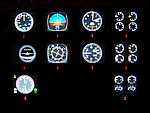
10 Left/Right analog Engine Gauges plus Fuel Level for the Beechcraft Baron 58 across 3 Saitek FIP's. I recommend these if you have 9 or more Saitek FIP's. However you can always scroll through the 3 gauges if you have less.
These compliment Philippe Verhaege's fantastic Beechcraft Baron 58 main gauges "essential_gauges.zip" nicely.
I grouped the Left/Right Manifold Pressure and RPM onto the first Saitek FIP. The Fuel Flow and Cylinder Head/Exhaust Gas Temperature onto the second. The Oil Temp/Pressure onto the third. Since there was room and they are directly below the engine gauges, I also incorporated the Fuel Level gauges.
The beautiful Freeware gauge artwork is by Laurent Ferrari (FlyFrog) of the www.thegaugesfactory.org (Website now dead). They even have the "Beechcraft" logo. Laurent's gauges were originally designed for high end custom cockpit gauges that I resized and configured to fit the Saitek FIP's. I customized XML's to position and calibrate to Flight Simulator X.
Thanks to Horacio for providing the original artwork via a zip file.
Installation requires simple copy and paste. These were only tested on a Windows 7 computer with a X99 i7-5960X processor. You may have to adjust the needle reaction speeds for your machine.
| Filename: | Beechcraft_Baron_58_FULL_Engine_Gauges_for_Saitek_.zip |
| License: | Freeware |
| Added: | 19th March 2015, 09:44:28 |
| Downloads: | 322 |
| Author: | Jack Pickett, Laurent Ferrari |
| Size: | 677.35 KB |
| Category: Flight Simulator 2004 - Utilities | |
| AIRound v1.0 |
|
File Description:
FS2004 AIRound v1.0. This utility displays AI aircraft around user plane in AI map or AI list forms, enables AI aircraft forward, fly by or spot plane views and has its own built-in traffic alert system. In forward view eyepoint is tied to AI aircraft in front of virtual cockpit with ability to change look direction. Fly by view has adjustable parameters and random options. Departure and arrival airports and time, total about 40 ATC, state, control surfaces, radio, etc. AI aircraft parameters are available. AI map has set of scales and can be placed everywhere within 160nm AI aircraft zone around user plane. You can customize AI aircraft appearance on the map by changing mark colors, shapes, sizes and data tag types. Utility has mini panel with small scalable AI map for quick in-flight AI aircraft related analysis. Traffic alert panel helps to avoid collision with AI aircraft. Also it may be used as a navigation gauge in escort missions assisting to find, get closer and follow accompanied AI aircraft. Utility works both in FS windowed and full screen modes and doesn't require any other add-on modules or programs. You have 10 FS sessions for free.
| Filename: | AIRound_v10.zip |
| License: | Shareware, time limited |
| Added: | 12th February 2006, 22:02:49 |
| Downloads: | 5,266 |
| Author: | Valery Stenin |
| Size: | 612.81 KB |
| Category: Flight Simulator 2004 - Panels | |
| Piper PA-23 Apache Panel Upgrade (2D and VC) |
|
File Description:
If you’ve flown in Lynn and Bill Lyon’s Piper PA-23 Apache then you’ll likely know where I’m coming from when I say it’s one of the best payware old GA aircraft models out there. Like the Maule and a few others, it’s one of the few freeware packages out there that could have easily been released as payware (and I think may have initially been payware), and I for one, am very grateful it was not.
However, one of the big gripes with the Apache’s package is the lack of a DME display unit to couple with the Collins multi-comms/avionics gauge, a directional gyro with a heading bug and a suitable autopilot insert to bind the avionics to one AP unit. Initially the PA-23 was sold as an IFR capable plane, with the autopilot being either “good trimming” or the person in the right seat flying the plane. In the decades which followed, autopilots and updated gear became commonplace and most Piper PA-23’s were outfitted with modern avionics.
This upgrade will replace the bank indicator with a Directional Gyro w/ Heading Bug, add a DME indicator, and add a Bendix/King KAP 140 autopilot controller.
| Filename: | Piper_PA23_Apache_Panel_Upgrade_2D_and_VC.zip |
| License: | Freeware |
| Added: | 12th January 2008, 09:58:07 |
| Downloads: | 1,509 |
| Author: | Mark McCoy |
| Size: | 1.61 MB |
| Category: Flight Simulator 2002 - Panels | |
| Purple Panel Project Black (v5) |
|
File Description:
This is a new release for the purple panel project - it includes panels for Single Piston
Engine, Twin Piston Engine, Single Jet, Twin Jet, Twin TurboProp, along with 3 and 4 Jet
aircraft (also included are instructions on adding a water rudder to any of the panels). These
are 'all-in-one' panels that include everything needed to fly in one window/panel. Features
include pushback, switches for lights, door and power along with a variety of other things
(all switches have tooltip IDs), radio altimeter, EADI w/Glideslope indicator, OAT, Clock,
Taxi Control, APU (where applicable), GPS, Smoke, AutoBrake, TCAS, Spoiler Arming, full fuel
control, Dual Needle RMI, the 'blue' radio plus all the bells and whistles I could fit in the
panel like warning lights, pressure and windspeed indicators ect... This release corrects some
minor issues with v3 and is a major rework with new taxi and pushback gauges, a minimum of
gauge relocation from panel to panel and a improved background bitmap. As with v3 prop and
mixture control are in place on applicable aircraft plus the ADF radio and transponder are the
same from panel to panel and do not move as they did in v3. It is the perfect 'standard panel' for use with nearly all the aircraft one can fly in FS2002... No previous versions are
required to use these panels.
| Filename: | Purple_Panel_Project_Black_v5.zip |
| License: | Freeware, limited distribution |
| Added: | 5th May 2003, 12:18:13 |
| Downloads: | 1,654 |
| Author: | Don Janusz |
| Size: | 11.77 MB |


© 2001-2026 AVSIM Online
All Rights Reserved
Privacy Policy |