
Where Flight Simulation Enthusiasts Gather from Around the World!
AVSIM Library - Search Results

| Category: Flight Simulator X - Aircraft Repaints, Textures and Modifications | |
| Modification of the power table for the Continental IO-520-F Cessna CU206G Stationair 6 II de CARENADO. |

|
Images related to this file:
File Description:
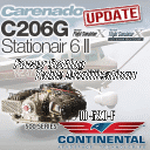
New update of flight dynamics settings.
Corrected the indicated speed error (KIAS) vs the true speed (KTAS) according to the data suggested in the pilot's operating manual (POH).
In some cases the position of the center of gravity unladen weight is corrected for a better weight and balance of the airplane.
Actual direct references from Pilot Operations Manual (POH) for specific details, Power,
Nose or pitch position and weight and balance settings, airplane geometry, piston or turbine engine data,
propeller and everything that refers to references, also the real references of the manufacturers of sea engines whatever the specific case.
This model in particular, I am sure that the gauges have a difference error between what the indicator of
manifold pressure and actual airplane reading, similar case to the PA34 Seneca II, the RPM tachometer needle marked 2500 and the
Maus cursor on the tachometer said there were 2200 rpm.
In this modification of the Cessna CU206G Stationair 6 II there is still an error that could not be adjusted to what it says in manual
pilot operation (POH) because it is a gauge error and not an adjustment error in the .air file.
When the error is corrected it will be published together with a new and improved VC.
| Filename: | Modification_of_the_power_table_for_the_Continenta.zip |
| License: | Freeware |
| Added: | 15th April 2020, 18:48:28 |
| Downloads: | 147 |
| Author: | Rafael Ledezma |
| Size: | 642.83 KB |
| Category: Flight Simulator X - Panels | |
| F-111A |
|
File Description:
The purpose of this up date is because of the restore issue at the AVSIM lib. Secondly, this version V1.01 includes a bug fix for the compass gauge and the logic of the sonic sound. This panel has been designed according to the �F-111 Aardvark Pilot's Flight Operating Instructions� document published by the USAF. The design goal was to develop a panel and gauges
as close as possible to the original aircraft. It was not possible to program all the functionsand sub-panels, because of the complexity of the system and because of limitations in FSX.
The panel is a 2D panel. The panel has been developed from scratch as well as all the gauges.
All gauges are programmed in XML with the ACE tool from the MS SDK SP2 package.
The aircraft model, development by Mike Stone, has been used as the model for this panel. The model is part of the package. Other models may by used as well. However, the Light section and Flaps section in the aircraft.cfg may be modified accordingly in order to meet the requirements of this panel. There is an SP1 and SP2 Version. There are no tooltips in the SP1 Version. For installation and functional instructions, please read the PDF-Document
�F-111A-Panel-Documentation" which is included in the ZIP-File.
| Filename: | F111A.zip |
| License: | Freeware |
| Added: | 1st November 2009, 22:18:36 |
| Downloads: | 335 |
| Author: | Dietmar Loleit |
| Size: | 12.95 MB |
| Category: Flight Simulator 2004 - Panels | |
| New Vickers VC10 Panel, Part 4 - Missing bmp files |
|
File Description:
There were 2 missing bmps relating to Nav_Info from my 'New Vickers VC10 Panel, Part 4' (new_vc10_panel_project_4_maintenance_2.zip). In order for it to work correctly you need these files.
This project is based on David Maltby's panel. This update the first in the 50th Anniversary year of the VC10 (there are currently nine still flying) brings to fruition a number of extensive works in progress that have involved almost every gauge! The aircraft now has a fully integrated pressurisation and oxygen delivery system that conforms not only to the Flight Manual but also to ICAO regulations. Therefore cockpit mismanagement can potentially result in hypoxia! Besides this there are also a large number of new additions both in conformity with the Flight Manual and as extra visuals. It's now possible to "see" the Marshaller - There are new speed calls - and whilst you are preoccupied with your checklists the ground staff can be heard going about their business preparing for the flight as indicated also on the Ignition Panel. For a full list of changes view the VC10 Panel Update 4.doc
For this latest update thanks must go to Edi Hirsch for his excellent NavInfo gauges and again to the Gurus at FSDeveloper.com for their advice. To install make sure you have installed the previous (linked) files beforehand.
| Filename: | New_Vickers_VC10_Panel_Part_4__Missing_bmp_files.zip |
| License: | Freeware |
| Added: | 11th April 2012, 18:28:42 |
| Downloads: | 1,353 |
| Author: | Nicholas Weber |
| Size: | 10.5 KB |
| Category: Flight Simulator 2002 - Panels | |
| Purple Panel Project Black (v5) |
|
File Description:
This is a new release for the purple panel project - it includes panels for Single Piston
Engine, Twin Piston Engine, Single Jet, Twin Jet, Twin TurboProp, along with 3 and 4 Jet
aircraft (also included are instructions on adding a water rudder to any of the panels). These
are 'all-in-one' panels that include everything needed to fly in one window/panel. Features
include pushback, switches for lights, door and power along with a variety of other things
(all switches have tooltip IDs), radio altimeter, EADI w/Glideslope indicator, OAT, Clock,
Taxi Control, APU (where applicable), GPS, Smoke, AutoBrake, TCAS, Spoiler Arming, full fuel
control, Dual Needle RMI, the 'blue' radio plus all the bells and whistles I could fit in the
panel like warning lights, pressure and windspeed indicators ect... This release corrects some
minor issues with v3 and is a major rework with new taxi and pushback gauges, a minimum of
gauge relocation from panel to panel and a improved background bitmap. As with v3 prop and
mixture control are in place on applicable aircraft plus the ADF radio and transponder are the
same from panel to panel and do not move as they did in v3. It is the perfect 'standard panel' for use with nearly all the aircraft one can fly in FS2002... No previous versions are
required to use these panels.
| Filename: | Purple_Panel_Project_Black_v5.zip |
| License: | Freeware, limited distribution |
| Added: | 5th May 2003, 12:18:13 |
| Downloads: | 1,654 |
| Author: | Don Janusz |
| Size: | 11.77 MB |
| Category: Flight Simulator 2004 - Scenery | |
| Carrier Division Two off Cape Cod |
|
File Description:
This scenery places the two Yorktown-class aircraft carriers of the pre-WW2 U.S. Navy with a screen of four cruisers at sea 100 miles due east of Provincetown, Massachusetts, on the tip of Cape Cod. The ships are the Virtual Navy's Task Force 16 relocated and with the Hornet posing as the Yorktown. This package contains the carriers, cruisers, ship wakes, AFCAD files for all six ships and Arrestor Cables catch zones for the carriers. It provides start points on both carriers, on the catapults of all four cruisers, and in the water between the carriers for seaplanes. Also included are flight starts for Paul Clawson's Curtiss SOC Seagull on the catapults of the cruisers and for the plane of your choice on the carriers, and authentic repaints of the SOC for aircraft assigned to the cruisers plus one for the personal aircraft of the Admiral commanding CarDiv2. There is also a selection of Golden Wings splash screens featuring the ships and planes of CarDiv2. Carrier Division 2 is being released in celebration of Golden Wings 3, but works just as well in a standard FS9 installation. Catapult floatplane operations require the Carrier Operations Gauge Package and Paul Clawson's Curtiss SOC Seagull or another catapult floatplane. Ships and wake effects by The Virtual Navy, modified AFCAD files, SOC repaints, flights and ship placement by Mick Morrissey. A big Thank you to the Virtual Navy for allowing this use of their ships!
| Filename: | Carrier_Division_Two_off_Cape_Cod.zip |
| License: | Freeware, limited distribution |
| Added: | 17th September 2005, 12:50:26 |
| Downloads: | 3,294 |
| Author: | Mick Morrissey |
| Size: | 5.19 MB |
| Category: Flight Simulator 2004 - Helicopters | |
| Bell 429 Base Pack |
|
Images related to this file:
File Description:
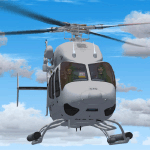
A large number of different models based on the real rotorcraft and with at least one different livery per model (32 in total) / A great variety of animations: All doors (including the clamshell in the rear of the ship). Main rotor, which is fully articulated. Show/hide flight controls feature by a single mouse click. Show/hide passengers feature by a single mouse click. Show/hide pilots feature. Depending if the helicopter is on the ground, with both engines off and the battery switch off, some other objects will show or hide. And much more, find it out yourself! / Clickable Virtual Cockpit; the most important switches and knobs do its job! Engine starter, fuel valves, etc., you name it! / Integration between 2d panel gauges and virtual cockpit gauges, switches and clickspots. Caution and warning messages, depending on helicopter’s conditions and limits. / Instrument backlighting effects at sunset, night and dawn! / Your flight experience will be enhanced by a sophisticated sound system which resembles the Pratt&Whiney PW207D1 Turboshaft Engines. You will be able to enjoy the start up and shuting down sequences for both engines from interior and exterior perspectives; audible transitions between idling, on ground at 100% rpm and also in flight conditions. I have included -as a bonus- a set of two audio files meant to be used beside the BladeSlapSND (Helicopter Blade Slap Sound Gauge) by Stephan Siebertz. / Author: Sergio Kauffman.
| Filename: | Bell_429_Base_Pack.zip |
| License: | Freeware, limited distribution |
| Added: | 15th September 2016, 12:34:23 |
| Downloads: | 2,029 |
| Author: | Sergio Kauffman |
| Size: | 150.11 MB |
| Category: Miscellaneous Files - Demos from Commercial Vendors | |
| Singapore Airlines Airbus A380 version 2 |
|
File Description:
Demoversion with banners, new VOR gauge, with new PANEL and GAUGES, new external model, sound and virtuall cockpit. The Airbus A380 is a doubledecker, four-engined airliner manufactured by Airbus S.A.S. It first flew on April 27, 2005 from Toulouse, France. Commercial flights should begin in 2006 after 15 months of testing. During much of ist development, the aircraft was known as the Airbus A3XX. The A380 is now the largest passenger airliner, topping the Boeing 747, which was the largest for 35 years. However, the Antonov An-225 retains the record of being the world's largest commercial aircraft. The media has termed the A380 a "superjumbo", with some comparing it to Howard Hughes's Spruce Goose. The first A380 prototype was unveiled during a ceremony in Toulouse, France, on January 18, 2005. Its manufacturer's serial number is 001, and is registered as F-WWOW. The new Airbus will initially be sold in two versions: the A380-800, carrying 555 passengers in a three-class configuration or up to 800 passengers in a single-class economy configuration. Expected range for the -800 model is 8,000 nautical miles (14,800 km). The second model, the A380-800F dedicated freighter, will carry 150 tons of cargo 5,600 miles (10,400 km). Airbus made the cockpit layout, procedures and handling characteristics similar to those of other Airbus aircraft to reduce crew training costs. Likewise, the A380 features a glass cockpit and side-stick flight controller. Panel, GAUGES, model, sound and textures by www.afs-design.de - Author: A.Meyer.
| Filename: | Singapore_Airlines_Airbus_A380_version_2.zip |
| License: | Commercial demo |
| Added: | 22nd March 2008, 00:56:59 |
| Downloads: | 2,866 |
| Author: | Andreas Meyer |
| Size: | 2.04 MB |
| Category: Miscellaneous Files - Demos from Commercial Vendors | |
| AIR FRANCE Airbus A380v2, , |
|
File Description:
Demoversion with banners, new VOR gauge, with new PANEL and GAUGES, new external model, sound and virtuall cockpit. The Airbus A380 is a doubledecker, four-engined airliner manufactured by Airbus S.A.S. It first flew on April 27, 2005 from Toulouse, France. Commercial flights should begin in 2006 after 15 months of testing. During much of ist development, the aircraft was known as the Airbus A3XX. The A380 is now the largest passenger airliner, topping the Boeing 747, which was the largest for 35 years. However, the Antonov An-225 retains the record of being the world's largest commercial aircraft. The media has termed the A380 a "superjumbo", with some comparing it to Howard Hughes's Spruce Goose. The first A380 prototype was unveiled during a ceremony in Toulouse, France, on January 18, 2005. Its manufacturer's serial number is 001, and is registered as F-WWOW. The new Airbus will initially be sold in two versions: the A380-800, carrying 555 passengers in a three-class configuration or up to 800 passengers in a single-class economy configuration. Expected range for the -800 model is 8,000 nautical miles (14,800 km). The second model, the A380-800F dedicated freighter, will carry 150 tons of cargo 5,600 miles (10,400 km). Airbus made the cockpit layout, procedures and handling characteristics similar to those of other Airbus aircraft to reduce crew training costs. Likewise, the A380 features a glass cockpit and side-stick flight controller. Panel, GAUGES, model, sound and textures by www.afs-design.de - Author: A.Meyer.
| Filename: | AIR_FRANCE_Airbus_A380v2_.zip |
| License: | Commercial demo |
| Added: | 12th April 2008, 02:10:45 |
| Downloads: | 3,203 |
| Author: | Andreas Meyer |
| Size: | 2.15 MB |
| Category: Miscellaneous Files - Demos from Commercial Vendors | |
| Emirates Airbus A380 |
|
File Description:
Demoversion with banners, new VOR gauge, with new PANEL and GAUGES, new external model, sound and virtuall cockpit. The Airbus A380 is a doubledecker, four-engined airliner manufactured by Airbus S.A.S. It first flew on April 27, 2005 from Toulouse, France. Commercial flights should begin in 2006 after 15 months of testing. During much of ist development, the aircraft was known as the Airbus A3XX. The A380 is now the largest passenger airliner, topping the Boeing 747, which was the largest for 35 years. However, the Antonov An-225 retains the record of being the world's largest commercial aircraft. The media has termed the A380 a "superjumbo", with some comparing it to Howard Hughes's Spruce Goose. The first A380 prototype was unveiled during a ceremony in Toulouse, France, on January 18, 2005. Its manufacturer's serial number is 001, and is registered as F-WWOW. The new Airbus will initially be sold in two versions: the A380-800, carrying 555 passengers in a three-class configuration or up to 800 passengers in a single-class economy configuration. Expected range for the -800 model is 8,000 nautical miles (14,800 km). The second model, the A380-800F dedicated freighter, will carry 150 tons of cargo 5,600 miles (10,400 km). Airbus made the cockpit layout, procedures and handling characteristics similar to those of other Airbus aircraft to reduce crew training costs. Likewise, the A380 features a glass cockpit and side-stick flight controller. Panel, GAUGES, model, sound and textures by www.afs-design.de - Author: A.Meyer.
| Filename: | Emirates_Airbus_A380.zip |
| License: | Commercial demo |
| Added: | 24th May 2008, 08:30:10 |
| Downloads: | 2,150 |
| Author: | Andreas Meyer |
| Size: | 2.05 MB |
| Category: Flight Simulator X - Utilities | |
| Gauges Recovery 1.2 for FSX |
|
File Description:
New ! Since version 1.2 Gauges Recovery also fix the problem of compatibility from FS9 add-ons which display all gray and without texture !!!
DESCRIPTION:
For years I worked on Flight Simulator I realized that many people have problems with showing the gauges panel (black screen) or special effects such as afterburner, smoke or line of condensation occurring after uninstalling an add-on or accidentally deleted files of the simulator.
In your Flight Simulator X there is a folder named 'Gauges' it contains files 'gauges' representative board instrumentation for each add-on, such as the autopilot, the horizon indicator etc, if you delete one of these files, your panel will not display the gauge that it was programmed. It is the same for the folder 'Effects' that contains all the special effects in FSX, it sometimes happens that some files in these folders disappear leaving your simulator in a situation where you no longer see your instrument panel (black screens) and afetburner invisible. Under these conditions, you reinstall FSX and lose a lot of time (and patience).
So I created Gauges Recovery, a small free utility that will restore all your gauges and effects of origin in less than 10 seconds. With Gauges Recovery, you're sure to get the display of all gauges and effects.
This program does restore the original files from Microsoft FSX FSX SP1, FSX SP2 and not the files from other publishers, no changes will be made to these files.
Some people see the gauges all black (black screens), unless FSX is installed correctly. The solution to this problem is to install the files MSVCP70.DLL and msvcr70.dll in your 'system32', Gauges Recovery does this automatically for you.
Do not look if Gauges Recovery is installed because there is no installation, the program only updates files in FSX and nothing else.
| Filename: | Gauges_Recovery_12_for_FSX.zip |
| License: | Freeware |
| Added: | 19th January 2010, 10:47:17 |
| Downloads: | 4,887 |
| Author: | Erik BENDER |
| Size: | 11.43 MB |


© 2001-2026 AVSIM Online
All Rights Reserved
Privacy Policy |