
Where Flight Simulation Enthusiasts Gather from Around the World!
AVSIM Library - Search Results

| Category: Flight Simulator 2004 - AI Flight Plans | |
| World GA Traffic |

|
File Description:
These AI flight plan files have been created as a replacement to (NOT an addition to) the default Microsoft FS2004 GA flight plans. If you already use proper AI flight plans for commercial traffic, this is ideal for you.
The default flight plans, as many know, are far from realistic as traffic just flies back and forth between two airports at regular intervals throughout each 24-hour day.These replacement plans are far more realistic in that:
a) Aircraft keep flying to different airports throughout the day, returning home in the evening.
b) Each aircraft flies to different destinations on different days of the week,
c) Evening flights are substantially reduced,
d) Night flights are minimal, and
e) Appropriate country-based tail numbers are used.
The flights comprise a total of 25389 aircraft, flying to 5520 different airfields. There are no circuits or touch and go flights to hamper your landing.
They use only the MS default aircraft and fly to and from the default GA airports in FS2004. The only vintage aircraft included in these plans are DC-3s and Piper Cubs.
(File re-uploaded at the request of AVSIM)
| Filename: | World_GA_Traffic.zip |
| License: | Freeware |
| Added: | 16th February 2010, 11:32:58 |
| Downloads: | 7,539 |
| Author: | John Hinson |
| Size: | 48.04 MB |
| Category: Flight Simulator X - AFCAD Files | |
| Somerset Airport (KSMQ), NJ |
|
File Description:
Located 03 miles N of Somerville, New Jersey on 210 acres of land, Somerset is a public airport with one asphalt and two grass runways, the longest of which is 2733' in length. The turf runways have no hard surfaces and you will be landing on terrain so have your mesh set as high as possible - both runways are still selectable in the ATC window for landing/takeoff announcements. AI aircraft will not use them. The helipad is a start location in front of the main terminal if a parking location is not wanted to begin helicopter flights. Parking is divvied up into three categories - GA_SMALL spots will accommodate aircraft with wingspans no greater than 40 feet. GA_MEDIUM spots will accommodate aircraft with wingspans no greater than 60 feet. GA_LARGE spots are named to identify locations suitable for starting in a glider if you wish to do so. They can also accommodate aircraft with wingspans no greater than 60 feet. In addition to tie downs, there are 13 hangars open for parking in various locations - they can be identified by GA_DOCK. Only the N Parking hangar can accommodate aircraft with wingspans no greater than 60 feet - all other hangers are suitable only for aircraft with wingspans no greater than 40 feet. Several of the hangars have attendants - look beside the doors for the NAV2 frequency to set for opening them. AI aircraft will only spawn on the north tarmac/hangars (largely to prevent AI traffic crossing the runway on taxi). All objects and static aircraft in the immediate vicinity of parking and taxiways have collision disabled. If your aircraft has a wingspan greater than 40 feet it is NOT recommended that you taxi down the middle taxiway leading to the main tarmac from N Parking as you will not clear the hangars - go either via the NW taxiway past the grass tie downs (NW Parking) or around East to the next taxi way on the other side of the east hangars (E Parking) which has more wing clearance. Fuel is available on both tarmacs north and south of the runway by stopping on the asphalt in front of the tanks/pump.
Scenery constructed with use of satellite images/streetview/aerial photos - the author has not been there in person.
This scenery is meant to be used in conjunction with MegaScenery Earth New York 005. It is not required, but apron use is minimized to allow satellite scenery to show through as much as possible, and objects are placed based on the MSE textures - lack of it may make scenery look out of place.
| Filename: | Somerset_Airport_KSMQ_NJ.zip |
| License: | Freeware |
| Added: | 27th September 2011, 01:15:53 |
| Downloads: | 306 |
| Author: | Drew Sikora |
| Size: | 1.47 MB |
| Category: Miscellaneous Files - Demos from Commercial Vendors | |
| QuickPlan for Windows |
|
Images related to this file:
File Description:

QuickPlan for Windows is a visual point and click flight planner that makes it easy to generate flight plans in native FSX, FS2004 or X-Plane formats.
The entire route is generated visually, by tapping the map to add the departure airport, intermediate waypoints and arrival airport in the same order that you intend flying the plan.
During plan creation and after adding the final arrival waypoint you also have the opportunity to remove any of the intermediate waypoints before saving the plan in your preferred format.
QuickPlan utilises a new mapping engine and includes 12 world-wide map styles and has support for FSWidgets Cloud Based Aero Charts (free Cuba/Puerto Rico WAC Cloud Based Chart included) and FSWidgets Cloud Based World Nav Data (Free KSFO - San Francisco Bay area Nav Data included).
QuickPlan can be used in Freeform Mode, Advanced Mode, or a combination of both.
FREEFORM MODE: Simply click anywhere on the map and QuickPlan will allow you to add it as a generic waypoint. VFR pilots often use towns, lakes and other unique geographic features and with QuickPlan you can add any geographical location shown on the base map. Plans created this way label the waypoints automatically with generic names (e.g. DEP, WP1, WP2, ARR).
If desired, the entire route from departure to arrival can be created without reference to any navigational aids or official airports. This is handy for bush pilots who often use unlicensed airfields and small landing strips (or seaplane landing areas). Helicopter pilots can also quickly create plans that depart from off-airport locations like building rooftops or land on a road.
ADVANCED MODE: If you own the FSWidgets Cloud Based World Nav Data product you can create more advanced flight plans by clicking on any of the icons displayed on the map to add them as waypoints - airports, VOR's, NDB's and intersections (data for the KSFO area is included free). Plans created this way label the waypoints automatically with airport and navigational aid identifiers taken from the Nav Data (e.g. KSFO, OSI, LV, FABLA). FEATURE LIST:
- Generates native FSX (.pln), FS2004 (.pln) and X-Plane (.fms) format flight plans
- Saves flight plans to any folder (preferred folder set in Preferences)
- Search for airport by ICAO identifier
- Map powered by CloudMade Leaflet API (using OpenStreetMap data)
- Includes 12 world-wide maps styles
- Supports FSWidgets Cloud Based AERO CHARTS
- Free Cuba/Puerto Rico WAC Cloud Based Chart included
- Supports FSWidgets Cloud Based WORLD NAV DATA
- Free KSFO (San Francisco Bay) area Nav Data included
- World-wide Metar and TAF Data icons
- US Nexrad (Next-Gen Radar) Data
| Filename: | QuickPlan_for_Windows.zip |
| License: | Commercial demo |
| Added: | 27th October 2012, 09:22:33 |
| Downloads: | 523 |
| Author: | Fermin Fernandez - FSWidgets |
| Size: | 1.95 MB |
| Category: Flight Simulator 2004 - Original Aircraft | |
| TUI Airlines Boeing 757-200 |
|
Images related to this file:
File Description:

This is a repaint on the TDS (Tenkuu Developers Studio) Boeing 757-200 RR model, in current TUI livery, registration G-OOBA. . A special thanks to Luis Castro for the winglet night lighting, and Landing light night lighting by Adam Hamada and the Nick Chinn for the refueling station photos from a real Delta 757 that helped me enhance these textures even more. A special thanks also goes to Adam Hamada , Thomas Muller, and Salman Saikh for digging thru photos to make this the best it could possibly be accuracy wise. This also includes updated Official FDEs by Nate Rosenstrauch and Joe DeGregorio for the Rolls Royce 757-200. Model developed by Tenkuu Developers Studio, features high resolution textures, dynamic flexing wings, nose gear steering, rudder lock, ground spoilers, low speed aileron locks at high speed, fully animated control surfaces, fully independent suspension, trim animation, opening passenger doors, rolling wheels, animated thrust reverse with reverser block doors, detailed textures, full night lighting, ground service vehicles and more. Model design by Hiroshi Igami. Flight dynamics design by Nate Rosenstrauch and Joe DeGregorio. Paint kit and master textures by Carlos Eduardo Salas. TDS members: Hiroshi Igami,Nick Wilkinson,Carlos Eduardo Salas,Yosuke Ube,Stian Svensen,David Biggar, Luiz Antonio Perina,Nate Rosenstrauch, Joe DeGregorio.
| Filename: | TUI_Airlines_Boeing_757200.zip |
| License: | Freeware |
| Added: | 26th September 2018, 18:54:35 |
| Downloads: | 1,271 |
| Author: | TDS Developer Studio |
| Size: | 17.36 MB |
| Category: Flight Simulator 2004 - Scenery | |
| Mackenzie River close to Tulita CZFN in Northwest Territories Canada |
|
Images related to this file:
File Description:
I discovered, while testing another airfield near the Mackenzie River, that along the side of the Mackenzie adjacent to Tulita, and for a considerable distance, there was a cliff of water. I have no idea if my version of Ultimate Terrain has developed a fault or if this has been caused by the installation of a terrain mesh that now argues with UT for some unknown reason. Whatever, it was impossible to leave it as it was. I have included a screenshot of the cliff further upstream. To avoid the cliff of water I have flattened that area of the Mackenzie River and the adjacent river banks and both the town and the airfield to a height above sea level of 400 feet. This does not reflect the real life situation but is the lesser of two optical evils. I have included a screenshot of the flattened area. If you do not have a problem then you do not need this. If you too have a cliff of water then you might want to try this. It does not completely get rid of the problem, but it does get rid of it in the area visible when landing or taking off at Tulita.
| Filename: | Mackenzie_River_close_to_Tulita_CZFN_in_Northwest_.zip |
| License: | Freeware, limited distribution |
| Added: | 1st August 2021, 22:27:01 |
| Downloads: | 75 |
| Author: | Roger Wensley |
| Size: | 573.48 KB |
| Category: Flight Simulator X - Scenery | |
| CVN68_Carrier_North Sea_V1 |
|
Images related to this file:
File Description:
This scenery is based on the great CVN 68 Nimitz carrier model from Javier Fernandez.
The scenery shall replace my current CVN 75 scenery in the North Sea.
The scenery includes the following scenery elements, objects and dynamic traffic:
The carrier CVN 68 Nimitz and a lot of stuff on deck, 2 flying Helicopters over the Carrier,
4 Navy-Destroyers escorting the Carrier, 2 moving Destroyer based on a "Boats Traffic Plan
which are traveling around the group, 1 moving Tanker,a Oilrig about 30 nm northwest from the Carrier with a landable Platform !!
Seven F-18 Hornets as AI traffic, three F-18 Hornets based on recorded flights.
For the re-play of the start and landing traffic, the tool FSRecorder is required. The tool is part of this scenery package.
The carrier is built up as an airport with the code " CV68 ".
For installation and more info see the documentation inside the zip file.
For full carrier operation (catapul/cable catch) you need one of the two tools: RCBCO-30.zip, or ArrCab26.zip both available at the AVSIM lib.
CREDIT goes to :Javier Fernandez for his super great carrier model and to
Matthias Neusinger for his excellent FSRecorder tool.
| Filename: | CVN68_Carrier_North_Sea_V1.zip |
| License: | Freeware |
| Added: | 2nd June 2010, 01:37:06 |
| Downloads: | 2,919 |
| Author: | Dietmar Loleit |
| Size: | 32.58 MB |
| Category: Flight Simulator 2004 - Aircraft Repaints, Textures and Modifications | |
| Italian Air Force, Lockeed F-104G "Starfighter" |
|
Images related to this file:
File Description:
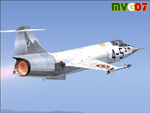
Lockheed's F-104 "Starfighter" was sleek, sexy, and difficult to fly. Essentially a J-79 turbojet with tiny wings and a place for the pilot to sit, it had a poor turning radius and very unpredictable behavior at high angles of attack along with very high takeoff and landing speeds. Its strength was never in its agility, but rather in its speed. The type was the only aircraft in existence at the time that could sustain speeds of over Mach 2.0, and it had a stellar rate of climb.
The "Starfighter" was an icon among jet interceptors throughout the 1970s. It was built also in Italy (G version), under licence. The first Italian F-104G flown during the end of 1962 and the last one (S version) was retired from active service in 2004 (42 Years !!!).
Textures only for two "Starfighters" of the 9 Gruppo of 4 Aerobrigata of the Aeronautica Militare Italiana (Italian Air Force), the first unit to receive the "Starfighter", based on Grosseto Airport, Italy, 1963/64. These textures require a legal copy of the payware Alphasim F-104G. The paints were done with the paintkit provided by Alphasim/Frank Safranek and the metal base textures provided by Henry William. Repaint by Manuele Villa.
| Filename: | Italian_Air_Force_Lockeed_F104G_Starfighter.zip |
| License: | Freeware |
| Added: | 4th June 2010, 11:28:46 |
| Downloads: | 599 |
| Author: | Manuele Villa |
| Size: | 6.05 MB |
| Category: Flight Simulator 2004 - Sounds | |
| FS2004/FSX Boeing 737 Next-Generation (600-900ER) CFMI CFM56-7B Soundpack |
|
File Description:
This sound is intended for use on Project Opensky's models, but they'll work pretty good I am sure on other freeware and payware planes. After month's of hard precision work, I present to you my new realistic and accurate 737NG CFM56-7B soundpack for Microsoft Flight Simulator 2004 and X. The interior sounds are mainly from a passenger perspective. Once you load your aircraft with these sounds, you'll hear the APU System and Fans in the cabin. You hear the humming sound of the CFM56-7B at idle after you have started the engines. You spool up the engines at takeoff then hear the buzzsaw-like sound of the CFM56-7B engine's fans. Once you lift off and put up the landing gear you will hear a chime from the cabin. It features realistic cockpit sounds like the autopilot deactivation sound, stall clicker, overspeed clicker, gear up warning sound buzzer, flaps lever, rolling whine, and touch-down. I am sure that if you are a frequent Boeing 737 Next-Generation aircraft flyer, or if you're a pilot or flight crew onboard a 737NG aircraft, that you'll pretty impressed by these sounds. Give this soundpack a try, I am sure you won't be disappointed!
| Filename: | FS2004FSX_Boeing_737_NextGeneration_600900ER_CFMI_.zip |
| License: | Freeware |
| Added: | 15th July 2010, 01:38:47 |
| Downloads: | 9,290 |
| Author: | Adam Murphy - SkyHigh Sound Systems |
| Size: | 55.26 MB |
| Category: Flight Simulator X - Aircraft Repaints, Textures and Modifications | |
| North American P-51D Mustang "Boo-Man Choo" (N51MV) |
|
Images related to this file:
File Description:
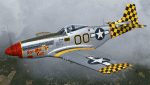
A repaint only for the payware Warbirdsim product 'Mustang Tales'. This repaint depicts the restored P-51D-25-NT 45-11391, "Boo-Man Choo", registered N51MV. This aircraft has a long civilian history, having been first registered with the FAA in 1963. In the 1990's, this aircraft became a popular sight when owned by Wally Sanders and painted as "Nervous Energy IV", and could sometimes be seen flown by the late, great Jeff Ethell. In the years since, the aircraft has passed through several owners, though the same over-all paint scheme has remained. In 2005, the aircraft's name was changed to "Luscious Lisa". In 2008, not long after having switched hands, the aircraft was damaged in a hard landing. For the next four years the aircraft was repaired and rebuilt, flying again in May 2012. The aircraft's most recent owner is Col. Ray Hofman, who now bases the aircraft in Midland, TX. The aircraft is now named "Boo-Man Choo", which is derived from the nickname of Col. Hofman's son, "Boo-Man". The nose art was inspired by the nurse character from the animated cartoon Animaniacs. This repaint features new bump maps, wheel well, gun bay, and cockpit textures.
| Filename: | North_American_P51D_Mustang_BooMan_Choo_N51MV.zip |
| License: | Freeware |
| Added: | 17th April 2013, 06:21:24 |
| Downloads: | 190 |
| Author: | John Terrell |
| Size: | 27.52 MB |
| Category: Microsoft Flight Simulator (2020) - Utilities | |
| FBWA320_LINDA_Module_ByJujunet_v0.3 |
|
File Description:
This module allow to control hidden controls of the FBW A320, using LINDA software and FSUIPC. Require : FSUIPC ver 7 full licence, Microsoft Flight Simulator and LINDA software. Installation : Uncompress archive in any place. Move A32nx.evt file to your FSUIPC root folder. Move A320.hvar on \Community\fsuipc-lvar-module\modules. On LINDA software : Click on "Maintenance", on top, select "--aircrafts--". Click on "Select Source Folder", below "Import Aircraft Module", browse to the folder FBWA320, click on "Import", or "Overwrite" if updating. This module for Linda freeware allows to bind : -Landing and Nose light independently -Seat-belt -No Smoking -Mode and zoom on ND -Display function ARPT, VOR, WPT, NDB... on ND -Terrain on ND -Eicam pages, with an encoder -ILS -Barometer increment and decrement with automatic detection of position (HPA or inHg) -Toggle between HPA and inHg -Toggle between QNH setting and STD -Autobrake Cycle -Reverse ON/OFF -Full compatibility for Managed/Selected on SPD, HDG, ALT and Selected mode on VS. To create your own module, or customize this one, go to my Youtube Tutorial : My channel : https://www.youtube.com/channel/UCVgdlnaAk2Q4EOSCICW_0iA Changelog : Version 0.1 : Initial Release Version 0.2 : Update to work with FBWA320 v0.8.0, Version 0.3 : Update to work with FBWA320 v0.11.0
| Filename: | FBWA320_LINDA_Module_ByJujunet_v03.zip |
| License: | Freeware |
| Added: | 16th January 2024, 14:31:38 |
| Downloads: | 35 |
| Author: | Julien GICQUIAUD |
| Size: | 14.32 KB |


© 2001-2026 AVSIM Online
All Rights Reserved
Privacy Policy |