
Where Flight Simulation Enthusiasts Gather from Around the World!
AVSIM Library - Search Results

| Category: Flight Simulator 2004 - AFCAD Files | |
| Metro Oakland with Active Crosswind Runways |

|
File Description:
A high spec AFCAD2 for the FS2004 Metro Oakland Int'l Airport (KOAK) scenery by the Mach-1 Design Group. This afcad has been built using FAA Charts, various aerial photographs and information from the Airport Website. All taxiways are named and all aprons are reworked to be as real as possible according to photos. All gates are named and have airlines assigned to them. As per real life, only Southwest Airlines will use Terminal 2, all other airlines being allocated to Terminal 1. The Fedex and UPS aprons are represented and can accomodate many cargo aircraft. The final parking area is random GA parking to the north of the airport. Overflow parking is also available for rush hour periods. This airport features a tower view and also night and approach lighting. Finally, by using the crosswind runway technique, runways 9L/27R, 9R/27L and 11/29 can all be used simultaniously for take-off and landing. Runway 15/33 is closed as it is not used in real life. An extra taxiway "Zulu" has been added (not real life) to avoid AI conflicts when using runway 29 for Takeoffs and landings. Enjoy!! Requires that you install m1dg_oak2007.zip from this site.
| Filename: | Metro_Oakland_with_Active_Crosswind_Runways.zip |
| License: | Freeware |
| Added: | 1st June 2007, 17:44:02 |
| Downloads: | 1,461 |
| Author: | Lee Brompton |
| Size: | 203.67 KB |
| Category: Flight Simulator X - AFCAD Files | |
| Herr Mountain Airport (5NJ2), NJ |
|
File Description:
Located 02 miles N of Stanton, New Jersey, Herr Mountain Airport is a private turf strip. No aircraft are based here, so don't expect much except for ample room to land and take off again. There is a residence on the property, but no hangar or storage facilities. The runway is 2800x100 feet so not too hard to arrive and depart from. Approaching Runway 25 can be a slight challenge given that you need to level off your descent to cross over a mountain top before diving in to land. There is no hard surface runway, so you will be landing on terrain - be gentle! It's recommended to have your mesh complexity set as high as possible to get the full effect. The runway is not lit so daytime VFR operations only are allowed at this airport.
Scenery constructed with use of satellite images/streetview/aerial photos - the author has not been there in person.
This scenery is meant to be used in conjunction with MegaScenery Earth New Jersey/Delaware 001. It is not required, but apron use is minimized to allow satellite scenery to show through as much as possible, and objects are placed based on the MSE textures - lack of it may make scenery look out of place.
| Filename: | Herr_Mountain_Airport_5NJ2_NJ.zip |
| License: | Freeware |
| Added: | 1st February 2011, 23:06:28 |
| Downloads: | 187 |
| Author: | Drew Sikora |
| Size: | 422.37 KB |
| Category: Flight Simulator X - AFCAD Files | |
| Thomas Browne Airpark Airport (61NJ), NJ |
|
File Description:
Located 02 miles W of Glassboro, New Jersey, Thomas Browne Airpark Airport is a private turf strip 2000��80 feet. There is no hard-surfaced runway, which means you will be landing on terrain so it is recommended you set your mesh resolution as high as possible. Watch out for trees and buildings alongside and at opposite ends of the runway. Crop fields are planted to the south of the runway and border the runway. You won't crash if you run into them but it certainly won't put you in good favor with the field owners! Take caution to avoid the transmission line towers as they are not lit at night! Neither is the runway, for that matter, so daytime VFR operations only are recommended for this airfield.
Scenery constructed with use of satellite images/streetview/aerial photos - the author has not been there in person.
This scenery is meant to be used in conjunction with MegaScenery Earth New Jersey/Delaware 004. It is not required, but apron use is minimized to allow satellite scenery to show through as much as possible, and objects are placed based on the MSE textures - lack of it may make scenery look out of place.
| Filename: | Thomas_Browne_Airpark_Airport_61NJ_NJ.zip |
| License: | Freeware |
| Added: | 4th February 2011, 02:47:24 |
| Downloads: | 166 |
| Author: | Drew Sikora |
| Size: | 1.41 MB |
| Category: Flight Simulator X - AFCAD Files | |
| Bridgeport-Cahill Field Airport (6NJ9), NJ |
|
File Description:
Located 01 miles SW of Bridgeport, New Jersey on 167 acres of land, this airport is non-existent in real life, as far as I am able to determine. although it is still listed as Active, no visible trace of anything remotely suitable for a landing strip is visible anywhere in this area. The strip mining operation nearby in some satellite/aerial photos shows a long narrow grass strip that could be used as a runway, but then others show it stripped down to bare dirt as part of the apparent mining operation, and the MegaSceneryEarth textures depict this latter representation as well. So I have simply removed visible evidence of this strip, although FSX will still try to tell you it's there in the airport directory.
Scenery constructed with use of satellite images/streetview/aerial photos - the author has not been there in person.
This scenery is meant to be used in conjunction with MegaScenery Earth New Jersey/Delaware 004. It is not required, but apron use is minimized to allow satellite scenery to show through as much as possible, and objects are placed based on the MSE textures - lack of it may make scenery look out of place.
| Filename: | BridgeportCahill_Field_Airport_6NJ9_NJ.zip |
| License: | Freeware |
| Added: | 10th February 2011, 05:01:38 |
| Downloads: | 197 |
| Author: | Drew Sikora |
| Size: | 209.8 KB |
| Category: Flight Simulator X - Aircraft Repaints, Textures and Modifications | |
| North American P-51D Mustang "Boo-Man Choo" (N51MV) |
|
Images related to this file:
File Description:
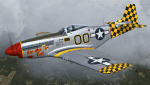
A repaint only for the payware Warbirdsim product 'Mustang Tales'. This repaint depicts the restored P-51D-25-NT 45-11391, "Boo-Man Choo", registered N51MV. This aircraft has a long civilian history, having been first registered with the FAA in 1963. In the 1990's, this aircraft became a popular sight when owned by Wally Sanders and painted as "Nervous Energy IV", and could sometimes be seen flown by the late, great Jeff Ethell. In the years since, the aircraft has passed through several owners, though the same over-all paint scheme has remained. In 2005, the aircraft's name was changed to "Luscious Lisa". In 2008, not long after having switched hands, the aircraft was damaged in a hard landing. For the next four years the aircraft was repaired and rebuilt, flying again in May 2012. The aircraft's most recent owner is Col. Ray Hofman, who now bases the aircraft in Midland, TX. The aircraft is now named "Boo-Man Choo", which is derived from the nickname of Col. Hofman's son, "Boo-Man". The nose art was inspired by the nurse character from the animated cartoon Animaniacs. This repaint features new bump maps, wheel well, gun bay, and cockpit textures.
| Filename: | North_American_P51D_Mustang_BooMan_Choo_N51MV.zip |
| License: | Freeware |
| Added: | 17th April 2013, 06:21:24 |
| Downloads: | 190 |
| Author: | John Terrell |
| Size: | 27.52 MB |
| Category: Flight Simulator 2004 - Scenery | |
| Mackenzie River close to Tulita CZFN in Northwest Territories Canada |
|
Images related to this file:
File Description:
I discovered, while testing another airfield near the Mackenzie River, that along the side of the Mackenzie adjacent to Tulita, and for a considerable distance, there was a cliff of water. I have no idea if my version of Ultimate Terrain has developed a fault or if this has been caused by the installation of a terrain mesh that now argues with UT for some unknown reason. Whatever, it was impossible to leave it as it was. I have included a screenshot of the cliff further upstream. To avoid the cliff of water I have flattened that area of the Mackenzie River and the adjacent river banks and both the town and the airfield to a height above sea level of 400 feet. This does not reflect the real life situation but is the lesser of two optical evils. I have included a screenshot of the flattened area. If you do not have a problem then you do not need this. If you too have a cliff of water then you might want to try this. It does not completely get rid of the problem, but it does get rid of it in the area visible when landing or taking off at Tulita.
| Filename: | Mackenzie_River_close_to_Tulita_CZFN_in_Northwest_.zip |
| License: | Freeware, limited distribution |
| Added: | 1st August 2021, 22:27:01 |
| Downloads: | 75 |
| Author: | Roger Wensley |
| Size: | 573.48 KB |
| Category: Flight Simulator 2004 - AFCAD Files | |
| Los Angeles International KLAX for Simflyer 2004 |
|
File Description:
This should be the best AFCAD you can find for this scenery. I have spent many hours trying to make this perfect. I have used a number of materials to make it correct, I even used aerial photos. The AFCAD uses the correct runways unlike the default airport that Microsft provides. I have done my best to test every part of this AFCAD. I even added a gate to the international terminal that the Simflyer developers left out. Keep in mind that there may still be flaws. There is runway 25L for landing and 25R for take-off. Then runway 24L for take-off and 24R for landings. I think it will be difficult for someone to fill all the spots at this airport. There are a ton of cargo spots that are the hardest to fill due to the fact that not many people make cargo flightplans. I am sorry if you download my other file for 2004, it was incorrect. Please ignore it, this is the real thing. If any of you have try my RAFCAD for 2002 in the past then you'll love this one even more. I will keep perfecting this file so it will be as real as possible.
| Filename: | Los_Angeles_International_KLAX_for_Simflyer_2004.zip |
| License: | Freeware |
| Added: | 24th November 2003, 04:43:31 |
| Downloads: | 2,346 |
| Author: | Aaron Ricchio |
| Size: | 25.78 KB |
| Category: Flight Simulator 2002 - Aircraft Repaints, Textures and Modifications | |
| Qantas Airways Boeing 747-400 RR |
|
File Description:
Ladies and gentlemen,tonight,it is the honor for me to introduce Project Opensky's " Gorgeous " Boeing 747-400 RR which I repainted ! As you know I started to trans my QF FSPainter's Boeing 747-400 RR to POSKY's Boeing 747-400 V3 RR. Today I finished. Many thanks to FSpainter to use his base texture of fuselage and my friends hiro and Karasu who check my errors of texture.
Complete with model, default panel and sound. Features include fully animated control surfaces, fully independent suspension, main gear steering, trim animation, opening passenger doors, opening cargo doors, dynamic flexing wings, animated tilting bogies, rolling wheels, animated thrust reversers, fully reflective textures ( each part has different degree of reflection based on material ), accurate flight dynamics ( accurate FDE with full profiles for wheels, tires, struts, leading/trailing struts, engine types ... Tested by real pilots.), newly re-defined individual part damage profiles, new FS2002 effects, accurate spoiler animation, detailed textures, full night lighting, visible landing lights from the cockpit, reflective cockpit windows, crash effects, transparent nav light lenses, newly re-defined individual part damage profiles. Model Designer Vincent C. Cho. Flight Dynamics Designer Warren C. Daniel. FDE Advisors Nick Peterson, Simon Ng Hin Tat.
I hope you enjoy them. Thank you.
| Filename: | Qantas_Airways_Boeing_747400_RR.zip |
| License: | Freeware |
| Added: | 3rd January 2003, 18:16:38 |
| Downloads: | 1,778 |
| Author: | Jun Kazama / POSKY |
| Size: | 7.51 MB |
| Category: Flight Simulator 2002 - Aircraft Repaints, Textures and Modifications | |
| Continenal Airlines Boeing 777-224ER PRO |
|
File Description:
Continental Airlines Boeing 777-224ER, Includes 2 of Continental's 777 fleet: N78017 and N27015. This plane was completely hand painted, New exterior Night lights were designed, and added many static effects to give it a realistic touch, Furthermore, this package includes a semi-photoreal interior area, with photoreal seats and other parts, special attention was given to the night textures
This rendition of the B777 has been completely built from scratch in Gmax and features a 32-sided fuselage and engines; "maintenance mode" featuring opening engine cases, deployable Ram Air Turbine, opening gear bay doors on ground, opening captain's window; virtual cabin (business class); folding wings; reflective textures; flexing wings; dynamic wing views; animated reversers with
animated fan air blocker doors; see through engines; animated landing gear with fully modeled struts and hydraulic pistons. Also featuring animated flexible gear hoses; animated flaps, slats, ailerons, elevators and spoilers with animated hydraulic pistons; advanced logic nose gear and main gear steering; animated primary and secondary rudder; dynamic shine and reflective surfaces;
3D APU; 3D gear, flap, slat bays; seamless wing root fairing; dimensioned to high accuracy; accurate flight dynamics; extremely detailed all round. Original model by MelJet (Melvin Rafi). Textures by Yarden Ben-Dor/ Online Simulation Solutions, LLC.
| Filename: | Continenal_Airlines_Boeing_777224ER_PRO.zip |
| License: | Freeware, limited distribution |
| Added: | 28th June 2003, 20:12:35 |
| Downloads: | 6,312 |
| Author: | Yarden Ben-Dor/ Online Simulation Solutions, LLC |
| Size: | 17.51 MB |
| Category: Microsoft Flight Simulator (2020) - Utilities | |
| FBWA320_LINDA_Module_ByJujunet_v0.3 |
|
File Description:
This module allow to control hidden controls of the FBW A320, using LINDA software and FSUIPC. Require : FSUIPC ver 7 full licence, Microsoft Flight Simulator and LINDA software. Installation : Uncompress archive in any place. Move A32nx.evt file to your FSUIPC root folder. Move A320.hvar on \Community\fsuipc-lvar-module\modules. On LINDA software : Click on "Maintenance", on top, select "--aircrafts--". Click on "Select Source Folder", below "Import Aircraft Module", browse to the folder FBWA320, click on "Import", or "Overwrite" if updating. This module for Linda freeware allows to bind : -Landing and Nose light independently -Seat-belt -No Smoking -Mode and zoom on ND -Display function ARPT, VOR, WPT, NDB... on ND -Terrain on ND -Eicam pages, with an encoder -ILS -Barometer increment and decrement with automatic detection of position (HPA or inHg) -Toggle between HPA and inHg -Toggle between QNH setting and STD -Autobrake Cycle -Reverse ON/OFF -Full compatibility for Managed/Selected on SPD, HDG, ALT and Selected mode on VS. To create your own module, or customize this one, go to my Youtube Tutorial : My channel : https://www.youtube.com/channel/UCVgdlnaAk2Q4EOSCICW_0iA Changelog : Version 0.1 : Initial Release Version 0.2 : Update to work with FBWA320 v0.8.0, Version 0.3 : Update to work with FBWA320 v0.11.0
| Filename: | FBWA320_LINDA_Module_ByJujunet_v03.zip |
| License: | Freeware |
| Added: | 16th January 2024, 14:31:38 |
| Downloads: | 35 |
| Author: | Julien GICQUIAUD |
| Size: | 14.32 KB |


© 2001-2026 AVSIM Online
All Rights Reserved
Privacy Policy |