
Where Flight Simulation Enthusiasts Gather from Around the World!
AVSIM Library - Search Results

| Category: Flight Simulator X - Scenery | |
| EGVL - RAF Little Rissington - Gloucestershire, England |

|
File Description:
RAF Little Rissington (ICAO: EGVL) is an RAF aerodrome and former RAF station in Gloucestershire, England. It was once home to the Central Flying School, the Vintage Pair and the Red Arrows.
Built during the 1930s, the station was opened in 1938 and closed in 1994. The married-quarters and main technical site were sold in 1996 (the former becoming the village of Upper Rissington), but the aerodrome has been retained by the Ministry of Defence and remains active along with the southern technical sites, under the operational control of HQ No.2 Flying Training School at RAF Syerston.
It is now home to 637 Volunteer Gliding Squadron as the primary military unit, who provide elementary flying training for Combined Cadet Force and Air Training Corps cadets. The airfield is also used by the forces as a relief landing ground, training area and parachute dropping area. In previous years, the Royal Air Force estate has been used as a film set, including The Avengers, part of the ice chase in Die Another Day, and the Thunderbirds film. Souce: Wikipedia
| Filename: | EGVL__RAF_Little_Rissington__Gloucestershire_England.zip |
| License: | Freeware |
| Added: | 23rd November 2015, 14:41:23 |
| Downloads: | 466 |
| Author: | Terry Boissel |
| Size: | 19.74 KB |
| Category: Flight Simulator 2004 - Scenery | |
| Seldovia PASO in Alaska US |
|
Images related to this file:
File Description:
Seldovia is a small airfield across the Kachemak Bay from Homer, 15 miles to the south. The runway is gravel and without lighting; the runway edges and the apron edges are marked by cones. The runway in real life is aligned 16-34 and is just over 1,800 feet, increased here to 2,200 feet to accomodate FS9 AI plane capabilities. The video is one of a series that are well worth watching and this one demonstrates the technique of short field landing and take off.
There is AI, with flights between Homer and Seldovia. I should mention here that the I can only make scenery to fit into my version of FS9, and probably your version is not exactly the same. Also, you may not have the planes that I have used for AI. Unfortunately I cannot cater for something I do not have myself. Homer PAHO will follow on from this post. If you find an error email me please, and note that my email address has been changed to rogwens at Gmail dot com.
| Filename: | Seldovia_PASO_in_Alaska_US.zip |
| License: | Freeware, limited distribution |
| Added: | 28th July 2021, 03:30:16 |
| Downloads: | 77 |
| Author: | Roger Wensley |
| Size: | 9.66 MB |
| Category: Flight Simulator X - Gauges | |
| PFD for Flight Instrument Panel |
|
Images related to this file:
File Description:
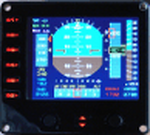
For Saitek Pro Flight Instrument Panel.
This Primary Flight Display (PFD) Glass type gauge provides following utilities:
1. Artificial horizon with sliding bug (yellow).
2. Moving tapes for: Air speed, Altitude, Heading.
3. Detail window for altitude.
4. Needle for vertical speed.
5. Glide slope and Localizer bars, they appear when in range of ILS only.
6. Digital values for: Total Air Temperature (TAT), QNH, Mach number, VOR 1 selected course, VOR 1 bearing, DME 1 range, Radio height altitude up to 2000 feet, above a bar go through the window, vertical speed, a minus sign appears when vertical speed is negative.
7. Autopilot bugs for: Selected altitude, Selected speed, Selected heading. Rmk: Bugs appear only when autopilot ALT, SPD or HDG functions are selected.
8. Display Autopilot functions with Text acronysm in yellow: AP, Autopilot Master On, THR, auto throttle mode engaged, SPD, air speed mode selected, HDG, heading mode selected, NAV, navigation mode selected (VOR 1), APR, approach mode selected, BC, back course mode selected.
9. Knobs functions: Right, allows to change QNH value. Left, allows to move VOR 1 course.
| Filename: | PFD_for_Flight_Instrument_Panel.zip |
| License: | Freeware |
| Added: | 23rd May 2011, 22:37:18 |
| Downloads: | 1,096 |
| Author: | Philippe Verhaege |
| Size: | 249.48 KB |
| Category: Prepar3D V1-4 - Utilities | |
| AIFlow SimConnect Utility for P3D v4 |
|
Images related to this file:
File Description:
AIFlow v1.1 is a simconnect utility designed to ease AI congestion and go-arounds at the airport the user is departing from and arriving at. AIFlow does this by enforcing spacing minimums between arriving AI aircraft resulting in more orderly arrival patterns. AIFlow also supports spacing spacing minimums between the AI aircraft and the USER’s aircraft when the user is flying (during all phases of the user's flight). For added realism, AIFlow adds landing effects (e.g., micro bank and pitch corrections that scale up during crosswind conditions) to the AI on short final approach. The user can also briefly squawk 1234 in their aircraft to temporarily suspend landings so that the user can find a slot to depart a busy runway. AIFlow is designed to compliment the default P3D AI program and thus is fully compatible with any AI-related program that is compatible with the default AI program (e.g., AIG, Ultimate Traffic Live, Radar Contact, etc.). AIFlow is targeted to Prepar3D version 4.5 or 5.0, specifically SimConnect Version 4.5.0.0 or later. AIFlow operates externally via simconnect and thus makes no changes to the P3D sim. NEW for v1.1: (1) detect and correct AI performing poor approaches (e.g., dive-bombing, descent into terrain) under control of the P3D AI engine, (2) user can specify minimum and maximum AI approach speeds in terminal area, (3) prevent AI from stopping on runway when user landing, (4) AI plane spotting mode only, (5) external database fallback in case simconnect fails to provide local airport data, (6) adjustable in-sim message level, (7) periodic read of .ini file to tweak parameters more easily, (8) AIFlow starts minimized. FIXES for v1.1 include: sequencing in heavy AI traffic would sometimes cause excessive go-arounds, going around AI would sometimes improperly hold, changing AI spacing from default value did not have any effect, sometimes user aircraft would get controlled, .ini file would sometimes get confused reading parameter values having whites spaces.
| Filename: | AIFlow_SimConnect_Utility_for_P3D_v4.zip |
| License: | Freeware |
| Added: | 3rd July 2020, 23:57:52 |
| Downloads: | 2,015 |
| Author: | Roland Foster |
| Size: | 1.18 MB |
| Category: Flight Simulator 2004 - Scenery | |
| Avon STOLPort (KWHR) |
|
File Description:
A recreation of the Avon STOLPort (ident KWHR) for MS Flight Simulator 2004, A Century of Flight. Avon was operated as an exclusive destination for Rocky Mountain Airways between (approximately) 1978 and sometime in the late 80's or early 90's. The 4,000' runway was short for the nearly 7,500' elevation, and surrounded by mountains, some towering over 6,000' above the airport elevation. To allow all weather operation, the airport eventually featured what was reported as the steepest ILS ever constructed, with a seven degree glideslope. RMA had exclusive use of the tiny STOLPort and operated it with 50-passenger De Haviland Dash 7 equipement.
Lacking the original chart, I surveyed in FS and plotted what is hopefully an accurate representation of the ILS approach, using my best understanding of TERPS - the US standard for instrument approaches. I also created an NOS-style IAP chart of this approach for the package. A text Takeoff Minimums & Procedure is also included.
AI ATC & traffic recognition of the approach will hopefully follow, but does not exist yet. In other words, you can fly this approach and see the localizer in the GPS, but AI ATC will not give you vectors to it. You'll need to follow the full procedure included on the chart.
Please see the full Readme.txt in "Flight Simulator 9\Addon Scenery\KWHR\Docs" in this zipfile for information on installation of the scenery, flying the approach, and more on the history of the Avon STOLPort.
| Filename: | Avon_STOLPort_KWHR.zip |
| License: | Freeware, limited distribution |
| Added: | 12th May 2008, 23:14:38 |
| Downloads: | 418 |
| Author: | Stephen Comer |
| Size: | 2.1 MB |
| Category: Flight Simulator 2004 - Original Aircraft | |
| Piaggio P-166CL2 |
|
File Description:
Thanks to Andrew Spring of www.p166.com!!
The fifth of the coming P-166 aircraft series. I'm going to build the whole family of these graceful twins.
This file covers the whole production line of the P-166CL2!!! (Well, just 2...(-:)
The Piaggio P-166A is a light small twin. An Exotic two-engined prop that sold all over the world including America, UK, and Australia. he P-166CL2 was developed to take advantage of the cabin spaciousness of the P-166 series: a new landing gear that retracts under the fuselage into two small blisters lets expand the internal useful area more bakwards between the wings, as there is no central section. This lets the P-166CL2 accomodate 12 poassengers + pilot. The old gear bays at the side of te fuselage were replaced with two large windows that give a strange top-down view for the passenger. Tiptanks are optionally unattachable, as using them plus 12 passengers makes the plane go overweight. Means that the 12 passengers can only be transported on a considerabily short range. Only 2 P-166CL2s were built, due to the low-range caused by the small old-type tiptanks and the unstability of the new landing gear, that gave serious problems while taxiing. The P-166C is dated October '64, and converted to CL2 in 1972. The aircraft is still in production in a slightly modified turboprop version, the P-166D-P1. This model is 760 Kbs with c.a. 23000 polygons in c.a.170 assemblies. Features Clickable Dynamic VC with non-planar throttle quadrant. Detailed internals. Fully compatible with FS 2002 (pro edition)
| Filename: | Piaggio_P166CL2.zip |
| License: | Freeware |
| Added: | 4th April 2004, 18:02:21 |
| Downloads: | 5,617 |
| Author: | Mario Noriega |
| Size: | 7.23 MB |
| Category: Flight Simulator X - Scenery | |
| Gold Coast Airport (YBCG) |
|
File Description:
The Gold Coast Airport (formerly known as Coolangatta) is a busy international airport located some 100 ks south of Brisbane and 850 ks north of Sydney. This scenery contains and accurate depiction of the terminal, control tower, hangers and the very distinctive lighthouse at Coolangatta (with beacon) plus night lighting of the apron. In addition many buildings have been added to Coolangatta and Surfers some of which are original but many are stock buildings. The scenery has been reduced in complexity to attempt to be reasonably frame rate friendly. All models are GMAX or FSDS3.0. Extensive coastline changes has added beaches as far south as Byron Bay and the canal network behind Surfers Paradise, Bond Uni, Currumbin and Coolangatta. Recent upgrades of the airport to a 2500 metre runway have been reflected as well as a widened apron. Therefore it may look a little different from the current Google Earth image but it is accurate. The airport will now handle direct flights from Asia and typical planes landing might include Airbus 343 or similar wide bodied aircraft.
| Filename: | Gold_Coast_Airport_YBCG.zip |
| License: | Freeware |
| Added: | 12th July 2007, 15:08:44 |
| Downloads: | 6,176 |
| Author: | John Ross |
| Size: | 12.16 MB |
| Category: Flight Simulator X - Missions | |
| Challenging Approach: Innsbruck, Austria, LOWI |
|
File Description:
This is the first in a series of missions on challenging approaches and landings. The mission begins with you are approaching SBG VOR, enroute to Innsbruck, Austria, LOWI. As you approach Rattenberg NDB, ATC commands 200 KIAS and 9500' to intercept RTT (Goal 1). You are also advised to enter a holding pattern at RTT, your fix, to allow time for snow removal from the runway. The pattern is standard right-hand turns with 1.5 minute legs and 200 knots at 9500'. The inbound track is 226°, while outbound is 46°. Winds are high, so you will have to compensate to stay aligned in the pattern and certify (Goal 2). Next up is to achieve a stabilized approach on the steep glide slope to runway 25 as Goal 2. The final goal is a safe full stop landing on runway 26 at elevation 1894' The descent is near 4° gradient and the runway VOR (111.1) is offset to the right, thus the “challengeâ€. Complete all three goals and you certify to fly to LOWI and receive a Reward.
| Filename: | Challenging_Approach_Innsbruck_Austria_LOWI.zip |
| License: | Check within download |
| Added: | 6th May 2023, 13:41:36 |
| Downloads: | 109 |
| Author: | Jake Rogers |
| Size: | 10.73 MB |
| Category: Microsoft Train Simulator - Activities | |
| WV&O Local 105 Parts 1, 2 and 3 Marietta to Zanesville |
|
File Description:
In these three linked activities, set in the early diesel era, you'll run most of the WV&O mainline, from Marietta to Zanesville, performing switching work in all the towns along the way. Requires the WV&O and OR&W Rolling Stock add on packs available here (instructions included).
| Filename: | WVO_Local_105_Parts_1_2_and_3_Marietta_to_Zanesvil.zip |
| License: | Freeware |
| Added: | 17th December 2002, 01:36:38 |
| Downloads: | 1,290 |
| Author: | Steve Davis |
| Size: | 186.28 KB |
| Category: Flight Simulator 2002 - AFCAD Files | |
| Gates/Taxiways for Airport Teneriffe Reina Sofia and La Gomera (Canary Islands) |
|
File Description:
This AFCAD file adds all the Teneriffe's (GCTS) and La Gomera's (GCGM) Airport real gates and taxiways.
To use with the Teneriffe2003 scenery by Sim-Wings.
Teneriffe2003 by http://www.sim-wings.de and
AFCAD are needed.
| Filename: | GatesTaxiways_for_Airport_Teneriffe_Reina_Sofia_an.zip |
| License: | Freeware |
| Added: | 3rd October 2002, 00:37:23 |
| Downloads: | 873 |
| Author: | Juerg Bertschinger |
| Size: | 66.82 KB |


© 2001-2026 AVSIM Online
All Rights Reserved
Privacy Policy |