
Where Flight Simulation Enthusiasts Gather from Around the World!
AVSIM Library - Search Results

| Category: Flight Simulator X - Original Aircraft | |
| FSX Turkish Airlines Boeing 787-9 AGS V6.2. |

|
Images related to this file:
File Description:
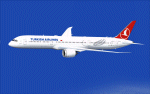
FSX Turkish Airlines Boeing 787-9 AGS V6.2.
New Main landing gear bogie.
New Animated Ground Servicing.
New static displays.
New landing / taxi soft light beams.
New 2D panel.
Model design and paint by Camil Valiquette. ( CamSim )
| Filename: | FSX_Turkish_Airlines_Boeing_7879_AGS_V62.zip |
| License: | Freeware |
| Added: | 14th July 2020, 19:17:23 |
| Downloads: | 219 |
| Author: | Camil Valiquette |
| Size: | 10.37 MB |
| Category: Flight Simulator 2004 - AFCAD Files | |
| KDTW (Default Scenery) with Working Crosswind Runways |
|
File Description:
This is my version of KDTW with correct gate parking codes. This file also allows all 6 runways to be used at once. No more long takeoff lines and tons of go-arounds! Also look for my upcoming KLGA, KORD, EHAM, and YSSY AFCAD2s.
| Filename: | KDTW_Default_Scenery_with_Working_Crosswind_Runway.zip |
| License: | Freeware |
| Added: | 14th August 2004, 05:35:06 |
| Downloads: | 3,297 |
| Author: | Anthony DuJardin |
| Size: | 19.65 KB |
| Category: Flight Simulator 2002 - Aircraft Repaints, Textures and Modifications | |
| Malaysia Airlines Airbus A380 |
|
File Description:
FS2002 Malaysia Airlines, Airbus A380 ProMX Version 2 The ver.2 added landing lights and new night textures to the long list of the orignal ProMX like: cargo/luggages bay with night textures and opening cargo doors, thrust reversed, wings and engines views from the cockpit with all the moving spoiler, engines fans and leading edges, tilted landing wheels, front turning wheels, 3D cockpit with night textures and 3D landing gears bays. Panel by: A.Asensio Model design and paint by: Camil Valiquette
| Filename: | Malaysia_Airlines_Airbus_A380.zip |
| License: | Freeware |
| Added: | 20th January 2003, 13:43:15 |
| Downloads: | 1,205 |
| Author: | Camil Valiquette |
| Size: | 665.19 KB |
| Category: Flight Simulator 2002 - Aircraft Repaints, Textures and Modifications | |
| Emirates Airbus A388 Cargo |
|
File Description:
FS2002 Emirates Cargo, Airbus A388 ProMX Version 2
The ver.2 added landing lights and new night textures to the long list of the
orignal ProMX like: cargo/luggages bay with night textures and opening cargo doors,
thrust reversed, wings and engines views from the cockpit with all the moving spoiler,
engines fans and leading edges, tilted landing wheels, front turning wheels,
3D cockpit with night textures and 3D landing gears bays.
Panel by: A.Asensio
Model design and paint by: Camil Valiquette
| Filename: | Emirates_Airbus_A388_Cargo.zip |
| License: | Freeware |
| Added: | 20th January 2003, 13:44:45 |
| Downloads: | 820 |
| Author: | Camil Valiquette |
| Size: | 1.01 MB |
| Category: Flight Simulator 2004 - Panels | |
| Chase View Window in Cockpit View - Panel Icon addon |
|
File Description:
Chase View - Panel Icon addon.
This icon addition to your panel will bring up a small "Spot/Chase View" window while you are still in Cockpit view. All normal Spot View commands such as changing the view will be shown in this window while you are still in the cockpit! Great for parking and push-back situations and for verifying that your landing gear is down etc. etc.. The gauge is provided by Barry Blaisdell of Premier Aircraft Design. He has kindly granted permission for it to be included in this package which has been compiled by David "Opa" Marshall. A setup for the default b737-400 Panel is included. Just unzip to a temporary directory (using folders option) and follow the simple instructions.
| Filename: | Chase_View_Window_in_Cockpit_View__Panel_Icon_addo.zip |
| License: | Freeware |
| Added: | 25th November 2004, 22:48:25 |
| Downloads: | 2,960 |
| Author: | David Marshall - Barry Blaisdell |
| Size: | 821.52 KB |
| Category: Flight Simulator 2004 - Gauges | |
| DR-2 Flight Calculator |
|
Images related to this file:
File Description:
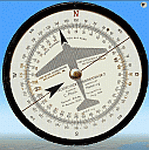
DR-2 flight calculator gauge for Fs2004. Flight calculator ("Dreieckrechner") DR-2 is a powerful calculator to solve most common VFR navigation problems, i.e. solution of Wind Triangle problem, Time, Speed and Distance problem, fuel comsumption calculation etc.
| Filename: | DR2_Flight_Calculator.zip |
| License: | Freeware, limited distribution |
| Added: | 22nd February 2012, 15:56:16 |
| Downloads: | 431 |
| Author: | Alexander Belov |
| Size: | 931.36 KB |
| Category: Flight Simulator X - Gauges | |
| CB 5000 NAVRAD Navigational RADAR and Multi-Function Display ver 1.5 |
|
Images related to this file:
File Description:
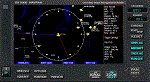
Some of the features included in this gauge are customizable Traffic RADAR, Map Panning, TAWS map, and Nearest Airport Search with a 375 nm range listing up to 500 airports. Instrumentation Manual Included. Come Check Us Out - www.coosbayhops.com
| Filename: | CB_5000_NAVRAD_Navigational_RADAR_and_MultiFunctio.zip |
| License: | Freeware, limited distribution |
| Added: | 20th March 2013, 08:19:09 |
| Downloads: | 2,413 |
| Author: | Greg Swift (CoosBay Hops) |
| Size: | 2.89 MB |
| Category: Flight Simulator 2004 - Sounds | |
| Replacement callout for FPDA Airbus A330/340 Altitude Callout Gauge |
|
File Description:
Replacement sound files for the missing 400ft and 300ft callout's for FPDA's Airbus A330/340 Altitude Callout Gauge. I've also included a bonus file with the "retard" callout which can be used by replacing the 10Ft file. Enjoy!
| Filename: | Replacement_callout_for_FPDA_Airbus_A330340_Altitu.zip |
| License: | Freeware |
| Added: | 2nd March 2006, 15:02:19 |
| Downloads: | 5,349 |
| Author: | J G |
| Size: | 754.96 KB |
| Category: Flight Simulator 2004 - Panels | |
| Golding MD-80 FS9 Update |
|
File Description:
This update brings Paul Golding's original MD-80 flight deck to FS9 functionality. The panel now includes Lee Hetherington's TCAS/Transponder system, the FS9 GPS with autopilot integration, and retains Tom Woods' HUD and Bill Morad's ATC panel. FS2000 Concorde gauge required.
| Filename: | Golding_MD80_FS9_Update.zip |
| License: | Freeware, limited distribution |
| Added: | 20th September 2004, 04:17:02 |
| Downloads: | 11,636 |
| Author: | Paul Golding/Leon Seale |
| Size: | 8.28 MB |
| Category: Prepar3D V1-4 - Scenery | |
| KMEM - Memphis International Airport - Tennessee (TN), USA |
|
File Description:
Prepar3D Scenery--Memphis International Airport (KMEM), Tennessee (TN), USA. This is Ray Smith's fsx_kmem_rs.zip file. Ray has given permission to adapt his file for Prepar3Dv2. There are two optional files one version with crosswind runway activated where all four runways will be used for takeoff/landing and one version as the default runway operation. The main FedEx ramp and buildings completely replaced, the terminal now updated as per phase 1 and phase 2 upgrades, assigned parking as per their website with extra parking including over 125 FedEx parking spots, taxiways and taxi signs updated to the latest charts including waypoint BLEWS renamed MCVEY, extra fuel trucks, support vehicle roads rebuilt and many other scenery improvements, airport views are from inside the control tower (when in tower view). By Robert Catherall.
| Filename: | KMEM__Memphis_International_Airport__Tennessee_TN_.zip |
| License: | Freeware |
| Added: | 19th October 2015, 18:54:55 |
| Downloads: | 13,932 |
| Author: | Robert Catherall |
| Size: | 2.11 MB |


© 2001-2026 AVSIM Online
All Rights Reserved
Privacy Policy |