
Where Flight Simulation Enthusiasts Gather from Around the World!
AVSIM Library - Search Results

| Category: Flight Simulator 2002 - Panels | |
| Airbus A310 Panel V1.1 |

|
File Description:
Airbus A310 v1.1 panel for FS2002. Optimized for 1024x768 full-screen resolution. Uses FS default and some freeware gauges. Due to some feedback from V1.0 some modifications have been made. This panel now requires the Concorde gauge.
| Filename: | Airbus_A310_Panel_V11.zip |
| License: | Freeware |
| Added: | 9th February 2003, 00:28:18 |
| Downloads: | 3,133 |
| Author: | Matt Richards |
| Size: | 1.13 MB |
| Category: Flight Simulator 2004 - Miscellaneous Files | |
| SkySpirit2010 Boeing 767-400ER FDE Update #2 |
|
File Description:
This is a mandatory FDE update for the SkySpirit2010 767-400ERv5 series. This file fixes Takeoff Speeds, Drag values, and Trim effectiveness This file supersedes the first fix. Original FDE by Warren C. Daniel. Updates by Brandon D. Henry.
| Filename: | SkySpirit2010_Boeing_767400ER_FDE_Update_2.zip |
| License: | Freeware, limited distribution |
| Added: | 10th July 2011, 09:30:01 |
| Downloads: | 805 |
| Author: | Brandon D. Henry | Warren C. Daniel | SkySpirit2010 Team |
| Size: | 9.15 KB |
| Category: Flight Simulator 2004 - Panels | |
| Nimrod MR2 Update |
|
File Description:
This is a completely revised Panel and Gauge setup for the FS2004 Simshed Nimrod MR2 by Brian Franklin.
These panel and gauge files contain authentic MR2 Flight Director and Autopilot.
In addition the Nav suite is fully emulated and contains a working TACAN.
All current UK TACAN beacons are included inside the Gauge file.
The default 2D panel is a simplistic view to maximize the viewable area outside.
However, I have included some photo-realistic panel bitmaps so that you can customize
your 2D view.
The VC contains no working gauges in order to optimise the FPS. However this panel was
created for the Nimrod enthusiast who wants to practice IFR in the 2D panel.
Those of you who have never flown a 'real' Nimrod before:
"Welcome to the most complicated Autopilot ever produced".
Have fun learning how to set it up!
Produced by Simshed (Jim Cooper and Doug Freeman)
[email protected]
www.simshed.co.uk
| Filename: | Nimrod_MR2_Update.zip |
| License: | Freeware, limited distribution |
| Added: | 18th April 2006, 04:03:24 |
| Downloads: | 1,251 |
| Author: | Jim Cooper |
| Size: | 7.76 MB |
| Category: Flight Simulator X - Gauges | |
| DA Fokker 70 Panel Controller |
|
File Description:
After flying the DA Fokker 70 and 100 for a while, I realised that not all FS pilots would have access to a programmable joystick that would enable them to assign a button to operate the various pop-up panels in the Fokker, so I thought that a gauge mounted on the flight panel that centralised the controls for the pop-up windows may be a handy addition.
After adding the gauge you will be able to access the following pop-up panels using the mouse from one centralised position on both the Pilot Flying and First Officer the panels.
From left to right the pop-up panels are as follows..
Upper Row
Overhead Upper, Overhead Lower, Pedestal Forward. Pedestal Middle and Pedestal Rear...
Lower Row
Radio Stack, CDU, Doors and Ground Power, Secondary Annunciator Panel, Enlarged Left Hand MFDU
Also included are instructions on how to add the Groundhandling gauge by Rob Barendregt to the Doors and Ground Power panel of the Fokker.
| Filename: | DA_Fokker_70_Panel_Controller.zip |
| License: | Freeware |
| Added: | 28th July 2008, 11:01:36 |
| Downloads: | 839 |
| Author: | James Hodkinson |
| Size: | 365.34 KB |
| Category: Flight Simulator 2002 - Gauges | |
| Real AP V1.1 (Autopilot Upgrade) - Auto Rudder |
|
File Description:
This is the update of my "Real AP V1.0" on "Auto Rudder" function. This gauge adds Auto Rudder System into the default Autopilot Yaw Damper System. Auto Rudder will be automatically engaged when Yaw Damper is engaged. When the Yaw Damper is disengaged, you have control of the rudder pedal!! This gauge simply adds this function to the default Yaw Damper, simulating "Rudder Coordination System" of the Boeing jets.
| Filename: | Real_AP_V11_Autopilot_Upgrade__Auto_Rudder.zip |
| License: | Freeware, limited distribution |
| Added: | 29th August 2002, 21:48:22 |
| Downloads: | 981 |
| Author: | Jun Kawamura |
| Size: | 183.35 KB |
| Category: Prepar3D V1-4 - Scenery | |
| EDDF - Frankfurt-Main, Germany |
|
Images related to this file:
File Description:
This is Ray Smith's FSX file. Ray has given me permission to modify his file for P3Dv4. This is a very accurate rendition with two optional files: one file with the Crosswind runway 18/36 operating (18 takeoff only) where all 4 runways will be used simultaneously and one file as the default airport runway operation. The Northwest runway 7L/25R ia for landing only. ILS frequencies and approaches now corrected to the latest charts and some transitions. Assigned parking as per their website with extra parking including gates for the A380. Taxiways and taxi signs updated to the latest charts. New control tower, the South cargo apron updated, the A380 maintenance apron, extra fuel trucks, support vehicle roads rebuilt and many other scenery improvements and objects added.
| Filename: | EDDF__FrankfurtMain_Germany.zip |
| License: | Freeware |
| Added: | 15th March 2018, 23:40:24 |
| Downloads: | 31,788 |
| Author: | Robert Catherall |
| Size: | 3.18 MB |
| Category: Flight Simulator X - Scenery | |
| LSZQ - Bressaucourt Jura Switzerland |
|
Images related to this file:
File Description:
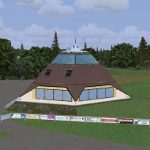
The newest airport of Switzerland, opened in 2011th. Have fun and Happy Landing!
| Filename: | LSZQ__Bressaucourt_Jura_Switzerland.zip |
| License: | Freeware |
| Added: | 16th August 2012, 19:45:37 |
| Downloads: | 2,034 |
| Author: | Marco Baehler, Oskar Wagner, Richard schaller |
| Size: | 41.57 MB |
| Category: Flight Simulator 2002 - Miscellaneous Files | |
| RWControl V1.1 |
|
File Description:
RWControl V1.1
NEW in V1.1:
-Airbus style gauge and BAe style gauge;
-Utility to have Roger Wilco remote controlled;
-bug fix: no change in ATC stations on some systems;
------
This is a FS2002 module that simplifies the selection
of voice communication channels using Roger Wilco
when flying online in the environment of either
VATSIM (http://www.vatsim.net) or IVAO (www.ivao.org),
the most popular “virtual air traffic network” providers.
Additionally, gauges are provide that can be
integrated in your panel(s).
By Stefan Gallmann
[email protected]
| Filename: | RWControl_V11.zip |
| License: | Freeware |
| Added: | 22nd November 2002, 21:07:28 |
| Downloads: | 1,103 |
| Author: | Stefan Gallmann |
| Size: | 513.95 KB |
| Category: Flight Simulator 2004 - Gauges | |
| MeatWater FO Altitude Callouts v1.0 |
|
File Description:
I sat down and built a gauge that does just that: it provides altitude callouts from 1.000ft down to ten, however not a computerized voice but a normal voice that sounds as you would hear it over the intercom. Your virtual PNF will make altitude callouts beginning with 1.000ft, then 500, 400...100, 50, 40...10
The callouts will not sound during climbout! The gauge is activated once the aircraft has reached an altitude of 1.500ft AGL.
It can be used with any aircraft!
| Filename: | MeatWater_FO_Altitude_Callouts_v10.zip |
| License: | Freeware |
| Added: | 30th April 2006, 02:14:55 |
| Downloads: | 28,951 |
| Author: | Nick Schreger, MeatWater |
| Size: | 388.09 KB |
| Category: Flight Simulator X - Gauges | |
| AP_MultiFuel_Gauges for FIP |
|
Images related to this file:
File Description:
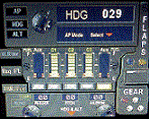
This set of 3 gauges is for use in the Saitek FIP and is an extension to my FIP gauge. That set of 3 gauges was designed to complement the Saitek AP/Multi panel and primarily showed the selected AP Altitude and Vert Spd whilst the Saitek AP/multi panel was displaying HDG. The second main part of those gauges were the Fuel Level displays, each gauge displaying a different combination of fuel tanks to suit the aircraft being flown and thus offered functionality for all types of aircraft.
This set of 3 gauges is designed for the same purpose but now encompasses a working AP that allows you to select HDG, ALT and VS values and activate the HDG and ALT mode (and AP master switch) to enable auto-pilot flight (for those who have a FIP but not an AP/multi panel).
For those who have an AP/multi panel, it gives a backup AP in your build/rig (although it all works off the same FS telemetry, I have found that when the AP/multi-panel freezes, especially the 'Alt' button, then this FIP gauge can de-activate it. The combinations displayed are those that suit my choice of aircraft, however it is easy to re-configure gauge Elements (fuel tank names) and artwork (fuel gauge titles) to suit the combination you prefer.
These gauges also retain the gear, flaps and light indicators, auto rudder on/off button plus rudder and aileron trim capability that were in the previous gauges. An additional feature is the battery switch will now turn off the AP display and fuel levels.
The artwork in these gauges has also been upgraded a bit and a template artwork is included to assist in customising.
| Filename: | AP_MultiFuel_Gauges_for_FIP.zip |
| License: | Freeware |
| Added: | 20th October 2014, 16:00:33 |
| Downloads: | 266 |
| Author: | Robert Budd |
| Size: | 764.26 KB |


© 2001-2026 AVSIM Online
All Rights Reserved
Privacy Policy |