
Where Flight Simulation Enthusiasts Gather from Around the World!
AVSIM Library - Search Results

| Category: Flight Simulator 2004 - Gauges | |
| Apollo MX20 Multi-Function Display/GPS |

|
File Description:
This gauge is modeled after the Apollo MX20 Multi-Function Display. This gauge is written in XML and is designed to mesh with the default FS9GPS map input data. Compatible with FS2004 (FS9) ONLY!
Although I tried to make this gauge as close to the real Apollo MX20 as possible it is not considered to be an exact replica. It is limited to certain features that the FS9 data will provide. It does however have all the great features that the default FS9GPS offers and offers an alternative to the default GPS.
Size (pixel size) is the same as the FS9 default GPS so placement (or replacement) of the gauge is quick and easy.
| Filename: | Apollo_MX20_MultiFunction_DisplayGPS.zip |
| License: | Freeware |
| Added: | 24th December 2003, 05:29:16 |
| Downloads: | 9,192 |
| Author: | Keith Giveans |
| Size: | 156.91 KB |
| Category: Flight Simulator 2004 - Gauges | |
| Flight Information Display Version 1.0a |
|
File Description:
Last version hat a small bug in the readme about implementing the gauge into the panel - sorry!
| Filename: | Flight_Information_Display__Version_10a.zip |
| License: | Freeware |
| Added: | 9th March 2005, 13:52:53 |
| Downloads: | 2,568 |
| Author: | Georg Aubele |
| Size: | 85.95 KB |
| Category: Prepar3D V1-4 - Gauges | |
| Oxynator |
|
Images related to this file:
File Description:
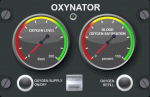
"OXYNATOR" is an oxygen-supply-simulation for addon-aircraft from A2A Simulations and simulate an bottle-based-oxygen-supply implemented as gauge with a lua-plugin. "OXYNATOR" was developed and tested with the C182 from A2A running Prepar3Dv4.5HF2. "OXYNATOR" was also tested with the Piper Comanche 250 from A2A running FSX. So it might be possible to run this gauge also with other A2A aircrafts or older version of Prepar3D or FSX. CAUTION: in order to run this gauge, you need the registered version of FSUIPC!!!
| Filename: | Oxynator.zip |
| License: | Check within download |
| Added: | 7th May 2020, 17:54:19 |
| Downloads: | 261 |
| Author: | Sascha Bauer |
| Size: | 486.84 KB |
| Category: Microsoft Train Simulator - Trains and Consist | |
| Baldwin C21-Narrow Gauge SN3 Consist |
|
File Description:
A complete consist of SN3 Narrow Gauge cars and sounds to help you get started with Captain Bazza's great new Baldwin D&RGW C21 #360 Engine and Tender...
These beautiful cars have been re-scaled for use in SN3...3 Standard gauge cars are also used to represent narrow gauge cars because of their size and the relationship to this new scale.
Cars have realistic coupler slack sounds on starting and stopping...and a steel on steel rolling sound with wagon noises while moving.
| Filename: | Baldwin_C21Narrow_Gauge_SN3_Consist.zip |
| License: | Freeware |
| Added: | 21st December 2002, 16:12:42 |
| Downloads: | 1,342 |
| Author: | Joe Russell |
| Size: | 5.32 MB |
| Category: Flight Simulator 2004 - Gauges | |
| Cockpit Commander |
|
File Description:
FS2004 Gauge: Cockpit Commander. This 28-push button powerhouse will greatly simplify life in a busy cockpit. It uses a numeric pad to enter frequencies into Comm 1 and C2, Nav 1 and N2, and the ADF. It will set headings, course, altitude, VS, and IAS airspeed functions on the AP. Gauge contains an efficient layout for ATC responses for use during hectic IFR approaches because they are located on gauge by autopilot. Has K-key for quick "000" entry. Panel or separate window install.
| Filename: | Cockpit_Commander.zip |
| License: | Freeware |
| Added: | 6th March 2006, 21:42:11 |
| Downloads: | 6,208 |
| Author: | Glenn Copeland |
| Size: | 155.39 KB |
| Category: Flight Simulator 2004 - Panels | |
| Grumman Albatross version 2.1 Panel |
|
Images related to this file:
File Description:
FS2004 Grumman Albatross HU-16 version 2.1
Greg Pepper Michael Verlin
Panel Package
Along with the modifications I've made to Greg Pepper's wonderful Albatross, I felt that a upgrade for the panel was overdue.
The changes consist of a revised set of primary flight instruments in keeping with the chronological period.
The airspeed gauge is part of Greg's gauge set that he provided with the aircraft.
The attitude gauge and turn indicator come from Jens Christensen's DC-6 gauge package.
The altimeter, gyro and vertical speed were designed by Scott Thomas from his Aero Commander 500 gauge package.
The Bendix King radios were designed by Pierre Fasseaux.
The KLN90 gps was designed by Ike Slack.
I've also included Rob Barendregt's Ground Handling package and the RKG Fuelstat gauge.
A few notes on using this panel:
Please read Pierre's instructions for proper operation of the autopilot before you fly.
The GPS will load the flight plan you specify from FS9.
There is a hot spot in the upper left corner of the radio stack that will close it when it isn't needed.
Michael Verlin
[email protected]
May 27, 2012
| Filename: | Grumman_Albatross_version_21_Panel.zip |
| License: | Freeware |
| Added: | 27th May 2012, 23:13:55 |
| Downloads: | 700 |
| Author: | Greg Pepper Michael Verlin |
| Size: | 9.61 MB |
| Category: Flight Simulator X - Gauges | |
| Head Up Display (HUD) |
|
Images related to this file:
File Description:
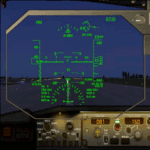
This gauge has been developed for FSX Flight Simulator SP1 or SP2. It
has also been tested with Microsoft Acceleration but compatibility is not guaranteed by the
author. The functionality of this gauge is based on the Rockwell Collins HGS which is
designed for the Bombardier CRJ 700. However, this gauge is not following the Rockwell
Collins design completely. It is created to be used as a generic HUD for all commercial
aircraft. It can be programmed to work on any FSX aircraft as a stand alone pop up
window. The gauge is available in the frame color of gray and beige.
For installation and configuration look at the documentation inside the zip file.
Credit goes out to: Kaj O. Hallstrom for his outstanding support on
documentation, pre beta and beta testing and improvement recommendations
for the gauge and control panel.
Credit also goes to Doug Dawson for his config.gau generating dsd-XML
interface.
| Filename: | Head_Up_Display_HUD.zip |
| License: | Freeware |
| Added: | 14th October 2011, 16:57:19 |
| Downloads: | 5,224 |
| Author: | Dietmar Loleit |
| Size: | 2.68 MB |
| Category: Flight Simulator 2004 - Gauges | |
| RwyInfo 2 Data Update |
|
File Description:
The purpose of this download is to allow you to update the data used by Ernie Alston's Runway Info gauge (RwyInfo version 2.0, available from http://www.fsbuild.com/rwyinfo/). This is an excellent little gauge that allows you to retrieve, through a gauge on your panel, information for all the runways at an airport (selected by ICAO code), and optionally automatically load frequency and course for an ILS into your NAV1 radio and MCP. However the usefulness of the gauge is somewhat restricted by the fact that it comes with a text database of 'info' to be displayed, and does not include any method for updating this info, other than by going into the text file and typing changes yourself (carefully, character by character). This is not really a practical method of getting the data to match your current FS configuration. What I have done is created a little utility that will create a new text database for the RwyInfo 2 gauge, based on your current scenery configuration.
| Filename: | RwyInfo_2_Data_Update.zip |
| License: | Freeware |
| Added: | 30th October 2011, 21:24:00 |
| Downloads: | 471 |
| Author: | Ken Leedham |
| Size: | 4.39 KB |
| Category: Flight Simulator 2002 - Scenery | |
| Arizona AI Traffic, Scenery & Tour |
|
File Description:
Enhancement of FS2002 default Arizona scenery
including addition of random AI traffic at 49
public and military airports, 3D scenery
objects, and new private airports to allow use
of Steve Jones' "Do Arizona!" tour (update included).
However, if you're looking for actual scheduled
traffic, this is not it.
| Filename: | Arizona_AI_Traffic_Scenery__Tour.zip |
| License: | Freeware, limited distribution |
| Added: | 9th October 2002, 15:46:23 |
| Downloads: | 1,160 |
| Author: | Dick Graham |
| Size: | 2.72 MB |
| Category: Flight Simulator 2004 - Scenery | |
| Edwards AFB |
|
File Description:
This file replaces the default FS2004 Edwards AFB and gives it a more realistic feel. The parking Spaces are in random order so if you have any AI aircraft that fly in and out of there they won't be crowded in one area of the flight line. Enjoy!
| Filename: | Edwards_AFB.zip |
| License: | Freeware |
| Added: | 21st December 2005, 19:04:48 |
| Downloads: | 5,116 |
| Author: | Shane Dresser |
| Size: | 753.78 KB |


© 2001-2026 AVSIM Online
All Rights Reserved
Privacy Policy |