
Where Flight Simulation Enthusiasts Gather from Around the World!
AVSIM Library - Search Results

| Category: Flight Simulator 2002 - Original Aircraft | |
| Project Open Sky 747-400 Passenger House Colors with PW Engines |

|
File Description:
The Project Open Sky 747-400 Passenger v3 with Pratt & Whitney Engines, in the Project Open Sky House Colors. Features include fully animated control surfaces, fully independent suspension, main gear steering, trim animation, opening passenger doors, opening cargo doors, dynamic flexing wings, animated tilting bogies, rolling wheels, animated thrust reversers, fully reflective textures ( each part has different degree of reflection based on material ), accurate flight dynamics ( accurate FDE with full profiles for wheels, tires, struts, leading/trailing struts, engine types ... Tested by real pilots.), newly re-defined individual part damage profiles, new FS2002 effects, accurate spoiler animation, detailed textures, full night lighting, visible landing lights from the cockpit, reflective cockpit windows, crash effects, transparent nav light lenses, newly re-defined individual part damage profiles. Model Designer C. Vincent Cho. Flight Dynamics Designer Warren C. Daniel. FDE Advisors Nick Peterson, Simon Ng Hin Tat. Tested by Project Open Sky Members. Master textures by C. Vincent Cho. Project Open Sky House Color Design by Bob Jones, Painted by Andrew J. McKeown.
| Filename: | Project_Open_Sky_747400_Passenger_House_Colors_wit.zip |
| License: | Check within download |
| Added: | 17th May 2003, 06:33:57 |
| Downloads: | 6,808 |
| Author: | Andrew J. McKeown / Project Open Sky |
| Size: | 7.9 MB |
| Category: Flight Simulator 2004 - Aircraft Repaints, Textures and Modifications | |
| Project Opensky Skyservice A330-300 |
|
File Description:
Features ( in depth ): Fully animated control surfaces Fully independent suspension Dynamic flexing wings that respond to turbulence ( Thanks to Fraser Turner ) Thrust reversers that open fully on idle reverser thrust. ( Thanks to Fraser Turner ) Drooping ailerons on elevators when engines are shut off ( Thanks to Bill Leaming ) Fully reflective textures ( each part has different degree of reflection based on material ) Accurate flight dynamics ( accurate FDE with full profiles for wheels, tires, struts, leading/trailing struts, engine types ... Tested by real pilots.) Detailed textures Interchanging 2D and 3D engine fans Full night lighting Visible landing lights from the cockpit Reflective cockpit windows Crash effects Transparent nav light lenses Virtual Cockpit with clickable buttons. Optimized for FS2004 ( VC version only ) Rain effects on windshield ( VC mode ) Wingview ( Wingview version only ) Dynamic Shine Opening Passenger and Cargo Doors ( fully independent ) Shift+E = left door Shift+T = right door, Shift+E+2 = Cargo doors More detail to landing gear and flaps More textures to add realism ( landing gear, leading edge flaps , fan blades ) Animated vent scoops under belly ( Shift+W) New lighting and condensation effects.
| Filename: | Project_Opensky_Skyservice_A330300.zip |
| License: | Freeware |
| Added: | 2nd December 2004, 14:14:08 |
| Downloads: | 1,440 |
| Author: | Shane Strong / Project Opensky |
| Size: | 5.35 MB |
| Category: Flight Simulator X - Original Aircraft | |
| TU-95MS Bear H |
|
Images related to this file:
File Description:
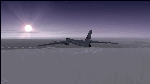
The Russian Air Force 37th Air Army operates the TU-95MS (TU-95M 55 Bear H) from the 182th TBAP unit based in Zavitinsk and 6213 BKHUAT based at Engels Air Base in the Moscow Region. It's use is primarily in maritime operations. She carries cruise missiles even if only used for submarine comms. Her initial design is a competitor with the B-52, but uses 4 Turboprop engines with 8 contra-rotating props. She can fly about as far as, but not as high as the B-52, nor can she fly as fast. She is often monitored off the coast of Alaska and easily met with F-22 Raptors every time. She is also often met by NATO fighters near European borders. Since 45,000 feet is about the highest she can cruise, most fighters can meet her. Her real danger is the cruise missiles which, if launched, have a range more than 1,500 nm and can pinpoint any directed target using GPS ground control. She is normally flown in formations of 3 or more, but sometimes only 2 are observed. She is not designed to fly fast over low terrain, like the B-52, but can do-so if necessary, and dangerously. The aircraft has not seen any major improvements or modifications since the cold war era, and several have crashed due to lack of maintenance. It is currently unknown how many are in service condition. Since much is unknown about this aircraft, yet enough is known to re-create an authentically working model, I have done-so here. Every bit of the aircraft.cfg file and associated .air file has been re-worked to match what known data can offer, and known aerodynamic formulas can equate. The most difficult aspect is the Turboprop aspect, since Turboprop engines do not work like jet engines in any way. Luckily for the simmer, there is no need to adjust feathering or anything like that would be necessary in a normal Turboprop because these engines are self-adjusting. Even though they meet the full known specs of the real engines, I have actually worked all the math to make them actual Turboprop engines (not pseudo-jet engines). That may sound exciting, but you must remember that she is a prop-driven aircraft, and not a jet. Even though you can fly her like a jet, the engines do not adjust like a jet. All aspects have been configured to meet realistic standards, including the MOI factors, weight/balance (including payload positions), gear locations, aircraft dimensions, light positions, engine smoke locations and operations, and weight. I did not simply throw this together, but have been perfecting her for many years. Original Modeler/Sounds: Vladimir Zhyhulskiy (2006); Panel: Marco Spada; Auto Smoke Effects: Richard Wisman; Aero/Engine Dynamics, effects, and details: Douglas E. Trapp, FS Flight Dynamics Engineer, [email protected], November 2018. The use of this model, and the configuration of such, is designed for free educational purposes, and protected by the Free Use Act: (https://www.law.cornell.edu/uscode/text/17/107). This model and/or aspects of such cannot be used for monetary purposes!
| Filename: | TU95MS_Bear_H.zip |
| License: | Freeware |
| Added: | 3rd November 2018, 23:28:41 |
| Downloads: | 750 |
| Author: | Douglas E. Trapp |
| Size: | 42.71 MB |
| Category: Flight Simulator X - Utilities | |
| FSX/FS2004 Flight Calculator Ver 1.6.5 |
|
Images related to this file:
File Description:
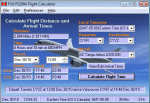
FS Flight Calculator will calculate distance and arrival times for both FSX and FS2004. The program has four input components, Local TimeZone, Departing Airport, Destination Airport and the Aircraft to be used for the flight. The program calculates the distance in nautical miles between two FlightSim Airports. It determines the flight length in hours based on the aircraft's speed and then calculates the Arrival time. If the flight time passes midnight the arrival day is incremented by a day. In addition this version takes into account the timezones of both departing and destination airports and calculates the timezone offset between them allowing display of the arrival in local time at the destination airport. The distances and times are based on point to point calculations and do not allow for taxi out, taxi in, start-up times etc. To compensate for this you can input a time period in minutes which is automatically added to the flight time to give a more accurate estimate of arrival times. This version also adds a Flight Summary Window to the main screen, the ability to create multi leg routes and a utility to create a new Aircraft.txt file. Freeware By Dave Westbury
| Filename: | FSXFS2004_Flight_Calculator_Ver_165.zip |
| License: | Freeware, limited distribution |
| Added: | 29th September 2011, 01:10:39 |
| Downloads: | 3,482 |
| Author: | Dave Westbury |
| Size: | 4.29 MB |
| Category: Flight Simulator X - Gauges | |
| Flypad Gauge V2.0 |
|
Images related to this file:
File Description:
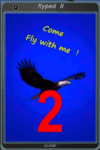
FSX, Flypad Gauge Version 2.0
This gauge has been developed on Win7 for FSX Flight Simulator SP2 or SP1.It should also work with Acceleration, but this is not guaranteed by the author. The gauge is a little extra addon based on the design of a smart phone and provides 9 different displays which are different from all of the standard gauge displays on a regular aircraft panel. It is mainly helpful for the user flying small propeller aircraft, and old timer aircraft.
However, the displays are as well attractive for sim pilots flying modern jet aircraft. Use it as if you just grabbed to your smart phone during a flight and check on the status of your aircraft, or how the terrain awareness situation looks like, how the AI traffic on the radar is, while you proceed with your flight plan. Enjoy the new design of a simple aircraft attitude display during an ILS approach. A new screen for LAT/LON coordination control and distance/bearing calculation has been added to this version in addition with a number of improvements.For credits look at the pdf documentation inside the zip file. By Dietmar Loleit
| Filename: | Flypad_Gauge_V20.zip |
| License: | Freeware |
| Added: | 2nd August 2014, 17:50:45 |
| Downloads: | 779 |
| Author: | Dietmar Loleit |
| Size: | 4 MB |
| Category: Flight Simulator 2002 - Utilities | |
| FlightSim Manager v1.0.4 |
|
File Description:
FlightSim Manager 1.0.4
FlightSim Manager is a great tool for managing addons to Microsoft Flight Simulator 2002. You may easily import your existing Aircraft, Panels, Sounds and Scenery. FlightSim Manager can also to install new aircraft and scenery directly from distribution ZIP files you may have downloaded using an Easy to use Wizard. While installing new aircraft/scenery FlightSim Manager will automatically copy the required files and repair it if necessary. You may even add or remove aircraft variants as you wish. The comprehensive Hangar management allows you to manage and configure your addons off your live FS2002 installation. You can mass add scenery, clean gauges and a fly from anywhere in the world using an map view. Create Texture Sets and install with ease. Automatically Save Screenshots from FS. Launch FlighSimulator in High Priority mode with Random Splash screen and more.
FSM can also diagnose Flight Simulator scenery, aircrafts, gauges, effects, alias used and such - with a repository with easy restore feature.
Please search on my name to make sure you are downloading the latest version of this program.
| Filename: | FlightSim_Manager_v104.zip |
| License: | Freeware |
| Added: | 27th June 2004, 21:57:04 |
| Downloads: | 2,167 |
| Author: | Rana Hossain |
| Size: | 3.3 MB |
| Category: Flight Simulator X - Miscellaneous Files | |
| FSX Metal GUI |
|
Images related to this file:
File Description:
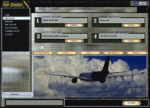
I designed this for myself to darken the default User Interface for 2 reasons. I have bad eyes that are sensitive to bright objects on the screen, and I like to fly the simulator in the evening hours with the lights turned off in the room. I hope you like my end result.
I also added 2 bonus features. Instead of hearing the Windows/Internet Explorer click sound when you mouse click on a menu item, you now will hear the "Fasten Seatbelts" sound effect. Be sure to back up the original sound "checkc" in case you find the new sound annoying. Secondly, I have included 4 optional Aircraft Viewer images that give the selected aircraft a more airborne look. I will make switching these simple by adding them to the Generic Mod Enabler(JSGME) that I will include in the download.
The look is created using Diamond Plate and Polished Aluminum textures, and modifying the buttons with some more color.
This is Freeware, and I am giving permission to anyone that wants to create their own and upload to any site they wish. I do not wish that you have to mention my name in any credits.
| Filename: | FSX_Metal_GUI.zip |
| License: | Freeware |
| Added: | 20th November 2011, 00:12:46 |
| Downloads: | 464 |
| Author: | Todd McCuistion |
| Size: | 7.83 MB |
| Category: Flight Simulator 2004 - Panels | |
| Installation of functional yokes to 2D Panels |
|
File Description:
Movable yokes for 2D panels (primarily for use at add-on aircraft). Noted that many aircraft 2D panels are missing the functional yokes. These yokes can be easily installed to aircraft panels, and opened with the button (marked 'Yoke' in yellow - installed to the panel}.
The yoke opens in the middle of the screen but can then be dragged to any most realistic panel location preferable not obscuring the essential instruments. The flight can then be saved with the yoke in this position. To see the instruments behind, the yoke can always be closed by pressing the yellow button.
The 18 included yokes are intended for the cockpits of: B-17, B-24, B-29, B-52, B707, B737, B747-777, B757-767, Beachcraft, Cessna, Concorde, DC8-9, Douglas props, Embraer, Learjet, MD11, Piper and VC10.
Note that the actual yokes could be different, custom made for the different airlines and different aircraft types, therefore some of these might just partially resemble the authentic yokes used in these types. All included yokes can also be used for any other aircraft panels as deemed appropriate. Finally Many Thanks to all the 'free download' aircraft panel designers, great jobs!
| Filename: | Installation_of_functional_yokes_to_2D_Panels.zip |
| License: | Freeware |
| Added: | 11th May 2022, 04:05:27 |
| Downloads: | 164 |
| Author: | Peter Bendl |
| Size: | 8.9 MB |
| Category: Flight Simulator 2004 - AFCAD Files | |
| London Stansted (EGSS) with parallel runways |
|
File Description:
This is a complete rework of London Stanstead (EGSS)for the default scenery. A fictional parallel 11000ft runway has been created giving runways 5L/23R and 5R/23L. Both runways are activated with full ILS. 05R/23L will be used for take off and 05L/23R is used for landing. The apron and gate area has also been completely reworked with designated gates for Ryanair and Easyjet as in real life. As always thanks to Lee Swordy for the fabulous AFCAD program. Enjoy!
| Filename: | London_Stansted_EGSS_with_parallel_runways.zip |
| License: | Freeware |
| Added: | 13th October 2005, 23:01:22 |
| Downloads: | 1,288 |
| Author: | David Brunning |
| Size: | 10.77 KB |
| Category: Civil Flight Simulators - Looking Glass Flight Unlimited 3 | |
| Big Red v2 |
|
File Description:
File Description:
Beech Baron "Big Red". This is a repaint / cockpit upgrade of Ansgar Avermeyer's new Baron model BaronAvm_V1_12.ZIP. The livery and the cockpit interior bitmaps are based entirely on photos kindly provided by Ed Weber of Lake Havasu City, Arizona--the owner and pilot of the real aircraft. Full aircraft, does not require any other files. This upload is based on my Big Red v1 and differs by having a modified panel and slightly altered textures, palette included.
| Filename: | Big_Red_v2.zip |
| License: | Freeware |
| Added: | 4th January 2006, 01:12:13 |
| Downloads: | 333 |
| Author: | Hans Petter Roverud |
| Size: | 6.54 MB |


© 2001-2026 AVSIM Online
All Rights Reserved
Privacy Policy |