
Where Flight Simulation Enthusiasts Gather from Around the World!
AVSIM Library - Search Results

| Category: Flight Simulator X - AFCAD Files | |
| Murtala Muhammed International Airport, Lagos (DNMM) Version 2 |

|
File Description:
Hi again fellow simmers....
This is an major update to my previous AFCAD on this famous West African airport.
Here are all its features:
- ILS offset fixed as well as some smaller details, like the fact that rwys 1L/1R are
permanently closed to take-off and landings.
- Corrected runway lightings/markings.
- DME on Rwy 19R now working.
- Right Hand Pattern Approach/Take-off only.
- Added correct amount of gates at the International Terminal with parking codes for airlines
that actually fly to DNMM (British Airways, Air France, KLM, Alitalia, Virgin Atlantic,
Virgin Nigeria, Sabena, Swiss, Afriqiya, Emirates, Qatar Airways, South African Airways and
more).
- Domestic Terminal fully laid out and functional with domestic airline parkinting codes
(Albarka, Chanchangi, ADC, Belleview, Kabo Air, etc).
- Cargo parking fully functional.
- Military parking (C130, MiG-21, MiG-29, Alpha Jet, Jaguar, Tornado).
To Install:
1. DELETE THE PREVIOUS 'AF2_DNMM.BGL' file from the 'Flight Simulator X/Addon
Scenery/scenery' folder.
2. Extract all files from the downloaded '.zip' file.
3. Now COPY the NEW 'AF2_DNMM.BGL' file and place it into 'Flight Simulator X/Addon
Scenery/scenery' folder.
4. Start up the Flight sim and the changes will be present.
READ THIS !!!
I've tried to the best of my ability to produce and much detail as possible but i'm sure
something has been left out (there always is).
I've used the latest Jeppesen charts and other materials at my disposal and even my own
eyesight at great risk to myself (yep, even pilots are restricted from certain places at
airports)
Also, lots of airports have changed drasticly on the past couple years like Abuja airport
(DNAA) and I would love to do justice to it as its fast becoming a major hub in the region. I
would be willing to join forces to with anyone that is good with AFCAD on this project.
Enjoy!
[email protected]
13:44 30/07/2007
| Filename: | Murtala_Muhammed_International_Airport_Lagos_DNMM_.zip |
| License: | Freeware |
| Added: | 30th July 2007, 19:44:57 |
| Downloads: | 3,283 |
| Author: | usman saleh |
| Size: | 7.38 MB |
| Category: Flight Simulator 2004 - Scenery | |
| EPGO Goraszka 2010 - The Airshow Challenge |
|
Images related to this file:
File Description:
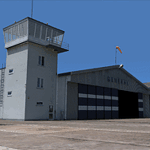
EPGO Goraszka 2010 - The Airshow Challenge is a freeware, extremely detailed scenery of a general aviation airport located 12nm (20km) south-east of Warsaw downtown and Warsaw Frederic Chopin International Airport, Poland. EPGO Goraszka airfield was built in 1994 and currently belongs to a General Aviation company, which offers aero-taxi flights, air transport and special flights (air photo, patrol) and airport services. The airport has a 800m-long runway and a lightened helipad, which can be used by helicopters of up to 5700kg weight. General Aviation's fleet includes Antonov AN-2, PZL-104 Wilga 80, Bell 407 and 427. Since 1996 the International Air Picnic Goraszka is organized every year by the "Polish Eagles" foundation created on initiative of Zbigniew Niemczycki.
The scenery is equipped with an automatic installer. Currently we support a safe, manual way of adding new sceneries to the Scenery Library in Flight Simulator. This is just one thing users need to do for themselves. Detailed instructions will be given during the installation process.
Scenery features:
-Compatible with FS2004 only
-Highest level of accuracy in geographic positioning, modeling and texturing
-Incredibly high quality photoreal textures of all airport buildings. Textures are based on over 300 real world -photographs made for this project.
-Hundreds of 3D objects like tents, exhibitions, airport buildings and surrounding buildings
-Life in the airport: people and cars will enhance your feelings
-AI traffic, animations and effects, designed specifically for FS2004
-Some buildings include interior (control tower)
-High quality aerial photos of the airport surroundings (5 seasons + night) with autogen and water mask
-Ultra high quality aerial photos of the airport (with seasons)
-Plain airport scenery with no airshow objects available too (details in the manual)
-Product includes manual and airport charts in PDF format
EPGO Goraszka 2010 - The Airshow Challenge scenery is compatible with almost every payware add-on, including Ultimate Terrain Eastern Europe and Warsaw Photo Scenery by Simdesign.
Scenery by Drzewiecki Design - www.drzewiecki-design.net
| Filename: | EPGO_Goraszka_2010__The_Airshow_Challenge.zip |
| License: | Freeware |
| Added: | 14th July 2010, 09:49:07 |
| Downloads: | 3,755 |
| Author: | Drzewiecki Design - Stanislaw Drzewiecki, Jakub Paczek |
| Size: | 132.03 MB |
| Category: Prepar3D V1-4 - Aircraft Repaints, Textures and Modifications | |
| China Airlines 1998 AI Package |
|
File Description:
China Airlines had almost completely repainted the fleet by 1998, in these flightplans there is only 1 A300s left in the old livery. China Airlines rushed the repaint of their fleet as the Taiwanese flag on the old colors was not allowed in HKG after the 1997 hand over from England making Hong Kong a Chinese Territory. As such, the old colors were gone by 1998. The 737-400s were still very much active, but were very near the end of their lives with China Airlines retired by 1999 or so. The 737-400s do some regional international routes, and also high frequency KHH-TSA flights and a few TPE-KHH flights. Only 2 747-200s left, mostly flying to HND, and the A300-600R is the backbone of the fleet with a handful of A300B4s still flying. The 747SPs all were at Mandarin by 1998. At this time, and Mandarin aircraft often subbed for China Airlines 747-400s and MD-11s using the "DYNASTY" callsign. I have included an MD-11 in Mandarin colors operating China Airlines flights, I recommend you make a separate aircraft.cfg entry for the Mandarin MD-11 aircraft with the "DYNASTY" callsign and "CAL" parking code for realism. Repaints by Ranmori Scythe for the FAIB 737-400, 747-200, 747-400, FSPX MD-11, and TFS A300B4 and A300-600R are included. As a bonus, textures are also included for the FAIB 737-800(which entered the fleet in 1999) and the old colors on the FAIB 747-400(discontinued by 1997). Feel free to use the 737-400 instead of the 737-800 if you wish. All repaints were done by the very talented Ranmori Scythe and flightplans were done by the not-so-talented Chasen Richardson. Requires mandarin_airlines_1998.zip for the Mandarin textures. Part of the 1998 Flight Simulator Project. Follow us on Facebook at facebook.com/flightsim98 and on instagram as @bayviationsim. For more Retro AI, check out the forums at: http://retroai.proboards.com/
| Filename: | China_Airlines_1998_AI_Package.zip |
| License: | Freeware, limited distribution |
| Added: | 21st November 2019, 19:18:09 |
| Downloads: | 296 |
| Author: | Ranmori Scythe, Chasen Richardson/Bayviation |
| Size: | 13.92 MB |
| Category: Flight Simulator X - Aircraft Repaints, Textures and Modifications | |
| Boeing 747-8i Delta Northwest |
|
File Description:
FSX Boeing 747-8i Delta Northwest with advanced VC by Alejandro Rojas Lucena and VC Texture Upgrade by Enrique Cornejo. This gives the b747 a payware Virtual Cockpit look! It even has a pilot jacket hanged in the rear of the cockpit (besides the right jumpseat).
The panel.cfg and the aircraft.cfg have been assembled and edited by the Flightsim Workshop Team. Now you can pop up "My icons" window in the Virtual Cockpit to easily reach the following windows: GPS, avionics, map, ATC, Climb/Radio Altimeter/Spoiler switch, auto-break switch, throttle quadrant, clock, descentometer, kneeboard and overhead panel.
The aircraft has new engine views (from both wings) and new Virtual Cockpit interior views from the left, right and central jump seats.
The Delta Northwest texture is wonderful and it has a unique paintscheme by Mcphat Studios with a repaint by Enrique Cornejo which also includes details such as some stains caused by humidity and other details just like a real aircraft.
This aircraft uses the Project Opensky FSX Boeing B747-800 Model OSX748V4_GENX(MDL), and includes the gauge window Posky Utility to view the main stairs, ground cargo servicing, etc. The engine sounds are edited like the real ones with cockpit ambient, so you can enjoy a pleasant flight. The Flight Management Computer (FMC) is fixed and looks like a payware instrument. The VC includes FMC, Primary Flight Display (PFD) and Multi-Function Display (MDF) displayed in the correct size.
The virtual cockpit also has an Engine-Indicating and Crew-Alerting System also known as EICAS, Ground Proximity Warning System (GPWS), working wipers, cabin lights, fire suppression, avionics switch, fuel crossfeed, and you can identify those intruments in the overhead panel because they are bordered with color lines. You can also find landing lights switches, taxi light switch, engine generators, APU generator, battery switch, starter switches, de-ice switch, general lights switches which are a great work of Alejandro. So now the whole cockpit and texture upgrade with all these improvements looks better than a payware version. The clock numbers are now in orange which makes them look better and easily recognizable.
Assembled and edited for FSX by Enrique Cornejo.
| Filename: | Boeing_7478i_Delta_Northwest.zip |
| License: | Freeware |
| Added: | 13th January 2013, 01:02:31 |
| Downloads: | 990 |
| Author: | Enrique Cornejo |
| Size: | 78.26 MB |
| Category: Flight Simulator X - Aircraft Repaints, Textures and Modifications | |
| Boeing 747-8i Delta Northwest |
|
File Description:
FSX Boeing 747-8i Delta Northwest with advanced VC by Alejandro Rojas Lucena and VC Texture Upgrade by Enrique Cornejo. This gives the b747 a payware Virtual Cockpit look! It even has a pilot jacket hanged in the rear of the cockpit (besides the right jumpseat).
The panel.cfg and the aircraft.cfg have been assembled and edited by the Flightsim Workshop Team. Now you can pop up "My icons" window in the Virtual Cockpit to easily reach the following windows: GPS, avionics, map, ATC, Climb/Radio Altimeter/Spoiler switch, auto-break switch, throttle quadrant, clock, descentometer, kneeboard and overhead panel.
The aircraft has new engine views (from both wings) and new Virtual Cockpit interior views from the left, right and central jump seats.
The Delta Northwest texture is wonderful and it has a unique paintscheme by Mcphat Studios with a repaint by Enrique Cornejo which also includes details such as some stains caused by humidity and other details just like a real aircraft.
This aircraft uses the Project Opensky FSX Boeing B747-800 Model OSX748V4_GENX(MDL), and includes the gauge window Posky Utility to view the main stairs, ground cargo servicing, etc. The engine sounds are edited like the real ones with cockpit ambient, so you can enjoy a pleasant flight. The Flight Management Computer (FMC) is fixed and looks like a payware instrument. The VC includes FMC, Primary Flight Display (PFD) and Multi-Function Display (MDF) displayed in the correct size.
The virtual cockpit also has an Engine-Indicating and Crew-Alerting System also known as EICAS, Ground Proximity Warning System (GPWS), working wipers, cabin lights, fire suppression, avionics switch, fuel crossfeed, and you can identify those intruments in the overhead panel because they are bordered with color lines. You can also find landing lights switches, taxi light switch, engine generators, APU generator, battery switch, starter switches, de-ice switch, general lights switches which are a great work of Alejandro. So now the whole cockpit and texture upgrade with all these improvements looks better than a payware version. The clock numbers are now in orange which makes them look better and easily recognizable.
Assembled and edited for FSX by Enrique Cornejo.
| Filename: | Boeing_7478i_Delta_Northwest.zip |
| License: | Freeware |
| Added: | 13th January 2013, 01:24:18 |
| Downloads: | 1,961 |
| Author: | Enrique Cornejo |
| Size: | 78.71 MB |
| Category: Prepar3D V1-4 - Aircraft Repaints, Textures and Modifications | |
| Korean Air 1998 AI Package |
|
File Description:
Korean Air was one of only 2 airlines doing domestic Korean flights in 1998, with Korean Air having a much larger market share than Asiana and extensively flying the A300s on many domestic routes. By 1998, Korean Air had converted(to a freighter) or retired most of the 747-200s, 747-300s, MD-11s and A300B4s, but they were still in the fleet in very small numbers. The A330-300 and 777-200 were also starting to join the fleet very slowly with a few examples of each. The MD-80s and Fokker 100s were being used in decent numbers on both domestic flights and flights to Japan and China. The 747SPs were active but only picked up flying as spare airplanes, so they mostly sit in GMP but during the week do GMP-SFO-DEN, GMP-NRT-LAX-GMP, and GMP-HKG flights taken from 747-400s. As is the case with some of these plans, to upkeep 100% of the OAG flight schedule using the limitations of AI in flight simulator, there are a few extra planes(4x MD-80 and 1x Fokker 100) in these plans with fake registration numbers. The user may decided if they'd rather see all real life flights or the real amount of aircraft. Ranmori has painted a 727-200 as a bonus, and I gave these extra 4 MD-80s registration numbers from 727s and segregated them from the flightplans in case you wish to use the 727, but in real life it was retired in late 1996. Note that these plans and all 1998 plans use the Seoul-Gimpo airport(GMP/RKSS) as Incheon(ICN/RKSI) did not open until 2001. Textures by Ranmori Scythe for the AIA MD-80, Fokker 100, FAIB 747-200, 747-300, 747-400, 747SP FSPX 777-200, A330-300, MD-11, TFS A300B4 and A300-600R along with the AIA 727-200 bonus included. Flightplans by Chasen Richardson. Part of the 1998 Flight Simulator Project. Follow us on Facebook at facebook.com/flightsim98 and on instagram as @bayviationsim. For more Retro AI, check out the forums at: http://retroai.proboards.com/
| Filename: | Korean_Air_1998_AI_Package.zip |
| License: | Freeware, limited distribution |
| Added: | 21st November 2019, 19:18:41 |
| Downloads: | 282 |
| Author: | Ranmori Scythe, Chasen Richardson/Bayviation |
| Size: | 32.16 MB |
| Category: Flight Simulator 2004 - Original Aircraft | |
| Caproni-Vizzola C-22J Ventura |
|
Images related to this file:
File Description:
The Machine:
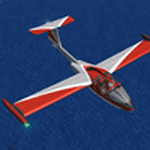
A fully aerobatic, very-light Jet that compares to the Bede BD-5J, but heavier and sporting two instead of one TRS-18 turbojets. Up to Mach 0.47 and 650 NM of range, with a service ceiling of 25000ft. A low stall speed (for a jet) makes the aircraft good for short field operations.
Certified for VFR operations only, yet includes a good avionics suite.
This is a "Classic" aircraft featuring "Steam" gauges and radios. Yet, controls and systems are easy to operate.
The History:
The C-22J is the last aircraft to be adorned with the legendary Caproni name. Originally known as "Caproncino", then marketed as "Ventura". A very-light jet developed in the 1980s as a military trainer, surveillance and reconnaissance aircraft. Powered by two TRS-18 turbojets fed from a dorsal NACA intake, the aircraft reached Mach 0.47 and was fully aerobatic. The airframe shows its origin in a glider design, the Caproni A-21 Calif. After the merger with SIAI Marchetti, the project was cancelled in favor of the SF-260.
The Simulation - 3D Model:
This aircraft ships with a 3-D cockpit, that incorporates realistic night lighting, in the form of a dim dome flood light, backlit gauges and luminous digital displays. The flight crew of 2 is affected by your input in the payloads menu of Flight Simulator, allowing to choose between male, female or empty seats. The Copilot Figure can be hidden with a quick click in the internal 3D view as well.
The Simulation - Realism:
This aircraft has been tuned with the invaluable help of Engineer Carlo Ferrarin, who created the real aircraft. Unique and one-off documentation has been kindly provided, and used extensively, for the creation of this product!
Just like the real aircraft, the systems are simple and of easy operation. Engines can be started with the press of a button. Systems modelling allows the following of real-world checklists as closely as Flight Simulator allows. An in-sim checklist is included, as well as a full flight manual.
The flight model is tuned with advanced aerospace techniques, resulting in a highly realistic aircraft, yet, it is very pleasant to fly, both during aerobatic displays or "A to B" cruising.
Highlights:
- High-Resolution 3D cockpit
- Full Documentation
- Aerobatic
FS-2004 Version comes with limited support and is free due to platform limitations. See Readme. FS-X & P3Dv4 (64-bit) versions are commercial products.
| Filename: | CaproniVizzola_C22J_Ventura.zip |
| License: | Freeware, limited distribution |
| Added: | 7th November 2020, 18:31:45 |
| Downloads: | 677 |
| Author: | Mario Noriega |
| Size: | 157.85 MB |
| Category: Prepar3D V1-4 - Aircraft Repaints, Textures and Modifications | |
| VARIG 1998 |
|
File Description:
In 1998, VARIG was still a huge legacy airline, but routes and frequencies were starting to be cut, which continued into the 2000s until their 2006 demise. MD-11s, DC-10-30s, and 747-300s mostly served long-haul routes such as NGO, NRT, LAX, MIA, JFK, MAD, BCN, LHR, CPH, ect, while the 767s did longer South America routes as well as CUN/MEX/JFK/MCO/MIA as well as flights to Spain and Portugal. VARIG's "around the world" GIG-GRU-JNB-BKK-HKG-BKK-JNB-CPT-GRU-GIG flight was flown with an MD-11 at the time, and I have assigned it to the "World Cup" livery MD-11, which means you will not see the aircraft much in Brazil but it will pop up abroad. VARIG flew many "tag on" flights, like LIM-LAX-NRT/NGO, LHR-CPH, MAD-BCN, MIA-MCO, ect, and there are many, many GIG-GRU and GRU-GIG flights that were part of international routes with no ticket sales in between. Between 0500 and 0700, there are many widebodies making this short flight. The 737-300s flew all over Brazil and to some South American countries. Rio Sul, who did the flights to CGH and SDU, is not included was released seperately on Avsim as "rio_sul_1998.zip". Though VARIG livery 737-300s flew on behalf of Rio Sul, Nordeste and PLUNA, those flights are not included and are included in those respective airlines. An MD-11 and a 737-300 were painted in special colors to celebrate the World Cup, and a 767-200 wore a special Star Alliance livery. The 747-300 in the Star Alliance colors only had them applied to one side of the aircraft and never flew revenue service in that livery, so it is not included. The rest of the fleet wore a mix of the 1997 introduced livery and the 1980s blue and white colors with the silver belly. The entire fleet on the FAIB 737-200, 737-300, 747-300, 767-200 and 767-300,and FSPX MD-11 by Raphael Rodrigues is included. The DC-10-30s on the AIM model by Jason King are on Avsim as "aim_dc1030_varig_pp-vmb_313514.zip" and "aim_dc1030_varig_oldcolors_307373.zip". Flightplans by Chasen Richardson. Part of the 1998 Flight Simulator Project. Follow us on Facebook at facebook.com/flightsim98 and on instagram as @bayviationsim. For more Retro AI, check out the forums at: http://retroai.proboards.com/
| Filename: | VARIG_1998.zip |
| License: | Freeware, limited distribution |
| Added: | 1st January 2020, 20:13:56 |
| Downloads: | 620 |
| Author: | Raphael Rodrigues, Chasen Richardson\ Bayviation |
| Size: | 30.59 MB |
| Category: Prepar3D V1-4 - AI Flight Plans | |
| California Pacific 2019 AI Flightplans |
|
File Description:
California Pacific was the pet-project of eccentric millionaire Ted Vallas who was determined to overcome a near-decade of obstacles to bring scheduled jet service to the Northern San Deigo\Carlsbad area. The airline was founded in 2009, but ran into a laundry list of problems over the years. Initially, the airline had acquired an EMB-170 which was painted in the airlines own colors and kept at the airlines Carlsbad base(CLD\KCRQ). The initial plan called for 3-class service to destinations including SJC, OAK, PHX, SMF, and even SJD. However, a US government shut down ill-timed during the scheduled proving runs and certification process for the airline delayed the process indefinitely. After months of waiting, and paying for staff and the aircraft to the dismay of investors, the E170 was returned and used as a cooperate shuttle in Arizona in full California Pacific colors, though it never would return. The founder did not give up, however, and years later was able to circumvent the certification process by purchasing the operating certificate of ADI's Essential Air Service operation which connected Watertown and Pierre, South Dakota with Denver with a pair of EMB-145s. One of the EMB-145s was painted in full California Pacific colors and used to launch scheduled flights, this time initially to SJC, RNO and LAS with AZA instead of PHX later being added. However, the other EMB-145 was damaged after being struck by ground equipment in Pierre, SD and was grounded for the rest of the airline's life, causing all EAS flights to cancel soon after California Pacific had acquired the flying. The airline was stretched so thin when service started in November 2018 that the departure of a pilot in January 2019 shut the airline down, after just 2 months in operation. Flights were for months considered "suspended", with airport signage being retained at the destinations, but soon after the website was taken down and all hopes of re-starting the company seemed abandoned. These flights are based on an early 2019 schedule I found online, but the EAS flights were not listed. As the flights did not operate anyway for the most part as California Pacific, I elected not to include them. The schedule was changed several times in the airline's short history as it struggled to maintain an aggressive 30 minute ground-time between flights with just 1 aircraft. The repaint for the AIM ERJ-145 may be found here: https://fsai-repaints.com/?p=1095
| Filename: | California_Pacific_2019_AI_Flightplans.zip |
| License: | Freeware, limited distribution |
| Added: | 9th December 2019, 18:02:01 |
| Downloads: | 61 |
| Author: | Chasen Richardson\Bayviation |
| Size: | 14.58 KB |
| Category: Flight Simulator 2004 - Utilities | |
| F1 View Module |
|
File Description:
The F1_View module is a very basic tool that implements mouse-based zooming, panning, and eyepoint adjustments, including the ability to move your eyepoint beyond the limits imposed by Flight Simulator (this feature is good to stroll about virtual cabins of larger aircraft).
This module requires a wheel-mouse (a center wheel that also acts as a center mouse button).
/QUOTE
This application is provided for free by Flight1 and can even be placed on your own website for download providing you follow the guide lines set down in the agreement.
For those who are interested, you can find it HERE http://atr.flight1.net/ , look under:
Quick Links to our ATR Project Areas...
• Accessory Downloads
which can be found about half way down the page you are initially viewing.
and a bit more info from the readme:
Modes of Operation:
Rolling the mouse wheel forward means rolling the wheel away from the user.
Rolling the mouse wheel backward means rolling the wheel towards the user.
Virtual-cockpit:
Wheel forward moves you forward and wheel backward moves you back.
CTRL+forward moves right and CTRL+backward moves left.
SHIFT+forward moves up and SHIFT+backward moves down.
CTRL+SHIFT+forward zooms out and CTRL+SHIFT+backward zooms in.
While in Pan Mode (when mouse wheel is pressed and held down) inside the Virtual Cockpit:
Moving the mouse to the left rotates the view to the left.
Moving the mouse to the right rotates the view to the right.
Moving the mouse forward, away from the user, rotates the view up.
Moving the mouse backward, towards the user, rotates the view down.
Cockpit view:
CTRL+SHIFT+forward zooms the exterior view out and CTRL+SHIFT+backward zooms it in.
Tower view:
CTRL+SHIFT+forward zooms the view out and CTRL+SHIFT+backward zooms it in.
Spot view:
Wheel forward moves the view distance forward, and wheel backward moves the distance back.
CTRL+forward rotates the eyepoint right, and CTRL+backward rotates the eyepoint left.
SHIFT+forward moves the eyepoint down, and SHIFT+backward moves the eyepoint up.
CTRL+SHIFT+forward zooms out and CTRL+SHIFT+backward zooms in.
Note: View distance is different from view zoom.
While in Pan Mode (when mouse wheel is pressed and held down) in spot view:
Mouse left/right rotates the eyepoint right/left.
Mouse up/down moves the eyepoint up/down.
Top-down view:
CTRL+SHIFT+forward moves the view distance out and CTRL+SHIFT+backward moves it in.
Note: In this mode you can move your view all the way to outer space and back in.
| Filename: | F1_View_Module.zip |
| License: | Freeware |
| Added: | 8th May 2005, 04:27:45 |
| Downloads: | 15,464 |
| Author: | Flight1 |
| Size: | 725.3 KB |


© 2001-2026 AVSIM Online
All Rights Reserved
Privacy Policy |