
Where Flight Simulation Enthusiasts Gather from Around the World!
AVSIM Library - Search Results

| Category: Flight Simulator X - Miscellaneous Files | |
| 737NG Normal Procedures Non-APU version |

|
Images related to this file:
File Description:
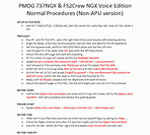
After some input and ideas from a fellow FS2Crew pilot here is a non-APU version of my flow and checklist to even closer mimic real world OPs the way many big airlines operate in real life every day at big airports around the world where the use of APU is limited to only a short period of time a couple of minutes before engine start. I also (don't I always ;-)) did some other changes and what I think improvements since my last version so give it a try and see what you think! About fitting the list on 2 A4 pages when printing it from WordPad please set all your margins to 25 mm in WordPad and uncheck the option to print the page numbers. This time I will not ask the AVSIM Library Managers to replace my old version with this one since some of you might still want the version where the APU is used depending on what kind of flights you do and to what kind of airports. Instead this will be uploaded as a new and separate version.
A flow/checklist for flying PMDG's 737NGX with FS2Crew Voice Edition. Did this mainly for my own use meaning the flow/checklist is adjusted for how I do my flying and with the addons I use like Aerosoft AES for example. Please also be aware this is not the kind of flow/checklist that includes all things you need to perform during a normal flight but instead you are expected to already have a general knowledge of both the NGX and FS2Crew. However I thought others might be helped by this too both newbies to get you going with the "flow" using FS2Crew but also for the more experienced users as a simple to print out and use memory note. It's also easy for you to change whatever you like to suit your own needs better since I created it in common rtf format using the standard Wordpad Windows application. I deliberately made it as compressed as possible leaving out stuff like all the answers to the checklists etc so it would fit on a single A4 sheet being easy to print and maybe also laminate if you like. Hope you'll enjoy it!
| Filename: | 737NG_Normal_Procedures_NonAPU_version.zip |
| License: | Freeware |
| Added: | 22nd June 2012, 03:34:37 |
| Downloads: | 1,085 |
| Author: | Richard Asberg (with input from Peter Wolf) |
| Size: | 6.36 KB |
| Category: Flight Simulator 2004 - Scenery | |
| Kotzebue PAOT on the northwestern coast of Alaska |
|
Images related to this file:
File Description:
There are four main northwestern Alaska towns which have good airports and are serviced by Alaska Airlines. From these airports local flights connect to nearby villages, "nearby" in Alaska meaning up to 150 miles away. The northernmost is Barrow. Southwest of Barrow is Kotzebue, then Nome, and the furthest south is Bethel. The town of Kotzbue is north of the Bering Strait on the northwestern coast, 320 miles southwest of Barrow. The population is just over 3,000 people. The location was for a long time a base for trading in furs, with three rivers emptying into the sea and providing routes into the interior land and villages; a meeting place between hunters and traders from Russia and elsewhere. The Kotzebue airport is called the Ralph Wien Memorial and has two runways. The modern one is aligned 08-26 and is 5,880 feet of 150 feet wide asphalt built across a shallow lagoon, with an ILS on 08 and PAPI on both ends. The second and older runway is originally military and gravel, aligned 17-35 and 3,786 feet long and used (wind allowing) by the GA planes that park alongside the runway. The prevalent wind is from the west; when the wind is from the east it is generally relatively feeble and with a much lower cloud base, possibly to the ground, hence the need for an ILS. All AI aircraft in FS9 much prefer to use a runway that has an ILS and so will continue to use 08-26 even if the wind is from the south until it reaches 30+ knots, even if they are a Cessna 150 flying VFR. So for AI realism in FS9 a northern or southern wind needs to be a strong one so that the runway is actually used. However, as Alaska Airlines, Northern Air Cargo, and Everts Air also fly to Kotzebue and can only use the east-west runway (as less than 4,000 feet of asphalt would be seriously inconvenient for a Boing 737 or DC6) it is necessary to have the northern or southern wind UNDER 30 knots at the times when they are landing or taking off. Your choice. I suppose a permanent strong wind from the west would be the most realistic on a daily basis, deterring all planes from ever using 17-35. The AI will develop along with further scenery additions in the neighbourhood.
| Filename: | Kotzebue_PAOT_on_the_northwestern_coast_of_Alaska.zip |
| License: | Freeware, limited distribution |
| Added: | 2nd August 2016, 16:47:52 |
| Downloads: | 463 |
| Author: | Roger Wensley |
| Size: | 19.32 MB |
| Category: Flight Simulator 2004 - Scenery | |
| Nome PAOM on the northwestern coast of Alaska |
|
Images related to this file:
File Description:
There are four main northwestern Alaska towns which have good airports and are serviced by Alaska Airlines. From these airports local flights connect to nearby villages, "nearby" in Alaska meaning up to 200 miles away. The northernmost is Barrow. Southwest of Barrow is Kotzebue, then Nome, and the furthest south is Bethel. The town of Nome is south of the Bering Strait on the southern coast of the Seward Peninsula, around 185 miles south of Kotzebue, with a population of about 3,800. It is the town that led to the creation of the most famous dogsledge race in the world, the Iditarod, which is based on the delivery to Nome of diphtheria serum during the blizzard conditions of the winter of 1925. The Nome airport (it currently has no other name) was originally built as the last of the refuelling airfields for planes being ferried to Russia during WW2. It has two runways, aligned 09-27 and 02-20 in FS9 (the wandering magnetic north has recently renamed the magnetic headings) and both of them around 6,000 feet with an ILS on 27. There is a modern airport layout diagram included showing taxiway names etc. Alaska Airlines, ERA, and Bering Air (which is headquartered in Nome), along with the shared cargo terminal for Northern Air Cargo and Everts Air, are all on the southern apron. The northern apron is mainly for GA, along with maintenance facilities, a garage building that also houses a weather bureau, and at the far northern end of runway 02-20 an apron and hanger for the Alaska Air National Guard. All AI aircraft in FS9 much prefer to use a runway that has an ILS and so will continue to use 09-27 even if the wind is from the north or south, right up until it reaches 30+ knots, so for AI realism in FS9 a permanent wind from the west would be the most realistic on a daily basis. There is also a small gravel strip just north of the town and this is included (94Z), as are some old line-of-sight radio communication reflectors on the hills above the town. There is a note about making adjustments to Ultimate Terrain Alaska-Canada regarding both realistic road lighting and also auto-generation.
| Filename: | Nome_PAOM_on_the_northwestern_coast_of_Alaska.zip |
| License: | Freeware, limited distribution |
| Added: | 18th October 2016, 02:38:42 |
| Downloads: | 488 |
| Author: | Roger Wensley |
| Size: | 22.65 MB |
| Category: Prepar3D V1-4 - Utilities | |
| Random Flight Database |
|
Images related to this file:
File Description:
Random Flight Database is a program that will allow you, depending on one or more criteria, to choose a flight corresponding to existing flights.
These flights are extracted from a database of 1,262,465 lines, available in the program. This database is updated in summer 2019.
You also have a user base that will allow you to share your data files (.XLS) between users to add even more choices.
Part of it is also dedicated to importing data from the website: https://developer.flightstats.com/
You must create an account on this site in order to extract (limited to about 6 airports in total for 1 account)
This import is made 7 days from the moment you make this import.
Once this import is done, you can import it directly into your user database and / or export it in XLS format for sharing with other users.
Files are available for free on the org.
The criteria for choosing your flights are:
- Airlines
- Departure airport
- Arrival Airport
- Type of plane
- Day of the week
- Multiple generation (generates a number of flights determined by the user)
- flight time (choice of a flight time interval, minimum flight time
| Filename: | Random_Flight_Database.zip |
| License: | Freeware |
| Added: | 29th August 2019, 16:11:49 |
| Downloads: | 129 |
| Author: | mikoulprostgrandprix |
| Size: | 79.9 MB |
| Category: Prepar3D V1-4 - Utilities | |
| Random Flight Database 2.1.9 |
|
File Description:
Random Flight Database is a program that will allow you, depending on one or more criteria, to choose a flight corresponding to existing flights.
These flights are extracted from a database of 1,262,465 lines, available in the program. This database is updated in summer 2019.
You also have a user base that will allow you to share your data files (.XLS) between users to add even more choices.
Part of it is also dedicated to importing data from the website: https://developer.flightstats.com/
You must create an account on this site in order to extract (limited to about 6 airports in total for 1 account)
This import is made 7 days from the moment you make this import.
Once this import is done, you can import it directly into your user database and / or export it in XLS format for sharing with other users.
Files are available for free on the org.
The criteria for choosing your flights are:
- Airlines
- Departure airport
- Arrival Airport
- Type of plane
- Day of the week
- Multiple generation (generates a number of flights determined by the user)
- flight time (choice of a flight time interval, minimum flight time
| Filename: | Random_Flight_Database_219.zip |
| License: | Freeware |
| Added: | 2nd September 2019, 22:25:07 |
| Downloads: | 86 |
| Author: | mikoulprostgrandprix |
| Size: | 80.46 MB |
| Category: Flight Simulator 2004 - Aircraft Repaints, Textures and Modifications | |
| Air Iceland/Flugfelag Islands Bombardier Dash-8-106 (TF-JMB) |
|
Images related to this file:
File Description:
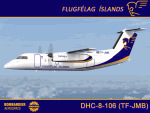
Here's another Dash-8 especially for the Icelandic simmers out there or those who prefer the challenge of simming the skies and airports of the northernmost latitudes. This is one of two (2) Dash 8-106's flown by Air Iceland (Icelandic: Flugfelag Islands) and bears registration TF-JMB. Flugfelag Islands, a subsidiary of Icelandair Group, is a regional airline with bases at Reykjavik Airport and Akureyri Airport. It operates scheduled service to destinations in Iceland and Greenland, as well as the Faroe Islands. I want to give due credit to and thank Elmar Voigt, who inspired this project and repaint and worked with me to get every detail of it as realistic as possible. Some of those details include the text 'flugfelag.is' on the bottom of the fuselage (just like the real aircraft) and a tug painted in Air Iceland/Flugfelag Islands colors with their logo on the doors. All repainted textures in this package are 32-bit with no mips for maximum quality. This is a textures only package; you must have the Dreamwings Design Dash8 Q-100 model available here at AVSIM.
| Filename: | Air_IcelandFlugfelag_Islands_Bombardier_Dash8106_T.zip |
| License: | Freeware, limited distribution |
| Added: | 29th June 2010, 02:25:57 |
| Downloads: | 1,042 |
| Author: | Jeffrey S. Bryner, Elmar Voigt, Dreamwings Design |
| Size: | 3.21 MB |
| Category: Flight Simulator 2004 - AI Aircraft | |
| Pegasus Aviation AI Pack: The Viscount Flies On |
|
Images related to this file:
File Description:
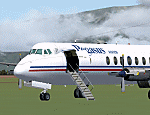
In deepest darkest Africa, one Viscount can still be found flying commercially - with Pegasus Aviation in the Democratic Republic of Congo.
These files include the aircraft, appropriate AI flight plans and AFCAD files for some of the airports served. Although not a true "AI
aircraft" it is unlikely to cause a strain on computer resources given the light
demands of AI traffic and scenery in the Congo area on Flight Simulator.
The aircraft is a modified version of Rick Piper's excellent Vickers Viscount 800
model available from http://www.btinternet.com/~rick.piper/ . If you wish to fly
the Pegasus Aviation Viscount yourself, please download the original aircraft files
from his site and install these textures to work with them - what is included
here is not suitable for your own flying as the Flight Dynamics have been modified
to work as AI traffic. [File re-uploaded at request of AVSIM] Footnote - since this file was first released in 2007, the aircraft has changed hands, it passed to Mango Airlines as 9Q-COD and is currently out of service at FZQA Lubumbashi. Sadly, it seems that the Viscount no longer flies on.
| Filename: | Pegasus_Aviation_AI_Pack_The_Viscount_Flies_On.zip |
| License: | Freeware |
| Added: | 26th May 2010, 19:15:46 |
| Downloads: | 985 |
| Author: | John Hinson, Billy Rutherford & Rick Piper |
| Size: | 812.55 KB |
| Category: Flight Simulator X - AFCAD Files | |
| OMAA - Abu Dhabi International Airport - Abu Dhabi, United Arab Emirates |
|
Images related to this file:
File Description:
Abu Dhabi International Airport is an airport in Abu Dhabi, the capital of the United Arab Emirates. The airport is one of the fastest growing airports in the world in terms of passengers, new airline operators and infrastructural development. The airport is now undergoing a US$6.8 billion expansion. As of January 2012, 53 airlines offered service to 85 destinations in 49 countries.
The airport is the second largest in the UAE, serving over 10 million passengers in 2010. It has three operational passenger terminals. Its terminal spaces are dominated by Etihad Airways, which is the United Arab Emirates' second largest air carrier after Emirates.
The new Terminal 3, a US$270 million interim facility, was designed to allow for the airport's passenger growth before the planned opening of the new Midfield Terminal in 2014. Used predominantly by Etihad Airways, the terminal boosted the airport's seven million passenger per year capacity to 12 million. It also added 10 new gates, two of which are Airbus A380 compatible.
Using ADEx 1.51, aeronautical maps and Google Earth this AFCAD is now on par with today's situation.
| Filename: | OMAA__Abu_Dhabi_International_Airport__Abu_Dhabi_U.zip |
| License: | Freeware |
| Added: | 12th January 2013, 22:09:29 |
| Downloads: | 1,693 |
| Author: | Menno C. Robert |
| Size: | 3.62 MB |
| Category: Flight Simulator X - AFCAD Files | |
| Greater Moncton International Airport / Canada (CYQM) |
|
Images related to this file:
File Description:
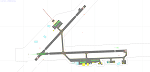
CYQM - Greater Moncton International Airport / Moncton, New Brunswick, Canada
This airport update was made with the latest version of ADE (Airport Design Editor) and made for FSX as a replacement for the stock (default) airport. I found that most stock airports in FSX lack a decent amount of character and realism and this area in particular was dreadful! The stock airport was rather inaccurate. I've made several additions to the airport which are listed below. All these enchancements are as close to the real airport as I can get with stock library objects. I've used satellite images, terminal photos and maps throughout the whole process so building locations are as accurate as possible. Happy landings in the beautiful Canada!
Features:
*Expanded parking apron
*Main terminal building with it's 2 jetways and additional parking for regional jets/turboprops
*Seperate parking aprons for GA traffic near the old terminal
*Hangar and other airport buildings added
*Airport vehicles and objects throughout the airport
*Main road in front of airport added with static vehicles
*Parking lots with static vehicles
*Airport fire station with fire trucks
*Static de-icing vehicles
| Filename: | Greater_Moncton_International_Airport__Canada_CYQM.zip |
| License: | Freeware |
| Added: | 21st July 2012, 02:41:58 |
| Downloads: | 816 |
| Author: | Jaison Diaz |
| Size: | 10.6 KB |
| Category: Flight Simulator X - AFCAD Files | |
| CYLW - Kelowna International Airport / Kelowna, British Columbia, Canada |
|
Images related to this file:
File Description:
CYLW - Kelowna International Airport / Kelowna, British Columbia, Canada
This airport update was made with the latest version of ADE (Airport Design Editor) and made for FSX as a replacement for the stock (default) airport. I found that most stock airports in FSX lack a decent amount of character and realism and I've done my best to correct that wherever possible. I've made several additions to the airport which are listed below. All these enchancements are as close to the real airport as I can get with stock library objects. I've used satellite images, terminal photos and maps throughout the whole process so building locations are as accurate as possible. Happy landings in the beautiful Canada!
Features:
*Expanded parking apron
*Main terminal building with it's 8 gates some with jetways
*Seperate parking aprons for GA traffic
*Runway accurately expanded to 8,900ft to reflect 2008 runway project
*Hangar and other airport buildings added
*Airport vehicles and objects throughout the airport
*Main road in front of airport added with static vehicles
*Parking lots with static vehicles
*Airport fire station with fire trucks
*Static de-icing vehicles & runway plow
*2 Helipads
(Next up: CYWG Winnipeg Intl Airport)
| Filename: | CYLW__Kelowna_International_Airport__Kelowna_Briti.zip |
| License: | Freeware |
| Added: | 22nd July 2012, 15:13:45 |
| Downloads: | 1,129 |
| Author: | Jaison Diaz |
| Size: | 10.38 KB |


© 2001-2026 AVSIM Online
All Rights Reserved
Privacy Policy |