
Where Flight Simulation Enthusiasts Gather from Around the World!
AVSIM Library - Search Results

| Category: Flight Simulator 2004 - Scenery | |
| Replacement Dynamic Water Textures Version 8 |

|
File Description:
Replacement dynamic water texture-sets for FS2004 (VERSION 8). This is the full version 8. The default reflections and water colors leave a lot to be desired in FS2004. As an example; The default milky "white/green" texture is highly unrealistic in overcast conditions. The replacement textures will change this dramactically to a much more convincing and realistic "blue/grey", cast, with improved lighting and refections in respect to the sun. These replacement textures will generally give a much more realistic tone and color to the water effects in FS2004. The change is quite dramactic and transforms the flight sim experience to a much greater level of realism. Fully compatible with my earlier versions of "overcast" texture modifications. Textures included are; Clear weather; High noon, mid-sun, low sun, sun-rise and sun-set with a choice of four "overcast" tones and a choice of two sun sets Version 8 has improved sun-set and sun-rise textures which offer better colours and better transitions from daylight to dawn/dusk hours; and a small change to the reflections on the low-sun texture. As an added bonus with Version 8 you have a choice of sun sets to use. Now you can have the very bright "orange" sun sets or select one of the new "golden yellows" which offer two distinct variations. It is important to stress the default FS9 textures are fully compatible with these new textures and they can be used in any combinations and can be mixed and matched with the new textures. For example it may be that some users want to keep some of the water environment textures as they are by default but change only one or two textures. The choice is yours. As a further added bonus a voice control file has been included for "Shoot" which will control FS2004 by voice. It is brilliant and it's free.
| Filename: | Replacement_Dynamic_Water_Textures_Version_8.zip |
| License: | Freeware |
| Added: | 7th January 2004, 19:51:30 |
| Downloads: | 4,112 |
| Author: | Peter Wilding |
| Size: | 2.71 MB |
| Category: Flight Simulator 2004 - Scenery | |
| EPGO Goraszka 2010 - The Airshow Challenge |
|
Images related to this file:
File Description:
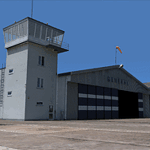
EPGO Goraszka 2010 - The Airshow Challenge is a freeware, extremely detailed scenery of a general aviation airport located 12nm (20km) south-east of Warsaw downtown and Warsaw Frederic Chopin International Airport, Poland. EPGO Goraszka airfield was built in 1994 and currently belongs to a General Aviation company, which offers aero-taxi flights, air transport and special flights (air photo, patrol) and airport services. The airport has a 800m-long runway and a lightened helipad, which can be used by helicopters of up to 5700kg weight. General Aviation's fleet includes Antonov AN-2, PZL-104 Wilga 80, Bell 407 and 427. Since 1996 the International Air Picnic Goraszka is organized every year by the "Polish Eagles" foundation created on initiative of Zbigniew Niemczycki.
The scenery is equipped with an automatic installer. Currently we support a safe, manual way of adding new sceneries to the Scenery Library in Flight Simulator. This is just one thing users need to do for themselves. Detailed instructions will be given during the installation process.
Scenery features:
-Compatible with FS2004 only
-Highest level of accuracy in geographic positioning, modeling and texturing
-Incredibly high quality photoreal textures of all airport buildings. Textures are based on over 300 real world -photographs made for this project.
-Hundreds of 3D objects like tents, exhibitions, airport buildings and surrounding buildings
-Life in the airport: people and cars will enhance your feelings
-AI traffic, animations and effects, designed specifically for FS2004
-Some buildings include interior (control tower)
-High quality aerial photos of the airport surroundings (5 seasons + night) with autogen and water mask
-Ultra high quality aerial photos of the airport (with seasons)
-Plain airport scenery with no airshow objects available too (details in the manual)
-Product includes manual and airport charts in PDF format
EPGO Goraszka 2010 - The Airshow Challenge scenery is compatible with almost every payware add-on, including Ultimate Terrain Eastern Europe and Warsaw Photo Scenery by Simdesign.
Scenery by Drzewiecki Design - www.drzewiecki-design.net
| Filename: | EPGO_Goraszka_2010__The_Airshow_Challenge.zip |
| License: | Freeware |
| Added: | 14th July 2010, 09:49:07 |
| Downloads: | 3,756 |
| Author: | Drzewiecki Design - Stanislaw Drzewiecki, Jakub Paczek |
| Size: | 132.03 MB |
| Category: Flight Simulator X - Original Aircraft | |
| Airbus A359ULR |
|
Images related to this file:
File Description:
Sinapore Airlines is the launch customer for the A359ULR. The aircraft is configured in a two-class layout, with 67 Business Class seats and 94 Premium Economy Class seats. She is designed for long range flights of over 9,700 nm. Fuel has been increased at the expense of souls on board. The primary use will initially be for routes between WSSS and KJFK (or KLGA), but many others of similar distance can be added later. The flight number on this aircraft reflects the first flight from KJFK-WSSS which is only 8,275 nm (Contrary to media reports of over 9,000 nm) and about 17.5 hours duration (see You Tube video on this flight). The aircraft follows normal flight rules with a higher flight level and longer range. Almost everything is computer controlled and monitored throughout the flight, from take-off to landing. Two of Four pilots monitor the flight at all times, and shift changes occur on a schedule that allows appropriate rest for the crew. The passengers enjoy accommodations unlike provided in any other aircraft or flight, with plenty of meal servings and entertainment options. To see the seating chart, enter the Airbus A359ULR Singapore Airlines folder and click the icon named “SeatGuru Seat Map Singapore Airlines Airbus A350-900 ULR.html†and the seating map will appear. The model here has ground servicing animation. Please review the ReadMe_FSX.txt document for further info on this. Read A359ULR details.txt for aircraft details. Model Design and Panel by: Camil Valiquette; Sounds: Unknown Author and modified by Douglas E. Trapp; Auto Smoke Effects by Richard Wisman, modified by Douglas E. Trapp; Real World Aero/Engine Dynamics and Modifications by: Douglas E. Trapp, Irving, Texas, [email protected], December 2018. The use of this model, and the configuration of such, is designed for free educational purposes, and protected by the Free Use Act: (https://www.law.cornell.edu/uscode/text/17/107). This model and/or aspects of such cannot be used for monetary purposes!
| Filename: | Airbus_A359ULR.zip |
| License: | Freeware |
| Added: | 2nd December 2018, 00:56:21 |
| Downloads: | 1,008 |
| Author: | Douglas E Trapp |
| Size: | 31.63 MB |
| Category: Prepar3D V1-4 - Utilities | |
| AIGround SimConnect Utility for P3D v4 |
|
Images related to this file:
File Description:
AIGround is a simconnect utility designed to improve AI taxi characteristics at the airport the user’s aircraft is located at. AIGround holds the AI stationary on the tarmac after pushback for a more realistic amount of time before the AI begins its taxi out and optionally performs an extended pushback including more realistically turning the AI toward the apron. The AI will also perform control surface checks as the AI begin their taxi out. Finally, AIGround enforces better spacing between AI and the user’s aircraft when the user is performing a taxi-out or taxi-in. AIGround does this by commanding the AI to temporarily stop in situations that the normal P3D AI control program would miss. In situations where the user might want the AI to pass (e.g., giving way at an intersection), the user can flash the landing lights on the user’s aircraft (on, then quickly off) as a signal to the AI to continue the taxi. AIGround also allows the user to adjust AI landing and takeoff lengths. AIGround is designed to compliment the default P3D AI program and thus is fully compatible with any AI-related program that is compatible with the default AI program (e.g., AIG, Ultimate Traffic Live, Radar Contact, etc.). AIGround is also compatible with the AIFlow simconnect utility. AIGround is targeted to SimConnect Version 4.5.0.0 or later. AIGround operates externally via simconnect and thus makes no changes to the P3D sim. NEW for v1.1: (1) adjust AI landing and takeoff length, (2) option for AI to perform extended pushback including turns, (3) option to disable control checks (for compatibility with certain AI sets), (4) AI plane spotting mode only, (5) adjustable in-sim message level, (6) Periodic read of .ini file to tweak parameters more easily, (7) AIGround starts minimized. FIXES for v1.1: (1) output consolse sometimes froze, (2) AI cyclic stop-start, (3) .ini file would sometimes get confused reading parameter values having whites spaces.
| Filename: | AIGround_SimConnect_Utility_for_P3D_v4.zip |
| License: | Freeware |
| Added: | 3rd July 2020, 23:58:42 |
| Downloads: | 1,849 |
| Author: | Roland Foster |
| Size: | 796.88 KB |
| Category: Flight Simulator X - Original Aircraft | |
| VC-25A (Air Force One) |
|
Images related to this file:
File Description:
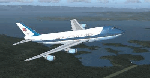
The VC-25A is a modified Boeing 747-200F used as a dignitary transport by the Air Mobility Command's 89th Airlift Wing, Andrews Air Force Base (KADF), Maryland. There are two twin sister aircraft with tail numbers 28000 and 29000. Both are used by the President of the United States (POTUS) and the First Lady of the United States (FLOTUS) and as a dignitary transport for high level personnel for special missions. When carrying the President, the call-sign is “Air Force Oneâ€, but otherwise uses a variety of call-signs when the President is not on-board. Each sister aircraft is nearly identical to the other, with all of the same accommodations. One can fly as a “Mask†when the President is on-board the other.
The aircraft is modified with many secret aspects, and is heavier at Empty Weight than a normal 747-200F because of this. However, she normally only carries 102 souls on board with enough supplies to last for any long range flight, so she operates at a lower weight than the normal 747-200F. Due to the fortifications employed within the design, her MTOW is lower, as well. The engines are a bit more powerful than normal, and have better fuel efficiency. She has specialized equipment on-board for communications, a weather/recon radar dome (not shown in this paint scheme), and missile/aircraft countermeasures if needed. The interior is almost silent due to the high pressure cabin structure and fortified frame, including bullet-proof windows.
With all of the above, she is still the most powerful, efficient, and the fastest 747 ever built.
Original Model Designers (FS2004):
C. Vincent Cho, Yosuke Ube, Nick Peterson, Warren C. Daniel, Simon Ng, Hin Tat, BIll Kovatchev.
Sound: Emil Serafino.
Panel: Philippe Wallaert.
Real World Aero/Engine Dynamics and Modifications by Douglas E. Trapp ([email protected]), June 2018.
| Filename: | VC25A_Air_Force_One.zip |
| License: | Freeware |
| Added: | 24th June 2018, 00:38:28 |
| Downloads: | 988 |
| Author: | Douglas E. Trapp |
| Size: | 118.85 MB |
| Category: Prepar3D V1-4 - Utilities | |
| AIFlow SimConnect Utility for P3D v4 |
|
Images related to this file:
File Description:
AIFlow v1.1 is a simconnect utility designed to ease AI congestion and go-arounds at the airport the user is departing from and arriving at. AIFlow does this by enforcing spacing minimums between arriving AI aircraft resulting in more orderly arrival patterns. AIFlow also supports spacing spacing minimums between the AI aircraft and the USER’s aircraft when the user is flying (during all phases of the user's flight). For added realism, AIFlow adds landing effects (e.g., micro bank and pitch corrections that scale up during crosswind conditions) to the AI on short final approach. The user can also briefly squawk 1234 in their aircraft to temporarily suspend landings so that the user can find a slot to depart a busy runway. AIFlow is designed to compliment the default P3D AI program and thus is fully compatible with any AI-related program that is compatible with the default AI program (e.g., AIG, Ultimate Traffic Live, Radar Contact, etc.). AIFlow is targeted to Prepar3D version 4.5 or 5.0, specifically SimConnect Version 4.5.0.0 or later. AIFlow operates externally via simconnect and thus makes no changes to the P3D sim. NEW for v1.1: (1) detect and correct AI performing poor approaches (e.g., dive-bombing, descent into terrain) under control of the P3D AI engine, (2) user can specify minimum and maximum AI approach speeds in terminal area, (3) prevent AI from stopping on runway when user landing, (4) AI plane spotting mode only, (5) external database fallback in case simconnect fails to provide local airport data, (6) adjustable in-sim message level, (7) periodic read of .ini file to tweak parameters more easily, (8) AIFlow starts minimized. FIXES for v1.1 include: sequencing in heavy AI traffic would sometimes cause excessive go-arounds, going around AI would sometimes improperly hold, changing AI spacing from default value did not have any effect, sometimes user aircraft would get controlled, .ini file would sometimes get confused reading parameter values having whites spaces.
| Filename: | AIFlow_SimConnect_Utility_for_P3D_v4.zip |
| License: | Freeware |
| Added: | 3rd July 2020, 23:57:52 |
| Downloads: | 2,019 |
| Author: | Roland Foster |
| Size: | 1.18 MB |
| Category: Flight Simulator 2004 - Scenery | |
| Toronto Downtown Airport CYTZ, Ontario Canada, for Toronto2 |
|
Images related to this file:
File Description:
CYTZ is on an island in Lake Ontario and immediately adjacent to downtown Toronto, and this is the version for use with Flight Ontario's Toronto2 scenery for the Greater Toronto Area. There have been major changes after Porter Airlines purchase of the airport. The obvious and main new item is the terminal, made with photo textures, and with ten gates sized to meet the requirements of the Dash 8-400 they currently use. The terminal has a passenger entrance and a vehicle setdown point as part of the link to the ferry terminal that wraps around the west side of the original and preserved terminal building. The ferry terminal is included here, along with a ferry. Also new are the car parking, road routing, gate and taxi markings, taxiways, taxiway signage, taxiway lighting, runway lighting, aprons, apron lighting (from Sid, and you will need to install his "lights_ss_v2"), fences, fuel tanks, tanker trucks, access roads to navigation equipment, ai parking, static parked planes, parked cars, apron equipment, and the useable floatplane ramp. The AI includes Porter, Jazz, several GA aircraft, and a helicopter; only 3 of these require downloads. The Lake Ontario AI includes three large ships, typical of the traffic to be seen on all the Great Lakes. CYTZ has three runways and there is an airport diagram included. 08-26 has ILS and is the only runway long enough for Porter to use; FS9 atc will ignore this. There is fuel available and it is dispensed from a truck. The longer projection from the front of the terminal building is a covered ramp that leads up from the terminal basement level, used by towed luggage trolleys. The gates are not powered in any way except for the weather cover that protects passengers as they cross the small area of asphalt between plane and gate. I did not try to reproduce this in FS9.
| Filename: | Toronto_Downtown_Airport_CYTZ_Ontario_Canada_for_T.zip |
| License: | Freeware, limited distribution |
| Added: | 23rd October 2012, 12:52:29 |
| Downloads: | 1,526 |
| Author: | Roger Wensley + Flight Ontario |
| Size: | 12.71 MB |
| Category: Flight Simulator X - Scenery | |
| EPGO Goraszka 2010 - The Airshow Challenge |
|
Images related to this file:
File Description:
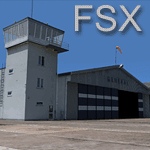
EPGO Goraszka 2010 - The Airshow Challenge is a freeware, extremely detailed scenery of a general aviation airport located 12nm (20km) south-east of Warsaw downtown and Warsaw Frederic Chopin International Airport, Poland. EPGO Goraszka airfield was built in 1994 and currently belongs to General Aviation company, which offers aero-taxi flights, air transport and special flights (air photo, patrol) and airport services. The airport has a 800m-long runway and a lightened helipad, which can be used by helicopters up to 5700kg weight. General Aviation's fleet includes Antonov AN-2, PZL-104 Wilga 80, Bell 407 and 427. Since 1996 the International Air Picnic Goraszka is organized every year by "Polish Eagles" Foundation created on initiative of Zbigniew Niemczycki.
The scenery is equipped with an automatic installer. Currently we support a safe, manual way of adding new sceneries to Scenery Library in Flight Simulator. This is just one thing users need to do for themselves. Detailed instructions will be given during the installation process.
Scenery features:
-Compatible with FSX only
-Highest level of accuracy in geographic positioning, modelling and texturing
-Incredibly high quality photoreal textures of all airport buildings. Textures are based on over 300 real world -photographs made for this project.
-Hundrieds of 3D objects like tents, exhibitions, airport buildings and surrounding buildings
-Life in the airport: people and cars will enchance your feelings
-AI traffic, animations and effects, designed specifically for FSX
-Some buildings include interior (control tower)
-High quality aerial photos of the airport surrondings (5 seasons + night) with autogen and water mask
-Ultra high quality aerial photos of the airport (with seasons)
-Plain airport scenery with no airshow objects available too (details in the manual)
-Product includes manual and airport charts in PDF format
EPGO Goraszka 2010 - The Airshow Challenge scenery is compatible with almost every payware add-on, including Ultimate Terrain Eastern Europe and Warsaw Photo Scenery by Simdesign. Scenery by Drzewiecki Design - www.drzewiecki-design.net .
| Filename: | EPGO_Goraszka_2010__The_Airshow_Challenge.zip |
| License: | Freeware |
| Added: | 16th July 2010, 12:31:42 |
| Downloads: | 4,716 |
| Author: | Drzewiecki Design - Stanislaw Drzewiecki, Jakub Paczek |
| Size: | 237.18 MB |
| Category: Miscellaneous Files - Demos from Commercial Vendors | |
| Latin VFR Cuzco Photo and Airport Scenery |
|
File Description:
Cuzco or how is also formally known today as “Cusco” is one of the most important cities of Peru and is the historic capital of the Inca empire, it is also the historical capital of Peru designated by its constitution. The city is located in the Andes mountains and its elevation is above 3310 metres or 10860 feet above sea level. The city is nearby the ancient historical symbol of the Incas, Machu Picchu which is about 80 kilometers from Cusco, which became one of the New seven wonders of the world back in 2007.
This airport (SPZO) or (CUZ) has a visibility restriction and only operates during daylight due to the requirement of a visual approach to land. The aircraft operate mainly in one direction of flight in and out of this airport, they land on runway 28 and depart on runway 10. During weather situations in which no visual approach can be made the airport is closed until the weather gets better. No pilot dares to land with an overcast sky into an airport completely surrounded by mountains and no precision guidance navaid in order to assist for the landing. Therefore all landings conducted are SOLELY visual, and strict VFR rules apply. American Airlines (AA) briefly operated in this airport in the late 90’s and the word out there was that they kept doing miss approaches having difficulties with the approach, so it is widely known to be an airport dominated by veterans of the Cuzco approach, mainly Peruvian pilots or Andean pilots that know how difficult it is to have such restrictions. This is certainly the Madeira or the Innsbruck of all Latin American airports, it would be wise to say that this one is harder due to the lack of a precision approach. And by the way the largest aircraft permitted to operate here is a B757-200, however, anything bigger than a B737-200 needs government approval.
| Filename: | Latin_VFR_Cuzco_Photo_and_Airport_Scenery.zip |
| License: | Commercial demo |
| Added: | 2nd May 2009, 01:50:57 |
| Downloads: | 1,201 |
| Author: | LatinVFR |
| Size: | 34.22 MB |
| Category: Flight Simulator 2004 - Panels | |
| PS Panels 737NG |
|
File Description:
Built completely from scratch, the PS Panels 737NG incorperates a high level of realism whilst still allowing the virtual pilot to use important FS features such as the flight planner and ATC systems.
Authentic NG EHSI
The PS Panels 737NG incorporates a high definition EHSI display including all the modes as per the real aircraft.
Approach, VOR, Map and Plan modes are all modelled (APP, VOR and Map in both Expanded and Standard modes).
The authentic and fully animated EHSI control panel allows the virtual pilot to set the display to his preference.
The PS Panels 737NG interfaces completely with the FS Flight Planner, you're flight plan will be automatically displayed in both the Plan and Map modes.
Extensive Overhead
The PS Panels 737NG incorporates a custom overhead panel to control the many modelled aircraft systems.
Based on the real NG Overhead panel with a slightly altered layout that allows the virtual pilot to continue to monitor his key instruments whilst managing the Fuel, Electrical, Hydraulic, Lighting and Pnuematic systems controlled through the panel.
Careful attention combined with detailed research has allowed us to model these systems to a high degree of accuracy.
Complete Radio Stack
The panel comes with an authentic 737NG radio stack, accurate down to the last details.
IRS System
The PS Panels 737NG models the operation of the aircrafts IRS. Unless proper alignment is completed through the IRS panel, many features of the aircraft's displays will be INOP.
Custom Throttle Panel
The panel comes with a custom throttle panel accurate to that on the real aircraft.
Advanced 2-stage Night Lighting
A first for PS Panels, the 737NG contains two stage night lighting allowing the virtual pilot to choose between two levels of cockpit lighting on the fly.
The main panel and all subpanels are lit using the same schemes.
Thanks to Yoo Sang Jun for his work on this.
| Filename: | PS_Panels_737NG.zip |
| License: | Freeware, limited distribution |
| Added: | 7th July 2007, 22:06:00 |
| Downloads: | 26,678 |
| Author: | Paul Scarratt |
| Size: | 4.1 MB |


© 2001-2026 AVSIM Online
All Rights Reserved
Privacy Policy |