
Where Flight Simulation Enthusiasts Gather from Around the World!
AVSIM Library - Search Results

| Category: Flight Simulator 2004 - Aircraft Repaints, Textures and Modifications | |
| KLM Douglas DC-3 pre-war |

|
Images related to this file:
File Description:
Re-upload. FS2004 KLM Douglas DC-3 pre-war textures.
Before and after World War II, KLM was a major European operator of the Douglas DC-3. The first DC-3, PH-ALI 'Ibis', entered service with KLM in October 1936. This made KLM the first operator of the DC-3 in Europe.
22 others would join before Nazi-Germany invaded the Netherlands on 10 May 1940 and occupied the country for five dark years. Those DC-3's present at Amsterdam-Schiphol, if not destroyed by bombs, were impounded by the Germans. Other DC-3's that happened to be elsewhere out of reach of the enemy found their way either to the Dutch East Indies where they served on the KNILM routes until the Japanese invasion in February 1942, or to England where they were leased by BOAC for the London (later Bristol) to Lisbon service.
Both PH-ALI 'Ibis' and PH-ARW 'Wulp' moved to England. Unfortunately they did not survive World War II. The 'Wulp' was destroyed in November 1940 when Bristol got bombed by
the German Luftwaffe. The 'Ibis' was shot down by Junkers Ju-88's on 1 June 1943 over the Bay of Biscay.
The repaints of PH-ALI and PH-ARW are based on the templates Mark Beaumont created for the MAAM-SIM Douglas DC-3 (passenger version), which were based on Jan Visser's original textures. These are textures only. You will require MAAM-SIM's great donationware Douglas R4D/DC-3 package. Repaints by Maarten Brouwer.
| Filename: | KLM_Douglas_DC3_prewar.zip |
| License: | Freeware, limited distribution |
| Added: | 12th June 2010, 01:16:55 |
| Downloads: | 666 |
| Author: | Maarten Brouwer |
| Size: | 10.05 MB |
| Category: Flight Simulator 2004 - Scenery | |
| RAF Brawdy 1979-1992 |
|
Images related to this file:
File Description:

In September of 1974, No. 229 Operational Conversion Unit moved to Brawdy after the closure of RAF Chivenor. This unit was later renamed No.1 Tactical Weapons Unit, and became one of two TWU's equipped with the Hawk trainer. The Hawk and Hunter equipped Nos. 79 and 234 Squadrons. There were also some unique Jet Provosts present as well. The Camouflaged T Mk 4 JP's provided Forward Air Controller training for both the fast jet trainees and for army controllers.
The Hunters were retired by mid-1984, and the Jet Provosts had gone by the end of the 80s.
RAF Brawdy was itself laid to rest by the Royal Air Force, who moved out the Hawks during 1994 and had relocated to RAF Leeming. Brawdy was passed over to the army and renamed Cawdor Barracks.
This scenery includes all the Hawk aircraft of 1 TWU in both camouflage and air defence grey schemes, depending on your preferred choice. There are flightplans included, which are representative only, but enables the aircraft to fly to bases and checkpoints around the country.
I have also included flighplans for the RAF Hawker Hunter model by John Young (acg_hunters_raf_9.zip from flightsim.com), to be used in conjunction with the camouflaged Hawks.
The scenery has been constructed using objects mainly from MAIW sceneries, which will need to be installed in order to gain the full visual experience.
A BIG thanks to Nick Black for the use of his superb AI HAwk, and to Chris A. Brown for paint' 'em!
| Filename: | RAF_Brawdy_19791992.zip |
| License: | Freeware, limited distribution |
| Added: | 21st June 2013, 21:30:26 |
| Downloads: | 1,468 |
| Author: | Brian Clarke, Stewart Pearson, Daryl Payne, Chris A. Brown |
| Size: | 36.06 MB |
| Category: Flight Simulator 2004 - Scenery | |
| Replacement Dynamic Water Textures v11 |
|
File Description:
Replacement dynamic water texture-sets for FS2004 (VERSION 11). These newer version 11 moon light textures are a completely new type than my earlier versions. The results are much improved and there is also a "new moon" texture in this version which is a more realistic and darker blue/black which contrasts nicely with my moon light textures. This compares quite drastically to the default over lit pinkish brown tones the default FS9 uses for a new moon. Now when you fly by moonlight you can actually see the moon kissed water and even see some wave action. It actually feels like you are there! There are 2 moon light textures in this download. The default reflections and water colors leave a lot to be desired in FS2004. As an example; The default milky "bright green" overcast texture is highly unrealistic in overcast conditions. The replacement textures will change this dramatically to a much more convincing and realistic "blue/grey", cast, with improved lighting and reflections in respect to the sun. These replacement textures will generally give a much more realistic tone and color to the water effects in FS2004. The change is quite dramatic and transforms the flight sim experience to a much greater level of realism. It is important to stress the default FS9 textures are fully compatible with these new textures and they can be used in any combinations and can be mixed and matched with the new textures. For example it may be that some users want to keep some of the water environment textures as they are by default but change only one or two textures. The choice is yours. As a further added bonus a voice control file has been included for "Shoot" which will control FS2004 by voice. It is brilliant and it's free.
| Filename: | Replacement_Dynamic_Water_Textures_v11.zip |
| License: | Freeware |
| Added: | 11th January 2004, 20:38:03 |
| Downloads: | 3,057 |
| Author: | Peter Wilding |
| Size: | 3.49 MB |
| Category: Prepar3D V5 - Scenery | |
| VOBL_P3Dv5 |
|
File Description:
Kempegowda International Airport (IATA: BLR, ICAO: VOBL) is an international airport serving Bangalore, the capital of the Indian state of Karnataka, in the Southern part of India. Spread over 4,000 acres (1,600 ha), it is located about 30 kilometres (19 mi) north of the city near the suburb of Devanahalli. It is owned and operated by Bengaluru International Airport Limited (BIAL), a public–private consortium. The airport opened in May 2008 as an alternative to increased congestion at HAL Airport, the original primary commercial airport serving the city. It is named after Kempe Gowda I, the founder of Bangalore. Kempegowda International Airport became Karnataka's first fully solar powered airport developed by CleanMax Solar.[5][6]
Kempegowda Airport is the third-busiest airport by passenger traffic in the country, behind the airports in Delhi and Mumbai, and is the 29th busiest airport in Asia. It handled around 33.30 million passengers in the calendar year 2018 with 658 aircraft movements a day. The cargo handled by the airport continues to increase steadily, with the airport handling about 386,849 tonnes (426,428 short tons) of cargo between April 2018 and March 2019.[7]
The airport consists of two runways and a passenger terminal, which handles both domestic and international operations. The second runway, constructed by Larsen & Toubro, was commissioned on 6 December 2019.[8][9] A second terminal is in the early stages of construction. Also, there is a cargo village and three cargo terminals. The airport serves as a hub for AirAsia India, Alliance Air, and IndiGo and is a focus city for Air India and SpiceJet.
Note: All terminal buildings credit goes to thomlinden. It's freeware scenery.
| Filename: | VOBL_P3Dv5.zip |
| License: | Freeware |
| Added: | 28th October 2020, 22:42:22 |
| Downloads: | 189 |
| Author: | Abhishek Banerjee |
| Size: | 20.83 MB |
| Category: Prepar3D V5 - Scenery | |
| VOBL_P3Dv5 |
|
File Description:
Kempegowda International Airport (IATA: BLR, ICAO: VOBL) is an international airport serving Bangalore, the capital of the Indian state of Karnataka, in the Southern part of India. Spread over 4,000 acres (1,600 ha), it is located about 30 kilometres (19 mi) north of the city near the suburb of Devanahalli. It is owned and operated by Bengaluru International Airport Limited (BIAL), a public–private consortium. The airport opened in May 2008 as an alternative to increased congestion at HAL Airport, the original primary commercial airport serving the city. It is named after Kempe Gowda I, the founder of Bangalore. Kempegowda International Airport became Karnataka's first fully solar powered airport developed by CleanMax Solar.[5][6] Kempegowda Airport is the third-busiest airport by passenger traffic in the country, behind the airports in Delhi and Mumbai, and is the 29th busiest airport in Asia. It handled around 33.30 million passengers in the calendar year 2018 with 658 aircraft movements a day. The cargo handled by the airport continues to increase steadily, with the airport handling about 386,849 tonnes (426,428 short tons) of cargo between April 2018 and March 2019.[7] The airport consists of two runways and a passenger terminal, which handles both domestic and international operations. The second runway, constructed by Larsen & Toubro, was commissioned on 6 December 2019.[8][9] A second terminal is in the early stages of construction. Also, there is a cargo village and three cargo terminals. The airport serves as a hub for AirAsia India, Alliance Air, and IndiGo and is a focus city for Air India and SpiceJet. Note: All terminal buildings credit goes to thomlinden. It's freeware scenery.
| Filename: | VOBL_P3Dv5.zip |
| License: | Freeware |
| Added: | 31st October 2020, 19:00:11 |
| Downloads: | 852 |
| Author: | Abhishek Banerjee |
| Size: | 16.84 MB |
| Category: Flight Simulator 2004 - Aircraft Repaints, Textures and Modifications | |
| KNILM Douglas DC-3 |
|
Images related to this file:
File Description:
Re-upload. FS2004 KNILM Douglas DC-3. Before and after World War II KLM was a major European operator of the Douglas DC-3. The first DC-3 entered service with KLM in October 1936. This made KLM the first operator of the DC-3 in Europe. 22 others would join before Nazi-Germany invaded the Netherlands on 10 May 1940 and occupied the country for five dark years. The KLM DC-3's served destinations in Europe as well as the famous 'Indies-route' from Amsterdam to Batavia (Dutch East Indies; nowadays Jakarta, Indonesia). Those DC-3's present at Amsterdam-Schiphol, if not destroyed by bombs, were impounded by the Germans. Other DC-3's that happened to be
elsewhere out of reach of the enemy found their way either to the Dutch East Indies where they served on the KNILM routes to various destinations in Far East Asia and Australia until the Japanese invasion in February 1942, or to England where they were leased by BOAC for the London (later Bristol) to Lisbon service. PH-ALP 'Pelikaan' ('Pelican') ended up in the Dutch East Indies, was bought by KNILM (Royal Netherlands Indies Airways) as PK-AFV. On her last flight on 3 March 1942 from Batavia to Broome, Australia, Japanese Zero fighters shot at PK-AFV and set her alight. The aircraft succesfully crash-landed on the beach at Carnon Bay, Australia. The repaint of PK-AFV is based on the templates Mark Beaumont created for the MAAM-SIM Douglas DC-3 (passenger version), which were based on Jan Visser's original textures. These are textures only. You will require MAAM-SIM's great donationware Douglas R4D/DC-3 package. Repaints by Maarten Brouwer.
| Filename: | KNILM_Douglas_DC3.zip |
| License: | Freeware, limited distribution |
| Added: | 12th June 2010, 01:18:01 |
| Downloads: | 399 |
| Author: | Maarten Brouwer |
| Size: | 7.68 MB |
| Category: Flight Simulator X - Scenery | |
| UGAM Ambrolauri Airport, Georgia [FSX] |
|
Images related to this file:
File Description:
DISCLAIMER: The FSX Version is a straight port from the P3D version and might have issues or missing features compared to the P3Dv5 version. The screenshots are taken in P3D.
Ambrolauri
Ambrolauri (Georgian: áƒáƒ›áƒ‘რáƒáƒšáƒáƒ£áƒ ი) is a city in Georgia, located in the western part of the country, on both banks of the Rioni river, at the elevation of 550 m above sea level. It is a self-governing city. At the same time, the city serves as the seat of the Racha-Lechkhumi and Kvemo Svaneti regional administration and the Ambrolauri Municipality. According to the 2014 census, the city had a population of 2,047. Its area is 1.6 km². Ambrolauri is first recorded in the 17th century as a place, where one of the palaces of the kings of Imereti was located. It acquired the city status in 1966 and became a self-governing city with its own municipal government in 2014.
The Airport
The airport is nestled into the Caucasus mountains right at the bank of the river Rioni. It has a single runway of 1100 m length and caters small propeller aeroplanes. The apron has space for two planes at a time and caters up to 50 passengers at one time.
In the Simulator
The virtual airport is very close to its real-world counterpart. All the buildings at and near the airport are modelled and the terminal even has an interior that can be seen from outside. The look and feel from a trip to the Racha region is definitely there. In real life, only small planes fly to the airport but that shouldn't stop you to bring planes from the size of the Dash 8.
| Filename: | UGAM_Ambrolauri_Airport_Georgia_FSX.zip |
| License: | Freeware, limited distribution |
| Added: | 5th July 2020, 22:50:18 |
| Downloads: | 445 |
| Author: | David Hilker |
| Size: | 309.42 MB |
| Category: Flight Simulator X - Scenery | |
| VOHS-VOBL package for FSX and FSX-SE |
|
Images related to this file:
File Description: Rajiv Gandhi International Airport (IATA: HYD, ICAO: VOHS) is an international airport that serves Hyderabad,
the largest city in the Indian state of Telangana. It is located in Shamshabad, about 24 kilometres (15 mi) south of Hyderabad.
The airport is operated by GMR Hyderabad International Airport Ltd, a public–private venture.
It was opened in March 2008 to replace Begumpet Airport as the primary commercial airport for Hyderabad.
It is named after Rajiv Gandhi, former Prime Minister of India. _______________________________________________________________________________________ Kempegowda International Airport (IATA: BLR, ICAO: VOBL) is an international airport serving Bangalore, the capital of the Indian state of Karnataka.
Spread over 4,000 acres (1,600 ha), it is located about 40 kilometres (25 mi) north of the city near the village of Devanahalli.
It is owned and operated by Bangalore International Airport Limited (BIAL), a public–private consortium.
The airport opened in May 2008 as an alternative to increased congestion at HAL Airport,
the original primary commercial airport serving the city. It is named after Kempe Gowda I, the founder of Bangalore.
Kempegowda International Airport became Karnataka's first fully solar powered airport developed by CleanMax Solar.[2][3] As of 2016, Kempegowda Airport is the third-busiest airport by passenger traffic in the country,
behind the airports in Delhi, Mumbai and is the 35th-busiest airport in Asia. It handled over 22.2 million passengers in 2016 with little less than 500 aircraft movements a day.
The airport also handled about 314,060 tonnes (346,190 short tons) of cargo. By 2020, it is expected to handle at least 40 million passengers per year,
with 45 international airlines and more than 1000 aircraft movements per day.
| Filename: | VOHSVOBL_package_for_FSX_and_FSXSE.zip |
| License: | Freeware |
| Added: | 28th January 2018, 17:03:17 |
| Downloads: | 4,438 |
| Author: | morten thomas van der linden |
| Size: | 171.62 MB |
| Category: Prepar3D V1-4 - Aircraft Repaints, Textures and Modifications | |
| Alaska Airlines "HONORING THOSE WHO SERVE" livery Operated by Horizon Air E175LR (N651QX) |
|
Images related to this file:
File Description:
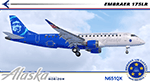
I am proud to present this very special Alaska Airlines Embraer E175LR, operated by Horizon Air, registration N651QX. This E175LR is the third "Honoring Those Who Serve" aircraft in the Alaska Airlines fleet which pays tribute to US military members, veterans, fallen soldiers and their families. Its unique exterior paint scheme, conceived by a small group of Alaska maintenance technicians, was designed to honor those who serve today, and those who served in the past. The design includes; A red stripe and blue aircraft body to incorporate elements of the American flag, the phrase "Honoring Those Who Serve," displayed on the fuselage, symbolic crests representing the Alaska Airlines Fallen Soldier Program on the starboard side rear cargo door and on the port side of the aircraft behind the aft service door, a "Horizon Air Salutes" medallion near the nose of the aircraft on both sides with the five stars, winglets in red, white and blue representing the flag of the United States and five gold stripes on the engine cowls representing the five branches of the U.S. Armed Forces. There is also a Sidney Sheldon quote next to the forward passenger entry door reading “My heroes are those that risk their lives to protect the world and make it a better place.â€
The repainted textures in this package are 32-bit with no mipmaps for best clarity and quality. All of the medallions are hand painted. This is the Version 3 model of the FeelThere Embraer 175. You must own a copy of the Feelthere E-JETS E175 and E195 V3 to enjoy this repaint.
A special thank you to all who serve, who have served and to those who gave their lives in service to this country.
| Filename: | Alaska_Airlines_HONORING_THOSE_WHO_SERVE_livery_Op.zip |
| License: | Freeware, limited distribution |
| Added: | 29th April 2020, 19:09:32 |
| Downloads: | 831 |
| Author: | Jeffrey S. Bryner, FeelThere |
| Size: | 56.71 MB |
| Category: Prepar3D V1-4 - Utilities | |
| Flightplan Visualizer 1.17 |
|
Images related to this file:
File Description:
Flightplan Visualizer (FV) version 1.17.0. Copyright 2018-2020 by Pelle F. S. Liljendal ([email protected]), all rights reserved.
FV comes with 783 pre-imported Commercial AI flightplans (+380 BizJet flightplans are available as a separate download). However you are able to import additional (AI) flightplans yourself. Once imported these (AI) flightplans can be visualized on a map-view, and the user will be able to search accross all these. Hence you can use the program as inspiration as to which routes to fly. E.g. you can search across all imported flightplans to find all flights in an A321 flying into/out from LDDU, or simply to look for all flights in a Boeing 747-8F.
Simply run the included installer to install the software. The program will be installed into "C:\Program Files (x86)\Flightplan Visualizer" and all datafiles will be installed into: "C:\Users\[UserName]\AppData\Roaming\FlightplanVisualizer". The program comes with a full manual explaining everything, and a 3 page quick manual to get you started. The first 3 times you run the program the quick manual will automatically open. The forum is hosted here: https://forum.aerosoft.com/index.php?/forum/919-flightplan-visualizer/
Version 1.17 Contains the following changes:
- A big Thank You to Alex for the donation, it is appreciated ... You are actually the first one to donate, but then again I never expected to get rich writing this software :-)
- Both version 1.16 and 1.17 are mandatory, so if updating from a previous version you MUST install/run both versions as outlined on the forum. Running version 1.17 will forcefully update all flightplans to the latest file-version, as version 1.18 will remove some of the backward comparability.
- Added support for importing flightplans from the new .aigfp file-format used by Alpha India Group. Export of flightplans (in aifp-format) is disabled for flightplans originally imported from .aigfp files, because the repaint-info is not imported from these.
- Beside the supplied aircraft-types contained in the ("factory") aircraft-database, users can now add their own user-aircraft, both in form of owned (flyable) 3rd party aircraft and aircraft-types (used in flightplans, or as basis for owned aircraft).
- Added support for Helicopters (simply created the "aircraft" with the engine-type set to "Heli"). They will be listed/treated as an "aircraft" with a specific engine-type (and in stead of a "wingspan" they have a "rotor diameter").
- Many reports have been added to list "suitable" substitute aircraft based on match-score (a value between 0 and 100, where 100 is a perfect match). Likewise reports have been added to visualize repaints that you have, and those you might be "missing" for a particular aircraft/airline.
- In form leg-info you can now "tag" a leg by pressing the new "Tag" button. Doing so will add the leg to the new "Tagged legs" menu-item found in the "Misc" menu. This menu can contain the last 10 tagged legs (flights). Selecting any of these 10 menu-items will open the leg-info form and show the details of the tagged leg.
- The AIG flightplan download-form will now only pre-select flightplans with a new season or a new revision, as you have to pay attention to flightplans with status "Not installed" since the reason these are not installed can be due to airlines being defunct or have changed their names.
- The AIG flightplan download-form now have 2 numbers above the list-view. The first tells the number of flightplans being listed for the selected season, and the 2nd number in parentheses tells the number of checked flightplans. So choosing a season, you can simply look at the number in the parentheses to see the count of new seasons/revisions to install (without the need to scroll throgh the list).
- The "Defunct list" (list of all defunct airlines, as marked by AIG) that can both be displayed in the "AIG flightplan downloader" and the "Enable / disable flightplans" forms, is now both sorted by Name (first) and by ICAO (last), making it more easy to look for a particular airline.
- The Leg-info and Edit flightplan -forms now both list the (flightplan) sub-folder name and the name of the original imported filename (in case you need to see the version/revision number that AIG append to this filename).
- The same sub-foldername and original imported flightplan filename are also added in the top when generating a leg-info report.
- If the departure/destination airports have gates marked as favorites, or gates with comments, therse are added to the leg-info report. E.g. "Gate G47 (36.0): B744F, no-jetway", where "36.0" is the radius of the gate (in meters), and "B744F, no-jetway" is the comment.
- Many "behind the scene" changes were made to the Leg-info report, and more data have been added (e.g. carrier/operator-callsign, time-zone/offset, airport-size, rank and traffic-density).
- Added a button to the Leg-info form to show list of possible substitute aircraft, sorted by scored (based on how well these match the parameters of the original aircraft).
- Internally the program stores- and perform all weight-calculations in lbs, however in settings you can now choose if weights should be shown in lbs or kg.
- Using EOW- or MTOW- filter sub-type in the aircraft filter the specified weight will now be according to the chosen weight-unit specified in the settings form (in previous version it was fixed to be lbs).
- Obtaining METAR/TAF messages from the internet takes a few fractions of a second, hence the "Show as Report" button on the Leg info form, now contains an asterisk until the METAR/TAF messages have been obtained, as these would otherwise appear as "not obtained" in the generated report. So if you need these messages in the report, you should wait pressing the "Show as Report" button, until the asterisk is removed.
- The form for creating user-airlines now contains a "Lookup" button that lets you search for airlines, so you can check if an airline already exists before creating it as a user airline.
- Airlines without official iCAO/IATA-codes are sometime created with an artificial ICAO code of "---". Airlines with this ICAO-codes are no longer listed as alternatives.
- Reordered the two "fields" in the "Min. Rank" and "Min. Traffic-density" combo-boxes, to make it more easy reading- and picking- the correct.
- Improved scanning of readme-files during import (more files are excluded such as "Repaints.txt").
- Changed the default size of the about-form, to make it more easy to being reading the history-text without having to first resize the form.
- All forms in FV have been made with a HD resolution (1920x1080) in mind. Some users are running at this resolution, but have chosen to scale the font-size to 125%. If doing so, some forms were not fully visible. Hence there is now a new setting item called "Reduced desktop". If defaults to be disabled, however once enabled some forms will be reduced in their size (e.g. the flightplan-, airline and aircraft- list-views in the Leg Search form will be more narrow, allowing the form to be fully visible).
- The country sub-filter no longer supports wildcards (nor partial codes), but now it accepts both 2 and 3 letter (ISO) country-codes. The filter-text will be colored red, if an invalid country-code is entered.
- The result-viewer now have a "Save as" button that allows you to save its content. Also an "Enable edit" check-box have been added, which puts the text-box into edit-mode, so you can change its conent (e.g. before copying to clipboard, or saving to disk).
- Right-clicking the main-map there is now a menu-item to show country, time-zone/offset (as a hint) at the GPS-position of the mouse-cursor. These information are downloaded from the web, hence there will be a small delay.
- Added more logging, to better identify which actions might have led to the program displaying an error-message. Also tweaked the log-format a bit to make it more readable.
- Updated all external libraries to the latest versions.
- Added release dates for each version in this version-history text.
- Fixed: If marking gates as favorites or adding comments to gates these data were not saved unless other user-data were added to the airport (e.g. marking the airport as favorite, setting rank/traffic-density, manually specifying size, taxi-in/out times, entering comments or hint-text for the airport).
- Fixed: If changing the ICAO-code of a user-airline, the alternative-list was not updated until next time the form was opened. The form also got a minor optimization in the process. When editing an user-airline you can now press enter in stead of clicking the "Save" button (as long as the Comments field does not have focus).
- Fixed: In a few cases the week-number was not calculated correctly for multi-week flightplans.
- Fixed: In some cases the week-day was still shown as a "name" (2 letters), even if the user had selected to display these as numbers in settings.
- Fixed: Aircraft/Airline search forms would not perform initial search when opening the form, if the search-text was blank. You had to enter a letter, and delete it again, before the search was performed.
- Fixed: Aircraft search form did not use natural-sort when sorting by name (e.g. "CRJ1000" was listed before "CRJ200").
- Fixed: Setting core-affinity to a non-zero mask, and change it back to zero, it would not return to its initial state (e.g. all cores selected) until the program was re-started.
- Data: Updated a few airports with missing country-code and/or missing time-zone.
- Data: A few new aircraft were added and some aircraft were split in dedicate pax/freight-versions.
- Data: A few helicopters have been added.
- Data: Aircraft-data updated as there were still a couple of freighters with non-zero passenger-count. Also the weight constraints were updated for A LOT of aircraft.
- Data: Cumulative aircraft-types (such as "[32S] Airbus A318/A319/A320/A321") are now removed in many views, unless the type is in use by at least one active flightplan.
- Flightplans: Compared the list of flightplans bundled with FV to the list of flightplans available in AIG AIM. This meant a few flightplans were marked as defunct (and removed from the installer) and a few missing were added (primarily from 2017).
- Flightplans: The first Summer 2020 flightplans have been added (FedEx and UPS).
- Flightplans: All new/updated flightplans have been added to the installer, and all obsolete have been removed. A total of 783 active flightplans are bundled with the installer.
Pelle
| Filename: | Flightplan_Visualizer_117.zip |
| License: | Freeware, limited distribution |
| Added: | 8th August 2020, 17:44:15 |
| Downloads: | 415 |
| Author: | Pelle Liljendal |
| Size: | 29.48 MB |


© 2001-2026 AVSIM Online
All Rights Reserved
Privacy Policy |