
Where Flight Simulation Enthusiasts Gather from Around the World!
AVSIM Library - Search Results

| Category: Flight Simulator X - Scenery | |
| CYAZ-Tofino |

|
File Description:
Welcome to beautiful Tofino, BC . the airport is used by both float planes and very small passenger planes.[3] Coastal fog is a common morning phenomenon in the summer, complicating access by air until the weather clears.
I have enhanced both parking lot, included the famous SAR Helipad station, a GA parking zone in the taxiway Foxtrot partially closed, added the Tower that FSX just forgot :( and reorganised properly all taxisigns and fuel area.
Hope you'll enjoy your stop in Tofino!
| Filename: | CYAZTofino.zip |
| License: | Freeware |
| Added: | 13th March 2009, 11:44:27 |
| Downloads: | 1,876 |
| Author: | Daniel Louvet |
| Size: | 531.16 KB |
| Category: Flight Simulator X - Gauges | |
| AP_MultiFuel_Gauges for FIP |
|
Images related to this file:
File Description:
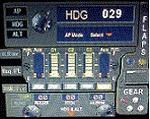
This set of 3 gauges is for use in the Saitek FIP and is an extension to my FIP gauge. That set of 3 gauges was designed to complement the Saitek AP/Multi panel and primarily showed the selected AP Altitude and Vert Spd whilst the Saitek AP/multi panel was displaying HDG. The second main part of those gauges were the Fuel Level displays, each gauge displaying a different combination of fuel tanks to suit the aircraft being flown and thus offered functionality for all types of aircraft.
This set of 3 gauges is designed for the same purpose but now encompasses a working AP that allows you to select HDG, ALT and VS values and activate the HDG and ALT mode (and AP master switch) to enable auto-pilot flight (for those who have a FIP but not an AP/multi panel).
For those who have an AP/multi panel, it gives a backup AP in your build/rig (although it all works off the same FS telemetry, I have found that when the AP/multi-panel freezes, especially the 'Alt' button, then this FIP gauge can de-activate it. The combinations displayed are those that suit my choice of aircraft, however it is easy to re-configure gauge Elements (fuel tank names) and artwork (fuel gauge titles) to suit the combination you prefer.
These gauges also retain the gear, flaps and light indicators, auto rudder on/off button plus rudder and aileron trim capability that were in the previous gauges. An additional feature is the battery switch will now turn off the AP display and fuel levels.
The artwork in these gauges has also been upgraded a bit and a template artwork is included to assist in customising.
| Filename: | AP_MultiFuel_Gauges_for_FIP.zip |
| License: | Freeware |
| Added: | 20th October 2014, 16:00:33 |
| Downloads: | 265 |
| Author: | Robert Budd |
| Size: | 764.26 KB |
| Category: Flight Simulator X - Scenery | |
| RAF Barkston Heath - 1944 |
|
File Description:
At the time of its construction, RAF Barkston Heath in common with a number of other airfields in the Grantham area had been planned for the RAF's No. 7 Group. In late 1943, Barkston Heath was made available to the United States Army Air Forces Ninth Air Force and designated as USAAF station 483. It was earmarked for basing troop carrier units scheduled to be transferred from Sicily to participate in the forthcoming cross-Channel invasion, Operation "Overlord"
American 61 TCG aircraft based at Barkston Heath carried British paratroops on the ill-fated operation Market Garden.
The USAAF returned control of the airfield to the Air Ministry in June 1945 when the war in Europe ended. Barkston Heath was used by No 256 Maintenance Unit and No 2 RAF Regiment. Beginning in May 1948.,
RAF Barkston Heath has the Naval and Army Elements of No. 3 Flying Training School (3 FTS) which, for a period between approximately 1995-2010 operated the Slingsby T67M260 Firefly two-seat trainer. The school now operates the Grob Tutor T1. A secondary role of RAF Barkston Heath is as a Relief Landing Ground for the flying training activities at RAF Cranwell.
Source: Wikipedia
| Filename: | RAF_Barkston_Heath__1944.zip |
| License: | Freeware |
| Added: | 10th March 2017, 07:13:15 |
| Downloads: | 150 |
| Author: | Terry Boissel |
| Size: | 1.05 MB |
| Category: Flight Simulator 2004 - Miscellaneous Files | |
| Active ILS - Niagara International Airport KBUF |
|
File Description:
As most know initiating the ILS at certain airports for AI Aircraft or User Planes is not a function at this time when using AFCAD2 if visibilty falls below 3 miles. This is do to the somewhat complex XML code that has to be written for NAVAIDS and then the compiling into a bgl file. If you add a new ILS runway to an airport such as KBUF (rwy 32) only the user aircraft can use this runway when visibility falls below 3 miles if a GPS/LDA is unavailable. ATC will no longer use 32 ILS runway for AI Traffic or User Aircraft (by default) because FS9 sees it as a visual runway and will now vector your Planes back to 5/23 ILS which is also being used as a Terminal Departure Runway. The KBUF_ILS_jv.bgl file adds all NAVAIDS for making 32 a Precision Instrument Runway by adding all the radar fixes for both the ILS/DME approach portion and the proper missed approach procedures as per current published plates for runway 32. See the readme for what's new at the KBUF airport. **** AFCAD2 included for FS9 default scenery. ****
| Filename: | Active_ILS__Niagara_International_Airport__KBUF.zip |
| License: | Freeware, limited distribution |
| Added: | 30th January 2005, 17:21:34 |
| Downloads: | 1,306 |
| Author: | Jim Vile |
| Size: | 117.25 KB |
| Category: Flight Simulator 2004 - AI Aircraft | |
| CASA CN-235-220 |
|
File Description:
AiVER presents the first CASA CN-235-220 AI Aircraft model for FS2004.Aircraft features 9 LOD’s to produce optimized framerates. LOD1 has 3,007 polygons and LOD9 has 293 polygons.The aircraft also features front gears with animated gear bays and main gears that extend during final approach and retracts after takeoff, animated propellers with 3 different speed textures such as the still propeller, slow-rotating propeller and fast-rotating propeller to correctly animate the propeller speed, and flaps that extend during final approach in 3 increments and retracts after touchdown. This model also has landing lights that lights up before entering the runway for takeoff, taxi lights that lights up when the aircraft moves and turns off when it temporarily halts in the taxiway, wing navigational lights, logo lights, beacons and strobe lights. This AI model has a pushback vehicle with a driver and rotating tires upon pushback. Upon final stop, the passenger and cargo doors are opened and a destination sign is displayed. Paint Kit is also included in this file in multi-layered Adobe Photoshop and 32-bit bitmap formats. Aircraft model, flight model, animations, Asian Spirit repaint and Paint.
| Filename: | CASA_CN235220.zip |
| License: | Freeware, limited distribution |
| Added: | 5th March 2006, 02:45:03 |
| Downloads: | 7,020 |
| Author: | AiVER/ Archt. Ver Walter Gulfan |
| Size: | 5.99 MB |
| Category: Prepar3D V1-4 - Aircraft Repaints, Textures and Modifications | |
| PLUNA 1998 AI Package |
|
File Description:
PLUNA of Uruguay was owned by VARIG, and aircraft were often swapped back and forth or operated in full VARIG colors as needed. By 1998, the 707 had recently left the fleet in favor of a DC-10-30 leased from VARIG and used for multi-stop flights to Madrid. There were 3 variations of the 737; standard, VARIG hybrid, and a special livery. Raphael Rodrigues has painted all 3 and I will be uploading them to Avsim this week. Note that some of the aircraft are scheduled for long ground times in Brazil, likely as maintenance was done there. Textures by Raphael Rodrigues included for the FAIB 737-200. Also note that sources say the DC-10-30 left the fleet in 1998, which would suggest a VARIG DC-10-30 covered these flights. Do as you please.Textures by Raphael Rodrigues included for the FAIB 737-200, DC-10-30 by Jason King is in the Avsim Library as "aim_dc1030_pluna_newcolors_307355.zip". Part of the 1998 Flight Simulator Project. Follow us on Facebook at facebook.com/flightsim98 and on instagram as @bayviationsim. For more Retro AI, check out the forums at: http://retroai.proboards.com/
| Filename: | PLUNA_1998_AI_Package.zip |
| License: | Freeware, limited distribution |
| Added: | 5th November 2019, 06:13:16 |
| Downloads: | 207 |
| Author: | Raphael Rodrigues, Chasen Richardson/Bayviation |
| Size: | 4 MB |
| Category: Flight Simulator X - Scenery | |
| West Coast Victoria v2 for ORBX v2 YWBL Warrnambool YPOD Portland YPFA Port Fairy |
|
Images related to this file:
File Description:

'West Coast Victoria v2' is made to match ORBX Australia v2 scenery. Use 'West Coast Victoria' for ORBX v1 or no ORBX. There are 3 airports YWBL Warrnambool YPOD Portland YPFA Port Fairy. ORBX has done 2 of these (YWBL, YPOD) as they have done every airport included with FSX in Australia to a reasonable standard. If I had not already done them for ORBX V1 I would not have bothered. However these are better than ORBX because the surroundings have been modified to match real life. Towns have been added or shifted. Forests cut down or added. There are also custom accurate versions of the actual terminal buildings. Included are AI traffic files that cover all 3 airports + YHML Hamilton nearby (little or no traffic from ORBX). In short a lot more time spent. ORBX had to do every airport has in Australia! Recommend installing the excellent YHML Hamilton (by Anthony Lynch). These files are for Flight Simulator X. Made using Airport Design Editor using some objects borrowed from Robert Budd's excellent Baccus Marsh and 'Static aircrafts' by Jean-Pierre Fillion. REQUIRED The scenery is designed to interface with ORBX FTX_AU V2 scenery for Australia (payware).
| Filename: | West_Coast_Victoria_v2_for_ORBX_v2____YWBL_Warrnam.zip |
| License: | Freeware |
| Added: | 8th October 2019, 20:00:14 |
| Downloads: | 321 |
| Author: | Colin Jeffery |
| Size: | 8.56 MB |
| Category: Prepar3D V1-4 - Utilities | |
| Random Flight Database v2.2.5 |
|
File Description:
Random Flight Database is a simple and easy to use application.
It will allow you to randomly choose a flight according to your criteria.
A default database is already included, but also the possibility for each user to create his own database.
But it's not all, you can also extract the flights of the day for an airport, or extract flights on a full week.
Windows Only
2.2.5 :
Replace winter by summer 2019 :
Cyprus Airways
Flyadeal
Flynas
Frontier Airlines
GetJet Airlines
Saudia Cargo
Saudia
SkyUp Airlines
Uzbekistan Airways Cargo
Uzbekistan Airways
Improved code for extracting data from Flightpedia and FlightAware sites
Added in "Extraction of scheduled flights and random choice in the list" :
- Flight Aware Departure (Longest Extraction, 3 Day Extraction, No Codeshare Extract)
- Flight Aware Departure (Longest Extraction, Last Week's Flight Extraction, No Codeshare Preview)
- Flight Aware Arrival (Longest Extraction, 3 Day Extraction, No Codeshare Extract)
- Flight Aware Arrival (Longest Extraction, Last Week's Flight Extraction, No Codeshare Preview)
Install : Execute .exe
Contact [email protected]
https://mikoulprostgrandprix.wixsite.com/randomflightdatabase
Other install : execute the shortcut "Check Update Random Flight Database"
Do not hesitate to send me bugs, or proposals. Thanks
| Filename: | Random_Flight_Database_v225.zip |
| License: | Freeware |
| Added: | 15th September 2019, 20:52:26 |
| Downloads: | 91 |
| Author: | mikoulprostgrandprix |
| Size: | 79.06 MB |
| Category: Flight Simulator 2004 - Miscellaneous Files | |
| Active ILS - KLAS (McCarran Intl - Las Vegas, Nevada) |
|
File Description:
As most know initiating the ILS at certain airports for AI Aircraft or User Planes is not a function at this time when using AFCAD2 if visibilty falls below 3 miles. This is do to the somewhat complex XML code that has to be written for NAVAIDS and then the compiling into a bgl file. If you add a new ILS runway to an airport such as KLAS (rwy 01L) only the user aircraft can use this runway when visibility falls below 3 miles. ATC will no longer use 01L ILS runway for AI Traffic or User Aircraft (by default) because FS9 sees it as a visual runway and will now vector your Planes back to rwy 7/25LR ILS which is also being used as a Terminal Departure Runway. The KLAS_ILS_jv.bgl file adds all NAVAIDS for making 01L a Precision Instrument Runway by adding all the radar fixes for both the ILS/DME approach portion and the proper missed approach procedures as per current published plates for runway 01L. See the readme for what's new at the KLAS airport. **** AFCAD2 included for FS9 default scenery. ****
| Filename: | Active_ILS____KLAS__McCarran_Intl____Las_Vegas_Nev.zip |
| License: | Freeware, limited distribution |
| Added: | 28th February 2005, 15:44:40 |
| Downloads: | 3,027 |
| Author: | Jim Vile |
| Size: | 33.84 KB |
| Category: Flight Simulator 2004 - Panels | |
| Generic Customized Advanced Panels |
|
File Description:
FS2004 Generic Advanced Customized Panels. Since this panel includes All XML gauges for 2-, 3- and 4 Jet engines aircrafts, Concorde and Warplains for 1 and 2 Engines, including landing panel. Special effects of the visor in the mainpanel of the Concorde. It can be used for any heavy jet. Also you have 3 choices, between the metal gray color panel (old Boeing) or the brown color of the FS2004 boeing default and the feeling to be in a Airbus (PFD of A380). All gauges are on the same place in the different engine version or airplane, no more memorizing the different panels. It has a full working overhead, TCAS radar, ATC control, customized FS2004 GPS, ACS-GPS, APU, FMC, HUD, Wiper and many custom xml gauges. Special attention is made on the Radio, Fuel, PFD, Clock, Taxi speed control, Wind speed, Bank rate, Auto mb-Hg, Push back,and Sim speed. A lot of information during take off, flight and landing. Many warnings included. Ideal panel for beginners and advanced simmers. Special Credit of gauges to Acsoft, Arne Bartels, Eric Mariano, Björn Karlsson, Tony d'Ambrosi, Nick Pike, etc. Panel design and gauges by Guy de Smet.
| Filename: | Generic_Customized_Advanced_Panels.zip |
| License: | Freeware |
| Added: | 16th January 2004, 23:00:39 |
| Downloads: | 16,068 |
| Author: | Guy De Smet |
| Size: | 10.3 MB |


© 2001-2026 AVSIM Online
All Rights Reserved
Privacy Policy |