
Where Flight Simulation Enthusiasts Gather from Around the World!
AVSIM Library - Search Results

| Category: Flight Simulator X - Scenery | |
| CVN68_Carrier_North Sea_V1 |

|
Images related to this file:
File Description:
This scenery is based on the great CVN 68 Nimitz carrier model from Javier Fernandez.
The scenery shall replace my current CVN 75 scenery in the North Sea.
The scenery includes the following scenery elements, objects and dynamic traffic:
The carrier CVN 68 Nimitz and a lot of stuff on deck, 2 flying Helicopters over the Carrier,
4 Navy-Destroyers escorting the Carrier, 2 moving Destroyer based on a "Boats Traffic Plan
which are traveling around the group, 1 moving Tanker,a Oilrig about 30 nm northwest from the Carrier with a landable Platform !!
Seven F-18 Hornets as AI traffic, three F-18 Hornets based on recorded flights.
For the re-play of the start and landing traffic, the tool FSRecorder is required. The tool is part of this scenery package.
The carrier is built up as an airport with the code " CV68 ".
For installation and more info see the documentation inside the zip file.
For full carrier operation (catapul/cable catch) you need one of the two tools: RCBCO-30.zip, or ArrCab26.zip both available at the AVSIM lib.
CREDIT goes to :Javier Fernandez for his super great carrier model and to
Matthias Neusinger for his excellent FSRecorder tool.
| Filename: | CVN68_Carrier_North_Sea_V1.zip |
| License: | Freeware |
| Added: | 2nd June 2010, 01:37:06 |
| Downloads: | 2,919 |
| Author: | Dietmar Loleit |
| Size: | 32.58 MB |
| Category: Flight Simulator 2004 - Scenery | |
| Mary River CMR2 on Baffin Island in Nunavut Canada |
|
Images related to this file:
File Description:
This is a very early version of an airfield in Nunavut built to serve an iron ore mine some 100 miles south of Pond Inlet on Baffin Island. In 2004 the airstrip was just being built, with a very basic camp set up for the construction crew who then went on to develop the roads etc in the immediate area. The original plan was for an opencast mine, with ore being transported south on a new (and expensive) railroad link to a new port on the south shore of Baffin Island. This plan was later changed to a (much cheaper) road to Milne Inlet, north of Mary River. And there my story rests, as although production has now started I have no further information about the operating mine. Nolinor currently flies regular supply flights into the camp; the AI here is for the early days. The gravel runway is 4,800 feet long and 150 feet wide, aligned 124T-304T as all runway headings in the north are given as true rather than the unreliable magnetic, which would be 12-30. Runway lighting and PAPI was installed early on and is included here; signage is not and the apron is the early version.
| Filename: | Mary_River_CMR2_on_Baffin_Island_in_Nunavut_Canada.zip |
| License: | Freeware, limited distribution |
| Added: | 18th August 2018, 02:57:19 |
| Downloads: | 136 |
| Author: | Roger Wensley |
| Size: | 4.82 MB |
| Category: Flight Simulator 2004 - Scenery | |
| North Manitoba Airfields 20# in Canada |
|
Images related to this file:
File Description:
These are 20 airfields in north Manitoba, Canada. They were all previously posted individually But not on Avsim. There is a screenshot of Google Earth showing their names and locations amid other airfields. "Lodge" indicates the fact that there is a fishing lodge and airfield at that location but that I have no information to enable me to make the scenery. There are also some airfields that I downloaded years ago and are part of my FS9 set up, such as Flin Flon. There is AI with the supply flights that are vital for these isolated outposts. Gillam is a northern airfield that is connected to the rest of Canada by a railroad that continues north to Churchill Manitoba on the Hudson Bay coast and is used for grain exports during the ice-free summer months. A large number of the supply flights originate from Gillam. You may wonder about the numbers of fuel tanks at these airfields. These are not for the airfield use, they are for the settlement to be able to generate electricity and also to provide heating in the winter. If you find an error email me please, and note that my email address has been changed to rogwens at Gmail dot com.
| Filename: | North_Manitoba_Airfields_20_in_Canada.zip |
| License: | Freeware, limited distribution |
| Added: | 7th April 2021, 17:09:34 |
| Downloads: | 82 |
| Author: | Roger Wensley |
| Size: | 35.99 MB |
| Category: Flight Simulator 2004 - Scenery | |
| Komakuk Beach & Storm Hills DEW sites in Yukon and Northwest Territories, Canada |
|
Images related to this file:
File Description:
These are DEW line sites in northern mainland Canada, to the west of Tuktoyaktuk.
Komakuk Beach CWKB is not included in FS9 and is in the Yukon, only 20 miles from the Alaska border. It is, as the name suggests, close to the sea, and the gravel runway 3,600' by 125' has its western end almost on the beach.
There is no lighting and no signage and the airfield is officially listed as closed, but in fact is used during the annual maintenance and refuelling of the automated NWS (North Warning Station) close by and for any unscheduled servicing. This replaced the previous much older DEW station that was manned year round and had a lot more buildings.
Storm Hills CWSH is in the Northwest Territories, 43 miles south-southwest of Tuktoyaktuk, up on higher land at 810 feet ASL. The NWS (there was no previous DEW station at this site) is serviced by helicopter from Tuktoyaktuk and has a gravel landing pad on the north side of the station. It will show on a gps and it is 5 miles west of the distinctively shaped and large Parsons Lake. This too was not in FS9.
| Filename: | Komakuk_Beach__Storm_Hills_DEW_sites_in_Yukon_and_.zip |
| License: | Freeware, limited distribution |
| Added: | 16th July 2012, 18:56:09 |
| Downloads: | 306 |
| Author: | Roger Wensley |
| Size: | 1.68 MB |
| Category: Flight Simulator X - Scenery | |
| Airport update for Pudong Intl with New Satellite Terminal (ZSPD) |
|
Images related to this file:
File Description:
This is a reasonably accurate and up-to-date version of Pudong Intl airport and made only for FSX users, not suitable for use in P3D: I have given this airport a complete makeover which now includes the new Satellite terminal S1 and S2, assigned parking as per their website with extra overflow parking, all gates/parking numbered correctly where possible with gates included for the A380 (Gates are 24 at T1, 71,75 at T2, 504 remote stand near S1 on taxiway L2, between taxiway P2 and south of P3 and 170 at S2), taxiways and taxi signs updated to the latest charts, extra fuel trucks, drainage channels, support vehicle roads rebuilt, and many other scenery improvements and objects added, airport views are from inside the control tower (when in tower view)
I have also added the new runway 15/33 and its taxiways, although not officially in operation yet, i have opened it so AI traffic will use it and be able to get to the terminals, because there are no charts available to me there are no approaches or taxiway designators for this runway,
I will try to update the approaches and taxiways for runway 15/33 when the updated charts become available to me, please view the readme before installation.
| Filename: | Airport_update_for_Pudong_Intl_with_New_Satellite_.zip |
| License: | Freeware, limited distribution |
| Added: | 15th December 2020, 03:51:37 |
| Downloads: | 44,887 |
| Author: | Ray Smith |
| Size: | 4.07 MB |
| Category: Flight Simulator 2004 - Scenery | |
| CYHD - Dryden Regional - Ontario, Canada * Updated v2 * |
|
Images related to this file:
File Description:
This greatly modifies my previous (2009) post of Dryden; this version has bespoke buildings and is stand-alone and does not require you to have the previous post. There will also be follow-up posts of Sioux Lookout and Geraldton. Dryden is in northern Ontario, 110 miles east of the Manitoba border, 40 miles west of Sioux Lookout, and with the US border 90 miles to the south. The town is on the northern shore of Wabigoon Lake and has a population of around 7,800. The main business is pulp and paper, along with agriculture, tourism, and mining. The airport is 5 miles northeast of the town.
Dryden Regional has 6,000' of asphalt which in FS9 is aligned 11-29. The second runway is compacted sand 2,000' long and aligned 05-23. There are two aprons, the western being for the terminal building and some ga parking, and the eastern larger and used in the summer for parking fire fighting planes, along with maintenance hangarage and accomodation etc. The Ontario Fire Service planes were included with my original Geraldton post and are included here again; they fly back and forth and keep Dryden busy along with several Bearskin Airlines and Perimeter Aviation flights.
| Filename: | CYHD__Dryden_Regional__Ontario_Canada___Updated_v2.zip |
| License: | Freeware, limited distribution |
| Added: | 16th March 2013, 09:59:52 |
| Downloads: | 595 |
| Author: | Roger Wensley |
| Size: | 26.99 MB |
| Category: Flight Simulator 2004 - Original Aircraft | |
| Piaggio P-166CL2 |
|
File Description:
Thanks to Andrew Spring of www.p166.com!!
The fifth of the coming P-166 aircraft series. I'm going to build the whole family of these graceful twins.
This file covers the whole production line of the P-166CL2!!! (Well, just 2...(-:)
The Piaggio P-166A is a light small twin. An Exotic two-engined prop that sold all over the world including America, UK, and Australia. he P-166CL2 was developed to take advantage of the cabin spaciousness of the P-166 series: a new landing gear that retracts under the fuselage into two small blisters lets expand the internal useful area more bakwards between the wings, as there is no central section. This lets the P-166CL2 accomodate 12 poassengers + pilot. The old gear bays at the side of te fuselage were replaced with two large windows that give a strange top-down view for the passenger. Tiptanks are optionally unattachable, as using them plus 12 passengers makes the plane go overweight. Means that the 12 passengers can only be transported on a considerabily short range. Only 2 P-166CL2s were built, due to the low-range caused by the small old-type tiptanks and the unstability of the new landing gear, that gave serious problems while taxiing. The P-166C is dated October '64, and converted to CL2 in 1972. The aircraft is still in production in a slightly modified turboprop version, the P-166D-P1. This model is 760 Kbs with c.a. 23000 polygons in c.a.170 assemblies. Features Clickable Dynamic VC with non-planar throttle quadrant. Detailed internals. Fully compatible with FS 2002 (pro edition)
| Filename: | Piaggio_P166CL2.zip |
| License: | Freeware |
| Added: | 4th April 2004, 18:02:21 |
| Downloads: | 5,617 |
| Author: | Mario Noriega |
| Size: | 7.23 MB |
| Category: Flight Simulator 2004 - Original Aircraft | |
| Piaggio P-166DL3 SEM Patrol Version |
|
File Description:
Thanks to Andrew Spring of www.p166.com!!
The seventh of the coming P-166 aircraft series. I'm going to built the whole family of these graceful twins. The Piaggio P-166A is a light small twin. An Exotic two-engined prop that sold all over the world including America, UK, and Australia. The P-166DL3 is the actual production version of a plane that firt flew in 1957, now with turboprop engines, new avionics, increased fuel capacity, and completly new hydraulic and electric system. Its origin is traced Back to the Piaggio P-136, a light anphibian, which the P-166 keeps the wings, the engines and the tailplanes. The first P-166A flew in November 1957, and the DL3 is dated 1976. The APH version (Aero-PHotograammetric) was originally built featuring a flat bottom with opening holes for cameras and orher devices, planning to use the unit for logistic squads, that never formed. So the APH internal features were generally limited to Military high density transport, paratrooper transport, or Cargo. Units fitted with APH original projected photogrammetric capibilities are very rare. he SEM version can be esily identified by the big sonar under the nose, the FLIR under the left wing and a search light on the right wing. It' a maritime antismuggling patrol aircraft, and it's used by the italian Cost guard and "guardia Di Finanza (Finance Guard). The aircraft waits to be repalced by a new version, the P-166DP-1, with PT-6A engines.
This model is 740 Kbs with c.a. 21000 polygons in c.a.160 assemblies. Features Clickable Dynamic Photoreal VC with non-planar throttle quadrant. New here is the photoreal panel. Detailed internals.
| Filename: | Piaggio_P166DL3_SEM_Patrol_Version.zip |
| License: | Freeware |
| Added: | 19th May 2004, 15:22:01 |
| Downloads: | 7,228 |
| Author: | Mario Noriega |
| Size: | 7.41 MB |
| Category: Prepar3D V1-4 - Utilities | |
| Flightplan Visualizer 1.12 |
|
Images related to this file:
File Description:
Flightplan Visualizer (FV) version 1.12.0. Copyright 2018-2019 by Pelle F. S. Liljendal ([email protected]), all rights reserved.
FV comes with 540 pre-imported Commercial AI flightplans (+380 BizJet flightplans are available as a separate download). However you are able to import additional (AI) flightplans yourself. Once imported these (AI) flightplans can be visualized on a map-view, and the user will be able to search accross all these. Hence you can use the program as inspiration as to which routes to fly. E.g. you can search across all imported flightplans to find all flights in an A321 flying into/out from LDDU, or simply to look for all flights in a Boeing 747-8F.
Simply run the included installer to install the software. The program will be installed into "C:\Program Files (x86)\Flightplan Visualizer" and all datafiles will be installed into: "C:\Users\[UserName]\AppData\Roaming\FlightplanVisualizer". The program comes with a full manual explaining everything, and a 3 page quick manual to get you started. The first 3 times you run the program the quick manual will automatically open. The forum is hosted here: https://forum.aerosoft.com/index.php?/forum/919-flightplan-visualizer/
Version 1.12 Contains the following changes: ⦠Ability to automatically check for available program-updates. The actual download of the new installer is still a manual process, but the program will at least list the download-URL. However You cannot see this feature in action until the next version will be released ;-) Updated the flightplan file-format to accommodate changes in the latest versions of (AI) flightplans. The program remains backward compatible and can still read older flightplans, however these might “miss†some (at this time) non-essential information. As a result all “Wi18-19†and “Su19†(and a few “Su18) flightplans have been re-imported and have been bundled with the version 1.12 installer, using the new file-format. Added new "Generate redirection report" button to the redirection edit form. Pressing this button will generate- and display a report of all active pseudo airports and redirections per flightplan. Added new menu-item to re-process all flightplans, according to specified airport-redirections. The "UserAirportRedirect.xml" file bundled with the installer have been updated, based on output from the new "Generate redirection report". These updated airport-redirections have been used to re-process/update all flightplans bundled with the installer. Buttons have been added to the "Leg Info" which allows you to transfer data for a particular leg/flight from FV to SimBrief in order to kick-start your "paper work" for a flight to fly. The "Leg Info" form also got buttons to show decoded METAR/TAF, and the raw METAR/TAF is also embedded in the text copied to the clipboard (when pressing the appropriate button). In settings you can now speficy the path of the folder holding the files that MakeRunway generates (if not specified it will use the UserData folder). Once set to the folder where MakeRunway generates its files (e.g. the P3D folder), you only have to run MakeRunway, you no longer have to copy the 3 files to the UserData folder. A few new traffic-charts were added to the "Airport Info" form (traffic per: region, sub-region and country), and a combo-box was added to switch between inbound- and outbound-traffic. The "Nearby Airport" form that can be opened from the "Flightplan Import" form now have an extra comment-column with information about the non-pseudo/pseudo airports. The comment column on the airport tab-sheet of the "Flightplan Import" form now also contains more info about non-pseudo/pseudo airports. The Generic Randomizer form got a new button called "Pick random flight", which will display info for a flight, randomly picked from all flights for the selected flightplan, or last search. In the "Search legs" form, you can now enter multiple ICAO-codes (separated by comma) to search for flights to/from these (e.g. search for all flights to/from EBLG or ELLX, by entering "EBLG,ELLX"). If you press SHIFT while clicking the airport browser button, the selected airport will be added to the comma separated list. If you do not hold SHIFT, the list will only contain the newly selected airport. Added support for using FS Global Real Weather (FSGRW) as a Weather provider for METAR-messages (FSGRW does not support TAF-messages). To use FSGRW you must go to settings and specify a full path (including filename) of the file generated by FSGRW. When editing a flightplan the user will be warned if trying to close the form, if changes were made. The menu-item to generate report with all defuct-/obsolete flightplans have been removed from the main-menu, but can now be generated using a button on the "Enable/disable flightplans" form. Now all applicable authors are shown when hoovering the mouse over the flightplan combo-box when a search is active. In previous versions the "Edit" buttons next the flightplan combo-box (on the main form) was only active when a flightplan was selected. Now its also active when "[Last Search]" is selected. However it will instead launch the "Search Legs" form, where you can then edit the criteria of the search. A few airports and airlines have been added/updated in the data-files bundled with the updated installer to accommodate the additional bundled flightplans. The Beluga XL Freighter was added as well as many of the other aircraft were updated with various changes. Added support for a bunch of military aircraft: A6/AE6, A10, C5, C17, E2, E3, EF2000, F14, F15, F16, F18, F22, F35, F111, F117, JAS39, KC10, KC135, MiG 21/23/25/27/29/31, Mirage III/5/2000, Rafale, SU 17/20/22/24/25/27/30/32/34, V22. New "Exclude military aircraft" setting have been added (defaults to true). When true military aircraft will not be shown (can be changed in the settings form). Added new menu-item to load/display current log-file. FV tend to be somewhat memory-hungry while (re)loading all active flightplans, and you might see a peek in memory consumption. But from this release and forward it will try to free up most of the memory once all flightplans have been loaded. Minor changes to the "Enable/disable flightplans" form, to make it more responsive, and added a progressbar that is visible while flightplans are being moved, copied or deleted. Fixed: issue when trying to import a flightplan zip-file containing multiple "Flightplan_XXX" files. If the same zip contains multiple sets of matching files (Flightplan, Aircraft and Airport) the user will now be presented with a combo-box from where the user can pick which set of files to import (only the flightplan-file will be shown). Fixed: The file "f5.csv" was missing from previous installers. Fixed: issue with pseudo-airports when using the "Nearby airports" tab-sheet in the Airport Info form. Fixed: Saving a flightplan that was edited, it would try to save it in the (flightplan) [ROOT] folder even if it was loaded from a sub-folder. Now it will always try to save it in the same location with the same filename. If you want it saved elsewhere/with another filename use the "Save As" button in stead. Imported flightplans will still be saved to the [ROOT] flightplan folder. Fixed: Pressing ENTER in the Flightplan import/edit-form while the comments-field had focus, would close the form (saving the flightplan). Fixed: Result-viewer will no longer display with all text selected. Fixed: METAR/TAF decoder will no longer display with raw-message selected. Fixed: In some cases the program needed to be restarted if changes were made to the weather-provided data in the settings-form. Installer: Comes with +30 new pre-imported (Summer 2019) flightplans of which some are replacements of obsolete flightplans (from previous installers), and 2 of the "old" flightplans have been marked as defunct.
Pelle
| Filename: | Flightplan_Visualizer_112.zip |
| License: | Freeware, limited distribution |
| Added: | 23rd August 2019, 17:15:13 |
| Downloads: | 195 |
| Author: | Pelle Liljendal |
| Size: | 30 MB |
| Category: Flight Simulator X - Original Aircraft | |
| B-52J |
|
Images related to this file:
File Description:
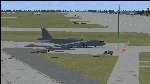
Since it became operational in 1955, the B-52 has been the main long-range heavy bomber of the U.S. Air Force. It first flew on Apr. 15, 1952. Nearly 750 B-52s were built when production ended in Oct. 1963. This "J" model is the future re-engined "h" model 60-0042 of the 917th Wing AFRC based at Barksdale AFB (KBAD). She flies higher, further, and faster than any previous version. The aircraft can cruise at 380 KIAS at 500 ft agl over about 5,000 nm which makes her capable of reaching targets within enemy airspace anywhere on the globe without being detected by radar until it's too late. Her normal high altitude cruise speed has been increased to Mach .88 above FL550E over 9,000 nm without refueling, and her service ceiling has increased to FL570E. The 50,000 lb payload is still nominal, but due to the lighter engines she now has more accomidations for the crew, and does not require refueling very often. She can range much further with less speed (i.e., Mach .85), but there is normally no need for that. This aircraft is designed to fly like the real thing. It is likely one of the best B-52 models available at this time. I have test-flown this aircraft around the globe several times to reassure myself that all is well. You will not have a bouncing effect occur when cruising with 16x speed acceleration and autopilot engaged because all aerodynamics and balance are perfected to a very low margin of error, or no error margin at all. Please be sure to read the INSTRUCT.TXT file for extended details. Original aircraft designer: Mike Stone; Textures by Bill Baldwin; Panel and gauges by Philippe Wallaert; Auto Smoke Effects by Richard Wisman; BR-725 Sound by Ronald Buffalo; Real World aero/engine dynamics, data, lights and effects by: Douglas E. Trapp, FS Flight Dynamics Engineer, Irving, Texas, [email protected], October 2018. The use of this model, and the configuaration of such, is designed for free educational purposes, and protected by the Free Use Act: (https://www.law.cornell.edu/uscode/text/17/107). This model and/or aspects of such cannot be used for monetary purposes!
| Filename: | B52J.zip |
| License: | Freeware |
| Added: | 27th October 2018, 18:57:21 |
| Downloads: | 628 |
| Author: | Douglas E. Trapp |
| Size: | 24.51 MB |


© 2001-2026 AVSIM Online
All Rights Reserved
Privacy Policy |