
Where Flight Simulation Enthusiasts Gather from Around the World!
AVSIM Library - Search Results

| Category: Flight Simulator 2004 - Original Aircraft | |
| Buecker Bü-131 Jungmann |

|
Images related to this file:
File Description:

Re-upload by Leen de Jager (for info about this package contact me)
FS2004 Buecker 131 Jungmann Version 2 Package. The Buecker "Jungmann" was the first plane produced by the new Buecker Flugzeugbau GmbH company founded in 1932 in Johannistal, Berlin.
The prototype B 131A V-1, registration: D-3150, was conceived as a training/private plane capable of aerobatics and powered by a 80 hp (60KW) Hirth HM60R inline engine. It made its inaugural flight on 27th April 1934. Later production models, such as the 131B were available with more powerful engines.
The biplane was constructed under the leadership of the Swedish technical director Anders J. Anderson. The Buecker Jungmann served as the standard training-plane of the German Luftwaffe and in total around 5000 were built. Model and Copyright by Oliver Fischer 18.2 MB
| Filename: | Buecker_B131_Jungmann.zip |
| License: | Freeware, limited distribution |
| Added: | 14th May 2010, 09:30:19 |
| Downloads: | 8,130 |
| Author: | O. Fischer |
| Size: | 17.75 MB |
| Category: Prepar3D V1-4 - Aircraft Repaints, Textures and Modifications | |
| Messerschmitt Bf-109E - Yellow ‘1’ Josef Priller |
|
Images related to this file:
File Description:
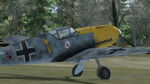
Yellow ‘1’, W.Nr. 5057, was flown by the commander of 6. Staffel JG 51, Josef Priller, and underwent several camouflage color modifications through its career. According to some sources, the initial scheme was composed of RLM 70/71/65. However, it is easier to confirm later variations, when the underside light blue was extended up the sides of the fuselage, and quite high up at that. Later, this color was subdued by the application of irregular squiggles of RLM 02 and 71. Furthermore, the upper surfaces of the wing, originally composed of broken lines, were augmented in a similar manner as the fuselage sides. This was the appearance of the aircraft in the fall of 1940, and as depicted by our profile. At the time, the aircraft also received a yellow nose section and rudder. The extent of the front end yellow coloring is up for speculation. The emblem of II./JG 51 ‘Gott strafe England!’ (God punish England!) shown on the rear of the fuselage, is sprayed on without the usual white background, only with the black border around a black raven with an umbrella, symbolizing Neville Chamberlain. The Staffel marking in the form of the Ace of Hearts subsequently was used on Priller’s later aircraft as a personal marking. The kill marks denoting Priller’s aerial victories on the tail in the form of vertical tabs with dates, partially obscured the Swastika. Beer lover Josef Priller attained 101 aerial victories in 1,307 operational flights between 1939 and 1945.TEXTURES only. Included are textures for a non-Swastika version. Repaint for the Shockwave (A2) Messerschmitt BF 109 for FSX. The aircraft works without issues in P3D. Just copy aircraft the installation folder from FSX to the P3D Simobjects folder.
| Filename: | Messerschmitt_Bf109E__Yellow_1_Josef_Priller.zip |
| License: | Freeware, limited distribution |
| Added: | 22nd March 2019, 04:33:30 |
| Downloads: | 101 |
| Author: | Eberhard Haberkorn / A2A |
| Size: | 75.69 MB |
| Category: Flight Simulator 2004 - Scenery | |
| Tuktoyaktuk CYUB in Northwest Territories, Canada |
|
Images related to this file:
File Description:
Tuktoyaktuk is on the northern coast of Canada, 70 miles north of Inuvik and to the east of the Mackenzie River delta. It has a population of around 900 and because of its natural harbour is a centre for oil exploration activity on the surrounding land and on the Beaufort Sea, with sizeable but now under-used yards dating back to the peak of activity in the late 1970's. On land work is restricted to the winter half of the year, as only the freeze-up makes it possible to move on land with heavy equipment, and during the winter further supples are driven over an ice road from Inuvik up to Tuk. The ice-free summer months are used for floating equipment from Yuk along the coast on barges and then up the rivers to inland sites in preparation for the winter activity. Before the oil there was a DEW line station here, and there is still an automated station on the same site and included here, as are the yards. The airfield is on the coast close to the town and the yards, at 15' ASL. The gravel runway 09/27 is 5,000' feet long and 150' wide; both thresholds are displaced by 200', but of course there are no markings on the gravel. The large apron is on the north side at the centre of the runway and is large enough to accomodate several large planes. Inuvik revised should be installed first, now Tuk, then last of the three Sachs Harbour which has AI for Aklak Airlines flights (operated by Kenn Borek) for all three airfields. There is a separate AI file included here, featuring freight delivery by Buffalo Airways and small planes.
| Filename: | Tuktoyaktuk_CYUB_in_Northwest_Territories_Canada.zip |
| License: | Freeware, limited distribution |
| Added: | 14th May 2012, 17:19:20 |
| Downloads: | 618 |
| Author: | Roger Wensley |
| Size: | 8.99 MB |
| Category: Flight Simulator 2004 - Scenery | |
| LIMN Cameri, Italy (UPDATED v2) |
|
Images related to this file:
File Description:
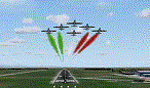
This scenery is a homage to the great military airport of Cameri NO, Italy; it has been revised with complete new ground that solves the previous flickering problems; it is builded-up with ownmade GMax objects and other existing ones; some buildings by GMax, remainder by others and by Generic Building system.
Information: Built during 1910 close to Novara, it became a prestigious Flight School where a lot of pilots of WWI where trained. Later, Gabardini/CANSA entered by promoting and developing aviation activities, mainly establishing a military flight school. On 27th July 1914, first of story's time, a flight from Cameri crossed the Alps (Camery - Viege, over Monte Rosa) with a Gabardini 80HP aircraft and pilot Achille Landini together with Giuseppe Lampugnani passenger. On 1930 the school closed, but the field still remained as aviation workshop. During the WWII the airport was quite destroyed by the german army, during their retreat. After the war, the rebuild operations carried on to Cameri several details, of which the acrobatic patrol of "Lancieri Neri" and, 1967-1999, the great 53th "Stormo Caccia". On 1998 the storm was moved to Gioia del Colle airport and the base was restructured as Comand Airport, where some technical departments still works (the 453th Operative Technical Services Group, the 553th Logistic Operative Services Group and, mainly the 1st Aircrafts Maintenance Dep.nt)
Contents: all around new great terrain for about 4.5 x 3.5 km; static aircraft inside hangar as Tornado, Eurofighter and historic monoliths at admittance and inside airport; ground equipments, cars outside and inside airport, bus, tankers, emergency trucks; military shelters (10) and workshop ones (5); buildings outside/inside airport, control tower, VOR, radar tower and some other navaids; lights at hangars, admittance and all over the boundaries; more then 10 km boundary by walls and fences of the complete areas; thousands trees all over the scenery. This scenery includes the airport scenery content only. You can find separate further sceneries for Babini Army station and Museum
| Filename: | LIMN_Cameri_Italy_UPDATED_v2.zip |
| License: | Freeware |
| Added: | 20th October 2011, 00:20:05 |
| Downloads: | 2,357 |
| Author: | Aldo Della Vedova, Daniele Lanfranchi |
| Size: | 25.08 MB |
| Category: Prepar3D V1-4 - Utilities | |
| AIFlow SimConnect Utility for P3D v4 |
|
Images related to this file:
File Description:
AIFlow v1.1 is a simconnect utility designed to ease AI congestion and go-arounds at the airport the user is departing from and arriving at. AIFlow does this by enforcing spacing minimums between arriving AI aircraft resulting in more orderly arrival patterns. AIFlow also supports spacing spacing minimums between the AI aircraft and the USER’s aircraft when the user is flying (during all phases of the user's flight). For added realism, AIFlow adds landing effects (e.g., micro bank and pitch corrections that scale up during crosswind conditions) to the AI on short final approach. The user can also briefly squawk 1234 in their aircraft to temporarily suspend landings so that the user can find a slot to depart a busy runway. AIFlow is designed to compliment the default P3D AI program and thus is fully compatible with any AI-related program that is compatible with the default AI program (e.g., AIG, Ultimate Traffic Live, Radar Contact, etc.). AIFlow is targeted to Prepar3D version 4.5 or 5.0, specifically SimConnect Version 4.5.0.0 or later. AIFlow operates externally via simconnect and thus makes no changes to the P3D sim. NEW for v1.1: (1) detect and correct AI performing poor approaches (e.g., dive-bombing, descent into terrain) under control of the P3D AI engine, (2) user can specify minimum and maximum AI approach speeds in terminal area, (3) prevent AI from stopping on runway when user landing, (4) AI plane spotting mode only, (5) external database fallback in case simconnect fails to provide local airport data, (6) adjustable in-sim message level, (7) periodic read of .ini file to tweak parameters more easily, (8) AIFlow starts minimized. FIXES for v1.1 include: sequencing in heavy AI traffic would sometimes cause excessive go-arounds, going around AI would sometimes improperly hold, changing AI spacing from default value did not have any effect, sometimes user aircraft would get controlled, .ini file would sometimes get confused reading parameter values having whites spaces.
| Filename: | AIFlow_SimConnect_Utility_for_P3D_v4.zip |
| License: | Freeware |
| Added: | 3rd July 2020, 23:57:52 |
| Downloads: | 2,014 |
| Author: | Roland Foster |
| Size: | 1.18 MB |
| Category: Flight Simulator X - Missions | |
| MSF6 |
|
Images related to this file:
File Description:
All the MSF missions consist of several episodes. The present mission here is the episode n°6. It is obvious that the next episode will be the logical result of this present adventure, and so on for the following episodes.
The story of this episode n°6 begins at the airport of BUKOBA and ends at the airport of ENTEBBE, with very bad weather conditions.
The briefing of departure is voluntarily very short, you will find no indication for the realization of the episode, simply the description of the context there of departure. All the indications to realize the episode will be given to you by sound files. In other words, it will be necessary to you to be very attentive to the diverse dialogues, in French, sorry, which you will hear. I will try to create an English version later.
ALL EPISODES OF MSF ARE A TRIBUTE TO THE WOMEN AND MEN OF THE MEDICAL WORLD.
| Filename: | MSF6.zip |
| License: | Freeware |
| Added: | 27th May 2021, 21:32:14 |
| Downloads: | 76 |
| Author: | Alain BOUTIE |
| Size: | 9.39 MB |
| Category: Flight Simulator 2004 - Miscellaneous Files | |
| Active ILS - EHAM (Amsterdam - Schiphol Airport) |
|
File Description:
As most know initiating the ILS at certain airports for AI Traffic is not a function at this time when using AFCAD2. If you add a new ILS runway to an airport such as EHAM (Schiphol 18R/36L) only the user aircraft can use this runway when visibility falls below 3 miles. ATC will no longer use this runway for AI Traffic because FS9 sees it as a visual runway. This will cause ATC to vector all your AI Traffic back to (01L/19R old numbers) 18C/36C (new numbers) which is also a Terminal departure runway. This bgl file adds all NAVAIDS for making 18R/36L a Precision Instrument Runway. All AI Aircraft will now continue to use 18R when Airport weather conditions are less than 3 miles. Read the text file for all the enhancements added to EHAM *** 3rd Party Scenery Designers Special ILS bgl and FS2004 Default Scenery AFCAD included ***
| Filename: | Active_ILS__EHAM_Amsterdam__Schiphol_Airport.zip |
| License: | Freeware, limited distribution |
| Added: | 6th October 2004, 18:16:17 |
| Downloads: | 5,583 |
| Author: | Jim Vile |
| Size: | 43.27 KB |
| Category: Flight Simulator 2004 - Scenery Design | |
| Land Classification Visual Reference |
|
File Description:
Welcome to the visual reference for Land Classifications used with MSFS 2002 and 2004. This reference is not tested with MS Flight Simulator X, but I guess it could be very helpful there too.
You are able to see how a specific Land Classification Value will look in MSFS without building a .bgl file first. You can even compare different Values right away to make an easy decision of which one to use.
Since this reference is a PDF file, you don't need any other tool, but a PDF reader or editor of your choice.
The amount of the visual references is very complete, at least as far as the documentation of the SDK for Terrain Modeling is complete.
All the screenshots are taken at Ibiza, Spain at the exact same location, angle of view, season, date and time with identical weather conditions. This way it is easy to compare the different Land Classifications and get an idea of how they really look.
| Filename: | Land_Classification_Visual_Reference.zip |
| License: | Freeware |
| Added: | 23rd October 2006, 22:28:34 |
| Downloads: | 1,397 |
| Author: | Gerhard Scheuerecker |
| Size: | 18.2 MB |
| Category: Flight Simulator 2004 - Miscellaneous Files | |
| Go To any Airport Version 3 |
|
File Description:
Go To Any Airport Version 3.- Now 3 Airports Included.
Always wanted to return to your favourite local Airport from anywhere in the world? simply - with no fuss? Look no Further.
Start at your Designated Airport, [in this case London Gatwick or Innsbruck or Dublin in a 737], then Goto any Airport! - via the FS9 World menu and return to the Original Designated Airport - every time! - By Just turning the GPS/nav switch to GPS and Flight Director and autothrottle on whilst still on the ground.Click on the Autopilot and Nav Hold switch once above 1000ft - thats it !! . Set Weather and Altitude as required and Speed in autopilot and away you go. Use the FS9 ATC as You Travel, call into designated Airport when close and receive the curent ATIS and Runway approach in use.
HAVE FUN.
(This is different to the great circle direct routes that you can programme into the very good FS9 GPS - each and every time you start from a new airport).
| Filename: | Go_To_any_Airport_Version_3.zip |
| License: | Freeware |
| Added: | 7th March 2004, 17:42:32 |
| Downloads: | 433 |
| Author: | Alan Trussell |
| Size: | 26.95 KB |
| Category: Flight Simulator 2004 - Miscellaneous Files | |
| GoTo Any Airport |
|
File Description:
GoTo Any Airport.
Inclued here Heathrow and London Luton. Always wanted to return to your favourite local Airport from anywhere in the world? simply - with no fuss? Look no Further.
Start at these Designated Airports,then Goto any Airport! - via the FS9 World menu and return to the Original Airport - every time! - By Just turning the GPS/nav switch to GPS and Flight Director and autothrottle on whilst still on the ground.Click on the Autopilot, IAS, ALT and Nav Hold switches once above 1000ft - thats it !! . Set Weather and Altitude as required and Speed in autopilot and away you go. Use the FS9 ATC as You Travel, call into Airport when close and receive the curent ATIS and Runway approach in use.
The added circuit flights are on Autopilot and allow you to observe the airport befor landing.They make good moving screen savers - but make sure you have plenty of fuel!compatible with UK2000 Airports & VFR scenery for UK.
| Filename: | GoTo_Any_Airport.zip |
| License: | Freeware |
| Added: | 19th June 2004, 07:12:30 |
| Downloads: | 690 |
| Author: | Alan Trussell |
| Size: | 38.37 KB |


© 2001-2026 AVSIM Online
All Rights Reserved
Privacy Policy |