
Where Flight Simulation Enthusiasts Gather from Around the World!
AVSIM Library - Search Results

| Category: Flight Simulator X - Scenery | |
| KMRY - Monterey Regional Airport - California, USA |

|
Images related to this file:
File Description:
FSX Scenery - Monterey Regional Airport (IATA: MRY, ICAO: KMRY, FAA LID: MRY) is three miles (5 km) southeast of Monterey, in Monterey County, California, USA. It was created in 1936 and was known as the Monterey Peninsula Airport until the board of directors renamed it on September 14, 2011. The airport is owned by the several municipalities that make up the Monterey Peninsula Airport District. It is a public entity and its five-member board of directors is publicly elected. The airport has its origins with flights from the polo field of the Hotel Del Monte in 1910. In 1941, local communities formed the Monterey Peninsula Airport District and acquired land to build an airport. World War II intervened, and the U.S. Navy leased the land, opening Naval Auxiliary Air Station Monterey on May 23, 1943. The Navy remained at the airport until 1972. For your flying pleasure by John B. Loney, Jr.
| Filename: | KMRY__Monterey_Regional_Airport__California_USA.zip |
| License: | Freeware, limited distribution |
| Added: | 5th June 2016, 12:11:50 |
| Downloads: | 592 |
| Author: | John B. Loney, Jr. |
| Size: | 39.38 MB |
| Category: Flight Simulator 2004 - Original Aircraft | |
| Tupolev Tu-95 Bear |
|
Images related to this file:
File Description:
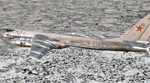
The Tupolev Tu-95 (Russian: Туполев Ту-95; NATO reporting name: "Bear") is a large, four-engine turboprop-powered strategic bomber and missile platform. First flown in 1952, the Tu-95 entered service with the Soviet Union in 1956 and is expected to serve the Russian Aerospace Forces until at least 2040.[1] A development of the bomber for maritime patrol is designated Tu-142, while a passenger airliner derivative was called Tu-114.
The aircraft has four Kuznetsov NK-12 engines with contra-rotating propellers. It is the only propeller-powered strategic bomber still in operational use today. The Tu-95 is one of the loudest military aircraft, particularly because the tips of the propeller blades move faster than the speed of sound.[2] Its distinctive swept-back wings are set at an angle of 35°. The Tu-95 is unique as a propeller-driven aircraft with swept wings that has been built in large numbers.
| Filename: | Tupolev_Tu95_Bear.zip |
| License: | Freeware |
| Added: | 11th January 2019, 22:45:14 |
| Downloads: | 549 |
| Author: | Peter Mercy |
| Size: | 179.28 MB |
| Category: Flight Simulator X - Gauges | |
| Flypad Gauge |
|
Images related to this file:
File Description:

This gauge has been developed on Win7 for FSX Flight Simulator SP2 or SP1.It should also work with Acceleration, but this is not guaranteed by the author. The gauge is a little extra addon based on the design of a smart phone and provides 9 different displays which are different from all of the standard gauge displays on a regular aircraft panel. It is mainly helpful for the user flying small propeller aircraft, and old timer aircraft. However, the displays are as well attractive for sim pilots flying modern jet aircraft. Use it as if you just grabbed to your smart phone during a flight and check on the status of your aircraft,
or how the terrain awareness situation looks like, how the AI traffic on the radar is, while you proceed with your flight plan. Enjoy the new design of a simple aircraft attitude display during an ILS approach. For credits look at the pdf documentation inside the zip file. By Dietmar Loleit
| Filename: | Flypad_Gauge.zip |
| License: | Freeware |
| Added: | 6th June 2014, 20:59:12 |
| Downloads: | 396 |
| Author: | Dietmar Loleit |
| Size: | 3.82 MB |
| Category: Flight Simulator 2004 - Scenery | |
| CYEK - Arviat - Nunavut, Canada v 1.1 |
|
Images related to this file:
File Description:
This version of Arviat corrects the VASI position on the runway, and also updates the taxiway edge lights to a newer and smaller version which is more realistically sized. This is a complete version and does not require you to have installed the old version. You can just replace the existing .bgl's and the existing textures in the scenery and texture folders if you already have this scenery. Arviat is a small town on the west coast of Hudson Bay in Nunavut, around 90 miles south of Whale Cove, 130 miles south of Rankin Inlet, and 160 miles north of Churchill. The airfield is just south of the town, and the 4,000 feet of gravel runway is aligned 149T/329T, as these are true bearings and not magnetic, as Arviat is just inside the Northern Domestic Airspace zone. There is 100LL fuel available in drums, with 2 hours prior notice. The visiting AI airline is Calm Air, plus a cargo delivery by Buffalo Air.
| Filename: | CYEK__Arviat__Nunavut_Canada_v_11.zip |
| License: | Freeware, limited distribution |
| Added: | 23rd August 2014, 11:20:05 |
| Downloads: | 226 |
| Author: | Roger Wensley |
| Size: | 2.33 MB |
| Category: Flight Simulator X - Aircraft Repaints, Textures and Modifications | |
| Turkish Airlines Airbus A330-200 GE (4 liveries) |
|
Images related to this file:
File Description:

Turkish Airlines A330-200 installed with GE engines for the BlackBox (BBS) A330-200 (v0.85 and up). Aircraft included: TC-JNA (named 'Gaziantep'), TC-JNB (named 'Konya'), TC-JND (named 'Antalya') and TC-JNE (named 'Kayseri'). This package does NOT include TC-JNC (retro livery). This file includes new engine spinners, belly logo (only for TC-JND and TC-JNE as per the real aircraft) and other markings found on the real planes. The only difference is the absence of the 'Star Alliance' written text logo near the L1 and R1 doors. Please read the 'readme.txt' before taking any action on the downloaded file. Some routes that the planes fly have been added to the readme.txt file. This file was made for FSX although it might work for P3D (no guarantee though as I do not own P3D). If you want to install for P3D, simply follow the instructions on the readme but for P3D instead of FSX. Enjoy your flights!
| Filename: | Turkish_Airlines_Airbus_A330200_GE_4_liveries.zip |
| License: | Freeware, limited distribution |
| Added: | 22nd December 2020, 19:28:16 |
| Downloads: | 245 |
| Author: | Neel Pillai |
| Size: | 12.56 MB |
| Category: Flight Simulator 2004 - Scenery | |
| Ontario Small Fields in Canada: #04 Stoney Point (Le Cunff) CRML V1 |
|
Images related to this file:
File Description:
This is the fourth in a series of small airfields in southern Ontario, Canada. It is Stoney Point (Le Cunff) CRML, a field near a small town (Stoney Point) close to Lake St Clair. The airfield has a grass runway of 2,250 feet, aligned 18/36; with trees around the house gardens between road and runway the south threshold is displaced by 250 feet. The markers approximately show the touchdown point north of the runway end. Le Cunff is the family name of the owners, included to differentiate between this and another Stoney Point field, CRJ2. I found the default FS9 airfield at the correct elevation of 625 feet, but sitting on a plateau, despite my Genesis Mesh. This looked so unreal that I have revised this to an incorrect lower elevation of 580. So if you find the airfield sitting in a hole in your installation you now know the reason. Let me know, with a screenshot please.
| Filename: | Ontario_Small_Fields_in_Canada_04_Stoney_Point_Le_.zip |
| License: | Freeware, limited distribution |
| Added: | 29th July 2015, 16:08:32 |
| Downloads: | 146 |
| Author: | Roger Wensley |
| Size: | 1.6 MB |
| Category: Flight Simulator X - Aircraft Repaints, Textures and Modifications | |
| FSX Air Canada Boeing 737-MAX10 (New Livery) |
|
Images related to this file:
File Description:

This is a repaint for the amazing TDS Boeing 737-MAX10. It includes the base model, high-quality textures, a VC, and custom ground service vehicles.
As of early 2024 Air Canada has not ordered any Boeing 737-MAX10 aircraft, opting to fly a fleet of 40 smaller MAX8 aircraft. As usual, in our new universe, Air Canada has taken delivery of one single Boeing 737-MAX10, available to fly any route of your choice. It flies under the fictional registration C-GMIX and the tail number 541.
MAX VC and Cockpit Info:
This aircraft includes a VC updated to closer resemble the true-to-life MAX cockpit. The VC is the Microsoft/Alejandro Rojas Lucena/FSND base modified by Speedbird77 including gauges by G. Munro. I have also modified the 2d panel. I increased the size of the PFD and MFD to better fill the panel. If you don't like this modification, you can search for the original panel included in the base model.
| Filename: | FSX_Air_Canada_Boeing_737MAX10_New_Livery.zip |
| License: | Freeware, limited distribution |
| Added: | 29th April 2024, 15:59:37 |
| Downloads: | 150 |
| Author: | Julian Flight |
| Size: | 78.49 MB |
| Category: Flight Simulator X - Aircraft Repaints, Textures and Modifications | |
| Aerosoft F-16C WA 86-0251 '926OG' Splinter Repaint Textures |
|
Images related to this file:
File Description:
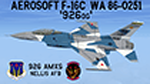
This is a repaint for the Aerosoft F-16, depicting Nellis AFB aircraft WA 86-0251 '926OG' of the 926 AMXS in the 'Splinter' paint scheme. This is "the CO's jet" for the newly formed "926 OG" and the 706th Aggressor Squadron, with a mission to mimic 4th gen adversary aircraft.
To give the jet a "Hi-Def" look I first painted these textures in 2048 resolution, then reduced them to Aerosofts' native 1024 resolution, and saved them with DXT5. However, I left a couple textures/areas on the jet in 2048, that way the decals in those textures/areas look sharp and not pixilated. You'll also find textures and instrucions for repainted/upgraded weapon textures in both the INERT and LIVE colors!
I've included installation instructions for the CLEAN "C" model, but these textures can be used with ANY of the Aerosoft F-16 models (except the CFT model), so feel free to install/use them on those jets as well!
| Filename: | Aerosoft_F16C_WA_860251_926OG_Splinter_Repaint_Tex.zip |
| License: | Freeware |
| Added: | 6th June 2024, 13:41:29 |
| Downloads: | 51 |
| Author: | Daniel Gregory |
| Size: | 14.94 MB |
| Category: Flight Simulator X - Aircraft Repaints, Textures and Modifications | |
| FS2004/FSX HNAC Egyptair Cargo SU-GAS Airbus A300B4-622R(F) |
|
Images related to this file:
File Description:

(TEXTURES ONLY)
(ONLY TESTED IN FSX: STEAM EDITION)
This was requested by Ahmed Fouad on Facebook.
The engine spiral for this livery is surprisingly unusual, like some sort of hybrid combination of the Hurricane Spiral and Comma Spiral. I think this is just a subgenre of the hurricane spiral with a different type of hurricane displayed there, but it just reminds me of the comma spiral with the black and white swapped out, like what you see on some Iran Air A300s.
Working on this livery for this model is quite tricky, as the engine pylons texture uses the same side for all sides. Inside the engine pilons texture ("all_engines.t" and "all_engines.l"), there is 2 pylons painted top and bottom. But the model only uses the lower pylon for both sides in both pylons, leaving the other upper one in the dust.
Instructions and more information are included in the readme file.
| Filename: | FS2004FSX_HNAC_Egyptair_Cargo_SUGAS_Airbus_A300B46.zip |
| License: | Freeware |
| Added: | 19th March 2026, 14:10:05 |
| Downloads: | 63 |
| Author: | Ryubunao |
| Size: | 55.93 MB |
| Category: Microsoft Flight Simulator (2020) - Utilities | |
| Flightplan Visualizer 1.19 |
|
Images related to this file:
File Description:
Flightplan Visualizer (FV) version 1.19.0. Copyright 2018-2021 by Pelle F. S. Liljendal ([email protected]), all rights reserved.
FV comes with 1164 pre-imported AI flightplans (of which +380 are BizJet flightplans, the rest are commercial). However you are able to import additional (AI) flightplans yourself. Once imported these (AI) flightplans can be visualized on a map-view, and the user will be able to search accross all these. Hence you can use the program as inspiration as to which routes to fly. E.g. you can search across all imported flightplans to find all flights in an A321 flying into/out from LDDU, or simply to look for all flights in a Boeing 747-8F.
Simply run the included installer to install the software. The program will be installed into "C:\Program Files (x86)\Flightplan Visualizer" and all datafiles will be installed into: "C:\Users\[UserName]\AppData\Roaming\FlightplanVisualizer". The program comes with a full manual explaining everything, and a 3 page quick manual to get you started. The first 3 times you run the program the quick manual will automatically open. The forum is hosted here: https://forum.aerosoft.com/index.php?/forum/919-flightplan-visualizer/
Version 1.19 Contains the following changes:
- The release-version of the application is now aimed at 64-bit (granting access to more memory if needed). Enabling 64-bit adds a memory overhead of approx 50% compared to 32-bit, but its the "price to pay" to have access to more memory (for those of you with many active flightplans loaded into memory at the same time).
- FV can now connect to your simulator using FSUIPC (tested both with P3D and MSFS). By default you will have to manually connect/disconnect (using new menu-items in the File-menu). However in settings you can choose to do it automatic. When automatic-connection is selected the connect/disconnect menu-items becomes inactive.
- When connected to a sim, the location/heading of your aircraft can be displayed on the map, using an orange aircraft-marker, and hoovering the mouse over this marker will display some key data (GPS-location, altitude, heading, speed and so on).
- Added abillity to playback audio-files. In settings you can choose which audio-device to use, and set the volume at which these files are played (defaults to 50%). If volume>0 these files will automatically be played back whenever FV connects to/disconnects from the Sim.
- Added additional icons that are automatically selected to indicate when the program is connected to the simulator. Hence the icon in the main-form will indicate if FV is connected to a simulator or not.
- In the form for editing (user)-airlines and in the form for searching airlines the context menu now have a menu-item called "Show usage". When selected, it will generate a report showing all the (active) flightplans in which the airline is used.
- Added a new "Manual" check-box next to the load-factor when editing user-airlines. This check-box needs to be checked if you want to manually enter a load-factor. When not checked (default) the load-factor will automatically be set to the default value of the selected country.
- When editing user-airlines, the airline just added/edited will be visible and selected in the list-view. Likewise when deleting an airline, the previous item will be be visible/selected (in stead of always scrolling to the top afterwards, as in previous versions).
- The Insert/Delete keyboard-keys can now be used as shortcuts adding/deleting user-airlines and user-aircraft (both owned and types).
- The gate-map context-menu (Airport Info), now allows you to re-center the map (in case your have been panning the map, and can't locate the airport again).
- Added a new menu-item/form to calculate head/cross-wind from manually entered flight/runway-heading and wind-direction/speed. Don't forget the runways tab-page in the Airport-info form already calculates this for each runway (and wind-direction/speed is automatically obtained from METAR).
- Added a new menu-item/form to convert plain-text into morse-code. There is also a button that lets you listen to the generated morse-code, so you can practice your morse-code listening skills (e.g. entering an ILS/VOR-ident, to know which morse-code to listen for in the aircraft, to verify the correct ident is reqeived).
- The "Cruise speed" column have been removed from the aircraft tab-page of the Edit Flightplan form to make more room for the Carrier/Operator-columns. In the past these simply contained the ICAO for the airlines. Now it both contains: ICAO, IATA (if not blank) and Name.
- The criteria in the leg-search window now allows you to filter on departure/arrival week-days (e.g. only include flights departing a particular airport on a Saturday or Sunday).
- When using the flightplan-filter on the main-form, it will favour the current active flightplan (as in previous versions), however if not able to, it will select the first flightplan included in the filtered list (in stead of choosing "[None]").
- Improved import of AIGFP-flightplans where the airport is not contained within the embedded airport.txt file and is using a different ICAO-code in route-files (observed for "AIG_UTair_Summer2018v6" and "AIG_S7Airlines_Winter2019-2020v3").
- Added runway-info (for both Departure/Destination-airports) to the flightplan leg-report. For ILS-eqiupped runways its lists the ID (both as text, as morse-code), frequency and ils-slope.
- Morse-code also added to ILS-ID column on the "Runways" tab-page of the airport-info form. Above the list-view there is also a label showing the morse-code (using a larger font), and next to it there is a button that lets you listen to the morse-code.
- Traffic-pattern direction (for take-off and landing) are now displayed for each runway. These data are extracted from the scenery by MakeRunways, hence the info can't be "better" than the info in the scenery (hence most default airports simly shows 'Left').
- Current/peak- memory usage is now logged at various stages while running, and when closing the program. These values can also be observed opening the about-box, which will also forcefully append these values to the log.
- When using MkRwy with MSFS it can't obtain the country-name, hence these are taken from the airport-database embedded with FV. However the name for USA ("United States of America") is too long to be shown together with state-name, hence code have beed added it to shorten it to "United States" (which was the default country-name used in FSX/P3D).
- Changed font in Comments-box for user-aircraft to a fixed font, in case some users what to enter text "in columns" (e.g. if you make "tables" with speed-restrictions).
- Changed the color of the splitter-bars in the Airport-info and leg-search forms to a draker color, to better indicate where it is.
- The build-part of the version-number can now be ignored when performing the automatic version-check at start-up. This new setting is by default disabled. If enabled it will ignore changes from version 1.x.0 to 1.x.1 (e.g. an update from 1.19.0 to 1.19.1). However major/minor versions-updates (e.g. from 1.19.x to 1.20.x) will not be ignored.
- Fixed: Excessive logging while importing AIGFP flightplans removed (leftover from fixing a bug before the release of version 1.18).
- Fixed: When using kg in the leg-info report, the weight of Luggage incl. pax weight (shown in parentees) was wrong.
- Fixed: Button to open filter-manual on Gate-page of the Airport-info form was not visible/position was not fixed.
- Fixed: The wind-speed obtained from the METAR and used to calc head/tail-wind on the Runway tab-page of the Airport-info form, did not considder the unit (e.g. Khp or meters-per-second).
- Data: A VERY BIG THANK YOU to Bruce Nicholson for assistance updating the Airline-database, both with new/missing entries and marking defunct airlines as such.
- Data: A lot of "fictios airlines" was added as well. These are used for companies without official ICAO/IATA codes. To indicate they are fictios the ICAO-code is set to "---" and the IATA-code is used to indicate the kind of traffic (e.g. the combination "---/BZ" is used for biz-jet flights).
- Data: Also thanks to Bruce for pointing out that a few aircraft were not being detected as they should. So this version should do a better job with Cessna T206H, Cessna Citation SII/S550 and Global 7500.
- Flightplans: The bundled AIG flightplans have been updated to the latests versions/revisions available from AIG (there were a few defunct that was removed, a few new versions that was added, and a lot of new revisions being updated).
- Flightplans: Eric Steinmetz's Bizjet (AI) flightplans that have previously been available as a separate download are once again bundled with the installer (they are only installed if you choose the option during installation). These have all been updated to use the new "---/BZ" airlines (for companies without official ICAO/IATA-codes), and the Author/Provider have been set to "Eric Steinmetz"/"ESAI" (the previous/separate download was created before adding author/provider to the software).
Pelle
| Filename: | Flightplan_Visualizer_119.zip |
| License: | Freeware, limited distribution |
| Added: | 2nd May 2021, 00:02:01 |
| Downloads: | 280 |
| Author: | Pelle Liljendal |
| Size: | 35.71 MB |


© 2001-2026 AVSIM Online
All Rights Reserved
Privacy Policy |