
Where Flight Simulation Enthusiasts Gather from Around the World!
AVSIM Library - Search Results

| Category: Flight Simulator X - Miscellaneous Files | |
| Solomon Islands 1943 AI Boat Traffic |

|
Images related to this file:
File Description:
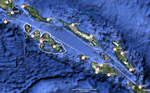
This project was inspired by Mark Schimmer's World War II-era Solomon Islands scenery, with routes are based on his outline. There are two US carrier groups, light carriers, destroyers, supply boats, PT boats, and IJN destroyer patrols. All ship models and textures are included, with permission from their respective authors.
| Filename: | Solomon_Islands_1943_AI_Boat_Traffic.zip |
| License: | Freeware |
| Added: | 26th October 2010, 22:48:31 |
| Downloads: | 1,220 |
| Author: | David Wilson-Okamura, Mike Barnes, Phil Crowther, Mark Fitch, Bruce Fitzgerald, Alberto Garcia, Ron Jeffers, and Ian Thatcher |
| Size: | 28.76 MB |
| Category: Flight Simulator 2004 - Scenery | |
| Central Europe 1961 |
|
Images related to this file:
File Description:

This scenery package contains twelve airports in Germany, nine in the Netherlands, one in Luxembourg, three in Switzerland , and three in Austria - providing taxiways and details as they were at the beginning of the 1960's.
We also created the harbors of Rotterdam, Hamburg and Den Helder, all the lighthouses along the Dutch coast and some along the German coast, and created the island of Helgoland from scratch. Although most of the airports of the package are for civil use, we also produced some Dutch military bases with AI and static aircraft. At many of the airports you will find moving crash tenders and at Amsterdam moving airport buses. Although we did not always have enough photos and information we tried to come as close as possible. Our goal was to reflect something of the atmosphere and feel of that period, prior to the all-jet era of today.
| Filename: | Central_Europe_1961.zip |
| License: | Freeware, limited distribution |
| Added: | 17th May 2013, 20:07:54 |
| Downloads: | 6,669 |
| Author: | Wolfgang Gersch, Harry Biard, Michael Schneider,Jaap de Baare, Nikko Yaginuma, Tom Gibson, Bernard Leuenberger and Mike Stevens |
| Size: | 55.23 MB |
| Category: Prepar3D V1-4 - Utilities | |
| Flightplan Visualizer 1.12 |
|
Images related to this file:
File Description:
Flightplan Visualizer (FV) version 1.12.0. Copyright 2018-2019 by Pelle F. S. Liljendal ([email protected]), all rights reserved.
FV comes with 540 pre-imported Commercial AI flightplans (+380 BizJet flightplans are available as a separate download). However you are able to import additional (AI) flightplans yourself. Once imported these (AI) flightplans can be visualized on a map-view, and the user will be able to search accross all these. Hence you can use the program as inspiration as to which routes to fly. E.g. you can search across all imported flightplans to find all flights in an A321 flying into/out from LDDU, or simply to look for all flights in a Boeing 747-8F.
Simply run the included installer to install the software. The program will be installed into "C:\Program Files (x86)\Flightplan Visualizer" and all datafiles will be installed into: "C:\Users\[UserName]\AppData\Roaming\FlightplanVisualizer". The program comes with a full manual explaining everything, and a 3 page quick manual to get you started. The first 3 times you run the program the quick manual will automatically open. The forum is hosted here: https://forum.aerosoft.com/index.php?/forum/919-flightplan-visualizer/
Version 1.12 Contains the following changes: ⦠Ability to automatically check for available program-updates. The actual download of the new installer is still a manual process, but the program will at least list the download-URL. However You cannot see this feature in action until the next version will be released ;-) Updated the flightplan file-format to accommodate changes in the latest versions of (AI) flightplans. The program remains backward compatible and can still read older flightplans, however these might “miss†some (at this time) non-essential information. As a result all “Wi18-19†and “Su19†(and a few “Su18) flightplans have been re-imported and have been bundled with the version 1.12 installer, using the new file-format. Added new "Generate redirection report" button to the redirection edit form. Pressing this button will generate- and display a report of all active pseudo airports and redirections per flightplan. Added new menu-item to re-process all flightplans, according to specified airport-redirections. The "UserAirportRedirect.xml" file bundled with the installer have been updated, based on output from the new "Generate redirection report". These updated airport-redirections have been used to re-process/update all flightplans bundled with the installer. Buttons have been added to the "Leg Info" which allows you to transfer data for a particular leg/flight from FV to SimBrief in order to kick-start your "paper work" for a flight to fly. The "Leg Info" form also got buttons to show decoded METAR/TAF, and the raw METAR/TAF is also embedded in the text copied to the clipboard (when pressing the appropriate button). In settings you can now speficy the path of the folder holding the files that MakeRunway generates (if not specified it will use the UserData folder). Once set to the folder where MakeRunway generates its files (e.g. the P3D folder), you only have to run MakeRunway, you no longer have to copy the 3 files to the UserData folder. A few new traffic-charts were added to the "Airport Info" form (traffic per: region, sub-region and country), and a combo-box was added to switch between inbound- and outbound-traffic. The "Nearby Airport" form that can be opened from the "Flightplan Import" form now have an extra comment-column with information about the non-pseudo/pseudo airports. The comment column on the airport tab-sheet of the "Flightplan Import" form now also contains more info about non-pseudo/pseudo airports. The Generic Randomizer form got a new button called "Pick random flight", which will display info for a flight, randomly picked from all flights for the selected flightplan, or last search. In the "Search legs" form, you can now enter multiple ICAO-codes (separated by comma) to search for flights to/from these (e.g. search for all flights to/from EBLG or ELLX, by entering "EBLG,ELLX"). If you press SHIFT while clicking the airport browser button, the selected airport will be added to the comma separated list. If you do not hold SHIFT, the list will only contain the newly selected airport. Added support for using FS Global Real Weather (FSGRW) as a Weather provider for METAR-messages (FSGRW does not support TAF-messages). To use FSGRW you must go to settings and specify a full path (including filename) of the file generated by FSGRW. When editing a flightplan the user will be warned if trying to close the form, if changes were made. The menu-item to generate report with all defuct-/obsolete flightplans have been removed from the main-menu, but can now be generated using a button on the "Enable/disable flightplans" form. Now all applicable authors are shown when hoovering the mouse over the flightplan combo-box when a search is active. In previous versions the "Edit" buttons next the flightplan combo-box (on the main form) was only active when a flightplan was selected. Now its also active when "[Last Search]" is selected. However it will instead launch the "Search Legs" form, where you can then edit the criteria of the search. A few airports and airlines have been added/updated in the data-files bundled with the updated installer to accommodate the additional bundled flightplans. The Beluga XL Freighter was added as well as many of the other aircraft were updated with various changes. Added support for a bunch of military aircraft: A6/AE6, A10, C5, C17, E2, E3, EF2000, F14, F15, F16, F18, F22, F35, F111, F117, JAS39, KC10, KC135, MiG 21/23/25/27/29/31, Mirage III/5/2000, Rafale, SU 17/20/22/24/25/27/30/32/34, V22. New "Exclude military aircraft" setting have been added (defaults to true). When true military aircraft will not be shown (can be changed in the settings form). Added new menu-item to load/display current log-file. FV tend to be somewhat memory-hungry while (re)loading all active flightplans, and you might see a peek in memory consumption. But from this release and forward it will try to free up most of the memory once all flightplans have been loaded. Minor changes to the "Enable/disable flightplans" form, to make it more responsive, and added a progressbar that is visible while flightplans are being moved, copied or deleted. Fixed: issue when trying to import a flightplan zip-file containing multiple "Flightplan_XXX" files. If the same zip contains multiple sets of matching files (Flightplan, Aircraft and Airport) the user will now be presented with a combo-box from where the user can pick which set of files to import (only the flightplan-file will be shown). Fixed: The file "f5.csv" was missing from previous installers. Fixed: issue with pseudo-airports when using the "Nearby airports" tab-sheet in the Airport Info form. Fixed: Saving a flightplan that was edited, it would try to save it in the (flightplan) [ROOT] folder even if it was loaded from a sub-folder. Now it will always try to save it in the same location with the same filename. If you want it saved elsewhere/with another filename use the "Save As" button in stead. Imported flightplans will still be saved to the [ROOT] flightplan folder. Fixed: Pressing ENTER in the Flightplan import/edit-form while the comments-field had focus, would close the form (saving the flightplan). Fixed: Result-viewer will no longer display with all text selected. Fixed: METAR/TAF decoder will no longer display with raw-message selected. Fixed: In some cases the program needed to be restarted if changes were made to the weather-provided data in the settings-form. Installer: Comes with +30 new pre-imported (Summer 2019) flightplans of which some are replacements of obsolete flightplans (from previous installers), and 2 of the "old" flightplans have been marked as defunct.
Pelle
| Filename: | Flightplan_Visualizer_112.zip |
| License: | Freeware, limited distribution |
| Added: | 23rd August 2019, 17:15:13 |
| Downloads: | 195 |
| Author: | Pelle Liljendal |
| Size: | 30 MB |
| Category: Flight Simulator 2004 - AI Aircraft | |
| Five repaints of Henry Tomkiewicz F-16C in the colors of the 496th TFS plus the Wing's CO C model and two repaints of the unit's F-16D, all during 1988/1989, textures only |
|
Images related to this file:
File Description:
Re-upload of five repaints of Henry Tomkiewicz F-16C in the colors of the 496th TFS plus the Wing's CO C model and two repaints of the unit's F-16D, all during 1988/1989, textures only
| Filename: | Five_repaints_of_Henry_Tomkiewicz_F16C_in_the_colo.zip |
| License: | Freeware |
| Added: | 16th May 2010, 21:29:21 |
| Downloads: | 290 |
| Author: | Bert Dekker |
| Size: | 1.13 MB |
| Category: Flight Simulator 2004 - Scenery | |
| Solis-Piriapolis Photo-Real Scenery |
|
Images related to this file:
File Description:
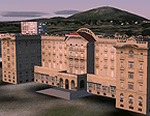
Photo-real scenery of the Solis-Piriapolis-Laguna del Sauce region in the department of Maldonado, Uruguay. This package covers an area of about 150 km2 west of Punta del Este with photo-real textures. Also included are custom 3D objects in Solis and Piriapolis, autogen and two real grass strip airports at Cuchilla Alta and Punta Colorada.
Scenery also works in FSX.
| Filename: | SolisPiriapolis_PhotoReal_Scenery.zip |
| License: | Freeware, limited distribution |
| Added: | 20th February 2010, 14:54:16 |
| Downloads: | 1,086 |
| Author: | "As the Bird Flies / A Vuelo de Pajaro" group members: Diego Altgenug, Alan Pereira-Pierce and Juan Pablo Simonet |
| Size: | 18.3 MB |
| Category: Flight Simulator X - Original Aircraft | |
| U.S.S. Macon (ZRS-5) |
|
File Description:
The USS Macon (ZRS-5) was a 785 foot long flying aircraft carrier. She and her sister (the USS Akron) were the largest of the famous USN rigid airships (dirigibles), and carried up to five fighters on board. Commissioned on 11 March 1933, the Macon was tragically lost at sea on 11 February 1935 during a storm while returning to her home air base at NAS Sunnyvale, California. You MUST read the "Read Me First" file. If you do not take the time to read and understand the information given on how to fly the USS Macon you will be very disappointed. you will be unable to fly her. FSX ONLY!
| Filename: | USS_Macon_ZRS5.zip |
| License: | Freeware, limited distribution |
| Added: | 6th October 2010, 00:15:43 |
| Downloads: | 1,440 |
| Author: | Piotr Lowicki, Jeff Schaefer, Dan Dunn, Jim Dhaenens, John Stinstrom, Wayne Tudor, Earl Watkins, Bill Learning and Bill Mackay |
| Size: | 13.03 MB |
| Category: Flight Simulator 2004 - Aircraft Repaints, Textures and Modifications | |
| German Air Force FOUGA CM170 Version 1.2 |
|
File Description:
Updated Version 1.2 of the German Fouga model with 4 paintjobs: AA-011 (Flugzeugführerschule A in Landsberg), AA-180 1964, AA-180 Camouflage, AA-180 Camouflage (different Model with Frontantenna but real painted Wingtanks). Include accurate German panel with Callsign.
My first Version needed Foufinn1.zip and Foufran.zip for the Panel to work, this one works without them.
| Filename: | German_Air_Force_FOUGA_CM170_Version_12.zip |
| License: | Check within download |
| Added: | 15th April 2004, 02:47:48 |
| Downloads: | 3,305 |
| Author: | Sounds by Mike Hambly. Panel by Brahim Rhoul. Designed by Kari Virtanen and Mikko Maliniemi. Artwork by Roland Pohl. |
| Size: | 20.37 MB |
| Category: Flight Simulator 2004 - Scenery | |
| Glacier Bay - Alaska/Canada, Version 2, Part 1 of 2 |
|
Images related to this file:
File Description:
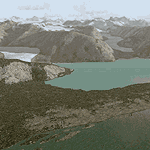
Glacier Bay v2 is a complete replacement of the default FS2004 landscape and scenery of more than 90,000 square kilometers (36,000 sq miles) of Southeast Alaska and adjacent areas of Yukon and British Columbia. File 1 of 2 (also requires glbayv2b.zip)
Landscape enhancements include high-resolution terrain mesh, detailed shorelines, rivers, lakes, and glaciers, and accurate land cover data with custom seasonal ground textures. Inland water bodies can be made to "freeze over" via an on/off switch. Other landmarks include the settlements of Juneau, Haines, Skagway, Yakutat, Atlin, and Carcross as well as road and railroad networks, cabins, lodges, and lighthouses. We modeled or enhanced 16 main airfields (plus one fictitious airstrip), 20 unlisted airstrips, 16 seaplane bases, and seven heliports. We've also included AI ship traffic in various locations as well as optional flightplans for GA and floatplane AI traffic.
Glacier Bay v2 is fully compatible with other third-party add-ons, including terrain mesh (FSGlobal, FS Genesis, etc.), ground textures (Ground Environment, BEV, FScene, etc.), and landscape enhancements (Ultimate Terrain Canada/Alaska, Misty Fjords, Tongass Fjords, Freight Dogs). A configurator panel (requires .Net Framework!) allows users to set compatibility options and to choose levels of scenery detail. We provide an autoinstaller and detailed documentation with a sectional map of the coverage area and a list of weblinks to real-world information.
For feedback and questions, please visit the Glacier Bay v2 support forum at http://forums.fsaddon.eu/viewforum.php?f=10. This project is a collaboration of nine FS developers from Germany, Austria, USA, and Canada, logging more than 1000 hours of work over the past 14 months. We acknowledge the kind support of FSAddon.com. However, this project is independent of any commercial company or product. Enjoy!
| Filename: | Glacier_Bay__AlaskaCanada_Version_2_Part_1_of_2.zip |
| License: | Freeware, limited distribution |
| Added: | 28th May 2010, 19:34:54 |
| Downloads: | 41,288 |
| Author: | Holger Sandmann, Rainer Duda, Michael Eder, Scot Fraser, Manfred Herz, Jay Langham, Jon Patch, Larry Silsbee, and Jim Vile |
| Size: | 56.46 MB |
| Category: Flight Simulator 2004 - Scenery | |
| Glacier Bay - Alaska/Canada, Version 2, Part 2 of 2 |
|
Images related to this file:
File Description:
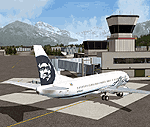
Glacier Bay v2 is a complete replacement of the default FS2004 landscape and scenery of more than 90,000 square kilometers (36,000 sq miles) of Southeast Alaska and adjacent areas of Yukon and British Columbia. File 2 of 2 (also requires glbayv2a.zip)
Landscape enhancements include high-resolution terrain mesh, detailed shorelines, rivers, lakes, and glaciers, and accurate land cover data with custom seasonal ground textures. Inland water bodies can be made to "freeze over" via an on/off switch. Other landmarks include the settlements of Juneau, Haines, Skagway, Yakutat, Atlin, and Carcross as well as road and railroad networks, cabins, lodges, and lighthouses. We modeled or enhanced 16 main airfields (plus one fictitious airstrip), 20 unlisted airstrips, 16 seaplane bases, and seven heliports. We've also included AI ship traffic in various locations as well as optional flightplans for GA and floatplane AI traffic.
Glacier Bay v2 is fully compatible with other third-party add-ons, including terrain mesh (FSGlobal, FS Genesis, etc.), ground textures (Ground Environment, BEV, FScene, etc.), and landscape enhancements (Ultimate Terrain Canada/Alaska, Misty Fjords, Tongass Fjords, Freight Dogs). A configurator panel (requires .Net Framework!) allows users to set compatibility options and to choose levels of scenery detail. We provide an autoinstaller and detailed documentation with a sectional map of the coverage area and a list of weblinks to real-world information.
For feedback and questions, please visit the Glacier Bay v2 support forum at http://forums.fsaddon.eu/viewforum.php?f=10. This project is a collaboration of nine FS developers from Germany, Austria, USA, and Canada, logging more than 1000 hours of work over the past 14 months. We acknowledge the kind support of FSAddon.com. However, this project is independent of any commercial company or product. Enjoy!
| Filename: | Glacier_Bay__AlaskaCanada_Version_2_Part_2_of_2.zip |
| License: | Freeware, limited distribution |
| Added: | 28th May 2010, 19:36:31 |
| Downloads: | 40,564 |
| Author: | Holger Sandmann, Rainer Duda, Michael Eder, Scot Fraser, Manfred Herz, Jay Langham, Jon Patch, Larry Silsbee, and Jim Vile |
| Size: | 85.99 MB |
| Category: Flight Simulator X - Original Aircraft | |
| Travel Air 'Magic One' |
|
File Description:
This is a wonderful 1929 Travel Air biplane, Magic One, based in Orcas Island, WA. The original model is by Bill and Lynn Lyons, and has been modified by Bill Schulz of The Cielo Co. for FSX (distributed with permission). This version is for FSX only and uses some default gauges for the virtual cockpit--there is no functioning 2D cockpit.
| Filename: | Travel_Air_Magic_One.zip |
| License: | Freeware |
| Added: | 1st December 2006, 00:28:23 |
| Downloads: | 6,593 |
| Author: | Modified for FSX by Bill Schulz of The Cielo Company. Original Aircraft by Bill and Lynn Lyons. (Distributed with Permission) |
| Size: | 6.87 MB |


© 2001-2026 AVSIM Online
All Rights Reserved
Privacy Policy |