
Where Flight Simulation Enthusiasts Gather from Around the World!
AVSIM Library - Search Results

| Category: Flight Simulator 2004 - Scenery | |
| Cyprus: Airfields plus landmarks and land class for all of Cyprus and AI |

|
Images related to this file:
File Description:
Cyprus, an island in the eastern Mediterranean. Without the benefit of Ultimate Terrain, which does not exist for Cyprus, the land class provided by FS9 stands out as hopelessly inadequate. I have added the extensive farmland and the larger towns and villages, plus the major roads. Four completely new airfields are included here, three in the north and one in the south. Ercan LCEN is in the north and functions as the airport for all of the north. It was recently closed for two years while a new terminal was built and the runway updated and an apron extended etc, and during that time Gecitkale LCGK functioned (barely) as the airport for the north. Gecitkale is now hardly used at all. The third northern airfield is Ilker Karter LCIK and this functions as the HQ base of the Turkish Army Corp in northern Cyprus. The last of the new airfields is Kingsfield LCRE, which is in the Sovereign Base area to the east of Larnaca and is now used for recreational purposes. Ercan is now undergoing further expansion with a new runway and a new terminal building and apron, so this scenery is for the period between 2010 to 2015. My set up of Cyprus already included a payware Larnaca by Aerosoft (now only 12 euros) plus a freeware Paphos, Nicosia, and Akrotiri; that was my starting point. Larnaca has been the major airport for Cyprus since the mid 1970's, with a huge tourist trade that peaks in the summer but which is year long (almost a million Brits visit every year, let alone the other nationalities). I have adapted this (gate sizes etc) to allow parking by a multitude of B737's and others. Nicosia is freeware (posted in 2010) and I have included modifications to reflect its now total disuse. Paphos is at the far western end of the island and freeware, and I have modified this to allow larger and military ai aircraft to function properly; the poster improved his first version to better cater for ai but I was unaware of this and I have stayed with my modifications. Akrotiri is freeware and includes a lot of library object input from MAIW. I have modified the parking somewhat and added further residential areas and munitions storage. The AI is based upon recorded take offs and landings in April, with some further additions in later months. At Ercan the visible gate numbers on the apron are as per real life, but the numbers within FS9 reflect the fact that planes are directed to gates at the centre of the terminal building and not at the far ends. Follow the pink line and obey ATC when it says taxi to gate number 2 even if it is visibly numbered 4.
| Filename: | Cyprus_Airfields_plus_landmarks_and_land_class_for.zip |
| License: | Freeware, limited distribution |
| Added: | 13th August 2017, 21:21:46 |
| Downloads: | 943 |
| Author: | Roger Wensley |
| Size: | 29.61 MB |
| Category: Flight Simulator X - Aircraft Repaints, Textures and Modifications | |
| Supermarine Spitfire Mk.XIV RM656 DL-F 91 Sqn |
|
Images related to this file:
File Description:

This folder contains a repaint for the Supermarine Spitfire Mk.XIV by Real Air. It shows Spitfire Mk.XIV RM656 DL-F, which was the aircraft that Captain Jean Maridor, of the Free French Air Force, was flying on the 3rd of August 1944, when he was killed while destroying a V1. Jean Maridor was born in Le Havre, France on the 24 November, 1920. He became interested in flying at a young age. He stopped his studies to focus of this new interest. Maridor began to take many courses in flying. He obtained his pilot's licence at 16, making him the youngest pilot in France. In 1939, he joined the French Air Force and received his pilot's wings in september 1939, continiuing his training on the Dewoitine D520. He joined a squadron just two days before the French Surrender, only to receive the order to burn his aircraft. After the French surrender, Maridor left to go to England with many other French pilots, where he joined the R.A.F. After training, he began flying with the 615 Squadron on Hurricanes. He scored his first kill on the 14th of October 1941. In february 1942, he transferrd to 91 squadron, flying Spitfires, where he scored a further 8 kills, one of which was Lt Paul Galland, the brother of Adolf Galland, in october 1942.
From june 1944, 91 squadron flew the Spitfire mk XIV and specialised in shooting down the V1's that the Germans started sending over to the UK. Capt Maridor was succesful at this too, shooting down 6 of the Doodlebugs before his final flight on the 3rd of August 1944.
On this day, Maridor intercepted a Doodlebug over Rolvenden around 12:33. Flying towards the bomb, he shot at it at 12:39. Although he hit it, the bomb was only damaged not destroyed. On his second attack, he saw the bomb was heading for Benenden School, which at the time was being used as a military hospital. Knowing that hundreds of lives would be lost if the bomb was to hit, Maridor launched a final attack at 12.43. He approached to less than 50 metres to ensure he would not miss a second time. The Doodlebug exploded this time, but the wing of his plane was caught in the explosion and ripped from the body. The plane crashed beside the lake on the school grounds, killing Maridor just 8 days before his wedding. His fiancée has been quoted as saying he would not have hesitated in his attack on the bomb. He knew that many lives would have been lost otherwise.
Repaint by Jan Kees Blom, based on the paintkit by RealAir.
| Filename: | Supermarine_Spitfire_MkXIV_RM656_DLF_91_Sqn.zip |
| License: | Freeware |
| Added: | 10th July 2018, 17:40:04 |
| Downloads: | 96 |
| Author: | Jan Kees Blom |
| Size: | 3.84 MB |
| Category: Flight Simulator 2004 - Scenery | |
| Chennai airport for fs9/Fs2004 |
|
File Description:
Hi everyone
This is my first project, and it took 6 months to complete. This is a freeware airport, but I have tried to put in as much detail as I possibly can. I made this airport because FS9 did not have very many good-quality payware or freeware airports, so I decided to make an airport for my home country. Some general info for the airport is below:
Chennai International Airport (MAA), located in Meenambakkam, is the primary airport serving Chennai, Tamil Nadu, and the southern part of India. It has two terminals: Terminal 1 for domestic flights and Terminal 2 for international flights. The airport is known for its modern infrastructure and facilities, including shopping areas, lounges, dining options, and passenger services. It is an important hub for domestic and international travel, especially for travelers heading to South Asia, Southeast Asia, and the Middle East. The airport also has strong connectivity via road and metro.
Features of the scenery:
1)Has the latest terminal and airport layout since I used the latest data
2)added buildings to the surroundings (Custom 3d model made from scratch even the terminals)
3)has partial photoreal scenery(will talk about issues in bugs area)
4)has good jetbridges
5)3d volumetric grass in certain parts(will talk about issues in bugs area)
6)taxiways designed as in real life
7)Includes parked cars, lights, nearby buildings
8)Added lots of ground equipment
9)Trees around the airport
10)airport perimeter walls
11)Used Lh simulations library for some buildings and volumetric grass
Known bugs:
1)photoreal scenery has some issues since I can't get my photoreal scenery maker to work properly
2)Papi lights are kinda bugged
3)3d volumetric grass is limited to some parts due to fps loss
How to install:
1)Download file
2)Extract from rar using WinRaR or other program
3)paste vomm in the addon scenery of your flight sim installation directory and add scenery in settings once you open fs9
4)Includes better default textures for aprons and taxiways (optional!!!!!)
5)enjoy!!
Reminder: This airport does not have custom taxiways or aprons the default textures modified by me are the ones used in the picture. If you decide to replace your default files with mine all your airports globally(default) will have these textures for taxiways and aprons.
Tested to run on low-end devices with minimal lag
will run well on better devices
Hope you enjoy this completely freeware scenery and always read the above instructions to avoid unnecessary scenery limitation discussions.
Thank all you fs9 folks.
Download link: https://sharemods.com/imxa719wg065/Chennai_airport_fs9.rar.html
| Filename: | Chennai_airport_for_fs9Fs2004.zip |
| License: | Freeware |
| Added: | 18th January 2025, 01:22:51 |
| Downloads: | 243 |
| Author: | Jeremy(lol890) |
| Size: | 92.14 MB |
| Category: Flight Simulator 2004 - Scenery | |
| Prudhoe Bay area on Alaska North Slope US |
|
Images related to this file:
File Description:
The Prudhoe Bay area of the Alaska north slope is dominated by all the equipment and machinery that is necessary for the extraction of oil and its transfer by the pipeline that reaches south to Valdez. Prudhoe Bay airport is now closed, and its replacement just to the south is Deadhorse PASC, with numerous storage, maintenance, and accomodation areas immediately to the north of the apron, and others adjacent to the road between the two. The runway is just under 6,500 feet with approach lights at both ends and ILS on 04 (true heading of 75 degrees). This scenery reflects the overall situation in 2011 and oil production facilities and buildings are included here. The airport buildings and those close to the airport are replicas of the real life buildings; while as distance increases the accuracy fades somewhat there are everywhere replica trucks and cross country vehicles that are true to life. Deadhorse handles around 7,000 passengers per month as staff are rotated in and out on Alaska Air and ERA flights and by oil company private flights. There are also freight flights to complement the trucking effort up the Dalton Highway. The Alaska Airlines terminal building and ERA (the red buildings nearby) are at one end of the apron, while at the other end is a very large and new green terminal, storage, hangar building built by the airport authority. All of the airport components, runways, taxiways, and aprons, are built up on a gravel base to raise them above the surrounding terrain that floods with melting snow, freezes, or dries out, according to the seasons. There are other new airstrips included here that serve the oil industry. Around 33 miles to the east is Badami PABP airport servicing a subsiduary oil producing area, with 5,000 feet of gravel runway. Some 28 miles to the west of Deadhorse is Ugnu-Kuparuk UBW with just over 6,000 feet of gravel (gravel in 2011, it is now asphalted) servicing oil production by Conoco Phillips, which uses 737's to fly staff in and out. A further 32 miles west is Alpine AK15 with 5,400 feet of gravel and also served by the Conoco Phillips 737's. To the south of Alpine and connected by road is the village of Nuiqsut. To the north of Alpine and reachable only by air in the delta of the Sagavanirktok River is CD-3, an oil collection and pump station area with another gravel runway of 3,000 feet. Other airstrips that were prviously posted are now updated, Nuiqsut and Oliktok. I experimented, but decided against trying to reproduce the several hundred miles of pipelines. The are new AI aircraft, and there are notes regarding downloading. There is a new "cement" texture (not its name, but used as that by SBuilder) for the built up gravel bases. It is slightly darker than the original but not so much that any previous use will be spoilt. You may wish to download my "Alaska Frozen Rivers and Lakes" which freezes lakes and the northern sea and makes them landable on wheels.
| Filename: | Prudhoe_Bay_area_on_Alaska_North_Slope_US.zip |
| License: | Freeware, limited distribution |
| Added: | 19th December 2017, 00:38:06 |
| Downloads: | 586 |
| Author: | Roger Wensley |
| Size: | 28.54 MB |
| Category: Flight Simulator 2004 - Miscellaneous Files | |
| The Steamer PATRIA, pearl on VFR of Lario - Como Lake, Italy |
|
Images related to this file:
File Description:
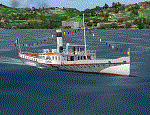
Steamship sailing, GMax model with photo real textures and panel with exterior views.
The History: Born with the name of "Savoia" this steamer was placed in the yard June 7, 1926 by the Odero's workers at the construction site of Dervio, and in a very short time, triumphantly launched July 31, 1926 first in the waters of Dervio , to start shipping in the Como Lake.
Soon after this launch, the site was put on the twin " October 28 ", which later became the "Concordia". In December 1926, the " Savoia " incorporates a major change : the distribution system of the machine new one "Caprotti" type that has excellent results and is , up to date, the only example in the world (reduction of rolling steam). In May 1927, the " Savoia " has the honor to welcome on board the King of Italy Vittorio Emanuele III , escorted by the steamers " October 28" and " Plinio". During World War II , following the fall of the fascist regime , July 25, 1943 , is required to change the name of the steamer. Even public opinion is mobilized and decide to rename the steamer by the name of "PATRIA". At the same time the twin " October 28 " is renamed "Concordia". Back after a break in service , January 10, 1945 is attacked and strafed while browsing the center of the lake . At the end of was counted 5 victims and 17 injured of which one will die as a result. At the height of the bridge spread of a fire, for piercing and incendiary bullets used by the Anglo-Americans, but soon subdued by the crew. In June 1951, the PATRIA is back in service with some modifications. The smokestack is shortened to about 3 mts and boilers and burners are converted from coal to oil. In August 1952, the boat service on the lake shift from "Lariana " to Government Management, which taken the steamer. In 1973 the interior of the " Patria" is restored according to the original scheme: the magnificent ship back into service June 10, 1973.
Great new features are the stained glass windows in the inner surface that allow you to see the paddle wheels in motion. In the 80s the PATRIA is used mainly for special cruises and rentals, limiting the use of the line. The summer of 1990 is the last one that sees the "PATRIA" in service. In the fall it is stopped at the construction site of Tavernola, later transferred to Dervio where it remains moored for years waiting to know his fate ... between demolition or renovation (this strongly desired by the Lariana population). Finally in 2003, the Province of Como takes the field by engaging in the recovery of the steamer, with PATRIA's historic "friends" of "Famiglia Comasca"; February 27, 2004 the remains of the steamer is formally sold to the Province of Como in the symbolic figure of " 1 Euro". After a series of bureaucratic delays, in August 2008 is finally contracted the first batch of works and the renovation starts. On 8 May 2013, PATRIA comes to Dervio for a short cruise, and for testing stability on the lake, and received a "Certificate of Class" that officially renames it as a ship. After 23 years it is the first time that the PATRIA sails again, since 1990, the year of its disarmament. The inauguration takes place July 19, 2013, at Villa Olmo in Como present authorities, proponents of the huge recovery and many other enthusiasts ... as me. Enjoy.
Check video available here: http://youtu.be/KALgHsGiPu8
| Filename: | The_Steamer_PATRIA_pearl_on_VFR_of_Lario__Como_Lak.zip |
| License: | Freeware |
| Added: | 22nd February 2014, 01:25:28 |
| Downloads: | 590 |
| Author: | Aldo Della vedova, Daniele Lanfranchi, Gian Mario Verga |
| Size: | 10.5 MB |
| Category: Microsoft Flight Simulator (2020) - Utilities | |
| Flightplan Visualizer 1.22 |
|
Images related to this file:
File Description:
Flightplan Visualizer (FV) version 1.22. Copyright 2018-2022 by Pelle F. S. Liljendal ([email protected]), all rights reserved.
FV comes with 1599 pre-imported AI flightplans (of which +726 are BizJet flightplans, the rest are commercial, government and military). However you are able to import additional (AI) flightplans yourself. Once imported these (AI) flightplans can be visualized on a map-view, and the user will be able to search accross all these. Hence you can use the program as inspiration as to which routes to fly. E.g. you can search across all imported flightplans to find all flights in an A321 flying into/out from LDDU, or simply to look for all flights in a Boeing 747-8F.
Simply run the included installer to install the software. The program will be installed into "C:\Program Files (x86)\Flightplan Visualizer" and all datafiles will be installed into: "C:\Users\[UserName]\AppData\Roaming\FlightplanVisualizer". The program comes with a full manual explaining everything, and a 3 page quick manual to get you started. The first 3 times you run the program the quick manual will automatically open. The forum is hosted here: https://forum.aerosoft.com/index.php?/forum/919-flightplan-visualizer/
Version 1.22 Contains the following changes:
- I had initially added a feature to download AIG airline-logos, however a later change in AIG's server setup rendered this feature useless. In stead you can now specify the local folder holding AIG's airline logo's (if/when you are using AIG AIM on your computer for AI-traffic). If specified, airline-logo's will be obtained from this folder.
- On the same note, I had to remove the menu-item to download AIG flightplans, as this program no longer have directly access to the AIG servers. For the same reason the menu-item to access the index with flightplans (up to summer 2021) was re-enabled.
- In the past when opening the Airport-Info form it defaulted to show in-/out-going traffic for the selected flightplan or active leg-search only. Now there is a new setting where you can set it up to in stead default to showing all traffic in/out of the airport (the Airport-info form still contains a combobox where you maually can choose what to see).
- "Owned aircraft" was renamed into "Simulator-aircraft", as these are the (flyable) aircraft you have available within your simulator of choise.
- When choosing to use calculated flight-times in a leg-search, you can now specify a percentage-difference (between leg-time and calculated-time). Only when the difference between leg-time and calculated-time exceeds this specified value will the calculated time be used during leg-search (e.g. "only use calc-times if diff. exceeds 50%, otherwise use leg-times").
- Began using (aircraft) short-names many places where the program in the past used IATA/ICAO-code (e.g. when hovering the mouse over a route, or list of aircraft servicing specific airports when editing flightplans). Also added short-name columns to aircraft browser and when choosing favorites (these stil contains columns for IATA/ICAO-codes).
- Pressing the "Usage" button when editing/viewing an aircraft-type or right-clicking an aircraft-type in the browser and choosing "View usage-report..." from the context menu, you will be shown a report that inform you how that aircraft-type is used: which simulator-aircraft are based on that type, which owned aircraft that have been marked as substitute for that type, which airlines are using that type (as carrier/operator), and finally in which (active) flightplans that type is used.
- Items in airline-browser are now by default sorted by (airline) name, and the usage-column shows the size of the airline if its in use. If available a logo for the selected airline is displayed in the upper/right corner.
- Improved performance when searching for ICAO-codes in the airport-browser. Also improved priority of the default selected item, in cases when an airport had a 3 letter ICAO-code, and another was using the same 3 leters for its IATA code.
- When searching for ICAO/IATA-codes in the airline-browser, it will now prioritize non-defunct airlines, if multiple airlines share the same ICAO/IATA-code.
- When enabling/disabling flightplans, you can now select all BizJet flightplans (those prefixed with "Bz_"), all Military (prefixed with "Ml_") or all Goverment (prefixed with "Gv_").
- Individual FP sub-folders can now be setup to leave (not move) defunct- and/or obsolete FP, even if the settings to automatic move these to the disabled folder is set.
- Performing "Search legs" you can now filter on aircrafts you are allowed to fly via type-ratings ("Must be type-rated").
- Performing a substitute of a user-airline, that airline will remain selected (previously the list scrolled to the top, and selected the 1st item).
- Added new check-box to "Search legs" that can exclude round-trips (legs taking-off and landing at same airport).
- Airline/Aircraft-repaint -filter can now filter on size of airline (e.g. "size=major"). Size is determined from usage as carrier/operator in active flightplans. Airlines not in use by active flightplans are listed with a size of "unknown").
- Added GPS-conversion (deg deg,min,sec) to the conversion-form, as requested by a colleague. You can either manually enter lat/lon or look-up an airport to get it. There is both a primary lat/lon and a secondary, and the form will show the (GC)distance between these and the initial/final course.
- Added new "Max airport-distance" for airport-redirections. At the same time added new feature when importing/editing airports to permanent change an airport. If used, it is not saved/handled as a redirection (can't be restored) but rather as a perpament change.
- Reordered- and renamed some of the tab-pages in the Airport-info form.
- Reordered the length/distance-fields in the unit-conversion form.
- The Wind-calculator have been removed from the main-menu, in stead wind-calcuations can now be performed using the unit-conversion form. Also now the speed of the wind is always displayed as a positive value, and in stead the label will either say "Head-wind" or "Tail-wind".
- Added new "Country list" menu-item in the misc-menu. Will list all countries twice (sorted by names, and sorted by ISO3-codes).
- Showing airport-marker tool-tips on the main-map is now prioritized over showing route tool-tips.
- Added "Min take-off fuel ("MTFL") field to user-aircraft weight-fields. As of now its not set for any aircraft in the database, however it can be estimated as 60 minutes of flight at cruise.
- Moved several group-boxes of the settings-form to the 2nd tab-page, and added new fields for defalt simulator/logging-environment based on the File-prefix used when starting the program.
- Also now the header-names that was previous fixed to "Rank" and "Traffic-density" can be changed, so the selectable 6 values can be used for something entirely different, if anyone have the need for this. If/when changed, these new names are shown when editing an airport, or when performing a leg-search (as the leg-search can filter on these fields).
- MakeRunways (MkRwy) by Pete Dowson is challenged handling unicode in the scenery it scans/writes to XML. E.g. the Icelandic airport (BIFL) "Flúðir Airport" is exported by MkRwy as "Flúðir Airport". In this version FV will try to identify when this happens, and then it will fall back using the airport/city-names from the databases bundled with FV. This is not a perfect solution, but at least it improves the result.
- Various minor changes and tweaks to multiple forms (e.g. Unit conversion form can now be closed with ESC, renamed log-archives and so on).
- Fixed: If the main-form had an active flightplan filter when using the search-legs feature the flightplan combo-box still only contained the filtered context. Pressing the Clear button did not resolve the issue.
- Fixed: Since adding support for the AIGFP file-format, there could be flights departing from- and arriving at the same airport (e.g. helicopter flights). In previous versions the calculated flights-time would only consist of taxi-out/in times. In this version the flightplan leg-time will now also be uses for the calculated time, when the same airport is used both for departure and destination.
- Fixed: In some cases re-processing flightplans (resetting and performing redirection) could corrupt the flightplans and remove airport-data from the flightplans. This version will also try to add any missing airport-data to flightplans when re-processing them.
- Fixed: Selecting "only show favorites" in the Search aircraft-type form would filter out all aircraft (including those marked as favories).
- Fixed: In the leg-info form the fields to show times (Out, Off, On, In) were too narrow for multi-week flights, when showing the week-number (e.g. "TH7/14:37").
- Fixed: Issues when estimating cruise/taxi fuel-burn for user-aircraft, where in some cases some fields were not saved, and wrong calcuation if setup to show weight in Kg.
- Fixed: In some cases wrong TimeZone was used when calculating local time for OUT, OFF, ON, IN-times.
- Data: The airport redirection file ("UserAirportRedirect.xml") in the UserData folder have been updated to match the latest MSFS world update. However this new file is only installed by the installer if it does not already exists (in case you made your own changes), hence you need to delete this file manually prior to running the version 1.22 installer.
- Data: Quite a few airports in the airport-database were updated (had wrong names due to issues with unicode-letters). Also some additional airports were added.
- Data: The installer comes bundled with +300 airline-logos (optional install), and a separat package of +1400 airline-logos are avilable for download from AVSIM (in both cases these are encoded into a propriotary format using the ".CAL" extension).
- Data: Added the P2F (Passenger-to-Freighter) versions of the Airbus A320, A321 and A330. Also added the package freighter versions of CRJ100 and CRJ200.
- Data: Improved detection of Boeing 737-700/800 BCF/BDSF when importing flightplans utilizing these (passenger aircraft converted into freighters). Also improved a few other freighter detections.
- Data: Changed a few (aircraft) short-names to either shorten them a bit, or make them "more readable".
- Flightplans: All new/updated flightplans have been added to the installer, and all obsolete/defunct have been marked/removed. A total of 1599 active flightplans are bundled with the installer.
| Filename: | Flightplan_Visualizer_122.zip |
| License: | Freeware, limited distribution |
| Added: | 18th October 2022, 23:31:28 |
| Downloads: | 395 |
| Author: | Pelle Liljendal |
| Size: | 45.57 MB |
| Category: Prepar3D V1-4 - Utilities | |
| Flightplan Visualizer 1.12 |
|
Images related to this file:
File Description:
Flightplan Visualizer (FV) version 1.12.0. Copyright 2018-2019 by Pelle F. S. Liljendal ([email protected]), all rights reserved.
FV comes with 540 pre-imported Commercial AI flightplans (+380 BizJet flightplans are available as a separate download). However you are able to import additional (AI) flightplans yourself. Once imported these (AI) flightplans can be visualized on a map-view, and the user will be able to search accross all these. Hence you can use the program as inspiration as to which routes to fly. E.g. you can search across all imported flightplans to find all flights in an A321 flying into/out from LDDU, or simply to look for all flights in a Boeing 747-8F.
Simply run the included installer to install the software. The program will be installed into "C:\Program Files (x86)\Flightplan Visualizer" and all datafiles will be installed into: "C:\Users\[UserName]\AppData\Roaming\FlightplanVisualizer". The program comes with a full manual explaining everything, and a 3 page quick manual to get you started. The first 3 times you run the program the quick manual will automatically open. The forum is hosted here: https://forum.aerosoft.com/index.php?/forum/919-flightplan-visualizer/
Version 1.12 Contains the following changes: ⦠Ability to automatically check for available program-updates. The actual download of the new installer is still a manual process, but the program will at least list the download-URL. However You cannot see this feature in action until the next version will be released ;-) Updated the flightplan file-format to accommodate changes in the latest versions of (AI) flightplans. The program remains backward compatible and can still read older flightplans, however these might “miss†some (at this time) non-essential information. As a result all “Wi18-19†and “Su19†(and a few “Su18) flightplans have been re-imported and have been bundled with the version 1.12 installer, using the new file-format. Added new "Generate redirection report" button to the redirection edit form. Pressing this button will generate- and display a report of all active pseudo airports and redirections per flightplan. Added new menu-item to re-process all flightplans, according to specified airport-redirections. The "UserAirportRedirect.xml" file bundled with the installer have been updated, based on output from the new "Generate redirection report". These updated airport-redirections have been used to re-process/update all flightplans bundled with the installer. Buttons have been added to the "Leg Info" which allows you to transfer data for a particular leg/flight from FV to SimBrief in order to kick-start your "paper work" for a flight to fly. The "Leg Info" form also got buttons to show decoded METAR/TAF, and the raw METAR/TAF is also embedded in the text copied to the clipboard (when pressing the appropriate button). In settings you can now speficy the path of the folder holding the files that MakeRunway generates (if not specified it will use the UserData folder). Once set to the folder where MakeRunway generates its files (e.g. the P3D folder), you only have to run MakeRunway, you no longer have to copy the 3 files to the UserData folder. A few new traffic-charts were added to the "Airport Info" form (traffic per: region, sub-region and country), and a combo-box was added to switch between inbound- and outbound-traffic. The "Nearby Airport" form that can be opened from the "Flightplan Import" form now have an extra comment-column with information about the non-pseudo/pseudo airports. The comment column on the airport tab-sheet of the "Flightplan Import" form now also contains more info about non-pseudo/pseudo airports. The Generic Randomizer form got a new button called "Pick random flight", which will display info for a flight, randomly picked from all flights for the selected flightplan, or last search. In the "Search legs" form, you can now enter multiple ICAO-codes (separated by comma) to search for flights to/from these (e.g. search for all flights to/from EBLG or ELLX, by entering "EBLG,ELLX"). If you press SHIFT while clicking the airport browser button, the selected airport will be added to the comma separated list. If you do not hold SHIFT, the list will only contain the newly selected airport. Added support for using FS Global Real Weather (FSGRW) as a Weather provider for METAR-messages (FSGRW does not support TAF-messages). To use FSGRW you must go to settings and specify a full path (including filename) of the file generated by FSGRW. When editing a flightplan the user will be warned if trying to close the form, if changes were made. The menu-item to generate report with all defuct-/obsolete flightplans have been removed from the main-menu, but can now be generated using a button on the "Enable/disable flightplans" form. Now all applicable authors are shown when hoovering the mouse over the flightplan combo-box when a search is active. In previous versions the "Edit" buttons next the flightplan combo-box (on the main form) was only active when a flightplan was selected. Now its also active when "[Last Search]" is selected. However it will instead launch the "Search Legs" form, where you can then edit the criteria of the search. A few airports and airlines have been added/updated in the data-files bundled with the updated installer to accommodate the additional bundled flightplans. The Beluga XL Freighter was added as well as many of the other aircraft were updated with various changes. Added support for a bunch of military aircraft: A6/AE6, A10, C5, C17, E2, E3, EF2000, F14, F15, F16, F18, F22, F35, F111, F117, JAS39, KC10, KC135, MiG 21/23/25/27/29/31, Mirage III/5/2000, Rafale, SU 17/20/22/24/25/27/30/32/34, V22. New "Exclude military aircraft" setting have been added (defaults to true). When true military aircraft will not be shown (can be changed in the settings form). Added new menu-item to load/display current log-file. FV tend to be somewhat memory-hungry while (re)loading all active flightplans, and you might see a peek in memory consumption. But from this release and forward it will try to free up most of the memory once all flightplans have been loaded. Minor changes to the "Enable/disable flightplans" form, to make it more responsive, and added a progressbar that is visible while flightplans are being moved, copied or deleted. Fixed: issue when trying to import a flightplan zip-file containing multiple "Flightplan_XXX" files. If the same zip contains multiple sets of matching files (Flightplan, Aircraft and Airport) the user will now be presented with a combo-box from where the user can pick which set of files to import (only the flightplan-file will be shown). Fixed: The file "f5.csv" was missing from previous installers. Fixed: issue with pseudo-airports when using the "Nearby airports" tab-sheet in the Airport Info form. Fixed: Saving a flightplan that was edited, it would try to save it in the (flightplan) [ROOT] folder even if it was loaded from a sub-folder. Now it will always try to save it in the same location with the same filename. If you want it saved elsewhere/with another filename use the "Save As" button in stead. Imported flightplans will still be saved to the [ROOT] flightplan folder. Fixed: Pressing ENTER in the Flightplan import/edit-form while the comments-field had focus, would close the form (saving the flightplan). Fixed: Result-viewer will no longer display with all text selected. Fixed: METAR/TAF decoder will no longer display with raw-message selected. Fixed: In some cases the program needed to be restarted if changes were made to the weather-provided data in the settings-form. Installer: Comes with +30 new pre-imported (Summer 2019) flightplans of which some are replacements of obsolete flightplans (from previous installers), and 2 of the "old" flightplans have been marked as defunct.
Pelle
| Filename: | Flightplan_Visualizer_112.zip |
| License: | Freeware, limited distribution |
| Added: | 23rd August 2019, 17:15:13 |
| Downloads: | 195 |
| Author: | Pelle Liljendal |
| Size: | 30 MB |


© 2001-2026 AVSIM Online
All Rights Reserved
Privacy Policy |