
Where Flight Simulation Enthusiasts Gather from Around the World!
AVSIM Library - Search Results

| Category: Flight Simulator 2004 - Utilities | |
| FS2004 - AI Flight Creator Version 1.7.5 |

|
File Description:
FS2004 - AI Flight Creator Version 1.7.5
AI Flight Creator is a utility designed to create AI FlightPlans for Microsoft's Flight Simulator FS2004. Built in support for Traffic Tools. The most difficult part of creating a new FlightPlan is to convert local time into GMT (UTC) to have the flights depart on time, both locally and internationally. AI Flight Creator allows you to select any Time Zone in the world, enter a local departure time and it will automatically convert the local time to GMT (UTC) time for your FlightPlan. Also supports Daylight Saving Time (DST). AI Flight Creator also has the ability to filter FlightPlans and display only the Departures or Arrivals for a selected Airport. It can randomly generate Aircraft Registration numbers with a user-defined prefix. Also provides support for Weekly departures and Touch and Go's. You'll need a copy of Lee Swordy's Traffic Tools to compile your new FlightPlans. Version 1.7.5 corrects a problem that can occur when loading flightplans. AI FlightPlan Creator is a companion utility to the AI FlightPlan Utilities package (AIFPE154.zip) available here at Flightsim. The previous version (1.7.4) had 1611 downloads.
Freeware - Dave Westbury
| Filename: | FS2004__AI_Flight_Creator_Version_175.zip |
| License: | Freeware, limited distribution |
| Added: | 19th October 2008, 19:33:56 |
| Downloads: | 6,021 |
| Author: | Dave Westbury |
| Size: | 1.77 MB |
| Category: Flight Simulator 2004 - Original Aircraft | |
| Cessna Citation Sovereign |
|
Images related to this file:
File Description:
This VJPL production of the Cessna Citation Sovereign comes fully loaded with all the features one could expect of a 16 million dollar business jet Custom designed to be frame rate friendly using a "Lite" switch that during use in high density scenery hides the passenger cabin in an instant and reduces the load on the computer. Further, this model performs better in the VC than with the 2D panel in view, interior appointments include a high detail passenger cabin with running water in the lavatory and a flushing toilet, all tables extend for use and include wine for the animated passenger, a functional bar, an operational computer and all cabin doors including closet open and close and leather seating, animated copilot, fully click able Virtual Cockpit animated down to the visors and custom cabin lighting, the exterior has all control surfaces and exits animated and thrust reverser's.
PDF documents for this model include performance data, flight instructions and FMC operations manual. My thanks to Glenn Copeland for the computer display, the good Friar and all those who helped with specifications and layout.
| Filename: | Cessna_Citation_Sovereign.zip |
| License: | Freeware |
| Added: | 9th December 2009, 19:46:29 |
| Downloads: | 15,299 |
| Author: | Chuck Jodry |
| Size: | 11.17 MB |
| Category: Flight Simulator 2004 - Panels | |
| New Vickers VC10 panel, Part 1 |
|
File Description:
This is part 1 of two downloads.
This project is based on David Maltby's panel for the Vickers VC10, model available here: www.dmflightsim.co.uk/vickers_vc10.htm.

The project's aim is to enhance the cockpit experience by re-activating numerous gauges, switches and lights that previously had no function. It also introduces some new gauges and windows that are not in the original model. And, to bring the cockpit procedures as close as possible to the real checklists. To this end it contains voicechecklist files, a cockpit briefing and interactions with the cabin crew including a safety briefing.
The cockpit instrumentation has also been brought up to date with modern requirements and practices. And, as well as a number of new additional windows there is also a new night cockpit. The checklists are taken from the original BOAC flight manual and are extremely detailed as they are designed for a three man crew! So, as a single "sim" pilot you will be very busy! I have made well over 100+ additions and changes making this a comprehensive update. The original model was very similar to how one drives a car. That is get in, turn on the ignition and drive off!! You will find this update very different as it intentionally brings you much much closer to the reality of handling a high performance heavy jet especially one as complex as the elegant VC10!
| Filename: | New_Vickers_VC10_panel_Part_1.zip |
| License: | Freeware |
| Added: | 31st August 2011, 09:45:19 |
| Downloads: | 3,325 |
| Author: | Nicholas Weber |
| Size: | 144.76 MB |
| Category: Flight Simulator 2004 - Panels | |
| New Vickers VC10 panel, Part 2 |
|
File Description:
This is part 2 of a two part download.
This project is based on David Maltby's panel for the Vickers VC10, model available here: www.dmflightsim.co.uk/vickers_vc10.htm.
The project's aim is to enhance the cockpit experience by re-activating numerous gauges, switches and lights that previously had no function. It also introduces some new gauges and windows that are not in the original model. And, to bring the cockpit procedures as close as possible to the real checklists. To this end it contains voicechecklist files, a cockpit briefing and interactions with the cabin crew including a safety briefing.
The cockpit instrumentation has also been brought up to date with modern requirements and practices. And, as well as a number of new additional windows there is also a new night cockpit. The checklists are taken from the original BOAC flight manual and are extremely detailed as they are designed for a three man crew! So, as a single "sim" pilot you will be very busy! I have made well over 100+ additions and changes making this a comprehensive update. The original model was very similar to how one drives a car. That is get in, turn on the ignition and drive off!! You will find this update very different as it intentionally brings you much much closer to the reality of handling a high performance heavy jet especially one as complex as the elegant VC10!
| Filename: | New_Vickers_VC10_panel_Part_2.zip |
| License: | Freeware |
| Added: | 31st August 2011, 09:53:11 |
| Downloads: | 2,429 |
| Author: | Nicholas Weber |
| Size: | 172.82 MB |
| Category: Flight Simulator X - Utilities | |
| Flight Simulator First Officer V2.2 |
|
Images related to this file:
File Description:
Flight Simulator First Officer is a generic virtual copilot for FSX and FS9. The primary function of FSFO is to assist the Pilot In Command (PIC) to fly the aircraft safely while adhering to Standard Operating Procedures (SOPs). This is accomplished via virtual checklist and sharing of cockpit duties/responsibilities. Specifically, the First Officer reads the following configurable checklist: Before Start, After Start, Before Takeoff, In-Range, After Landing and Shutdown. After reading the checklist items, the Copilot will wait to ensure you (i.e. the pilot) have configured the aircraft correctly before proceeding to the next item. Also, the Virtual copilot is capable of performing the following actions: Call Vspeeds based on your input, Raise the Landing Gear on Takeoff, Retract the Flaps, Manage the taxi/landing lights, Land the Aircraft, Tune the ILS frequencies, Call Climb Power based on your input, Reset Vertical Speed when the Aircraft is within 1000 ft of the programmed altitude, IAS warning (e.g. Aircraft is above 250 IAS while below 10000 ft), GS Warnings (e.g. Aircraft is above 25 knots while taxing), Resets the altimeter to standards when passing TA, Engage Heading Hold on Takeoff, Engage Altitude Hold on Takeoff, Reset Speed on Takeoff, Engage Speed Hold on Takeoff, Engages Rev Thrust on Landing, Ground Proximity Warning System (GPWS) and much more...
View the change log to view what's new with V2.2: http://flightsimaddons.proboards.com/thread/32/change-log-updated-july-2014
This is a complete installer; you DO NOT need FSFO V2.*. If upgrading from 2.*, please read the attached readme.txt file for instructions
| Filename: | Flight_Simulator_First_Officer_V22.zip |
| License: | Freeware, limited distribution |
| Added: | 12th July 2014, 08:19:29 |
| Downloads: | 2,358 |
| Author: | Matthew King |
| Size: | 67.17 MB |
| Category: Prepar3D V1-4 - Original Aircraft | |
| Consolidated PBY-5A (ZK-AMP) TEAL |
|
Images related to this file:
File Description:
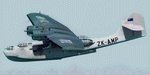
This folder contains a repaint for the Aerosoft PBY Catalina for FSX, representing PBY-5 ZK-AMP of Tasman Empire Airways Ltd. The Royal New Zealand Air Force had 56 Catalina's in all between 1943 and 1953. They were registered NZ4001-4056 inclusive and included 22 PBY-5s (mostly MklVAs) with the remainder being PB2B-1 s. All were flying boats, with no amphibian models being taken on charge. After the war only half a dozen or so of the best aircraft were maintained in service with No 5 Sqn (squadron code became PA-) and fitted with the latest search radar which had a large radome behind the cockpit. The remainder were put into storage. Two PB2B-ls were loaned to Tasman Empire Airways Ltd (TEAL) for short periods after the war, one (which became ZK-AMI) as a crew trainer, the other (ZK-AMP, former NZ4038 PA-J) to survey a flying boat route from Fiji to Tahiti, later to become known as "The Coral Route" and used by TEAL's Solent flying boats. These two aircraft were eventually returned to the RNZAF before being scrapped.
I have included two versions, one for P3Dv5 (without reflections) and one for the earlier sims (FSX/P3Dv1-4), with slight reflections. I felt these were too shiny in v5, but feel free to try for yourself.
I did paint this aircraft earlier, this paint has been adapted and improved on all fronts.
| Filename: | Consolidated_PBY5A_ZKAMP_TEAL.zip |
| License: | Freeware |
| Added: | 5th June 2020, 21:00:57 |
| Downloads: | 190 |
| Author: | Jan Kees Blom |
| Size: | 21.17 MB |
| Category: Flight Simulator X - Panels | |
| Project Black Panels v6.3 |
|
Images related to this file:
File Description:

Looking for a functional all-in-one panel? This package might be worth a look then. With a consistent layout for all instrumentation except aircraft type specific gauges (like engine displays and controls), this package offers panels for nearly all possible aircraft types. These IFR compatible 2D panels use the proper autopilot system for the aircraft type and have all the bells and whistles in easy reach; including an upgraded PFD, backup gauges, full IFR gauges (including ADF), fuel request, jetway toggle, engine startup and shutdown ability, a speed reduction system with auto spoilers, auto reverse thrust and auto taxi after landing, automatic gear, a true auto-smoke gauge that works with any aircraft having an engine smoke system, ground handling and popups like a custom exits control gauge, flight information computer and a TCAS radar plus much more. No attempt was made to replicate an actual aircraft panel, these were designed to allow flight of any aircraft in any location or situation without having to figure out how to use a different panel for each plane, and to assure all the necessary controls are present.
v6.3 is a Major Upgrade with a cleaner, more uniform look and tons of updated graphics, along with a load of new and improved features, including a functional TOGA system and, for piston engine aircraft, an Auto-Takeoff system. Complete package, no previous version required.
Support & Updates for this package can be found here:
http://www.thecurrentpage.com/?page_id=2686
| Filename: | Project_Black_Panels_v63.zip |
| License: | Freeware, limited distribution |
| Added: | 18th June 2010, 01:50:04 |
| Downloads: | 1,857 |
| Author: | Don Janusz |
| Size: | 28.84 MB |
| Category: Flight Simulator 2004 - Scenery | |
| Lechfeld, v2 |
|
Images related to this file:
File Description:
This airbase, located about 35 NM in the west of Munich (Bavaria, South Germany),
is the homebase of JaBoG32 riding the Tornado PA200. The German flight check
department GMFS, using C-47 in the early days and thereafter Hawker-Siddeley 748
as well as HS-125 for periodic recalibration of the radar- and navigational
equipment at civil and military airfields, was also on the base till 1994.
After the final decision was made not to establish commercial air traffic although
it had been discussed for a long time period, I reworked the airbase completely.
Among other objects, 38 hardened shelters for combat aircraft have been emplaced.
The included AI-Package contains: Lockheed F-104E GAF, Panavia Tornado PA200 GAF,
Mikoyan MiG-29 GAF, Douglas C-47 GAF, Canberra B.20 GAF, Boeing E3A Nato, Boeing
KC-135 USAF and an aircraft.cfg for the MS Learjet 45.
Several F104's, Tornadoes and MiGs perform touch and goes in the local area,
a Nato E3A leaves IFR to Geilenkirchen (ETNG), an USAF KC-135 routes IFR to
Decimomannu (LIED), a Canberra B.20 (was used for high altitude validations) goes
IFR to Cologne (EDDK) high in the sky and a Learjet shoots IFR to Bremen (EDDW) per
attached flight plan.
Lago's FSE is required in order to see most of the emplaced buildings /objects.
Lets get ready to rumble, but keep in mind, don't argue with the flight checkers
if they are on duty.
| Filename: | Lechfeld_v2.zip |
| License: | Freeware |
| Added: | 12th April 2011, 13:26:46 |
| Downloads: | 1,419 |
| Author: | Klaus Jone |
| Size: | 5.43 MB |
| Category: Flight Simulator X - Scenery | |
| RAF North Creake |
|
File Description:
RAF North Creake is a former Royal Air Force station located 3.3 miles (5.3 km) southwest of Wells-next-the-Sea, Norfolk and 5.7 miles (9.2 km) northwest of Fakenham, Norfolk, England.
Originally used in 1941 as a decoy site for RAF Docking, construction of this Class A airfield began in October 1942, with the station being provided with accommodation for 2,951 male and 411 female staff. The airfield had 36 loop type hardstandings, two T2 hangars and one B1 hangar.
By December 1943 the airfield had passed to 100 Group, although it did not immediately become operational as consideration was given to upgrading the airfield to Very Heavy Bomber Standard. In the event, this did not take place, with RAF Sculthorpe being selected for upgrade.
Short Stirling III's from 199 Squadron arrived in May 1944 to complete Window and Mandrel operations against enemy radar tracking of Bomber Command raids, however, in March 1945 these were changed to Handley Page Halifax III's. In September 1944, No. 199's 'C' Flight was used to re-form 171 Squadron, who contributed to 100 Group's radio counter-measures activities with Halifaxes.
The RAF relinquished the station in 1947, and the area is now used for agriculture, though some evidence of runways, buildings and facilities remains. Seventeen aircraft were lost from the airfield, eight Stirling's and nine Halifax's.
The control tower survives, and has been converted into a house, offering bed and breakfast.
Source: Wikipedia
| Filename: | RAF_North_Creake.zip |
| License: | Freeware |
| Added: | 13th February 2016, 12:50:51 |
| Downloads: | 237 |
| Author: | Terry Boissel |
| Size: | 1.73 MB |
| Category: Flight Simulator 2002 - Scenery | |
| Palisades SRTM Altitude Mesh |
|
File Description:
Ever wanted to fly down the VFR corridor over the Hudson River and gawk at all the skyscrapers in New York City? ... in your dreams! The Department of Fatherland Security has closed it down.
But, we still have Flight Simulator. Unfortunately, the altitude mesh for this area is somewhat lacking in detail.
This Palisades altitude mesh remedies that. Covers the Palisades cliffs, of course (but no Amusement Park, sniff), and also Riverside, Morningside, and Washington Heights, and Fort Tryon. In fact, all 5 Boroughs of New York City are covered, as well as most of central and northern New Jersey (visit beautiful downtown Hoboken!), and the larger part of Long Island. Also Rockland, Westchester, Orange, Putnam counties and more. And even Bear Mountain State Park.
Approximate coverage: N40* to N42* and W73* to W75*.
Made from NASA Shuttle Radar Topography Mission data (3 arc-second resampled to LOD9 - horizontal resolution of 76.4 meters) using SRTM to BGL by Matthew Styles (available in the AvSim library.) Very easy to use - give it a try.
BONUS: includes simple instructions so that anyone can make altitude mesh for their area from SRTM data using SRTM to BGL by Matthew Styles. Sorry, SRTM data only available for the Americas at the moment. The rest of the world coming soon. Check inside for more details.
No support of any kind is offered for this package - very sorry.
| Filename: | Palisades_SRTM_Altitude_Mesh.zip |
| License: | Freeware |
| Added: | 12th June 2003, 16:09:26 |
| Downloads: | 2,165 |
| Author: | Luis, scenery design forum |
| Size: | 3.48 MB |


© 2001-2026 AVSIM Online
All Rights Reserved
Privacy Policy |