
Where Flight Simulation Enthusiasts Gather from Around the World!
AVSIM Library - Search Results

| Category: Prepar3D V1-4 - AI Flight Plans | |
| California Pacific 2019 AI Flightplans |

|
File Description:
California Pacific was the pet-project of eccentric millionaire Ted Vallas who was determined to overcome a near-decade of obstacles to bring scheduled jet service to the Northern San Deigo\Carlsbad area. The airline was founded in 2009, but ran into a laundry list of problems over the years. Initially, the airline had acquired an EMB-170 which was painted in the airlines own colors and kept at the airlines Carlsbad base(CLD\KCRQ). The initial plan called for 3-class service to destinations including SJC, OAK, PHX, SMF, and even SJD. However, a US government shut down ill-timed during the scheduled proving runs and certification process for the airline delayed the process indefinitely. After months of waiting, and paying for staff and the aircraft to the dismay of investors, the E170 was returned and used as a cooperate shuttle in Arizona in full California Pacific colors, though it never would return. The founder did not give up, however, and years later was able to circumvent the certification process by purchasing the operating certificate of ADI's Essential Air Service operation which connected Watertown and Pierre, South Dakota with Denver with a pair of EMB-145s. One of the EMB-145s was painted in full California Pacific colors and used to launch scheduled flights, this time initially to SJC, RNO and LAS with AZA instead of PHX later being added. However, the other EMB-145 was damaged after being struck by ground equipment in Pierre, SD and was grounded for the rest of the airline's life, causing all EAS flights to cancel soon after California Pacific had acquired the flying. The airline was stretched so thin when service started in November 2018 that the departure of a pilot in January 2019 shut the airline down, after just 2 months in operation. Flights were for months considered "suspended", with airport signage being retained at the destinations, but soon after the website was taken down and all hopes of re-starting the company seemed abandoned. These flights are based on an early 2019 schedule I found online, but the EAS flights were not listed. As the flights did not operate anyway for the most part as California Pacific, I elected not to include them. The schedule was changed several times in the airline's short history as it struggled to maintain an aggressive 30 minute ground-time between flights with just 1 aircraft. The repaint for the AIM ERJ-145 may be found here: https://fsai-repaints.com/?p=1095
| Filename: | California_Pacific_2019_AI_Flightplans.zip |
| License: | Freeware, limited distribution |
| Added: | 9th December 2019, 18:02:01 |
| Downloads: | 61 |
| Author: | Chasen Richardson\Bayviation |
| Size: | 14.58 KB |
| Category: Flight Simulator 2004 - Scenery | |
| VAGO Goa/Dabolim Navy, India |
|
File Description:
Googly scenery for Dabolim Navy Airport, Goa - a busy Indian military airport also used for
civilian flights which is poorly provided for in Flight Simulator 2004. These scenery
files add taxiways, aprons, buildings and other airport features, so that you and
your "AI" traffic can land, taxi, park and take off in a realistic manner.
Today Goa is a popular tourist destination, but it does not have its own civilian
airport. Instead the ever-increasing number of charter flights use the Indian
Navy's airport. But they may only land when the Navy's novice pilots are not
pretending the runway is a 11,000 foot aircraft carrier deck so civilian flights
have to be packed into short periods (before 9 am and 1 pm to 6 pm) and this leads
to the small terminal ramp being literally packed with aircraft at times. All kinds
of jets from around the world up to Boeing 747s call here, flown by European and
Asian operators like Air Deccan, Air India, Air Sahara, Arkefly, Condor Thomas Cook,
Go Air, Indian Airlines, Jet Airways, Kingfisher Airlines, Monarch Airlines,
Spicejet, SriLankan Airlines, Thomsonfly, Tiger Airways, Transaero and XL Airways
along with ATR turboprops on shorter flights with Air Deccan. The
Indian Coast Guard has a base here for its aircraft, and the Indian Air Force
carry out exercises from time to time with their fighter bombers. The Navy's
three-aircraft aerobatic team is also based here.
To cope with the increasing traffic, the airport is currently under development
and enlargement but details of this are not currently available so this scenery has
been created showing the existing arrangements. This, combined with the limitations
of Flight Simulator and its parking and taxying arrangements, means that it isn't
possible to realistically pack the aircraft all in at busy times. Any overflow of traffic will
find itself diverted to the Navy's parking area or even the aircraft museum.
However, my observations are that many of the schedules prepared for Flight
Simulator do not recognise the limited landing times and the traffic is spread
fairly evenly throughout the day, so such overflows should be infrequent.
The scenery does not purport to be ultra-accurate. Based on high-detail satellite
imagery from Google Earth, the layout is proportionally correct but the added
airport features, such as buildings, are built from default Microsoft objects
and add-on libraries so will not look like the real thing.
You are not obliged to download and install any additional scenery libraries,
but to enjoy this scenery in its entirety, you may wish to. It will work fine,
with or without.
| Filename: | VAGO_GoaDabolim_Navy_India.zip |
| License: | Freeware |
| Added: | 8th August 2007, 23:14:21 |
| Downloads: | 3,958 |
| Author: | John Hinson |
| Size: | 78.48 KB |
| Category: Flight Simulator 2004 - Scenery | |
| Ketchikan PAKT in southern Alaska plus float planes 5KE and the town |
|
Images related to this file:
File Description:
This is Ketchikan PAKT in southern Alaska, 45 miles north of the Canadian border and 220 miles south of Juneau. It is the closest major Alaskan airport to the lower 48 and most flights from or to Seattle pass through Ketchikan en route. The airport is on the southern side of the stretch of water known as The Narrows and the town is on the northern side, with ferries connecting the two. The town side was somewhat modified as part of one of the three Misty Fjords sceneries, so there were already some marinas and docked cruise liners etc before I started this. In addition, Ketchikan Airport had been partly made way back in 2006, and further modified in 2007; I say "partly" as there is in fact no way to accurately make PAKT within the limitations of FS9 as there is a 50 or 60 feet difference in elevation between runway and apron, and the taxiways are actually ramps up from the apron to the ends of the runway. This has a knock-on effect on the float plane and ferry docks on the water below the airport. I can see why the Misty Fjord sceneries avoided it. This scenery retains the original buildings from the Alan Wright scenery. It also includes the modification made by John Hinson, who created the second taxiway to the western end of the runway; FS9 had not included this as the original airport started operations with only one taxiway in place. There are new vehicles on the apron (fuel etc), new apron markings and some parking modifications to enable AI with Boing 737, DC6, Beechcraft 1900, and GA, plus runway and taxiway signage, windsocks, some car parking, freight items, etc. There is a road and covered bridges down to the docks and ferry, and the town side of the water has been modelled to include other float plane docks along with waterfront buildings, including the ship repair facility with it's dry dock (actually a floating dock that lifts ships out of the water) and the Alaskan Ferry Terminal wharf etc. The ferry forms a part of the AI, generously permitted by FSAddon and originally a part of the payware Tongass Fjords package, as are the AI aircraft also included here. There are new waterside buildings that stretch from the ship repair yard, past the shopping plaza and onward to the stationary cruise liners (that were part of the Tongass payware scenery) including float docks for the float plane companies that are based in Ketchikan, plus a new AI liner. The AI is a further adaptation of the already posted CF36 AI and PAKN AI, as listed in the AI folder. Due to the surrounding hills there may be some interference with AI float aircraft, depending on the wind direction, though I have watched succesful Beaver landings with the wind from the east. The combined AI for float planes creates a float plane take off or landing at, on average, 20 minute intervals; this is still well short of the actual busy summertime period.
| Filename: | Ketchikan_PAKT_in_southern_Alaska_plus_float_plane.zip |
| License: | Freeware, limited distribution |
| Added: | 12th February 2017, 23:27:59 |
| Downloads: | 1,228 |
| Author: | Roger Wensley |
| Size: | 47.11 MB |
| Category: Microsoft Flight Simulator (2020) - Aircraft Repaints, Textures and Modifications | |
| Bleriot XI Britannia |
|
Images related to this file:
File Description:
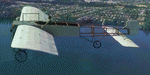
This folder contains a repaint for the Bleriot XI by Wings42 in the colors of Bleriot XI-2 Britannia. The third Bleriot XI imported into New Zealand, it was a two seater presented by the Imperial Air Fleet committee to the New Zealand government. The committee's aim was to promote the development of aviation in the British empire, and the presentation was intended to stimulate military aviation in New Zealand. The aircraft was a proven one, having been flown 347km non-stop from Dover to Cologne by Gustav Hamel in 4 hours 18 minutes on April 17, 1913. The aircraft was dubbed "Britannia' at a ceremony at Hendon on May 22, and Hamel then took former New Zealand Prime Minister Sir Joseph Ward for a short flight. The committee was composed primarily of London businessmen and Sir Joseph was the deputy-Chairman. The aircraft was paid for by public subscription and was valued for insurance purposes at 1400 pounds. The aircraft was disassembled and shipped to New Zealand aboard the Athenic. The aircraft arrived in Wellington on September 29, 1913, where it was discovered that the propeller was not in the shipment. This was soon shipped to New Zealand. In the meantime the aircraft was stored in a purpose built shed at the Buckle street Defence stores. In late 1913 Joseph 'Joe' Hammond had been appointed official Government pilot.
Mr Hammond suggested flying the aircraft to Auckland for display at an Exhibition. However the aircraft was railed north and was assembled in Auckland on January 14, 1914. On January 17, 1914 Mr Hammond made his first flight in the aircraft from the Epsom showgrounds. The following day he completed an hour long flight over Auckland at low level. A flight on the 19th with a journalist as passenger was aborted during takeoff when Hammond found he had no rudder control. Repairs were made and the aircraft flown again on January 24th. Another flight with a passenger then took place. Rather than a member of the media or any of the officials present Hammond chose to take Miss Esme McLalland as passenger. Miss McLalland was a member of the touring Royal Pantomime Company which was performing in Auckland, and the choice failed to impress the officials - Joe Hammonds employment as official pilot was terminated. The aircraft remained on static display for the remainder of the Exhibition and was returned to Wellington at the end of April 1914. Without a pilot (there were several Army Officers training in England - 2nd Lt. A. Piper and 2nd Lt. W. Burn) any official role for the aircraft (and officials did not seem to know what to do with it), it was placed in storage at the Mt Cook barracks in Wellington. Soon after, a report by General Hamilton, the Imperial Inspector of Overseas Forces discouraged further aviation development. With the outbreak of war an offer was made to send the aircraft with the New Zealand Expeditionary Force. It was shipped back to England, departing on the Arawa on October 16. It was unloaded in London on January 15, 1915 and and went from there to Brooklands where it is believed to have been used as a trainer. Repaint by Jan Kees Blom
| Filename: | Bleriot_XI_Britannia.zip |
| License: | Freeware |
| Added: | 8th May 2021, 17:39:55 |
| Downloads: | 17 |
| Author: | Jan Kees Blom |
| Size: | 38.51 MB |
| Category: Flight Simulator 2004 - Utilities | |
| Servinfo Update 5(Nov 01, 2010) |
|
File Description:
Thank you for downloading this 5th update of Servinfo 2.02.
This update actualised with logos and data the following Airlines and Air Forces:Air Zimbabwe, Basler Flight Service, Bristow Helicopters, British International Helicopters,RAF Barkston Heath, Braniff International Airways, BQB LÃ�ÂÂneas A�©reas, China Northern Airlines,China Southern Airlines, Canadian Western Airlines, Centurion Air Cargo, Air Comores International,Dominicana de Aviaci�³n, DAS Air Cargo, Ecuatoriana De Aviaci�³n, Georgian National Airlines,Caribbean Star Airlines, Ghana International Airlines, Royal Tongan Airlines, Turkish Air Force,Ju-Air, RAF Leuchars, Albanian Airlines, South African Air Force, 32th Squadron RAF,USAF 100th Air Refuelling Wing, RAF(Support Helicopter Force),RAF Scampton, RAF St Athan,RAF Topcliffe Flying Training Unit, Vladivostok Air and RAF Valley Flying Training Unit.
The following aircrafts are now identified by Servinfo in all his flights:
Antonov An-2,Antonov An-8,Antonov An-12,Antonov An-22,Antonov An-24,Antonov An-26,Antonov An-28,Antonov An-30,Antonov An-32 Sutley/Firekiller,Antonov An-38,Antonov An-70,Antonov An-72,Antonov An-74-100/200, Antonov A124 Ruslan ,Antonov A140,Antonov A148,Antonov A225 Mriya,Antonov An-74-300,Avro Lancaster,Avro Lancastrian,Boeing B-17 Flying Fortress,Boeing B-29 Superfortress,Bristol Blenheim,B�¼cker B�¼ 131 Jungmann,B�¼cker B�¼ 131 Jungmeister,Consolidated B-24 Liberator,Curtiss P-40 Warhawk/Kittyhawk
Curtiss SNC-1 Falcon,De Havilland DH.98 Mosquito,Douglas AD Skyraider,
Douglas A-20 Havoc/Boston/P-70/DB-7,Douglas B-26 Invader,Douglas SBD Dauntless
Fairey Swordfish,Grumman F4F Wildcat,Grumman F6F Hellcat,Grumman F7F Tigercat,
Grumman F8F Bearcat,Grumman TBF Avenger,Grumman F9F Panther,Grumman S-2/S-2F Tracker,Grumman S-2 Turbo Tracker,Hawker Hurricane/Sea Hurricane, Hawker Fury-Sea Fury,Hawker Hunter,Hawker Hind,Heinkel He-111,Ilyushin A-50,Ilyushin IL-103,Ilyushin IL-114,Ilyushin IL-2M3,Ilyushin IL-4,Ilyushin IL-10,Ilyushin IL-12,Ilyushin IL-14,Ilyushin IL-18/IL-20/IL-22"Coot"/IL-22 Zebra/IL-24,Ilyushin IL-28,Ilyushin IL-38,Ilyushin IL-62,Ilyushin IL-76/IL-78/IL-82/IL-76 Gajaraj
Ilyushin IL-86/IL-87,Ilyushin IL-96,Kamov Ka-25 "Hormone",Kamov Ka-27"Helix"
Martin B-26B Marauder,Messerschmitt 109,Messerschmitt 262 Schwalbe,MiG-15,
MiG-17,MiG-19,MiG-21,MiG-25,MiG-27,MiG-29,MiG-31,Mitsubishi A6M Rei-Sen"Zero",
North American F-82 Twin Mustang,Northrop P-61 Black Widow,Vought F4U Corsair,
Short S-25 Sandringham,SIAI Marchetti SF.260,Sukhoi Su-7,Sukhoi Su-15,Sukhoi Su-17/Su-20/Su-22,Sukhoi Su-24,Sukhoi Su-25/Su-28/Su-39,Sukhoi Su-26,Sukhoi Su-29,Sukhoi Su-31,Sukhoi Su-38,Sukhoi Su-47 Berkut,Sukhoi Su-80,Sukhoi Superjet 100-95,Tupolev Tu-2,Tupolev Tu-4,Tupolev Tu-14,Tupolev Tu-16,Tupolev Tu-20/95/142,Tupolev Tu-22,Tupolev Tu-22M,Tupolev Tu-114,Tupolev Tu-124, Tupolev Tu-134,Tupolev Tu-144,Tupolev Tu-154,Tupolev Tu-160,Tupolev Tu-204/214/224/234,Tupolev Tu-334 and Vickers Supermarine Spitfire/SeaFire.
| Filename: | Servinfo_Update_5Nov_01_2010.zip |
| License: | Freeware |
| Added: | 2nd November 2010, 01:43:39 |
| Downloads: | 934 |
| Author: | Daniel Nole |
| Size: | 1.44 MB |
| Category: Microsoft Flight Simulator (2020) - Utilities | |
| Flightplan Visualizer 1.22 |
|
Images related to this file:
File Description:
Flightplan Visualizer (FV) version 1.22. Copyright 2018-2022 by Pelle F. S. Liljendal ([email protected]), all rights reserved.
FV comes with 1599 pre-imported AI flightplans (of which +726 are BizJet flightplans, the rest are commercial, government and military). However you are able to import additional (AI) flightplans yourself. Once imported these (AI) flightplans can be visualized on a map-view, and the user will be able to search accross all these. Hence you can use the program as inspiration as to which routes to fly. E.g. you can search across all imported flightplans to find all flights in an A321 flying into/out from LDDU, or simply to look for all flights in a Boeing 747-8F.
Simply run the included installer to install the software. The program will be installed into "C:\Program Files (x86)\Flightplan Visualizer" and all datafiles will be installed into: "C:\Users\[UserName]\AppData\Roaming\FlightplanVisualizer". The program comes with a full manual explaining everything, and a 3 page quick manual to get you started. The first 3 times you run the program the quick manual will automatically open. The forum is hosted here: https://forum.aerosoft.com/index.php?/forum/919-flightplan-visualizer/
Version 1.22 Contains the following changes:
- I had initially added a feature to download AIG airline-logos, however a later change in AIG's server setup rendered this feature useless. In stead you can now specify the local folder holding AIG's airline logo's (if/when you are using AIG AIM on your computer for AI-traffic). If specified, airline-logo's will be obtained from this folder.
- On the same note, I had to remove the menu-item to download AIG flightplans, as this program no longer have directly access to the AIG servers. For the same reason the menu-item to access the index with flightplans (up to summer 2021) was re-enabled.
- In the past when opening the Airport-Info form it defaulted to show in-/out-going traffic for the selected flightplan or active leg-search only. Now there is a new setting where you can set it up to in stead default to showing all traffic in/out of the airport (the Airport-info form still contains a combobox where you maually can choose what to see).
- "Owned aircraft" was renamed into "Simulator-aircraft", as these are the (flyable) aircraft you have available within your simulator of choise.
- When choosing to use calculated flight-times in a leg-search, you can now specify a percentage-difference (between leg-time and calculated-time). Only when the difference between leg-time and calculated-time exceeds this specified value will the calculated time be used during leg-search (e.g. "only use calc-times if diff. exceeds 50%, otherwise use leg-times").
- Began using (aircraft) short-names many places where the program in the past used IATA/ICAO-code (e.g. when hovering the mouse over a route, or list of aircraft servicing specific airports when editing flightplans). Also added short-name columns to aircraft browser and when choosing favorites (these stil contains columns for IATA/ICAO-codes).
- Pressing the "Usage" button when editing/viewing an aircraft-type or right-clicking an aircraft-type in the browser and choosing "View usage-report..." from the context menu, you will be shown a report that inform you how that aircraft-type is used: which simulator-aircraft are based on that type, which owned aircraft that have been marked as substitute for that type, which airlines are using that type (as carrier/operator), and finally in which (active) flightplans that type is used.
- Items in airline-browser are now by default sorted by (airline) name, and the usage-column shows the size of the airline if its in use. If available a logo for the selected airline is displayed in the upper/right corner.
- Improved performance when searching for ICAO-codes in the airport-browser. Also improved priority of the default selected item, in cases when an airport had a 3 letter ICAO-code, and another was using the same 3 leters for its IATA code.
- When searching for ICAO/IATA-codes in the airline-browser, it will now prioritize non-defunct airlines, if multiple airlines share the same ICAO/IATA-code.
- When enabling/disabling flightplans, you can now select all BizJet flightplans (those prefixed with "Bz_"), all Military (prefixed with "Ml_") or all Goverment (prefixed with "Gv_").
- Individual FP sub-folders can now be setup to leave (not move) defunct- and/or obsolete FP, even if the settings to automatic move these to the disabled folder is set.
- Performing "Search legs" you can now filter on aircrafts you are allowed to fly via type-ratings ("Must be type-rated").
- Performing a substitute of a user-airline, that airline will remain selected (previously the list scrolled to the top, and selected the 1st item).
- Added new check-box to "Search legs" that can exclude round-trips (legs taking-off and landing at same airport).
- Airline/Aircraft-repaint -filter can now filter on size of airline (e.g. "size=major"). Size is determined from usage as carrier/operator in active flightplans. Airlines not in use by active flightplans are listed with a size of "unknown").
- Added GPS-conversion (deg deg,min,sec) to the conversion-form, as requested by a colleague. You can either manually enter lat/lon or look-up an airport to get it. There is both a primary lat/lon and a secondary, and the form will show the (GC)distance between these and the initial/final course.
- Added new "Max airport-distance" for airport-redirections. At the same time added new feature when importing/editing airports to permanent change an airport. If used, it is not saved/handled as a redirection (can't be restored) but rather as a perpament change.
- Reordered- and renamed some of the tab-pages in the Airport-info form.
- Reordered the length/distance-fields in the unit-conversion form.
- The Wind-calculator have been removed from the main-menu, in stead wind-calcuations can now be performed using the unit-conversion form. Also now the speed of the wind is always displayed as a positive value, and in stead the label will either say "Head-wind" or "Tail-wind".
- Added new "Country list" menu-item in the misc-menu. Will list all countries twice (sorted by names, and sorted by ISO3-codes).
- Showing airport-marker tool-tips on the main-map is now prioritized over showing route tool-tips.
- Added "Min take-off fuel ("MTFL") field to user-aircraft weight-fields. As of now its not set for any aircraft in the database, however it can be estimated as 60 minutes of flight at cruise.
- Moved several group-boxes of the settings-form to the 2nd tab-page, and added new fields for defalt simulator/logging-environment based on the File-prefix used when starting the program.
- Also now the header-names that was previous fixed to "Rank" and "Traffic-density" can be changed, so the selectable 6 values can be used for something entirely different, if anyone have the need for this. If/when changed, these new names are shown when editing an airport, or when performing a leg-search (as the leg-search can filter on these fields).
- MakeRunways (MkRwy) by Pete Dowson is challenged handling unicode in the scenery it scans/writes to XML. E.g. the Icelandic airport (BIFL) "Flúðir Airport" is exported by MkRwy as "Flúðir Airport". In this version FV will try to identify when this happens, and then it will fall back using the airport/city-names from the databases bundled with FV. This is not a perfect solution, but at least it improves the result.
- Various minor changes and tweaks to multiple forms (e.g. Unit conversion form can now be closed with ESC, renamed log-archives and so on).
- Fixed: If the main-form had an active flightplan filter when using the search-legs feature the flightplan combo-box still only contained the filtered context. Pressing the Clear button did not resolve the issue.
- Fixed: Since adding support for the AIGFP file-format, there could be flights departing from- and arriving at the same airport (e.g. helicopter flights). In previous versions the calculated flights-time would only consist of taxi-out/in times. In this version the flightplan leg-time will now also be uses for the calculated time, when the same airport is used both for departure and destination.
- Fixed: In some cases re-processing flightplans (resetting and performing redirection) could corrupt the flightplans and remove airport-data from the flightplans. This version will also try to add any missing airport-data to flightplans when re-processing them.
- Fixed: Selecting "only show favorites" in the Search aircraft-type form would filter out all aircraft (including those marked as favories).
- Fixed: In the leg-info form the fields to show times (Out, Off, On, In) were too narrow for multi-week flights, when showing the week-number (e.g. "TH7/14:37").
- Fixed: Issues when estimating cruise/taxi fuel-burn for user-aircraft, where in some cases some fields were not saved, and wrong calcuation if setup to show weight in Kg.
- Fixed: In some cases wrong TimeZone was used when calculating local time for OUT, OFF, ON, IN-times.
- Data: The airport redirection file ("UserAirportRedirect.xml") in the UserData folder have been updated to match the latest MSFS world update. However this new file is only installed by the installer if it does not already exists (in case you made your own changes), hence you need to delete this file manually prior to running the version 1.22 installer.
- Data: Quite a few airports in the airport-database were updated (had wrong names due to issues with unicode-letters). Also some additional airports were added.
- Data: The installer comes bundled with +300 airline-logos (optional install), and a separat package of +1400 airline-logos are avilable for download from AVSIM (in both cases these are encoded into a propriotary format using the ".CAL" extension).
- Data: Added the P2F (Passenger-to-Freighter) versions of the Airbus A320, A321 and A330. Also added the package freighter versions of CRJ100 and CRJ200.
- Data: Improved detection of Boeing 737-700/800 BCF/BDSF when importing flightplans utilizing these (passenger aircraft converted into freighters). Also improved a few other freighter detections.
- Data: Changed a few (aircraft) short-names to either shorten them a bit, or make them "more readable".
- Flightplans: All new/updated flightplans have been added to the installer, and all obsolete/defunct have been marked/removed. A total of 1599 active flightplans are bundled with the installer.
| Filename: | Flightplan_Visualizer_122.zip |
| License: | Freeware, limited distribution |
| Added: | 18th October 2022, 23:31:28 |
| Downloads: | 390 |
| Author: | Pelle Liljendal |
| Size: | 45.57 MB |
| Category: X-Plane - Utilities | |
| X-Camera 2.2.1 |
|
Images related to this file:
File Description:
The X-Camera 2.1.1 plugin for X-Plane 9 and 10 is a replacement camera system that lets you define multiple view categories and multiple views within those categories that are associated with specific aircraft. X-Camera is similar to EzDok for FSX only for X-Plane. Watch this short X-Camera demo on YouTube: https://www.youtube.com/watch?v=PgOxG8ejq9A
Each view can have options:
- TrackIR:
Each view can enable or disable the TrackIR input. If the view is out the cockpit window having TrackIR enabled is desirable. However, if the view is a close-up of an instrument panel then having TrackIR disabled is probably the better choice since the view will be stable making it easy to click on cockpit controls with the mouse. We also support LinuxTrack on Linux and Mac systems.
- HeadShake:
If the HeadShake plugin from SimCoders is installed then the view can accept input from HeadShake. Similar to the TrackIR feature you will likely want this enabled for certain views but disabled for views on instrument panel close-ups where a stable camera makes it easier to use a mouse to control cockpit knobs and switches. The HeadShake plugin must be at version 1.3 or higher for the integration to work.
- Scenic Flyer:
If the Scenic Flyer plugin from Digital Avionics is installed then the view can choose to display either the Scenic Flyer Glass panel or GA panel.
- Smooth Transition:
When this option is enabled the camera with smoothly transition from one view to another over approximately half a second. When the option is off the view will transition immediately.
- Views can be controlled in a number of ways:
> Each view can be positioned by using keyboard keys or a control panel
> The camera'™s X, Y, Z, Heading, and Pitch can all be adjusted for each view
> Views can be assigned to a HotKey or JoyStick button for easy selection
> HotKey or JoyStick button can be used to navigate to next or previous views
> The views for a specific aircraft can be saved to a CSV file for easy editing
- Walk Mode:
Any view'™s camera can be placed in Walk Mode. While in this mode the camera can be walked or floated around using keyboard input. If you ever played the video game asteroid that is what walk mode is like. The mode is particularly useful for pre-flight inspections of your aircraft. You can create a external view and after selecting that view you can "Walk" the camera around checking out your landing gear, props, etc.
- Linear Transitions and Auto Advance:
Linear transitions allows you to define a transition between two adjacent cameras in category. This capability, in conjunction with the auto advance feature, allows you define fairly sophisticated animations that can be used for automated Pre-flight inspections, scenery viewing, and cool transitions affects that can be used when creating flight videos. All the transitions in our YouTube video were done with X-Camera.
- Bezier Curve Transitions:
Bezier curve transitions allows you to define a transition between three or more adjacent cameras in a category. This capability, in conjunction with the auto advance feature, allows you define fairly sophisticated animations that have an ultra smooth movement between the curve control points.
- Many Unique Camera Attributes:
Tracking Cameras - Camera Leveling - Smooth Camera Joining - Auto Advance to the Next Camera - Individual Zoom and Field of View Setting - External Cameras - Free Cameras - Target Following Cameras - Cineflex Cameras - Automatically Generate Unique Orbit and Fly-By Animations
X-Camera can create unique orbit and fly-by camera sequences by providing a few key parameters
- Airport Cameras:
You can define a set of free cameras associated with an airport. You can create up to 2,000 cameras per airport. X-Camera can also automatically populate airport cameras by reading the airport scenery files and creating cameras at runways, starting locations, taxiway signs, and airport viewpoints. You can map a joystick button to quickly switch between your aircraft camera set and the nearest camera at the nearest airport.
- Target Following Cameras:
Targets are locations defined by a latitude, longitude, and elevation in meters. Target following cameras are a special type of external camera that is attached to your plane and it has the ability to track a selected target. You can also view the target reciprocal which as a view from the target back to you plane.
X-Camera Tutorial Videos: There is also a four part series of tutorial videos that will help you get started with X-Camera. You can access them from the X-Camera Tutorial Page: https://www.stickandrudderstudios.com/x-camera-tutorial-videos/
The full manual is included in the zip file you can also view it here: https://www.stickandrudderstudios.com/downloads/User_Guide.pdf
| Filename: | XCamera_221.zip |
| License: | Shareware, limited functionality |
| Added: | 27th January 2017, 15:14:21 |
| Downloads: | 478 |
| Author: | Mark Ellis |
| Size: | 4.61 MB |
| Category: Microsoft Flight Simulator (2020) - Utilities | |
| Flightplan Visualizer 1.18 |
|
Images related to this file:
File Description:
Flightplan Visualizer (FV) version 1.18.0. Copyright 2018-2020 by Pelle F. S. Liljendal ([email protected]), all rights reserved.
FV comes with 787 pre-imported Commercial AI flightplans (+380 BizJet flightplans are available as a separate download). However you are able to import additional (AI) flightplans yourself. Once imported these (AI) flightplans can be visualized on a map-view, and the user will be able to search accross all these. Hence you can use the program as inspiration as to which routes to fly. E.g. you can search across all imported flightplans to find all flights in an A321 flying into/out from LDDU, or simply to look for all flights in a Boeing 747-8F.
Simply run the included installer to install the software. The program will be installed into "C:\Program Files (x86)\Flightplan Visualizer" and all datafiles will be installed into: "C:\Users\[UserName]\AppData\Roaming\FlightplanVisualizer". The program comes with a full manual explaining everything, and a 3 page quick manual to get you started. The first 3 times you run the program the quick manual will automatically open. The forum is hosted here: https://forum.aerosoft.com/index.php?/forum/919-flightplan-visualizer/
Version 1.18 Contains the following changes:
- GREATLY improved the search-legs feature (by a factor of +50).
- In the past the application was forced to 32 bit. This is no longer the case, hence if needed its able to allocate more memory than before. I have never heard of anyone getting an "out of memory" exception, buy anyway.
- In the settings form, the field for entering the path to where to look for the Make Runways -files, have been replaced with a (MRU) combo-box, remembering the last 5 paths entered. So now you don't need to remember these paths each time you want to change it (e.g. if you switch between a set of files generated for P3D and another generated for MSFS). Remark that when this path is changed, FV will automatically restart when saving the settings, as the MkRwy-data are only loaded at startup.
- Added new command-line argument /MkRwy="G:\FS\MakeRunways". If this argument is set, FV will try to locate the files generated by Pete Dowson's MakeRunway in the specified folder, no matter the value of the MkRwy-path set in the settings-form.
- Added new command-line argument /FilePrefix=XXX. If this prefix is set (in the short-cut starting FV) it will look for files in the UserData-folder using this prefix and an underscore (e.g. open "XXX_UserAirportInfo.xml" in stead of "UserAirportInfo.xml"). If FV is started with this argument it will be displayed in the caption of the main-form to notify the user "which prefix is in use".
- Added new command-line argument /ForceReprocessFlightplans which forces all flightplans to be reprocessed on startup (e.g. process all airport redirections according to loaded redirection file).
- Added new command-line argument /? or /help. Using either of these, or having specified a wrong command-line argument will show a small example of the correct way to use these arguments.
- Added a new "Auto-activation prefixes" entry field to the "Edit owned aircraft" form where you can now enter a comma separated list of prefixes for which each aircraft should set to active. If entered, the aircraft will automatically be set active when FV have been started with the /FilePrefix argument set to the entered value (e.g. P3D). If one or more prefixes have been entered into this field, and FV have been started with another prefix, those aircraft will be set to not-active.
- Added new setting to reprocess all loaded flightplans on startup if FV was started with another /FilePrefix argument than used the previous time FV was started (e.g. if you switch between two different simulators).
- Improved how pseudo-airports tries to look-up airport data from the bundled airport-database. So there is now a higher chance that: name, country/state, and time-zone will be populated with useful data for the pseudo airports.
- In previous versions when opening the airport-info form, the checkbox "Exclude small/grass/dirt" (runways) was always checked, meaning you had to uncheck this checkbox before being able to see any runway-information for small airports. In this version a new setting have been added where you can chose if this checkbox should default to being: Checked, Unchecked or (default) Automatic. if choosing "Automatic", this checkbox will default to un-checked for airports only having few/small runways.
- Redesigned the settings-form so things are less "cluttered", and it will be more easy for me to add additional items in the future.
- The Search Airport form now contains fields that lets you specify min/max criteria for rwy-length and airport elevation, and min/max distance to a specified airport (e.g. find all airports within 20-50 Nm of XXXX). Also you can specify required rwy-type (e.g. "All Hard", "Have Soft" ...).
- Added an "Edit" menu-item to the context menu in the Search Airport form, which opens the Airport Info form, and returns back to the Search Airport form (e.g. see details for a few found airports before chooing one of them).
- If Transition Altitude (TA) is not known for a particular airport, the program will now try to estimate TA based on nearby airports in the same country, where those nearby are weighted more than those further away (its not perfect, but "better" than 0). An estimated TA will be postfixed by a asterisk to mark that it is estimated.
- Minor (internal) changes to the automatic version-check.
- Fixed: Issue importing some AigFP flightplans where airports were being redirected (e.g. "AIG_AviaTrafficCompany_Winter_2019-2020v2").
- Fixed: Using the context menu in the list-view showing all owned aircraft, the changes were sometimes not saved.
- Fixed: In the conversion-form when converting weight/volume into US-Gal, the calcuation was wrong (converting from US-Gal was not an issue).
- Fixed: In the leg-info report the value of Transition Altitude was in some cases used in stead of the length of the longest runway.
- Fixed: Leg-info report only contained taxi-out time for all airports. Now it only contains the taxi-out time for the departure airport, but both departure- and destination airports contains a taxi-in time.
- Fixed: In some cases an airport that was currently being edited, could be edited in another window at the same time (opening multiple Airport Info forms).
- Data: The bundled airport-database had a MAJOR face-lift. Various data were corrected, and it have more than doubled in number of airports/helipads contained within the database.
- Data: Improved detection of aircraft-type "IAI 1126 Galaxy" (as "Gulfstream G200"). Thanks to Bruce Nicholson for notifying me of the issue when importing a particular AIG flight-plan.
- Flightplans: All new/updated flightplans have been added to the installer, and all obsolete/defunct have been marked/removed. A total of 787 active flightplans are bundled with the installer.
Pelle
| Filename: | Flightplan_Visualizer_118.zip |
| License: | Freeware, limited distribution |
| Added: | 9th November 2020, 20:09:24 |
| Downloads: | 479 |
| Author: | Pelle Liljendal |
| Size: | 34.48 MB |


© 2001-2026 AVSIM Online
All Rights Reserved
Privacy Policy |