
Where Flight Simulation Enthusiasts Gather from Around the World!
AVSIM Library - Search Results

| Category: Flight Simulator 2004 - Scenery | |
| Prudhoe Bay area on Alaska North Slope US |

|
Images related to this file:
File Description:
The Prudhoe Bay area of the Alaska north slope is dominated by all the equipment and machinery that is necessary for the extraction of oil and its transfer by the pipeline that reaches south to Valdez. Prudhoe Bay airport is now closed, and its replacement just to the south is Deadhorse PASC, with numerous storage, maintenance, and accomodation areas immediately to the north of the apron, and others adjacent to the road between the two. The runway is just under 6,500 feet with approach lights at both ends and ILS on 04 (true heading of 75 degrees). This scenery reflects the overall situation in 2011 and oil production facilities and buildings are included here. The airport buildings and those close to the airport are replicas of the real life buildings; while as distance increases the accuracy fades somewhat there are everywhere replica trucks and cross country vehicles that are true to life. Deadhorse handles around 7,000 passengers per month as staff are rotated in and out on Alaska Air and ERA flights and by oil company private flights. There are also freight flights to complement the trucking effort up the Dalton Highway. The Alaska Airlines terminal building and ERA (the red buildings nearby) are at one end of the apron, while at the other end is a very large and new green terminal, storage, hangar building built by the airport authority. All of the airport components, runways, taxiways, and aprons, are built up on a gravel base to raise them above the surrounding terrain that floods with melting snow, freezes, or dries out, according to the seasons. There are other new airstrips included here that serve the oil industry. Around 33 miles to the east is Badami PABP airport servicing a subsiduary oil producing area, with 5,000 feet of gravel runway. Some 28 miles to the west of Deadhorse is Ugnu-Kuparuk UBW with just over 6,000 feet of gravel (gravel in 2011, it is now asphalted) servicing oil production by Conoco Phillips, which uses 737's to fly staff in and out. A further 32 miles west is Alpine AK15 with 5,400 feet of gravel and also served by the Conoco Phillips 737's. To the south of Alpine and connected by road is the village of Nuiqsut. To the north of Alpine and reachable only by air in the delta of the Sagavanirktok River is CD-3, an oil collection and pump station area with another gravel runway of 3,000 feet. Other airstrips that were prviously posted are now updated, Nuiqsut and Oliktok. I experimented, but decided against trying to reproduce the several hundred miles of pipelines. The are new AI aircraft, and there are notes regarding downloading. There is a new "cement" texture (not its name, but used as that by SBuilder) for the built up gravel bases. It is slightly darker than the original but not so much that any previous use will be spoilt. You may wish to download my "Alaska Frozen Rivers and Lakes" which freezes lakes and the northern sea and makes them landable on wheels.
| Filename: | Prudhoe_Bay_area_on_Alaska_North_Slope_US.zip |
| License: | Freeware, limited distribution |
| Added: | 19th December 2017, 00:38:06 |
| Downloads: | 583 |
| Author: | Roger Wensley |
| Size: | 28.54 MB |
| Category: Flight Simulator X - Aircraft Repaints, Textures and Modifications | |
| Consolidated PBY-5A VB-126 #20 |
|
Images related to this file:
File Description:
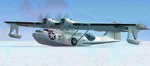
A repaint for the Aerosoft PBY-5a Catalina in the colors of PBY-5a #20 (BuNo 7277) of VB-126 as it looked during a rescue operation on the Greenland ice cap in 1943. On 5 november 1942, a C-53 en route from Iceland to Greenland was reported missing off Greenland's east coast. Four days later, a B-17F, en route for England was aked to to keep a lookout for the missing plane, but it crashed on the ice cap. The crew of suffered only minor injuries, and they soon received food and other supplies that were dropped on the ice. Unfortunately, they had landed in a heavily crevassed part of the icecap, making an evacuation difficult. On 28 november, a USCG Grumman Duck, flown by Lt Pritchard, managed to make a wheels-up landing on the ice and brought out two of the crew. The next day, a ground rescue team arrived on the dite as well, and things looked good....
One crew member and a rescuer died when their sled disappeared in a crevasse, and later the same day, Lt. Pritchard's Duck disappeared as well, with a crew of three. On 6 december, an attempt was made to evacuate the B-17's navigator, Lt. O'Hara, who suffered from gangrene in his feet. One member is the rescue party fell into an crevasse, and the motorsled they were using broke down, so the men had to dig in and wait for help. The days continued until over christmas, but morale was kept high with airdrops whenever the weather permitted. A rescue by sled became impossible however due to bad conditions and heavy snows. Lt.Col Balchen, who had used a PBY the previous summer to rescue the members of the B-17 'My Gal Sal' (currently under restoration in Ohio) of the ice, and was now in charge of the rescue operation, proposed to try the same here. The last summer, the PBY landed on a melt water lake on the icecap however, this time he wanted to belly land the PBY, and nobody knew if the hull could withstand such a battering. In the meantime, a ski-equipped T8P1 aircraft tried the same, but dispappeared over the east coast. The crew members were found five days later in a rubber dinghy. The Navy finally gave permission to try an attempt with the PBY. and two PBY-5a"s were send to airfield BW-8, to wait for the right weather. On 5 febuary 1943, Lt Bernard Dunlop succesfully bellylanded BuNo 7277 / 20 (the above paintjob) at the motorsled camp, and the three survivors were taken on board. It has frozen solid in the ice, but after two hours of hard labor, the crew managed to free the PBY and it took off. Now only the three crew members still at the original site needed to be rescued. A ground rescue party was sent to the wreck to transport the survivors to a spot where the PBY could land, but bad weather prevented any flying until 17 march. On that day, Lt. Dunlop landed on the ice, dropping off Lt.Col Balchen and the rescue party, who reached the wreck the following day. The weather closed in again until finally, on april 5th, Lt Dunlop landed his PBY for the third time on the ice cap. All hands were taken on board, but after five attempts to take off, the starboard engine caught fire. The blaze was extinguished, but repairs were necessary. The next day, they managed to take off, but without the rescue party, to lighten the load. 149 days after their crash, the B-17 crew was finally clear of the ice. It wasn't until 18 may that the last member of the rescue party was finally evacuated, making this a six and a half month rescue operation...
Repaint by Jan Kees Blom, based on the paintkit by Aerosoft
| Filename: | Consolidated_PBY5A_VB126_20.zip |
| License: | Freeware |
| Added: | 13th July 2018, 20:33:17 |
| Downloads: | 135 |
| Author: | Jan Kees Blom |
| Size: | 10.19 MB |
| Category: Microsoft Flight Simulator (2020) - Aircraft Repaints, Textures and Modifications | |
| Bleriot XI Britannia |
|
Images related to this file:
File Description:
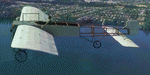
This folder contains a repaint for the Bleriot XI by Wings42 in the colors of Bleriot XI-2 Britannia. The third Bleriot XI imported into New Zealand, it was a two seater presented by the Imperial Air Fleet committee to the New Zealand government. The committee's aim was to promote the development of aviation in the British empire, and the presentation was intended to stimulate military aviation in New Zealand. The aircraft was a proven one, having been flown 347km non-stop from Dover to Cologne by Gustav Hamel in 4 hours 18 minutes on April 17, 1913. The aircraft was dubbed "Britannia' at a ceremony at Hendon on May 22, and Hamel then took former New Zealand Prime Minister Sir Joseph Ward for a short flight. The committee was composed primarily of London businessmen and Sir Joseph was the deputy-Chairman. The aircraft was paid for by public subscription and was valued for insurance purposes at 1400 pounds. The aircraft was disassembled and shipped to New Zealand aboard the Athenic. The aircraft arrived in Wellington on September 29, 1913, where it was discovered that the propeller was not in the shipment. This was soon shipped to New Zealand. In the meantime the aircraft was stored in a purpose built shed at the Buckle street Defence stores. In late 1913 Joseph 'Joe' Hammond had been appointed official Government pilot.
Mr Hammond suggested flying the aircraft to Auckland for display at an Exhibition. However the aircraft was railed north and was assembled in Auckland on January 14, 1914. On January 17, 1914 Mr Hammond made his first flight in the aircraft from the Epsom showgrounds. The following day he completed an hour long flight over Auckland at low level. A flight on the 19th with a journalist as passenger was aborted during takeoff when Hammond found he had no rudder control. Repairs were made and the aircraft flown again on January 24th. Another flight with a passenger then took place. Rather than a member of the media or any of the officials present Hammond chose to take Miss Esme McLalland as passenger. Miss McLalland was a member of the touring Royal Pantomime Company which was performing in Auckland, and the choice failed to impress the officials - Joe Hammonds employment as official pilot was terminated. The aircraft remained on static display for the remainder of the Exhibition and was returned to Wellington at the end of April 1914. Without a pilot (there were several Army Officers training in England - 2nd Lt. A. Piper and 2nd Lt. W. Burn) any official role for the aircraft (and officials did not seem to know what to do with it), it was placed in storage at the Mt Cook barracks in Wellington. Soon after, a report by General Hamilton, the Imperial Inspector of Overseas Forces discouraged further aviation development. With the outbreak of war an offer was made to send the aircraft with the New Zealand Expeditionary Force. It was shipped back to England, departing on the Arawa on October 16. It was unloaded in London on January 15, 1915 and and went from there to Brooklands where it is believed to have been used as a trainer. Repaint by Jan Kees Blom
| Filename: | Bleriot_XI_Britannia.zip |
| License: | Freeware |
| Added: | 8th May 2021, 17:39:55 |
| Downloads: | 17 |
| Author: | Jan Kees Blom |
| Size: | 38.51 MB |
| Category: Orbiter - Orbital Stations | |
| New Skylab 2, 3 And 4 Mission |
|
File Description:
Skylab 2
25 May 1973 13:00 GMT. Duration: 28.03 days. Call Sign: Skylab. Backup
Crew: McCandless, Musgrave, Schweickart. Nation: USA. Agency: NASA.
Launch Site: Cape Canaveral . Launch Complex: LC39B. Launch Vehicle:
Saturn IB . LV Configuration: Saturn IB s/n SA-206. Program: Skylab.
Class: Manned. Type: Lunar spacecraft. Spacecraft: Apollo CSM. Payload
: Apollo CSM 116. Mass: 19,979 kg. Location of Spacecraft: Naval
Aviation Museum, Pensacola, FL. Perigee: 427 km. Apogee: 439 km.
Inclination: 50.0 deg. Period: 93.2 min.
Epic repair mission which brought Skylab into working order. Included
such great moments as Conrad being flung through space by the whiplash
after heaving on the solar wing just as the debris constraining it
gave way; deployment of a lightweight solar shield, developed in
Houston in one week, which brought the temperatures down to tolerable
levels. With this flight US again took manned spaceflight duration
record.
When the meteoroid shield ripped loose, it disturbed the mounting of
workshop solar array "wing" two and caused it to partially deploy.
The exhaust plume of the second stage retro-rockets impacted the
partially deployed solar array and literally blew it into space.
Also, a strap of debris from the meteoroid shield overlapped solar
array "wing" number one such that when the programmed deployment
signal occurred, wing number one was held in a slightly opened
position where it was able to generate virtually no power.
In the meantime, the space station had achieved a near-circular orbit
at the desired altitude of 435 kilometers (270 miles). All other
major functions including payload shroud jettison, deployment of the
Apollo Telescope Mount (Skylab's solar observatory) and its solar
arrays, and pressurization of the space station occurred as planned.
Scientists, engineers, astronauts, and management personnel at the
NASA Marshall Space Flight Center and elsewhere worked throughout
the first ten-day period of Skylab's flight to devise the means for
its rescue. Simultaneously, Skylab--seriously overheating--was
maneuvered through varying nose-up attitudes that would best maintain
an acceptable "holding" condition. Because of the loss of the
meteoroid shield, however, this positioning caused workshop
temperatures to rise to 52 degrees Celsius (126 degrees F). During
that ten-day period and for some time thereafter, the space station
operated on less than half of its designed electrical system, in the
partially nose-up attitudes, was generating power at reduced
efficiency. The optimum condition that maintained the most favorable
balance between Skylab temperatures and its power generation
capability occurred at approximately 50 degrees nose-up.
The crew rendezvoused with Skylab on the fifth orbit. After making
substantial repairs, including deployment of a parasol sunshade which
cooled the inside temperatures to 23.8 degrees C (75 degrees F), by
June 4 the workshop was in full operation. In orbit the crew conducted
solar astronomy and Earth resources experiments, medical studies, and
five student experiments; 404 orbits and 392 experiment hours were
completed; three EVAs totalled six hours, 20 minutes.
Skylab 3
28 July 1973 11:10 GMT. Duration: 59.46 days. Call Sign: Skylab.
Backup Crew: Brand, Lenoir, Lind. Nation: USA. Agency: NASA. Launch
Site: Cape Canaveral . Launch Complex: LC39B. Launch Vehicle: Saturn
IB . LV Configuration: Saturn IB s/n SA-207. Program: Skylab. Class:
Manned. Type: Lunar spacecraft. Spacecraft: Apollo CSM. Payload:
Apollo CSM 117. Mass: 20,121 kg. Location of Spacecraft: NASA Lewis
Research Center, Cleveland, OH. Perigee: 422 km. Apogee: 442 km.
Inclination: 50.0 deg. Period: 93.2 min.
Continued maintenance of the Skylab space station and extensive
scientific and medical experiments. Installed twinpole solar shield
on EVA; performed major inflight maintenance; doubled record for
length of time in space. Completed 858 Earth orbits and 1,081 hours
of solar and Earth experiments; three EVAs totalled 13 hours, 43
minutes.
Skylab4
16 November 1973 14:01 GMT. Duration: 84.05 days. Call Sign: Skylab.
Backup Crew: Brand, Lenoir, Lind. Nation: USA. Agency: NASA. Launch
Site: Cape Canaveral . Launch Complex: LC39B. Launch Vehicle: Saturn
IB . LV Configuration: Saturn IB s/n SA-208. Program: Skylab. Class:
Manned. Type: Lunar spacecraft. Spacecraft: Apollo CSM. Payload:
Apollo CSM 118. Mass: 20,847 kg. Location of Spacecraft: National Air
and Space Museum (Smithsonian Institution), Washington, DC. Perigee:
422 km. Apogee: 437 km. Inclination: 50.0 deg. Period: 93.1 min.
Included observation and photography of Comet Kohoutek among numerous
experiments. Completed 1,214 Earth orbits and four EVAs totalling 22
hours, 13 minutes. Increased manned space flight time record by 50%.
Rebellion by crew against NASA Ground Control overtasking led to none
of the crew ever flying again.
| Filename: | New_Skylab_2_3_And_4_Mission.zip |
| License: | Freeware |
| Added: | 11th January 2003, 16:39:14 |
| Downloads: | 1,934 |
| Author: | Ronald Dandurand |
| Size: | 6.06 KB |
| Category: Prepar3D V1-4 - Utilities | |
| Flightplan Visualizer 1.15 |
|
Images related to this file:
File Description:
Flightplan Visualizer (FV) version 1.15.0. Copyright 2018-2020 by Pelle F. S. Liljendal ([email protected]), all rights reserved.
FV comes with 738 pre-imported Commercial AI flightplans (+380 BizJet flightplans are available as a separate download). However you are able to import additional (AI) flightplans yourself. Once imported these (AI) flightplans can be visualized on a map-view, and the user will be able to search accross all these. Hence you can use the program as inspiration as to which routes to fly. E.g. you can search across all imported flightplans to find all flights in an A321 flying into/out from LDDU, or simply to look for all flights in a Boeing 747-8F.
Simply run the included installer to install the software. The program will be installed into "C:\Program Files (x86)\Flightplan Visualizer" and all datafiles will be installed into: "C:\Users\[UserName]\AppData\Roaming\FlightplanVisualizer". The program comes with a full manual explaining everything, and a 3 page quick manual to get you started. The first 3 times you run the program the quick manual will automatically open. The forum is hosted here: https://forum.aerosoft.com/index.php?/forum/919-flightplan-visualizer/
Version 1.15 Contains the following changes:
- As a first, you can now import flightplans even if one or more aircraft-types cannot be automatically detected during import. These will instead be assigned to a dummy-type during import, however you need to manually assign substitute aircraft-type(s) before being able to save the imported flightplan. If/when the program gets support for the aircraft-type(s) that were missing during import, the substitute aircraft-types can either be re-detected manually or by using the "Re-process aircraft/airport-redirects" menu-item.
- Added a combo-box that can be used to filter the flightplans that are shown in the flightplan combo-box on the main-form (e.g. enter "west" to see only flightplans containing "west" in the name). Hovering the mouse over this new filter combo-box will show examples of the more complex filters (e.g. filter by provider, author, season, year, and so on).
- In version 1.14 user-airlines were added, and these could be accessed via a menu-item on the main-form. However in version 1.15 you can now also add user-airlines from the import-flightplan form, so you don't have to abort a pending import, and go to the main form in case you find you are missing a user-airline.
- Added MRU-lists (Most Recent Used) to the browser-forms used to search for: Airport, Aircraft and Airline. The text-edit in the top of these forms have been replaced by a combo-box holding up to 20 items (in chronological order, with the most recent at the top).
- Added a new chart to the Airport Info form showing: "Daily flights per international/domestic/same state".
- Added Utilization-pct to the fleet report (both total for the entire fleet, and per aircraft). The Utilization-pct is also visible for the displayed schedule (for a single aircraft) in the Leg-Info form. This value tells the pct of time the aircraft spends servicing the schedule (the remaining time the aircraft "sits at the gate", including the time spend loading/unloading passenger and cargo, loading fuel, being serviced by ground-crew and what not).
- On the main-form, renamed menu-item "Re-process airport-redirects" into "Re-process flightplans".
- Distance from selected airport to mouse-position on main-map moved from the bottom of the form to the upper/right-corner of the form (where info of selected airport is listed).
- Using the (right-click) context-menu on the main-form airports can now be toggled (on/off) as being favorites.
- A few minor changes were made to the default leg search criteria. If you have saved your own default, you should go to the leg search form, press-and-hold SHIFT while clicking the "Reset" button (to reset to "factory default"), then set the criteria to your perferences, and finally press the "Save Reset" button to re-save your preferences.
- Added MRU-list (Most Recent Used) to fuel-density combo-box on Unit Conversion form. If empty, the list will be preloaded with the values 0.7850 (old default), 0.8040 (often used as a standard for Jet-A), 0.8200 (often used as a standard for Jet-A1). The user is still able to enter another value.
- The values used in the unit-conversion form are saved with the settings file, so each time you open the form will contain the values entered last time you used the form.
- Tweaked the method for calculated flight-time. In previous version the same parameters were used for calculating flight-time for all flights. Now these parameters are dependant on distance, resulting in calculated flight times that are closer to those used in the flight-plans (based on statistic-data from +700.000 AI flights).
- Some of the aircraft have been marked as "Retro", and in settings you can choose to exclude the "Retro" (they are enabled by default).
- Improved (Boeing) aircraft-type detection when importing flightplans using non-standard naming, such as "B744F" in stead of "747-400F" or "B736" in stead of "737-600".
- Updated all libraries in use to the latest versions, and addressed some minor issues with the map.
- Fixed: Newer versions of MyRwy are outputting airport elevation as a floating point value (e.g. "629.92") whereas older versions were outputting it as an integer value (e.g. "630"). In previous versions of FV the floating point value "629.92" was wrongly read as an elevation of 62992 ft. The program can now both handle floating point and integer values, hence can be used with both old- and new versions of MkRwy.
- Fixed: When adding new user-airlines in version 1.14, callsign was being set to the name of the airline, in stead of the entered callsign. If you added any user-airlines in version 1.14, you should edit these with version 1.15, and set the callsigns again.
- Fixed: If a Leg search was active (combo-box in bottom of main-form showing "[Last Search]") and all flightplans were disabled in "Enable/Disable -flightplans" the program would shut-down with an exception.
- Fixed: The list of the airline-codes (gate-tab on Airline-Info form) started with a comma, however comma should only be used to separate the items when multiple airline-codes were associated with the same gate (3rd party scenery only).
- Fixed: In some cases the cruise-speed was not shown correctly in the Aircraft search form.
- Fixed: Some of the menu-items for launching the (YouTube) tutorial-videos were missing the tool-tip text ("Hold SHIFT to copy url to clipboard").
- Fixed: About-box can now be closed with ESC, like most other forms.
- Fixed: potential issue reading xml-data, perhaps with a the benefit of a slightly better performance.
- Data: Added support for flightplans using "retro" aircraft types such as: Aerospatiale SE-210 Caravelle, British Aerosapce ATP/BAC One Eleven, Concorde, DC-3, DC-4, DC-6, DC-8, De Havilland Comet, Fokker F28, Hawker Siddeley HS 121 Trident, Ilyushin Il-18/20/22/24/86, Lockheed Constellation/L-188 Electra, Shorts SC-5, Tupolev TU-134, Vickers VC10/Viscount, and thanks to user Aucery Lockheed 1011.
- Data: Support for additional aircraft-types added as well: BN-2A Trislander, CASA C-212/C-235, CubCrafters XCub, DHC-2 Beaver/Turbo-Beaver, DHC-3 Otter, DHC-5 Buffalo, Diamond DA-42/62, Extra EA-300, Honda HA-420, ICON A5, NAMC YS-11, Mooney, Mudry CAP 10, Pilatus PC-6/PC-24, Piper Cub/Super Cub, Robin DR-300/400, Shorts SC-7, Tecnam P2012/P2006T
- Data: Some of the aircraft-types, for which multiple ICAO/IATA-codes exists, were split into two (one for Pax and one for Freight), e.g. Convair 580, DC-9-10/30/40, and Il-96. As a result you should execute "Re-process flightplans" (found in the "Flightplan" menu), and "Re-detect all" aircraft.
- Data: A few missing aircraft IATA/ICAO codes were added, and some "behind the screen" data for multiple aircraft were updated as well.
- Data: A few Airlines were added/updated (a big THANK YOU to Bruce Nicholson for the assistance keeping these data up-to-date).
- Flightplans: The good people over at AIG (Alpha India Group) have once again been VERY busy since the last release, hence the installer comes with 298 new/updated pre-imported flightplans, bringing the total of flightplans bundled with the installer to 738.
- Flightplans: A few flightplans were bundled with the program in duplicates (2 slightly different names, or 2 different seasons). These duplicates have been marked as obsolete, and have been removed from the installer. Using the "Select all obsolete flightplans" menu-item in "Enable/disable-flightplans" you can mark these flightplans and move them to the "Disabled" folder, from where they can be deleted.
Pelle
| Filename: | Flightplan_Visualizer_115.zip |
| License: | Freeware, limited distribution |
| Added: | 20th March 2020, 17:08:52 |
| Downloads: | 377 |
| Author: | Pelle Liljendal |
| Size: | 28.9 MB |


© 2001-2026 AVSIM Online
All Rights Reserved
Privacy Policy |