
Where Flight Simulation Enthusiasts Gather from Around the World!
AVSIM Library - Search Results

| Category: Flight Simulator X - Aircraft Repaints, Textures and Modifications | |
| North American Mustang III FZ152 S-S |

|
Images related to this file:
File Description:
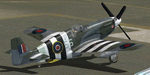
This folder contains a repaint for the P-51B/C model for FSX by Warbirdsim. North American Mustang Mk.III, FZ-152 SS, the aircraft of Wing Commander Stanislaw Skalski when he was the C/O of 133 (Polish) Fighter Wing in June 1944. He was the first allied ace of the war, having shot down six german aircraft by 16 september 1939. After the Polish defeat, he fled Poland and joined the RAF, fighting in the battle of Britain. In 1942, he was given command of the Polish Fighting Team (PFT), or so called "Cyrk Skalskiego" (Skalski's Circus) - a Special Flight consisting of fifteen experienced Polish fighter pilot volunteers. They fought in the North African campaign until may 1943. Skalski then became commander of 601 (County of London) Squadron the first Pole to command an RAF Squadron. He then took part in the invasion of Sicily and invasion of Italy. From December 1943 to April 1944 he flew with 131 Polish Fighter Wing. On 4 April 1944 he was appointed commander of No. 133 Polish Fighter Wing flying the Mustang Mk III. Stanislaw Skalski was the most successful Polish ace of WW II, with a record of 22 confirmed victories, 1 probable, and 1 damaged enemy aircraft. Three times he was awarded the British DFC, and he received many other medals. After the war he returned to Poland in 1947 and joined the Air Force of the Polish Army. In 1948 however he was arrested by the communist regime under the false charge of espionage. Sentenced to death, he spent three years awaiting the execution, after which his sentence was changed to life imprisonment in Wronki Prison. After the end of Stalinism in Poland, in 1956 he was released, rehabilitated, and allowed to join the military. He served at various posts in the Headquarters of the Polish Air Forces. Stanislaw Skalski died in Warsaw on 12 November 2004. Repaint by Jan Kees Blom, based on the warbirdsim paintkit.
| Filename: | North_American_Mustang_III_FZ152_SS.zip |
| License: | Freeware |
| Added: | 6th February 2011, 15:10:01 |
| Downloads: | 324 |
| Author: | Jan Kees Blom |
| Size: | 8.01 MB |
| Category: Flight Simulator 2002 - Scenery | |
| Caticlan-Boracay Version 2003 |
|
File Description:
Caticlan Airport is located in Malay, Aklan, northwest of the island of Panay, Philippines.
Boracay Island ,meanwhile, is the internationally known tourist spot destination for travellers and vacationers worldwide for its COOL WHITE SANDY BEACHES. Caticlan Airport is the gateway to BORACAY ISLAND due to its close proximity to the island resorts. Today,Asian Spirit serves the MANILA-CATICLAN route with a total of 9 flights daily,and the CEBU-CATICLAN route with a total of 2 flights daily. Southeast Asian Airlines (SEAIR) also serves Caticlan with 10 flights daily from Manila and 1 flight daily from Cebu. Other smaller airline companies also serve the Manila-Caticlan route such as Pacific Air.
This CATICLAN-BORACAY SCENERY features the most real replicas of structures in Caticlan airport.It features the Godofredo P. Ramos Airport Terminal building, Air Transportation Office and Pacific Air Terminal Building, Crash and Fire Rescue Station, Old Caticlan Control Tower, Pactrans Building, Asian Spirit Departure Lounge, Alice in Wonderland, the new Caticlan Control Tower Complex, Duty Free Philippines-Caticlan and the Caticlan Pier area.
Boracay Island also features different aqua sports activities in most realistic forms such as Jetskiing, Windsurfing, Banana Boating, Parasailing, Catamaran Sailing, Birds Watching, Girls Watching, and a static volleyball tournament along the White Beach area. Also featured in Boracay Island are the following resorts: FRIDAY'S BEACH RESORT, CLUB PANOLY BEACH RESORT, WILLY'S ROCK BEACH RESORT and LORENZO SOUTH BEACH RESORT. Shipping Companies are also featured in the nearby vicinity of the Boracay Oceans such as WG&A SUPERFERRY2, CEBU FERRIES and SULPICIO LINES' PRINCESS OF THE UNIVERSE.
Caticlan-Boracay Scenery Version 2003 is developed for FS2002 by Ver Walter L. Gulfan and the Philippine Flightsimmers Group, with the aim of helping promote the Boracay Island and Philippine Tourism. (A Caticlan-Boracay Scenery version for FS2004 will be released soon).
Inclusions in this release: 1. RPVE afcad file 2. RPVE scenery.cfg file 3. RPVE TTools airports.cfg file 4. RPVE and Caticlan VCPMOD file for Editvoicepack.
| Filename: | CaticlanBoracay_Version_2003.zip |
| License: | Freeware |
| Added: | 20th August 2003, 17:43:24 |
| Downloads: | 2,864 |
| Author: | Ver Walter L. Gulfan/ Philippine FlightSimmers Group |
| Size: | 10.17 MB |
| Category: Flight Simulator X - Original Aircraft | |
| Grumman "Turbo" Goose for FSX |
|
Images related to this file:
File Description:
FSX version that modifies default or OzX Redux Grumman G21A Goose into a G21G turbine-powered Goose. It is a "revised" model built with GMax and FSDS based on the default FSX Grumman Goose model file and adds a completely new aircraft to your simobjects folder. That said, you must have either the default flyable FSX Grumman G21 Goose (FSX Deluxe or higher) or the OzX Grumman Goose G21a Redux HP model installed for this modification to work. I do not know if it will work in the FSX-SE version, but I believe it will. Nor do I know if it will work in any version of P3D. All I can suggest is try. This download “accesses†your existing Goose texture folders to turn that Goose into a Turbine Goose. It does not modify your existing Piston Goose install, so you will have the Piston Goose as flyable options. It only uses the default files to generate the visual display of the texture in the Turbo Goose. I did this to avoid any perceived or potential copyright violations. They will not work on any other version of the Grumman G21A Goose and will not make the AI Goose that comes with FSX Standard a flyable aircraft. The Turbine Goose has 2 680hp P&W PT6A-27 turboprop engines to replace the Wasp R-985 radials and seats 9 passengers and the pilot. The payload and aircraft weight is almost double that of the piston-powered Goose and has an 800 to 1,000 nm range, burning JetA instead of 100LL. The constant speed 3-blade propellers have reverse pitch and give the Turbo Goose a 2,000 fpm climb and 200+ knot cruise airspeed. This is my first attempt at aircraft modeling with GMax, so it is not a "payware" quality model, but I have flown it over 2,000 miles in FSX and enjoyed every minute of it. Uses a modified FDE and airfile by permission from Pam Brooker, default FSX Kingair 350 turbine gauges, and either the default FSX Kingair 350 sound file or the incredibly great sounding TPE331 sound file by Alex Jorda.
| Filename: | Grumman_Turbo_Goose_for_FSX.zip |
| License: | Freeware |
| Added: | 28th October 2018, 02:04:47 |
| Downloads: | 1,402 |
| Author: | Randy Tyndall |
| Size: | 95.03 MB |
| Category: Prepar3D V1-4 - Aircraft Repaints, Textures and Modifications | |
| Douglas C-54 (VH-PAF) Pacific Air Freighters |
|
Images related to this file:
File Description:
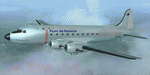
This folder contains a repaint for the Douglas C-54 / DC-4 by Flight Replicas. It shows Douglas DC-4 VH-PAF in the colors of Pacific Air Freighters.
VH-Paf was originally delivered new to the USAAF as 44-9126 on May 14, 1945. It transferred to the USAF in 1947 and was Withdrawn from service and stored at Davis Montahan, Arizona - December 1971. She was sold to Dross Metals in 1975 and entered onto the United States Aircraft Register as N9013V.She then flew for several companies in the US until she was seized by Bahamas authorities for alleged smuggling activities in April 1981. She was sold again, among others flying for Lynch Air Tankers Inc, Billings, Montana between 1984 and 1995 as 'City of Billings'.
She then went to Australia with Pacific Air Freighters Pty Ltd, arriving in Cairns on completion of the ferry flight to Australia in June 1995.
The ferry route was Chino - Hilo - Majuro - Honiara - Cairns, the first leg of this ferry flight took 14 hours. On arrival at Majuro some problems associated with Number 2 engine were worked on before departing for Honiara. During this leg Number 2 engine began to play up so it was shut down in flight. As the problem could not be rectified it was decided to carry on to Cairns as planned on three engines. She was ferried Cairns - Brisbane (Archerfield) on three engines in june 1995 and entered onto the Australian Aircraft Register as VH-PAF on January 31, 1996
She commenced long term contract with Goroka Air Service, Papua New Guinea - October 14, 1996. Returned to Brisbane after 3 months and placed in open storage and sold at auction to Airfreighters International P/L - May 22, 1997. Services were flown under the name of Pacific Air Freighters. Chartered by Ansett Australia Cargo for service Brisbane - Darwin - September 15, 2000. She was then sold to Historical Aviation Restoration Society Inc and ferried to Brisbane - Albion Park Regional Airport, where she was reregistered as VH-EAY - June 23, 2008. At present, she is undergoing complete overhaul for return to airworthy condition.
A repaint by Jan Kees Blom, based on the paintkit by Flight Replicas.
| Filename: | Douglas_C54_VHPAF_Pacific_Air_Freighters.zip |
| License: | Freeware |
| Added: | 28th November 2019, 23:21:36 |
| Downloads: | 103 |
| Author: | Jan Kees Blom |
| Size: | 58.97 MB |
| Category: Flight Simulator X - AFCAD Files | |
| Essex County Airport (KCDW), NJ |
|
File Description:
Located 02 miles N of Caldwell, New Jersey on 275 acres of land, Essex County Airport is a public airport with two asphalt runways, the longest of which is 4552'. Major changes include Runway 9/27 updated to the current 10/28; Runway 4/22 markings are custom made to match the real world, with threshold stripes on Runway 22 only; the beacon has been relocated to its real world location atop the control tower. Additionally, 221 parking locations have been accurately placed around the airport, broken up into 6 sections. See the included airport diagram that labels the various parking areas. 89 of these parking spaces are labeled RAMP_GA and these spaces are occupied by static aircraft. Collision with all static aircraft is disabled but still, if you do not want to start occupying the same space as another airplane, do not choose parking spots labeled RAMP_GA. Instead, all user aircraft should choose either RAMP_GA_SMALL (for wingspans up to 40') or RAMP_GA_MEDIUM (for wingspans up to 60' and only available in East Parking). Also, only 86 of these parking spaces are available for AI aircraft to spawn in. There are hangars available to transient aircraft: the two in South and Southeast parking are able to accommodate small craft with wingspans up to 40'; the one in Northeast parking is able to accommodate larger aircraft with wingspans up to 54'. Helicopters can start either on Taxiway P (South helipad), Taxiway N (North helipad) or in front of the main terminal (East helipad). Fuel is available in both the East and South parking areas by stopping anywhere on the concrete next to the fuel tank/pump. Take note that the runway patterns are both Left and Right and the pattern altitude varies for aircraft type. There are known issues with the AI for this airport, see the ReadMe for more details.
Scenery constructed with use of satellite images/streetview/aerial photos - the author has not been there in person.
This scenery is meant to be used in conjunction with MegaScenery Earth New York 005. It is not required, but apron use is minimized to allow satellite scenery to show through as much as possible, and objects are placed based on the MSE textures - lack of it may make scenery look out of place.
| Filename: | Essex_County_Airport_KCDW_NJ.zip |
| License: | Freeware |
| Added: | 14th April 2011, 01:50:13 |
| Downloads: | 416 |
| Author: | Drew Sikora |
| Size: | 2.4 MB |
| Category: Prepar3D V1-4 - AI Flight Plans | |
| California Pacific 2019 AI Flightplans |
|
File Description:
California Pacific was the pet-project of eccentric millionaire Ted Vallas who was determined to overcome a near-decade of obstacles to bring scheduled jet service to the Northern San Deigo\Carlsbad area. The airline was founded in 2009, but ran into a laundry list of problems over the years. Initially, the airline had acquired an EMB-170 which was painted in the airlines own colors and kept at the airlines Carlsbad base(CLD\KCRQ). The initial plan called for 3-class service to destinations including SJC, OAK, PHX, SMF, and even SJD. However, a US government shut down ill-timed during the scheduled proving runs and certification process for the airline delayed the process indefinitely. After months of waiting, and paying for staff and the aircraft to the dismay of investors, the E170 was returned and used as a cooperate shuttle in Arizona in full California Pacific colors, though it never would return. The founder did not give up, however, and years later was able to circumvent the certification process by purchasing the operating certificate of ADI's Essential Air Service operation which connected Watertown and Pierre, South Dakota with Denver with a pair of EMB-145s. One of the EMB-145s was painted in full California Pacific colors and used to launch scheduled flights, this time initially to SJC, RNO and LAS with AZA instead of PHX later being added. However, the other EMB-145 was damaged after being struck by ground equipment in Pierre, SD and was grounded for the rest of the airline's life, causing all EAS flights to cancel soon after California Pacific had acquired the flying. The airline was stretched so thin when service started in November 2018 that the departure of a pilot in January 2019 shut the airline down, after just 2 months in operation. Flights were for months considered "suspended", with airport signage being retained at the destinations, but soon after the website was taken down and all hopes of re-starting the company seemed abandoned. These flights are based on an early 2019 schedule I found online, but the EAS flights were not listed. As the flights did not operate anyway for the most part as California Pacific, I elected not to include them. The schedule was changed several times in the airline's short history as it struggled to maintain an aggressive 30 minute ground-time between flights with just 1 aircraft. The repaint for the AIM ERJ-145 may be found here: https://fsai-repaints.com/?p=1095
| Filename: | California_Pacific_2019_AI_Flightplans.zip |
| License: | Freeware, limited distribution |
| Added: | 9th December 2019, 18:02:01 |
| Downloads: | 62 |
| Author: | Chasen Richardson\Bayviation |
| Size: | 14.58 KB |
| Category: Combat Flight Simulator 1 and 2 - Aircraft | |
| Gloster Meteor F8 RAAF A77-120 77th Squadron |
|
File Description:
Gloster Meteor F8 A77-120 of the RAAF 77th Squadron deployed at Kimpo Air Base(K-14)in the Korean War.
77th Squadron started the war with a dotation of F-51D Mustangs based at Taegu(K-2)and was requipped
with the Meteor F8 in April 1951. First operational mission was flew the 30th July, 1951.
22th August was a bad day for the Squadron:A77-128 and A77-354 were lost in colission, both pilots
were reported KIA.
The fighters were tasked to flight CAP missions over MiG Alley and the 29th August was reported the
first lost in combat mission:A77-721(Warrant Officer Guthrie ,POW) was shot down by the KPAFAC MiG-15 flew by
Lev K. Shchukin(18 GIAP, 303 IAD), in the same mission A77-616(Squadron Leader Wilson) was heavy damaged by
N. V. Babonin also of the 18 GIAP, 303 IAD.The first MiG kill was obtained the 8th May 1952, one MiG-15 of the
PLAAF shot down by William H.Simmonds and the second and last the 23th March 1953 by George S.Hale ,another
MiG-15 of the PLAAF. This two are the only confirmed victories of the Meteors in the Korean War; no MiGs
were shot down in the sad day 1th December 1951; this day were lost A77-29(Sergent B.Thompson POW)shot down by
Serafim P. Subbotin(176 GIAP, 324 IAD),A77-251(Sergent V.Drummond POW) shot down by Sergei M. Kramarenko(176 GIAP, 324 IAD)
and A-77-949(Sergent E.Armitt KIA)by Sergei F. Vishnyakov(176 GIAP, 324 IAD); also heavy damaged A77-559
(Sergent Bill Middlemiss)by Pavel S. Milaushkin(176 GIAP, 324 IAD).V-VS not confirmed the kills of Flying Officer
B.Gogerly in the A77-17 or the shared between Scannel/THorton and Cadan.Actually not MiGs were lost this day by
the Russians or Chineses Air Forces(KPAFAC,V-VS and PLAAF).The first MiG-15 lost in December 1951 was shot down the
next day by Zane S. Amell(335 FIS, 4 FIW) with his USAF F-86A-5.
After this fiasco Meteors were assigned to ground attack, and A77-120 was lost in one of this missions shot down by
AAA in March, 1952. Pilot Sergent L. Cowper was captured and POW.
32 Meteors and pilots were lost in the Korean War( six were confirmed shot down by MiGs and others 5 possible writen off)
V-VS also confirmed another combat mission the 25th August 1951 and the shot down of two others Meteors flew by
Ronald Mitchell and Reg L. R. Lamb, destroyed by the MiGs of Nikolai V. Sutyagin and Grigorii I. Pulov(boths 17 IAP, 303 IAD),
but that was not confirmed by the RAAF to this day.
And for the results:4836 missions flew, 3700 building destroyed, 1500 Vehicles and two MiG-15.
| Filename: | Gloster_Meteor_F8_RAAF_A77120_77th_Squadron.zip |
| License: | Freeware |
| Added: | 15th February 2004, 23:45:52 |
| Downloads: | 515 |
| Author: | Daniel Nole |
| Size: | 157.66 KB |
| Category: Prepar3D V1-4 - Utilities | |
| Flightplan Visualizer 1.16 |
|
Images related to this file:
File Description:
Flightplan Visualizer (FV) version 1.16.0. Copyright 2018-2020 by Pelle F. S. Liljendal ([email protected]), all rights reserved.
FV comes with 765 pre-imported Commercial AI flightplans (+380 BizJet flightplans are available as a separate download). However you are able to import additional (AI) flightplans yourself. Once imported these (AI) flightplans can be visualized on a map-view, and the user will be able to search accross all these. Hence you can use the program as inspiration as to which routes to fly. E.g. you can search across all imported flightplans to find all flights in an A321 flying into/out from LDDU, or simply to look for all flights in a Boeing 747-8F.
Simply run the included installer to install the software. The program will be installed into "C:\Program Files (x86)\Flightplan Visualizer" and all datafiles will be installed into: "C:\Users\[UserName]\AppData\Roaming\FlightplanVisualizer". The program comes with a full manual explaining everything, and a 3 page quick manual to get you started. The first 3 times you run the program the quick manual will automatically open. The forum is hosted here: https://forum.aerosoft.com/index.php?/forum/919-flightplan-visualizer/
Version 1.16 Contains the following changes:
- First of all a big THANK YOU to AIG (Alpha India Group) for allowing me to add features to both download their flight-plans (actually a feature suggested by Kai Kamjunke who is one of the developers of AIG AIM and other AIG tools) and access their list of defunct/renamed flightplans. While giving thanks, I also want to thank all (AI) aircraft-model creators, repainters and those who create all the flightplans ... our virtual sky would not be the same without your hard and dedicated work.
- Added new form to download or install AIG flightplans (downloaded directly from the AIG-servers). The form will identify all flightplans that are newer than those already installed or flightplans that are not currently installed. You can simply double-click a flightplan and it will be directly installed without the need to first download the file, and then choose to import this file.
- Both the new flightplan download- and the enable/disable flightplan- form contains a button which download- and show a list of defunct/renamed flightplans (obtained directly from the AIG forum).
- If you create a user-Airline while importing a flight-plan, when you return to the import-form you will be asked if you want to use that newly created flightplan (saves you from having to open the airline-browser and search-for/select that user-airline).
- Added Flightplan-, Airline- and Aircraft-filter to the top of the leg-search form to filter the items shown in the listviews.
- The "Select All" and "Select None" buttons now only (de)select visible items (if a filter is active there might be more items not displayed). However holding SHIFT while pressing these buttons, ALL items will be (de)selected no matter if they are shown or not.
- Replaced the two airport entry fields (in the leg-search form) with filter combo-boxes (MRU) so you can now enter a filter-text to filter which airports to include (the default filter is usign ICAO-codes so the old functionallity is preserved).
- Added filters to search for legs with specific flight-numbers and/or served by aircraft with specific registrations.
- When setting up a filter, sub-elements of the same type can now be separated by "/" so you only have to enter the type-name once (e.g. "country=dnk/nor/swe"). The pipe-char ("|") can be uses in stead if you prefer (e.g. "country=dnk|nor|swe").
- Now both "?" and "%" can be used as a single char wildcard in the filters ("?" is a DOS wildcard, whereas "%" is a SQL-wildcard).
- Added "#" as a wildcard for a single numeric value (0-9) in filters.
- Added "@" as a wildcard for a single alpha value (A-Z) in filters.
- Improved detection of invalid filter-text, which changes the text-color into red, to indicatet that the filter is invalid.
- The ISO3 country-code is now visible in the country combo-boxes in the leg-search form (these codes can be used in the airline- and airport- filters).
- Likewise 3-char Region- and Sub-region -codes have been added to their respective combo-boxes (these codes can also be used in the airline- and airport- filters).
- Saving the leg-search criteria will no longer require the input to be validated. E.g. you can now save the criteria where no aircraft have been selected. If you want to make sure that the criteria is valid for a search, please perform a search before you save the criteria.
- Flightplan-filter added to the "Re-process flightplans" form.
- Aircraft-filter added to the "Choose favorite aircraft-types" form. Also a few extra columns were added to the aicraft list-view.
- The Decode-METAR/TAF form now allows the user to manually enter METAR/TAF messages, and the form can now be opened directly from the main-menu (in case you optain METAR/TAF from other sources and need to decode it).
- Added a new button to the Randomizer form which lets you pick a random route (there is already a button to pick a random flight). The difference is the statistical chance of the chosen route.
- Added 2 columns to the runways listview in the Airport-info form showing head/cross-wind based on selected wind-direction/speed (automatically updated from the obtained METAR report).
- When accepting the result of a leg-search the previous used criteria (if different) are now archived. So you are able to load the 5 last used search criteria.
- The Result-viewer form now have a "Top-most" check-box. When checked that form will be shown on top of all other windows. This allows you to have this form shown on top of other forms (e.g. if you need to enter data from a metar-message into the FMC in the simulator).
- Many of the result-viewer forms now opens non-modal, meaning it can be displayed next to the window form where it was opened and you can switch between the two (you might need to use the new "Top-most" check-box for the best result). When closing the form from where the result-viewer was opened, the result-viewer will be closed as well.
- Likewise the Unit Conversion form also got the "Top-most" check-box in case you want to display this window on top of another program (e.g. if you have paper-work with weight based on kg and you need to enter the weights into a FMC/MCDU that only accepts lbs (or vice versa).
- The "Copy to clipboard" buttons on the METAR/TAF-decode form, and the Leg-Info form have been replaced by a "Show Report" button in stead. This new button will in stead show the text in the Result-viewer form (if you need to, it can be clipped to the clipboard from there).
- Below the (left/right) list-views in the "Enable/disable flightplans" form you now find a label showing two numbers. The 1st number shows the number of items (flightplans) shown in the list-view, and the 2nd number (in the parentheses) shows the number of selected items.
- When importing a flightplan where the aircraft-type can not be detected, the "lines" assigned to the "DUMMY AIRCRAFT" are now all automatically selected. So it is easy to just hit the "Change Aircraft type" button in case there is just a single, or multiple that should have the same type assigned.
- Hoovering the mouse over the gate-markers in the Airport-info form, the tool-tip now contains the GPS-position of the gate. Likewise editing the gate the caption of the edit window contains the GPS-position.
- Added airport size to "FS Comment" column in the "Nearby Airports" form.
- Added line-breaks to the METAR/TAF tool-tips displayed in the Leg-info form (line-breaks also included in the report).
- Fixed: There was a nasty bug in the "Legs" tab-page of the Airport-Info form where the same time-zone was used for both departure- and destination-airport when showing the departure-/destination-times as local times, even if departure- and destination-airports were in different time-zones.
- Fixed: The value of the "Calculated flighttime" check-box in the leg-search form was not set to the loaded value.
- Fixed: If one of your user-airlines had a blank callsign, it would list all airlines with a blank callsign as alternatives. Now it will only try to match non-blank callsigns.
- Fixed: The METAR/TAF decoder was not able to correctly detect a fraction visibility if following variable wind (e.g. "210V290 3/8SM").
- Fixed: Some of the combo-boxes in the leg-search form were enabled for text-entry, where the user should only be able to pick a value.
- Fixed: If "[None]" was selected and you executed a leg-search the "Edit" button remained disabled when you returned to the main form.
- Data: While testing some of the new filters I saw a few erros in the aircraft data (e.g. a few freight aircraft had a non-zero passenger count and other minor issues like that), which were fixed.
- Data: Thanks to Bruce Nicholson for bringing it to my attention that DC-9-15F was not being detected in version 1.15. Now all the DC-9 sub-variants should be detected correctly (e.g. 9-11/12/13/14...51 both pax and freight). The same better sub-variant detection was added to the DC-8's and DC-10's as well.
- Data: Thanks to Aucery for bringing it to my attension that some of the (BizJet) aircraft were not being detected, or not being detected correctly. The King Air 250/300 should now be detected correctly as are Hawker-700/1000, Mitsubishi MU-300, IAI Astra Jet 1125, Cessna T210/T303, and Dornier 328JET/PROP.
- Flightplans: All new/updated flightplans have been added to the installer, and all obsolete have been removed. A total of 765 active flightplans are bundled with the installer.
Pelle
| Filename: | Flightplan_Visualizer_116.zip |
| License: | Freeware, limited distribution |
| Added: | 2nd May 2020, 23:15:38 |
| Downloads: | 318 |
| Author: | Pelle Liljendal |
| Size: | 29.27 MB |


© 2001-2026 AVSIM Online
All Rights Reserved
Privacy Policy |