
Where Flight Simulation Enthusiasts Gather from Around the World!
AVSIM Library - Search Results

| Category: Flight Simulator 2004 - Scenery | |
| CNZ3 - Chatham-Kent - Ontario, Canada V1 |

|
Images related to this file:
File Description:
This is partly part of the Small Ontario Fields series. The airport ICAO was changed from CNZ3 to CYCK in November 2012; I have left it as it was. The runway too remains as it was a few years ago. Chatham is located 50 miles east of Detroit and 150 miles southwest of Toronto, between Lake St. Clair and Lake Erie, and the airfield is southeast of the town. There is a single asphalt runway 5,000 feet long and 75 feet wide, aligned 05/23 in FS9 but in fact in real life now 06/24 due to the wandering magnetic north. The apron is on the northern side of the runway at the eastern end, with added taxiways to cater for newer hangars wearing identical colour schemes. There is fuel, runway lighting, some taxiway lights, visitor parking on the grass, and plane maintenance in the large hangar beside the small terminal building on the north side of the apron. There is a train station in the middle of the town, and no scheduled flights to the airport that is 8 miles away; these two facts may be connected. Ditches along the road and around much of the airfield provide separation, which is why the fences are not continuous. If you are on the runway and find your path to the apron blocked by another plane that is stationary at the hold short, continue past the first turnoff to the threshold markers and turn off the runway and wait. The AI plane will then taxi out and you will have a clear path.
| Filename: | CNZ3__ChathamKent__Ontario_Canada_V1.zip |
| License: | Freeware, limited distribution |
| Added: | 27th August 2015, 21:02:59 |
| Downloads: | 341 |
| Author: | Roger Wensley |
| Size: | 9.89 MB |
| Category: Flight Simulator 2004 - Aircraft Repaints, Textures and Modifications | |
| Zambia Airways DHC-2 Beaver c1966 |
|
Images related to this file:
File Description:
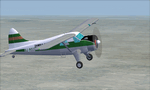
This is a repaint of a DHC-2 Beaver in Zambia Airways colors. The freeware DHC-2 Beaver (wheels) by John L. Woodward is needed for this repaint. It is an FS2004 plane, but I flew it in FSX-SE using the default Beaver panel. The plane can be downloaded here on Avsim, file name: beaver_wheels_2005.zip. Zambia Airways was formed as a subsidiary of Central African Airways (CAA) in April 1964. When CAA collapsed in 1967, Zambia Airways became a fully Zambian owned carrier. In 1968, the fleet consisted of DHC2 Beavers, DC-3s, and two newly delivered BAC-111s from the defunct CAA. They flew on regional routes to Kenya, Malawi, Tanzania, and Mauritius. Alitalia was also hired to provide support of the initiation of new international services. A Douglas DC-8-43 leased from Alitalia was used for the long-haul Lusaka to London flights, which were inaugurated in November 1968, via Nairobi and Rome. In 1970 Zambia Airways took delivery of 3 HS-748s, and in 1974 they received their first Boeing liner; the 707-343C. One year later the two BAC-111s were sold to Dan-Air. July 1976 saw the delivery of the carrier's first 737-200. Zambia Airways received their first wide-body DC-10-30 in July 1984. Zambia Airways did well financially over the years, but by the end of the 1980s and early 1990s, things were a bit more complicated. With financial difficulties facing Zambia Airways, it was forced into liquidation in December 1994. Zambia Airways operated a total of 4 DHC-2 Beavers on local services. This aircraft, 9J-RFZ, was with the airline from 1964 to 1967. This repaint should work on FSX & FS2004. Textures are 32bit BMP.
| Filename: | Zambia_Airways_DHC2_Beaver_c1966.zip |
| License: | Freeware |
| Added: | 22nd August 2019, 08:34:05 |
| Downloads: | 82 |
| Author: | Ted Giana |
| Size: | 2.48 MB |
| Category: Prepar3D V1-4 - Utilities | |
| Flightplan Visualizer 1.10 |
|
Images related to this file:
File Description:
Flightplan Visualizer (FV) version 1.10.0. Copyright 2018-2019 by Pelle F. S. Liljendal ([email protected]), all rights reserved.
FV comes with 300 Commercial-, and +380 BizJet AI pre-imported flightplans which the creators of those flightplans have gracefully allowed me to include with the installer, however you are able to import additional (AI) flightplans if you want to. Once imported these (AI) flightplans can be visualized on a map-view, and the user will be able to search accross all these. Hence you can use the program as inspiration as to which routes to fly. E.g. you can search across all imported flightplans to find all flights in an A321 flying into/out from LDDU, or simply to look for all flights in a Boeing 747-8F.
Simply run the included installer to install the software. The program will be installed into "C:\Program Files (x86)\Flightplan Visualizer" and all datafiles will be installed into: "C:\Users\[UserName]\AppData\Roaming\FlightplanVisualizer". The program comes with a full manual explaining everything, and a 3 page quick manual to get you started. The first 3 times you run the program the quick manual will automatically open. The forum is hosted here: https://forum.aerosoft.com/index.php?/forum/919-flightplan-visualizer/
Version 1.10 Contains the following changes: In the flightplan combo-box at the bottom of the main-form, "Active Search" have been renamed into "Last Search". Picking "Last Search" from the flightplan combo-box, will re-execute the last performed search, and populate the map accordingly. A new entry called "None", have been added flightplan combo-box (at the top of the list). Chosing this item will "deselect" the otherwise current search or selected flightplan, and clear the map of routes. A form have been added to assist enabling/disabling flightplans. Gate-letters/numbers are now by default written using a (5x7) Matrix-"font". If you want to revert to the segment-"font", used in previous versions, simply set the value of the "UseMatrixGateChars" tag in the settings-file to false. changed how the Gate-letters/numbers are written in the round gate-markers on the map. Previously all "chars" had the same width. Now the width is dependant on which sub-elements are in use by each "char" (e.g. a "1" is not as wide as an "8"), as a result the gate letter/number are more easy to read. Zulu- and local-time added to the "Selected airport" group-box in the upper/right corner of the main form. If no airport is selected, or no time-zone is registred for the selected airport, only zulu-time will be displayed. Selections of favorite aircraft can now be saved and loaded.⦠This selection of aircraft can be loaded as a selection of aircraft in the "Search leg" form. Video tutorials can now be accessed from the "Help" menu. These are simply "links" to the actual videos on YouTube, hence will launch the default browser. If you hold SHIFT the url will in stead be copied to the clipboard (e.g. in case you want to upen the link in another browser). In the same manner the "Help" menu now contains a link to the forum. The form with decoded METAR/TAF-messages now shows: name, city, and country/state for the selected station in the caption. This text will also be embedded when copying the content to the clipboard. Likewise UTC/Local-time is also embedded when copying the content to the clipboard as it can be used to show the "age" of the report and convert between UTC and Local -times (based on the difference of UTC- and local-time). The info presented when pressing the "Show Scenery Gates" button on the Airport Info form, can now be copied to the clipboard. Various minor "behind the scenes" changes and optimizations. Added support for additional aircraft: Airbus A220-100 (CS100), Airbus A220-300 (CS300), Boeing 777-8 and Boeing 777-9. Listviews containing both (aircraft) IATA and ICAO-codes now all list them in the following order: IATA, ICAO (both individual sortable). Hovering the mouse over gate-markers the hint window will no show the radius both in meters and feet. Editing gate-info you will now see more info for the gate being edited: Type, Size (meters and feet) and if applicable: airlines. Fixed: Minor bug in relation to how the airport size was calculated. Fixed: IATA/ICAO columns were swapped when choosing Favorite Aircraft. Fixed: Typo on the METAR/TAF-decoder form.
| Filename: | Flightplan_Visualizer_110.zip |
| License: | Freeware, limited distribution |
| Added: | 5th June 2019, 21:20:51 |
| Downloads: | 319 |
| Author: | Pelle Liljendal |
| Size: | 24.81 MB |
| Category: Prepar3D V1-4 - Utilities | |
| Flightplan Visualizer 1.16 |
|
Images related to this file:
File Description:
Flightplan Visualizer (FV) version 1.16.0. Copyright 2018-2020 by Pelle F. S. Liljendal ([email protected]), all rights reserved.
FV comes with 765 pre-imported Commercial AI flightplans (+380 BizJet flightplans are available as a separate download). However you are able to import additional (AI) flightplans yourself. Once imported these (AI) flightplans can be visualized on a map-view, and the user will be able to search accross all these. Hence you can use the program as inspiration as to which routes to fly. E.g. you can search across all imported flightplans to find all flights in an A321 flying into/out from LDDU, or simply to look for all flights in a Boeing 747-8F.
Simply run the included installer to install the software. The program will be installed into "C:\Program Files (x86)\Flightplan Visualizer" and all datafiles will be installed into: "C:\Users\[UserName]\AppData\Roaming\FlightplanVisualizer". The program comes with a full manual explaining everything, and a 3 page quick manual to get you started. The first 3 times you run the program the quick manual will automatically open. The forum is hosted here: https://forum.aerosoft.com/index.php?/forum/919-flightplan-visualizer/
Version 1.16 Contains the following changes:
- First of all a big THANK YOU to AIG (Alpha India Group) for allowing me to add features to both download their flight-plans (actually a feature suggested by Kai Kamjunke who is one of the developers of AIG AIM and other AIG tools) and access their list of defunct/renamed flightplans. While giving thanks, I also want to thank all (AI) aircraft-model creators, repainters and those who create all the flightplans ... our virtual sky would not be the same without your hard and dedicated work.
- Added new form to download or install AIG flightplans (downloaded directly from the AIG-servers). The form will identify all flightplans that are newer than those already installed or flightplans that are not currently installed. You can simply double-click a flightplan and it will be directly installed without the need to first download the file, and then choose to import this file.
- Both the new flightplan download- and the enable/disable flightplan- form contains a button which download- and show a list of defunct/renamed flightplans (obtained directly from the AIG forum).
- If you create a user-Airline while importing a flight-plan, when you return to the import-form you will be asked if you want to use that newly created flightplan (saves you from having to open the airline-browser and search-for/select that user-airline).
- Added Flightplan-, Airline- and Aircraft-filter to the top of the leg-search form to filter the items shown in the listviews.
- The "Select All" and "Select None" buttons now only (de)select visible items (if a filter is active there might be more items not displayed). However holding SHIFT while pressing these buttons, ALL items will be (de)selected no matter if they are shown or not.
- Replaced the two airport entry fields (in the leg-search form) with filter combo-boxes (MRU) so you can now enter a filter-text to filter which airports to include (the default filter is usign ICAO-codes so the old functionallity is preserved).
- Added filters to search for legs with specific flight-numbers and/or served by aircraft with specific registrations.
- When setting up a filter, sub-elements of the same type can now be separated by "/" so you only have to enter the type-name once (e.g. "country=dnk/nor/swe"). The pipe-char ("|") can be uses in stead if you prefer (e.g. "country=dnk|nor|swe").
- Now both "?" and "%" can be used as a single char wildcard in the filters ("?" is a DOS wildcard, whereas "%" is a SQL-wildcard).
- Added "#" as a wildcard for a single numeric value (0-9) in filters.
- Added "@" as a wildcard for a single alpha value (A-Z) in filters.
- Improved detection of invalid filter-text, which changes the text-color into red, to indicatet that the filter is invalid.
- The ISO3 country-code is now visible in the country combo-boxes in the leg-search form (these codes can be used in the airline- and airport- filters).
- Likewise 3-char Region- and Sub-region -codes have been added to their respective combo-boxes (these codes can also be used in the airline- and airport- filters).
- Saving the leg-search criteria will no longer require the input to be validated. E.g. you can now save the criteria where no aircraft have been selected. If you want to make sure that the criteria is valid for a search, please perform a search before you save the criteria.
- Flightplan-filter added to the "Re-process flightplans" form.
- Aircraft-filter added to the "Choose favorite aircraft-types" form. Also a few extra columns were added to the aicraft list-view.
- The Decode-METAR/TAF form now allows the user to manually enter METAR/TAF messages, and the form can now be opened directly from the main-menu (in case you optain METAR/TAF from other sources and need to decode it).
- Added a new button to the Randomizer form which lets you pick a random route (there is already a button to pick a random flight). The difference is the statistical chance of the chosen route.
- Added 2 columns to the runways listview in the Airport-info form showing head/cross-wind based on selected wind-direction/speed (automatically updated from the obtained METAR report).
- When accepting the result of a leg-search the previous used criteria (if different) are now archived. So you are able to load the 5 last used search criteria.
- The Result-viewer form now have a "Top-most" check-box. When checked that form will be shown on top of all other windows. This allows you to have this form shown on top of other forms (e.g. if you need to enter data from a metar-message into the FMC in the simulator).
- Many of the result-viewer forms now opens non-modal, meaning it can be displayed next to the window form where it was opened and you can switch between the two (you might need to use the new "Top-most" check-box for the best result). When closing the form from where the result-viewer was opened, the result-viewer will be closed as well.
- Likewise the Unit Conversion form also got the "Top-most" check-box in case you want to display this window on top of another program (e.g. if you have paper-work with weight based on kg and you need to enter the weights into a FMC/MCDU that only accepts lbs (or vice versa).
- The "Copy to clipboard" buttons on the METAR/TAF-decode form, and the Leg-Info form have been replaced by a "Show Report" button in stead. This new button will in stead show the text in the Result-viewer form (if you need to, it can be clipped to the clipboard from there).
- Below the (left/right) list-views in the "Enable/disable flightplans" form you now find a label showing two numbers. The 1st number shows the number of items (flightplans) shown in the list-view, and the 2nd number (in the parentheses) shows the number of selected items.
- When importing a flightplan where the aircraft-type can not be detected, the "lines" assigned to the "DUMMY AIRCRAFT" are now all automatically selected. So it is easy to just hit the "Change Aircraft type" button in case there is just a single, or multiple that should have the same type assigned.
- Hoovering the mouse over the gate-markers in the Airport-info form, the tool-tip now contains the GPS-position of the gate. Likewise editing the gate the caption of the edit window contains the GPS-position.
- Added airport size to "FS Comment" column in the "Nearby Airports" form.
- Added line-breaks to the METAR/TAF tool-tips displayed in the Leg-info form (line-breaks also included in the report).
- Fixed: There was a nasty bug in the "Legs" tab-page of the Airport-Info form where the same time-zone was used for both departure- and destination-airport when showing the departure-/destination-times as local times, even if departure- and destination-airports were in different time-zones.
- Fixed: The value of the "Calculated flighttime" check-box in the leg-search form was not set to the loaded value.
- Fixed: If one of your user-airlines had a blank callsign, it would list all airlines with a blank callsign as alternatives. Now it will only try to match non-blank callsigns.
- Fixed: The METAR/TAF decoder was not able to correctly detect a fraction visibility if following variable wind (e.g. "210V290 3/8SM").
- Fixed: Some of the combo-boxes in the leg-search form were enabled for text-entry, where the user should only be able to pick a value.
- Fixed: If "[None]" was selected and you executed a leg-search the "Edit" button remained disabled when you returned to the main form.
- Data: While testing some of the new filters I saw a few erros in the aircraft data (e.g. a few freight aircraft had a non-zero passenger count and other minor issues like that), which were fixed.
- Data: Thanks to Bruce Nicholson for bringing it to my attention that DC-9-15F was not being detected in version 1.15. Now all the DC-9 sub-variants should be detected correctly (e.g. 9-11/12/13/14...51 both pax and freight). The same better sub-variant detection was added to the DC-8's and DC-10's as well.
- Data: Thanks to Aucery for bringing it to my attension that some of the (BizJet) aircraft were not being detected, or not being detected correctly. The King Air 250/300 should now be detected correctly as are Hawker-700/1000, Mitsubishi MU-300, IAI Astra Jet 1125, Cessna T210/T303, and Dornier 328JET/PROP.
- Flightplans: All new/updated flightplans have been added to the installer, and all obsolete have been removed. A total of 765 active flightplans are bundled with the installer.
Pelle
| Filename: | Flightplan_Visualizer_116.zip |
| License: | Freeware, limited distribution |
| Added: | 2nd May 2020, 23:15:38 |
| Downloads: | 318 |
| Author: | Pelle Liljendal |
| Size: | 29.27 MB |


© 2001-2026 AVSIM Online
All Rights Reserved
Privacy Policy |