
Where Flight Simulation Enthusiasts Gather from Around the World!
AVSIM Library - Search Results

| Category: Flight Simulator 2004 - AFCAD Files | |
| CYZD |

|
File Description:
Downsview Airport or Toronto/Downsview Airport, (IATA: YZD, ICAO: CYZD), is located in Toronto, Ontario and has been exclusively used and owned as a testing facility by Bombardier Aerospace since 1994. Downsview Airport has its own fire service (Bombardier Emergency Services) which covers airport operations (using two airport fire rescue vehicles) and plant operations (using two SUV emergency vehicles). Bombardier Emergency Services employs robust employees who are trained as fire fighters, paramedics, and as peace officers (despite being a private airport, its security force is sworn in as Peace Officers per Canadian Airport Standards as well as being sworn fire fighters under the authority of the Ontario Fire Marshall).
The Downsview Airport was developed in 1939 as an airfield next to an aircraft manufacturing plant operated by de Havilland Canada. In 1947, the Department of National Defence purchased property surrounding the airfield and expanded it, creating RCAF Station Downsview to provide an air base for Royal Canadian Air Force units. The base was renamed Canadian Forces Base Toronto (Downsview) in 1968 and retained this name until its closure in 1994.
Since 1998, the property has been administered by a civilian Crown corporation Parc Downsview Park, which co-manages the airfield with Bombardier Aerospace (the successor to de Havilland Canada). In recent years the property has been undergoing various landscape usage plans and some redevelopment has taken place.
The airfield was used in recent years to host the 1984 and 2002 Papal visits by Pope John Paul II, as well as to host the 2003 SARS concert headlined by the Rolling Stones.
The airfield has also served as a test site for several famous aircraft produced by de Havilland, including the Beaver, the Twin Otter, and the Dash 8. The airport is available to pilots only with prior permission.
Discription By Wikipedia.
| Filename: | CYZD.zip |
| License: | Freeware, limited distribution |
| Added: | 30th May 2007, 01:11:04 |
| Downloads: | 812 |
| Author: | Max Udaskin |
| Size: | 346.78 KB |
| Category: Flight Simulator X - Original Aircraft | |
| Mirage F.1CG Hellenic Air Force |
|
File Description:
On 16 June 1974 the contract for 40 Mirage F.1CG.s was signed and the deliveries were scheduled to last from 1977 until 1979. Because of the invasion of Cyprus by Turkey, in July 1974, the Mirages delivered on 5 August 1975. The Greek F.1CGs aircraft entered service with the 342 Mira, which at the time was still using the F-102A Delta Dart as an all-weather interceptor. The last Delta Daggers in HAF service would be retired in 1977 when all 40 F.1CGs were delivered. Unfortunately the Hellenic Air Force Staff did not buy any of the French AA missiles to equip the new fighters and so these had to be armed with US-supplied AIM-9Js instead. In 1984 the KETA (Center for Research and Aviation Technology) stared to develop the wiring for the 2 outboard underwing pylons, in order to make F.1Cgs able to carry 4 AAM instead of 2. This happened with Dassault's help by 1985 and ever since the PA Mirage tooth four AIM-9P-2. After the arrival of more modern types in PA service, the Mirage E.1CG's started to become secondary in PA planning and air operations. In 2000 344 Mira disbanded and all it’s aircraft and personnel passed on to 342 Mira. After almost 28 years of service, on 30 June 2003 the remaining 24 F.1CG's were retired at Tanagra AB. In total, the PA logged no less but 160.000+ flying hours with its F.1CGs, which means 5500-6000 per airframe - and many of these - over 3.500+ hours - in "live" interceptions over the Aegean Sea, under combat-similar conditions. Features: panel, Virtual Cockpit, four Textures, Sounds, msonic boom effect, reworked and more accurate flight dynamics.
| Filename: | Mirage_F1CG_Hellenic_Air_Force.zip |
| License: | Freeware |
| Added: | 26th June 2007, 10:53:15 |
| Downloads: | 34,745 |
| Author: | Thanasis Delizisis, Panagiotis Delizisis, Kirk Olsson |
| Size: | 33.76 MB |
| Category: Flight Simulator X - Utilities | |
| FS Remote version 1.0 |
|
File Description:
Email: [email protected]
Name: Hans Elzer
Current version 1.0
Version 1.0 contains various little bug fixes plus Fuel management in the Engines dialog
FS-Remote a utility for remotely controlling FSX
The Zip file contains:
* Readme text file
* .NET 2.0 FS-Remote executable
* Configuration file for FS-Remote
* Document file in MSWord format
What you need to run FS-Remote:
* .NET 2.0 or 3.0 installed on the computer where you want to run FS-Remote
* FSUIPC4 (registered) on the computer where you run FSX
* WideClient (FSUIPC4 FSWide remote) if you want to run FS-Remote on a remote computer
It does what the title says FS-Remote controls FSX remotely through FSUIPC.
Just take a look at the (word) document that is contained in the zip file and look at some screen shots.
It can view and control the following items in FSX through FSUIPC:
* Aircraft - Control aircraft switches like Lights, Doors, Pushback, De-Ice and Jetway plus call fuel truck
* Auto Pilot - Control auto pilot switches plus reset altimeter and heading indicator instruments
* Radio - Control radio stack switches and push buttons plus view navigation status information
* Attitude - View attitude information and warnings plus convert and view various items in feet, meter, knots, mph and km/p
* Engines - Control engines auto start and stop plus fuel management
* Weather - not implemented jet (next version)
* Environment - View the local date, time and position environment information
* Date Time - Control and view the flight simulator date and time
* Message - View and send messages to flight simulator message bar
* FPS - View real-time flight simulator frames per second FPS rate
* About - View version information about FS-Remote, FSUIPC4 and FSX
Hope that you like it.
| Filename: | FS_Remote_version_10.zip |
| License: | Freeware |
| Added: | 9th September 2007, 15:26:14 |
| Downloads: | 1,439 |
| Author: | Hans Elzer |
| Size: | 353.2 KB |
| Category: Flight Simulator X - Utilities | |
| FSRemote 2.0 |
|
File Description:
Current version 2.0
Version 2.0 contains a new more graphical interface
Version 1.0 contains various little bug fixes plus Fuel management in the Engines dialog
FS-Remote a utility for remotely controlling FSX
The Zip file contains:
* Readme text file
* .NET 2.0 FS-Remote executable
* Configuration file for FS-Remote
* Document file in MSWord format
What you need to run FS-Remote:
* .NET 2.0 or 3.0 installed on the computer where you want to run FS-Remote
* FSUIPC4 (registered) on the computer where you run FSX
* WideClient (FSUIPC4 FSWide remote) if you want to run FS-Remote on a remote computer
It does what the title says FS-Remote controls FSX remotely through FSUIPC.
Just take a look at the (word) document that is contained in the zip file and look at some screen shots.
It can view and control the following items in FSX through FSUIPC:
* Aircraft - Control aircraft switches like Lights, Doors, Pushback, De-Ice and Jetway plus call fuel truck
* Auto Pilot - Control auto pilot switches plus reset altimeter and heading indicator instruments
* Radio - Control radio stack switches and push buttons plus view navigation status information
* Attitude - View attitude information and warnings plus convert and view various items in feet, meter, knots, mph and km/p
* Engines - Control engines auto start and stop plus fuel management
* Weather - not implemented jet (next version)
* Environment - View the local date, time and position environment information
* Date Time - Control and view the flight simulator date and time
* Message - View and send messages to flight simulator message bar
* FPS - View real-time flight simulator frames per second FPS rate
* About - View version information about FS-Remote, FSUIPC4 and FSX
Hope that you like it.
| Filename: | FSRemote_20.zip |
| License: | Freeware |
| Added: | 9th November 2007, 22:24:52 |
| Downloads: | 1,674 |
| Author: | Hans Elzer |
| Size: | 620.8 KB |
| Category: Flight Simulator X - Scenery | |
| YKBR Kalbarri, Western Australia (VERSION 3) and townsite |
|
File Description:
YKBR Kalbarri includes a townsite where there was none in FSX and the entire mouth of the estuary and immediate coastline - The airport was rebuilt in 2001 replacing the old Kalbarri Strip. The Kalbarri Airport, 10km east of Kalbarri on the Kalbarri-Ajana Road, is a jointly owned by the Shires of Northampton and Greenough. The Airport was funded by both Shires, the State Government and significant contributions were also received from Arkona Holdings and Westralia Airports Corporation. The total cost of the construction is approximately $1.7 million. The Airport was officially opened on the 22nd September 2001 by the Hon. Michelle Roberts. The fee to land at the Kalbarri Airport is $15.00. This can be paid at the airport or Shire office in Kalbarri at the Allen Centre on Grey Street. Private aircraft can be parked permanently at the airport. There is a fee of $264.00 per annum and is payable in lieu of any landing fee. Skywest provide RPT services������������ from Perth������������ and Carnarvon������������ on Friday, Saturday and Sunday. REQUIRES Blencowe_LibraryKit.zip
REQUIRES blencowe_librarykit_309494.zip (Available HERE)
| Filename: | YKBR_Kalbarri_Western_Australia_VERSION_3_and_town.zip |
| License: | Freeware |
| Added: | 28th February 2013, 13:51:38 |
| Downloads: | 271 |
| Author: | Alan Blencowe |
| Size: | 4.95 MB |
| Category: Flight Simulator 2004 - AI Aircraft | |
| AI Aerocaribe McDonnell Douglas DC-9-31 Fleet Pack |
|
Images related to this file:
File Description:
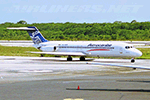
This is Aerocaribe McDonnell Douglas DC-9-31 Fleet Pack with the registrations: C5-JDZ as Azmar Airlines, C5-LPS, as Azmar Airlines, XA-ABQ (With Cancun VTP included), XA-ABR (With Albine Colors included), XA-ABS (With Albine Colors included), XA-ABT (With Albine Colors, and Tapatia Name included), XA-AEB (With Albine Colors included), XA-AEC (With Riviera Maya VTP included), XA-TVB, XA-TVC (With Metal Colors and USAir Livery), XA-TXG
Aerocaribe was an airline founded in Merida, Yucatan, Mexico. Aerocaribe was founded in 1972 as "Aerolineas Bonanza", it started operations on July 12th, 1975, under the name of "Aerocaribe". It was a regional subsidiary of Mexicana Airlines that operated services under the flag of "Mexicana Inter" and shared codes with its parent company.
it operated almost 120 flights per day. in 2005 Mexicana decided to rename Aerocaribe as a low cost airline, "MexicanaClick". Aerocaribe was purchased by "Compañia Mexicana de Aviacion". On August 23th, 1990. In 1996 Mexicana became part of the Cintra Group. Its subsidiary Aerocozumel was integrated. Mexicana decided to transfer its fleet of Fokker 100 aircraft to Aerocaribe to change the airline's brand. Its new name is MexicanaClick, And it is an attempt to create a low cost mexican airline, starting operations in July 2005.
It had aircraft together with its subsidiary Aerocozumel: FAIRCHILD FOKKER F27 FRIENDSHIP, MCDONNELL DOUGLAS DC-9-14/MCDONNELL DOUGLAS DC- 9-15, BRITTEN-NORMAN ISLANDER, CESSNA 208B CARAVAN, BAE JETSTREAM 31, MCDONNELL DOUGLAS DC-9-31, FOKKER 100.
The model is Alpha India Group (AIG) McDonnell Douglas DC-9-30, coming soon more Douglas DC-9-30 registrations and textures, Basepack. This is my website: https://el-mundo-de-los-aviones-ai-traffic.jimdosite.com I hope enjoy it!.
| Filename: | AI_Aerocaribe_McDonnell_Douglas_DC931_Fleet_Pack.zip |
| License: | Freeware |
| Added: | 12th July 2022, 18:26:10 |
| Downloads: | 77 |
| Author: | Jesus Gibran Soriano Solleiro |
| Size: | 99.65 MB |
| Category: Flight Simulator X - Gauges | |
| TCAS and Traffic Display Gauge V2.0 |
|
Images related to this file:
File Description:
This TCAS and Traffic Display Gauge Version 2.0 includes significant improvements from V1.0. It has been developed for the FSX Flight Simulator SP1/2 also. It should also work with Acceleration.The functionality for the TCAS part is based on general specs for commercial aircrafts. It does not provide in detail the function for a specific aircraft model. It is a generic gauge, and can be simple added to any aircraft as a standalone popup window.
In addition the gauge provides a AI traffic display in the ranges of 10,20, and 40 miles.Within this display mode, no TCAS rules are valid, which means all AI aircraft are displayed independent of any altitude or distance.
Improvements in V2.0 are: 1: Full TCAS and traffic display capability is provided even though your aircraft is on the ground. Only the trigger of the alarm/warn sound and the blinking lamp display willbe blocked. 2: An AI HDG pointer will be displayed. It shows in which direction the AI is moving. 3: A bearing pointer has been introduced. It allows the pilot to point to a specific AI.4: The AI additional text info display follows the structure of an ATC text.5:The AI additional text can be selected individually per AI with a mouse click.
6: Each AI display contains a ID index number (0 � 20).7: The design of the TCAS and Traffic Display Box has been updated.8: Increased the number of AIs displayed on the screen in display mode.
For installation and functional description look at the doc inside the ZIp.
CREDIT goes to :
Stefan Schneider for his support on special XML issues and TCAS functionality.
Bob Familton for his review of the documentation and testing for SP1 FSX.
Doug Dawson for his dsd-XML-sound interface in order to generate the sounds.
| Filename: | TCAS_and_Traffic_Display_Gauge_V20.zip |
| License: | Freeware |
| Added: | 25th October 2010, 13:37:36 |
| Downloads: | 3,757 |
| Author: | Dietmar Loleit |
| Size: | 981.32 KB |
| Category: Prepar3D V1-4 - Original Aircraft | |
| UV-4 V/STOL UAV (Experimental) |
|
Images related to this file:
File Description:
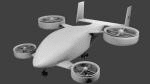
Created as a means to display the potential of a ducted fan rotorcraft powered by multiple electric motors. The system made its launch in 2015, since then advances and improvements have been completed to the airframe and power plant configurations. Delivering an efficient means of lift using smaller and therefore quieter propeller then traditional helicopters. The function of the ducted system serves as a mean of channeling pressure and vectoring thrust. Giving the UV-4 a unique control system and improved maneuverability. The design of a low speed "T-Tail" houses the function of yaw control with multiple rudders located on its vertical stabilizer, and elevators on its horizontal stabilizer. In addition the rear ducted systems may pivot up to less then sixty degrees forward and backwards to deliver the vector thrust where the aircraft needs it to be. The cargo bay may house up to four thousand pounds of deliverable payload. As its max gross take-off weight is designed to reach twelve thousand five hundred pounds. The electrical systems on the aircraft use a network of batteries, generators, and its two electrical motors. Proving five hundred horse power each, totaling an amount of one thousand horse power. An electrical charge then powers the mechanization used to spin the propeller to its desired rate per minute. Perhaps in the near future an additional system can be created to then generate electrical charges created by the spinning propeller of inside the duct back into the aircraft to then power systems or recharge the battery. We forward to providing this aircraft on Microsoft Flight Simulator X, Lockheed-Martin Prepar3d, and X-Plane 10 for download by the end of 2016. Aircraft by Rob Gomez & Kris Pyatt
| Filename: | UV4_VSTOL_UAV_Experimental.zip |
| License: | Commercial demo |
| Added: | 22nd January 2017, 04:10:41 |
| Downloads: | 186 |
| Author: | Rob Gomez & Kris Pyatt |
| Size: | 8.13 MB |
| Category: Flight Simulator 2004 - AFCAD Files | |
| Default Las Vegas McCarran with activated X-Wind Runways |
|
File Description:
A High quality AFCAD2 file for the default FS2004 Las Vegas McCarran airport. This file has been completely rebuilt from scratch using information from the latest FAA charts (17th March 2005). All Aprons have been completely rebuilt and are modelled to be as near real as possible. Improvements have been made to the taxiways, and newly built taxiways 'Romeo' and 'Zulu' have been added to the airport.
The 'crosswind runway technique' has been applied to this airport to activate all runways for simultaneous use.
Runways 01R/19L and 7L/25R will both be used for simultaneous take-offs whilst 01L/19R and 7R/25L will both be used for simultaneous landings, all dependent on wind direction.
Full night lighting has been provided for taxiways, runways and aprons and a 'Tower View' is now available. Full 'ALSF-2' approach lighting has been added to the landing runways to assist your approaches in poor visibility. The final runway modification is a 200ft overrun area at each end of runway 7R/25L only. All real life gates at this airport are now available for use, they are correctly numbered as per real life and have the correct airline assigned to them.
A new 'RJ' area with 12 stands for America West Express has also been added to the main apron, near the B concourse. Terminal 2 now has overflow parking to provide more space during peak periods. The 'Janet' (Area 51) shuttle area has been represented and has 8 coded stands for the 737s that use the terminal. Random parking has also been placed on the Executive Terminal area and also at 'Signature Parking' on the south west side.
Finally, there are a number of parking stands provided on the cargo area also. This file has been fully tested and all traffic flows as it should. If you have a large amount of traffic flowing thru LAS, this file will certainly bring the airport to life. Enjoy!!
| Filename: | Default_Las_Vegas_McCarran_with_activated_XWind_Ru.zip |
| License: | Freeware |
| Added: | 2nd April 2005, 22:00:16 |
| Downloads: | 4,841 |
| Author: | Lee Brompton |
| Size: | 81.04 KB |
| Category: Flight Simulator 2004 - Panels | |
| PS Panels 737NG |
|
File Description:
Built completely from scratch, the PS Panels 737NG incorperates a high level of realism whilst still allowing the virtual pilot to use important FS features such as the flight planner and ATC systems.
Authentic NG EHSI
The PS Panels 737NG incorporates a high definition EHSI display including all the modes as per the real aircraft.
Approach, VOR, Map and Plan modes are all modelled (APP, VOR and Map in both Expanded and Standard modes).
The authentic and fully animated EHSI control panel allows the virtual pilot to set the display to his preference.
The PS Panels 737NG interfaces completely with the FS Flight Planner, you're flight plan will be automatically displayed in both the Plan and Map modes.
Extensive Overhead
The PS Panels 737NG incorporates a custom overhead panel to control the many modelled aircraft systems.
Based on the real NG Overhead panel with a slightly altered layout that allows the virtual pilot to continue to monitor his key instruments whilst managing the Fuel, Electrical, Hydraulic, Lighting and Pnuematic systems controlled through the panel.
Careful attention combined with detailed research has allowed us to model these systems to a high degree of accuracy.
Complete Radio Stack
The panel comes with an authentic 737NG radio stack, accurate down to the last details.
IRS System
The PS Panels 737NG models the operation of the aircrafts IRS. Unless proper alignment is completed through the IRS panel, many features of the aircraft's displays will be INOP.
Custom Throttle Panel
The panel comes with a custom throttle panel accurate to that on the real aircraft.
Advanced 2-stage Night Lighting
A first for PS Panels, the 737NG contains two stage night lighting allowing the virtual pilot to choose between two levels of cockpit lighting on the fly.
The main panel and all subpanels are lit using the same schemes.
Thanks to Yoo Sang Jun for his work on this.
| Filename: | PS_Panels_737NG.zip |
| License: | Freeware, limited distribution |
| Added: | 7th July 2007, 22:06:00 |
| Downloads: | 26,673 |
| Author: | Paul Scarratt |
| Size: | 4.1 MB |


© 2001-2026 AVSIM Online
All Rights Reserved
Privacy Policy |