
Where Flight Simulation Enthusiasts Gather from Around the World!
AVSIM Library - Search Results

| Category: Prepar3D V1-4 - Aircraft Repaints, Textures and Modifications | |
| Curtiss Helldiver Italian Air Force |

|
Images related to this file:
File Description:
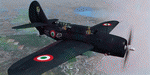
This folder contains a repaint for the Aerplane Heaven Curtiss Helldiver in the colors of S2C-5 MM4693 86-42 of the 86 Gruppo Antisom of the Italian Air Force, based in Grottaglie, 1952. Italy’s experience with the Helldiver was brief but interesting. In 1950, when the first post-WWII formal rearmament plan was put forward, the Italian navy identified as a priority obtaining a surplus American light aircraft carrier, with appropriate air wing. A team was sent to Naval Air Station Corpus Christi TX, where two pilots trained and qualified on the Helldiver, later practicing carrier operations aboard USS Midway (CV-41) where four more pilots earned US Navy carrier wings. In September 1952, two surplus Helldivers were presented to the Italian navy as a gift by the USA. The two planes were delivered to Naples, Italy.
Unfortunately for the Italian navy, there was still a Mussolini-era law on the books called Legge 1000 Kilo (law of a thousand kilograms) which mandated that only the Italian air force could fly planes over 2,200 lbs weight. As the result of a bizarre inter-services lawsuit, the navy was forced to abandon plans for both it’s aircraft carrier wish and the Helldivers.
A total of forty-six Helldivers were eventually transferred to the Italian air force (the two former navy planes plus a further forty-four). The Italian air force assigned them to the 86th Autonomous Antisubmarine Group at Grottaglie air base, where they flew ASW missions with depth charges. The Helldiver was not popular with the Italians…as an anecdotal example, they were housed in a disused WWII-era blimp hangar. They were viewed as obsolete and too difficult to master pilots on. The crews were also not keen on flying a single-engine type on long overwater patrols.
The Italian planes were only in frontline service for about one year. In 1953, they were replaced by PV-2 Harpoons and (later) S-2 Trackers, which were much more suitable to long-range ASW missions. Repaint by Jan Kees Blom, based on the paintkit by Aeroplane Heaven.
| Filename: | Curtiss_Helldiver_Italian_Air_Force.zip |
| License: | Freeware |
| Added: | 15th July 2018, 18:10:50 |
| Downloads: | 57 |
| Author: | Jan Kees Blom |
| Size: | 7.56 MB |
| Category: Flight Simulator X - Aircraft Repaints, Textures and Modifications | |
| Boeing B-17G 91st BG (LL-E) "Shoo shoo shoo baby" |
|
Images related to this file:
File Description:
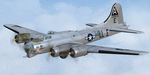
This folder contains a repaint for the A2A WoP2 B-17G in the colors B-17G-35-BO 42-32076, which rolled off Boeing's production line in Seattle in march 1944. This was around the transition from camouflaged to bare metal aircraft, which led to the odd situation that the datablock was stencilled onto a OD panel, while the rest of the aircraft was left bare metal. This was because the datablock was sprayed on right at the beginning of production. The aircraft was assigned to the 401st BS of the 91st BG, and was collected at the depot in Burtonwood by Paul McDuffee, who was so impressed with its smooth handling that he asked to be assigned to it. The aircraft was named by its crew chief, Hank Cordes, and was named after a popular song by the Andrews Sisters. Originally, the name was 'Shoo shoo baby', applied in gothic letters, which was later replaced by a Vargas girl and an additional 'shoo', painted by Cpl. Tony Starcer. McDuffee flew 13 missions with 076, before completing his tour of duty. On completion of his last flight, he buzzed the airfield and flew so low that fencing wire became entangled in the tail wheel. On the plane's 23rd mission, on 29 may 1944, Lt. Robert Guenther was flying 076 on a raid to Poznan when he suffered engine failure on one engine, and a while later, flak knocked out a second engine. 'Shoo shoo shoo baby' started to fall behind, and when a third engine started to falter, Lt Guenther decided to turn to neutral Sweden, with the crew jettisoning all loose equipment. A group of FW190's closed in, but did not open fire, peeling away. By the time 076 reached Bulltofta airfield near Malmö, it had only one engine left, but it did manage to perform a safe landing. The crew were interned, and the aircraft was impounded. The crew returned to the UK in October 1944, and 'Shoo shoo shoo baby' would later tour the world...
Repaint by Jan Kees Blom, based on the paintkit by A2A.
| Filename: | Boeing_B17G_91st_BG_LLE_Shoo_shoo_shoo_baby.zip |
| License: | Freeware |
| Added: | 7th October 2019, 18:22:46 |
| Downloads: | 106 |
| Author: | Jan Kees Blom |
| Size: | 18.03 MB |
| Category: Flight Simulator 2004 - Aircraft Repaints, Textures and Modifications | |
| Air Panama British Aerospace Jetstream 31 |
|
File Description:
After visiting Panama/Chiriqui this past New Years I noticed Mapiex had changed to Air Panama. I took on my first job on a repaint and here it is.
| Filename: | Air_Panama_British_Aerospace_Jetstream_31.zip |
| License: | Freeware |
| Added: | 5th March 2006, 02:25:23 |
| Downloads: | 550 |
| Author: | Original flight model used was made by Model by Dee Waldron, Nick Botamer. Historic Jetliners Group. Repaint Elias Castro. |
| Size: | 290.77 KB |
| Category: Flight Simulator 2004 - Scenery | |
| Solis-Piriapolis Photo-Real Scenery |
|
Images related to this file:
File Description:

Photo-real scenery of the Solis-Piriapolis-Laguna del Sauce region in the department of Maldonado, Uruguay. This package covers an area of about 150 km2 west of Punta del Este with photo-real textures. Also included are custom 3D objects in Solis and Piriapolis, autogen and two real grass strip airports at Cuchilla Alta and Punta Colorada.
Scenery also works in FSX.
| Filename: | SolisPiriapolis_PhotoReal_Scenery.zip |
| License: | Freeware, limited distribution |
| Added: | 20th February 2010, 14:54:16 |
| Downloads: | 1,085 |
| Author: | "As the Bird Flies / A Vuelo de Pajaro" group members: Diego Altgenug, Alan Pereira-Pierce and Juan Pablo Simonet |
| Size: | 18.3 MB |
| Category: Flight Simulator X - Aircraft Repaints, Textures and Modifications | |
| Boeing B-17G 91st BG (LG-O) "Roxy's Special" |
|
Images related to this file:
File Description:
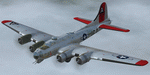
This folder contains a repaint for the A2A WoP2 B-17G in the colors of B-17G-85-BO #43-38348 LG-O "Roxy's Special" of the 322 BS/ 91st BG based in Bassingbourne UK. #348 arrived in Bassingbourne on 18 August 1944, and very quickly received her nose art, by Corporal Tony Starcer. By 5 September, it had flown four missions to Germany. The next mission, on the 8th of September, was to the I.G. Farben Chemical Plant in Ludwigshafen, Germany. On board this mission was David McCarty, pilot, Neil M. Mylin, co-pilot, Donald L. Brazones, navigator, Frank S. Bolen, bombardier, John Cangemi, top turret, Frank F. Trim, Jr., ball turret, Charles E. Beebe, waist guns, Floyd Z. Dillon, tail gun, and Henry R. Schuls, radio operator. Around 11.35 hours, short of the bomb drop near Ludwigshafen, “Roxy’s Special†took a hit ripping off a wing. A spin ensued pinning Bolen and navigator Don Brazones in their nose bubble followed almost immediately by an explosion blowing them free of the aircraft. Bolen and Brazones were the only two survivors of “Roxy’s Special.†They both parachuted down, but not together, therefore neither knew the fate of the other until later. Bolen eluded capture for 7 days before being picked up and carted off to Stalag Luft 1 near Barth, Germany after interrogations. Brazones had been picked up before Bolen and processed through the channels to Stalag Luft 1. The two were reunited at Stalag Luft 1 where they spent the remainder of the war. On Sept. 14, 1944, the day Bolen was captured, his wife Frances gave birth to their first child, Linda, in Selma - a child Bolen would not see until returning from imprisonment and the war. The “Roxy’s Special†crash site was near a Lutheran Church in Ludwigshafen. A very respectful group of Germans removed the remains of the air crew and buried them in the local cemetery. After the war, the remains were turned over to American authorities and they moved them to a National Cemetery in Northern France. In 1947, Bolen served as casket bearer for David McCarty when he was brought home to rest in Birmingham.
Repaint by Jan Kees Blom, based on the paintkit by A2A.
| Filename: | Boeing_B17G_91st_BG_LGO_Roxys_Special.zip |
| License: | Freeware |
| Added: | 7th October 2019, 18:21:26 |
| Downloads: | 109 |
| Author: | Jan Kees Blom |
| Size: | 18.33 MB |
| Category: Flight Simulator 2004 - Scenery | |
| Laguna del Sauce Airport, Punta del Este (SULS), Uruguay |
|
Images related to this file:
File Description:
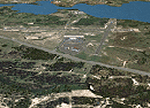
Photorealistic scenery of Laguna del Sauce / Curbelo (SULS) International Airport in Maldonado, Uruguay, version 1. This is the airport that serves the well-known beach resort of Punta del Este. This scenery package includes the airport facilities with the passenger terminal, general aviation area and the naval airbase on the banks of Laguna del Sauce lake. Several buildings and vehicles belonging to the airport have been recreated. Also included is the area around the airport recreated as photorealistic terrain with seasonal variations at a 4. 75 m/pixel resolution. Certain parts of the airport have been recreated with a 2 m/pixel photorealistic terrain. The aim of this scenery is to simulate flying to and around the airport under instrument flight rules (IFR) and also visual flight rules (VFR).
| Filename: | Laguna_del_Sauce_Airport_Punta_del_Este_SULS_Urugu.zip |
| License: | Freeware |
| Added: | 9th June 2010, 02:48:12 |
| Downloads: | 1,471 |
| Author: | "A Vuelo de Pajaro" / "As the Bird Flies" Design Group members: Diego Altgenug, Daniel Gazzano, Alan Pereira Pierce, Juan Pablo Simonet |
| Size: | 13.81 MB |
| Category: Flight Simulator X - Scenery | |
| RNAS Henstridge (HMS Dipper) |
|
File Description:
Royal Naval Air Station Henstridge or RNAS Henstridge (HMS Dipper) is a former Fleet Air Arm base located 7 miles (11 km) west of Shaftesbury, Dorset (Now Somerset) and 12.4 miles (20.0 km) east of Yeovil, Somerset in South West England.
The main part of the land (355 acres) was purchased in August 1941, after which building of the airfield and the marsh lane accommodation site commenced, it was commissioned on April 1, 1943 as HMS Dipper, principally as number 2 naval fighter school, on the 11th September 1942, another 18 acres was acquired at the adjoining gibbs marsh area for an aircraft repair and maintenance site. The design and lay-out of the airfield was quite unique, having 5 runways, 2 of these being east west lay-out (07-25) both 1000 yards long, the northern runway incorporated a dummy deck landing strip, complete with under-ground arresting gear with four above ground arrestor wires, which was a duplicate of that installed on HMS Implacable for training of aircraft carrier landings, these mainly being carried out with the Seafire, a naval version of the spitfire with folding wings. The site also had its own cinema and stage hall
March 1952 the airfield became inactive and was placed under care and maintenance, during 1953 Air whaling (now Bristow group) used the facilities for repairs to the whaling fleet of helicopters until moving out in June 1958.June 1957 it was finally closed as a naval establishment, from 1958-1960 the entire site was sold off. 27 June 1980 the BBC purchased the whole site and applied for planning permission to erect at the airfield a shortwave radio station consisting of 21 self-supporting towers holding aerial arrays and ancillary buildings on a 300-acre site. The station would transmit overseas radio services to Eastern Europe, the Soviet Union and perhaps South America the application failed and the BBC sold the land during January 1987 The airfield is also the home of the wessex strut, a general aviation club formed in January 1977, which holds an annual fly in and other events their first fly-in was on 17 April 1977 and attracted 107 aircraft. As of today the only usable runway is the north 07-25 runway, extant with the concrete dummy deck, and the underground machinery chamber, it is also the home to a large number of light aviation enthusiasts aircraft as well as the Yakolevs aerobatic display team and the Dorset and Somerset air ambulance
The current airfield is operated by EGHS and is an unlicensed airfield. The only usable runway is 07/25 tarmac/concrete 750 mts long x 6 mtr wide. Henstridge radio can be contacted on 130.250 MHz, it can be found at the south eastern stub of the Yeovilton MATZ
Source:Wikipedia
| Filename: | RNAS_Henstridge_HMS_Dipper.zip |
| License: | Freeware |
| Added: | 9th February 2017, 22:14:54 |
| Downloads: | 165 |
| Author: | Terry Boissel |
| Size: | 4.53 MB |
| Category: Prepar3D V1-4 - Utilities | |
| Flightplan Visualizer 1.10 |
|
Images related to this file:
File Description:
Flightplan Visualizer (FV) version 1.10.0. Copyright 2018-2019 by Pelle F. S. Liljendal ([email protected]), all rights reserved.
FV comes with 300 Commercial-, and +380 BizJet AI pre-imported flightplans which the creators of those flightplans have gracefully allowed me to include with the installer, however you are able to import additional (AI) flightplans if you want to. Once imported these (AI) flightplans can be visualized on a map-view, and the user will be able to search accross all these. Hence you can use the program as inspiration as to which routes to fly. E.g. you can search across all imported flightplans to find all flights in an A321 flying into/out from LDDU, or simply to look for all flights in a Boeing 747-8F.
Simply run the included installer to install the software. The program will be installed into "C:\Program Files (x86)\Flightplan Visualizer" and all datafiles will be installed into: "C:\Users\[UserName]\AppData\Roaming\FlightplanVisualizer". The program comes with a full manual explaining everything, and a 3 page quick manual to get you started. The first 3 times you run the program the quick manual will automatically open. The forum is hosted here: https://forum.aerosoft.com/index.php?/forum/919-flightplan-visualizer/
Version 1.10 Contains the following changes: In the flightplan combo-box at the bottom of the main-form, "Active Search" have been renamed into "Last Search". Picking "Last Search" from the flightplan combo-box, will re-execute the last performed search, and populate the map accordingly. A new entry called "None", have been added flightplan combo-box (at the top of the list). Chosing this item will "deselect" the otherwise current search or selected flightplan, and clear the map of routes. A form have been added to assist enabling/disabling flightplans. Gate-letters/numbers are now by default written using a (5x7) Matrix-"font". If you want to revert to the segment-"font", used in previous versions, simply set the value of the "UseMatrixGateChars" tag in the settings-file to false. changed how the Gate-letters/numbers are written in the round gate-markers on the map. Previously all "chars" had the same width. Now the width is dependant on which sub-elements are in use by each "char" (e.g. a "1" is not as wide as an "8"), as a result the gate letter/number are more easy to read. Zulu- and local-time added to the "Selected airport" group-box in the upper/right corner of the main form. If no airport is selected, or no time-zone is registred for the selected airport, only zulu-time will be displayed. Selections of favorite aircraft can now be saved and loaded.⦠This selection of aircraft can be loaded as a selection of aircraft in the "Search leg" form. Video tutorials can now be accessed from the "Help" menu. These are simply "links" to the actual videos on YouTube, hence will launch the default browser. If you hold SHIFT the url will in stead be copied to the clipboard (e.g. in case you want to upen the link in another browser). In the same manner the "Help" menu now contains a link to the forum. The form with decoded METAR/TAF-messages now shows: name, city, and country/state for the selected station in the caption. This text will also be embedded when copying the content to the clipboard. Likewise UTC/Local-time is also embedded when copying the content to the clipboard as it can be used to show the "age" of the report and convert between UTC and Local -times (based on the difference of UTC- and local-time). The info presented when pressing the "Show Scenery Gates" button on the Airport Info form, can now be copied to the clipboard. Various minor "behind the scenes" changes and optimizations. Added support for additional aircraft: Airbus A220-100 (CS100), Airbus A220-300 (CS300), Boeing 777-8 and Boeing 777-9. Listviews containing both (aircraft) IATA and ICAO-codes now all list them in the following order: IATA, ICAO (both individual sortable). Hovering the mouse over gate-markers the hint window will no show the radius both in meters and feet. Editing gate-info you will now see more info for the gate being edited: Type, Size (meters and feet) and if applicable: airlines. Fixed: Minor bug in relation to how the airport size was calculated. Fixed: IATA/ICAO columns were swapped when choosing Favorite Aircraft. Fixed: Typo on the METAR/TAF-decoder form.
| Filename: | Flightplan_Visualizer_110.zip |
| License: | Freeware, limited distribution |
| Added: | 5th June 2019, 21:20:51 |
| Downloads: | 319 |
| Author: | Pelle Liljendal |
| Size: | 24.81 MB |
| Category: Prepar3D V1-4 - Utilities | |
| Flightplan Visualizer 1.14 |
|
Images related to this file:
File Description:
Flightplan Visualizer (FV) version 1.14.0. Copyright 2018-2019 by Pelle F. S. Liljendal ([email protected]), all rights reserved.
FV comes with 629 pre-imported Commercial AI flightplans (+380 BizJet flightplans are available as a separate download). However you are able to import additional (AI) flightplans yourself. Once imported these (AI) flightplans can be visualized on a map-view, and the user will be able to search accross all these. Hence you can use the program as inspiration as to which routes to fly. E.g. you can search across all imported flightplans to find all flights in an A321 flying into/out from LDDU, or simply to look for all flights in a Boeing 747-8F.
Simply run the included installer to install the software. The program will be installed into "C:\Program Files (x86)\Flightplan Visualizer" and all datafiles will be installed into: "C:\Users\[UserName]\AppData\Roaming\FlightplanVisualizer". The program comes with a full manual explaining everything, and a 3 page quick manual to get you started. The first 3 times you run the program the quick manual will automatically open. The forum is hosted here: https://forum.aerosoft.com/index.php?/forum/919-flightplan-visualizer/
Version 1.14 Contains the following changes:
- Flightplan file-format was changed, to accommodate changes to the airline-data. In previous versions the airline ICAO-code had to be unique, hence not allowing old defunct airlines still remaining in the data-file when a new airline would be issued the same ICAO-code (now they can both exists, and many of the defunct have been marked as defunct).
- On start-up old flightplans in enabled folders will automatically be updated to the new format. If you have sub-folders containing additional flightplans, you should make sure these are enabled, in order to have these updated as well. Once they have been updated you can go ahead and disable these sub-folders again as you please.
- Its now possible to add user defined airlines, in case you want to add you own fictitious airlines (e.g. VA's) or you want to add airlines missing in the official data-files that I supply with the program (if this is the case, please notify me, so I can add these in the next release of the program).
- "Favorite aircraft" have been renamed into "Favorite aircraft-types", as it is the "types" of aircraft you mark. You don't mark a particular aircraft/cofiguration (like the PMDG B737-800 NGXu) as your favorite, but rather the "type" (B737-800). The file containing the (active) favorite aircraft-type selection was renamed as well (you don't have to do anything, the file is automatically renamed on start-up).
- Added a new Unit-Conversion form, letting the user convert units of: Speed, Lenght/Distance, Weight/Volume, Pressure and Temperature. The Weight/Volumne conversions is a bit special as it lets the user convert between weight (kg/lbs) and volume (liter/gal), thanks to a Fuel Density that defaults to 0.785, but can be changed by the user.
- All search-forms (seaching for airport, aircraft and airline) was changed to ignore whitespeaces (e.g. "airBaltic" vs. "air Baltic"), and ignore diacritics (e.g. "AerolÃnea" vs. "Aerolinea"), making it more easy to find what you are searching for in one go.
- The airline search-form will by default exclude airlines that have been marked as defunct. However a new "Include defunct" check-box have been added to the form, allowing you to include these (who am I to say you can not still use "Air Berlin", "Monarch" or "Thomas Cook" flightplans if you want to).
- Added 3 new columns to the airline search form showing commence/cease-date, and wheter or not the airline is "in use" (as carrier/operator by any of the active fligthplans).
- State is now by default excluded when using the airport search form, which make it a lot more convenient to find airports in the city of "New York". State can still be included in the search by choosing a different search-type using the combo-box in the upper/right corner.
- When Flightplan Visualizer needs for perform potentially lengthy operations it will spread the workload over the available cores of the CPU. However if you want to limit which cores it uses you can now set the affinity-mask in the settings form.
- The splash-screen shown when the program starts, and when reloading active flightplans was prevoiusly always shown on top (top-most), but if you find this anoying it can now be disabled in settings.
- Fixed: Warnings/errors regarding loading flightplans were only displayed at start-up. Now they are shown whenever all active flightplans are loaded (e.g. after having enabled a sub-folder).
- Data: The airline-data got a major update, and a bunch of new airlines were added, and the data for MANY others were updated. It is a manual process to update these, almost as funny to do as to watch paint dry ;-)
- Data: A few countries had a wrong- or no sub-region code, so these were fixed/updated. As usual, if any of you spot any erros, or missing data, please use the forum to notify me.
- Data: Additional info added to the aircraft-data (in preparation for some future plans).
- Flightplans: All flightplans bundled with the installer have been updated to the new file-format.
- Flightplans: Thanks to Ryan Carson (RCAI) for allowing me to bundle the installer with a few of his flightplans, so the installer comes with the very first winter 2019-2020 flightplan.
- Flightplans: The good people over at AIG (Alpha India Group) have been VERY busy since the last release, hence the installer comes with +130 new pre-imported flightplans, bringing the total to 629. This update concludes Summer 2019, and AIG already have the first Winter 2019/2020 flight-plans in beta-test.
Pelle
| Filename: | Flightplan_Visualizer_114.zip |
| License: | Freeware, limited distribution |
| Added: | 10th December 2019, 06:59:46 |
| Downloads: | 370 |
| Author: | Pelle Liljendal |
| Size: | 31.01 MB |
| Category: Microsoft Flight Simulator (2020) - Utilities | |
| Flightplan Visualizer 1.21.1 |
|
Images related to this file:
File Description:
Flightplan Visualizer (FV) version 1.21.1. Copyright 2018-2021 by Pelle F. S. Liljendal ([email protected]), all rights reserved.
FV comes with 1482 pre-imported AI flightplans (of which +690 are BizJet flightplans, the rest are commercial). However you are able to import additional (AI) flightplans yourself. Once imported these (AI) flightplans can be visualized on a map-view, and the user will be able to search accross all these. Hence you can use the program as inspiration as to which routes to fly. E.g. you can search across all imported flightplans to find all flights in an A321 flying into/out from LDDU, or simply to look for all flights in a Boeing 747-8F.
Simply run the included installer to install the software. The program will be installed into "C:\Program Files (x86)\Flightplan Visualizer" and all datafiles will be installed into: "C:\Users\[UserName]\AppData\Roaming\FlightplanVisualizer". The program comes with a full manual explaining everything, and a 3 page quick manual to get you started. The first 3 times you run the program the quick manual will automatically open. The forum is hosted here: https://forum.aerosoft.com/index.php?/forum/919-flightplan-visualizer/
Version 1.21.1 Contains the following changes:
- Due to a bug introduced in version 1.19 regrading the (automatic/manual) version-check, version 1.20 was skipped and this version was released as 1.21.1 (in stead of 1.21.0).
- Beside the season based commercial flightplans, the "Download AIG flightplans" menu-item (found in the "Flightplan" menu) is now able to download (AIG) GA- and Military-flightplans. A big thank you to AIG for granting access to these.
- Reorded the download-folders (in the combo-box), so the season-based AIG commercial folders are displayed in chronological order (e.g. "SUMMER_2020" is before "WINTER_2020-2021").
- When scanning for/loading flightplans the program will now automatic look for flightplans marked as defunct or obsolete, and if found these will be move to the "Disabled" sub-folder. Two new settings have been added, so you can disable this feature if you want to.
- Aircraft-types can now be grouped in families of similar aircraft (e.g. a group containing all the Airbus A318, A319, A320 and A321). These families can be managed via the "User Aircraft" menu-item.
- Removed menu-item "Index of AIG flightplans" in the "Flightplan" menu, as its not needed since the "Download AIG flightplans" was added in version 1.16 (May 2020).
- Minor changes to the flightplan-name grooming algoritm (e.g. spaces are inserted before/after ampersand, if not already present) and prefix can be added to indicate the type of flightplan (e.g. for biz-jet, government or military flights). Detection of this prefix can be disable in settings.
- Dropped support for the old ".FPL" flightplan file-format. Since version 1.11 (july 2019) FV have been using the binary ".BFP" file-format in stead.
- Based on active flightplans, the program will try to detect primary- and secondary-hubs for each airline. An airport must have flights to atleast 10 different airports for that airline, in order to be considdered being either a primary/secondary hub for that airline. This information is displayed both in the airline edit-form and the airline usage-report.
- The airline usage-report will also list all destinations served by the airline (ordered by which airports are flying to most different airports).
- The airline usage-report will now also contain a list of the routes served by that airline (as carrier or operator). This list is sorted so the routes that are most flown (per week) comes first.
- Added an extra tab-page to the Airport-info form that shows which airlines have routes to/from the airport, and which airlines are using the airport as a primary or secondary hub.
- Added (right-click) context-menu to many aircraft/airline list-views, that lets you lookup aircraft-/airline -information.
- Added power-conversion to the unit-conversion form, to convert between HP (Horse-Power) and kW (kilo watt).
- Also added context-menu to the carrier/operator labels in the Leg-info form to show more details for the airline. Likewise the aircraft-labels have a context-menu for showing aircraft-details
- Removed a few columns from the form choosing favorite aircraft-types, as this info can now be obtained via the new context-menu.
- Added a column with engine-type/count in the aircraft browser.
- Minor changes to the airport redirection report (to align some values in columns, making it more easy to read the report).
- Added a few hard-coded names to the author-name grooming-method, to unify differnt spellings of the "same names". Also added flightplan/author-count to the "Flightplan per author" report.
- Swapped the operator/carrier-count showed next to size-category in the user-airline edit form (now first value is operator and 2nd is carrier).
- Minor change to the airline-criteria in the leg-search to simplify selection (removed options: "Carrier only" and "Operator only").
- Fixed: The "Download AIG flightplans" form was not able to download flightplans with an ampersand ("&") in the name.
- Fixed: Once again improved importing of AIGFP flightplans where airport data is using different ICAO-codes (observed with 15 or so of the new BizJet flightplans, e.g. "ESAI_Aero-TechServices(GA-C)_Winter_2020-2021").
- Fixed: Issued with the program version-check (both automatic and manual) introduced in version 1.19. Resulting in this version being released as 1.21.1.
- Fixed: Sometimes closing (without saving) the form for editing user-aircraft it would sometime report there were unsaved changes, even though it was not the case.
- Fixed: Only the active sub fp-folders were scanned for backup files. Now the main fp-folder is scanned for backups as well.
- Data: Some of the aircraft-types sharing the same IATA/ICAO-codes have been split into multiple new types (e.g. the Beechcrafts, Cessnas, Pipers and Learjets). This was done to better detect the specific aircraft-types in use (all bundled flightplans have been reprocessed to re-detect the specific types).
- Data: A few aircraft can now be detected (during flightplan import) using their millitary designation (e.g. Boeing C-22, C-32, C-40, and Gulfstream C-20 and C-37).
- Data: Improved detection of a few "De Havilland" aircraft.
- Data: Added a couple of new aircraft-types (Lockheed C-141 Starlifter, Transall C-160 and a few aircraft without official IATA/ICAO-codes, hence using "---" as the IATA-code for these).
- Flightplans: Thanks to the new feature to download (AIG) GA/Military-flightplans a LOT of new flightplans have been bundled with the installer (a few government and military flightplans, but mostly BizJet). The previous installer came bunled with 385 Bizjet flightplans, however in this version many of these have been updated and a lot more have been added, bringing the total count of BizJet flightplans to +690. All BizJet are prefixed by "Bz_", all Government are prefixed by "Gv_" and all military are prefixed by "Ml_", in case you want to move these to differnt sub-folders using the "enable/disable flightplans" menu-item.
- Flightplans: All new/updated flightplans have been added to the installer, and all obsolete/defunct have been marked/removed. A total of 1481 active flightplans are bundled with the installer (incl. all of the previous mentioned BizJet's).
Pelle
| Filename: | Flightplan_Visualizer_1211.zip |
| License: | Freeware, limited distribution |
| Added: | 20th June 2021, 19:45:19 |
| Downloads: | 791 |
| Author: | Pelle Liljendal |
| Size: | 36.74 MB |


© 2001-2026 AVSIM Online
All Rights Reserved
Privacy Policy |