
Where Flight Simulation Enthusiasts Gather from Around the World!
AVSIM Library - Search Results

| Category: Prepar3D V5 - Utilities | |
| FSTramp v8.84 for Prepart3D 2-6, MSFS, FSX(-SE), X-Plane (Win) |

|
Images related to this file:
File Description:
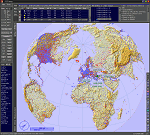
This add-on is an EXE application for Microsoft Flight Simulator and a DLL module for all other simulators. The DLL variant is activated via hotkeys or the simulator menu add-ons or plugins. Window size and layout are configurable for one or more screens. To avoid dazzling, the brightness of the entire application is customizable. Primarily it is a flight management system (FMS) with automatic control from start to landing. This also includes the observance of SID, STAR and Approaches in unmatched quality. The flight plan required for the FMS can be created manually or automatically, interactive changes and additions during the flight are possible. The basis of the flight planner is the 3D world map and the search function for airfields and navigation aids. The FMS by FSTramp relies on the autopilot of the aircraft. In case of incompatibility, the autopilot integrated in FSTramp will be used. This allows FSTramp to control almost all aircraft from airport to airport. The altitude profile of the flight plan, SID, STAR and approach is taken into account. This means that FSTramp extends the often incomplete airport procedures to and from the runway so that they can be flown completely automatically. During the fully automatic flight, the autopilot values ​​for HDG, ALT, VSPEED, SPD and MACH can be manually overridden. This is e.g. useful for being able to react to the instructions of the tower in the final approach without completely stopping the automatic flight. The rotating or north pointing 3D world map with numeric display of the terrain elevation under the mouse arrow is another special feature. It does not need an internet but is synthesized from included height profiles of the globe. The Data of continents, mountains and rivers are included in the setup. Airspaces, Airways, Waypoints and SID, STAR and Approaches are also included in the setup, but can be updated by installing additional AIRAC cycles. Airfields and navigation stations are taken from the simulator. NVIDIA: If the frame rate of the simulator drops sharply about 20 seconds after FSTramp's visibility, the power management of the GPU slows down prematurely. In the NVIDIA Control Panel, change the 'Manage 3D settings - Power management mode' option to 'Adaptive'.
| Filename: | FSTramp_v884_for_Prepart3D_26_MSFS_FSXSE_XPlane_Wi.zip |
| License: | Shareware, time limited |
| Added: | 7th July 2023, 04:35:26 |
| Downloads: | 43 |
| Author: | Helge Schroeder |
| Size: | 358.21 MB |
| Category: Flight Simulator X - Utilities | |
| FSTramp v8.84 for MSFS, FSX(-SE), Prepart3D, X-Plane (Win) |
|
Images related to this file:
File Description:
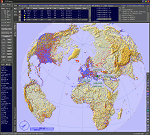
This add-on is an EXE application for Microsoft Flight Simulator and a DLL module for all other simulators. The DLL variant is activated via hotkeys or the simulator menu add-ons or plugins. Window size and layout are configurable for one or more screens. To avoid dazzling, the brightness of the entire application is customizable. Primarily it is a flight management system (FMS) with automatic control from start to landing. This also includes the observance of SID, STAR and Approaches in unmatched quality. The flight plan required for the FMS can be created manually or automatically, interactive changes and additions during the flight are possible. The basis of the flight planner is the 3D world map and the search function for airfields and navigation aids. The FMS by FSTramp relies on the autopilot of the aircraft. In case of incompatibility, the autopilot integrated in FSTramp will be used. This allows FSTramp to control almost all aircraft from airport to airport. The altitude profile of the flight plan, SID, STAR and approach is taken into account. This means that FSTramp extends the often incomplete airport procedures to and from the runway so that they can be flown completely automatically. During the fully automatic flight, the autopilot values ​​for HDG, ALT, VSPEED, SPD and MACH can be manually overridden. This is e.g. useful for being able to react to the instructions of the tower in the final approach without completely stopping the automatic flight. The rotating or north pointing 3D world map with numeric display of the terrain elevation under the mouse arrow is another special feature. It does not need an internet but is synthesized from included height profiles of the globe. The Data of continents, mountains and rivers are included in the setup. Airspaces, Airways, Waypoints and SID, STAR and Approaches are also included in the setup, but can be updated by installing additional AIRAC cycles. Airfields and navigation stations are taken from the simulator. NVIDIA: If the frame rate of the simulator drops sharply about 20 seconds after FSTramp's visibility, the power management of the GPU slows down prematurely. In the NVIDIA Control Panel, change the 'Manage 3D settings - Power management mode' option to 'Adaptive'.
| Filename: | FSTramp_v884_for_MSFS_FSXSE_Prepart3D_XPlane_Win.zip |
| License: | Shareware, time limited |
| Added: | 7th July 2023, 04:35:43 |
| Downloads: | 130 |
| Author: | Helge Schroeder |
| Size: | 358.21 MB |
| Category: Flight Simulator 2004 - Aircraft Repaints, Textures and Modifications | |
| Louisiana State Police Texture Updates Bell/Textron 430 |
|
File Description:
FS2004 Bell/Textron 430 Helicopter Louisiana State Police Updates
This package contains 2 revised texture sets for: N810SP & N918SP which are based here in Baton Rouge.
These fixes add the gold stripe on the tail and reflect the readjusted bottom
gold cheat stripe and a few more small tweaks that make the textures more accurate.
There is a well known member of the FS Community that is also painting up more LSP Bell430s.I believe that his will feature 430s from LSP Troop I,B and C.
Giving you all more N#'s to fly based on your preference of which Troop you want to fly for.So keep an eye out for more LSP Bell 430s in the near future!!
As always....Enjoy!!
**P.S.***
I am finishing up on a custom scenery to compliment these repaints.
The scenery will feature a large photoreal terrain area of the Independence Park area here in Baton Rouge wich houses on its grounds the following:
Louisiana State Police Headquarters,Louisiana Statepolice Training acadamy,various State Gov't offices such as Dept. of Motor Vehicles,Louisiana State Office of Emergency Managment,State fire Marshals Offices,e.t.c.....
The main Helipad is set up as a runway..rwys 9-27 which feature their own ILS systems with outermarkers,an NDB,Fictioal Airport Designation of 1LSP.Trees,Military Landing Zones,resturants,minmalls,gas stations along the perimeter,the main Fire House/Fire Station for that area.the Main branch of the Public Library and the big school bus transfer area on the west side.Street lights along the roadways,and much more.With minimal impact of FPS.
This will be a great add-on tool for the real LSP and AIr Med pilots who fly into this place everyday.Now you guys/gals can practice approaches in inclement weather conditions without fear of ruining a 5 million dollar chopper,all the while honing your IMC skills.
This scenery will integrate seemlessly with the upcoming release of KBTR v2.
The screenshots in this archive are from KBTRv2 Beta and the 1LSP beta sceneries!!
Keep an eye out at the BSMP forum for updates and preview screenshots... www.bsmp.co.nz
| Filename: | Louisiana_State_Police_Texture_Updates_BellTextron.zip |
| License: | Freeware |
| Added: | 25th May 2008, 19:00:07 |
| Downloads: | 358 |
| Author: | Joe DeGregorio / Alan Devins / Rory Kelly / Keith Devins |
| Size: | 2.96 MB |
| Category: Miscellaneous Files - General Utilities | |
| CONCORDE PERFORMANCE SYSTEM NEW GENERATION |
|
File Description:
CONCORDE PERFORMANCE SYSTEM
NEW GENERATION
CPS-NG (Concorde Performance System New Generation) is the successor to CPS-X, the essential flight preparation utility created in 2011
and discontinued in 2018.
Since the end of its development, still present on AVSIM despite a large number of unavailable functions, it has been downloaded more
than 3000 times.
This new CPS opus will satisfy the most demanding Concorde simulation enthusiasts.
CPS-NG now makes it possible to plan Concorde flights with the following simulators:
- FsLabs Concorde X for FSX, and P3D up to version 3.
- Colimata Concorde FXP for X-Plane and Gaston Reif's beautiful mod, Heritage Concorde Avionics Package.
With these simulators, CPS-NG can export waypoints to INS, payload and fuel to aircraft.
Like its illustrious predecessors, CPS-NG uses authentic Air France data and charts.
It offers a map of the flight including the navigation points, the points to protect from the supersonic bang, on departure and on
arriva.
The flight preparation stages are done in a user-friendly way.
the subsonic steps are configurable, the anti-noise procedures are calculated as in reality. The aircraft loading is modifiable by
the user in order to obtain the ideal centering.
The fuel is calculated as in reality and its distribution in the 11 tanks of Concorde complies with the filling law of Air France and
British Airways.
CPS-NG like its previous version also offers the user a flight report in the form of a PDF document which contains all the elements
necessary for the preparation of the aircraft.
it also offers Concorde-specific settings such as
- Initial climb angle.
- Time to anti noise procedure.
- Throttle levers angle during anti noise procedure.
- Fuel flow.
- Maximum pressure in P7 compressor.
- Trim adjustment and everything a pilot and flight engineer could want for a perfect flight.
CPS-NG also offers in the flight report, Take-off and landing forms in accordance with the real documents and the user has the choice
between the Air France form and the British Airways one.
Finally, CPS-NG allows the use of real-time weather from NOAA, personalized weather or the one generated by Active Sky 2016,
Active Sky for P3D and Active Sky for X-Plane 11 or 12.
In summary, here you have the ultimate tool for Concorde simulation.
NOTE: The manual curently in writing, thanks for your patience.
You dreamed it, we did it!
Break the sound barrier.
| Filename: | CONCORDE_PERFORMANCE_SYSTEM_NEW_GENERATION.zip |
| License: | Freeware, limited distribution |
| Added: | 20th July 2023, 05:20:23 |
| Downloads: | 131 |
| Author: | Pierre Chassang |
| Size: | 19.49 MB |
| Category: Miscellaneous Files - Miscellaneous Files | |
| CPS-NG RC 5 |
|
File Description:
CPS-NG (Concorde Performance System New Generation) is the successor to CPS-X, the essential flight preparation utility created in 2011
and discontinued in 2018.
Since the end of its development, still present on AVSIM despite a large number of unavailable functions, it has been downloaded more
than 3000 times.
This new CPS opus will satisfy the most demanding Concorde simulation enthusiasts.
CPS-NG now makes it possible to plan Concorde flights with the following simulators:
FsLabs Concorde X for FSX, and P3D up to version 3.
Colimata Concorde FXP for X-Plane and Gaston Reif's beautiful mod, Heritage Concorde Avionics Package.
With these simulators, CPS-NG can export waypoints to INS, payload and fuel to aircraft.
Like its illustrious predecessors, CPS-NG uses authentic Air France data and charts.
It offers a map of the flight including the navigation points, the points to protect from the supersonic bang, on departure and on
arrival
The flight preparation stages are done in a user-friendly way.
the subsonic levels are configurable, the anti-noise procedures are calculated as in reality. The loading of the plane is modifiable by
the user in order to obtain the ideal centering.
The fuel is calculated as in reality and its distribution in the 11 tanks of Concorde complies with the filling law of Air France and
British Airways.
CPS-NG like its previous version also offers the user a flight report in the form of a PDF document which contains all the elements
necessary for the preparation of the aircraft.
it also offers Concorde-specific settings such as initial climb angle, time until anti noise procedure, throttle levers angle during
anti noise procedure, fuel flow, maximum pressure in P7,
trim adjustment and everything a pilot and flight engineer could want for a perfect flight.
CPS-NG also offers in the flight report, Take-off and landing forms in accordance with the real documents and the user has the choice
between the Air France form and the British Airways one.
Finally, CPS-NG allows the use of real-time weather from NOAA, personalized weather or the one generated by Active Sky 2016,
Active Sky for P3D and Active Sky for X-Plane 11 or 12.
In summary, here you have the ultimate tool for Concorde simulation.
You dreamed it, we did it!
Break the sound barrier.
| Filename: | CPSNG_RC_5.zip |
| License: | Freeware |
| Added: | 10th August 2023, 15:48:00 |
| Downloads: | 74 |
| Author: | Pierre Chassang |
| Size: | 19.49 MB |
| Category: Flight Simulator 2004 - Scenery | |
| CYCE - James T. Field Memorial at Centralia, Ontario, Canada V1 updated |
|
Images related to this file:
File Description:
This is an updated version of the original post, revising and adding to AI, parking, rear fences, paths from apron to hangar doors, etc. The Lockheed Constellation was downloaded from the web site California Classics, and with the knowledge and permission of Tom Gibson the modified plane is included here complete with its Air Alaska textures and a modified .cfg file so that it will imitate a lightly loaded plane and squeeze the landing run to suit the runway length of 10-28. The airfield is in southern Ontario, 55 miles west of Kitchener and 25 miles northwest of London, close to the shore of Lake Huron. The airfield is ex-military and was previously listed as Huron Airpark before being officially named the James T. Field Memorial; for me it will always be Huron Airpark. The field is owned by Goderich Aircraft Inc, a company that fits out aircraft with new interiors including instrumentation, seating, and paint schemes. Their main customers are business jet owners, which is why the AI here is oriented towards Lear etc. There are now two runways in use, the third being closed and marked as such (though still listed in the AI for you to select one to land on). The main runway is 10-28 and just over 5,000 feet. The second runway is 16-34 and 4,400 feet, with only identification numbers and centreline markings. There appear to be no apron lights, taxiway lights or runway signage currently installed. There is a small club hangar (and club room) adjacent to the main apron at the southern end, with GA parking, and there are two large hangars (one new) used by Goderich at the northern end. The remainder of the original large hangars are now in use as light industrial units unrelated to aviation, the most obvious of which is a garbage collection company with numerous parked garbage trucks. One of the hangars adjacent to the apron does incorporate what appears to be a new set of hangar doors (the red one) but it is unclear if this is actually in use for a plane. The control tower is no longer in use, and there is only limited snow clearance in the winter by Goderich; presumably they only clear it when they need to use it themselves.
| Filename: | CYCE__James_T_Field_Memorial_at_Centralia_Ontario_.zip |
| License: | Freeware, limited distribution |
| Added: | 24th November 2016, 22:20:37 |
| Downloads: | 325 |
| Author: | Roger Wensley |
| Size: | 13.92 MB |
| Category: Flight Simulator 2004 - Scenery | |
| Kotzebue PAOT on the northwestern coast of Alaska |
|
Images related to this file:
File Description:
There are four main northwestern Alaska towns which have good airports and are serviced by Alaska Airlines. From these airports local flights connect to nearby villages, "nearby" in Alaska meaning up to 150 miles away. The northernmost is Barrow. Southwest of Barrow is Kotzebue, then Nome, and the furthest south is Bethel. The town of Kotzbue is north of the Bering Strait on the northwestern coast, 320 miles southwest of Barrow. The population is just over 3,000 people. The location was for a long time a base for trading in furs, with three rivers emptying into the sea and providing routes into the interior land and villages; a meeting place between hunters and traders from Russia and elsewhere. The Kotzebue airport is called the Ralph Wien Memorial and has two runways. The modern one is aligned 08-26 and is 5,880 feet of 150 feet wide asphalt built across a shallow lagoon, with an ILS on 08 and PAPI on both ends. The second and older runway is originally military and gravel, aligned 17-35 and 3,786 feet long and used (wind allowing) by the GA planes that park alongside the runway. The prevalent wind is from the west; when the wind is from the east it is generally relatively feeble and with a much lower cloud base, possibly to the ground, hence the need for an ILS. All AI aircraft in FS9 much prefer to use a runway that has an ILS and so will continue to use 08-26 even if the wind is from the south until it reaches 30+ knots, even if they are a Cessna 150 flying VFR. So for AI realism in FS9 a northern or southern wind needs to be a strong one so that the runway is actually used. However, as Alaska Airlines, Northern Air Cargo, and Everts Air also fly to Kotzebue and can only use the east-west runway (as less than 4,000 feet of asphalt would be seriously inconvenient for a Boing 737 or DC6) it is necessary to have the northern or southern wind UNDER 30 knots at the times when they are landing or taking off. Your choice. I suppose a permanent strong wind from the west would be the most realistic on a daily basis, deterring all planes from ever using 17-35. The AI will develop along with further scenery additions in the neighbourhood.
| Filename: | Kotzebue_PAOT_on_the_northwestern_coast_of_Alaska.zip |
| License: | Freeware, limited distribution |
| Added: | 2nd August 2016, 16:47:52 |
| Downloads: | 463 |
| Author: | Roger Wensley |
| Size: | 19.32 MB |
| Category: Flight Simulator X - Original Aircraft | |
| JELAIR - Maersk Air, Boeing 737-2L9 (OY-MBZ) - version 3 |
|
Images related to this file:
File Description:

This aircraft (for FSX, with update-patch #2) is a simulated replica of Maersk Air's 'Pocket Rocket' OY-MBZ (a Boeing 737-2L9 a.k.a. 737-200/Advanced) anno 1989. It is designed for a screen-resolution of 1280x1024. Other resolutions have not been tested. It will NOT work correctly in FS2004 (FS9). It has been tested on Windows XP (32bit) and Windows 7 (64bit) only. It is designed to be as realistic as possible, and flight-experience from the real aircraft, as well as large amounts of documentation, have been used to get it as accurate as possible. It has a fairly advanced panel with many systems simulated, such as a passenger oxygen system, a cabin pressure system, anti-skid brakes, EPR control of each engine (with the possibility of asymmetric thrust), IVSI with TCAS, Sperry SP177 autopilot with working CWS and level-change button, active yaw-damper, Quality-of-flight index (so you can see how well you operate the aircraft), windshield wiper, custom flight-computer, automatic Vspeeds for takeoff and landing, takeoff trim calculator, master caution system, PAX simulator (if you make a mistake they may die), a JT8D-17 engine with slow spin-up time (do not idle it on approach). It features a relatively realistic random-failures/error simulation which will trigger, or de-trigger, any of a variety of possible failures/errors (from small gauge-errors to large engine-failures or cabin de-compression). The chance of a failure/error is very low (you may never even get one, but they can happen, so stay alert), maybe less than 1 percent chance per 24 hours of flight-time. It features engine-management simulation, so overheating an engine will cause it to fail (now you actually need to pay attention to the EGT during engine-startup, and have your finger ready at the fuel-cutoff switch just in case you need to save the engine from heat-damage). It features sounds recorded from the actual aircraft (OY-MBZ).
This is the third release of this JELAIR addon. A very big thank you to all the following very talented people that participated directly or in-directly in the production of this add-on: Original Model by Erick Cantu, Original Panel by Pablo Contouris, Original Panel BMP by Bob Scott, Original Panel Gauges by Ken Mitchell, Doug Dawson, Pierre Fasseaux, SPanel, www.FS2X.com, Original Sound by Christoffer Petersen, Original Textures by Henry William, FDE, various modifications and adjustments for aircraft type, as well as additional gauges and sounds by JELAIR
| Filename: | JELAIR__Maersk_Air_Boeing_7372L9_OYMBZ__version_3.zip |
| License: | Freeware |
| Added: | 16th April 2011, 13:52:24 |
| Downloads: | 7,038 |
| Author: | Erick Cantu, Pablo Contouris, Bob Scott, Ken Mitchell, Doug Dawson, Pierre Fasseaux, Christoffer Petersen, Henry William, Jacob Larsen |
| Size: | 80.51 MB |
| Category: Flight Simulator 2004 - Scenery | |
| VAGO Goa/Dabolim Navy, India |
|
File Description:
Googly scenery for Dabolim Navy Airport, Goa - a busy Indian military airport also used for
civilian flights which is poorly provided for in Flight Simulator 2004. These scenery
files add taxiways, aprons, buildings and other airport features, so that you and
your "AI" traffic can land, taxi, park and take off in a realistic manner.
Today Goa is a popular tourist destination, but it does not have its own civilian
airport. Instead the ever-increasing number of charter flights use the Indian
Navy's airport. But they may only land when the Navy's novice pilots are not
pretending the runway is a 11,000 foot aircraft carrier deck so civilian flights
have to be packed into short periods (before 9 am and 1 pm to 6 pm) and this leads
to the small terminal ramp being literally packed with aircraft at times. All kinds
of jets from around the world up to Boeing 747s call here, flown by European and
Asian operators like Air Deccan, Air India, Air Sahara, Arkefly, Condor Thomas Cook,
Go Air, Indian Airlines, Jet Airways, Kingfisher Airlines, Monarch Airlines,
Spicejet, SriLankan Airlines, Thomsonfly, Tiger Airways, Transaero and XL Airways
along with ATR turboprops on shorter flights with Air Deccan. The
Indian Coast Guard has a base here for its aircraft, and the Indian Air Force
carry out exercises from time to time with their fighter bombers. The Navy's
three-aircraft aerobatic team is also based here.
To cope with the increasing traffic, the airport is currently under development
and enlargement but details of this are not currently available so this scenery has
been created showing the existing arrangements. This, combined with the limitations
of Flight Simulator and its parking and taxying arrangements, means that it isn't
possible to realistically pack the aircraft all in at busy times. Any overflow of traffic will
find itself diverted to the Navy's parking area or even the aircraft museum.
However, my observations are that many of the schedules prepared for Flight
Simulator do not recognise the limited landing times and the traffic is spread
fairly evenly throughout the day, so such overflows should be infrequent.
The scenery does not purport to be ultra-accurate. Based on high-detail satellite
imagery from Google Earth, the layout is proportionally correct but the added
airport features, such as buildings, are built from default Microsoft objects
and add-on libraries so will not look like the real thing.
You are not obliged to download and install any additional scenery libraries,
but to enjoy this scenery in its entirety, you may wish to. It will work fine,
with or without.
| Filename: | VAGO_GoaDabolim_Navy_India.zip |
| License: | Freeware |
| Added: | 8th August 2007, 23:14:21 |
| Downloads: | 3,959 |
| Author: | John Hinson |
| Size: | 78.48 KB |
| Category: Flight Simulator X - Original Aircraft | |
| B-2A Spirit Stealth Bomber |
|
Images related to this file:
File Description:
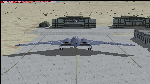
The B-2A Stealth Bomber is the most sophisticated aircraft on the planet. She is essentially a “Flying Wing†platform with no V-Tail, and is controlled by pre-programed flight computers stationed in various positions within the crew cabin and wings. There is one main computer that controls the aircraft, with two redundant back-up computers assigned to it in case of failure. All additional computers are assigned to functions involving flight control, system monitoring, data communications, and radar. Engine and Aerodynamic effects are controlled by these computers which serve several actuators and ailerons, including the spoilerons, which further compensate for the lack of a V-Tail. In theory, and because of these computers, the aircraft is “Stall-Proofâ€. The only way it can stall is if the computers fail. There is no way she can be flown without the computers active. The REAL aircraft does almost everything based on pre-programed data, other than taxi to the runway (although this is also possible to program). Before each flight, the Mission is designed and then assigned to the Mission Flight Box (Portable Computer) which is then carried by the Commander to the aircraft, and the data from the box is “transferred†to the main on-board computers. Because of this, the B-2 cannot be flown until the box is ready for the mission, and pilots cannot simply jump in and fly her, with the exception that the data is transferred via satellite. Everything is pre-planned, and this takes several hours. Once the data is on-board, the taxi can begin. When lined-up on the runway, all the pilot needs to do is push a button or three. Everything else is computer controlled until landing. The aircraft CAN be flown manually with basic data inputs into the main computer systems, but even in that case it is not conventional. If a pilot wants to turn right, he sets the data to turn to a certain degrees of heading. The same with climb and descent, speed increase or decrease. A pilot cannot over-ride the computers in any case, so steep banks, climbs, or descents cannot be forced. There is a lot of space for the two member crew within the cockpit, but there is also a space reserved for one observer. This additional seat is known as “Suicide Position†because there is no ejection seat for that observer. In the event of a mishap, the observer can try to bail-out through the ejection hatches after the pilots, or can try the exit ramp door, or the bomb bay as an exit route. The odds of escape for the observer are very small, but he has a parachute as reassurance. Otherwise, what the crew does during missions is only a guess, since they really don't have to do anything unless an alarm goes off. Since the plane flies so smooth, we can only imagine what sort of things they may dream-up to entertain themselves during a long flight. High altitude flights are conducted at night mainly due to the obvious contrail such a flight will exhibit during the day with such hot engines. The engines are encased in a heat absorbing shield material (still exhaust exists), and the rest of the plane is coated with Radar absorbant material, with the additional low profile effect of the aircraft design itself. If it can be seen by the ground or a fighter, it can be attacked by fighters or the ground. During daytime flight they will stay below the contrail level, and monitor the radar systems in preparations for counter-measures. If a fighter can visually observe them, the fighter may be able to shoot them down with bullets from behind, but not likely with missiles because of the sophisticated counter-measures available. On Radar the aircraft appears the size of a pigeon, until about 8 to 10 miles away, which would be too late to counter from the ground, so most attacks are either done at night or during the day at very low altitude. Upon landing the aircraft is automated down to about 200 feet AGL, when the pilot takes command. All she/he does at this point is allow her to glide down and contact the runway, and retard the engines. Brakes are used to slow, then the computers are turned off, and the pilot can control the throttles, nose gear, and brakes. The Commander watches for obstructions, mainly, and communicates with the tower and ground crew. Everything in this model has been reconfigured to meet realistic standards, without any tricks or flight tuning, and following real world aerodynamic principals and available data, including MOI. The panel requires study before use, but very realistic. The sounds are very authentic. There is no other model offered anywhere that compares to what you have now available in front of you. Please read and study the Readme.txt file within the main folder before attempting to fly this 2.2 Billion Dollar aircraft. Yes, that's correct ... $2,200,000,000 each! The use of this model, and the configuration of such, is designed for educational purposes, and protected by the Free Use Act: (https://www.law.cornell.edu/uscode/text/17/107). The Authors will not approve redistribution for monetary purposes. Original aircraft design by Alphasim; VC Adaptation, panels and gauges by Philippe Wallaert; Sound by Ruggero Osto; REAL WORLD Engine/Aerodynamics, data and effects by Douglas E. Trapp ([email protected]) June 2018
| Filename: | B2A_Spirit_Stealth_Bomber.zip |
| License: | Freeware |
| Added: | 2nd June 2018, 17:16:30 |
| Downloads: | 1,040 |
| Author: | Douglas E. Trapp |
| Size: | 14.81 MB |


© 2001-2026 AVSIM Online
All Rights Reserved
Privacy Policy |