
Where Flight Simulation Enthusiasts Gather from Around the World!
AVSIM Library - Search Results

| Category: Microsoft Flight Simulator (2020) - Utilities | |
| WorkingTitleCJ4_LINDA_Module_ByJujunet_v0.2 |

|
File Description:
This module allows to use hidden controls of the default MSFS CJ4, using FSUIPC and LINDA software. Require : FSUIPC ver 7 full licence, Microsoft Flight Simulator and LINDA software. Installation : Uncompress archive in any place. Move CJ4.hvar on \Community\fsuipc-lvar-module\modules On LINDA software : Click on "Maintenance", on top, select "--aircrafts--". Click on "Select Source Folder", below "Import Aircraft Module", browse to the folder CJ4, click on "Import", or "Overwrite" if updating. This module for Linda freeware allows to bind : - Menu choice, menu inc/dec and puch : bind a key to browse to all screen menus, and scroll with an encoder to move up and down inside the menus. Push a key to validate. - Map zoom in/out - Terrain/WX - PFD functions (FRMT/TFC/NAV) - Seatbelt light - Safety light - Baro inc/dec - Baro std - AP modes : FLC, HDG, ALT, VS, APPR and Toga button. To create your own module, or customize this one, go to my Youtube Tutorial : My channel : https://www.youtube.com/channel/UCVgdlnaAk2Q4EOSCICW_0iA Changelog : Version 0.2 : Correction to working with the default CJ4 since AAU1 update, the Working title mod no longer exist.
| Filename: | WorkingTitleCJ4_LINDA_Module_ByJujunet_v02.zip |
| License: | Freeware |
| Added: | 16th January 2024, 14:29:33 |
| Downloads: | 37 |
| Author: | Julien GICQUIAUD |
| Size: | 6.35 KB |
| Category: Flight Simulator 2004 - Panels | |
| F16 |
|
File Description:
FS2004 Panel, F16 Air Show Tour. The panel of this jet fighter has been designed for cross country flying to events worldwide. The 2D cockpit is packed with new gauges that complement this high performance, yet docile aircraft. All gauges, lights, etc. are functional, easy to read, and are panel installed except GPS 500. For long distance flights, the panel contains on-demand refueling capabilities for both ground and air operations. A few of the new gauges are; 180-degree scan navigational radar, triple mode interceptor-refueling-terrain radar, refueling gauge with command screen, fuel center with time/distance remaining computer, new Descentometer for Mach-plus aircraft, analog engine gauges including thrust and fuel efficiency, plus a hangar full of warning and indicator lights. The intercept mode of the ai-radar feeds info to the autopilot to assist in the rendezvous with tanker to allow all-weather, day or night air refueling. Digital data for AP, radio, altimeter, timer, and Descentometer is input via a central keypad. Acknowledge ATC instructions using joystick. Designed for use with Kirk Olsson's F16 Viper. Includes 15 page illustrated instructions plus Intercept and Refueling tutorial. By Glenn Copeland
| Filename: | F16.zip |
| License: | Freeware |
| Added: | 12th January 2007, 03:00:43 |
| Downloads: | 5,781 |
| Author: | Glenn Copeland |
| Size: | 1.83 MB |
| Category: Flight Simulator 2004 - Aircraft Repaints, Textures and Modifications | |
| Virgin Atlantic "Dream Girl" Boeing 787-9 Dreamliner (G-VAHH) |
|
Images related to this file:
File Description:

Virgin Atlantic is a British airline with its head office in Crawley, West Sussex, England. The airline was established in 1984 as British Atlantic Airways, and was originally planned by its co-founders Randolph Fields and Alan Hellary to fly between London and the Falkland Islands. Soon after changing the name to Virgin Atlantic Airways, Fields sold his shares in the company after disagreements with Richard Branson over the management of the company. The maiden flight from Gatwick to Newark Liberty International Airport took place on 22 June 1984. The airline along with Virgin Holidays is controlled by a holding company Virgin Atlantic Limited which is owned 51% by the Virgin Group and 49% by Delta Air Lines.
Virgin Atlantic livery painted on Tenkuu Developers Studio (TDS) Boeing 787-9 Rolls Royce Trent 1000 model. The textures are saved in 32bit format for quality graphics. Textures are also characterized by HD (High Definition). Its features are idle-reverser animation, animated pack vents and pressurisation outflow valve, detailed textures, accurate paint, dynamic shine & effects, dynamic flexing wings that respond to turbulence, fully independent suspension, trim animation, gear steering, accurate flight dynamics, spoiler animation, reflective cockpit windows, improved wingflex code with input from several new parameters including ground spoilers, fuel load, and angle of attack, transparent navigation light lenses and many more. REPAINT TEXTURES ARE ALSO COMPATIBLE WITH THE FSX MODEL (needed).
Visit our Facebook page "Sky Level Textures" for news, updates and previews on my future repaint projects. Thanks for downloading & Happy flying. HD GAMING EXPERIENCE inside. https://www.facebook.com/SkyLevelTextures
| Filename: | Virgin_Atlantic_Dream_Girl_Boeing_7879_Dreamliner_.zip |
| License: | Freeware |
| Added: | 29th April 2015, 04:38:35 |
| Downloads: | 2,376 |
| Author: | Giacomo Tomasini | Sky Level Textures | Tenkuu Developers Studio (TDS) |
| Size: | 24.09 MB |
| Category: X-Plane - Utilities | |
| X-Camera 2.2.1 |
|
Images related to this file:
File Description:
The X-Camera 2.1.1 plugin for X-Plane 9 and 10 is a replacement camera system that lets you define multiple view categories and multiple views within those categories that are associated with specific aircraft. X-Camera is similar to EzDok for FSX only for X-Plane. Watch this short X-Camera demo on YouTube: https://www.youtube.com/watch?v=PgOxG8ejq9A
Each view can have options:
- TrackIR:
Each view can enable or disable the TrackIR input. If the view is out the cockpit window having TrackIR enabled is desirable. However, if the view is a close-up of an instrument panel then having TrackIR disabled is probably the better choice since the view will be stable making it easy to click on cockpit controls with the mouse. We also support LinuxTrack on Linux and Mac systems.
- HeadShake:
If the HeadShake plugin from SimCoders is installed then the view can accept input from HeadShake. Similar to the TrackIR feature you will likely want this enabled for certain views but disabled for views on instrument panel close-ups where a stable camera makes it easier to use a mouse to control cockpit knobs and switches. The HeadShake plugin must be at version 1.3 or higher for the integration to work.
- Scenic Flyer:
If the Scenic Flyer plugin from Digital Avionics is installed then the view can choose to display either the Scenic Flyer Glass panel or GA panel.
- Smooth Transition:
When this option is enabled the camera with smoothly transition from one view to another over approximately half a second. When the option is off the view will transition immediately.
- Views can be controlled in a number of ways:
> Each view can be positioned by using keyboard keys or a control panel
> The camera'™s X, Y, Z, Heading, and Pitch can all be adjusted for each view
> Views can be assigned to a HotKey or JoyStick button for easy selection
> HotKey or JoyStick button can be used to navigate to next or previous views
> The views for a specific aircraft can be saved to a CSV file for easy editing
- Walk Mode:
Any view'™s camera can be placed in Walk Mode. While in this mode the camera can be walked or floated around using keyboard input. If you ever played the video game asteroid that is what walk mode is like. The mode is particularly useful for pre-flight inspections of your aircraft. You can create a external view and after selecting that view you can "Walk" the camera around checking out your landing gear, props, etc.
- Linear Transitions and Auto Advance:
Linear transitions allows you to define a transition between two adjacent cameras in category. This capability, in conjunction with the auto advance feature, allows you define fairly sophisticated animations that can be used for automated Pre-flight inspections, scenery viewing, and cool transitions affects that can be used when creating flight videos. All the transitions in our YouTube video were done with X-Camera.
- Bezier Curve Transitions:
Bezier curve transitions allows you to define a transition between three or more adjacent cameras in a category. This capability, in conjunction with the auto advance feature, allows you define fairly sophisticated animations that have an ultra smooth movement between the curve control points.
- Many Unique Camera Attributes:
Tracking Cameras - Camera Leveling - Smooth Camera Joining - Auto Advance to the Next Camera - Individual Zoom and Field of View Setting - External Cameras - Free Cameras - Target Following Cameras - Cineflex Cameras - Automatically Generate Unique Orbit and Fly-By Animations
X-Camera can create unique orbit and fly-by camera sequences by providing a few key parameters
- Airport Cameras:
You can define a set of free cameras associated with an airport. You can create up to 2,000 cameras per airport. X-Camera can also automatically populate airport cameras by reading the airport scenery files and creating cameras at runways, starting locations, taxiway signs, and airport viewpoints. You can map a joystick button to quickly switch between your aircraft camera set and the nearest camera at the nearest airport.
- Target Following Cameras:
Targets are locations defined by a latitude, longitude, and elevation in meters. Target following cameras are a special type of external camera that is attached to your plane and it has the ability to track a selected target. You can also view the target reciprocal which as a view from the target back to you plane.
X-Camera Tutorial Videos: There is also a four part series of tutorial videos that will help you get started with X-Camera. You can access them from the X-Camera Tutorial Page: https://www.stickandrudderstudios.com/x-camera-tutorial-videos/
The full manual is included in the zip file you can also view it here: https://www.stickandrudderstudios.com/downloads/User_Guide.pdf
| Filename: | XCamera_221.zip |
| License: | Shareware, limited functionality |
| Added: | 27th January 2017, 15:14:21 |
| Downloads: | 478 |
| Author: | Mark Ellis |
| Size: | 4.61 MB |
| Category: Flight Simulator X - Aircraft Repaints, Textures and Modifications | |
| A330-200 KLM New Livery (PH-AOM) |
|
Images related to this file:
File Description:
KLM new livery for the BlackBox A330 v0.85 and up. This livery is of the new KLM livery introduced in 2015. PH-AOM is an A330-200 of KLM painted in the new colors. This repaint has been tested in FSX not P3D (though it should work). The repaint has its own Engine Spinners which replace the default spinners from the BlackBox aircraft. It also has its own door outlines and fuselage markings. READ the "readme.txt" before taking any action on the file. This repaint is HD and requires the Max texture load (in the FSX.cfg) to be set to 4096 before usage. If this is not set, the aircraft will work but the quality will not be high. I have included some routes that the A330 flies in the "readme.txt" file. Enjoy your flights!
| Filename: | A330200_KLM_New_Livery_PHAOM.zip |
| License: | Freeware, limited distribution |
| Added: | 28th April 2020, 19:05:41 |
| Downloads: | 460 |
| Author: | Neel Pillai |
| Size: | 6.49 MB |
| Category: Flight Simulator 2004 - Aircraft Repaints, Textures and Modifications | |
| Thomson Airways Boeing 757-28A WL (G-OOBE) |
|
Images related to this file:
File Description:

This (FS9 Version) repaint is part of my Very High Accuracy re-releases which are repaints I've spent over 2 months painting and feature very accurate details such as re-painted door labels & realistic colours. It is one of the most accurate repaints you'll find for the Thomson 757! The colours are very accurate.
This in particular is a VERY high accuracy non-fictional repaint of Thomson Airways' 757-200 aircraft: G-OOBE. This repaint is compatible with the QualityWings Ultimate 757 Collection (Which can be found here: http://qwsim.com/ ). This repaint should ONLY be used in FS2004 - Please refer to my other Repaint which is the original HD repaint this is converted from! Instructions on how to install the repaint are located within the zip file.
Compatibility: FS2004 ONLY.
| Filename: | Thomson_Airways_Boeing_75728A_WL_GOOBE.zip |
| License: | Freeware, limited distribution |
| Added: | 19th September 2014, 00:12:34 |
| Downloads: | 586 |
| Author: | Christopher Evans |
| Size: | 20.59 MB |
| Category: Flight Simulator 2004 - Scenery | |
| Sao Luis (Brazil) - Photoreal |
|
Images related to this file:
File Description:
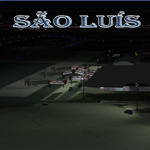
Sao Luis is a Brazilian city, capital of Maranhao state, founded on September 8, 1612. It is located on the island Upaon-Acu (the name was given by the Indians tupinambas meaning "Big Island"), South Atlantic, between the bays of San Marcos and San Jose. It is one of three Brazilian state capitals located on islands (the others are Florianopolis and Vitoria). The scenery contains:
Photoreal of Sao Luis island with hand placed autogen; Marechal Cunha Machado Intl. Airport photoreal in HD; real lighting effect; grass textures; AZL with detailed buildings and hangars; ground support vehicles; detailed terminal with fingers; ships on the coast; Itaqui harbor.
# Courtesy of Marco Santiago (Addons): Bridges Pres. Sarney, Bandeira Tribuzi and the Estreito dos Mosquitos; Terminal de Integracao BR; Alexandre Raposo aerodrome; CAVU aerodrome (Ultralight).
| Filename: | Sao_Luis_Brazil__Photoreal.zip |
| License: | Freeware, limited distribution |
| Added: | 4th December 2010, 03:58:01 |
| Downloads: | 2,733 |
| Author: | Jorge Amengol |
| Size: | 60.29 MB |
| Category: Flight Simulator X - Aircraft Repaints, Textures and Modifications | |
| RAF 322 "Dutch" Squadron Supermarine Spitfire Mk IX (3W-B, MK265) |
|
Images related to this file:
File Description:
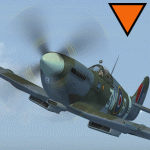
This packet includes one repaint of the Supermarine Spitfire IX, of Royal Air Force 322 "Dutch" Squadron. Serial 3W-B, MK265. Which was the aircraft of the squadron leader at that time.The MK265 was operated by the 322 Sqn between August and November of 1944.
To be used with the payware Spitfire 2008 from RealAir Simulation.
Buy it here: http://realairsimulations.com/list_box.php?page=spit08_buynow
The Realair repaintkit was used for making this repaint. The following items were done extra:
- Redone all stencils and added lots more, so far i could find information and pictures on the internet;
- Pilot is repainted completely;
- Redone some bump-maps for some more detail (with RealAir approval);
- Several textures are now HD, 2048x2048 pixel for more detail.
| Filename: | RAF_322_Dutch_Squadron_Supermarine_Spitfire_Mk_IX_.zip |
| License: | Freeware, limited distribution |
| Added: | 20th June 2014, 21:11:19 |
| Downloads: | 264 |
| Author: | Marcel Ritzema |
| Size: | 6.9 MB |
| Category: Flight Simulator 2004 - Aircraft Repaints, Textures and Modifications | |
| Eastern Air Lines, Douglas DC-7B (N836D) |
|
Images related to this file:
File Description:
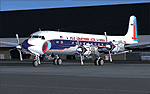
Eastern Air Lines, Douglas DC-7B (N836D) livery for FS9/FSX - This aircraft in real life has been lovingly restored by the Historical Flight Foundation (HFF). It has recently been approved for flight by the FAA, and should be seen at airshows soon.
The HFF is unique in that its Douglas Aircraft Co. DC-7B aircraft represents the only U.S. based, four engine, passenger prop-liner in operation today. The aircraft being operated by the HFF was still in its original passenger configuration as delivered to Eastern Air Lines in January 1958. Of the 112 DC-7 aircraft produced, this is the only surviving passenger configuration aircraft. You can read more about this aircraft and get all the latest news at: http://www.n836d.com/
THIS FLIGHT SIMULATOR VERSION:
This livery is a re-creation of the aircraft restored by the HFF, and is accurate as of April 2010. It uses a special model created by Tom Gibson, to allow an accurate livery layout on the nose and nose gear doors. Please follow the installation instructions carefully. You'll need to download and install the CalClassic Domestic DC-7B - the American Airlines DC-7B Base Pack: www.calclassic.com/dc7b.htm
For details about the FS plane, please refer to the DC7B2K4.TXT file in the Domestic DC-7B zip file.
| Filename: | Eastern_Air_Lines_Douglas_DC7B_N836D.zip |
| License: | Freeware |
| Added: | 29th April 2010, 09:47:43 |
| Downloads: | 1,038 |
| Author: | Eric Joiner, Tom Gibson, Greg Pepper, Jens Kristensen |
| Size: | 8.46 MB |
| Category: Flight Simulator X - Scenery | |
| RAF Kirton in Lindsey - Lincolnshire, England |
|
File Description:
It appears to have been an RAF habit (inherited from the RFC to name its bases after the nearest railway station, possibly to simplify the process of issuing Rail Warrants to personnel posted there. By that token, the site should be RAF Kirton Lindsey, Kirton Lindsey being the name of the nearby railway station constructed in 1849. No.255 Squadron's Operations Record Book (ORB) consistently uses that version of the name. So does the airfield's separate ORB, from the date of the site's WWII creation (15 May 1940) through to May 1941. After mid-1941 and the departure of No.255 Squadron, use of RAF Kirton-in-Lindsey. Kirton in Lindsey begins to appear in the site's own records – eventually dominating.
On 25 March 2013 it was announced to dispose of the airfield and technical facilities with only accommodation remaining. The airfield used to host No. 1 Air Control Centre (1ACC), the RAF’s only deployable ground-based early warning and air control radar unit, which was parented by RAF Scampton
The Station has had a varied selection of personnel occupying it, the RFC, RAF, USAAF, and before becoming an RAF Station for the last time it was the home of the Royal Artillery Regiment responsible for operating the Rapier sam. The Station finally closed in 2013.
| Filename: | RAF_Kirton_in_Lindsey__Lincolnshire_England.zip |
| License: | Freeware |
| Added: | 29th October 2015, 23:44:17 |
| Downloads: | 161 |
| Author: | Terry Boissel |
| Size: | 19 KB |


© 2001-2026 AVSIM Online
All Rights Reserved
Privacy Policy |