
Where Flight Simulation Enthusiasts Gather from Around the World!
AVSIM Library - Search Results

| Category: Flight Simulator 2004 - Scenery | |
| EDDB Berlin Brandenburg Airport 2012 |

|
Images related to this file:
File Description:
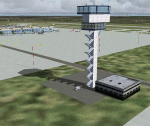
This is an update of my FS2004 freeware scenery for EDDB, BER (former
Berlin Schoenefeld after its extension to Berlin Brandenburg Airport).
Changes:
- Updated taxiway and apron positions according to AIP docs I got
in 2012 (thanks to Benjamin).
- Updated ILS (has DME) and approach routes with official waypoints taken from
this docs.
- Remove of EDDT and EDDI (EDDI already closed, EDDT should be closed 2012/6/3).
- Rebuild the old GAT area (the planned cargo area there isn't built yet),
updated layout as everything is built by now.
- New tower and SMR (Surface Movement Radar) towers.
- Corrects small errors (taxi labels, lines, lights).
- Parking spots at apron E.
- Modified colours of pier buildings.
Gernot Zander, [email protected], 2006-08-07, 2011-09-20, 2012-05-01
| Filename: | EDDB_Berlin_Brandenburg_Airport_2012.zip |
| License: | Freeware |
| Added: | 6th May 2012, 23:47:08 |
| Downloads: | 4,838 |
| Author: | Gernot Zander |
| Size: | 4.82 MB |
| Category: Flight Simulator X - Gauges | |
| Boeing 727-100/200 Various Fixes Ver2.0 |
|
File Description:
NEW for this version: Throttle control via the EPR setting bugs during cruise - Disabling of selected features.
The following are corrections or added enhancements to the Captain Sim B727-100/200/F:
-1 Airspeed Indicator Enhancement
-2 ADI & Flight Director Corrections
-3 A/P Enhancement for Flight Director
-4 Radar Altimeter Fix
-5 TAT Display toggle via DME Indicators
-6 Trim Sensitivity Fix (Optional)
-7 Auto Setting of Altimeter Alert (Optional)
-8 Auto setting of Take-off Elevator Trim (Optional)
-9 GPWS Switch Fixed (Optional)
-10 NAV/GPS toggle via Marker Beacon Sensitivity Switch (Optional)
-11 EPR Bug Setting Knob & Display Fixed
-12 Throttle Control via EPR Bug Setting Knob Fixed (Auto Mode)
-13 Maximum Continuous Thrust (MCT) drives EPR Bugs (Manual Mode)
| Filename: | Boeing_727100200_Various_Fixes_Ver20.zip |
| License: | Freeware, limited distribution |
| Added: | 31st May 2015, 21:04:54 |
| Downloads: | 1,819 |
| Author: | Paul Tally |
| Size: | 5.29 MB |
| Category: Flight Simulator X - Scenery Design | |
| SLLP El Alto Intl. Airport LA PAZ Bolivia FSX |
|
File Description:
¿Do you want to know what is like to take off and land in a high altitude airport?
SLLP LA PAZ Airport is waiting you!
We added some fictional buildings to this airport; was built with fsx elements (acceleration pack) so no more textures will be needed
than the lights and the radar whose credits have been indicated inside the delivery.
The city environment, taxiways, terminal, the hangar yards and scrap yards have been improved,
the approach points have been controlled according to the air navigation charts, adding D5.5 PAZ for SID.
It has two cargo parking, gates, jetways, and ramps for smaller aircraft etc.
It has a fixed and transported fuel service, as well as mobile jetways by default, pushback service,
and an environment suitable for the large area of this large Latin American airport. Aero charts included.
Enjoy it!
| Filename: | SLLP_El_Alto_Intl_Airport_LA_PAZ_Bolivia_FSX.zip |
| License: | Freeware |
| Added: | 6th December 2020, 23:50:55 |
| Downloads: | 1,850 |
| Author: | Cristóbal Laje Ros |
| Size: | 28.88 MB |
| Category: Flight Simulator X - Scenery | |
| EDDB Berlin Brandenburg Airport 2011 |
|
Images related to this file:
File Description:

This is an update of my FSX freeware scenery for EDDB, BER (former
Berlin Schoenefeld after its extension to Berlin Brandenburg Airport).
Changes:
- Updated taxiway and apron positions according to AIP docs I got
in 2012 (thanks to Benjamin).
- Updated ILS (has DME) and approach routes with official waypoints taken from
this docs.
- Remove of EDDT and EDDI (EDDI already closed, EDDT should be closed 2012/6/3).
- Rebuild the old GAT area (the planned cargo area there isn't built yet),
updated layout as everything is built by now.
- New tower and SMR (Surface Movement Radar) towers.
- Corrects small errors (taxi labels, lines, lights).
- Parking spots at apron E.
- Modified colours of pier buildings.
Gernot Zander, [email protected], 2006-08-07, 2011-09-20, 2012-05-01
| Filename: | EDDB_Berlin_Brandenburg_Airport_2011.zip |
| License: | Freeware |
| Added: | 6th May 2012, 23:57:24 |
| Downloads: | 15,035 |
| Author: | Gernot Zander |
| Size: | 4.75 MB |
| Category: Flight Simulator X - Original Aircraft | |
| B-2A Spirit Stealth Bomber |
|
Images related to this file:
File Description:
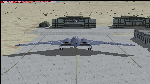
The B-2A Stealth Bomber is the most sophisticated aircraft on the planet. She is essentially a “Flying Wing†platform with no V-Tail, and is controlled by pre-programed flight computers stationed in various positions within the crew cabin and wings. There is one main computer that controls the aircraft, with two redundant back-up computers assigned to it in case of failure. All additional computers are assigned to functions involving flight control, system monitoring, data communications, and radar. Engine and Aerodynamic effects are controlled by these computers which serve several actuators and ailerons, including the spoilerons, which further compensate for the lack of a V-Tail. In theory, and because of these computers, the aircraft is “Stall-Proofâ€. The only way it can stall is if the computers fail. There is no way she can be flown without the computers active. The REAL aircraft does almost everything based on pre-programed data, other than taxi to the runway (although this is also possible to program). Before each flight, the Mission is designed and then assigned to the Mission Flight Box (Portable Computer) which is then carried by the Commander to the aircraft, and the data from the box is “transferred†to the main on-board computers. Because of this, the B-2 cannot be flown until the box is ready for the mission, and pilots cannot simply jump in and fly her, with the exception that the data is transferred via satellite. Everything is pre-planned, and this takes several hours. Once the data is on-board, the taxi can begin. When lined-up on the runway, all the pilot needs to do is push a button or three. Everything else is computer controlled until landing. The aircraft CAN be flown manually with basic data inputs into the main computer systems, but even in that case it is not conventional. If a pilot wants to turn right, he sets the data to turn to a certain degrees of heading. The same with climb and descent, speed increase or decrease. A pilot cannot over-ride the computers in any case, so steep banks, climbs, or descents cannot be forced. There is a lot of space for the two member crew within the cockpit, but there is also a space reserved for one observer. This additional seat is known as “Suicide Position†because there is no ejection seat for that observer. In the event of a mishap, the observer can try to bail-out through the ejection hatches after the pilots, or can try the exit ramp door, or the bomb bay as an exit route. The odds of escape for the observer are very small, but he has a parachute as reassurance. Otherwise, what the crew does during missions is only a guess, since they really don't have to do anything unless an alarm goes off. Since the plane flies so smooth, we can only imagine what sort of things they may dream-up to entertain themselves during a long flight. High altitude flights are conducted at night mainly due to the obvious contrail such a flight will exhibit during the day with such hot engines. The engines are encased in a heat absorbing shield material (still exhaust exists), and the rest of the plane is coated with Radar absorbant material, with the additional low profile effect of the aircraft design itself. If it can be seen by the ground or a fighter, it can be attacked by fighters or the ground. During daytime flight they will stay below the contrail level, and monitor the radar systems in preparations for counter-measures. If a fighter can visually observe them, the fighter may be able to shoot them down with bullets from behind, but not likely with missiles because of the sophisticated counter-measures available. On Radar the aircraft appears the size of a pigeon, until about 8 to 10 miles away, which would be too late to counter from the ground, so most attacks are either done at night or during the day at very low altitude. Upon landing the aircraft is automated down to about 200 feet AGL, when the pilot takes command. All she/he does at this point is allow her to glide down and contact the runway, and retard the engines. Brakes are used to slow, then the computers are turned off, and the pilot can control the throttles, nose gear, and brakes. The Commander watches for obstructions, mainly, and communicates with the tower and ground crew. Everything in this model has been reconfigured to meet realistic standards, without any tricks or flight tuning, and following real world aerodynamic principals and available data, including MOI. The panel requires study before use, but very realistic. The sounds are very authentic. There is no other model offered anywhere that compares to what you have now available in front of you. Please read and study the Readme.txt file within the main folder before attempting to fly this 2.2 Billion Dollar aircraft. Yes, that's correct ... $2,200,000,000 each! The use of this model, and the configuration of such, is designed for educational purposes, and protected by the Free Use Act: (https://www.law.cornell.edu/uscode/text/17/107). The Authors will not approve redistribution for monetary purposes. Original aircraft design by Alphasim; VC Adaptation, panels and gauges by Philippe Wallaert; Sound by Ruggero Osto; REAL WORLD Engine/Aerodynamics, data and effects by Douglas E. Trapp ([email protected]) June 2018
| Filename: | B2A_Spirit_Stealth_Bomber.zip |
| License: | Freeware |
| Added: | 2nd June 2018, 17:16:30 |
| Downloads: | 1,038 |
| Author: | Douglas E. Trapp |
| Size: | 14.81 MB |
| Category: Flight Simulator 2004 - Panels | |
| Flight1 ATR72 PANEL Enhancement -FAPE- |
|
File Description:
What FAPE does for you??
1) FAPE adds about 50 new clickspots to make easier the opening/closing of every panel window, following GUI ergonomical rules. You won't move your mouse anymore to open popup panels.
2) FAPE adds a clickspot to display the RealityXP500 Weather Radar (if you own it, of course).
3) FAPE integrates Rob Barendregt's nice Pushback gauge within the center panel.
4) FAPE displays the FMS in a smaller size and in the right bottom corner of the screen.
5) FAPE allows using the Panel Controller Window (panel icons) from the VFR window configuration, so you will be able to open every other panel from the VFR panel.
WARNING: THIS FILE IS ONLY FOR FLIGHT1 ATR72 OWNERS (GO AND BUY IT, IT'S A FANTASTIC AIRCRAFT!!) USING THE BROWN CONDENSED PANEL. UPON SIMMERS DEMAND I WILL DO THE SAME FOR THE BLUE CONFIG.
Enjoy!
| Filename: | Flight1_ATR72_PANEL_Enhancement_FAPE.zip |
| License: | Freeware |
| Added: | 10th November 2004, 14:02:26 |
| Downloads: | 2,500 |
| Author: | David Roch |
| Size: | 911.88 KB |
| Category: Flight Simulator 2004 - Miscellaneous Files | |
| Active ILS - KIAH (G Bush Intercontinental/Houston Airport) |
|
File Description:
As most know initiating the ILS at certain airports for AI Traffic is not a function at this time when using AFCAD2. If you add a new ILS runway to an airport such as KIAH (G Bush Intercontinental/Houston Airport 8L/26R) only the user aircraft can use this runway when visibility falls below 3 miles. ATC will no longer use this runway for AI Traffic because FS9 sees it as a visual runway and will now vector your AI Traffic back to 8R/26L which is also a Terminal departure runway. This file adds all NAVAIDS for making 8L/26R a Precision Instrument Runway by adding all the radar fixes for both the ILS approach portion and the proper missed approach procedures, altitudes and intersections as per current published plates. All AI Aircraft will now continue to use 8L/26R when Airport conditions are less than 3 miles.
| Filename: | Active__ILS__KIAH_G_Bush_IntercontinentalHouston_Airport.zip |
| License: | Freeware, limited distribution |
| Added: | 19th June 2004, 07:15:30 |
| Downloads: | 2,031 |
| Author: | Jim Vile |
| Size: | 41.99 KB |
| Category: Flight Simulator 2004 - Panels | |
| VFR/Landing View for "Level-D Simulations: The 767" |
|
File Description:
After a lot of hard work, and help and advice from 757/767 captains, I'm proud to release this small add-on for "Level-D Simulations: The 767"! This view has been verified by pilot's to be close to the "real-thing"! I have created two styles of these panels. One with the Radar-Altimeter tape (like AAL and Delta use on their 767-300s) and one without (like UAL). Both were made to work more seemlesly with PIC 767. Landing your 767 will never be the same again... Special thanks to "Jake" at www.airliners.net; without his input and photos, this panel would not exist.
DISCLAIMER: THESE FILES ARE THOROUGHLY TESTED. HOWEVER, THEY ARE TO BE USED AT YOUR OWN RISK!!!
Level-D is not responsible for any modifications to their product. Send an E-Mail to [email protected] with any comments or technical difficulties!
| Filename: | VFRLanding_View_for_LevelD_Simulations_The_767.zip |
| License: | Freeware, limited distribution |
| Added: | 18th October 2005, 10:22:05 |
| Downloads: | 5,292 |
| Author: | Philip A. Geddes |
| Size: | 863.24 KB |
| Category: Flight Simulator 2004 - Scenery | |
| Kerkira Airport Enhancement |
|
File Description:
This is old scenery which has been updated for FS2004 and enhances the visual environment of Ionian sea island airport of Kerkira, also known as Corfu. Its part of my “Greek Airfields” package that currently is not fully compatible with FS2004 since MS decided to move the airports in Greece and elsewhere to adjacent positions and ASD, which I use for placing these objects, is not compatible with FS2004. Here you will find airport & terrain enhancements for Hellenic airport of Kerkira LGKR that make it look closer to the real one; hotels, runway turning bay, perimeter fences, windsocks, radio antennae, new approach radar antenna to the southwest and most importantly, an exclusion of autogen scenery that is wrongfully generated on each side of the runway. A big difference is attributed to Babis Peribolas’s Kerkira mesh terrain that is included in this scenery. Scenery includes the necessary ASD 2.1 textures.
| Filename: | Kerkira_Airport_Enhancement.zip |
| License: | Freeware, limited distribution |
| Added: | 4th September 2003, 02:23:06 |
| Downloads: | 12,178 |
| Author: | Kyprianos Biris |
| Size: | 1.94 MB |
| Category: Flight Simulator 2004 - AFCAD Files | |
| Brookhaven Airport, Shirley, New York (KHWV/WSH) V.2 |
|
File Description:
Description: Located on the south shore of LI, NY a small but large airport of plenty of people. Civil air patrol (Unites states Airfoce Auxilery). Airshows are there and is part of the great Dowling College Brookhaven Campus. Took me a long time. If you want you can add builings and other spots if you need to make it better. Atleast 150 parking spots all based on real maps and photos. Created using AFCAD2. V2. I added some taxiway and parking spots I left out from the 1st. I also added buildings using RWY 12. They Are not in right spots some of them. I had trouble. If any one knows of an easier program so that I can see them be placed pleas contact me at [email protected]. Thanx
| Filename: | Brookhaven_Airport_Shirley_New_York_KHWVWSH_V2.zip |
| License: | Freeware |
| Added: | 29th September 2005, 01:16:28 |
| Downloads: | 323 |
| Author: | James Hudson |
| Size: | 11.27 KB |


© 2001-2026 AVSIM Online
All Rights Reserved
Privacy Policy |