
Where Flight Simulation Enthusiasts Gather from Around the World!
AVSIM Library - Search Results

| Category: Flight Simulator X - Gauges | |
| TR727_Gauge_Update.zip |

|
File Description:
This is an engine gauge(xml gauge)update for Thomas Ruth's new 727 model for FSX (tom7271.zip ). The gauge update changes the N1, N2, & EGT engine gauge calibration to reflect gauge readings within the normal and maximum ranges at TOGA(Take Off/Go-Around),MCT(Maximum Continuous thrust), and Cruise thrust settings. The original gauge readings at higher throttle settings indicated high off-scale for N1, N2, and especially EGT. The new gauge/thrust ratios may not perfectly reflect real 727 JT-8D engine settings in sim but the intent was to limit the maximum ranges.
Thanks to Thomas Ruth for making such an excellent 727 freeware model for FSX and giving permission for posting this small update.
| Filename: | TR727_Gauge_Updatezip.zip |
| License: | Freeware |
| Added: | 15th February 2011, 23:57:45 |
| Downloads: | 1,163 |
| Author: | Bry Hardee/Thomas Ruth |
| Size: | 8.6 KB |
| Category: Flight Simulator X - Gauges | |
| PFD for Flight Instrument Panel |
|
Images related to this file:
File Description:
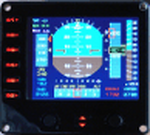
For Saitek Pro Flight Instrument Panel.
This Primary Flight Display (PFD) Glass type gauge provides following utilities:
1. Artificial horizon with sliding bug (yellow).
2. Moving tapes for: Air speed, Altitude, Heading.
3. Detail window for altitude.
4. Needle for vertical speed.
5. Glide slope and Localizer bars, they appear when in range of ILS only.
6. Digital values for: Total Air Temperature (TAT), QNH, Mach number, VOR 1 selected course, VOR 1 bearing, DME 1 range, Radio height altitude up to 2000 feet, above a bar go through the window, vertical speed, a minus sign appears when vertical speed is negative.
7. Autopilot bugs for: Selected altitude, Selected speed, Selected heading. Rmk: Bugs appear only when autopilot ALT, SPD or HDG functions are selected.
8. Display Autopilot functions with Text acronysm in yellow: AP, Autopilot Master On, THR, auto throttle mode engaged, SPD, air speed mode selected, HDG, heading mode selected, NAV, navigation mode selected (VOR 1), APR, approach mode selected, BC, back course mode selected.
9. Knobs functions: Right, allows to change QNH value. Left, allows to move VOR 1 course.
| Filename: | PFD_for_Flight_Instrument_Panel.zip |
| License: | Freeware |
| Added: | 23rd May 2011, 22:37:18 |
| Downloads: | 1,096 |
| Author: | Philippe Verhaege |
| Size: | 249.48 KB |
| Category: Flight Simulator X - Gauges | |
| Spool-Down and RMS Reset Fix Gauge Boeing B767 For Acceleration |
|
File Description:
This small invisible gauge, when added to the Level-D Simulations B767 panel, will prevent the spool-downs and FMS resets during engine start that occur when running the add-on in FSX with the Acceleration Pack installed. Requires registered FSUIPC V4.60 or later.
| Filename: | SpoolDown_and_RMS_Reset_Fix_Gauge_Boeing_B767_For_.zip |
| License: | Freeware, limited distribution |
| Added: | 2nd February 2011, 05:48:26 |
| Downloads: | 767 |
| Author: | Bob Scott |
| Size: | 8.06 KB |
| Category: Flight Simulator X - Gauges | |
| Moving Map Display |
|
File Description:
This is an adaptation of the FSX gps map in which I removed all the functions I didn't want. It simply displays the map with range rings and allows you to add or delete some of the standard items such as airspace boundaries, a compass ring, the ILS "feathers", etc.
| Filename: | Moving_Map_Display.zip |
| License: | Freeware |
| Added: | 7th February 2011, 00:41:51 |
| Downloads: | 982 |
| Author: | Bob Picht |
| Size: | 8.14 KB |
| Category: Flight Simulator X - Gauges | |
| Beech Baron engines gauge flaps landing gear and pitch trim for pf instrument panel |
|
File Description:
This gauge provides all essential engines' indications, engines RPM, Manifold pressure, fuel flow and also the fuel tanks levels, flaps positions, Pitch TRIM and landing gear position. Red needles are for left engine and green needles are for right engine.
Information in English and French
| Filename: | Beech_Baron_engines_gauge_flaps_landing_gear_and_p.zip |
| License: | Freeware |
| Added: | 27th March 2011, 02:39:20 |
| Downloads: | 587 |
| Author: | philippe verhaege |
| Size: | 160.05 KB |
| Category: Flight Simulator X - Gauges | |
| Update for HSI gauge for FIP - speed stripe added |
|
Images related to this file:
File Description:
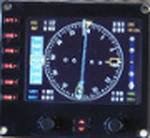
This is an update of hsi_glass.zip which provides a speed stripe on the left side and ADF bearing window is moved just below the course window (left up side).
This update has to be used with HSI_glass.zip file.
Two xml files are available for speed stripe. First with main steps of 5 KTS and up to 600 KTS. The xml file is named HSI_glass_IAS05_2011.xml and is convenient for light aircraft and heavy liner. Second with main steps of 10 KTS and up to 1200 KTS. The xml file is named HSI_glass_IAS10_2011.xml and is convenient for fighter.
| Filename: | Update_for_HSI_gauge_for_FIP__speed_stripe_added.zip |
| License: | Freeware |
| Added: | 9th April 2011, 20:36:25 |
| Downloads: | 734 |
| Author: | Philippe Verhaege |
| Size: | 106.63 KB |
| Category: Flight Simulator X - Gauges | |
| X-Gauge 2-D Panel Toggle Icon |
|
File Description:
2-D panel toggle icon for XGauge. Read the install.txt !!
Placement is for the default Boeing 737-800 panel but can be changed and used in any panel.
This can also be used in FS9.
| Filename: | XGauge_2D_Panel_Toggle_Icon.zip |
| License: | Freeware |
| Added: | 23rd July 2012, 16:15:21 |
| Downloads: | 464 |
| Author: | Dave Opper |
| Size: | 2.56 KB |
| Category: Flight Simulator X - Gauges | |
| V-One Gauge for Boeing 737-200/Adv Update |
|
Images related to this file:
File Description:

Update includes KG, LB, degrees C and degrees F functionallity. V-speed calculation accuracy improved.
| Filename: | VOne_Gauge_for_Boeing_737200Adv_Update.zip |
| License: | Freeware, limited distribution |
| Added: | 9th August 2012, 20:06:58 |
| Downloads: | 597 |
| Author: | Paul Tally |
| Size: | 14.27 KB |
| Category: Flight Simulator X - Gauges | |
| JELAIR - Pedal Free Auto Rudder for Helicopter - (20120514) |
|
Images related to this file:
File Description:
Addon for those who'd like to fly helicopters but have no rudder-pedals or joystick with rudder-axis. It is an XML gauge for FSX (it is not tested with FS2004 but may work there as well). The gauge is only tested on FSX/SP2. It's not an auto-pilot, but an auto-rudder. It doesn't make the helicopter any easier to fly than it is when using pedals, but it makes it possible to fly it without pedals using a 2-axis joystick only.
| Filename: | JELAIR__Pedal_Free_Auto_Rudder_for_Helicopter__201.zip |
| License: | Freeware |
| Added: | 13th May 2012, 08:56:05 |
| Downloads: | 382 |
| Author: | Jacob Larsen |
| Size: | 3.89 KB |
| Category: Flight Simulator X - Gauges | |
| VTOL/Hover addon (V4.0) for Tiltrotor |
|
Images related to this file:
File Description:
FSX Gauge: VTOL/Hover (V4.0) for Wilco Tiltrotor
This freeware package adds new V(S)TOL & Hover features to the Wilco BA609 Tiltrotor. This solution is based on overriding the normal FS flightdynamics when the nacelles are rotated out of the normal flight position; in short, it's a V(S)TOL&Hover FDE coded in a gauge. To use this addon, you need to have the (payware) Wilco Tiltrotor installed, and working, in FSX. The README includes extensive installation and flying instructions. By Rob Barendregt.
| Filename: | VTOLHover_addon_V40_for_Tiltrotor.zip |
| License: | Freeware, limited distribution |
| Added: | 23rd September 2012, 16:26:50 |
| Downloads: | 350 |
| Author: | Rob Barendregt |
| Size: | 19.24 KB |


© 2001-2026 AVSIM Online
All Rights Reserved
Privacy Policy |