
Where Flight Simulation Enthusiasts Gather from Around the World!
AVSIM Library - Search Results

| Category: Flight Simulator X - Aircraft Repaints, Textures and Modifications | |
| FSX/P3D Alisarda DC-9-14 1974 |

|
Images related to this file:
File Description:
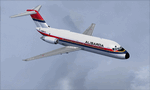
This is a repaint of the DC-9-14 in Alisarda colors. The freeware Eagle Rotorcraft Simulations' (George Arana) DC-9-10 native FSX conversion with VC, of Erick Cantu's DC-9-10, is needed for this repaint (Link provided). The textures are 32bit DDS. It was tested on FSX-SE, but should work on FSX & P3Dv3. Alisarda took purchase of two DC-9-14s from Delta Airlines, I-SARJ and I-SARV, both of which were delivered on 11 January 1974. These DC-9-14s were among the first Douglas produced DC-9s that were delivered to Delta Airlines in 1966. With 88 seats and a much longer reach than the Fokker F-27s, the DC-9s were used for charter flights to West Germany. A new color scheme was also introduced with the introduction of the DC-9s. The green with white was replaced by a red with blue and yellow color scheme. In addition to the two DC-9s, the only remaining F-27; I-SARQ, was also equipped with this new color scheme. The DC-9s were eventually replaced by leased DC-9-50s in 1981.
| Filename: | FSXP3D_Alisarda_DC914_1974.zip |
| License: | Freeware |
| Added: | 21st January 2020, 17:48:25 |
| Downloads: | 48 |
| Author: | Ted Giana |
| Size: | 3.62 MB |
| Category: Flight Simulator X - Aircraft Repaints, Textures and Modifications | |
| North American AT-6 Harvard (N3405) |
|
Images related to this file:
File Description:
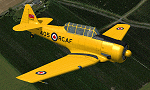
This is a repaint for the freeware Warwick "Wozza" Carter AT-6G Texan. This repaint depicts the restored Harvard Mk.4 RCAF Ser. 20405, N3405, registered to Yellow Canuck, LLC (Texas Flying Legends Museum). This aircraft began service with the Royal Canadian AF in 1952 and served until 1965. Although little information is readily available, it was reported that as of 1978, the aircraft was being stored, in original military configuration, in Mesa, Arizona. In about 2004 a ground-up restoration began in North Dakota and around 2011/2012 the aircraft was brought to Aircorps Aviation of Bemidji, Minnesota for completion. The aircraft has since been delivered to its current owner, painted in its original RCAF colors, and is an absolutely immaculate and authentic restoration throughout. The aircraft is one of 11 warbirds that the Texas Flying Legends Museum will be flying to Airventure 2013. This repaint includes all new exterior textures (including specular and bump maps), new engine and modified wheel well textures, and new and modified cockpit textures throughout. This repaint requires the files t6texmod.zip and fsds_t-6update.zip to be installed first.
| Filename: | North_American_AT6_Harvard_N3405.zip |
| License: | Freeware |
| Added: | 27th June 2013, 16:57:28 |
| Downloads: | 339 |
| Author: | John Terrell |
| Size: | 6.8 MB |
| Category: Flight Simulator 2004 - Scenery | |
| Iqaluit CYFB 2010 |
|
Images related to this file:
File Description:
Founded in 1942 as an American airbase, Iqaluit is now the capital city of the northern Canadian province of Nunavut. It is the smallest Canadian capital in terms of population and the only capital that is not connected to other settlements by a highway. The airport is of critical importance to the community, especially when ice makes boat travel impossible. At 62 degrees latitude (approx. the same as Yellowknife), Iqualuit offers some of the most severe weather you are likely to encounter at any airport, and has been used for cold weather testing of new airliners.
This version of Iqaluit is a complete rebuild of the default version. Almost all the buildings have been custom modeled based on photos. The design of the terminal building at Iqaluit is one of the coolest I've seen, and was the main inspiration for making this scenery. Due to its complexity many details had to be omitted, but hopefully I was able to at least capture some of its "Yellow Submarine" uniqueness. Ramp lights, fences, ground objects, arrestor cables (non-functional) and all the rest of the usual junk is included. Also Instrument Approach Plates.
| Filename: | Iqaluit_CYFB_2010.zip |
| License: | Freeware |
| Added: | 26th December 2010, 15:38:20 |
| Downloads: | 2,697 |
| Author: | Sidney Schwartz |
| Size: | 4.18 MB |
| Category: Miscellaneous Files - Demos from Commercial Vendors | |
| AirFx 06 (Commercial Demo) |
|
Images related to this file:
File Description:
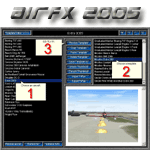
--Re-upload--
Imagine a low-level bombing run in Flightsim 02/04 only 3 MOUSE CLICKS AWAY.
The next generation of excitement is here, completely new inside and out.
Weapons, smoke writing, engine fires, and more EASY AS 1,2,3 with AirFx!
AirFx 06 makes the aircraft smoke system even easier to use.
Fully loaded with the new features everyones been asking for.
Includes a new html based help system with easy to understand graphics.
Demo includes FREE one full hour of flight-time in FlightSim with effects.
NEW AIRCRAFT EDITOR FEATURES:
Easy to use for the novice incredible time-saving features for the pro.
Import / Export FxPax effects packages for fast and easy sharing or backup.
Add your own exciting screenshots for easy template identification.
FxPax save your screenshot, effects, textures and smoke system settings.
Web enabled so you can download new effects packages, create and share your own FxPax.
NEW TEMPLATE EDITOR FEATURES:
The fastest and easiest way to position individual effects.
Revolutionary Aircraft Placement Matrix to easily place effects on your aircraft.
Error checking with auto-renumber and log for missing effect and texture files.
Copy paste cut insert functions.
Preview Multi or single line or full template.
Nudge buttons for easier effect placement.
This file is a Commercial Demo. DEMO VERSION LIMITATIONS: 1. No saving modified aircraft; 2. No FxPax Export; 3. No edit effects files; 4. 1 hour limit to FlightSim previews; 5. Nags
| Filename: | AirFx_06_Commercial_Demo.zip |
| License: | Commercial demo |
| Added: | 14th July 2010, 10:26:25 |
| Downloads: | 2,034 |
| Author: | Grant Bovee |
| Size: | 13.2 MB |
| Category: Flight Simulator X - Flight Plans | |
| Wrong Way Charlie |
|
File Description:
Charlie Hungsfinger Took off from KaraKose in Eastern Turkey in his
Yellow Piper Cub happy to fly his 87 take off in his Eastern Europe
VFR tour.After a great 400 ft high, mountain hopping flight he desided to land in
a little town he saw at his 3 O´clock to get some water something to eat and
directions for he knew he was lost. He called the tower at Karakose and told them of his intentions.
Two hours later Charlie was behind bars in an Iranian Army base....With a possible
International Incident about to happen!!!!!!
-----
A special Forces Team based in the Turkish Air Force Base of Van has been ordered
to get Charlie out of his prison as soon as possible...No
need for an Internatinal Incident due to Charlie´s "wrong way tour"!!!...
The Mission calls for an air drop near the army base, there will be 6 Special forces
dudes and their STALWART!!..Charlie, if gotten out will be driven back to the
border since it is to dangerous to land a plane at the Iranian Base!!! or near it.. No Way!!!
A very dangerous mission indeed!...on Four engines, a Stealth Fighter, 8 Wheels and tough boots!!!
| Filename: | Wrong_Way_Charlie.zip |
| License: | Freeware, limited distribution |
| Added: | 29th August 2007, 03:27:22 |
| Downloads: | 700 |
| Author: | Gera Godoy C |
| Size: | 298.66 KB |
| Category: Flight Simulator 2004 - Aircraft Repaints, Textures and Modifications | |
| FS2004/X PIA 747-367 AP-BFY "Ziarat" |
|
Images related to this file:
File Description:
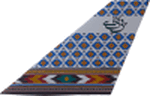
Pakistan International Airlines (PIA) B747-367 Megatop Jumbo, AP-BFY, titled "Ziarat - The City of Flowers". This aircraft, delivered to PIA in 1999, was previously B-HOM for Cathay Pacific Airways. Contains photoreal tail, accurately placed titles and door surround repainted to match the actual airplane. Engines repainted with large yellow stickers on the left side of the casing to match the actual airplane. Being a later model 747, unlike PIA's other 747s, AP-BFY is one without the HF wingtip antennas and a different style wing root and the relevant model has been included. Repainted on the stunning Project Opensky 747v4 Advanced model, with all updates till March 2010. Contains ground service vehicles, stairs,tow truck, catering trucks, luggage loaders and containers painted in standard PIA colors. Luggage containers specially repainted to give a more realistic look. Registration of the aircraft painted on the bottom of the left wing, as on the real airplane. Panel updated to include utility gauge and tow truck gauge. Updated model and fde. Complete pack,requires no external downloads. Textures in high quality 32 bit format to conserve quality. NOT tested in FSX, but should work fine. Repaint by Irfan Khan & Ahmed Ahsen, exclusively from Virtual PIA (WWW.VPIA.ORG)
| Filename: | FS2004X_PIA_747367_APBFY_Ziarat.zip |
| License: | Freeware, limited distribution |
| Added: | 25th March 2010, 18:29:43 |
| Downloads: | 427 |
| Author: | Ahmed Ahsen / Irfan Khan(Virtual PIA/WWW.VPIA.ORG) |
| Size: | 16.42 MB |
| Category: Flight Simulator X - AFCAD Files | |
| Alexandria Airport (N85), NJ |
|
File Description:
Located 02 miles W of Pittstown, New Jersey on 75 acres of land, Alexandria Airport handles small and medium GA craft as well as helicopters. The main parking area is at the southwest of the airport between the yellow lines - static aircraft are there to show you the parking arrangment. Collision with the three static aircraft in the parking area is disabled to make it easier to park next to them should you wish. AI will spawn in this area only. Craft with wingspans greater than 40 feet should not park here. There is additional space to park on the grass north of the airport and two open hangars are also available at the north tarmac. You can get fuel by stopping anywhere around the fuel tank on the east tarmac. Trees are summer ONLY.
Scenery constructed with use of satellite images/streetview, the author has not been there in person.
This scenery is meant to be used in conjunction with MegaScenery Earth New Jersey/Delaware 001. It is not required, but apron use is minimized to allow satellite scenery to show through as much as possible, and objects are placed based on the MSE textures - lack of it may make scenery look out of place.
| Filename: | Alexandria_Airport_N85_NJ.zip |
| License: | Freeware |
| Added: | 21st October 2010, 04:11:13 |
| Downloads: | 281 |
| Author: | Drew Sikora |
| Size: | 395.96 KB |
| Category: Flight Simulator 2004 - Gauges | |
| FS2004 GPS Map View Gauge v3.0 |
|
File Description:
The ultimate gauge. The Map will show: Airports details (Runways ID's, length & ILS), VOR's and NDB's frequencies,
Intersections and waypoints, Airspaces, Approaches and flight routes. You can toggle the view
you require for your flight. Also you can zoom in/out to see the nearest airports, vor's and
ndb's. The map will indicate A/C heading flightplan title and waypoints ID's.
Version 3 includes more enhancements such as the ability to input the ICAO code or name of any airport and the map will
show all the frequencies of that airport including ATIS, ILS, AND COM. In addition, the map will show the active
runway designations, length and width.
You can also input ICAO code of any VOR/NDB and the map will show their frequencies.
There was a bug in v2.0, in which if you enter ( click on ENT )the ICAO code of an airport, you will lose the flight
plan loaded. Now you can go back to the flight plan and with the NEXT/PREV buttons you have the choice of where to start
your FP.
The gauge will show Flight Plan Title, originating and destination airports, active waypoint, waypoint index and FP
crusing altitude.
I addition, the gauge will show various useful information, such as, Runway IDs, lenght, width and approach magnetic heading,
Airport name, city, and type. NAV1/2 names, codes, distances and ETA's, ADF1/2 names and codes.
Finally, the gaugee will show other information, such as, magvar, indicated airspeed, mach, ground velocity, ambient
wind velocity and direction, bank angle , and a/c altitude ( radio height ).
All the information above and much more on a single gauge window.
| Filename: | FS2004_GPS_Map_View_Gauge_v30.zip |
| License: | Freeware, limited distribution |
| Added: | 14th September 2005, 14:19:46 |
| Downloads: | 10,847 |
| Author: | Talal Alhaj |
| Size: | 710.05 KB |
| Category: Flight Simulator X - Gauges | |
| AP - Alt - VS MultiFuel Flaps v1 |
|
Images related to this file:
File Description:
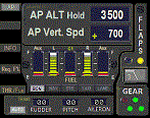
This gauge is for use in the Saitek FIP and is an extension to my recent Baron 58 (FSX default) gauge . That gauge was designed for a specific aircraft whilst this package of three gauges has the same functionality of the BB58 gauge but will work on all aircraft. Each of the three gauges displays fuel level for different tanks but are identical in all other respects. As part of your pre-flight checklist you will need to make sure the right gauge for the aircraft is being displayed.
The set of 3 gauges have been designed to complement the saitek AP / Multi panel. The gauges primarily show the selected AP Altitude and Vert Spd whilst the AP / multi panel is displaying HDG. Five indicators for "lights on" are included as well as lights for landing gear (in transition and down) . The flaps indicator shows a blue light for intermediate positions and a yellow light when at full down position. A separate flaps position indicator (numerical and needle) is included. The 5 fuel indicators in each gauge are vertical analogue 'meters'. Rudder and aileron trim is displayed and controlled by the two FIP rotary knobs. Pitch trim readout and other functions is included.
NOTE. This package includes a pitch trim image file that was inadvertently left out of my original BB58_AP_Alt_VS_and_Fuel_v1.zip folder.
| Filename: | AP__Alt__VS_MultiFuel_Flaps_v1.zip |
| License: | Freeware |
| Added: | 12th July 2014, 07:40:09 |
| Downloads: | 400 |
| Author: | Robert Budd |
| Size: | 183.72 KB |
| Category: Flight Simulator 2004 - Scenery | |
| Ontario Small Fields in Canada: #05 Pelee Island (CYPT) |
|
Images related to this file:
File Description:
This is the fifth in a series of small airfields in southern Ontario Canada, Pelee Island CYPT, an airfield on the island in Lake Erie and the southernmost airfield in Canada. The airfield has an asphalt runway of 3,300 feet, aligned 09/27 in FS9 while today in real life it is 10/28 due to the wandering magnetic pole. There is also a second runway, 36/18 and around 1,500 feet of gravel. There is a small terminal building which now has blue cladding; here it is still in the dirty yellow of the original colour scheme.
This version is based upon what appears to be a "lost" 2005 scenery of Pelee Island. When I started to make Pelee Island I discovered that in fact I already had a version installed; my memory can be excused, as I installed it in 2005. I modified the scenery to include parking, taxiways that connected, revised runway markings, new windsocks, new signage, larger apron, parked cars and planes, revised landclass, AI, etc. My intention was to instruct you to download and install the original and then incorporate my changes. Problem: it does not appear to exist for download; perhaps it was washed away when the Avsim site crashed. I have included it in this post. If anyone knows who made it please let me know.
| Filename: | Ontario_Small_Fields_in_Canada_05_Pelee_Island_CYP.zip |
| License: | Freeware, limited distribution |
| Added: | 5th August 2015, 18:52:25 |
| Downloads: | 171 |
| Author: | Roger Wensley |
| Size: | 4.39 MB |


© 2001-2026 AVSIM Online
All Rights Reserved
Privacy Policy |