
Where Flight Simulation Enthusiasts Gather from Around the World!
AVSIM Library - Search Results

| Category: X-Plane - Aircraft Repaints, Textures and Modifications | |
| Stampe-Vertongen SV-4C (F-GKEB) |

|
Images related to this file:
File Description:
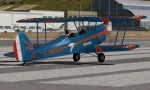
This is a repaint for the Stampe SV4C with Renault 4P engine, Version 2.0 released by Lamahelo & Beber
for XPFR.aeronautics and available on the XPFR website.
Look for STAMPE-SV4C_v.09-270_(33).zip
Livery-Artwork by Leen 'Flybike' de Jager, filename Stampe-F-GKEB.zip.
Sometimes a model is so appealing I really wonder why don't we all fly this bird?
I installed the little bird in X-Plane 10 and I am thrilled.
Really a small jewel, looking so pretty and flying so pleasantly.
As usual I could not resist making an extra attractive skin.
I implemented normal files in the model, added several details as usual , etc.
A big "Merci beaucoup" for my friends from XPFR.
This really is a "MUST HAVE".
For a big screen of this bird visit my website.
Enjoy.
Leen de Jager
www.flybike-paints.nl
| Filename: | StampeVertongen_SV4C_FGKEB.zip |
| License: | Freeware, limited distribution |
| Added: | 21st June 2013, 10:22:58 |
| Downloads: | 80 |
| Author: | Leen "Flybike" de Jager |
| Size: | 5.68 MB |
| Category: Flight Simulator 2004 - Aircraft Repaints, Textures and Modifications | |
| Canadian North 'new livery' Boeing 737-275C (C-GOPW) |
|
Images related to this file:
File Description:
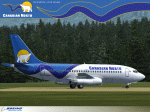
Canadian North has served the Northern Territories for over 75 years. It is a company 100% owned by aboriginals and provides service to all northerners including its 30,000 shareholders (Inuvialuit and Inuit of Nunavut). This particular Boeing 737-275C, painted in Canadian North's new "full polar livery", like several in their fleet, is actually a Combi model which can be configured to carry both passengers and cargo. This type of configurability and flexibility is necessary for the routes and destinations this airline flies. A splash screen is included in this package.
This is a textures only package; you must have the Tinmouse 737-200adv v2 base package available here at AVSIM (tinmouse_ii_v1_25.zip). The textures in this repaint are detailed 32-bit with no mips. NOTE: This is a re-upload due to the AVSIM site compromise.
| Filename: | Canadian_North_new_livery_Boeing_737275C_CGOPW.zip |
| License: | Freeware, limited distribution |
| Added: | 5th June 2010, 19:36:05 |
| Downloads: | 3,530 |
| Author: | Jeffrey S. Bryner, Tinmouse II Project |
| Size: | 6.34 MB |
| Category: Flight Simulator 2004 - Aircraft Repaints, Textures and Modifications | |
| "Virgin Blue" Boeing 737-700W |
|
Images related to this file:
File Description:
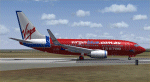
This is a repaint of the "Virgin Blue" livery for the Kitty Hawk 737-700W (FS9). This paint has been fully tested in FS9 (FS2004) ONLY and no guarantee's can be made as to its compatibility with FSX. All repainted textures have been 100% hand painted and formatted in 32 Bit. This is a complete file with the exception of a panel as I use a payware panel and have not included that with this upload (sorry). You can download a suitable panel OR, if you have the Kitty Hawk 737-700 model, copy and paste that panel into this file after installation, OR simply add the textures from this download to your existing Kitty Hawk 737-700 folder. Installation, Distribution Limitations and contact details for me are included in the TC Read Me file as well as a number of screen shots of the aircraft.
| Filename: | Virgin_Blue_Boeing_737700W.zip |
| License: | Freeware, limited distribution |
| Added: | 12th February 2012, 03:44:41 |
| Downloads: | 432 |
| Author: | Tony Cannon and Kitty Hawk |
| Size: | 3.37 MB |
| Category: Flight Simulator 2004 - Panels | |
| Flight1 ATR72 PANEL Enhancement -FAPE- |
|
File Description:
What FAPE does for you??
1) FAPE adds about 50 new clickspots to make easier the opening/closing of every panel window, following GUI ergonomical rules. You won't move your mouse anymore to open popup panels.
2) FAPE adds a clickspot to display the RealityXP500 Weather Radar (if you own it, of course).
3) FAPE integrates Rob Barendregt's nice Pushback gauge within the center panel.
4) FAPE displays the FMS in a smaller size and in the right bottom corner of the screen.
5) FAPE allows using the Panel Controller Window (panel icons) from the VFR window configuration, so you will be able to open every other panel from the VFR panel.
WARNING: THIS FILE IS ONLY FOR FLIGHT1 ATR72 OWNERS (GO AND BUY IT, IT'S A FANTASTIC AIRCRAFT!!) USING THE BROWN CONDENSED PANEL. UPON SIMMERS DEMAND I WILL DO THE SAME FOR THE BLUE CONFIG.
Enjoy!
| Filename: | Flight1_ATR72_PANEL_Enhancement_FAPE.zip |
| License: | Freeware |
| Added: | 10th November 2004, 14:02:26 |
| Downloads: | 2,500 |
| Author: | David Roch |
| Size: | 911.88 KB |
| Category: Flight Simulator X - Panels | |
| General Dynamics F-111 "Aardvark" PIG HUD Project - Pave Tack and Dump & Burn |
|
File Description:
FSX F-111 PIG HUD PROJECT - Pave Tack - Dump and Burn. (A)Pave Tack radically upgraded with unique features, control button layout improved. Ten instantaneous Reset view options with LED light indication added (thanks to suggestion by Bill McClellan) including targeting and bomb views.Still retains total flexability of panning and
Standoff in all modes. Four Text pages including authentic F-111 data
presentation active and responsive to waypoints with auto countdown ladder
and flashing indicators. A must have item for pilots who have flown the
actual F-111. Standoff features now enable high altitude 'Tank Plinking
-clear full screen views of cars from 35,000+' includes 7 pages of notes.
(B)The Dump and Burn is improved now has fuel vapour trail and variable
combustion zones and turbulence added to flame.
Simple installation. MUST have fxpiggb5.zip and fxpiggb7.zip already installed. By Karol Chlebowski.
| Filename: | General_Dynamics_F111_Aardvark_PIG_HUD_Project__Pa.zip |
| License: | Check within download |
| Added: | 16th June 2011, 17:02:53 |
| Downloads: | 432 |
| Author: | Karol Chlebowski |
| Size: | 2.87 MB |
| Category: Flight Simulator X - Scenery | |
| WashDCX 1.0 |
|
Images related to this file:
File Description:
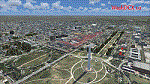
After more than 2000 downloads, I am pleased to announce a much anticipated UPDATE to WashDCX Beta. WashDCX 1.0 contains even more D.C. models and buildings, all of which have both Transparent and Night textures added. I have also expanded the Satellite Photo scenery around the National Mall area; added support for scenery complexity; added trees and more traffic; and corrected the destination bug within the installer program. You will also find many tourist among the more popular tourist destinations in Washington D.C. I hope that this addon will greatly enhance your flying experience around the D.C. Metro area. Be sure to check out both the Screen Shots and Video area on my website for a look at what is included in WashDCX 1.0. I encourage your comments either by email or on the forum for all others to see. Have fun and Happy Flying !!
www.myflightsimblog.com
| Filename: | WashDCX_10.zip |
| License: | Freeware |
| Added: | 5th February 2011, 03:14:09 |
| Downloads: | 3,607 |
| Author: | Larry Robbins |
| Size: | 86.69 MB |
| Category: Prepar3D V1-4 - Utilities | |
| FS Flight Builder - Update |
|
Images related to this file:
File Description:
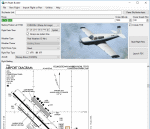
FS Flight Builder is a utility for general aviation flying that will build flight files for FSX, FSX Steam Edition, and Prepar3D based on waypoints and other data either entered manually or imported from SkyVector using the Plain Text Link functionality. Among other things, you can select your starting position, aircraft, and VFR or IFR flight plan.
One of the most interesting features of the application is that it will include a Briefing file, added to the aircraft's built-in kneedboard, that will include departure and destination airport information (runways, frequencies, weather, and charts) as well as navigation frequencies along the route.
Have you ever started up flight simulator and wondered “where do I want to go today� The new Destination Chooser functionality can help to solve that problem. The screen allows you to enter your departure airport and choose various parameters for your destination (like min and max distance, tower availability, ILS availability, runway length requirements, etc.).
| Filename: | FS_Flight_Builder__Update.zip |
| License: | Freeware |
| Added: | 30th July 2018, 18:12:05 |
| Downloads: | 303 |
| Author: | Tom Arduini |
| Size: | 27.99 MB |
| Category: Prepar3D V1-4 - Utilities | |
| P3D/FSX/FSXSE FS Flight Builder |
|
Images related to this file:
File Description:

Update to fix the auto-updater functionality
FS Flight Builder is a utility for general aviation flying that will build flight files for FSX, FSX Steam Edition, and Prepar3D based on waypoints and other data either entered manually or imported from SkyVector using the Plain Text Link information. Among other things, you can select your starting position, aircraft, and VFR or IFR flight plan.
One of the most interesting features of the application is that it will include a Briefing file, added to the aircraft's built-in kneedboard, that will include departure and destination airport information (runways, frequencies, weather, and charts) as well as navigation frequencies along the route.
Have you ever started up flight simulator and wondered “where do I want to go today� The new Destination Chooser functionality can help to solve that problem. The screen allows you to enter your departure airport and choose various parameters for your destination (like min and max distance, tower availability, ILS availability, runway length requirements, etc.).
| Filename: | P3DFSXFSXSE_FS_Flight_Builder.zip |
| License: | Freeware |
| Added: | 31st July 2018, 07:19:16 |
| Downloads: | 367 |
| Author: | Tom Arduini |
| Size: | 27.99 MB |
| Category: Prepar3D V1-4 - Gauges | |
| GPS2020 – V12.0 |
|
Images related to this file:
File Description:

Major upgrade for V10.3, with focus on zooming, Direct-To, inserting waypoints in the flight plan, and User waypoints (waypoints not present in FSX/P3D database).
Key improvements:
- Zooming maps with the mouse wheel now finally like in Google Maps, Google Earth, Bing Maps, Garmin BaseCamp, Little Navmap (FSX utility), etc..
- Direct-To Track Updating: dark red track line continuously follows aircraft movements. For proper operation, the user should install XMLVARS/XMLTools in FSX/P3D (most users will already have done this).
- Visual indication of "Direct-To Active".
- Flight plan: multiple POI's (points clicked on a map) can be inserted in the FPL, they will be named sequentially as TARGET1 to TARGETnnnn.
- Inserting in the flight plan, all sorts of waypoints from all possible sources, can be done with a quicker method with the green buttons alone, without needing to open the Direct-To page.
- Other refinements in code and screen layout since V10.3.
It is recommended to replace V10.3 with this V12.0!
| Filename: | GPS2020__V120.zip |
| License: | Freeware |
| Added: | 29th June 2020, 17:51:55 |
| Downloads: | 302 |
| Author: | Hugo Jansen |
| Size: | 15.7 MB |
| Category: Flight Simulator 2004 - Aircraft Repaints, Textures and Modifications | |
| Boeing 737-700 Corvette Textures |
|
Images related to this file:
File Description:
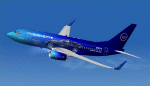
This file contains "TEXTURES ONLY" for the Posky 737-700 aircraft. The textures are of the Fictitious Corvette Airline and will hopefully appeal to all Corvette enthusiasts. These textures have only been tested in FS9 (2004) and you will require the FREEWARE Posky 737-700 to install them. A recommended panel for the aircraft is Targan UNUTMAZ great 737-700NG panel (tngv2.zip). While this is a freeware product UNDER NO CIRCUMSTANCES is this (or any of my textures) to be uploaded to or displayed on the FLYAWAY site or within their FORUMS. Should you wish to upload the textures to another site, or display a screen shot of the plane on another site, please accredit me as the Texture Artist. Thanks for your co-operation and I trust you will enjoy the plane. Should you have any questions or problems with this file feel free to contact me via my email address which is contained in the ReadMe file.
| Filename: | Boeing_737700_Corvette_Textures.zip |
| License: | Freeware |
| Added: | 29th September 2010, 19:28:30 |
| Downloads: | 148 |
| Author: | Tony Cannon |
| Size: | 3.88 MB |


© 2001-2026 AVSIM Online
All Rights Reserved
Privacy Policy |