
Where Flight Simulation Enthusiasts Gather from Around the World!
AVSIM Library - Search Results

| Category: Flight Simulator 2004 - Miscellaneous Files | |
| Shoot 1.6.3' Voice Contro File |

|
File Description:
"Shoot 1.6.3" voice control file for use with FS2004. You will need to download the main "freeware" program from http://clans.gameclubcentral.com/shoot/downloads.php which will allow you to make use of this control file for FS2004. The program is brilliant and allows you to control FS2004 by voice and it's totally free! All I have done is made a config file that works very well with FS2004.
It will allow you to; speak to ATC and instead of fighting with the keyboard or yoke/stick so you can fly more like a real pilot and keep your hands on the yoke more of the time. For example a commercial jet pilot calls out to the co-pilot to get the gear up and simply says "gear up". That's just what you will have to do, just like the real thing; the gear will go up when you make the call. When FS2004 ATC controller tells you to reply you can just say "roger" or "hello" or "ATC" or "air traffic" etc, etc, and the ATC window will pop up. Then all you have to do is call out the command instead of pushing buttons that real pilots don't use. Does a real pilot push a button to look out of the window or use a "mouse" to engage the autopilot?
Similarly you can call out "autopilot engage" or "autopilot master" or "autopilot disengage" and that's just what happens; the autopilot comes on/off. The best part though is when you try looking around the cockpit. If you want to move your head up you just say "move up" and presto you are higher up in your seat. You can move to the left or
Right, back or forward. You can say "zoom in" and that's what happens. You can say "reset zoom" and so on. You can say "next view" and then the view may be outside or another panel. Alternatively, you can say "panel 2" and the radio panel will come up in the 737 so you can tune the radios. If you have FS navigator installed all you have to
do is say "navigator" and the map comes up, and then say navigator again and off it goes. Just for once it is easy and possible to make full use of FS2004. Using this program has afforded me the opportunity of making better use of the views available, (and I have CH products yoke so if was never hard) but now it's even easier.
All the panels can be activated in this way, and control of the autopilot and control of FS2004. It's probably the best kept secret. I've made a file so we can all share in this freebie of a program. I've included a readme and instructions of how to make the best use of the program.
Config file for FS2004 only is provided.
| Filename: | Shoot_163_Voice_Contro_File.zip |
| License: | Freeware |
| Added: | 7th January 2004, 19:52:26 |
| Downloads: | 8,795 |
| Author: | Peter Wilding |
| Size: | 21.83 KB |
| Category: Flight Simulator 2004 - AFCAD Files | |
| Hilo International Airport, Hilo, Hawaii (PHTO) |
|
File Description:
This file is a version for Bill Melichar's airport with extra Gates/parking/cargo parking the runways/taxiways/aprons have improved lighting and the default helipads have been moved onto Bill's pads airport views are from the roof of the control tower (only when you are in TOWER view) not tested with the default airport but may work easy to unistall if it doesn't.
| Filename: | Hilo_International_Airport_Hilo_Hawaii_PHTO.zip |
| License: | Freeware |
| Added: | 28th December 2003, 17:00:02 |
| Downloads: | 2,158 |
| Author: | Ray Smith |
| Size: | 3.94 KB |
| Category: Microsoft Flight Simulator (2020) - Utilities | |
| AxisViewer 23.8.27 |
|
Images related to this file:
File Description:
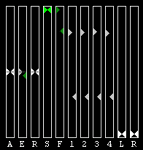
MSFS 2020 Version. Detailed user manual included. For each aircraft control surface selected, AxisViewer will show the position of the joystick axis attached to the control surface, and the actual position of the control surface according to the simulator. The benefits are: * Positive feedback on Control Surface Position. Ever ask yourself "Self, just what is that autopilot/autothrottle doing, anyway?!" * Allow you to manually adjust the Axis Positions to match the Control Surface Positions, so that you don't get a nasty surprise (for example, sudden change in thrust) when the autopilot and/or autothrottle is disengaged. * Verification of joystick functioning and range of motion. * Clear indication of when "dead zones" are entered. You will see the Control Surface Position "snap" to a particular value as the Axis Position approaches the dead zone.
| Filename: | AxisViewer_23827.zip |
| License: | Freeware, limited distribution |
| Added: | 28th August 2023, 14:54:07 |
| Downloads: | 54 |
| Author: | William Ruppel |
| Size: | 49.32 MB |
| Category: Flight Simulator X - Utilities | |
| AxisViewer 23.7.6 |
|
Images related to this file:
File Description:
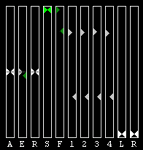
Detailed user manual included. For each aircraft control surface selected, AxisViewer will show the position of the joystick axis attached to the control surface, and the actual position of the control surface according to FSX/P3D. The benefits are: * Positive feedback on Control Surface Position. Ever ask yourself "Self, just what is that autopilot/autothrottle doing, anyway?!" * Allow you to manually adjust the Axis Positions to match the Control Surface Positions, so that you don't get a nasty surprise (for example, sudden change in thrust) when the autopilot and/or autothrottle is disengaged. * Verification of joystick functioning and range of motion. * Clear indication of when "dead zones" are entered. You will see the Control Surface Position "snap" to a particular value as the Axis Position approaches the dead zone.
| Filename: | AxisViewer_2376.zip |
| License: | Freeware, limited distribution |
| Added: | 3rd August 2023, 19:00:13 |
| Downloads: | 58 |
| Author: | William Ruppel |
| Size: | 45.45 MB |
| Category: Prepar3D V5 - Utilities | |
| AxisViewer 23.7.6 |
|
Images related to this file:
File Description:
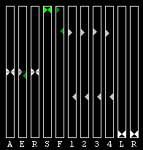
Detailed user manual included. For each aircraft control surface selected, AxisViewer will show the position of the joystick axis attached to the control surface, and the actual position of the control surface according to FSX/P3D. The benefits are: * Positive feedback on Control Surface Position. Ever ask yourself "Self, just what is that autopilot/autothrottle doing, anyway?!" * Allow you to manually adjust the Axis Positions to match the Control Surface Positions, so that you don't get a nasty surprise (for example, sudden change in thrust) when the autopilot and/or autothrottle is disengaged. * Verification of joystick functioning and range of motion. * Clear indication of when "dead zones" are entered. You will see the Control Surface Position "snap" to a particular value as the Axis Position approaches the dead zone.
| Filename: | AxisViewer_2376.zip |
| License: | Freeware, limited distribution |
| Added: | 3rd August 2023, 19:00:25 |
| Downloads: | 16 |
| Author: | William Ruppel |
| Size: | 45.45 MB |
| Category: Prepar3D V1-4 - Utilities | |
| AxisViewer 23.7.6 |
|
Images related to this file:
File Description:
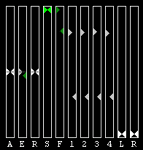
Detailed user manual included. For each aircraft control surface selected, AxisViewer will show the position of the joystick axis attached to the control surface, and the actual position of the control surface according to FSX/P3D. The benefits are: * Positive feedback on Control Surface Position. Ever ask yourself "Self, just what is that autopilot/autothrottle doing, anyway?!" * Allow you to manually adjust the Axis Positions to match the Control Surface Positions, so that you don't get a nasty surprise (for example, sudden change in thrust) when the autopilot and/or autothrottle is disengaged. * Verification of joystick functioning and range of motion. * Clear indication of when "dead zones" are entered. You will see the Control Surface Position "snap" to a particular value as the Axis Position approaches the dead zone.
| Filename: | AxisViewer_2376.zip |
| License: | Freeware, limited distribution |
| Added: | 3rd August 2023, 19:00:39 |
| Downloads: | 47 |
| Author: | William Ruppel |
| Size: | 45.45 MB |
| Category: Flight Simulator X - Sounds | |
| Editvoicepack ATC Phraseology Modifications Set 8 |
|
File Description:
THis is one simple change via EditVoicePack to the default FSX ATC, to do with area control/center callsigns.
This mod silences the "center" or "control" part of area control callsigns, and is set up so that these callsigns will randomly (p=0.5) appear without the ATS unit type part of the callsign. Examples are "contact Indianapolis Center on 128.3" vs. "contact Indianapolis on 128.3" and "Dakar Control, XYZ123 with you at FL350" vs. "Dakar, XYZ123 with you at FL350".
Install with EditVoicePack 4.0 (see here if you need information on how to do this: http://www.editvoicepack.com/).
| Filename: | Editvoicepack_ATC_Phraseology_Modifications_Set_8.zip |
| License: | Freeware |
| Added: | 13th April 2014, 06:49:53 |
| Downloads: | 2,603 |
| Author: | David Atkinson |
| Size: | 1.37 KB |
| Category: Flight Simulator 2004 - Aircraft Repaints, Textures and Modifications | |
| Eurowings Professional updated aircraft cfg files |
|
File Description:
These files replace the standard aircraft.cfg files that came with the Aerosoft Eurowings PRO 2004 package. They now include correct air traffic control airline callsigns and ICAO parking codes for all the planes included in the package. To benefit from this you will need to have 'EditVoicepack' running by Lars Møllebjerg.
| Filename: | Eurowings_Professional_updated_aircraft_cfg_files.zip |
| License: | Freeware |
| Added: | 6th September 2008, 17:41:52 |
| Downloads: | 241 |
| Author: | John O'Leary |
| Size: | 70.83 KB |
| Category: Flight Simulator 2002 - Aircraft Repaints, Textures and Modifications | |
| Valujet / FFX DC9 - 51 |
|
File Description:
Thanks to FFX/SGAIR, I have been able to repaint this model of the DC9-51.. Completely in GMAX, this aircraft has fully functional control surfaces and makes flying a treat.. This is but another repaint that I have put together for the Valujet livery,, and I hope you like it.. This model comes with stock components other than what FFX/SGAIR have provided,, thanks again and check out my VA website for further development news..
http://www.valujet.vze.com
| Filename: | Valujet__FFX_DC9__51.zip |
| License: | Freeware, limited distribution |
| Added: | 23rd July 2003, 21:31:44 |
| Downloads: | 1,071 |
| Author: | Girald Silvera, FFX, SGAIR |
| Size: | 4.51 MB |
| Category: Flight Simulator X - Utilities | |
| NumberPad Control for FSX and P3D |
|
Images related to this file:
File Description:
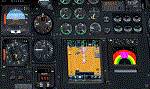
NpC4FSX&P3D (NumberPadControl for FSX and P3D) is a more efficient (and more convenient to set up)
version of a similar NpC program that I wrote a few years ago and which to
my surprise PC Pilot magazine included on their 100th Anniversary edition Freeware CD. With
NpC4FSX&P3D you assign keys to functions like Com, Nav, Heading, Course, Altitude, VS,
Autopilot functions, etc., and then can enter the associated values (like frequencies or headings) just by typing on the
keyboard’s numberpad instead of fiddling with elusive mouse click spots. NpC4FSX&P3D is
programmed primarily for aircraft with avionics that were developed within standard FSX
programming guidelines but also supports third party add-
on aircraft such as the Flysimware L35A and MU2, PMDG 737NGX / B777, Flight1 King Air
B200, A2A Cherokee 180, and also works with GPS units like the GTN750. Setup manual included.
A registered (payware) copy of FSUIPC is required.
| Filename: | NumberPad_Control_for_FSX_and_P3D.zip |
| License: | Freeware |
| Added: | 19th February 2018, 21:21:16 |
| Downloads: | 481 |
| Author: | Al Klayton |
| Size: | 683.59 KB |


© 2001-2026 AVSIM Online
All Rights Reserved
Privacy Policy |