
Where Flight Simulation Enthusiasts Gather from Around the World!
AVSIM Library - Search Results

| Category: Flight Simulator X - Original Aircraft | |
| UFO - A51 |

|
Images related to this file:
File Description:
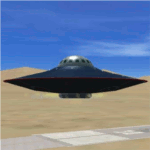
You can fly this UFO model in all directions e.g. vertical up/down lateral right/left, forward/backward, and can stay in a static position on any altitude level. The UFO provides a maximum speed of Mach 4.3 on all altitude levels and the altitude level is unlimited.
The overall radius of the model is 170 feet. The overall height is 100 feet. Be aware of this size if you are landing on standard airports. The model includes a animated gear system which is a big gray ring. The red disk on the outside of the model is the rotating UFO engine. In addition the model contains 3 guns which are moving out of the body if they are armed by activating a switch on the weapon control control panel. Important to say, the UFO is not a traditional aircraft. It reacts different and you need to handle it differently too! For more information and how to fly the model, read the documentation carefully and read the documentation first, before you go to fly it !!!!
The model and the gauges have been developed for FSX Flight Simulator SP2 or SP1. It has also been tested with Microsoft Acceleration but compatibility is not guaranteed by the author. The format for the panel and gauges is developed for a 4/3 monitor. Use the Wide Screen Panel.cfg if you have a 16/9 Monitor. For installation instructions see the documentation inside the zip file.
Credit goes out to: Bob Familton and Geoffrey Bogeaus for improvement, recommendations, testing and review, and to Doug Dawson for his XML IPC interface.
Enjoy a new way to fly.
Dietmar Loleit
| Filename: | UFO__A51.zip |
| License: | Freeware, limited distribution |
| Added: | 21st January 2014, 15:43:13 |
| Downloads: | 725 |
| Author: | Dietmar Loleit |
| Size: | 19.67 MB |
| Category: Flight Simulator 2004 - Gauges | |
| Integrated Simavionics: Dreamfleet 727 GNS Edition 1.0 |
|
File Description:
Here's probably the best addition to your favorite Trijet! The Dreamfleet 727 sure is one of the best simulated classic airliners out there for Flight Simulator, but being a classic, it also brings some problems when flown in a modern air traffic environment. Radio navigation alone just won't do it anymore, especially if you fly online with real controlers. A "go direct XXX" instruction can easily turn into a nightmare - nowadays technology offers some things to ease the workload and increase safety, and it's time to use these means wherever possible.
Boeing 727 jets are still being flown in almost all parts of the world, mostly as freighters, and almost all of them have been updated with modern avionics, ranging from small GPS devices up to full blown glass cockpits with flight management computers.
Thanks to Ernie Alston and his "Integrated Simavionics", you will now be able to equip your fleet of Dreamfleet 727 aircraft with a GNS, allowing not only detailed flight planning but also access to many informations that will very useful during your flights. In case you haven't already done so, now would be a good time to pick up the manuals that came with the "Integrated Simavionics Package" to learn about the many new possibilities you will gain by adding the GNS to your cockpit. The gauges will be added both to the 2D and 3D cockpits!
Another benefit you get with this package: the Virtual Cockpit textures will now appear in a much higher resolution, providing crisp and clear instruments and a much better look! Note that this is only enabled with the GNS-equipped cockpits.
| Filename: | Integrated_Simavionics_Dreamfleet_727_GNS_Edition_.zip |
| License: | Freeware |
| Added: | 6th December 2007, 16:08:58 |
| Downloads: | 3,618 |
| Author: | Nick "MeatWater" Schreger |
| Size: | 793.25 KB |
| Category: Flight Simulator 2004 - AI Flight Plans | |
| TUI Airlines Belgium - Summer 05 (corrected 2nd version) |
|
File Description:
::: Corrected version ::: Representative and accurate charter flight plans for the summer 2005 period, which have been compiled according to the company information for the week of 4th July, 2005.
TUI Airlines Belgium (TUB) is the most important charter airline based in Belgium, flying with its own fleet which includes: 1 Fokker 100 (OO-TUF), 3 Boeing 737-400 (OO-TUA, OO-TUB, OO-TUI), 2 Boeing 737-800W (OO-VAC, OO-VAS), and 1 Boeing 767-300ER (OO-TUC).
In addition for the summer, TUB is wet leasing two 737's from Futura International Airways, also operating under the "Beauty" callsign.
As for all charter company, flights differs from one week to one another but this file comprises its main destinations regularly visited throughout the summer period.
They are currently flying from its main base Brussels-National (as well as from the belgian regional airports of Liège and Oostende) to many various medium- and long-haul destinations:
Agadir, Alicante, Almeria, Araxos, Athens, Burgas, Cagliari, Cairo, Cancun, Catania, Chania, Chios, Djerba, Dubrovnik, Faro, Fuerteventura, Funchal, Girona, Gran Canaria, Hurghada, Ibiza, Iraklion, Jerez, Kerkira, Kos, Lanzarote, La Palma, Luxor, Mahon, Malagà, Malta, Marrakech, Marsa Alam, Mitilini, Monastir, Montego Bay, Murcia, Mykonos, Napoli, Pafos, Palermo, Palma de Mallorca, Puerto Plata, Punta Cana, Rhodos, Samos, Santorini, Sharm-el-Sheikh, Tabarka, Tanger, Tarbes, Tenerife-Sur, Toulon, Tunis, Varadero, Varna, and Zakinthos.
Other destinations such as Corsica, Tunisia and Turkey are jointly operated with partner airlines such as SN Brussels Airlines, MNG, Thomas Cook, Karthago and Tunis Air, but not included here.
Schedule files fully compatible with Traffic Tools by Lee Swordy (available on this site). Enjoy...
| Filename: | TUI_Airlines_Belgium__Summer_05_corrected_2nd_vers.zip |
| License: | Freeware |
| Added: | 3rd June 2005, 17:58:36 |
| Downloads: | 2,250 |
| Author: | Jean-Philippe DELWICHE |
| Size: | 10.03 KB |
| Category: Flight Simulator X - Scenery | |
| Frankfurt Main Airport (EDDF) v8 - Manual installation |
|
Images related to this file:
File Description:
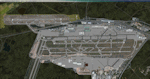
This major update represents EDDF in the July 2015 timeframe.
This version includes further expansion of the Terminal 3 area now in use as extended apron parking, with new J and K ramps for airline, general aviation and cargo aircraft, new apron night lighting, vehicular traffic/roadways as well as support for 70+ airlines coded for AI traffic.
In addition, this update features some brand new taxiways and updated airport navaids including use of the secondary 3.2 degree ILS approach paths for the Northwest runway.
For visual improvements, a new sound wall for the northern perimeter is included along with improvements in landclass to match Orbx FTX Global and inclusion of an optional 200Mb ground photo scenery layer providing even more realism.
Extended compatibility is also provided for P3D and GSX v1.9 (Ground Services for FSX) with the latter providing customized service vehicle parking for each parking position across the whole airport and in some cases, custom GSX pushback operations have been introduced at selected gates. The associated GSX airport .ini file is supplied in this package.
Last of all, more flexibility is delivered. This new scenery now comes supplied with 3 separate .BGL files - the standard .BGL AFCAD file together with the exclusions file ( _CVX) and the separate airport objects file ( _OBJ) so that the airport AFCAD can continue to be updated independently from the airport objects and exclusion files by users wishing to modify the airport layout to their own needs.
Default FSX scenery is required.
Please consult the readme and the comprehensive help manual prior to installation and for more information.
| Filename: | Frankfurt_Main_Airport_EDDF_v8__Manual_installatio.zip |
| License: | Freeware |
| Added: | 5th August 2015, 18:49:53 |
| Downloads: | 7,204 |
| Author: | Mark Aldridge |
| Size: | 230.24 MB |
| Category: Flight Simulator 2004 - Scenery | |
| PIK2004 |
|
File Description:
FS2004 - (Glasgow)Prestwick International Airport.
This whole package is intended to compliment the comprehensive scenery for Scotland provided by the Scotflight Commercial Product, whilst at the same time being fully compatible with default scenery also.
This Fs2004 only compatible scenery gives highly detailed scenery for Prestwick Airport and it's immediate surrounds.
Prestwick Airport is a hub for the low-cost carrier Ryanair providing flights to many European destinations. Other holiday charter flights operate from the airport and there is a busy cargo terminal. Also adjacent to the airfield is the BAE Systems factory ( formerly Scottish Aviation) and extensive detailed scenery for this site is included.
The ground elements of the scenery are drawn with Lee Swordy's excellent Afcad program. The same file also adds AI traffic and accurately placed gates and parking spots. Included is the recently added FlightCentre, with AI traffic movements, the new Ryanair Service Hangar and new Business Park.
All added buildings are custom made, many with photo-texturing. The scenery has taxiway signs, active wigwags and full night lighting and a few static aircraft, discreetly placed.
A stretch of redrawn accurate coastline is included allowing the addition of the sandy beaches on the approach to Runway 13.
The two renowned championship golf courses of Royal Troon and Old Prestwick also feature on the seaward approach plus further golf courses in the towns of Prestwick and Ayr.
A local replacement road system covering the airport surrounds and the towns of Prestwick and Ayr is also included and this together with the replacement coastline should be compatible with any of the new Coastline and Roads products now available.
| Filename: | PIK2004.zip |
| License: | Freeware, limited distribution |
| Added: | 27th August 2005, 19:32:32 |
| Downloads: | 24,609 |
| Author: | Iain Gallacher-Scotflight Scenery |
| Size: | 8.07 MB |
| Category: Flight Simulator X - Scenery | |
| Frankfurt Main Airport (EDDF) v8 - Auto installer |
|
Images related to this file:
File Description:
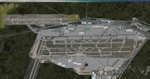
This major update represents EDDF in the July 2015 timeframe.
This version includes further expansion of the Terminal 3 area now in use as extended apron parking, with new J and K ramps for airline, general aviation and cargo aircraft, new apron night lighting, vehicular traffic/roadways as well as support for 70+ airlines coded for AI traffic.
In addition, this update features some brand new taxiways and updated airport navaids including use of the secondary 3.2 degree ILS approach paths for the Northwest runway.
For visual improvements, a new sound wall for the northern perimeter is included along with improvements in landclass to match Orbx FTX Global and inclusion of an optional 200Mb ground photo scenery layer providing even more realism.
Extended compatibility is also provided for P3D and GSX v1.9 (Ground Services for FSX) with the latter providing customized service vehicle parking for each parking position across the whole airport and in some cases, custom GSX pushback operations have been introduced at selected gates. The associated GSX airport .ini file is supplied in this package.
Last of all, more flexibility is delivered. This new scenery now comes supplied with 3 separate .BGL files - the standard .BGL AFCAD file together with the exclusions file ( _CVX) and the separate airport objects file ( _OBJ) so that the airport AFCAD can continue to be updated independently from the airport objects and exclusion files by users wishing to modify the airport layout to their own needs.
Default FSX scenery is required.
Please consult the readme and the comprehensive help manual prior to installation and for more information.
| Filename: | Frankfurt_Main_Airport_EDDF_v8__Auto_installer.zip |
| License: | Freeware |
| Added: | 5th August 2015, 18:50:05 |
| Downloads: | 15,661 |
| Author: | Mark Aldridge |
| Size: | 232.05 MB |
| Category: Microsoft Flight Simulator (2020) - Utilities | |
| Random Flight Database 3.5.2 |
|
File Description:
Random Flight Database is a simple and easy to use application.
​
It will allow you to randomly choose one or more VFR, IFR flights according to your criteria (type of plane, flight time, company, distance, departure airport, .....).
​
These flights are chosen at random from a default database, a user base created by yourself or according to the world aviation POIs.
​
A default database is already included, but also the possibility for each user to create his own database.
​
But that's not all, you can also extract the flights of the day for an airport, or extract the flights for a whole week.
Why Use RFD ?
The advantage of RANDOM FLIGHT DATABASE:
Extracted from FlightRadar but also from other databases, it chooses randomly among those where these databases according to your choices.
You can also make many other possible combinations, such as leaving each time from the arrival airport for each flight generated, but also selecting your favorite planes and airports.
Simply choose the departure airport, he chooses the arrival airport for you, choose the arrival airport, he chooses the departure airport for you and all this according to the real data of the airlines.
A tab for generating non-real flights is available, it will allow you to generate random flights from over 58,000 global aviation POIs.
​
Full of possibilities, including the possibility to choose the flight time but also to generate several flights while leaving the arrival airport.
You also have the option of creating your own data for inclusion in this software.
And one of the most important is that once the flight (s) are generated, you can send them to SIMBRIEF or PFPX to schedule this.
| Filename: | Random_Flight_Database_352.zip |
| License: | Freeware |
| Added: | 21st December 2020, 20:47:04 |
| Downloads: | 163 |
| Author: | mikoulprostgrandprix |
| Size: | 181.97 MB |
| Category: Microsoft Flight Simulator (2020) - Utilities | |
| Random Flight Database 3.5.2 |
|
File Description:
Random Flight Database is a simple and easy to use application.
​
It will allow you to randomly choose one or more VFR, IFR flights according to your criteria (type of plane, flight time, company, distance, departure airport, .....).
​
These flights are chosen at random from a default database, a user base created by yourself or according to the world aviation POIs.
​
A default database is already included, but also the possibility for each user to create his own database.
​
But that's not all, you can also extract the flights of the day for an airport, or extract the flights for a whole week.
Why Use RFD ?
The advantage of RANDOM FLIGHT DATABASE:
Extracted from FlightRadar but also from other databases, it chooses randomly among those where these databases according to your choices.
You can also make many other possible combinations, such as leaving each time from the arrival airport for each flight generated, but also selecting your favorite planes and airports.
Simply choose the departure airport, he chooses the arrival airport for you, choose the arrival airport, he chooses the departure airport for you and all this according to the real data of the airlines.
A tab for generating non-real flights is available, it will allow you to generate random flights from over 58,000 global aviation POIs.
​
Full of possibilities, including the possibility to choose the flight time but also to generate several flights while leaving the arrival airport.
You also have the option of creating your own data for inclusion in this software.
And one of the most important is that once the flight (s) are generated, you can send them to SIMBRIEF or PFPX to schedule this.
https://www.youtube.com/channel/UC8y3mSeP-gj-h2MbMT59AOw
| Filename: | Random_Flight_Database_352.zip |
| License: | Freeware |
| Added: | 28th December 2020, 18:47:26 |
| Downloads: | 151 |
| Author: | mikoulprostgrandprix |
| Size: | 181.97 MB |
| Category: Flight Simulator X - AFCAD Files | |
| Ekdahl Airport (NJ59), NJ |
|
File Description:
Located 04 miles S of Freehold, New Jersey, Ekdahl Airport is a private turf strip 1300' in length bordered closely by trees. This makes for an interesting landing as the 90' width of the runway is all the room you have to play with. However because it can be difficult to gauge your distance to trees and also because even the slightest brush with a tree can cause a crash, all trees immediately adjacent to the runway have crash disabled - mainly so you can turn your plane around if you land on Runway 02. The hard surface runway was removed so make sure your terrain mesh complexity is set as high as possible to get that bumpy ground realism. A windsock is listed as being available on this field but I could not locate it in any imagery and so placed it by default near the hangar building. You can start on the runways or parked in front of the hangar. Make sure your plane is capable of these take off and landing distances! Tree height around the field was not listed so I again used my best judgement from studying aerial photos. There is no fuel or parking for transient aircraft available. The field is not lit - daytime VFR operations only are recommended.
Scenery constructed with use of satellite images/streetview/aerial photos - the author has not been there in person.
This scenery is meant to be used in conjunction with MegaScenery Earth New Jersey/Delaware 002. It is not required, but apron use is minimized to allow satellite scenery to show through as much as possible, and objects are placed based on the MSE textures - lack of it may make scenery look out of place.
| Filename: | Ekdahl_Airport_NJ59_NJ.zip |
| License: | Freeware |
| Added: | 13th August 2011, 16:53:55 |
| Downloads: | 172 |
| Author: | Drew Sikora |
| Size: | 550.03 KB |
| Category: Flight Simulator X - AFCAD Files | |
| Peters Airport (4NJ8), NJ v1.1 |
|
File Description:
Located 05 miles W of Somerville, New Jersey on 70 acres of land, Peters Airport is a private turf strip that will test your short field skills to the max. The published runway dimensions for this strip are 1700x200 feet, and for the most case this is fairly accurate - however at the ends of both runways you have tree obstacles to overcome so this can shorten the amount of usable runway significantly, although the tree obstacles are no higher than 12-14m. There is no hardened runway surface so you will be landing/taking off on terrain. Depending on how high your mesh resolution is, this can be a significant factor, as Runway 31 is mainly uphill enough that you will need to power up with parking brakes on if you want to make it in the air. Runway 13 is the best since you are going downhill and the trees at the end are fewer and smaller. Pay close attention to the pattern! Runway 13 is Left and Runway 31 is Right - this airport is within 2 miles of Solberg-Hunterdon (N51) and you don't want to get in the way of that field's traffic! The runway is not lit, so daytime VFR operations only. There are no services at this strip for transient aircraft.
Scenery constructed with use of satellite images/streetview/aerial photos - the author has not been there in person.
This scenery is meant to be used in conjunction with MegaScenery Earth New Jersey/Delaware 001. It is not required, but apron use is minimized to allow satellite scenery to show through as much as possible, and objects are placed based on the MSE textures - lack of it may make scenery look out of place.
| Filename: | Peters_Airport_4NJ8_NJ_v11.zip |
| License: | Freeware |
| Added: | 20th September 2011, 14:08:43 |
| Downloads: | 405 |
| Author: | Drew Sikora |
| Size: | 461.03 KB |


© 2001-2026 AVSIM Online
All Rights Reserved
Privacy Policy |