
Where Flight Simulation Enthusiasts Gather from Around the World!
AVSIM Library - Search Results

| Category: Flight Simulator X - Utilities | |
| AI Monitoring and Taxi Speed Controller for Prepar3D |

|
File Description: This application allows you to monitor and more importantly set the taxi
speed of AI aircraft in Prepar3d.
Increasing the taxi speed, from the default of 20 knots, allows the aircraft to
vacant the runway sooner. Thereby reducing the induced go-arounds. As the
"runway" taxi speed is bled off automatically while the aircraft is still on the
runway, the Runway Taxi Speed should be set quite high, 60-80 is a reasonable
setting, but can even be set higher.
This has only been tested against Prepar3d v2.2,
however it should work with earlier versions of
Prepar3d.
| Filename: | AI_Monitoring_and_Taxi_Speed_Controller_for_Prepar.zip |
| License: | Freeware |
| Added: | 10th August 2014, 23:49:51 |
| Downloads: | 937 |
| Author: | Joe Oliveira |
| Size: | 698.96 KB |
| Category: Flight Simulator 2004 - Utilities | |
| FSPanel |
|
File Description:
This application is a generic General Aviation aircraft instrument panel for use with FS2004 and FS2002. It may work with FS2000 as well, but I haven't got a copy to test it with.
The program displays a GA type IFR instrument panel on a second computer via Pete Dowson's WideFS. It can also be used on a second monitor on the same computer as a replacement for the MSFS panel, but this is not it's intended use.
The panel is written without any use of 3D acceleration or OpenGL, so it will work on any computer capable of running Windows 95 or better. It has been tested and runs fine on a PII 133 with 8MB of RAM and a 4MB video card. Put that cheap old laptop to use as a seperate instrument panel!
| Filename: | FSPanel.zip |
| License: | Shareware, honor system |
| Added: | 30th May 2004, 07:15:12 |
| Downloads: | 1,268 |
| Author: | Richard Alty |
| Size: | 1.66 MB |
| Category: Flight Simulator 2004 - Utilities | |
| AirTrack Plug-in v1.4 |
|
Images related to this file:
File Description:

This is an update of the Microsoft Flight Simulator 9/2004 plug-in for the AirTrack iPhone, iPad and iPod Touch app. In order to install it run the executable that will deploy a gauge in the proper folder and automatically activate it.
AirTrack is an App that allows tracking of FS9 flights on your iPhone or iPad in real time using a local wireless network with built-in parameter reporting, an EFIS MFD, an FMC and Airport information. You can also command the plane from the application.
The current update fixes some bugs, improves the communication between the plug-in and the applicaiton and allows the flight plan created at the Flight Simulators to be displaid in the AirTrack. It also adds support for speeds limits, flight director bars in the PDF and VAS selector.
To learn more about the app and its availability please visit the product' site: air.ipobjects.com. If you have any question regarding the FSX plug-in you can contact us at [email protected]
| Filename: | AirTrack_Plugin_v14.zip |
| License: | Freeware |
| Added: | 10th May 2011, 13:46:01 |
| Downloads: | 189 |
| Author: | Jofre Palau |
| Size: | 296.36 KB |
| Category: Flight Simulator X - Utilities | |
| FSXRC Graphical Remote Control |
|
Images related to this file:
File Description:
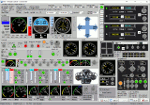
This is a FSX (only) Remote Control program with a GUI. It is intended to help you fly your various
aircraft without making changes to the aircraft files. This is a beta version with support for fixed
wing, combustion engine aircraft with 1 to 4 engines. It requires Pete Dowson's FSUIPC v4 with or
without WideFS, but it works best on a separate computer with the registered version of FSUIPC and
WideFS. The program will work for 30 days without a registration key. If you want a key, email me (see readme.txt file) with the installation code and your feedback.
With this application you can have a flight engineer working with you or an instructor can monitor and
challenge a student. You can simply use the app to help you control aspects of the aircraft that you
may not have easy access to.
| Filename: | FSXRC_Graphical_Remote_Control.zip |
| License: | Check within download |
| Added: | 16th June 2016, 08:15:08 |
| Downloads: | 182 |
| Author: | Scott Carpenter |
| Size: | 3.39 MB |
| Category: Flight Simulator X - Gauges | |
| A330/A340 Gauge Upgrade v2 |
|
File Description:
This is v2 of the OVERLAND SMS gauges upgrade pack.
It fixes several problems found on the first package and adds a few more features.
NEW FEATURES
1. It adds TERRAIN ON ND function, i.e. you can see the map at the ND (see screenshots). It is not very realistic, compered to the real thing, however it does add more realism and eliminates the use of the GPS for ground reference.
2. It adds a complete ILS CAT II & III autoland function to the aircraft. The original file belongs to Stefan Liebe, being modified by Francois
Dore, and finally being fine tuned for use with SMS A330 and A340 by me. It has been tested many times and this is the closest it can get
to the real thing. Now you can have a completely zero visibility landing performed automatically.
3. It provides new style square monitor 2d panels.
| Filename: | A330A340_Gauge_Upgrade_v2.zip |
| License: | Freeware |
| Added: | 9th June 2012, 06:29:25 |
| Downloads: | 3,146 |
| Author: | Dimitrios Moschos |
| Size: | 6.06 MB |
| Category: Flight Simulator X - Utilities | |
| FSXRC Graphical Remote Control ** UPDATE ** |
|
Images related to this file:
File Description:
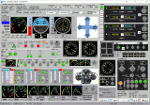
FSX - FSXRC Graphical Remote Control. This is an FSX (only) remote control program with a GUI. It is intended to help you fly your various aircraft without making changes to the aircraft files. This is a beta version with support for fixed wing, combustion engine aircraft with 1 to 4 engines. It requires Pete Dowson's FSUIPC v4 with or without WideFS, but it works best on a separate computer with the registered version of FSUIPC and WideFS. The program will work for 30 days without a registration key. If you want a key, email [email protected] with the installation code and your feedback. With this application you can have a flight engineer working with you or an instructor can monitor and challenge a student. You can simply use the app to help you control aspects of the aircraft that you may not have easy access to. By Scott Carpenter.
| Filename: | FSXRC_Graphical_Remote_Control__UPDATE_.zip |
| License: | Check within download |
| Added: | 6th July 2016, 09:10:06 |
| Downloads: | 150 |
| Author: | Scott Carpenter |
| Size: | 3.58 MB |
| Category: Flight Simulator 2004 - Utilities | |
| Courseplanner 3.D.3, Flight Planner |
|
File Description:
FS2004/FSCOF/FS2002/FS2000 Courseplanner 3.D.3, stand alone flight planner.
Complete flight management on a realistic world map. Over +30000 SID/STAR as well as +60000 waypoints.
Use YOUR own scenery, (airports, Navaids, etc), and all the planes in your hangar.
Monitor your progress, all the AI traffics, (and multiplayer), real time on the internet and intranet, this includes altitude, speed and more.
Great to use when flying with VATSIM or IVAO.
Use Courseplanner over the network, (CP on one machine and FS on another), or both on the same machine.
Runs independently to FS, (you do not even need to have FS running).
Import/Export FS flight plans and/or adventures.
Create printable maps, (en route, departure, airport, ILS etc), as well as the briefing files.
Courseplanner will fly the aircraft for you and even 'pause' the flight near the airport, or any point for that matter.
| Filename: | Courseplanner_3D3_Flight_Planner.zip |
| License: | Shareware, time limited |
| Added: | 23rd December 2005, 12:45:50 |
| Downloads: | 8,062 |
| Author: | MyOddweb.com Team |
| Size: | 26.35 MB |
| Category: Flight Simulator 2004 - Utilities | |
| Active Camera 2004 Update To Version 1.1 |
|
File Description:
Update to Active Camera 2004 version 1.1. For those who downloaded and installed Active Camera 2004 version 1.0 (ac2004.zip). New feature: Dynamic padlock view like in combat simulators. We have programmed a built-in TCAS (Traffic alert and Collision Avoidance System) in the Active Camera 2004 module. With this option enabled you can track any AI traffic flying in the vicinity of your aircraft (the pilot's head will track automatically the nearest AI). The user can monitor next traffic, lock the traffic view on the current AI or revert to the nearest AI. Operational purpose: It can be used if you wish to look out or if you suspect a traffic conflict. This is useful when, for example, ATC asks you to report traffic in sight or ATC reports you traffic. Ability to assign one of the 49 key events through a graphic interface. Fix: 3rd party windows in full screen mode are now properly displayed.
| Filename: | Active_Camera_2004_Update_To_Version_11.zip |
| License: | Commercial demo |
| Added: | 1st October 2003, 15:25:25 |
| Downloads: | 16,590 |
| Author: | Serge Baye - Guillaume Darier |
| Size: | 669.02 KB |
| Category: Flight Simulator X - Utilities | |
| SimLauncherX v5.9 |
|
Images related to this file:
File Description:
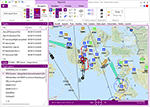
SimLauncherX (or SLX for short) can be used as a launcher application for both FSX:ME, FSX:SE and Prepar3D (v1, v2 and v3). Flights/scenarios can be loaded when launching the simulator or when the simulator is already running. New flights can be created by selecting one of the installed aircraft, selecting the start location (runway or parking position), selecting the type of weather and the time of day. You can also display and create flight plans and attach them to a flight as requested or active flight plan. Version 5.9 adds a flight computer, AI browser, interactive (spoken) checklists, PMDG 737/777 CDUs, approach charts, fleet management and many other improvements. SimLauncherX is a more modern version of my previous SimLauncher application with a lot of additional functionality:
- interactive map.
- display, create and modify flight plans.
- show .kml/.kmz files on the map.
- radio stack.
- instruments panel.
- scenery.cfg editor.
- dll/exe.xml editor.
- process monitor.
Works with FSX:ME, FSX:SE and P3D v1, v2 and v3.
| Filename: | SimLauncherX_v59.zip |
| License: | Freeware, limited distribution |
| Added: | 1st April 2017, 08:18:19 |
| Downloads: | 15,782 |
| Author: | Maarten Boelens |
| Size: | 52.64 MB |
| Category: Flight Simulator X - Miscellaneous Files | |
| FeelThere Map screens megapack |
|
File Description:
This package looks to be my final release of its' kind. Here are over 250 different screens for use with FeelThere Map; an amalgamation of my prior work into one package. You must have the payware add-on, FeelThere Map installed. These screens will work in FS9 and FSX, but were not tested in other sims. They should work in any sim that works with FeelThere Map (i.e. compatible versions of P3D). Many more complete airline sets are found here, along with a few sensible national groupings, a new bizjet operator grouping, and the addition of luxury brand advertisements for our high-end GA cockpit interiors, or to perhaps complete a set for an airline that might only have 2 or 3 screens of its' own. Lots of retro carriers, and some of the complete sets draw from historic timetable art, and/or bring type specificity. There are other packages from different authors available on the internet that would enable the construction of several more complete airline sets, for the dedicated VA pilot. Speaking of VAs, there's a few VA-specific groupings herein, as well. There's literally something here for every Map-enabled aircraft and flight context in your hangar. Enjoy your flights.
| Filename: | FeelThere_Map_screens_megapack.zip |
| License: | Freeware |
| Added: | 25th April 2026, 17:13:15 |
| Downloads: | 26 |
| Author: | Henry Douglas |
| Size: | 18.38 MB |


© 2001-2026 AVSIM Online
All Rights Reserved
Privacy Policy |