
Where Flight Simulation Enthusiasts Gather from Around the World!
AVSIM Library - Search Results

| Category: Flight Simulator X - Scenery | |
| KSNA, John Wayne-Orange County Airport |

|
Images related to this file:
File Description:

John Wayne Airport (IATA: SNA, ICAO: KSNA, FAA LID: SNA) is an airport in an unincorporated area in Orange County, California, with its mailing address in the city of Santa Ana, which is also the county seat, hence the International Air Transport Association (IATA) airport code. The main entrance to the airport is off of MacArthur Blvd in Irvine, the city that abuts the airport from the north and east. Newport Beach and Costa Mesa form the southern and western boundaries, respectively, together with a small unincorporated area along the Corona del Mar (73) Freeway. Santa Ana lies just north, not actually touching the airport directly. Originally named Orange County Airport, the county Board of Supervisors renamed it in 1979 to honor the actor John Wayne, who resided in neighboring Newport Beach and died that year. It also became the first airport to be named after an entertainer.
The main runway, at 5,701 feet (1,738 m), is one of the shortest of any major airport in the United States, resulting in most passenger aircraft operating from the airport to be no larger than the Boeing 757. However, some larger cargo aircraft, such as the FedEx A310/300, fly from SNA. Some gates are built to handle planes up to the size of a Boeing 767, which can operate with payload/fuel load restrictions. No wide-body passenger aircraft are currently in scheduled service at the airport.
| Filename: | KSNA_John_WayneOrange_County_Airport.zip |
| License: | Freeware, limited distribution |
| Added: | 11th October 2011, 08:25:20 |
| Downloads: | 11,000 |
| Author: | Mateusz Stabryla MK-Studios |
| Size: | 66.92 MB |
| Category: X-Plane - Aircraft Repaints, Textures and Modifications | |
| Balesin Island Club Cessna C208B Grand Caravan |
|
Images related to this file:
File Description:
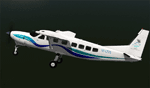
This archive only contains textures for the Carenado C208B GRAND CARAVAN V2 aircraft. In order for it to work, you need to own this specific aircraft. Since these are only textures, no further support is necessary, just follow the instructions below. If for some reason you don't like these textures, just delete the folder.
Installation
Open the zip file and move the whole folder Balesin Island Club to X-Plane 10 (where you installed X-Plane)--->Aircraft-->Carenado C208B GRAND CARAVAN V2 (where you installed the Carenado package)--->liveries. That's it!
A note on the Cessna C208B GRAND CARAVAN
The prototype first flew in December 1982. The production model was certified by the FAA in October 1984. Since then, the Caravan has undergone a number of design evolutions. Working with FedEx, Cessna produced first the Cargomaster, and followed that with the stretched and upgraded Super Cargomaster. The passenger model, the Grand Caravan, was derived from the Super Cargomaster. In January 2013 a higher-powered (867 shp from P&WC PT6A-140) version, the Grand Caravan EX, received FAA certification.[2] This higher-powered version will be produced by a Cessna-AVIC joint venture in China. Information taken from Wikipedia.org.
File information
The textures herein are made from the Carenado blanks. I have made every attempt to faithfully reproduce the Alphaland Balesin Island Club Caravan to the best of my abilities. The Balesin Island Club is a resort in the philippines operated by Alphaland Corporation. They use two Cessna C208B GRAND CARAVANS to ferry clients from Manila to the island resort.
| Filename: | Balesin_Island_Club_Cessna_C208B_Grand_Caravan.zip |
| License: | Freeware, limited distribution |
| Added: | 14th October 2013, 20:35:37 |
| Downloads: | 204 |
| Author: | Michel Theriault |
| Size: | 18.68 MB |
| Category: Flight Simulator X - Scenery | |
| KAFW Fort Worth Alliance Airport - Texas, US |
|
Images related to this file:
File Description:
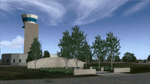
Ft. Worth Alliance Airport opened in 1989 and was billed as the world's first purely industrial airport. It is located around 14 miles North of the central business district of Ft. Worth and is also nearby the Dallas/Ft. Worth International Airport (KDFW). The airport serves general aviation, corporate jet, cargo, and military air traffic on a daily basis and it's proximity to the Texas Motor Speedway (only a few miles) brings extra dense traffic on race weekends. The airport is home to the American Airlines 777 and 767 maintenance base, FedEx Southwest Regional Sort Hub, Bell-Helicopter Training Center, DEA Air Operations Center and DynCorp International. Sadly the American Airlines maintenance base is set to close at the end of 2012 but is being kept alive in FSX!
This scenery features custom 3d buildings and objects bringing you a very accurate rendition of Ft. Worth Alliance Airport. Requires FSX Acceleration for the all scenery objects to display correctly.
Note: These files MUST be installed for the scenery to work correctly (otherwise there will be missing scenery objects at the airport):
-Filename: fsx_lts.zip - Ramp Lighting for FSX by Jim Dhaenens
-Filename: dlfcorelibraries2fsx.zip - Dan French Core Library Vol. 2
-Filename: lightstoo.zip - Jim Dhaenens Airfield Lighting
-Filename: objlib-jgse-fsx.zip - John Stinstrom JGSE Yellow Objects - this newer file replaces the older FS9 libraries with FSX versions
-Filename: objlib-ggse-fsx.zip - John Stinstrom GGSE Green Objects - this file also replaces FS9 libraries with FSX versions
| Filename: | KAFW_Fort_Worth_Alliance_Airport__Texas_US.zip |
| License: | Freeware, limited distribution |
| Added: | 12th December 2012, 16:56:36 |
| Downloads: | 2,932 |
| Author: | Brandon Thetford |
| Size: | 439.24 MB |
| Category: Flight Simulator 2004 - Scenery | |
| KIAH - Houston Intercontinental Airport v3.0 |
|
File Description:
Flightlevel390 is proud to present to you KIAH-Houston's George Bush Intercontinental Airport version 3.0.This scenery was created using EZ-Scenery object placer & Flightones' Instant Scenery.This scenery WILL NOT work in FS X.This will work with Default FS9 terrain,although it is optimized for use with ultimate terrain...This will be the final project under the FL390 brandname,all projects hereafter will be with BSMP...
Includes the Main terminals,Continental Maintenence Base,FedEx cargo ramp,UPS cargo ramp,City cargo ramp,fuel farm by 15R,CFR building further down 15R,CFR Building along Rwy 9-27 taxiway,FBOs on both sides of the 33s,including the big Landmark Aviation FBO,static ground equipment & some custom made signs.Also includes full ramp night lighting,aircraft gate outline markings at each gate.
This version adds some more stuff and fixing some stuff that was noted in previous versions.This also fixes the blurries that some people had reported.
Features a very good and super accurate AFCAD file and decent rendition of the real airport layout.***
Most of the objects in this scenery are all default with some of our own custom made stuff and some objects from some 3rd party EZ Object Libraries and RWY12 Object Libraries.
***You will need to download the EZ-Scenery & RWY12 Object Libraries which can be had at avsim,flightsim.com and our own website available as single downloads instead of multiple seperate downloads.I also recomend that you install our recently released EZ-Object Library Installer which is available at flightsim.com and our own website in the downloads section.File name on flightsim.com is ( EZOLIv33.zip )....
Downloading the installer will ensure that you will have all of the fixed default textures from Sid Schwartz's default libraries....As always...Enjoy!!
| Filename: | KIAH__Houston_Intercontinental_Airport_v30.zip |
| License: | Freeware |
| Added: | 15th June 2008, 17:39:45 |
| Downloads: | 8,408 |
| Author: | Joe DeGregorio |
| Size: | 3.08 MB |
| Category: Flight Simulator 2004 - Scenery | |
| PAEN, PAEX, 3AK4, 30AK, 52AK - Alaska, USA |
|
Images related to this file:
File Description:
The town of Kenai is on the east coast of Cook Inlet, 60 miles southwest of Anchorage. The airport is in the northern part of the town, with a runway aligned 1-19, 7,550 feet long and 150 feet wide (with an ILS on 19). A second runway is gravel, 2,000 feet long and for winter use by ski planes. There is also a water runway, and all three are aligned the same and called "1 left-19 right" (the main runway) "1 right-19 left" (gravel) and "1 water-19 water". The taxiways are extensive and designed for a far larger traffic than the airport has today, though even now the airport is fairly busy. In FS9 a water runway for AI cannot work with an ATC control tower; the water part of PAEN has therefore been separated into another call sign PAEX which has ONLY the water runway; the tower will therefore direct the plane that makes contact to use the water runway. The PAEN airport runway has taxiway connections at each end and also two intermediates; at the northern end there are in fact two so a total of 5; B, C, D, E, and F; there is an airport diagram included. GA traffic goes to one of two parking aprons, both at the southern end, and at the far southern end there is the hangar for the Civil Air Patrol. The AI includes aircraft from my previous Alaska posts, as Kenai is where I sent them when they departed from, for instance, Palmer. Airlines and cargo companies that operate from and to Kenai are included in the AI: ERA (which has recently changed it's name), Grant Aviation, Air North, Wings of Alaska, North Star Air, and a small local company Air Supply Alaska, along with Fedex, UPS, Everts, and Northern Air Cargo. There is also GA and float AI. Nearby smaller airfields are included, partly because one of them was dramatically misaligned in FS9.
| Filename: | PAEN_PAEX_3AK4_30AK_52AK___Alaska_USA.zip |
| License: | Freeware, limited distribution |
| Added: | 26th December 2015, 15:33:19 |
| Downloads: | 482 |
| Author: | Roger Wensley |
| Size: | 23.08 MB |
| Category: Flight Simulator 2004 - AFCAD Files | |
| Savannah/Hilton Head International Airport, Savannah, Georgia (KSAV) |
|
File Description:
This is a AFCAD2 file for the Savannah/Hilton Head International Airport. I tried to make the airport as realistic as possable with what is given to me with FS9. Gates 1 and 3 is Delta Connection from Cincinnatti, New York-LGA, and Dallas/Ft. Worth. Gates 5 and 7 are Delta from Atlanta, Gate 2 &2a are Continental Express (Expressjet) From Houston-Bush, and Newark, Gate 4 is Northwest (Mesaba and Pinnacle) from Detroit, Memphis, and Minneapolis, Gate 6 is Independence Air flights from Washington-Dulles (Make sure you have your Independence Air planes coded to BLR. That is what I have the gate coded to which is correct in real life.). Gate 8 is AirTran flights from Atlanta (I also have TRSX AirTran Jet Connect. They no longer fly, but I have them on my AI so I left it in.). Gates 9 and 11 are USAir (Gate 9 being USAir mainline and CRJ-200 flights from Charlotte, Philly and Pittsburgh and Gate 11 being CRJ-200 flights and Dash 8 flights Charlotte, Boston and New York-LGA.). And finally Gate 10 is United Express (Air Wisconsin) flights from Washington-Dulles and Chicago-O'Hare. At the old terminal I have the FedEx, and Airbourne Express/DHL areas, as well as the GA "terminal". North of that is the 165th Airlift Wing National Guard area with parking for their C130's, F-16's, F15's, and their F-18's. I do not have the jetways on yet, however they are done except for the Delta gates....look for them soon. I hope this is a better representation of the airport. I believe it is. All lights on the Taxiways, Runways, as well as landing lights are REAL TO LIFE. They are taken from the airport digrams themselfs as well as from the website www.fltplan.com. Please, let me know what you think as I am using you as an unofficial beta tester for this file.
| Filename: | SavannahHilton_Head_International_Airport_Savannah.zip |
| License: | Freeware |
| Added: | 6th January 2005, 15:12:51 |
| Downloads: | 1,615 |
| Author: | Jason Landuyt |
| Size: | 6.63 KB |
| Category: Flight Simulator X - Scenery | |
| Albany International Airport (KALB) Albany, New York |
|
Images related to this file:
File Description:
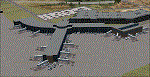
This airport was made using Airport Design Editor, Google Sketchup, and Instant Scenery 2. Albany International Airport, Is an airport located near Albany, New York. The airport has scheduled airline flights. Almost all of the buildings are custom made with photo textures to make it closer to real life. At the main terminal, I added more gates and put moving jetways. The gates have assigned parking codes. There is a parking lot next to the terminal full of cars. I put the airport access road in between the parking lot and the terminal. At the southwest ramp, I put hangars and some you can taxi inside of. If you choose to start off from the southwest DOCK gate, You will start off inside the Million Air Aviation FBO. I also put static aircraft on the ramp too. To the northwest, I put the New York Police hangar. You can start off inside this hangar by choosing the Northwest DOCK gate. Taxiing into or starting off inside a hangar will not cause a crash unless you touch the sides. To the Northeast, I put the cargo terminal with trucks. At the cargo section, I put three FedEx Cessna Caravans. I also put the control tower and the buildings. Tower views are from the roof of the control tower. To the southeast, I put small hangars and the Air National Guard Section with UH-60 helicopters. I extended runway 1/19 to the correct length of 8,500 feet. I also put red, blue, green, and purple Cessna 172s in different places around the airport. There will be more objects if your scenery complexity is set to normal (such as jetways, aircraft, and vehicles). This was all made based on Google Earth Imagery and Bing Maps. There are no night textures for the buildings. This will be added in a future version. An installer program is included to install the airport for you. There will be more versions of this that include night textures and static business jets. This is for Flight Simulator X only. By Tyler Lawrence.
| Filename: | Albany_International_Airport_KALB_Albany_New_York.zip |
| License: | Freeware |
| Added: | 2nd June 2012, 08:14:12 |
| Downloads: | 4,342 |
| Author: | Tyler Lawrence |
| Size: | 47.69 MB |
| Category: Flight Simulator 2004 - Scenery | |
| PAMR (Merrill Field, Anchorage), 5HO (Hope), 9Z9 (Lawing) - Alaska, USA |
|
Images related to this file:
File Description:
This stand-alone combined V2 version of Merrill Field 2016 includes: windsocks, a parked Fedex 727 that was recently donated to the University of Alaska, some missing taxiway lights, and small corrections to the apron layout. It also includes Hope 5HO and Lawing 9Z9. The 2016 version of Merrill Field PAMR dealt with a spectacular malfunction reported by one recent downloader; see the two screenshots. Merrill Field is in Anchorage Alaska, between Anchorage International to the southwest and and Elmendorf Air Force Base to the north. It caters for general aviation and is the land equivalent of the Lake Hood float plane base, with fuel and numerous maintenance facilities, and several hundred parking spots for small planes. There are three runways, and the longest is 4,000 feet of 100 feet wide asphalt, the second 2,635 feet of asphalt 75 feet wide, and the third 2,000 feet of 60 feet wide gravel. The first two have runway lights. It is a controlled airfield with a relatively new control tower to cater for the numerous flights and to coordinate with Elmensdorf and Anchorage International, the latter also controlling flights from Lake Hood and the adjacent gravel strip Z41 (see my Lake Hood scenery). The gravel runway at Merrill Field is not connected with active taxiways to the rest of the airfield; this avoids you being ordered to land on it when flying a plane too large to do so. The enclosed layout shows the runways and the taxiways complete with their assigned letters to help you find your way around, but note that this shows the current gravel runway with its wandering magnetic headings, not the ones prevailing when I made Merrill. The signage on the airfield is not total. The main taxiways are signed and each entry to a runway has a runway sign, but intermediate taxiways to or from a runway are not; if you have turned off the runway at the first possible exit you could then whether it is R or T is, I suppose, irrelevant. Try not to turn onto Merrill Field Drive at an intersection, this is a road that runs through the field. There are almost 50 buildings on the field and threequarters of them have been modelled from photographs specifically for this scenery; some of them were modelled from photos that were of not very good quality, but when the photos were taken I wasn't thinking that I would ever model the field. Which explains why there are buildings I had no photos of at all, of any sort of quality.
| Filename: | PAMR_Merrill_Field_Anchorage_5HO_Hope_9Z9_Lawing__.zip |
| License: | Freeware, limited distribution |
| Added: | 26th February 2016, 09:54:17 |
| Downloads: | 757 |
| Author: | Roger Wensley |
| Size: | 22.64 MB |
| Category: Prepar3D V1-4 - Utilities | |
| Flightplan Visualizer 1.17 |
|
Images related to this file:
File Description:
Flightplan Visualizer (FV) version 1.17.0. Copyright 2018-2020 by Pelle F. S. Liljendal ([email protected]), all rights reserved.
FV comes with 783 pre-imported Commercial AI flightplans (+380 BizJet flightplans are available as a separate download). However you are able to import additional (AI) flightplans yourself. Once imported these (AI) flightplans can be visualized on a map-view, and the user will be able to search accross all these. Hence you can use the program as inspiration as to which routes to fly. E.g. you can search across all imported flightplans to find all flights in an A321 flying into/out from LDDU, or simply to look for all flights in a Boeing 747-8F.
Simply run the included installer to install the software. The program will be installed into "C:\Program Files (x86)\Flightplan Visualizer" and all datafiles will be installed into: "C:\Users\[UserName]\AppData\Roaming\FlightplanVisualizer". The program comes with a full manual explaining everything, and a 3 page quick manual to get you started. The first 3 times you run the program the quick manual will automatically open. The forum is hosted here: https://forum.aerosoft.com/index.php?/forum/919-flightplan-visualizer/
Version 1.17 Contains the following changes:
- A big Thank You to Alex for the donation, it is appreciated ... You are actually the first one to donate, but then again I never expected to get rich writing this software :-)
- Both version 1.16 and 1.17 are mandatory, so if updating from a previous version you MUST install/run both versions as outlined on the forum. Running version 1.17 will forcefully update all flightplans to the latest file-version, as version 1.18 will remove some of the backward comparability.
- Added support for importing flightplans from the new .aigfp file-format used by Alpha India Group. Export of flightplans (in aifp-format) is disabled for flightplans originally imported from .aigfp files, because the repaint-info is not imported from these.
- Beside the supplied aircraft-types contained in the ("factory") aircraft-database, users can now add their own user-aircraft, both in form of owned (flyable) 3rd party aircraft and aircraft-types (used in flightplans, or as basis for owned aircraft).
- Added support for Helicopters (simply created the "aircraft" with the engine-type set to "Heli"). They will be listed/treated as an "aircraft" with a specific engine-type (and in stead of a "wingspan" they have a "rotor diameter").
- Many reports have been added to list "suitable" substitute aircraft based on match-score (a value between 0 and 100, where 100 is a perfect match). Likewise reports have been added to visualize repaints that you have, and those you might be "missing" for a particular aircraft/airline.
- In form leg-info you can now "tag" a leg by pressing the new "Tag" button. Doing so will add the leg to the new "Tagged legs" menu-item found in the "Misc" menu. This menu can contain the last 10 tagged legs (flights). Selecting any of these 10 menu-items will open the leg-info form and show the details of the tagged leg.
- The AIG flightplan download-form will now only pre-select flightplans with a new season or a new revision, as you have to pay attention to flightplans with status "Not installed" since the reason these are not installed can be due to airlines being defunct or have changed their names.
- The AIG flightplan download-form now have 2 numbers above the list-view. The first tells the number of flightplans being listed for the selected season, and the 2nd number in parentheses tells the number of checked flightplans. So choosing a season, you can simply look at the number in the parentheses to see the count of new seasons/revisions to install (without the need to scroll throgh the list).
- The "Defunct list" (list of all defunct airlines, as marked by AIG) that can both be displayed in the "AIG flightplan downloader" and the "Enable / disable flightplans" forms, is now both sorted by Name (first) and by ICAO (last), making it more easy to look for a particular airline.
- The Leg-info and Edit flightplan -forms now both list the (flightplan) sub-folder name and the name of the original imported filename (in case you need to see the version/revision number that AIG append to this filename).
- The same sub-foldername and original imported flightplan filename are also added in the top when generating a leg-info report.
- If the departure/destination airports have gates marked as favorites, or gates with comments, therse are added to the leg-info report. E.g. "Gate G47 (36.0): B744F, no-jetway", where "36.0" is the radius of the gate (in meters), and "B744F, no-jetway" is the comment.
- Many "behind the scene" changes were made to the Leg-info report, and more data have been added (e.g. carrier/operator-callsign, time-zone/offset, airport-size, rank and traffic-density).
- Added a button to the Leg-info form to show list of possible substitute aircraft, sorted by scored (based on how well these match the parameters of the original aircraft).
- Internally the program stores- and perform all weight-calculations in lbs, however in settings you can now choose if weights should be shown in lbs or kg.
- Using EOW- or MTOW- filter sub-type in the aircraft filter the specified weight will now be according to the chosen weight-unit specified in the settings form (in previous version it was fixed to be lbs).
- Obtaining METAR/TAF messages from the internet takes a few fractions of a second, hence the "Show as Report" button on the Leg info form, now contains an asterisk until the METAR/TAF messages have been obtained, as these would otherwise appear as "not obtained" in the generated report. So if you need these messages in the report, you should wait pressing the "Show as Report" button, until the asterisk is removed.
- The form for creating user-airlines now contains a "Lookup" button that lets you search for airlines, so you can check if an airline already exists before creating it as a user airline.
- Airlines without official iCAO/IATA-codes are sometime created with an artificial ICAO code of "---". Airlines with this ICAO-codes are no longer listed as alternatives.
- Reordered the two "fields" in the "Min. Rank" and "Min. Traffic-density" combo-boxes, to make it more easy reading- and picking- the correct.
- Improved scanning of readme-files during import (more files are excluded such as "Repaints.txt").
- Changed the default size of the about-form, to make it more easy to being reading the history-text without having to first resize the form.
- All forms in FV have been made with a HD resolution (1920x1080) in mind. Some users are running at this resolution, but have chosen to scale the font-size to 125%. If doing so, some forms were not fully visible. Hence there is now a new setting item called "Reduced desktop". If defaults to be disabled, however once enabled some forms will be reduced in their size (e.g. the flightplan-, airline and aircraft- list-views in the Leg Search form will be more narrow, allowing the form to be fully visible).
- The country sub-filter no longer supports wildcards (nor partial codes), but now it accepts both 2 and 3 letter (ISO) country-codes. The filter-text will be colored red, if an invalid country-code is entered.
- The result-viewer now have a "Save as" button that allows you to save its content. Also an "Enable edit" check-box have been added, which puts the text-box into edit-mode, so you can change its conent (e.g. before copying to clipboard, or saving to disk).
- Right-clicking the main-map there is now a menu-item to show country, time-zone/offset (as a hint) at the GPS-position of the mouse-cursor. These information are downloaded from the web, hence there will be a small delay.
- Added more logging, to better identify which actions might have led to the program displaying an error-message. Also tweaked the log-format a bit to make it more readable.
- Updated all external libraries to the latest versions.
- Added release dates for each version in this version-history text.
- Fixed: If marking gates as favorites or adding comments to gates these data were not saved unless other user-data were added to the airport (e.g. marking the airport as favorite, setting rank/traffic-density, manually specifying size, taxi-in/out times, entering comments or hint-text for the airport).
- Fixed: If changing the ICAO-code of a user-airline, the alternative-list was not updated until next time the form was opened. The form also got a minor optimization in the process. When editing an user-airline you can now press enter in stead of clicking the "Save" button (as long as the Comments field does not have focus).
- Fixed: In a few cases the week-number was not calculated correctly for multi-week flightplans.
- Fixed: In some cases the week-day was still shown as a "name" (2 letters), even if the user had selected to display these as numbers in settings.
- Fixed: Aircraft/Airline search forms would not perform initial search when opening the form, if the search-text was blank. You had to enter a letter, and delete it again, before the search was performed.
- Fixed: Aircraft search form did not use natural-sort when sorting by name (e.g. "CRJ1000" was listed before "CRJ200").
- Fixed: Setting core-affinity to a non-zero mask, and change it back to zero, it would not return to its initial state (e.g. all cores selected) until the program was re-started.
- Data: Updated a few airports with missing country-code and/or missing time-zone.
- Data: A few new aircraft were added and some aircraft were split in dedicate pax/freight-versions.
- Data: A few helicopters have been added.
- Data: Aircraft-data updated as there were still a couple of freighters with non-zero passenger-count. Also the weight constraints were updated for A LOT of aircraft.
- Data: Cumulative aircraft-types (such as "[32S] Airbus A318/A319/A320/A321") are now removed in many views, unless the type is in use by at least one active flightplan.
- Flightplans: Compared the list of flightplans bundled with FV to the list of flightplans available in AIG AIM. This meant a few flightplans were marked as defunct (and removed from the installer) and a few missing were added (primarily from 2017).
- Flightplans: The first Summer 2020 flightplans have been added (FedEx and UPS).
- Flightplans: All new/updated flightplans have been added to the installer, and all obsolete have been removed. A total of 783 active flightplans are bundled with the installer.
Pelle
| Filename: | Flightplan_Visualizer_117.zip |
| License: | Freeware, limited distribution |
| Added: | 8th August 2020, 17:44:15 |
| Downloads: | 415 |
| Author: | Pelle Liljendal |
| Size: | 29.48 MB |


© 2001-2026 AVSIM Online
All Rights Reserved
Privacy Policy |