
Where Flight Simulation Enthusiasts Gather from Around the World!
AVSIM Library - Search Results

| Category: Flight Simulator 2004 - Utilities | |
| Speeding Up Loading of FS9 Tutorial |

|
Images related to this file:
File Description:
FS2004 Utilities - A simple tutorial on SPEEDING up FS9 when loading. The tips originate from personal experience and extensive testing. These tips should work on any PC or laptop. They are probably most effective on "slower" Pcs or laptops. However, even high-end PCs may experience considerable time-saving during FS9 loading.
| Filename: | Speeding_Up_Loading_of_FS9_Tutorial.zip |
| License: | Freeware |
| Added: | 18th September 2014, 17:07:28 |
| Downloads: | 501 |
| Author: | Ronald Falzon |
| Size: | 45.55 KB |
| Category: Flight Simulator 2004 - Scenery Design | |
| Tutorial: Placing 3d Objects using Sbuilder |
|
File Description:
This is the fourth Tutorial in my series on using Sbuilder to design airport scenery. In this one I look at adding objects such as buildings, trees and vehicles to your scenery. I cover how Sbuilder displays information about, and categorizes objects. I show how to use FS default library objects, API macros and RWY12 objects to populate the airfield.
Support is available from my website www.scruffyduck.plus.com
| Filename: | Tutorial_Placing_3d_Objects_using_Sbuilder.zip |
| License: | Freeware, limited distribution |
| Added: | 16th December 2005, 23:24:44 |
| Downloads: | 3,560 |
| Author: | Jon Masterson |
| Size: | 1.46 MB |
| Category: Fly! II - Development | |
| SRTM to RAS Tutorial English Version |
|
File Description:
How to import SRTM files into FLY! II
| Filename: | SRTM_to_RAS__Tutorial__English_Version.zip |
| License: | Freeware |
| Added: | 25th August 2004, 16:44:05 |
| Downloads: | 264 |
| Author: | Daniele Tona |
| Size: | 907.78 KB |
| Category: Flight Simulator X - Panels | |
| TextInfo Gauge 4.0 and XML Tutorial |
|
Images related to this file:
File Description:
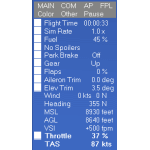
On-screen text display of flight data that operates equipment and dials settings. Includes a 70-page manual loaded with info about text gauges and panels, XML examples, and tips, plus detailed info about the FSX Shift-Z feature. Ver 4.0 is a complete re-write with too many adds and fixes to list here. Now has size settings that are transferable from aircraft to aircraft. Switch between two color schemes with a single click.
| Filename: | TextInfo_Gauge_40_and_XML_Tutorial.zip |
| License: | Freeware |
| Added: | 9th May 2014, 13:02:21 |
| Downloads: | 614 |
| Author: | Rick Federmann |
| Size: | 1.14 MB |
| Category: Flight Simulator X - Scenery Design | |
| Design Tutorial for Sloping Runway Scenery |
|
Images related to this file:
File Description:

The one aspect that has always bothered me is all the ingredients for sloping runways already exist in FSX. I can land a Cessna on the arching Golden Gate Bridge deck, hear tire squeal and see touchdown smoke as I head up hill, then throttle up and take off rolling down hill. So why are there no sloping runways?
Do you know how to apply texture to a surface? Can you make a curved sloping flatten polygon and locate it accurately within the FSX world? If your answers are yes, all you need to know is how to turn that polygon into a hardened surface. It is that simple. - Wally-Bob
| Filename: | Design_Tutorial_for_Sloping_Runway_Scenery.zip |
| License: | Freeware, limited distribution |
| Added: | 8th August 2011, 01:29:52 |
| Downloads: | 1,425 |
| Author: | Walter Roberts |
| Size: | 11.36 MB |
| Category: Flight Simulator 2004 - Miscellaneous Files | |
| Embraer 170/190 Checklist |
|
File Description:
This is an Embraer E-Jet Checklist which was created based on a realworld E170 Checklist. It's a checklist only, it does not contain any normal operation procedures and it's not meant to be used as a tutorial checklist.
| Filename: | Embraer_170190_Checklist.zip |
| License: | Freeware |
| Added: | 20th November 2010, 00:07:22 |
| Downloads: | 585 |
| Author: | Mike Fritsch |
| Size: | 12.21 KB |
| Category: Navigation and ATC - Navigation | |
| Holding Procedures Tutorials |
|
File Description:
An extensive tutorial for hellenic flightsimmers in Greek language that explains all basics an IFR simulator pilot needs to know about HOLDs. Hold entry procedures, crosswind corrections, speeds, altitudes and lots more are covered with detailed images as well.
| Filename: | Holding_Procedures_Tutorials.zip |
| License: | Freeware |
| Added: | 18th April 2003, 22:54:46 |
| Downloads: | 2,082 |
| Author: | Manolis Argyropoulos |
| Size: | 994.48 KB |
| Category: Flight Simulator X - Missions | |
| KSYR to KLGA mission |
|
Images related to this file:
File Description:
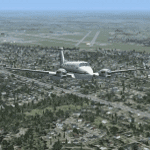
This mission can be a Tutorial or a very busy 60 minute flight from Syracuse to New York's LaGuardia. The Tutorial is on Arrival Charts and how to interpret them. This one uses the HAARP THREE ARRIVAL to KLGA. In this short time, you will use Eight VORs and even more checkpoints in the infamous zigzag approach to land on runway 22. This flight is VFR, but you must rely heavily on your instruments due to extreme traffic and other congestion in the New York area, BUT you will get plenty of guidance in this tutorial mode.
You also have the OPTION to fly an IFR mode in IMC conditions with visibility less than 2 miles. In this Mission you will be flying the King Air 350. If you can master this approach, then you will be ready for a full instrument approach for most any airport. Goals, Reward and Pilot feedback on your performance are all included.
| Filename: | KSYR_to_KLGA_mission.zip |
| License: | Freeware, limited distribution |
| Added: | 31st July 2019, 06:00:13 |
| Downloads: | 272 |
| Author: | Jake Rogers |
| Size: | 19.4 MB |
| Category: Flight Simulator 2004 - Miscellaneous Files | |
| Creation of an "Invisible Runway" - a Step by Step Illustrated Tutorial |
|
File Description:
How to create an "Invisible Runway" - a step by step Illustrated Tutorial. In response to several e-mails asking for information about the "invisible runway" technique, I have prepared this Illustrated Tutorial which will guide you step by step in the creation and use of them. Invisible runways can be used to allow start locations and special airports to show in your "go to airport " menu. They also allow them to be displayed on your "nearest airport" listings. Please unzip to a temporary folder - with the folders option checked. Compiled for your flying enjoyment by David "Opa" Marshall.
| Filename: | Creation_of_an_Invisible_Runway__a_Step_by_Step_Il.zip |
| License: | Freeware |
| Added: | 26th March 2005, 17:02:41 |
| Downloads: | 1,538 |
| Author: | David Marshall |
| Size: | 1.21 MB |
| Category: Prepar3D V1-4 - Aircraft Repaints, Textures and Modifications | |
| Engine Spinner Pratt & Whitney 777 PMDG (200LR / F / 300ER) |
|
Images related to this file:
File Description:
Engine with Spinner of the PW for the PMDG 777, only visual, copy the .dds file and paste into the livery folder of your preference, instructions in the readme.
| Filename: | Engine_Spinner_Pratt__Whitney_777_PMDG_200LR__F__3.zip |
| License: | Freeware |
| Added: | 19th May 2019, 17:07:03 |
| Downloads: | 219 |
| Author: | PMDG |
| Size: | 1.24 MB |


© 2001-2026 AVSIM Online
All Rights Reserved
Privacy Policy |