
Where Flight Simulation Enthusiasts Gather from Around the World!
AVSIM Library - Search Results

| Category: Flight Simulator 2004 - AI Aircraft | |
| Far Eastern Air Transport, McDonnell Douglas MD-83, B-28027 |

|
Images related to this file:
File Description:
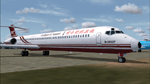
This is the livery repainted by use of the Paintkit which was made by David Rawlins. The "zip" file contained texture files only and to be used with the AI Aardvark MD-8X Base Model available separately: (aia_md8x.zip).
Far Eastern Air Transport was ever the biggest domestic airlines in Taiwan. The company was forced to shup down operations due bankrupt in May, 2008. After three years effort, the company was restructured and restarted its services on April 18, 2011. Currently, the company got four MD-82, four MD-83 and two B757-200. However only 3 of them got the certification to operated which were B-28025, B-28027 and B-28035. This Aircraft was the second one got the certification.
| Filename: | Far_Eastern_Air_Transport__McDonnell_Douglas_MD83_.zip |
| License: | Freeware |
| Added: | 16th May 2011, 10:05:55 |
| Downloads: | 1,259 |
| Author: | Ren-Jie Wu |
| Size: | 229.39 KB |
| Category: Flight Simulator X - Aircraft Repaints, Textures and Modifications | |
| FS2004/FSX/P3D Project Airbus Jetstar Asia Airbus A320-232 3 Liveries Pack |
|
Images related to this file:
File Description:

(TEXTURES ONLY)
(ONLY TESTED IN FSX: STEAM EDITION)
Unfortunately, I lost the motivation to continue the jetstar livery package and thought it is pointless to make it, so I just rejected it and release these 3 liveries.
I included 2 folders in each of the texture folders. One is an alternative lightmaps which shows the nose landing gear lights, and the other being the misc 1 texture file but with some parts of the texture blacked out. (The blacked out parts are actually transparent, recommended to use that misc texture when using an FSX model.)
The wheel rims are made by "dm6" from the X-Plane Forums!
Intrusctions and more information is included in the readme file.
| Filename: | FS2004FSXP3D_Project_Airbus_Jetstar_Asia_Airbus_A3.zip |
| License: | Freeware |
| Added: | 30th July 2025, 12:38:06 |
| Downloads: | 43 |
| Author: | Ryubunao |
| Size: | 38.05 MB |
| Category: Flight Simulator X - Gauges | |
| TCAS II v1.0 |
|
Images related to this file:
File Description:
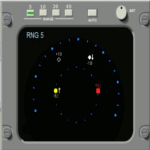
This gauge has been developed for the FSX Flight Simulator SP2 or SP1. It should also work with Acceleration but this is not guaranteed by the author.The functionality for this gauge is based on the Honeywell C81A system. The gauge will provide resolution advisories (TA or RA) to the pilots via recorded voice announcements once the aircraft is in danger of a collision with an intruder. The gauge is a generic gauge, and can be added to any aircraft as a stand alone pop up window. This particular gauge is available in 3 color options for the display body and the control panel. They are gray, light gray and beige.
For installation and operational instructions, please read the documentation inside the zip file.
| Filename: | TCAS_II_v10.zip |
| License: | Freeware |
| Added: | 18th May 2011, 14:37:13 |
| Downloads: | 2,463 |
| Author: | Dietmar Loleit |
| Size: | 1.89 MB |
| Category: Flight Simulator 2004 - Aircraft Repaints, Textures and Modifications | |
| Vueling Airlines Airbus A320-214 EC-KBU |
|
File Description:
Introducing the famous Vueling EC-KBU, "Be Vueling my Friend" for the incredible Project Airbus A320-200. The model is included.
Ladies and Gentleman, I have been waiting for over 2 years for a good Vueling repaint, but I haven't found any.. So tired of waiting I decided to move my lazy butt and to repaint my first aircraft, in the colours of my favourite airline, and here are the results! I want to dedicate the aircraft to my fellow workmate and friend Benito, to Justo, workmate friend and the one who put the name to this aircraft, and finally to all the Vueling crew who are based in Paris CDG, who are without any doubt the best persons on the earth!!!
Au revoir and have fun!!
| Filename: | Vueling_Airlines__Airbus_A320214_ECKBU.zip |
| License: | Freeware |
| Added: | 9th August 2007, 23:43:43 |
| Downloads: | 2,618 |
| Author: | Alex Fontes |
| Size: | 3.2 MB |
| Category: Prepar3D V5 - Scenery | |
| VIJP_P3Dv5 |
|
File Description:
Jaipur International Airport (IATA: JAI, ICAO: VIJP) is the primary airport serving Jaipur, the capital of the Indian state of Rajasthan. Jaipur International Airport has been declared as the World's Best Airport in the category of 2 to 5 million passengers per annum for 2015 & 2016 according to Airports Council International.[4][5] Jaipur Airport is the 11th busiest airport in India in daily scheduled flight operations.[6]
It is located in the southern suburb of Sanganer, 13 km (8.1 mi) from Jaipur.[7] The airport was granted the status of international airport on 29 December 2005.[8] The civil apron can accommodate 14 aircraft and the new terminal building can handle up to 1,000 passengers at a time.[9]
| Filename: | VIJP_P3Dv5.zip |
| License: | Freeware |
| Added: | 26th October 2020, 18:22:27 |
| Downloads: | 600 |
| Author: | Abhishek Banerjee |
| Size: | 42.75 MB |
| Category: Prepar3D V1-4 - Utilities | |
| Flightplan Visualizer 1.13 |
|
Images related to this file:
File Description:
Flightplan Visualizer (FV) version 1.13.0. Copyright 2018-2019 by Pelle F. S. Liljendal ([email protected]), all rights reserved.
FV comes with 586 pre-imported Commercial AI flightplans (+380 BizJet flightplans are available as a separate download). However you are able to import additional (AI) flightplans yourself. Once imported these (AI) flightplans can be visualized on a map-view, and the user will be able to search accross all these. Hence you can use the program as inspiration as to which routes to fly. E.g. you can search across all imported flightplans to find all flights in an A321 flying into/out from LDDU, or simply to look for all flights in a Boeing 747-8F.
Simply run the included installer to install the software. The program will be installed into "C:\Program Files (x86)\Flightplan Visualizer" and all datafiles will be installed into: "C:\Users\[UserName]\AppData\Roaming\FlightplanVisualizer". The program comes with a full manual explaining everything, and a 3 page quick manual to get you started. The first 3 times you run the program the quick manual will automatically open. The forum is hosted here: https://forum.aerosoft.com/index.php?/forum/919-flightplan-visualizer/
Version 1.13 Contains the following changes: Flightplans can now be exported in AIFP/TrafficTool-format (the same format that FV is able to import). It means if you have made any changes to a flightplan (e.g. redirected some airports) the flightplan can be exported from FV, and imported into AIFP (AI Flight Planner, by Don Grovestine) where it can be compiled into an AI-traffic bgl-file (traffic "scenery"). A new setting called "Adjust flight-time on airport-redirect" have been added. This setting defaults to "false" (un-checked), however if changed to "true" (checked) the flight-time will be changed if/when departure/destination-airports are changed due to airport-redirections (both automatic and manually). The flight-time is the result of the difference between departure-/destination-time, hence if the flight-time is changed either- or both departure-/destination-time will change as well. The original flight-time is scaled based on the original- and the redirected distance between the departure/destination-airports. When importing/editing flightplans you can now select one or multiple aircraft and delete them. When deleting an aircraft all schedules attached to that aircraft will be deleted as well. One use of this feature could be to remove aircraft you don't have a AI aircraft, prior to exporting the flightplan in AIFP/TT-format, and loading it into AIFP. When importing/editing flightplans a "Similar" button will appear next to the flightplan name if a similar named flightplan exists (e.g. "same name", but different season), or other flighplans exists for the same airline (ICAO). Hoovering the mouse over this button will show the names of these flightplans as a tool-tip, and if you click the button the list will be shown in a window (with some additional information), from where it can be copied to the clipboard if you need to. On the Edit/Import-flightplan form, the Aircraft- and Airport tab-sheets have been swapped, and a new tab-sheet was added to list all routes of the flightplan. For each route the distance is listed along will all aircraft types of the flightplan servicing that route. The "Aircraft" tabsheet of the form to import/edit flightplans now contains a button called: "Fleet report". Pressing this button will generate a report showing the fleet of an airline (based on the flightplan), that is sorted by Aircraft type and registration. For each aircraft it will show a list of all the airports served by that particular aircraft. A "Word-wrap" check-box have been added to the Result-viewer to toggle word-wrap on/off (word-wrap defaults to "on"). In previous versions any changes made in the settings form resulted in all flightplans having to reload (while showing the splash-screen). Changing the path for MakeRunway-files still results in an automatic "reboot" of the program. The combo-box for choosing default direction (outbound/inbound/both) for the leg-search (on reset) have been removed from settings, and it now defaults to "Outbound or Inbound". However in the search legs form you can now save your own preferred "Reset" criteria. When you press the reset-button, it will load this Reset-file (with your preferred reset criteria). If you hold SHIFT while pressing the reset-button (or you have not saved a personal reset-file), it will reset to the default factory-criteria. In the traffic tabsheet of the airport info form there is a combo-box letting you switch between "Selected flightplan" or last-search on main-form" and "All flights to/from this airport". In previous versions it did not perform the search of flights to-/from- the viewed airport until you selected the 2nd item from the combo-box. Now this search is performed in the background as soon as the form is opened, hence choosing the 2nd item in the combo-box is now instantaneous. The "Nearby Airports" tab-sheet in the "Airport Info" form, now have a column listing direction (from the airport to the nearby airports). When listing number of runways and gates (e.g. in the form showing nearby airports, or in the redirection-report), the radius of the largest gate is now included, as there is no need to redirect any 747 traffic to an airport where the largest gate is 23m (a 747 requires a gate with a radius of at least 36m). The frequency-count was removed from the before mentioned listing of runways and gates, to make more room for listing the aircraft serving each airport. The search for airport browse now have a new optional column listing comments (e.g. length of longest rwy and largest gate). The "show" combo-box lets you choose to show comments in stead of "Size/Rank/Traffic" or "Hint-text". Opening the search airport browser from the import/edit flightplan form, will automatically choose to show the comments column, as information regarding rwy length/gate radius can be relevant when redirecting airports. Form "Nearby Airports" now show the GPS-position in the caption of the form. Added runway/gate summary to caption-bar of airport info form, so you no longer need to look at both the runway- and gate- tab-sheet in order to see: number of runways, longest runway, number of gates and largest rate (radius). New check-box added to settings allowing you to include the before mentioned runway/gate info in the airport marker tool-tip on the main map. Region/sub-region added to "Airport Info" form (top/left corner). A new setting (default to disabled) lets you add region/sub-region to the airport marker-hint on the map as well. Added a button to the "airport info" to show the airport at flightradar24 (opens the default browser), and the button on the leg info form to show route the route at flightaware (also using the browser) have been replicated on the route info form. The METAR-/TAF-buttons on the leg info form now shows the raw METAR/TAF-message - as a tool tip - when you hoover the mouse over the buttons. As before, when you press these buttons it will open a window showing the decoded messages. Various minor changes to the leg info form: added info regarding longest runway and largest gate for each airport, and re-positioned some of the fields. Likewise the info copied to the clipboard when you click the appropriate button have been re-ordered as well. Changed flightplan format to accommodate additional information, but the format remains backward compatible. Button added to about-box allowing the user to copy version-info to the clipboard. Managed to "shave off" approx ½ a second during start-up (on my pc). Not a lot but still an improvement :-) Fixed: In the form for importing/editing flightplans the leg-page showed the original distance even if the airports were redirected. Fixed: On leg info form "Dest.Country" and "Dest.Apt" column-order were swapped. Fixed: Tweaked aircraft type detecting to better detect 740-400 and 767-200/300 freighters. In previous versions a few aircrafts were wrongly detected as pax, when they should have been detected as freighter. Data: Airbus 330-800/900 Neo, Boeing 747-400LCF (Dreamlifter), and Embraer 175/190/195-E2 have been added as supported aircraft, and a few additional airlines and airports were added as well. Flightplans: Installer comes with +70 new pre-imported (Summer 2019) flightplans of which some are replacements of obsolete flightplans (from previous installers), and 2 of the "old" flightplans have been marked as defunct, as "Adria Airways" and "Aigle Azur" have filed for bankruptcy and ceased their operations. Flightplans: Among the added flightplans you will find the first flightplan I have made myself, a flightplan for Airbus Transport International covering their 5 Beluga's an 2 Beluga XL's (the latter 2 are stil performing test-flights and have yet to be implemented into their "normal schedule").
| Filename: | Flightplan_Visualizer_113.zip |
| License: | Freeware, limited distribution |
| Added: | 13th October 2019, 17:50:53 |
| Downloads: | 355 |
| Author: | Pelle Liljendal |
| Size: | 30.45 MB |
| Category: Flight Simulator X - Aircraft Repaints, Textures and Modifications | |
| Qantas Consolidated PBY-5 5 paints |
|
Images related to this file:
File Description:

Five repaints for the Aerosoft PBY-5 Catalina in the colors of PBY-5's operated by Qantas on the 'Double Sunrise Service' between Western Australia and Ceylon between 1943 and 1945.
In 1943, Royal Australian Air Force personnel were seconded to operate Catalinas under the banner of Qantas. The plan called for flights between Perth, Western Australia, and RAF Base Koggala in southern Ceylon (now Sri Lanka). The flights were the longest non-stop air route of any airline, over 3,500 nautical miles (6,480 km) across the Indian Ocean. Navigating without the aid of radio, the crews relied solely on rudimentary navigation by compass and stars during the trip.
Only Catalinas had that kind of range, so five PBY-5 flying boats were converted to make them suitable for the trip.
They received camouflage paint, with a RAAF roundel on the fuselage, but also a civilian registration, since they were officialy operated by Qantas, and they were named after the stars they would be using for navigation:
Vega Star (G-AGFL/FP221 - tail code 1)
Altair Star (G-AGFM/FP244 - tail code 2)
Rigel Star (G-AGID/JX575 - tail code 3)
Antares Star (G-AGIE/JX577 - tail code 4)
Spica Star (G-AGKS/JX287 - tail code 5)
Taking between 27 and 33 hours, with departure timed so that the flight crossed Japanese occupied territory during darkness, the crews would observe the sunrise twice, which led to the service being known as "The Double Sunrise". The flight route flown was along the coast from Perth to Exmouth then setting out towards Cocos (Keeling) Island or Christmas Island (though neither was actually sighted during the flight) and onto Kogalla, a journey of approximately 3,580 nautical miles (6,630 km). After the success of the initial flights, it was decided to run a weekly service, with some services flying over Rottnest Island and then taking a direct line to Kogalla. As part of the Australia-England air route there was a surface component from Kogalla to Karachi that added considerable time to the service. This was later replaced by the Double Sunrise service, with Karachi to England flown by BOAC. Air crews would change in Kogalla taking the next plane in either direction minimising the time taken to complete the journey.
Though stripped of all non-essential equipment, including de-icing equipment and insulation, the average takeoff weight was 15,900 to 16,000 kg; this included 9,040 liters of fuel, which gave the Catalina a range of 3,600 nautical miles (6,700 km). The service made 271 crossings, delivered over 4,500 kg of mail and carried 860 passengers, including among them British MP Edith Summerskill and the journalist Keith Murdoch. 'The Secret Order of The Double Sunrise' was an illustrated certificate given to passengers aboard the flying boats of the Australia-England air link, to attest they had been airborne for more than 24 hours.
After the war the five modified Catalinas that had flown The Double Sunrise service were scuttled.
Repaints by Jan Kees Blom, based on the paintkit by Aerosoft
| Filename: | Qantas_Consolidated_PBY5_5_paints.zip |
| License: | Freeware |
| Added: | 13th July 2018, 20:38:43 |
| Downloads: | 178 |
| Author: | Jan Kees Blom |
| Size: | 49.87 MB |
| Category: Prepar3D V1-4 - Aircraft Repaints, Textures and Modifications | |
| Captainsim Boeing 767-300 P3DV4 (ZipAir | Blended-Winglet Pack) |
|
Images related to this file:
File Description:

A High Quality repaint of the Captain Sim Boeing 767-300ER in the livery of Zip Air Virtual. Fly the skies of Europe and beyond with the fantastic Boeing 767 and Zip Air. Visit www.zipair.uk. You must have the Captainsim 767 v2 for this to work.
| Filename: | Captainsim_Boeing_767300_P3DV4_ZipAir__BlendedWing.zip |
| License: | Freeware |
| Added: | 20th October 2020, 23:19:18 |
| Downloads: | 45 |
| Author: | Alex Letch |
| Size: | 28.06 MB |
| Category: Prepar3D V5 - Aircraft Repaints, Textures and Modifications | |
| Captainsim Boeing 767-300 P3DV4 (ZipAir | Blended-Winglet Pack) |
|
Images related to this file:
File Description:
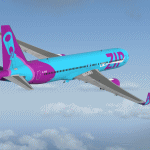
A High Quality repaint of the Captain Sim Boeing 767-300ER in the livery of Zip Air Virtual. Fly the skies of Europe and beyond with the fantastic Boeing 767 and Zip Air. Visit www.zipair.uk. You must have the Captainsim 767 v2 for this to work.
| Filename: | Captainsim_Boeing_767300_P3DV4_ZipAir__BlendedWing.zip |
| License: | Freeware |
| Added: | 20th October 2020, 23:19:39 |
| Downloads: | 39 |
| Author: | Alex Letch |
| Size: | 28.06 MB |
| Category: Microsoft Flight Simulator (2020) - Aircraft Repaints, Textures and Modifications | |
| Aermacchi MB-339 (G-800) Ghana Air Force |
|
Images related to this file:
File Description:
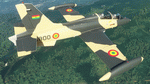
This folder contains a repaint for the Aermacchi MB-339 by IndiaFoxtEcho for MSFS2020, in the colors of G-800 of the Ghana Air Force. The aircraft, c/n 6776/AH001 is preserved in Accra, Ghana. Repaint by Jan Kees Blom, based on the paintkit by IndiaFoxtEcho.
| Filename: | Aermacchi_MB339_G800_Ghana_Air_Force.zip |
| License: | Freeware |
| Added: | 25th October 2020, 18:56:26 |
| Downloads: | 41 |
| Author: | Jan Kees Blom |
| Size: | 6.76 MB |


© 2001-2026 AVSIM Online
All Rights Reserved
Privacy Policy |