
Where Flight Simulation Enthusiasts Gather from Around the World!
AVSIM Library - Search Results

| Category: Flight Simulator X - Gauges | |
| TCAS II v1.0 |

|
Images related to this file:
File Description:
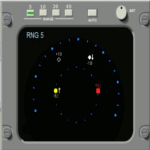
This gauge has been developed for the FSX Flight Simulator SP2 or SP1. It should also work with Acceleration but this is not guaranteed by the author.The functionality for this gauge is based on the Honeywell C81A system. The gauge will provide resolution advisories (TA or RA) to the pilots via recorded voice announcements once the aircraft is in danger of a collision with an intruder. The gauge is a generic gauge, and can be added to any aircraft as a stand alone pop up window. This particular gauge is available in 3 color options for the display body and the control panel. They are gray, light gray and beige.
For installation and operational instructions, please read the documentation inside the zip file.
| Filename: | TCAS_II_v10.zip |
| License: | Freeware |
| Added: | 18th May 2011, 14:37:13 |
| Downloads: | 2,462 |
| Author: | Dietmar Loleit |
| Size: | 1.89 MB |
| Category: Prepar3D V1-4 - Aircraft Repaints, Textures and Modifications | |
| North American P-51D 332nd FG (88) 'Little Freddie' |
|
Images related to this file:
File Description:

This folder contains a second repaint for the A2A WoP3 P-51D Mustang, in the colors of P-51D #88 "Little Freddie" as flown by Lt. Freddie Hutchins of the 302nd FS/ 332nd FG, based in Rammitelli, Italy in October 1944. It was one of the first D-models received by the 332nd, as was used to destroy four aircraft on the ground on 30 august 1944. Little Freddie was hit by flak on 6 october 1944 over Greece, and was completely destroyed in the crash landing. Lt Hutchins received 1st aid from Greek civilians and returned to the 332nd on 23 october. He went through another four "Little Freddies" until the end of the war.
Repaint by Jan Kees Blom, based on the A2A paintkit.
| Filename: | North_American_P51D_332nd_FG_88_Little_Freddie.zip |
| License: | Freeware |
| Added: | 10th November 2018, 16:33:23 |
| Downloads: | 76 |
| Author: | Jan Kees Blom |
| Size: | 12.42 MB |
| Category: Prepar3D V1-4 - Utilities | |
| Flightplan Visualizer 1.13 |
|
Images related to this file:
File Description:
Flightplan Visualizer (FV) version 1.13.0. Copyright 2018-2019 by Pelle F. S. Liljendal ([email protected]), all rights reserved.
FV comes with 586 pre-imported Commercial AI flightplans (+380 BizJet flightplans are available as a separate download). However you are able to import additional (AI) flightplans yourself. Once imported these (AI) flightplans can be visualized on a map-view, and the user will be able to search accross all these. Hence you can use the program as inspiration as to which routes to fly. E.g. you can search across all imported flightplans to find all flights in an A321 flying into/out from LDDU, or simply to look for all flights in a Boeing 747-8F.
Simply run the included installer to install the software. The program will be installed into "C:\Program Files (x86)\Flightplan Visualizer" and all datafiles will be installed into: "C:\Users\[UserName]\AppData\Roaming\FlightplanVisualizer". The program comes with a full manual explaining everything, and a 3 page quick manual to get you started. The first 3 times you run the program the quick manual will automatically open. The forum is hosted here: https://forum.aerosoft.com/index.php?/forum/919-flightplan-visualizer/
Version 1.13 Contains the following changes: Flightplans can now be exported in AIFP/TrafficTool-format (the same format that FV is able to import). It means if you have made any changes to a flightplan (e.g. redirected some airports) the flightplan can be exported from FV, and imported into AIFP (AI Flight Planner, by Don Grovestine) where it can be compiled into an AI-traffic bgl-file (traffic "scenery"). A new setting called "Adjust flight-time on airport-redirect" have been added. This setting defaults to "false" (un-checked), however if changed to "true" (checked) the flight-time will be changed if/when departure/destination-airports are changed due to airport-redirections (both automatic and manually). The flight-time is the result of the difference between departure-/destination-time, hence if the flight-time is changed either- or both departure-/destination-time will change as well. The original flight-time is scaled based on the original- and the redirected distance between the departure/destination-airports. When importing/editing flightplans you can now select one or multiple aircraft and delete them. When deleting an aircraft all schedules attached to that aircraft will be deleted as well. One use of this feature could be to remove aircraft you don't have a AI aircraft, prior to exporting the flightplan in AIFP/TT-format, and loading it into AIFP. When importing/editing flightplans a "Similar" button will appear next to the flightplan name if a similar named flightplan exists (e.g. "same name", but different season), or other flighplans exists for the same airline (ICAO). Hoovering the mouse over this button will show the names of these flightplans as a tool-tip, and if you click the button the list will be shown in a window (with some additional information), from where it can be copied to the clipboard if you need to. On the Edit/Import-flightplan form, the Aircraft- and Airport tab-sheets have been swapped, and a new tab-sheet was added to list all routes of the flightplan. For each route the distance is listed along will all aircraft types of the flightplan servicing that route. The "Aircraft" tabsheet of the form to import/edit flightplans now contains a button called: "Fleet report". Pressing this button will generate a report showing the fleet of an airline (based on the flightplan), that is sorted by Aircraft type and registration. For each aircraft it will show a list of all the airports served by that particular aircraft. A "Word-wrap" check-box have been added to the Result-viewer to toggle word-wrap on/off (word-wrap defaults to "on"). In previous versions any changes made in the settings form resulted in all flightplans having to reload (while showing the splash-screen). Changing the path for MakeRunway-files still results in an automatic "reboot" of the program. The combo-box for choosing default direction (outbound/inbound/both) for the leg-search (on reset) have been removed from settings, and it now defaults to "Outbound or Inbound". However in the search legs form you can now save your own preferred "Reset" criteria. When you press the reset-button, it will load this Reset-file (with your preferred reset criteria). If you hold SHIFT while pressing the reset-button (or you have not saved a personal reset-file), it will reset to the default factory-criteria. In the traffic tabsheet of the airport info form there is a combo-box letting you switch between "Selected flightplan" or last-search on main-form" and "All flights to/from this airport". In previous versions it did not perform the search of flights to-/from- the viewed airport until you selected the 2nd item from the combo-box. Now this search is performed in the background as soon as the form is opened, hence choosing the 2nd item in the combo-box is now instantaneous. The "Nearby Airports" tab-sheet in the "Airport Info" form, now have a column listing direction (from the airport to the nearby airports). When listing number of runways and gates (e.g. in the form showing nearby airports, or in the redirection-report), the radius of the largest gate is now included, as there is no need to redirect any 747 traffic to an airport where the largest gate is 23m (a 747 requires a gate with a radius of at least 36m). The frequency-count was removed from the before mentioned listing of runways and gates, to make more room for listing the aircraft serving each airport. The search for airport browse now have a new optional column listing comments (e.g. length of longest rwy and largest gate). The "show" combo-box lets you choose to show comments in stead of "Size/Rank/Traffic" or "Hint-text". Opening the search airport browser from the import/edit flightplan form, will automatically choose to show the comments column, as information regarding rwy length/gate radius can be relevant when redirecting airports. Form "Nearby Airports" now show the GPS-position in the caption of the form. Added runway/gate summary to caption-bar of airport info form, so you no longer need to look at both the runway- and gate- tab-sheet in order to see: number of runways, longest runway, number of gates and largest rate (radius). New check-box added to settings allowing you to include the before mentioned runway/gate info in the airport marker tool-tip on the main map. Region/sub-region added to "Airport Info" form (top/left corner). A new setting (default to disabled) lets you add region/sub-region to the airport marker-hint on the map as well. Added a button to the "airport info" to show the airport at flightradar24 (opens the default browser), and the button on the leg info form to show route the route at flightaware (also using the browser) have been replicated on the route info form. The METAR-/TAF-buttons on the leg info form now shows the raw METAR/TAF-message - as a tool tip - when you hoover the mouse over the buttons. As before, when you press these buttons it will open a window showing the decoded messages. Various minor changes to the leg info form: added info regarding longest runway and largest gate for each airport, and re-positioned some of the fields. Likewise the info copied to the clipboard when you click the appropriate button have been re-ordered as well. Changed flightplan format to accommodate additional information, but the format remains backward compatible. Button added to about-box allowing the user to copy version-info to the clipboard. Managed to "shave off" approx ½ a second during start-up (on my pc). Not a lot but still an improvement :-) Fixed: In the form for importing/editing flightplans the leg-page showed the original distance even if the airports were redirected. Fixed: On leg info form "Dest.Country" and "Dest.Apt" column-order were swapped. Fixed: Tweaked aircraft type detecting to better detect 740-400 and 767-200/300 freighters. In previous versions a few aircrafts were wrongly detected as pax, when they should have been detected as freighter. Data: Airbus 330-800/900 Neo, Boeing 747-400LCF (Dreamlifter), and Embraer 175/190/195-E2 have been added as supported aircraft, and a few additional airlines and airports were added as well. Flightplans: Installer comes with +70 new pre-imported (Summer 2019) flightplans of which some are replacements of obsolete flightplans (from previous installers), and 2 of the "old" flightplans have been marked as defunct, as "Adria Airways" and "Aigle Azur" have filed for bankruptcy and ceased their operations. Flightplans: Among the added flightplans you will find the first flightplan I have made myself, a flightplan for Airbus Transport International covering their 5 Beluga's an 2 Beluga XL's (the latter 2 are stil performing test-flights and have yet to be implemented into their "normal schedule").
| Filename: | Flightplan_Visualizer_113.zip |
| License: | Freeware, limited distribution |
| Added: | 13th October 2019, 17:50:53 |
| Downloads: | 355 |
| Author: | Pelle Liljendal |
| Size: | 30.45 MB |
| Category: Flight Simulator X - Aircraft Repaints, Textures and Modifications | |
| Qantas Consolidated PBY-5 5 paints |
|
Images related to this file:
File Description:

Five repaints for the Aerosoft PBY-5 Catalina in the colors of PBY-5's operated by Qantas on the 'Double Sunrise Service' between Western Australia and Ceylon between 1943 and 1945.
In 1943, Royal Australian Air Force personnel were seconded to operate Catalinas under the banner of Qantas. The plan called for flights between Perth, Western Australia, and RAF Base Koggala in southern Ceylon (now Sri Lanka). The flights were the longest non-stop air route of any airline, over 3,500 nautical miles (6,480 km) across the Indian Ocean. Navigating without the aid of radio, the crews relied solely on rudimentary navigation by compass and stars during the trip.
Only Catalinas had that kind of range, so five PBY-5 flying boats were converted to make them suitable for the trip.
They received camouflage paint, with a RAAF roundel on the fuselage, but also a civilian registration, since they were officialy operated by Qantas, and they were named after the stars they would be using for navigation:
Vega Star (G-AGFL/FP221 - tail code 1)
Altair Star (G-AGFM/FP244 - tail code 2)
Rigel Star (G-AGID/JX575 - tail code 3)
Antares Star (G-AGIE/JX577 - tail code 4)
Spica Star (G-AGKS/JX287 - tail code 5)
Taking between 27 and 33 hours, with departure timed so that the flight crossed Japanese occupied territory during darkness, the crews would observe the sunrise twice, which led to the service being known as "The Double Sunrise". The flight route flown was along the coast from Perth to Exmouth then setting out towards Cocos (Keeling) Island or Christmas Island (though neither was actually sighted during the flight) and onto Kogalla, a journey of approximately 3,580 nautical miles (6,630 km). After the success of the initial flights, it was decided to run a weekly service, with some services flying over Rottnest Island and then taking a direct line to Kogalla. As part of the Australia-England air route there was a surface component from Kogalla to Karachi that added considerable time to the service. This was later replaced by the Double Sunrise service, with Karachi to England flown by BOAC. Air crews would change in Kogalla taking the next plane in either direction minimising the time taken to complete the journey.
Though stripped of all non-essential equipment, including de-icing equipment and insulation, the average takeoff weight was 15,900 to 16,000 kg; this included 9,040 liters of fuel, which gave the Catalina a range of 3,600 nautical miles (6,700 km). The service made 271 crossings, delivered over 4,500 kg of mail and carried 860 passengers, including among them British MP Edith Summerskill and the journalist Keith Murdoch. 'The Secret Order of The Double Sunrise' was an illustrated certificate given to passengers aboard the flying boats of the Australia-England air link, to attest they had been airborne for more than 24 hours.
After the war the five modified Catalinas that had flown The Double Sunrise service were scuttled.
Repaints by Jan Kees Blom, based on the paintkit by Aerosoft
| Filename: | Qantas_Consolidated_PBY5_5_paints.zip |
| License: | Freeware |
| Added: | 13th July 2018, 20:38:43 |
| Downloads: | 176 |
| Author: | Jan Kees Blom |
| Size: | 49.87 MB |
| Category: Civil Flight Simulators - Micro Flight | |
| Micro Flight 5 |
|
File Description:
Micro Flight is a state of the art flight simulator specializing in simulating ultralight flying vehicles and micro meteorological conditions.
Unlike other flight simulators, Micro Flight simulates the intricate flow of air over the ground and the effects of thermals created by the sun, making it ideal for simulating gliders of all types.
Micro Flight also simulates types of vehicles not simulated by other general aviation programs, such as: Hanggliders, Paragliders, Gyroplanes, Helicopters, Trikes, Balloons and more.
Flight instrumentation and navigational aids were made to resemble real ones, this includes the hand held GPS, standard flight instruments, head up display and more.
The whole enviroment which the user interacts with is three dimentional, even operating the instruments in the cockpit is made by manipulating them with the mouse and not just by pressing keys.
The terrain model used is detailed and optimized, giving the terrain a photorealistic look while still maintaing a high frame rate during run.
The program supports a wide variety of scenery formats, and can import aerial photography and USGS digital elevation data directly.
The program includes flight recording and anaylis, giving the user the ability to study the flight in detail and export it's path in digital form for any purpose.
The program has netplay mode which enables users to fly and communicate with each other.
All this and more make the program a unique and valueable tool for flight simulation.
Copyright Ilan Papini 1999 - 2004 ©
| Filename: | Micro_Flight_5.zip |
| License: | Commercial demo |
| Added: | 16th December 2004, 04:03:44 |
| Downloads: | 543 |
| Author: | Ilan Papini |
| Size: | 6.46 MB |
| Category: Flight Simulator 2004 - Aircraft Repaints, Textures and Modifications | |
| Lear45 Gama Aviation |
|
File Description:
GAMA AVIATION repaint and mods of the default fs9 Lear45,repaint was done using a paintkit by Joao Paz,which i modified,to add a bare metal leading edge,to the tailwing,and extended the fin bare metal leading edge,to the top of the fin,like some of the pics i saw on airliners.net.
Logo lights and mainwing LE ice lights have been added,the 2d main panel as been reworked,to look more life like,and some switches added.
Also included is a brief manual,to show the new switch positions,the mainwing ice & logo lights are set by default to ms standard,but there are alternate lines,that you can activate,in the aircraft & panel.cfg files,if you have the AFG kingair b300 for the lights and project fokker 10070 for a nav/gps switch,in your fs9 system,both aircraft can be found on avsim.
I have played around with the flight dynamics,which make it more flyable than the standard out of the box version,also the default lear fin strobe did not come on using the 2d panel light switch,it only came on if you pressed the l key,that i have fixed.
Also included are the two modified default schemes,to update the bare metal leading edges and panel lines and alpha channels.
All these paints are saved in 32bit for a sharper image,i have not noticed any drop in frame rates,due to these paints.
| Filename: | Lear45_Gama_Aviation.zip |
| License: | Freeware |
| Added: | 4th October 2007, 22:13:43 |
| Downloads: | 908 |
| Author: | Alan Cottrill |
| Size: | 17.45 MB |
| Category: Miscellaneous Files - Demos from Commercial Vendors | |
| Lufthansa Airbus A380 Family |
|
Images related to this file:
File Description:

The Airbus A380 is a doubledecker, four-engined airliner manufactured by Airbus S.A.S. It first flew on April 27, 2005 from Toulouse, France. Commercial flights should begin in 2006 after 15 months of testing. During much of ist development, the aircraft was known as the Airbus A3XX. The A380 is now the largest passenger airliner, topping the Boeing 747, which was the largest for 35 years. However, the Antonov An-225 retains the record of being the world's largest commercial aircraft. The media has termed the A380 a "superjumbo", with some comparing it to Howard Hughes's Spruce Goose. The first A380 prototype was unveiled during a ceremony in Toulouse, France, on January 18, 2005. Its manufacturer's serial number is 001, and is registered as F-WWOW. The new Airbus will initially be sold in two versions: the A380-800, carrying 555 passengers in a three-class configuration or up to 800 passengers in a single-class economy configuration. Expected range for the -800 model is 8,000 nautical miles (14,800 km). The second model, the A380-800F dedicated freighter, will carry 150 tons of cargo 5,600 miles (10,400 km). Airbus made the cockpit layout, procedures and handling characteristics similar to those of other Airbus aircraft to reduce crew training costs. Likewise, the A380 features a glass cockpit and side-stick flight controller. Panel, GAUGES, model, sound and textures by www.afs-design.de - Author: A.Meyer.
| Filename: | Lufthansa_Airbus_A380_Family.zip |
| License: | Commercial demo |
| Added: | 5th February 2011, 03:09:25 |
| Downloads: | 207 |
| Author: | Andreas Meyer |
| Size: | 13.37 MB |
| Category: Miscellaneous Files - Demos from Commercial Vendors | |
| Lufthansa, Airbus A380 |
|
Images related to this file:
File Description:
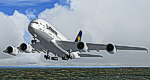
The Airbus A380 is a doubledecker, four-engined airliner manufactured by Airbus S.A.S. It first flew on April 27, 2005 from Toulouse, France. Commercial flights should begin in 2006 after 15 months of testing. During much of ist development, the aircraft was known as the Airbus A3XX. The A380 is now the largest passenger airliner, topping the Boeing 747, which was the largest for 35 years. However, the Antonov An-225 retains the record of being the world's largest commercial aircraft. The media has termed the A380 a "superjumbo", with some comparing it to Howard Hughes's Spruce Goose. The first A380 prototype was unveiled during a ceremony in Toulouse, France, on January 18, 2005. Its manufacturer's serial number is 001, and is registered as F-WWOW. The new Airbus will initially be sold in two versions: the A380-800, carrying 555 passengers in a three-class configuration or up to 800 passengers in a single-class economy configuration. Expected range for the -800 model is 8,000 nautical miles (14,800 km). The second model, the A380-800F dedicated freighter, will carry 150 tons of cargo 5,600 miles (10,400 km). Airbus made the cockpit layout, procedures and handling characteristics similar to those of other Airbus aircraft to reduce crew training costs. Likewise, the A380 features a glass cockpit and side-stick flight controller. Panel, GAUGES, model, sound and textures by www.afs-design.de - Author: A.Meyer.
| Filename: | Lufthansa_Airbus_A380.zip |
| License: | Commercial demo |
| Added: | 15th February 2011, 11:00:12 |
| Downloads: | 238 |
| Author: | Andreas Meyer |
| Size: | 13.37 MB |
| Category: Prepar3D V1-4 - Aircraft Repaints, Textures and Modifications | |
| Continental Micronesia 1998 AI Package |
|
File Description:
Continental Mircronesia was Continental's Guam-based Pacific operation. In 1998, CMI had 3 747-200s and 16 727s (10 pax+ 6 flying DHL cargo), and was also using 4 Continental 757s to cover routes from GUM. The 747s mostly fly between NRT/GUM/HNL and spend their down time at the HNL maintenance base, but they also flew charters to OKJ and SDJ which are represented in these plans. The 727s fly all over the Pacific, serving most every large city in Japan as well as TPE, CNS, and the 7-stop GUM-HNL "milk run", flown twice weekly. The cargo plans for the 727s are representitive and also serve much the the Pacific reaching as far as Australia. I created arrival and departure banks most days so the planes often arrive back to GUM in the middle of the night around the same time. The "Micronesia" titles were removed from the last DC-10-30 in March 1998, after which time all DC-10s wore the standard Continental livery as did the 757-200s while using the CMI codes and callsigns. Currently, there is no Continental Micronesia DC-10 AI paint, but links to all relevant paints are included as well as Ranmori Scythe's FAIB 747-200 PW texture. Flightplans by Chasen Richardson. Part of the 1998 Flight Simulator Project. Follow us on Facebook at facebook.com/flightsim98 and on instagram as @bayviationsim. For more Retro AI, check out the forums at: http://retroai.proboards.com/
| Filename: | Continental_Micronesia_1998_AI_Package.zip |
| License: | Freeware, limited distribution |
| Added: | 1st December 2019, 20:55:52 |
| Downloads: | 167 |
| Author: | Ranmori Scythe, Chasen Richardson/Bayviation |
| Size: | 1.51 MB |
| Category: Flight Simulator X - Scenery | |
| Navy Yard City Bremerton, Washington |
|
Images related to this file:
File Description:
This scenery updates the area around Bremerton, Washington, Mainly the Sinclair Inlet where Navy Yard city is located. This is a huge Naval yard which by default in FSX there isn't much there but a carrier. The update adds all the carriers, battleship, destroyers, other large and fishing/sport boats along with many docks, piers, marinas and many other objects. These objects were placed using aerial shots from Google Earth for proper placement. Though the placement is near perfect the objects of course are FSX 3D objects. The Subs? There aren't any subs in the FSX object library so I used "Ron Jeffers" ron_ez_maritime.bgl for the battelship, destroyers, subs and a riverboat. special thanks to "ron". The scenery also includes a fictitous Naval Yard Helo Base. There is a family inspiration for this location, please read the text files. Also included is the ship "USS Turner Joy", not a custom made ship but a ship from the default library to indicate where this "museum" ship is located. The atempt here was to give the area the Naval look and feel as you fly over. both West and East shores of Sinclair Inlet were updated with many objects. Everything is included in this download even the AF2 file for the start point at BNYP, the Naval helo base. Please enjoy this and visit the USS Turner Joy, it has daily tours. By Savageagle
| Filename: | Navy_Yard_City_Bremerton_Washington.zip |
| License: | Freeware |
| Added: | 16th August 2011, 05:48:51 |
| Downloads: | 1,589 |
| Author: | Tim Durham |
| Size: | 5.83 MB |


© 2001-2026 AVSIM Online
All Rights Reserved
Privacy Policy |