
Where Flight Simulation Enthusiasts Gather from Around the World!
AVSIM Library - Search Results

| Category: Microsoft Flight Simulator (2020) - Aircraft Repaints, Textures and Modifications | |
| Goodyear FG-1D Corsair VF-17 #29 Lt Kepford |

|
Images related to this file:
File Description:
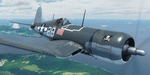
This folder contains a repaint for the FG-1D Corsair by Milviz, in the colors of F4U-1 BuNo 55995 of VF-17, the aircraft flown by Lt (jg) Ira C. Kepford, Bougainville, February 1944. Ira Cassius Kepford was born in Harvey, Illinois, on May 29, 1919, son of George Raymond and Emma McLaughlin Kepford. His family moved to Muskegon, Michigan, shortly after he was born. An all-around athlete at Muskegon High School from 1935-1937, he capped his prep career by being named an All-State back in his senior year. He enrolled at Northwestern University in 1938 to study for a dentistry career.
He enlisted in the U.S. Naval Reserve on August 18, 1941, and was honorably discharged on April 29, 1942, to accept appointment as Aviation Cadet, U.S.N.R. After flight training at the Naval Air Stations, Corpus Christi, Texas, and Miami, Florida, he became a Naval Aviator on November 5, 1942, and was commissioned Ensign, U.S.N.R., with date of rank October 16, 1942.
Detached from Naval Air Station, Miami, Florida, in December 1942, he served with Fighting Squadron 17 in the Pacific War Area until March 1944, where he became the U.S. Navy's leading ace, scoring a record 16 confirmed Japanese planes destroyed. That squadron won the Navy Unit Commendation and he was personally awarded the Navy Cross, a Gold Star in lieu of the second Navy Cross, the Silver Star Medal and the Distinguished Flying Cross.
From March until June he was attached to the Fleet Air, Alameda, Command, and the last six months of that year served with Fighting Squadron 84. In December 1944 he was transferred to the staff of Commander Fleet Air, West Coast, and remained in that assignment throughout the remaining period of hostilities. Repaint by Jan Kees Blom.
| Filename: | Goodyear_FG1D_Corsair_VF17_29_Lt_Kepford.zip |
| License: | Freeware |
| Added: | 4th April 2021, 15:38:23 |
| Downloads: | 63 |
| Author: | Jan Kees Blom |
| Size: | 41.83 MB |
| Category: Flight Simulator X - Aircraft Repaints, Textures and Modifications | |
| Beech D18S repaint 6-pack |
|
Images related to this file:
File Description:
FSX Beech D18S. Six repaints for the Shupe/Thomas/Folkers
Beech D18S, which you must have previously installed in FSX.
I fly the version modified for FSX SP2/ACC by Dave Carroll,
but I'll bet these textures will work with most other Shupe
Beech 18's as well, so give them a try and see! These 18's
are fresh from the restoration shop, sporting new paint in a
variety of colors and a newly remodeled earth tone tan interior,
which will nicely match any exterior paint schemes on these or
any other Shupe Beech 18's you may already have in your hangar.
There are no registration numbers or
corporate/airline/charter/freighter/military markings, so you
are free to add whatever markings you wish in order to customize
your own personal Beech 18. If you enjoy using your 'DXTBmp'
program and your computer's default 'MS Paint' program
(or any paint program you prefer), you can quickly and easily
add your own registration numbers, and other markings,
or whatever else pleases you! Those of you who fly online in
FSX Acceleration could customize your own Beech 18's and have
a fly-in to show them off. Don't feel like finishing the paint
details? That's cool, as you can also fly them as is if you wish,
with no numbers or markings at all, as they look kinda pretty
in just their new paint against a sunny blue sky! Includes a
new shared 'texture' folder, which replaces the original
very blue cabin interior with a new earth tone tan colored interior,
to better match all of your Beech 18's exterior paints. Also includes
an FSX compatible engine smoke effect. Have fun! Easy installation.
By Tom Tiedman
| Filename: | Beech_D18S_repaint_6pack.zip |
| License: | Freeware |
| Added: | 6th October 2010, 00:08:11 |
| Downloads: | 355 |
| Author: | Tom Tiedman |
| Size: | 59.58 MB |
| Category: Flight Simulator 2004 - Utilities | |
| FlightSim Manager 2.7.2 |
|
File Description:
Compatible with both FS2002 and FS2004
FlightSim Manager is a great tool for managing add-ons to Microsoft Flight Simulator. Using easy to Wizard - FSM can install various addins from distribution ZIP files that you may have downloaded, with easy uninstaller. FSM has lots of feature to offer, from an easy to use Aircraft editor to add/edit aircraft variants, to an comprehensive Hangar management that allows you to manage and configure your add-ons off your live FS installation. You can create Virtual Fleets, and enable/disable the complete fleet with ease. For serious pilots, there is also a complete Logbook.
If you have access to networked PCs, you can use FSM Lan View feature to create virtual cockpits with as many different views as you like. FSM also make it very easy to control Flight Simulator with speech commands, with additional support for auto-saving flight, warning system, and your own custom event sounds.
Using a powerful Editor, you can now edit your AI Flight Plans - plans can be saved as sets, which then in turn can be enabled in Flight Simulator. With FSM, you can create Texture Sets ( your own custom texture installer ) - capture screenshots, complete Benchmark with log, launching Flight Simulator with Random Screens, and fly from anywhere in the world using an map view.
Finally with a comprehensive Diagnostic Tools and Repository feature, FSM keeps your FS installation clean. Apart from the usual Missing and unused gauges, FSM can also locate Aircraft problems, Missing and unused effects, and Scenery Problems with a LandClass File relocate feature - say bye-bye to all the memory leaks.
There are still a lot more features that you will need to discover by yourself.
You can find the latest version from: http://www.ranainside.com/
| Filename: | FlightSim_Manager_272.zip |
| License: | Freeware |
| Added: | 18th December 2004, 21:56:49 |
| Downloads: | 20,537 |
| Author: | Rana Hossain |
| Size: | 5.45 MB |
| Category: Flight Simulator 2004 - Scenery | |
| Replacement Dynamic Water Textures v11 |
|
File Description:
Replacement dynamic water texture-sets for FS2004 (VERSION 11). These newer version 11 moon light textures are a completely new type than my earlier versions. The results are much improved and there is also a "new moon" texture in this version which is a more realistic and darker blue/black which contrasts nicely with my moon light textures. This compares quite drastically to the default over lit pinkish brown tones the default FS9 uses for a new moon. Now when you fly by moonlight you can actually see the moon kissed water and even see some wave action. It actually feels like you are there! There are 2 moon light textures in this download. The default reflections and water colors leave a lot to be desired in FS2004. As an example; The default milky "bright green" overcast texture is highly unrealistic in overcast conditions. The replacement textures will change this dramatically to a much more convincing and realistic "blue/grey", cast, with improved lighting and reflections in respect to the sun. These replacement textures will generally give a much more realistic tone and color to the water effects in FS2004. The change is quite dramatic and transforms the flight sim experience to a much greater level of realism. It is important to stress the default FS9 textures are fully compatible with these new textures and they can be used in any combinations and can be mixed and matched with the new textures. For example it may be that some users want to keep some of the water environment textures as they are by default but change only one or two textures. The choice is yours. As a further added bonus a voice control file has been included for "Shoot" which will control FS2004 by voice. It is brilliant and it's free.
| Filename: | Replacement_Dynamic_Water_Textures_v11.zip |
| License: | Freeware |
| Added: | 11th January 2004, 20:38:03 |
| Downloads: | 3,057 |
| Author: | Peter Wilding |
| Size: | 3.49 MB |
| Category: Flight Simulator 2004 - Scenery | |
| WASF Fak-Fak |
|
Images related to this file:
File Description:
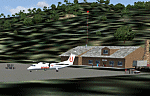
Googly scenery for WASF Fak-Fak, in Irian Jaya (Western New Gunea),
Indonesia - a small domestic airport that Microsoft managed to omit from Flight
Simulator 2004. These scenery files add the runway, apron, taxiways, buildings
and other airport features so that you and your "AI" traffic can land, taxi,
park and take off in a realistic manner.
Little information is available on the services operated - flight plans are
available for Lion Airlines showing two flights per week operated on their behalf
by Wings Abadi Dash 8 aircraft. But it is known that Merpati Nusentara also serve
the airport with Twin Otters. If you are using the Lion Airlines flight plans
for Winter 2006, you must change the airport's co-ordinates as detailed in the readme.txt file
because the co-ordinates given there will cause the aircraft to aim for a point
on the wrong side of the equator in the middle of the sea!
There is no lighting at this airport, and few navigational aids. However, I have
added a missing NDB nearby (FA, 380.0).
The scenery does not purport to be ultra-accurate. The quality of the satellite
imagery at Google Earth is poor, but a number of photographs and other information
has enabled this airport to be depicted reasonably accurately. However the added
airport features, such as buildings, are built from default Microsoft objects
and add-on libraries so will not look exactly like the real thing.
You are not obliged to download and install any additional scenery libraries,
but to enjoy this scenery in its entirety, you may wish to. It will work fine,
with or without.
An editvoicepack file has been included for the airport to help you embarrass
yourself in front of others when flying.
[File re-uploaded at request of AVSIM]
| Filename: | WASF_FakFak.zip |
| License: | Freeware |
| Added: | 7th May 2010, 22:30:22 |
| Downloads: | 1,903 |
| Author: | John Hinson |
| Size: | 72.51 KB |
| Category: Flight Simulator 2004 - Utilities | |
| FlightSim Manager 2.5.1 |
|
File Description:
Compatible with both FS2002 and FS2004
FlightSim Manager is a great tool for managing add-ons to Microsoft Flight Simulator. Using easy to Wizard - FSM can install aircraft, panels, textures and scenery directly from distribution ZIP files you may have downloaded, with proper uninstallation of add-ons. From an easy to use Aircraft editor to add or remove aircraft variants, to an comprehensive Hangar management allows you to manage and configure your add-ons off your live FS installation.
You can now create Virtual Fleets, and enable/disable the complete fleet with ease. For serious pilots, FSM also offers a complete Logbook.
Using FSM, you can create Texture Sets - i.e.. different Tree Sets, and you can install any set with a single click, capture screenshots from Flight Simulator, Benchmark with log, launch it with Random Splash Screens, and fly from anywhere in the world using an map view.
You can also control Flight Simulator with speech commands using FSM. It also supports auto-saving flight, warning sytem, and custom event sounds.
Finally with a comprehensive Diagnostic Tools and Repository feature, FSM keeps your FS installation clean. Apart from the usual Missing and unused gauges, FSM can also locate Aircraft problems, Missing and unused effects, Scenery Problems with a LandClass File relocate feature - say bye-bye to all the memory leaks.
To provide you - the user with the best Freeware FS-Addon, I need your help... if you have any suggestions, recommendations or problem using this software, please contact me through our Forum at:
http://softwares.ranainside.com/forum/
You can find the latest version from -
http://www.ranainside.com/
| Filename: | FlightSim_Manager_251.zip |
| License: | Freeware |
| Added: | 27th August 2004, 17:26:52 |
| Downloads: | 4,306 |
| Author: | Rana Hossain |
| Size: | 4.3 MB |
| Category: Flight Simulator 2004 - Miscellaneous Files | |
| The VA Administrator v5.2 |
|
File Description:
The VA Administrator version 5.2
Plus the Operations Centre v5.2 (Pilot Based Pirep System)
The VA Administrator v5.2 is out now and ready to make your job at running the VA a little easier. The software is like a smaller version of Myob for Virtual Airlines. Its all software based very easy to use. No need for website with ASP or PHP, this baby does it all on your local machine, after you have finished you just upload the pages to your site. So free hosting sites are great for this software, it will look like a database driven website but not... If PHP or ASP is hard for you to work out then this is for you. It does so much in a small amount of time. Like the older version it has its virtual bank so you can take out loans for new equipment. But this time you will love the new personal files, keep data on your virtual pilots from meetings to bad raps they may get. Store it all on the personal files with Photo ID if you get your pilots to send you a passport photo. Its only going to get better, this new version had some fixes to the virtual bank and some small nip and tucks here and there.
The GOOD NEWS ITS FREEWARE ! everyone can have a copy of this software. You can issue one copy for each hub and have each hub run itself and then report back at the end of month the the CEO in a meeting. Hey its freeware so don't just think about it do it. Its software to manage virtual airlines, and its FREE. This software was payware but now its free !
| Filename: | The_VA_Administrator_v52.zip |
| License: | Freeware |
| Added: | 24th February 2005, 19:13:01 |
| Downloads: | 1,175 |
| Author: | Ray Porteous |
| Size: | 6.29 MB |
| Category: Flight Simulator X - Scenery | |
| LFMQ - Le Castellet |
|
File Description:
Welcome to Le Castellet Airfield -
This airfield is situated few Nm east of Marseille Provence - LFML, in the south of France. On the 1,000 hectares of plateau he acquired between Marseille and Toulon, Paul Ricard, forever motivated by innovation and development, constructed in 1962 the largest
private airfield in the Provence-Alpes-Côte d’Azur region.
The landing strip at Le Castellet covered a distance of 1,000 metres and allowed for VFR (Visual Flight Rules) operation. Situated on a plateau at the time free of all economic development, it was above all a private airfield. In 1970, the construction
of the Paul Ricard Circuit nearby created an economic dynamic for the first time on Le Castellet plateau. In 1972, Paul Ricard invested in improvements to the runway, lengthening it from 1,000 to 1,750 metres, thus rendering it capable of
receiving business and private airplanes of up to 38 tonnes.
Over twenty years, Le Castellet Airport saw intense periods of activity due to business and private aviation, notably with the arrival of the first F1 French Grand Prix on the Paul Ricard Circuit in 1971, and more recently, with the creation of the Entreprise Zone at Signes, situated only a few kilometres from the airfield. Stop by for an amazing visit at the medieval village as well, situatued on top of a hill.
Nevertheless, from 1972 to 1999, no investment was made at the airfield. In May 1999, the company Excelis S.A. purchased the site (airfield and circuit) and refurbished and modernised the installations.
A truly amazing place to fly to - I have enhanced the entire apron as it is today, all marking correctly set, acces to runway and the Heli area for the "Eggbeater" fan :)
includes the hangar, building and other things around. Hope you'll enjoy your stay at "Le castellet"!
| Filename: | LFMQ__Le_Castellet.zip |
| License: | Freeware |
| Added: | 24th April 2009, 16:28:59 |
| Downloads: | 2,350 |
| Author: | Daniel Louvet |
| Size: | 986.65 KB |
| Category: Flight Simulator X - AFCAD Files | |
| Hammonton Municipal Airport (N81) NJ |
|
File Description:
Located 03 miles NE of Hammonton, New Jersey on 107 acres of land, Hammonton Municipal Airport is a public asphalt strip 3601' in length. It has recently been renovated with all-new taxiways and aprons and this update is depicted in this version with the big change being the extension of the main apron to join the previously-separated north and south tarmacs. The airport's magnetic variation, traffic pattern height, and PAPI glide slope and location have also all been accurately adjusted. All tie down parking locations are located on either the North or South tarmacs. Parking spots marked as RAMP_GA are occupied by static aircraft/objects and should not be chosen to start in (although all static objects have collision disabled). North parking spots can accommodate wingspans up to 50' while South parking spots should only be used by aircraft with wingspans of 40' or less. The one DOCK_GA location in the hangar start that can accommodate aircraft with wingspans up to 45'. The helicopter start location will place you on the North tarmac in front of the main hangar. Fuel is available by stopping on the concrete area on the North tarmac or by the fuel truck on the South tarmac in front of the hangars. Please see the ReadMe for known issues regarding AI aircraft parking.
Scenery constructed with use of satellite images/streetview/aerial photos - the author has not been there in person.
This scenery is meant to be used in conjunction with MegaScenery Earth New Jersey/Delaware 003. It is not required, but apron use is minimized to allow satellite scenery to show through as much as possible, and objects are placed based on the MSE textures - lack of it may make scenery look out of place.
| Filename: | Hammonton_Municipal_Airport_N81_NJ.zip |
| License: | Freeware |
| Added: | 5th June 2011, 06:22:53 |
| Downloads: | 202 |
| Author: | Drew Sikora |
| Size: | 897.82 KB |
| Category: Flight Simulator X - AFCAD Files | |
| Linden Airport (KLDJ), NJ v1.1 |
|
File Description:
Located 01 miles SE of Linden, New Jersey on 188 acres of land, Linden Airport is a public asphalt strip 4137' in length. Numerous changes have been made to this airport to bring it closer to its real-life counterpart including proper non-precision runway markings for R09 while only basic markings are used for R27; The 4-box VASI has been accurately located; the traffic pattern height has been adjusted; All 130 tiedown locations have been accurately placed. RAMP_GA spots are taken by static aircraft (all of which have collision disabled) so they should not be selected unless you want to start inside another aircraft! RAMP_GA_SMALL spots can be occupied by aircraft with wingspans up to 40 feet and RAMP_GA_MEDIUM spots can be occupied by aircraft with wingspans up to 60 feet. There are 4 open hangars labeled as GA_DOCK. The main hangar (NW Parking) can hold aircraft with wingspans up to 60 feet. The three smaller hangars (SW Parking) can hold aircraft with wingspans up to 35 feet. The W Helipad start location will put you in front of the smaller main tarmac hangar within the coned-off section. Fuel is only available by taxiing to a stop in front of either fuel tank to the west of the main tarmac. No AI aircraft will spawn in the SW Parking area.
Scenery constructed with use of satellite images/streetview/aerial photos - the author has not been there in person.
This scenery is meant to be used in conjunction with MegaScenery Earth New York 005. It is not required, but apron use is minimized to allow satellite scenery to show through as much as possible, and objects are placed based on the MSE textures - lack of it may make scenery look out of place.
| Filename: | Linden_Airport_KLDJ_NJ_v11.zip |
| License: | Freeware |
| Added: | 28th June 2011, 00:03:41 |
| Downloads: | 511 |
| Author: | Drew Sikora |
| Size: | 1.23 MB |


© 2001-2026 AVSIM Online
All Rights Reserved
Privacy Policy |