
Where Flight Simulation Enthusiasts Gather from Around the World!
AVSIM Library - Search Results

| Category: Flight Simulator X - Aircraft Repaints, Textures and Modifications | |
| Qatar Airways "One World" Airbus A320-232 (A7-AHL) |

|
Images related to this file:
File Description:

Qatar Airways, is the state-owned flag carrier of Qatar. Headquartered in the Qatar Airways Tower in Doha, it operates a hub-and-spoke network, linking over 100 international destinations from its base in Doha, using a fleet of more than 100 aircraft. Qatar Airways operates services across Africa, Central Asia, Europe, Far East, South Asia, Middle East, North America, South America and Oceania, and was named Airline of the Year 2011 at the Skytrax World Airline Awards. Qatar Airways main hub is Doha Hamad International OTHH.
Qatar airways "One World Alliance" livery is painted on Aerosoft Airbus X Extended A320-232 model (not included). The textures are saved in DXT5 format for quality graphics. Textures are also characterized by HD (High Definition) and custom Bump 3D files. Its features are idle-reverser animation, animated pack vents and pressurisation outflow valve, detailed textures, accurate paint, dynamic shine & effects, dynamic flexing wings that respond to turbulence, fully independent suspension, trim animation, gear steering, accurate flight dynamics, spoiler animation, reflective cockpit windows, improved wingflex code with input from several new parameters including ground spoilers, fuel load, and angle of attack, transparent navigation light lenses and many more.
Visit our Facebook page "Sky Level Textures" for news, updates and previews on our future repaint projects. Thanks for downloading & Happy flying. HD GAMING EXPERIENCE inside. https://www.facebook.com/SkyLevelTextures
| Filename: | Qatar_Airways_One_World_Airbus_A320232_A7AHL.zip |
| License: | Freeware |
| Added: | 15th November 2014, 19:47:16 |
| Downloads: | 2,822 |
| Author: | Giacomo Tomasini | Sky Level Textures | Aerosoft |
| Size: | 8.81 MB |
| Category: Prepar3D V1-4 - Aircraft Repaints, Textures and Modifications | |
| jetBlue "My Other Ride Is a JetBlue A320" E190AR (N329JB) |
|
Images related to this file:
File Description:
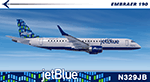
JetBlue Airways (aka jetBlue), founded in 1998 as "NewAir", is the sixth largest airline in the United States by passengers carried and is a major American low cost airline. It is based on Long Island New York in the borough of Queens, but also has offices in Utah and Florida. Its primary hub is in New York's JFK Airport, and is the whole of Terminal 5. It also has hubs in Boston, Ft. Lauderdale, Orlando and Long Beach CA. JetBlue operates a fleet of 60 Embraer E190's and was a launch customer for the E190. This specific airframe, registration N329JB, bears the slogan "My Other Ride Is a JetBlue A320". The complement aircraft in JetBlue's fleet is an A320-232 reg N793JB bearing "My Other Ride is A JetBlue E190" on the forward fuselage. In the last year, this E190 was the first in the jetBlue E190 fleet to wear the "HighRise" tailfin. The HighRise tailfin represents the New York City skyline and is quite striking. This aircraft is msn 433 and was delivered to jetBlue in 2011. The repainted textures in this package are 32-bit with no mipmaps for best clarity and quality. This is the Version 3 model of the FeelThere Embraer 190. You must own a copy of the Feelthere E-JETS E170 and E190 V3 to enjoy this repaint.
| Filename: | jetBlue_My_Other_Ride_Is_a_JetBlue_A320_E190AR_N32.zip |
| License: | Freeware, limited distribution |
| Added: | 17th April 2020, 03:29:56 |
| Downloads: | 1,125 |
| Author: | Jeffrey S. Bryner, FeelThere |
| Size: | 24.75 MB |
| Category: Flight Simulator 2004 - Utilities | |
| FsPassengers (ver 05 september) |
|
File Description:
FsPassengers 2004 is an add-on for Flight Simulator 2004 that will completely revolutionize the way you fly in Fs2004. Here
are just some of the features of FsPassengers 2004: Add passengers to your flights! Finally, you're not alone in the sky.
Passengers react to how you fly your plane. Hear them scream if you make drastic mistakes, and get their opinion of your
flight in real time. Provide in-flight passenger services such as movies, music, and drinks. Make money for successful
flights; be fined if you do something wrong. Manage an airline (make money, manage aircraft fleets, etc). Maintain your
aircraft in good condition, otherwise you may experience unique and suprising failures. Create and maintain pilot careers.
Keep detailed logs and statistics for every flight you make (great for virtual airlines). Fly through dangerous parts of the
world, and risk the safety of your plane, crew, or passengers! Export your flight to your Virtual Airline. This add-on
includes more than 200 in-flight sounds to immerse you in the ambiance of flight. Hear feedback from your co-pilot, flight
attendants, passengers; listen to ATC chatter, music, GPWS, and more. All screens and reports work in full screen. No need to
quit FS. - This demo is fully functional apart that you can only start a flight from San-Francisco area (but you can land
anywhere)
| Filename: | FsPassengers_ver_05_september.zip |
| License: | Shareware, limited functionality |
| Added: | 5th September 2005, 17:01:18 |
| Downloads: | 9,752 |
| Author: | Daniel Polli |
| Size: | 26.19 MB |
| Category: Flight Simulator 2004 - Scenery | |
| Masbate Airport, Masbate, Philippines |
|
File Description:
This is a totally new Masbate Scenery Addon for Flight Simulator 2004. This features Multi-Level of Detail (MLOD) which makes a scenery framerate-friendly. At a distance, the objects are on its LOW POLYGON STATE. And while you get closer and closer, the objects become more and more complex, making you landing sequence unaffected by heavy framerate hit due to the High number of Polygons of the Library Objects.
In this scenery, you will see a total transformation from the default Masbate City area in FS2004 to a new realistic and alive Masbate City as seen in the included screenshots.
Masbate Airport Scenery (RPVJ) features photorealistic textures. This includes the Main Terminal Building, the Rancho Cuervo Verde Hangar, the Masbate Airport cargo warehouse, the Administration Building, the Crash and Fire Rescue Station, and the Control Tower. This scenery has full night lighting textures and has night lighting beams that illuminate the ramp from the firestation building. Other library objects included are: Animated Baggage Carts, Airport and Ramp personnel, ferry boats, ships, yachts, sailboats, cargo vessels, lighthouse, jeeps, cows and horses. But these objects do not interfere with the framerate so much because this is defined in the MLOD feature.This scenery has not been tested with FS2002 but is more likely to work without problem in that version except that AFCAD for FS2002 should be separately designed.
Currently, Asian Spirit serves this destination daily from Manila arriving at 7:15 a.m. and departing for Manila at 7:35 a.m.
| Filename: | Masbate_Airport_Masbate_Philippines.zip |
| License: | Freeware |
| Added: | 29th June 2004, 02:55:36 |
| Downloads: | 4,247 |
| Author: | Ver Walter Gulfan, Philippine Flightsimmers Group |
| Size: | 4.09 MB |
| Category: Prepar3D V1-4 - Utilities | |
| Flightplan Visualizer 1.14 |
|
Images related to this file:
File Description:
Flightplan Visualizer (FV) version 1.14.0. Copyright 2018-2019 by Pelle F. S. Liljendal ([email protected]), all rights reserved.
FV comes with 629 pre-imported Commercial AI flightplans (+380 BizJet flightplans are available as a separate download). However you are able to import additional (AI) flightplans yourself. Once imported these (AI) flightplans can be visualized on a map-view, and the user will be able to search accross all these. Hence you can use the program as inspiration as to which routes to fly. E.g. you can search across all imported flightplans to find all flights in an A321 flying into/out from LDDU, or simply to look for all flights in a Boeing 747-8F.
Simply run the included installer to install the software. The program will be installed into "C:\Program Files (x86)\Flightplan Visualizer" and all datafiles will be installed into: "C:\Users\[UserName]\AppData\Roaming\FlightplanVisualizer". The program comes with a full manual explaining everything, and a 3 page quick manual to get you started. The first 3 times you run the program the quick manual will automatically open. The forum is hosted here: https://forum.aerosoft.com/index.php?/forum/919-flightplan-visualizer/
Version 1.14 Contains the following changes:
- Flightplan file-format was changed, to accommodate changes to the airline-data. In previous versions the airline ICAO-code had to be unique, hence not allowing old defunct airlines still remaining in the data-file when a new airline would be issued the same ICAO-code (now they can both exists, and many of the defunct have been marked as defunct).
- On start-up old flightplans in enabled folders will automatically be updated to the new format. If you have sub-folders containing additional flightplans, you should make sure these are enabled, in order to have these updated as well. Once they have been updated you can go ahead and disable these sub-folders again as you please.
- Its now possible to add user defined airlines, in case you want to add you own fictitious airlines (e.g. VA's) or you want to add airlines missing in the official data-files that I supply with the program (if this is the case, please notify me, so I can add these in the next release of the program).
- "Favorite aircraft" have been renamed into "Favorite aircraft-types", as it is the "types" of aircraft you mark. You don't mark a particular aircraft/cofiguration (like the PMDG B737-800 NGXu) as your favorite, but rather the "type" (B737-800). The file containing the (active) favorite aircraft-type selection was renamed as well (you don't have to do anything, the file is automatically renamed on start-up).
- Added a new Unit-Conversion form, letting the user convert units of: Speed, Lenght/Distance, Weight/Volume, Pressure and Temperature. The Weight/Volumne conversions is a bit special as it lets the user convert between weight (kg/lbs) and volume (liter/gal), thanks to a Fuel Density that defaults to 0.785, but can be changed by the user.
- All search-forms (seaching for airport, aircraft and airline) was changed to ignore whitespeaces (e.g. "airBaltic" vs. "air Baltic"), and ignore diacritics (e.g. "AerolÃnea" vs. "Aerolinea"), making it more easy to find what you are searching for in one go.
- The airline search-form will by default exclude airlines that have been marked as defunct. However a new "Include defunct" check-box have been added to the form, allowing you to include these (who am I to say you can not still use "Air Berlin", "Monarch" or "Thomas Cook" flightplans if you want to).
- Added 3 new columns to the airline search form showing commence/cease-date, and wheter or not the airline is "in use" (as carrier/operator by any of the active fligthplans).
- State is now by default excluded when using the airport search form, which make it a lot more convenient to find airports in the city of "New York". State can still be included in the search by choosing a different search-type using the combo-box in the upper/right corner.
- When Flightplan Visualizer needs for perform potentially lengthy operations it will spread the workload over the available cores of the CPU. However if you want to limit which cores it uses you can now set the affinity-mask in the settings form.
- The splash-screen shown when the program starts, and when reloading active flightplans was prevoiusly always shown on top (top-most), but if you find this anoying it can now be disabled in settings.
- Fixed: Warnings/errors regarding loading flightplans were only displayed at start-up. Now they are shown whenever all active flightplans are loaded (e.g. after having enabled a sub-folder).
- Data: The airline-data got a major update, and a bunch of new airlines were added, and the data for MANY others were updated. It is a manual process to update these, almost as funny to do as to watch paint dry ;-)
- Data: A few countries had a wrong- or no sub-region code, so these were fixed/updated. As usual, if any of you spot any erros, or missing data, please use the forum to notify me.
- Data: Additional info added to the aircraft-data (in preparation for some future plans).
- Flightplans: All flightplans bundled with the installer have been updated to the new file-format.
- Flightplans: Thanks to Ryan Carson (RCAI) for allowing me to bundle the installer with a few of his flightplans, so the installer comes with the very first winter 2019-2020 flightplan.
- Flightplans: The good people over at AIG (Alpha India Group) have been VERY busy since the last release, hence the installer comes with +130 new pre-imported flightplans, bringing the total to 629. This update concludes Summer 2019, and AIG already have the first Winter 2019/2020 flight-plans in beta-test.
Pelle
| Filename: | Flightplan_Visualizer_114.zip |
| License: | Freeware, limited distribution |
| Added: | 10th December 2019, 06:59:46 |
| Downloads: | 370 |
| Author: | Pelle Liljendal |
| Size: | 31.01 MB |
| Category: Flight Simulator X - Aircraft Repaints, Textures and Modifications | |
| FSX/P3D All Nippon Airways ANA 727-281 1986 |
|
Images related to this file:
File Description:

This is a repaint of a 727-281 in All Nippon Airways ANA 1986 "Mohican" colors. The freeware Boeing 727-100 by Tenkuu Developers Studio (TDS) is needed for this repaint. ANA added the first of many 727-281s to the fleet in 1969 in the new Mohican livery which was introduced in May of that year. The 727-281 served ANA up until 1990. That was the end of an era for the 727s flying the skies of Japan, as ANA was the last Japanese airline to utilize the 727 jetliner. This repaint was tested on FSX-SE. It should work on FSX, P3D v1-3, & FS2004.
| Filename: | FSXP3D_All_Nippon_Airways_ANA_727281_1986.zip |
| License: | Freeware |
| Added: | 12th May 2019, 18:37:35 |
| Downloads: | 134 |
| Author: | Ted Giana |
| Size: | 9.78 MB |
| Category: Flight Simulator X - Aircraft Repaints, Textures and Modifications | |
| FSX/P3D Saturn Airways 707-379C 1968 |
|
Images related to this file:
File Description:
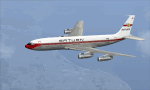
This is a repaint of the 707-379C in Saturn Airways 1968 colors. The payware 707-300C by Captain Sim is needed for this repaint. This 707-379C was ordered by Saturn, and Boeing prepared the aircraft for delivery, fully decked out in Saturn colors. However, due to problems Saturn did not take delivery of the aircraft, and it was eventually sold to Varig instead. So, this repaint is a representation of an aircraft that did not actually fly for the airline, but was furnished in its colors. This repaint was tested FSX-SE. It should work on FSX & P3D v1-3. Textures are dds5.
| Filename: | FSXP3D_Saturn_Airways_707379C_1968.zip |
| License: | Freeware |
| Added: | 5th July 2019, 17:26:59 |
| Downloads: | 84 |
| Author: | Ted Giana |
| Size: | 4.09 MB |
| Category: Flight Simulator X - Aircraft Repaints, Textures and Modifications | |
| TAP 'Circa 1978' Boeing 727-100 |
|
Images related to this file:
File Description:

This is a repaint of the 727-100 in TAP (Portugal) colors. The freeware 727-100 by Tenkuu Developers Studio (TDS) is needed for this repaint. TAP, Portugal's national airline, was created by the Portuguese government in 1944, but operations didn't start until 1946 with a DC-3 Lisbon to Madrid flight. TAP went "all jet" in 1967, before most carriers in the world, and were the first in Europe to be so. Their fleet at that time was 707s, 727-100s, and caravelles. This repaint depicts one of their 727-100s from the late 1970s. This repaint was tested on P3D v3. It should work on FSX & FSX-SE.
| Filename: | TAP_Circa_1978_Boeing_727100.zip |
| License: | Freeware |
| Added: | 5th May 2018, 00:13:59 |
| Downloads: | 297 |
| Author: | Ted Giana |
| Size: | 11.67 MB |
| Category: Flight Simulator X - AI Aircraft | |
| FlyBosnia Airbus A319-100 |
|
Images related to this file:
File Description:
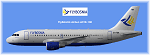
FlyBosnia Airbus A319-100 repaint for FAIB CFM model & paintkit by Erez Weber
Textures only.
Link for original aircraft see https://muenierweb.wordpress.com/ pages models & paintkits
The Sarajevo-based start-up FlyBosnia took delivery of its first aircraft in Sarajevo on 27/12/2018. The aircraft, which was repainted and retrofitted in Sofia, will now undergo final checks before the Bosnia and Herzegovina Directorate for Civil Aviation issues the Saudi-backed airline an Air Operator’s Certificate (AOC), enabling it to launch commercial operations. The carrier’s new CEO, Australian Chris Gabriel, said the company would focus both on flights to the Middle East and Europe.(http://www.sarajevotimes.com)
| Filename: | FlyBosnia_Airbus_A319100.zip |
| License: | Freeware |
| Added: | 31st December 2018, 14:53:56 |
| Downloads: | 228 |
| Author: | Christian Muenier |
| Size: | 2.64 MB |
| Category: Flight Simulator X - Aircraft Repaints, Textures and Modifications | |
| Maleth-Aero Airbus A340-642 "Thank you NHS" (9H-EAL) |
|
Images related to this file:
File Description:

Maleth-Aero Airbus A340-642 9H-EAL Thank you NHS livery. This aircraft is a former Virgin Atlantic frame (G-VNAP) now operated by the Maltese Airline based out of Bournemouth (EGHH). Painted with a "Thank You NHS" livery It is being operated as a cargo aircraft transporting medical supplies to the UK for the NHS. After creating a fictional livery for the 787, it is nice to see a real-life version of a livery painted on a real aircraft flying in our skies today thanking our wonderful medical staff. Textures only, you will need the freeware Thomas Ruth A340-600 model for this repaint to work.
| Filename: | MalethAero_Airbus_A340642_Thank_you_NHS_9HEAL.zip |
| License: | Freeware |
| Added: | 3rd May 2020, 22:34:35 |
| Downloads: | 292 |
| Author: | Adam Hamada | Thomas Ruth |
| Size: | 7.86 MB |


© 2001-2026 AVSIM Online
All Rights Reserved
Privacy Policy |