
Where Flight Simulation Enthusiasts Gather from Around the World!
AVSIM Library - Search Results

| Category: Flight Simulator 2004 - Panels | |
| Sperry 177 FCU Autopilot Panel Modification v2.1 for the Tinmouse II Boeing 737-200 |

|
Images related to this file:
File Description:
This package includes the files and installation procedures for a modification of the terrific Tinmouse II Boeing 737-200 panel available on AVSIM to add a Sperry 177 FCU autopilot to the panel. While the Tinmouse II panel is simply one of the best freeware 2D panels ever created, a number of pilots have expressed a desire for a replacement of the Sperry 77 (CWS) autopilot with the Sperry 177 (dials and digits) autopilot. The previous Sperry 177 modification I released had many of the elements of a Sperry 177, but did not entirely look or function like a Sperry 177 FCU. This version (2.1) corrects many of these issues, and should bring an entirely new level of realism to your Tinmouse II panel over the v1.0 modification. Here's the list of corrections and improvements implemented in the v2.1 package over v1 and v2: Actual Sperry 177 layout and functionality, Course knob now fully functional and works in synergy with gyro course knob, Panel refresh rate now accurate and smooth (no "click delay"), VOR LOC button drives the FS NAV1 Lock button, LNAV turns on the GPS Drives NAV1 signal, and an optional Sperry 177 full MCP layout or condensed w/ FD layout. This package requires the latest Tinmouse II aircraft and panel, which at the time of this release was v1.26.
| Filename: | Sperry_177_FCU_Autopilot_Panel_Modification_v21_fo.zip |
| License: | Freeware |
| Added: | 5th December 2010, 08:44:27 |
| Downloads: | 2,297 |
| Author: | Mark McCoy |
| Size: | 2.66 MB |
| Category: Flight Simulator X - Aircraft Repaints, Textures and Modifications | |
| United "Star Alliance" Boeing 777-300ER (N45957) |
|
Images related to this file:
File Description:
United/Continental Airlines Boeing 777-300ER Star Alliance (N45957) (Fictional)
With the upcoming news that UAL will purchase 10 Boeing 777-300ER's as an effort to modernize their fleet, I
was very excited to finally have a second -300ER America carrier. Star alliance is a great livery and I would
hope that UAL considers painting one of their brand new 77Ws in this livery!
Features:
1. Accurate Placement of STAR ALLIANCE text (correct positions in referenced to ANA77W Star Alliance Livery)
2. Accurate placement United Stare Alliance decals (referenced to United Continental 777-200ER Star Alliance)
3. Tail SA decals placement were made many times before I was "satisfied".
4. Studied and averaged precise grey color for engines.
5. All colors of the ribbon were sampled by more than 3 pictures.
6. Correct GE logo in Grey color on engines.
7. UAL Logo under Star Alliance in black and accurate size relative to the airplane/pictures
8. Star Alliance logo between L1/R1 door and cockpit windows
9. Line number placed at the end of L5/R5 door.
10.Flag accurate position/flipped correctly for the right side (to appear backwards)
11.Text under reg.
12.Great attention to detail and placement of decals/livery components
13.Lots of Love put in to the project as well :)
PMDG 777-300ER FSX only (Expansion needed to the original PMDG 777-200LR package)
| Filename: | United_Star_Alliance_Boeing_777300ER_N45957.zip |
| License: | Freeware, limited distribution |
| Added: | 27th January 2015, 09:14:49 |
| Downloads: | 2,590 |
| Author: | Rohan Patel |
| Size: | 17.1 MB |
| Category: Prepar3D V1-4 - Aircraft Repaints, Textures and Modifications | |
| Hunting Percival Sea Prince Belgian Air Force (RM-7) |
|
Images related to this file:
File Description:
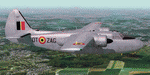
This folder contains a repaint for the Percival Sea Prince by Rob Richardson, in the colors of RM-7 of the Belgian Air Force, in the paintscheme it wore in its first year of service. In 1953 the Belgian Government ordered 12 Percival Pembroke's through Contract N° SP140 as a replacement for the ageing Avro Anson.The aircraft was used for short-range transport and liaison flights. Between 1956 and 1957 several brand-new Pembrokes were stored at Wevelgem awaiting a future detachment to the Belgian Congo, which eventually never materialised.
A number of Pembrokes were also used for the benefit of the Belgian National Geographical Institute that used the aerial photographs obtained with the Pembrokes to produce very detailed maps of the country. In 1978 the Pembrokes were struck of charge after their replacement, the Swearingen Merlin III became operational. All but two Pembrokes were sold to the rather dark company Air America (not to be confused with the CIA-supported Air America that was operational in South-East Asia), which was owned by a drugsdealer. After some very adventurous carreers in Souith America, several former Belgian Pembrokes were acquired and preserved in the USA. RM-7 is preserved in Belgium at Melsbroek air base by the Dakota Historical Center 15th Wing. Repaint by Jan Kees Blom, based on the paintkit by Rob Richardson.
| Filename: | Hunting_Percival_Sea_Prince_Belgian_Air_Force_RM7.zip |
| License: | Freeware |
| Added: | 5th August 2020, 19:14:00 |
| Downloads: | 46 |
| Author: | Jan Kees Blom |
| Size: | 7.83 MB |
| Category: X-Plane - Original Aircraft | |
| Su-34 (Su-27IB) Fighter Bomber |
|
File Description:
The Su-34 (also known as Su-27IB) fighter bomber has been developed by the Sukhoi Design Bureau Joint Stock Company in Moscow and the Novosibirsk Aircraft Production Association at Novosibirsk in Russia. First deliveries of the fighter bomber are expected to begin in 2005 and it is planned as a replacement for Su-24 and Su-25 aircraft. Su-34 is one of a number of Russian aircraft (Su-27, Su-30, Su-33 and Su-35) which have been given the NATO codename Flanker. The Su-34 fighter bomber is a derivative of the Su-27 fighter aircraft. The aircraft design retains the basic layout and construction of the Su-27 airframe, with a conventional high-wing configuration and a substantial part of the onboard equipment. The Su-34 has a changed contour of the nose section to accommodate an advanced multi-mode phased array radar with terrain following and terrain avoidance modes. It has a two-seat rather than single-seat cockpit. The capacity of the internal fuel tanks has been increased with a resulting increased take-off weight. Changes have been made to the central tail boom for a rear-facing radar. This model of the Su-34 for X-Plane version 6.30 includes two air-to-air missile types, the R-27, and R-73. Once downloaded, install the missiles into your weapons folder.
| Filename: | Su34_Su27IB_Fighter_Bomber.zip |
| License: | Freeware |
| Added: | 6th November 2002, 01:21:55 |
| Downloads: | 1,020 |
| Author: | Barry Leger |
| Size: | 2.1 MB |
| Category: Flight Simulator X - Original Aircraft | |
| Lufthansa Airbus A380 |
|
Images related to this file:
File Description:
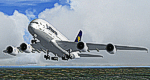
The Airbus A380 is a doubledecker, four-engined airliner manufactured by Airbus S.A.S. It first flew on April 27, 2005 from Toulouse, France. Commercial flights should begin in 2006 after 15 months of testing. During much of ist development, the aircraft was known as the Airbus A3XX. The A380 is now the largest passenger airliner, topping the Boeing 747, which was the largest for 35 years. However, the Antonov An-225 retains the record of being the world's largest commercial aircraft. The media has termed the A380 a "superjumbo", with some comparing it to Howard Hughes's Spruce Goose. The first A380 prototype was unveiled during a ceremony in Toulouse, France, on January 18, 2005. Its manufacturer's serial number is 001, and is registered as F-WWOW. The new Airbus will initially be sold in two versions: the A380-800, carrying 555 passengers in a three-class configuration or up to 800 passengers in a single-class economy configuration. Expected range for the -800 model is 8,000 nautical miles (14,800 km). The second model, the A380-800F dedicated freighter, will carry 150 tons of cargo 5,600 miles (10,400 km). Airbus made the cockpit layout, procedures and handling characteristics similar to those of other Airbus aircraft to reduce crew training costs. Likewise, the A380 features a glass cockpit and side-stick flight controller. By www.afs-design.de - Author: A.Meyer.
| Filename: | Lufthansa_Airbus_A380.zip |
| License: | Commercial demo |
| Added: | 8th November 2013, 11:17:58 |
| Downloads: | 2,092 |
| Author: | Andreas Meyer |
| Size: | 13.55 MB |
| Category: Flight Simulator 2004 - Scenery | |
| Kaltag KAL in Alaska |
|
Images related to this file:
File Description:
Kaltag is a small village on the west bank of the Yukon River, around 65 miles east of the coast at Unalakleet and about 40 miles south of where the river turns from north-south to east-west, east being upstream towards the distant Fairbanks. The population is just under 200 and living from fishing and the land. The airfield is close by and has a gravel runway aligned 21-3 and just under 5,000 feet long. Apart from the airfield itself, and it's buildings, this scenery modifies the local land class, adds village buildings while reducing the village size to reality, and creates a new airfield background. Kaltag is located on the edge of three different airlines coverage areas, and is served by Bering Air from the northwest, ERA from the southwest, and also by Wright Air from Fairbanks in the east. These are included in the AI.
A note here about my scenery making. This is post number 507 and there will not be many more to follow this as I am almost at the end of the photos I either took or found for scenery purposes. There is a limit to what can be located online and I have already been making use of the little there is; eg Unalakleet. So, if you are near an airport (preferably Canadian or Alaskan) and have a camera..... Let me know.
| Filename: | Kaltag_KAL_in_Alaska.zip |
| License: | Freeware, limited distribution |
| Added: | 20th August 2019, 19:04:35 |
| Downloads: | 104 |
| Author: | Roger Wensley |
| Size: | 3.57 MB |
| Category: Flight Simulator 2004 - AI Flight Plans | |
| Sorted default FS9 flight plans & GA flight plans sorted by ICAO/country |
|
File Description:
The Master_GA_sorted_country contains: some 20,436 flight plans that have been adopted from Reggie Fields' sorted aircraft registration collections. The following is from his readme file (included folder), "FS2004 General Aviation AI traffic with more correct registration numbers for the originating country. This file is a modification of the FS2004 default GA traffic designed to minimize the number of small single engine aircraft landing at the worlds major commercial airports. This will prevent a lot of go-around orders to commercial jets based on the length of time it takes a C172 to clear a 10,000 ft runway. This file makes commercial AI traffic flow much better than the MS default while retaining the GA aircraft in the airspace." Like Reggie Fields' files, all are free to use and redistribute but can not be sold. AC#defaultfp_sorted_ICAO folder contains all individual default aircraft in seperate files and their FS9 default flight plans are sorted by ICAO. A second folder contains a file for each country with the mentioned GA flight plans sorted by ICAO. This should be of an aide to those of us who wish to put more correct AI aircraft into a region or country. Copy/paste should be easier, this way, when building on each countries' aviation/flights. All files are text (.txt) files (ASCII.) They have no @ and TTOOLS by Lee Swordy is recommended.
| Filename: | Sorted_default_FS9_flight_plans__GA_flight_plans_s.zip |
| License: | Freeware |
| Added: | 10th May 2004, 14:48:30 |
| Downloads: | 2,984 |
| Author: | Rick Connolly |
| Size: | 5.57 MB |
| Category: Flight Simulator X - Scenery | |
| SKBO - El Dorado International Airport (2013) |
|
File Description:
El Dorado International Airport (IATA: BOG, ICAO: SKBO) is an international airport located in Bogota, Colombia. It is the largest Latin America airport in terms of cargo movements with 593,946 tons (2010) and the third in terms of
passenger traffic, only behind Sao Paulo-Guarulhos International Airport and Mexico City's Benito Juarez International Airport, transporting 18,934,203 passengers in 2010; as well as the largest airport in Colombia and the main
international and domestic air gateway in the country, serving as an important hub for Avianca, Copa Airlines Colombia, Aires, Satena, EasyFly and other cargo companies.
This file has the right coordinates, with the apron and characteristics of the airport with the new international terminal just builed in 2012. The runways were reoriented to the correct direction, runway were resized the gates placed on correct location and number, CATAM was placed
(Colombian Air force and Colombian National Army) and Colombia National Police and Colombian National Armada were assigned a correct apron. All the jet ways including the ones of the executive terminal are working. There is a copy
of all the airport charts required to navigate in and out of this airport which are courtesy of: Areonatica Civil de Colombia and the originals can be found at www.aerocivil.gov.co/ under Informacion Aeronautica click AIP; on AIP
click Aerodromos then click at SKBO.
This work is dedicated to West Wind Airlines.
| Filename: | SKBO__El_Dorado_International_Airport_2013.zip |
| License: | Freeware |
| Added: | 16th February 2013, 00:10:34 |
| Downloads: | 11,259 |
| Author: | Anwar Gonzalez |
| Size: | 19.16 MB |
| Category: Flight Simulator X - AFCAD Files | |
| Ekdahl Airport (NJ59), NJ |
|
File Description:
Located 04 miles S of Freehold, New Jersey, Ekdahl Airport is a private turf strip 1300' in length bordered closely by trees. This makes for an interesting landing as the 90' width of the runway is all the room you have to play with. However because it can be difficult to gauge your distance to trees and also because even the slightest brush with a tree can cause a crash, all trees immediately adjacent to the runway have crash disabled - mainly so you can turn your plane around if you land on Runway 02. The hard surface runway was removed so make sure your terrain mesh complexity is set as high as possible to get that bumpy ground realism. A windsock is listed as being available on this field but I could not locate it in any imagery and so placed it by default near the hangar building. You can start on the runways or parked in front of the hangar. Make sure your plane is capable of these take off and landing distances! Tree height around the field was not listed so I again used my best judgement from studying aerial photos. There is no fuel or parking for transient aircraft available. The field is not lit - daytime VFR operations only are recommended.
Scenery constructed with use of satellite images/streetview/aerial photos - the author has not been there in person.
This scenery is meant to be used in conjunction with MegaScenery Earth New Jersey/Delaware 002. It is not required, but apron use is minimized to allow satellite scenery to show through as much as possible, and objects are placed based on the MSE textures - lack of it may make scenery look out of place.
| Filename: | Ekdahl_Airport_NJ59_NJ.zip |
| License: | Freeware |
| Added: | 13th August 2011, 16:53:55 |
| Downloads: | 172 |
| Author: | Drew Sikora |
| Size: | 550.03 KB |
| Category: Flight Simulator X - Utilities | |
| Gauges Recovery 1.2 for FSX |
|
File Description:
New ! Since version 1.2 Gauges Recovery also fix the problem of compatibility from FS9 add-ons which display all gray and without texture !!!
DESCRIPTION:
For years I worked on Flight Simulator I realized that many people have problems with showing the gauges panel (black screen) or special effects such as afterburner, smoke or line of condensation occurring after uninstalling an add-on or accidentally deleted files of the simulator.
In your Flight Simulator X there is a folder named 'Gauges' it contains files 'gauges' representative board instrumentation for each add-on, such as the autopilot, the horizon indicator etc, if you delete one of these files, your panel will not display the gauge that it was programmed. It is the same for the folder 'Effects' that contains all the special effects in FSX, it sometimes happens that some files in these folders disappear leaving your simulator in a situation where you no longer see your instrument panel (black screens) and afetburner invisible. Under these conditions, you reinstall FSX and lose a lot of time (and patience).
So I created Gauges Recovery, a small free utility that will restore all your gauges and effects of origin in less than 10 seconds. With Gauges Recovery, you're sure to get the display of all gauges and effects.
This program does restore the original files from Microsoft FSX FSX SP1, FSX SP2 and not the files from other publishers, no changes will be made to these files.
Some people see the gauges all black (black screens), unless FSX is installed correctly. The solution to this problem is to install the files MSVCP70.DLL and msvcr70.dll in your 'system32', Gauges Recovery does this automatically for you.
Do not look if Gauges Recovery is installed because there is no installation, the program only updates files in FSX and nothing else.
| Filename: | Gauges_Recovery_12_for_FSX.zip |
| License: | Freeware |
| Added: | 19th January 2010, 10:47:17 |
| Downloads: | 4,889 |
| Author: | Erik BENDER |
| Size: | 11.43 MB |


© 2001-2026 AVSIM Online
All Rights Reserved
Privacy Policy |